







Protecting the Keys to the Kingdom
The Case for Adaptive AuthenticationforVPNs
2Protecting the Keys to the Kingdom
Today’s Speaker
Tim Arvanites
Vice President of Technical Services
SecureAuth
3Protecting the Keys to the Kingdom
Housekeeping
+ All attendee audio lines are muted
+ Submit questions via questions panel at any time!
+ Questions will be answered at the end of the presentation
+ Contact us at webinars@secureauth.com
+ Slides and recording will be sent
4Protecting the Keys to the Kingdom
Agenda
+ Today’s Reality
+ The Alternative
+ Adaptive Authentication in SecureAuth IdP
+ Live Demo – SecureAuth IdP
+ Q & A
5Protecting the Keys to the Kingdom
6Protecting the Keys to the Kingdom
The reality is….
• Preventativemeasures are failing
• We’re never going to totally stop an attack
• There are humans involved (on both sides)
• Passwords are no longer good enough
• VPNs are the “keys to your kingdom”
7Protecting the Keys to the Kingdom
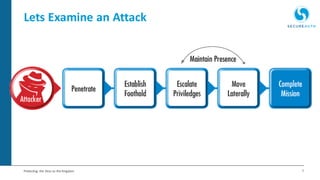
Lets Examine an Attack
8Protecting the Keys to the Kingdom
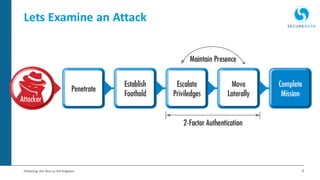
Lets Examine an Attack
9Protecting the Keys to the Kingdom
Tighter security has a price
• Consumerization of IT
• Leading our users to demand less “friction”
• BUT two-factor is becoming more mainstream
• Biometrics are going commercial
• Is 2-Factor the best we’ve got?
So what’s the alternative?
11Protecting the Keys to the Kingdom
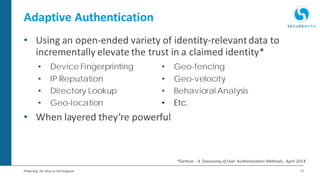
Adaptive Authentication
• Using an open-ended variety of identity-relevantdata to
incrementally elevate the trust in a claimed identity*
• When layered they’re powerful
• Device Fingerprinting • Geo-fencing
• IP Reputation • Geo-velocity
• Directory Lookup • Behavioral Analysis
• Geo-location • Etc.
*Gartner - A Taxonomy of User Authentication Methods, April 2014
12Protecting the Keys to the Kingdom
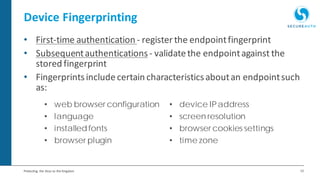
Device Fingerprinting
• First-time authentication - register the endpointfingerprint
• Subsequentauthentications- validatethe endpointagainst the
stored fingerprint
• Fingerprintsincludecertain characteristicsaboutan endpointsuch
as:
• web browser configuration • device IPaddress
• language • screen resolution
• installedfonts • browser cookies settings
• browser plugin • time zone
13Protecting the Keys to the Kingdom
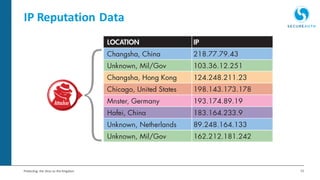
IP Reputation Data
14Protecting the Keys to the Kingdom
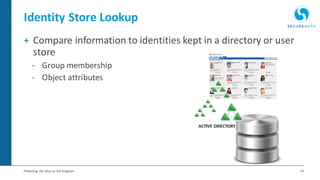
Identity Store Lookup
+ Compare information to identities kept in a directory or user
store
- Group membership
- Object attributes
15Protecting the Keys to the Kingdom
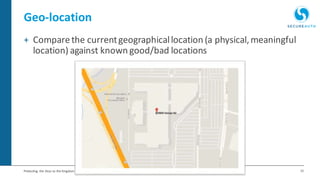
Geo-location
+ Comparethe currentgeographicallocation (a physical,meaningful
location) against known good/bad locations
16Protecting the Keys to the Kingdom
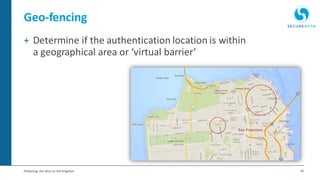
Geo-fencing
+ Determine if the authentication location is within
a geographical area or ‘virtual barrier’
17Protecting the Keys to the Kingdom
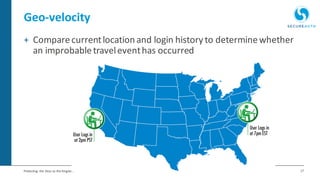
Geo-velocity
+ Comparecurrentlocation and login history to determinewhether
an improbabletraveleventhas occurred
18Protecting the Keys to the Kingdom
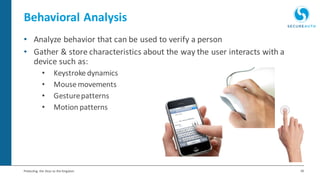
• Analyze behavior that can be used to verify a person
• Gather & store characteristics about the way the user interacts with a
device such as:
• Keystroke dynamics
• Mouse movements
• Gesturepatterns
• Motion patterns
Behavioral Analysis
19Protecting the Keys to the Kingdom
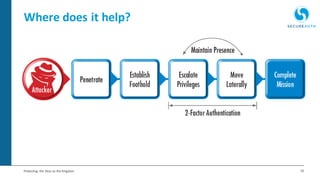
Where does it help?
20Protecting the Keys to the Kingdom
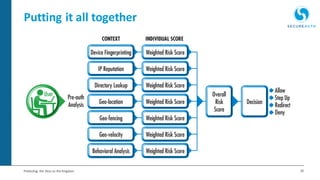
Putting it all together
21Protecting the Keys to the Kingdom
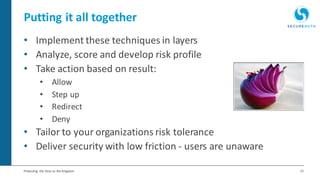
Putting it all together
• Implement these techniques in layers
• Analyze, score and develop risk profile
• Take action based on result:
• Allow
• Step up
• Redirect
• Deny
• Tailor to your organizations risk tolerance
• Deliver security with low friction - users are unaware
22Protecting the Keys to the Kingdom
There is hope
• Adaptive authentication: an emerging trend in
authentication technology
• You can achieve:
• Greater analysis and control of authentication
• Balance between security and a better user experience
• Preventativemethods are failing, but you can tighten the net
around attackers
SecureAuth IdP
24Protecting the Keys to the Kingdom
Locking the doors isn’t enough…
+ Attackers are focusing efforts on stealing credentials
– Once inside they move laterally through your network, evading
detection
+ Simply having password-based security is not enough
– You must also be analyzing login attempts in real time
+ Adaptive authentication can..
– Prevent intruders from getting to apps and data
– Maintain user experience
– Keep you from being the next headline
25Protecting the Keys to the Kingdom
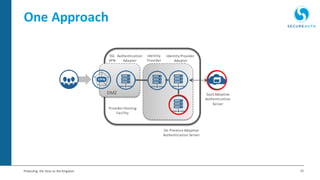
One Approach
SSL
VPN
Identity Provider
Adapter
Identity
Provider
Authentication
Adapter
DMZ SaaS Adaptive
Authentication
Server
On Premise Adaptive
Authentication Server
Provider Hosting
Facility
26Protecting the Keys to the Kingdom
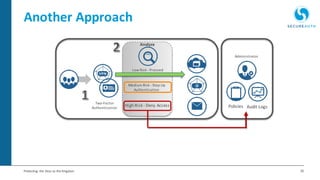
Another Approach
Two-Factor
Authentication Policies
Analyze
Administrator
Audit LogsHigh Risk - Deny Access
Low Risk - Proceed
Medium Risk - Step Up
Authentication
27Protecting the Keys to the Kingdom
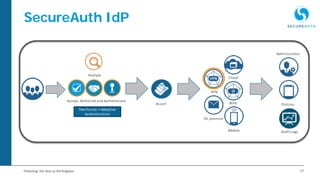
SecureAuth IdP
Two-Factor + Adaptive
Authentication
Assert
Administrator
Policies
Audit Logs
Accept, Authorize and Authenticate
Analyze
VPN
On premise
Web
Cloud
Mobile
28Protecting the Keys to the Kingdom
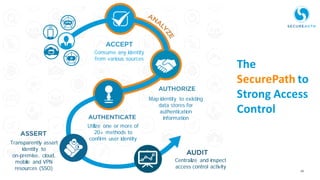
The
SecurePath to
Strong Access
Control
Consume any identity
from various sources
Map identity to existing
data stores for
authentication
information
Utilize one or more of
20+ methods to
confirm user identity
Transparently assert
identity to
on-premise, cloud,
mobile and VPN
resources (SSO)
Centralize and inspect
access control activity
29Protecting the Keys to the Kingdom
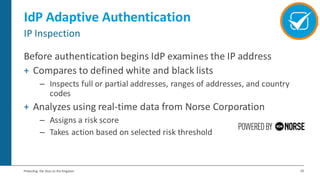
IdP Adaptive Authentication
Before authentication begins IdP examines the IP address
+ Compares to defined white and black lists
– Inspects full or partial addresses, ranges of addresses, and country
codes
+ Analyzes using real-time data from Norse Corporation
– Assigns a risk score
– Takes action based on selected risk threshold
IP Inspection
30Protecting the Keys to the Kingdom
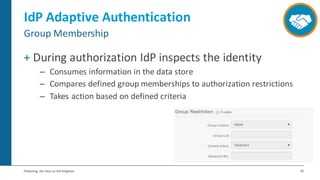
IdP Adaptive Authentication
+ During authorization IdP inspects the identity
– Consumes information in the data store
– Compares defined group memberships to authorization restrictions
– Takes action based on defined criteria
Group Membership
31Protecting the Keys to the Kingdom
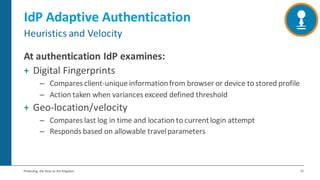
IdP Adaptive Authentication
At authentication IdP examines:
+ Digital Fingerprints
– Compares client-unique informationfrom browser or device to stored profile
– Action taken when variances exceed defined threshold
+ Geo-location/velocity
– Compares last log in time and location to currentlogin attempt
– Responds based on allowable travelparameters
Heuristics and Velocity
32Protecting the Keys to the Kingdom
IdP Adaptive Authentication
+ Pass
– User is authenticated
+ Redirect
– Use is redirected to a customizable URL
+ Challenge
– User is routed through additional multi-factor workflow(s)
+ Hard Stop
– Authentication is halted and a custom error message is displayed
User Response Options
Live Demo
34Protecting the Keys to the Kingdom
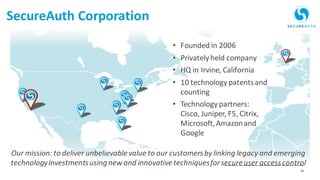
• Founded in 2006
• Privately held company
• HQ in Irvine, California
• 10 technology patentsand
counting
• Technology partners:
Cisco, Juniper, F5, Citrix,
Microsoft,Amazonand
Google
Our mission: to deliver unbelievablevalue to our customersby linking legacy and emerging
technologyinvestmentsusingnew and innovativetechniquesforsecureuser accesscontrol
SecureAuth Corporation
35Protecting the Keys to the Kingdom
Why SecureAuth?
+ We are an innovator of identity and information security solutions
that deliver secure access control in ways you never thought
possible
• Culture of innovation
• Customer focused
• Standards based – no lock in!
36Protecting the Keys to the Kingdom
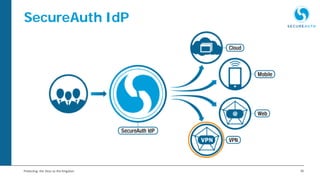
SecureAuth IdP
Q&A
The intellectual contentwithinthisdocumentisthe propertyof SecureAuth
and must not be shared withoutprior consent.

Protecting the Keys to the Kingdom - The Case for Adaptive Authentication for VPNs

  • 1.
    Protecting the Keysto the Kingdom The Case for Adaptive AuthenticationforVPNs
  • 2.
    2Protecting the Keysto the Kingdom Today’s Speaker Tim Arvanites Vice President of Technical Services SecureAuth
  • 3.
    3Protecting the Keysto the Kingdom Housekeeping + All attendee audio lines are muted + Submit questions via questions panel at any time! + Questions will be answered at the end of the presentation + Contact us at webinars@secureauth.com + Slides and recording will be sent
  • 4.
    4Protecting the Keysto the Kingdom Agenda + Today’s Reality + The Alternative + Adaptive Authentication in SecureAuth IdP + Live Demo – SecureAuth IdP + Q & A
  • 5.
    5Protecting the Keysto the Kingdom
  • 6.
    6Protecting the Keysto the Kingdom The reality is…. • Preventativemeasures are failing • We’re never going to totally stop an attack • There are humans involved (on both sides) • Passwords are no longer good enough • VPNs are the “keys to your kingdom”
  • 7.
    7Protecting the Keysto the Kingdom Lets Examine an Attack
  • 8.
    8Protecting the Keysto the Kingdom Lets Examine an Attack
  • 9.
    9Protecting the Keysto the Kingdom Tighter security has a price • Consumerization of IT • Leading our users to demand less “friction” • BUT two-factor is becoming more mainstream • Biometrics are going commercial • Is 2-Factor the best we’ve got?
  • 10.
    So what’s thealternative?
  • 11.
    11Protecting the Keysto the Kingdom Adaptive Authentication • Using an open-ended variety of identity-relevantdata to incrementally elevate the trust in a claimed identity* • When layered they’re powerful • Device Fingerprinting • Geo-fencing • IP Reputation • Geo-velocity • Directory Lookup • Behavioral Analysis • Geo-location • Etc. *Gartner - A Taxonomy of User Authentication Methods, April 2014
  • 12.
    12Protecting the Keysto the Kingdom Device Fingerprinting • First-time authentication - register the endpointfingerprint • Subsequentauthentications- validatethe endpointagainst the stored fingerprint • Fingerprintsincludecertain characteristicsaboutan endpointsuch as: • web browser configuration • device IPaddress • language • screen resolution • installedfonts • browser cookies settings • browser plugin • time zone
  • 13.
    13Protecting the Keysto the Kingdom IP Reputation Data
  • 14.
    14Protecting the Keysto the Kingdom Identity Store Lookup + Compare information to identities kept in a directory or user store - Group membership - Object attributes
  • 15.
    15Protecting the Keysto the Kingdom Geo-location + Comparethe currentgeographicallocation (a physical,meaningful location) against known good/bad locations
  • 16.
    16Protecting the Keysto the Kingdom Geo-fencing + Determine if the authentication location is within a geographical area or ‘virtual barrier’
  • 17.
    17Protecting the Keysto the Kingdom Geo-velocity + Comparecurrentlocation and login history to determinewhether an improbabletraveleventhas occurred
  • 18.
    18Protecting the Keysto the Kingdom • Analyze behavior that can be used to verify a person • Gather & store characteristics about the way the user interacts with a device such as: • Keystroke dynamics • Mouse movements • Gesturepatterns • Motion patterns Behavioral Analysis
  • 19.
    19Protecting the Keysto the Kingdom Where does it help?
  • 20.
    20Protecting the Keysto the Kingdom Putting it all together
  • 21.
    21Protecting the Keysto the Kingdom Putting it all together • Implement these techniques in layers • Analyze, score and develop risk profile • Take action based on result: • Allow • Step up • Redirect • Deny • Tailor to your organizations risk tolerance • Deliver security with low friction - users are unaware
  • 22.
    22Protecting the Keysto the Kingdom There is hope • Adaptive authentication: an emerging trend in authentication technology • You can achieve: • Greater analysis and control of authentication • Balance between security and a better user experience • Preventativemethods are failing, but you can tighten the net around attackers
  • 23.
  • 24.
    24Protecting the Keysto the Kingdom Locking the doors isn’t enough… + Attackers are focusing efforts on stealing credentials – Once inside they move laterally through your network, evading detection + Simply having password-based security is not enough – You must also be analyzing login attempts in real time + Adaptive authentication can.. – Prevent intruders from getting to apps and data – Maintain user experience – Keep you from being the next headline
  • 25.
    25Protecting the Keysto the Kingdom One Approach SSL VPN Identity Provider Adapter Identity Provider Authentication Adapter DMZ SaaS Adaptive Authentication Server On Premise Adaptive Authentication Server Provider Hosting Facility
  • 26.
    26Protecting the Keysto the Kingdom Another Approach Two-Factor Authentication Policies Analyze Administrator Audit LogsHigh Risk - Deny Access Low Risk - Proceed Medium Risk - Step Up Authentication
  • 27.
    27Protecting the Keysto the Kingdom SecureAuth IdP Two-Factor + Adaptive Authentication Assert Administrator Policies Audit Logs Accept, Authorize and Authenticate Analyze VPN On premise Web Cloud Mobile
  • 28.
    28Protecting the Keysto the Kingdom The SecurePath to Strong Access Control Consume any identity from various sources Map identity to existing data stores for authentication information Utilize one or more of 20+ methods to confirm user identity Transparently assert identity to on-premise, cloud, mobile and VPN resources (SSO) Centralize and inspect access control activity
  • 29.
    29Protecting the Keysto the Kingdom IdP Adaptive Authentication Before authentication begins IdP examines the IP address + Compares to defined white and black lists – Inspects full or partial addresses, ranges of addresses, and country codes + Analyzes using real-time data from Norse Corporation – Assigns a risk score – Takes action based on selected risk threshold IP Inspection
  • 30.
    30Protecting the Keysto the Kingdom IdP Adaptive Authentication + During authorization IdP inspects the identity – Consumes information in the data store – Compares defined group memberships to authorization restrictions – Takes action based on defined criteria Group Membership
  • 31.
    31Protecting the Keysto the Kingdom IdP Adaptive Authentication At authentication IdP examines: + Digital Fingerprints – Compares client-unique informationfrom browser or device to stored profile – Action taken when variances exceed defined threshold + Geo-location/velocity – Compares last log in time and location to currentlogin attempt – Responds based on allowable travelparameters Heuristics and Velocity
  • 32.
    32Protecting the Keysto the Kingdom IdP Adaptive Authentication + Pass – User is authenticated + Redirect – Use is redirected to a customizable URL + Challenge – User is routed through additional multi-factor workflow(s) + Hard Stop – Authentication is halted and a custom error message is displayed User Response Options
  • 33.
  • 34.
    34Protecting the Keysto the Kingdom • Founded in 2006 • Privately held company • HQ in Irvine, California • 10 technology patentsand counting • Technology partners: Cisco, Juniper, F5, Citrix, Microsoft,Amazonand Google Our mission: to deliver unbelievablevalue to our customersby linking legacy and emerging technologyinvestmentsusingnew and innovativetechniquesforsecureuser accesscontrol SecureAuth Corporation
  • 35.
    35Protecting the Keysto the Kingdom Why SecureAuth? + We are an innovator of identity and information security solutions that deliver secure access control in ways you never thought possible • Culture of innovation • Customer focused • Standards based – no lock in!
  • 36.
    36Protecting the Keysto the Kingdom SecureAuth IdP
  • 37.
  • 38.
    The intellectual contentwithinthisdocumentisthepropertyof SecureAuth and must not be shared withoutprior consent.