Evaluation
Your name
Production Process Evaluation
Research
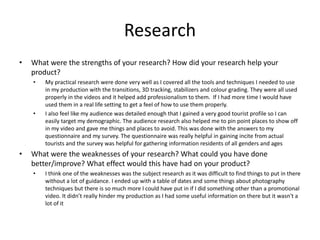
• What were the strengths of your research? How did your research help your
product?
• My practical research were done very well as I covered all the tools and techniques I needed to use
in my production with the transitions, 3D tracking, stabilizers and colour grading. They were all used
properly in the videos and it helped add professionalism to them. If I had more time I would have
used them in a real life setting to get a feel of how to use them properly.
• I also feel like my audience was detailed enough that I gained a very good tourist profile so I can
easily target my demographic. The audience research also helped me to pin point places to show off
in my video and gave me things and places to avoid. This was done with the answers to my
questionnaire and my survey. The questionnaire was really helpful in gaining incite from actual
tourists and the survey was helpful for gathering information residents of all genders and ages
• What were the weaknesses of your research? What could you have done
better/improve? What effect would this have had on your product?
• I think one of the weaknesses was the subject research as it was difficult to find things to put in there
without a lot of guidance. I ended up with a table of dates and some things about photography
techniques but there is so much more I could have put in if I did something other than a promotional
video. It didn’t really hinder my production as I had some useful information on there but it wasn't a
lot of it
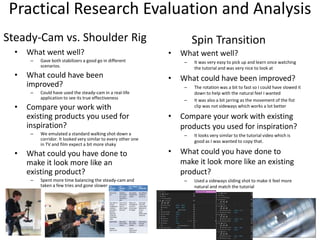
Practical Research Evaluation and Analysis
• What went well?
– Gave both stabilizers a good go in different
scenarios.
• What could have been
improved?
– Could have used the steady-cam in a real-life
application to see its true effectiveness
• Compare your work with
existing products you used for
inspiration?
– We emulated a standard walking shot down a
corridor. It looked very similar to every other one
in TV and film expect a bit more shaky
• What could you have done to
make it look more like an
existing product?
– Spent more time balancing the steady-cam and
taken a few tries and gone slower
Steady-Cam vs. Shoulder Rig
• What went well?
– It was very easy to pick up and learn once watching
the tutorial and was very nice to look at
• What could have been improved?
– The rotation was a bit to fast so I could have slowed it
down to help with the natural feel I wanted
– It was also a bit jarring as the movement of the fist
clip was not sideways which works a lot better
• Compare your work with existing
products you used for inspiration?
– It looks very similar to the tutorial video which is
good as I was wanted to copy that.
• What could you have done to
make it look more like an existing
product?
– Used a sideways sliding shot to make it feel more
natural and match the tutorial
Spin Transition
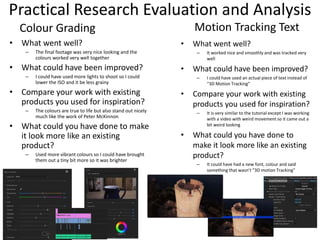
Practical Research Evaluation and Analysis
• What went well?
– It worked nice and smoothly and was tracked very
well
• What could have been improved?
– I could have used an actual piece of text instead of
“3D Motion Tracking”
• Compare your work with existing
products you used for inspiration?
– It is very similar to the tutorial except I was working
with a video with weird movement so it came out a
bit weird looking
• What could you have done to
make it look more like an existing
product?
– It could have had a new font, colour and said
something that wasn’t “3D motion Tracking”
Motion Tracking Text
• What went well?
– The final footage was very nice looking and the
colours worked very well together
• What could have been improved?
– I could have used more lights to shoot so I could
lower the ISO and it be less grainy
• Compare your work with existing
products you used for inspiration?
– The colours are true to life but also stand out nicely
much like the work of Peter McKinnon
• What could you have done to make
it look more like an existing
product?
– Used more vibrant colours so I could have brought
them out a tiny bit more so it was brighter
Colour Grading
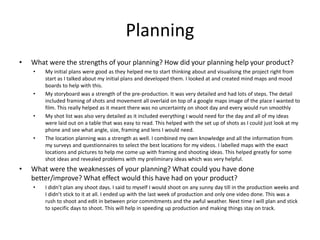
Planning
• What were the strengths of your planning? How did your planning help your product?
• My initial plans were good as they helped me to start thinking about and visualising the project right from
start as I talked about my initial plans and developed them. I looked at and created mind maps and mood
boards to help with this.
• My storyboard was a strength of the pre-production. It was very detailed and had lots of steps. The detail
included framing of shots and movement all overlaid on top of a google maps image of the place I wanted to
film. This really helped as it meant there was no uncertainty on shoot day and every would run smoothly
• My shot list was also very detailed as it included everything I would need for the day and all of my ideas
were laid out on a table that was easy to read. This helped with the set up of shots as I could just look at my
phone and see what angle, size, framing and lens I would need.
• The location planning was a strength as well. I combined my own knowledge and all the information from
my surveys and questionnaires to select the best locations for my videos. I labelled maps with the exact
locations and pictures to help me come up with framing and shooting ideas. This helped greatly for some
shot ideas and revealed problems with my preliminary ideas which was very helpful.
• What were the weaknesses of your planning? What could you have done
better/improve? What effect would this have had on your product?
• I didn’t plan any shoot days. I said to myself I would shoot on any sunny day till in the production weeks and
I didn’t stick to it at all. I ended up with the last week of production and only one video done. This was a
rush to shoot and edit in between prior commitments and the awful weather. Next time I will plan and stick
to specific days to shoot. This will help in speeding up production and making things stay on track.
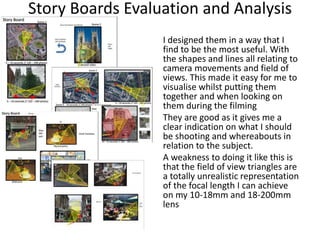
Story Boards Evaluation and Analysis
I designed them in a way that I
find to be the most useful. With
the shapes and lines all relating to
camera movements and field of
views. This made it easy for me to
visualise whilst putting them
together and when looking on
them during the filming
They are good as it gives me a
clear indication on what I should
be shooting and whereabouts in
relation to the subject.
A weakness to doing it like this is
that the field of view triangles are
a totally unrealistic representation
of the focal length I can achieve
on my 10-18mm and 18-200mm
lens
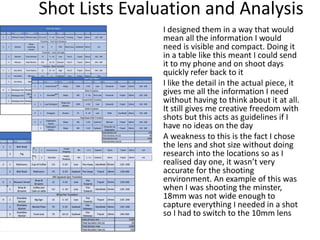
Shot Lists Evaluation and Analysis
I designed them in a way that would
mean all the information I would
need is visible and compact. Doing it
in a table like this meant I could send
it to my phone and on shoot days
quickly refer back to it
I like the detail in the actual piece, it
gives me all the information I need
without having to think about it at all.
It still gives me creative freedom with
shots but this acts as guidelines if I
have no ideas on the day
A weakness to this is the fact I chose
the lens and shot size without doing
research into the locations so as I
realised day one, it wasn’t very
accurate for the shooting
environment. An example of this was
when I was shooting the minster,
18mm was not wide enough to
capture everything I needed in a shot
so I had to switch to the 10mm lens
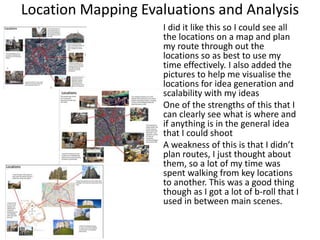
Location Mapping Evaluations and Analysis
I did it like this so I could see all
the locations on a map and plan
my route through out the
locations so as best to use my
time effectively. I also added the
pictures to help me visualise the
locations for idea generation and
scalability with my ideas
One of the strengths of this that I
can clearly see what is where and
if anything is in the general idea
that I could shoot
A weakness of this is that I didn’t
plan routes, I just thought about
them, so a lot of my time was
spent walking from key locations
to another. This was a good thing
though as I got a lot of b-roll that I
used in between main scenes.
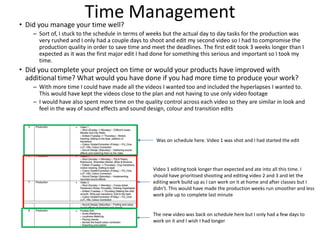
Time Management• Did you manage your time well?
– Sort of, I stuck to the schedule in terms of weeks but the actual day to day tasks for the production was
very rushed and I only had a couple days to shoot and edit my second video so I had to compromise the
production quality in order to save time and meet the deadlines. The first edit took 3 weeks longer than I
expected as it was the first major edit I had done for something this serious and important so I took my
time.
• Did you complete your project on time or would your products have improved with
additional time? What would you have done if you had more time to produce your work?
– With more time I could have made all the videos I wanted too and included the hyperlapses I wanted to.
This would have kept the videos close to the plan and not having to use only video footage
– I would have also spent more time on the quality control across each video so they are similar in look and
feel in the way of sound effects and sound design, colour and transition edits
Was on schedule here. Video 1 was shot and I had started the edit
Video 1 editing took longer than expected and ate into all this time. I
should have prioritised shooting and editing video 2 and 3 and let the
editing work build up as I can work on it at home and after classes but I
didn’t. This would have made the production weeks run smoother and less
work pile up to complete last minute
The new video was back on schedule here but I only had a few days to
work on it and I wish I had longer
Technical QualitiesProduction
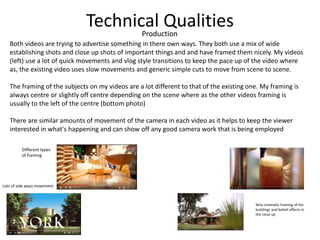
Both videos are trying to advertise something in there own ways. They both use a mix of wide
establishing shots and close up shots of important things and and have framed them nicely. My videos
(left) use a lot of quick movements and vlog style transitions to keep the pace up of the video where
as, the existing video uses slow movements and generic simple cuts to move from scene to scene.
The framing of the subjects on my videos are a lot different to that of the existing one. My framing is
always centre or slightly off centre depending on the scene where as the other videos framing is
usually to the left of the centre (bottom photo)
There are similar amounts of movement of the camera in each video as it helps to keep the viewer
interested in what's happening and can show off any good camera work that is being employed
Different types
of framing
Nice cinematic framing of the
buildings and bokeh effects in
the close up
Lots of side ways movement
Technical Qualities
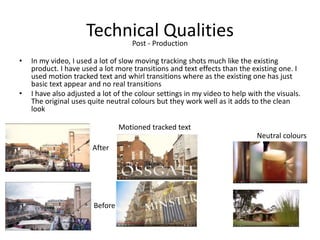
• In my video, I used a lot of slow moving tracking shots much like the existing
product. I have used a lot more transitions and text effects than the existing one. I
used motion tracked text and whirl transitions where as the existing one has just
basic text appear and no real transitions
• I have also adjusted a lot of the colour settings in my video to help with the visuals.
The original uses quite neutral colours but they work well as it adds to the clean
look
Post - Production
Before
After
Neutral colours
Motioned tracked text
Aesthetic Qualities
• Does your work look good?
– I believe it does look good. The colours look really nice and the overall aesthetic
is nice to look at.
• Was it creative?
– The use of the transitions and text effects and different styles of video make it
very creative.
• What aspects of your videos visuals do you like?
– I really like the colour grade as it brings life to the video. I also like the text
effects on Fossgate (video 2) and the Minster (video 1)
• What would you improve? How would you improve it?
– I would slow down the first video as it fly's by with no substance or depth. It all
moves to fast you cant really absorb what's being put out. I would either extend
the song by another 30 seconds or cut out the faster clips and replace them.
– I would also reshoot the hyperlapses as the exposure slightly changes through
out the clip. I can do this by shooting M instead of Av so the setting can be kept
the same and it will keep the exposure constant.
Aesthetic Qualities
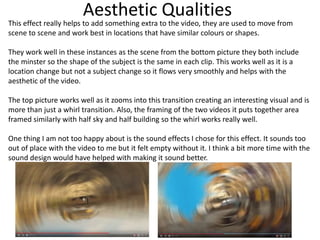
This effect really helps to add something extra to the video, they are used to move from
scene to scene and work best in locations that have similar colours or shapes.
They work well in these instances as the scene from the bottom picture they both include
the minster so the shape of the subject is the same in each clip. This works well as it is a
location change but not a subject change so it flows very smoothly and helps with the
aesthetic of the video.
The top picture works well as it zooms into this transition creating an interesting visual and is
more than just a whirl transition. Also, the framing of the two videos it puts together area
framed similarly with half sky and half building so the whirl works really well.
One thing I am not too happy about is the sound effects I chose for this effect. It sounds too
out of place with the video to me but it felt empty without it. I think a bit more time with the
sound design would have helped with making it sound better.
Aesthetic Qualities
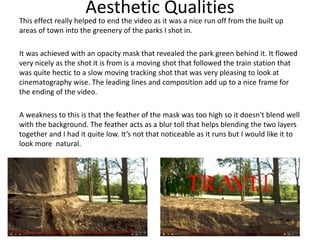
This effect really helped to end the video as it was a nice run off from the built up
areas of town into the greenery of the parks I shot in.
It was achieved with an opacity mask that revealed the park green behind it. It flowed
very nicely as the shot it is from is a moving shot that followed the train station that
was quite hectic to a slow moving tracking shot that was very pleasing to look at
cinematography wise. The leading lines and composition add up to a nice frame for
the ending of the video.
A weakness to this is that the feather of the mask was too high so it doesn't blend well
with the background. The feather acts as a blur toll that helps blending the two layers
together and I had it quite low. It’s not that noticeable as it runs but I would like it to
look more natural.
Aesthetic Qualities
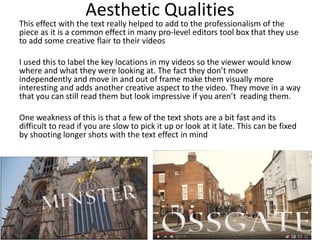
This effect with the text really helped to add to the professionalism of the
piece as it is a common effect in many pro-level editors tool box that they use
to add some creative flair to their videos
I used this to label the key locations in my videos so the viewer would know
where and what they were looking at. The fact they don’t move
independently and move in and out of frame make them visually more
interesting and adds another creative aspect to the video. They move in a way
that you can still read them but look impressive if you aren’t reading them.
One weakness of this is that a few of the text shots are a bit fast and its
difficult to read if you are slow to pick it up or look at it late. This can be fixed
by shooting longer shots with the text effect in mind
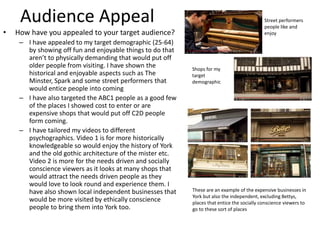
Audience Appeal
• How have you appealed to your target audience?
– I have appealed to my target demographic (25-64)
by showing off fun and enjoyable things to do that
aren’t to physically demanding that would put off
older people from visiting. I have shown the
historical and enjoyable aspects such as The
Minster, Spark and some street performers that
would entice people into coming
– I have also targeted the ABC1 people as a good few
of the places I showed cost to enter or are
expensive shops that would put off C2D people
form coming.
– I have tailored my videos to different
psychographics. Video 1 is for more historically
knowledgeable so would enjoy the history of York
and the old gothic architecture of the mister etc.
Video 2 is more for the needs driven and socially
conscience viewers as it looks at many shops that
would attract the needs driven people as they
would love to look round and experience them. I
have also shown local independent businesses that
would be more visited by ethically conscience
people to bring them into York too.
Street performers
people like and
enjoy
Shops for my
target
demographic
These are an example of the expensive businesses in
York but also the independent, excluding Bettys,
places that entice the socially conscience viewers to
go to these sort of places
Peer
Feedback
Feedback 1
• What did you like about the product?
Good variety of transitions used to keep the video fresh and
interesting. As well as this, the music pair nicely with the video which
makes it feel very professional. Finally, the camera work was smooth
and felt natural and all in all, everything looked and sounded like it
could be a professionally made advert for York.
What improvements could have been made to the
product?
The end is very good, but it seems to end abruptly after the final title.
Try using a fade or something to make the finish seem more natural.
When using background noise from the city, make the music or the
noise quieter so they don’t clash with one another.
Feedback 2
• What did you like about the product?
I liked your editing skills it adds more dimension to the
video. I also like the music you have put with it, it makes
it have a happy feeling while watching. Overall I feel that
it’s a really good video and makes York look like a really
nice place.
• What improvements could have been made to
the product?
I feel that the ending was kind of rushed like when it just
ends, might be good if you let the video play on for a
little after the ending title and make the music get
quieter so it’s a softer finish.
Feedback 3
• What did you like about the product?
– I like the way you made the text move with the video when it says Fossgate
– I like the movement of the camera
– I think that the music goes well with the video.
– I like that you chose some well known places in York.
– You instantly know the city that is being shown as it shows the word York
immediately
– Some of the transitions were cool.
• What improvements could have been made to the product?
– I think that in some parts of the video in parts such as when there are people
playing music you could have provided a bit of background sound as well as
the music playing in the video.
Feedback 4
• What did you like about the product?
– The angles and composition were very nice
– The transitions were very smooth
– Captured York very well
• What improvements could have been made to
the product?
– Slow down the first video as it doesn’t match the
speed and flow of the second video. Better if
consistant
Peer Feedback Summary
• What do you agree with from your peer feedback
– I agree with the fact that the end is abrupt. I will
defiantly fix this before the deadline date so it runs off
smoothly
– I agree with the fact the performance sounds would
be nice but they just don’t fit with or without the
music in any way
• What do you disagree with from your peer
feedback?
– I don’t disagree with any of it. I think its all valid and I
can build off everything
Peer Feedback Summary
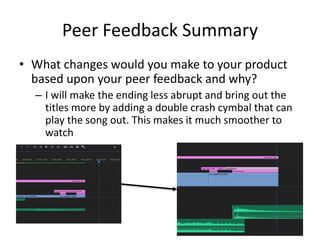
• What changes would you make to your product
based upon your peer feedback and why?
– I will make the ending less abrupt and bring out the
titles more by adding a double crash cymbal that can
play the song out. This makes it much smoother to
watch

5. evaluation(1)

  • 1.
  • 2.
  • 3.
    Research • What werethe strengths of your research? How did your research help your product? • My practical research were done very well as I covered all the tools and techniques I needed to use in my production with the transitions, 3D tracking, stabilizers and colour grading. They were all used properly in the videos and it helped add professionalism to them. If I had more time I would have used them in a real life setting to get a feel of how to use them properly. • I also feel like my audience was detailed enough that I gained a very good tourist profile so I can easily target my demographic. The audience research also helped me to pin point places to show off in my video and gave me things and places to avoid. This was done with the answers to my questionnaire and my survey. The questionnaire was really helpful in gaining incite from actual tourists and the survey was helpful for gathering information residents of all genders and ages • What were the weaknesses of your research? What could you have done better/improve? What effect would this have had on your product? • I think one of the weaknesses was the subject research as it was difficult to find things to put in there without a lot of guidance. I ended up with a table of dates and some things about photography techniques but there is so much more I could have put in if I did something other than a promotional video. It didn’t really hinder my production as I had some useful information on there but it wasn't a lot of it
  • 4.
    Practical Research Evaluationand Analysis • What went well? – Gave both stabilizers a good go in different scenarios. • What could have been improved? – Could have used the steady-cam in a real-life application to see its true effectiveness • Compare your work with existing products you used for inspiration? – We emulated a standard walking shot down a corridor. It looked very similar to every other one in TV and film expect a bit more shaky • What could you have done to make it look more like an existing product? – Spent more time balancing the steady-cam and taken a few tries and gone slower Steady-Cam vs. Shoulder Rig • What went well? – It was very easy to pick up and learn once watching the tutorial and was very nice to look at • What could have been improved? – The rotation was a bit to fast so I could have slowed it down to help with the natural feel I wanted – It was also a bit jarring as the movement of the fist clip was not sideways which works a lot better • Compare your work with existing products you used for inspiration? – It looks very similar to the tutorial video which is good as I was wanted to copy that. • What could you have done to make it look more like an existing product? – Used a sideways sliding shot to make it feel more natural and match the tutorial Spin Transition
  • 5.
    Practical Research Evaluationand Analysis • What went well? – It worked nice and smoothly and was tracked very well • What could have been improved? – I could have used an actual piece of text instead of “3D Motion Tracking” • Compare your work with existing products you used for inspiration? – It is very similar to the tutorial except I was working with a video with weird movement so it came out a bit weird looking • What could you have done to make it look more like an existing product? – It could have had a new font, colour and said something that wasn’t “3D motion Tracking” Motion Tracking Text • What went well? – The final footage was very nice looking and the colours worked very well together • What could have been improved? – I could have used more lights to shoot so I could lower the ISO and it be less grainy • Compare your work with existing products you used for inspiration? – The colours are true to life but also stand out nicely much like the work of Peter McKinnon • What could you have done to make it look more like an existing product? – Used more vibrant colours so I could have brought them out a tiny bit more so it was brighter Colour Grading
  • 6.
    Planning • What werethe strengths of your planning? How did your planning help your product? • My initial plans were good as they helped me to start thinking about and visualising the project right from start as I talked about my initial plans and developed them. I looked at and created mind maps and mood boards to help with this. • My storyboard was a strength of the pre-production. It was very detailed and had lots of steps. The detail included framing of shots and movement all overlaid on top of a google maps image of the place I wanted to film. This really helped as it meant there was no uncertainty on shoot day and every would run smoothly • My shot list was also very detailed as it included everything I would need for the day and all of my ideas were laid out on a table that was easy to read. This helped with the set up of shots as I could just look at my phone and see what angle, size, framing and lens I would need. • The location planning was a strength as well. I combined my own knowledge and all the information from my surveys and questionnaires to select the best locations for my videos. I labelled maps with the exact locations and pictures to help me come up with framing and shooting ideas. This helped greatly for some shot ideas and revealed problems with my preliminary ideas which was very helpful. • What were the weaknesses of your planning? What could you have done better/improve? What effect would this have had on your product? • I didn’t plan any shoot days. I said to myself I would shoot on any sunny day till in the production weeks and I didn’t stick to it at all. I ended up with the last week of production and only one video done. This was a rush to shoot and edit in between prior commitments and the awful weather. Next time I will plan and stick to specific days to shoot. This will help in speeding up production and making things stay on track.
  • 7.
    Story Boards Evaluationand Analysis I designed them in a way that I find to be the most useful. With the shapes and lines all relating to camera movements and field of views. This made it easy for me to visualise whilst putting them together and when looking on them during the filming They are good as it gives me a clear indication on what I should be shooting and whereabouts in relation to the subject. A weakness to doing it like this is that the field of view triangles are a totally unrealistic representation of the focal length I can achieve on my 10-18mm and 18-200mm lens
  • 8.
    Shot Lists Evaluationand Analysis I designed them in a way that would mean all the information I would need is visible and compact. Doing it in a table like this meant I could send it to my phone and on shoot days quickly refer back to it I like the detail in the actual piece, it gives me all the information I need without having to think about it at all. It still gives me creative freedom with shots but this acts as guidelines if I have no ideas on the day A weakness to this is the fact I chose the lens and shot size without doing research into the locations so as I realised day one, it wasn’t very accurate for the shooting environment. An example of this was when I was shooting the minster, 18mm was not wide enough to capture everything I needed in a shot so I had to switch to the 10mm lens
  • 9.
    Location Mapping Evaluationsand Analysis I did it like this so I could see all the locations on a map and plan my route through out the locations so as best to use my time effectively. I also added the pictures to help me visualise the locations for idea generation and scalability with my ideas One of the strengths of this that I can clearly see what is where and if anything is in the general idea that I could shoot A weakness of this is that I didn’t plan routes, I just thought about them, so a lot of my time was spent walking from key locations to another. This was a good thing though as I got a lot of b-roll that I used in between main scenes.
  • 10.
    Time Management• Didyou manage your time well? – Sort of, I stuck to the schedule in terms of weeks but the actual day to day tasks for the production was very rushed and I only had a couple days to shoot and edit my second video so I had to compromise the production quality in order to save time and meet the deadlines. The first edit took 3 weeks longer than I expected as it was the first major edit I had done for something this serious and important so I took my time. • Did you complete your project on time or would your products have improved with additional time? What would you have done if you had more time to produce your work? – With more time I could have made all the videos I wanted too and included the hyperlapses I wanted to. This would have kept the videos close to the plan and not having to use only video footage – I would have also spent more time on the quality control across each video so they are similar in look and feel in the way of sound effects and sound design, colour and transition edits Was on schedule here. Video 1 was shot and I had started the edit Video 1 editing took longer than expected and ate into all this time. I should have prioritised shooting and editing video 2 and 3 and let the editing work build up as I can work on it at home and after classes but I didn’t. This would have made the production weeks run smoother and less work pile up to complete last minute The new video was back on schedule here but I only had a few days to work on it and I wish I had longer
  • 11.
    Technical QualitiesProduction Both videosare trying to advertise something in there own ways. They both use a mix of wide establishing shots and close up shots of important things and and have framed them nicely. My videos (left) use a lot of quick movements and vlog style transitions to keep the pace up of the video where as, the existing video uses slow movements and generic simple cuts to move from scene to scene. The framing of the subjects on my videos are a lot different to that of the existing one. My framing is always centre or slightly off centre depending on the scene where as the other videos framing is usually to the left of the centre (bottom photo) There are similar amounts of movement of the camera in each video as it helps to keep the viewer interested in what's happening and can show off any good camera work that is being employed Different types of framing Nice cinematic framing of the buildings and bokeh effects in the close up Lots of side ways movement
  • 12.
    Technical Qualities • Inmy video, I used a lot of slow moving tracking shots much like the existing product. I have used a lot more transitions and text effects than the existing one. I used motion tracked text and whirl transitions where as the existing one has just basic text appear and no real transitions • I have also adjusted a lot of the colour settings in my video to help with the visuals. The original uses quite neutral colours but they work well as it adds to the clean look Post - Production Before After Neutral colours Motioned tracked text
  • 13.
    Aesthetic Qualities • Doesyour work look good? – I believe it does look good. The colours look really nice and the overall aesthetic is nice to look at. • Was it creative? – The use of the transitions and text effects and different styles of video make it very creative. • What aspects of your videos visuals do you like? – I really like the colour grade as it brings life to the video. I also like the text effects on Fossgate (video 2) and the Minster (video 1) • What would you improve? How would you improve it? – I would slow down the first video as it fly's by with no substance or depth. It all moves to fast you cant really absorb what's being put out. I would either extend the song by another 30 seconds or cut out the faster clips and replace them. – I would also reshoot the hyperlapses as the exposure slightly changes through out the clip. I can do this by shooting M instead of Av so the setting can be kept the same and it will keep the exposure constant.
  • 14.
    Aesthetic Qualities This effectreally helps to add something extra to the video, they are used to move from scene to scene and work best in locations that have similar colours or shapes. They work well in these instances as the scene from the bottom picture they both include the minster so the shape of the subject is the same in each clip. This works well as it is a location change but not a subject change so it flows very smoothly and helps with the aesthetic of the video. The top picture works well as it zooms into this transition creating an interesting visual and is more than just a whirl transition. Also, the framing of the two videos it puts together area framed similarly with half sky and half building so the whirl works really well. One thing I am not too happy about is the sound effects I chose for this effect. It sounds too out of place with the video to me but it felt empty without it. I think a bit more time with the sound design would have helped with making it sound better.
  • 15.
    Aesthetic Qualities This effectreally helped to end the video as it was a nice run off from the built up areas of town into the greenery of the parks I shot in. It was achieved with an opacity mask that revealed the park green behind it. It flowed very nicely as the shot it is from is a moving shot that followed the train station that was quite hectic to a slow moving tracking shot that was very pleasing to look at cinematography wise. The leading lines and composition add up to a nice frame for the ending of the video. A weakness to this is that the feather of the mask was too high so it doesn't blend well with the background. The feather acts as a blur toll that helps blending the two layers together and I had it quite low. It’s not that noticeable as it runs but I would like it to look more natural.
  • 16.
    Aesthetic Qualities This effectwith the text really helped to add to the professionalism of the piece as it is a common effect in many pro-level editors tool box that they use to add some creative flair to their videos I used this to label the key locations in my videos so the viewer would know where and what they were looking at. The fact they don’t move independently and move in and out of frame make them visually more interesting and adds another creative aspect to the video. They move in a way that you can still read them but look impressive if you aren’t reading them. One weakness of this is that a few of the text shots are a bit fast and its difficult to read if you are slow to pick it up or look at it late. This can be fixed by shooting longer shots with the text effect in mind
  • 17.
    Audience Appeal • Howhave you appealed to your target audience? – I have appealed to my target demographic (25-64) by showing off fun and enjoyable things to do that aren’t to physically demanding that would put off older people from visiting. I have shown the historical and enjoyable aspects such as The Minster, Spark and some street performers that would entice people into coming – I have also targeted the ABC1 people as a good few of the places I showed cost to enter or are expensive shops that would put off C2D people form coming. – I have tailored my videos to different psychographics. Video 1 is for more historically knowledgeable so would enjoy the history of York and the old gothic architecture of the mister etc. Video 2 is more for the needs driven and socially conscience viewers as it looks at many shops that would attract the needs driven people as they would love to look round and experience them. I have also shown local independent businesses that would be more visited by ethically conscience people to bring them into York too. Street performers people like and enjoy Shops for my target demographic These are an example of the expensive businesses in York but also the independent, excluding Bettys, places that entice the socially conscience viewers to go to these sort of places
  • 18.
  • 19.
    Feedback 1 • Whatdid you like about the product? Good variety of transitions used to keep the video fresh and interesting. As well as this, the music pair nicely with the video which makes it feel very professional. Finally, the camera work was smooth and felt natural and all in all, everything looked and sounded like it could be a professionally made advert for York. What improvements could have been made to the product? The end is very good, but it seems to end abruptly after the final title. Try using a fade or something to make the finish seem more natural. When using background noise from the city, make the music or the noise quieter so they don’t clash with one another.
  • 20.
    Feedback 2 • Whatdid you like about the product? I liked your editing skills it adds more dimension to the video. I also like the music you have put with it, it makes it have a happy feeling while watching. Overall I feel that it’s a really good video and makes York look like a really nice place. • What improvements could have been made to the product? I feel that the ending was kind of rushed like when it just ends, might be good if you let the video play on for a little after the ending title and make the music get quieter so it’s a softer finish.
  • 21.
    Feedback 3 • Whatdid you like about the product? – I like the way you made the text move with the video when it says Fossgate – I like the movement of the camera – I think that the music goes well with the video. – I like that you chose some well known places in York. – You instantly know the city that is being shown as it shows the word York immediately – Some of the transitions were cool. • What improvements could have been made to the product? – I think that in some parts of the video in parts such as when there are people playing music you could have provided a bit of background sound as well as the music playing in the video.
  • 22.
    Feedback 4 • Whatdid you like about the product? – The angles and composition were very nice – The transitions were very smooth – Captured York very well • What improvements could have been made to the product? – Slow down the first video as it doesn’t match the speed and flow of the second video. Better if consistant
  • 23.
    Peer Feedback Summary •What do you agree with from your peer feedback – I agree with the fact that the end is abrupt. I will defiantly fix this before the deadline date so it runs off smoothly – I agree with the fact the performance sounds would be nice but they just don’t fit with or without the music in any way • What do you disagree with from your peer feedback? – I don’t disagree with any of it. I think its all valid and I can build off everything
  • 24.
    Peer Feedback Summary •What changes would you make to your product based upon your peer feedback and why? – I will make the ending less abrupt and bring out the titles more by adding a double crash cymbal that can play the song out. This makes it much smoother to watch

Editor's Notes

  • #4 What were the strengths of your research? How did your research help your product? What were the weaknesses of your research? What could you have done better/improve? What effect would this have had on your product?
  • #7 What were the strengths of your planning? How did your planning help your product? What were the weaknesses of your planning? What could you have done better/improve? What effect would this have had on your product?
  • #11 Did you manage your time well? Did you complete your project on time or would your products have improved with additional time? What would you have done if you had more time to produce your work?
  • #12 Compare your work to similar existing products and discuss the similarities and differences Put your final piece(s) in the centre of a page alongside an existing product Use text boxes and arrows
  • #13 Compare your work to similar existing products and discuss the similarities and differences Put your final piece(s) in the centre of a page alongside an existing product Use text boxes and arrows
  • #14 Does your work look good? Was it creative? What aspects of your game’s visuals do you like? What would you improve? How would you improve it? Discuss the strengths and weaknesses Put your final piece(s) in the centre of a page and analyse them Use text boxes and arrows
  • #15 Does your work look good? Was it creative? What aspects of your game’s visuals do you like? What would you improve? How would you improve it? Discuss the strengths and weaknesses Put your final piece(s) in the centre of a page and analyse them Use text boxes and arrows
  • #16 Does your work look good? Was it creative? What aspects of your game’s visuals do you like? What would you improve? How would you improve it? Discuss the strengths and weaknesses Put your final piece(s) in the centre of a page and analyse them Use text boxes and arrows
  • #17 Does your work look good? Was it creative? What aspects of your game’s visuals do you like? What would you improve? How would you improve it? Discuss the strengths and weaknesses Put your final piece(s) in the centre of a page and analyse them Use text boxes and arrows
  • #25 What changes would you make to your product based upon your peer feedback and why?