PERFORMANCE TESTING -
MEANING
Performance testing is the process of
determining the speed or effectiveness
of a computer, network, software
program or device.
Performance testing is the process by
which software is
tested to determine the current
system performance.
Before going into the details, we
should understand the factors that
governs Performance testing:
Throughput
Response Time
Tuning
Benchmarking
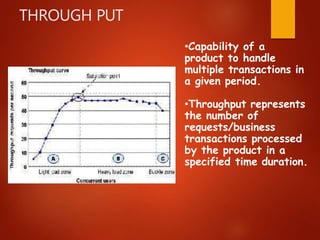
•Capability of a
product to handle
multiple transactions in
a given period.
•Throughput represents
the number of
requests/business
transactions processed
by the product in a
specified time duration.
THROUGH PUT
RESPONSE
TIME
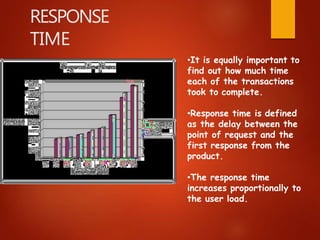
•It is equally important to
find out how much time
each of the transactions
took to complete.
•Response time is defined
as the delay between the
point of request and the
first response from the
product.
•The response time
increases proportionally to
the user load.
TUNING
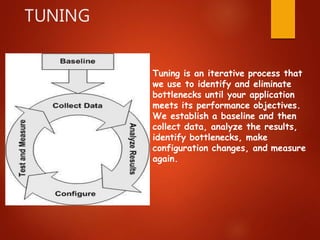
Tuning is an iterative process that
we use to identify and eliminate
bottlenecks until your application
meets its performance objectives.
We establish a baseline and then
collect data, analyze the results,
identify bottlenecks, make
configuration changes, and measure
again.
BENCHMARKI
NG
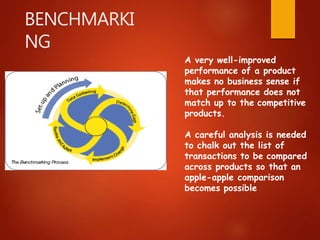
A very well-improved
performance of a product
makes no business sense if
that performance does not
match up to the competitive
products.
A careful analysis is needed
to chalk out the list of
transactions to be compared
across products so that an
apple-apple comparison
becomes possible
Purpose Of Performance Testing
 The purpose of performance testing is to verify the
system is able to meet the performance requirements
including number of transaction, on- line and batch
processing and capacity. The
performance requirements and to ensure
"worst
emphasis is on verifying satisfaction of
the
case"
system can handle stress and
scenarios.
Types Of Performance
Testing
1 LOAD TESTING
2 STRESS TESTING
3 VOLUME TESTING
4 SECURITY TESTING
5 RECOVERY TESTING
To test the performance and behavior at peak load (or
speed or configuration) ex. 100 users is the limit and
testing the system by applying 100 user is called as
Load Testing.
STRESS TESTING
It tests stress limits of a system (maximum number
of users, peak demands, etc) ex. beyond 100 users
and towards the system crash is called as Stress
testing.
LOAD TESTING
VOLUME TESTING
Volume testing means testing the application for
large volume for data is called volume testing. This
is mainly conducted to check the memory leaks and
capacity of the server handling huge volume of
data.
SECURITY TESTING
Security testing is a process to determine
that an information system protects data
and maintains functionality as intended.
RECOVERY TESTING
Testing how well a system recovers from
crashes, hardware failures. It tests system’s
response to presence of errors or loss of
data.
Performance Testing Process
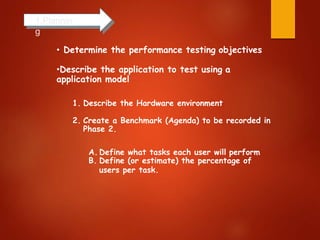
1.Plannin
g
• Determine the performance testing objectives
•Describe the application to test using a
application model
1. Describe the Hardware environment
2. Create a Benchmark (Agenda) to be recorded in
Phase 2.
A. Define what tasks each user will perform
B. Define (or estimate) the percentage of
users per task.
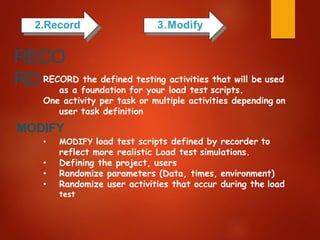
2.Record 3.Modify
RECORD the defined testing activities that will be used
as a foundation for your load test scripts.
One activity per task or multiple activities depending on
user task definition
MODIFY
• MODIFY load test scripts defined by recorder to
reflect more realistic Load test simulations.
• Defining the project, users
• Randomize parameters (Data, times, environment)
• Randomize user activities that occur during the load
test
RECO
RD
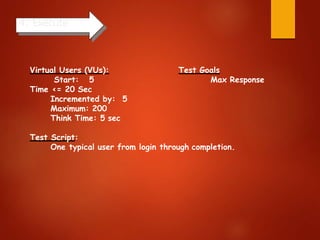
4. Execute
Virtual Users (VUs):
Start: 5
Time <= 20 Sec
Incremented by: 5
Maximum: 200
Think Time: 5 sec
Test Goals
Max Response
Test Script:
One typical user from login through completion.
Monitoring the scenario: We monitor scenario
execution using the various online runtime
monitors.
Analysing test results: During scenario execution,
the tool records the performance of the
application under different loads. We use the
graphs and reports to analyse the application’s
performance.
6. Analyze
5.Monitor
4.3.application performance

4.3.application performance

  • 2.
    PERFORMANCE TESTING - MEANING Performancetesting is the process of determining the speed or effectiveness of a computer, network, software program or device. Performance testing is the process by which software is tested to determine the current system performance.
  • 3.
    Before going intothe details, we should understand the factors that governs Performance testing: Throughput Response Time Tuning Benchmarking
  • 4.
    •Capability of a productto handle multiple transactions in a given period. •Throughput represents the number of requests/business transactions processed by the product in a specified time duration. THROUGH PUT
  • 5.
    RESPONSE TIME •It is equallyimportant to find out how much time each of the transactions took to complete. •Response time is defined as the delay between the point of request and the first response from the product. •The response time increases proportionally to the user load.
  • 6.
    TUNING Tuning is aniterative process that we use to identify and eliminate bottlenecks until your application meets its performance objectives. We establish a baseline and then collect data, analyze the results, identify bottlenecks, make configuration changes, and measure again.
  • 7.
    BENCHMARKI NG A very well-improved performanceof a product makes no business sense if that performance does not match up to the competitive products. A careful analysis is needed to chalk out the list of transactions to be compared across products so that an apple-apple comparison becomes possible
  • 8.
    Purpose Of PerformanceTesting  The purpose of performance testing is to verify the system is able to meet the performance requirements including number of transaction, on- line and batch processing and capacity. The performance requirements and to ensure "worst emphasis is on verifying satisfaction of the case" system can handle stress and scenarios.
  • 9.
    Types Of Performance Testing 1LOAD TESTING 2 STRESS TESTING 3 VOLUME TESTING 4 SECURITY TESTING 5 RECOVERY TESTING
  • 10.
    To test theperformance and behavior at peak load (or speed or configuration) ex. 100 users is the limit and testing the system by applying 100 user is called as Load Testing. STRESS TESTING It tests stress limits of a system (maximum number of users, peak demands, etc) ex. beyond 100 users and towards the system crash is called as Stress testing. LOAD TESTING
  • 11.
    VOLUME TESTING Volume testingmeans testing the application for large volume for data is called volume testing. This is mainly conducted to check the memory leaks and capacity of the server handling huge volume of data. SECURITY TESTING Security testing is a process to determine that an information system protects data and maintains functionality as intended.
  • 12.
    RECOVERY TESTING Testing howwell a system recovers from crashes, hardware failures. It tests system’s response to presence of errors or loss of data.
  • 13.
  • 14.
    1.Plannin g • Determine theperformance testing objectives •Describe the application to test using a application model 1. Describe the Hardware environment 2. Create a Benchmark (Agenda) to be recorded in Phase 2. A. Define what tasks each user will perform B. Define (or estimate) the percentage of users per task.
  • 15.
    2.Record 3.Modify RECORD thedefined testing activities that will be used as a foundation for your load test scripts. One activity per task or multiple activities depending on user task definition MODIFY • MODIFY load test scripts defined by recorder to reflect more realistic Load test simulations. • Defining the project, users • Randomize parameters (Data, times, environment) • Randomize user activities that occur during the load test RECO RD
  • 16.
    4. Execute Virtual Users(VUs): Start: 5 Time <= 20 Sec Incremented by: 5 Maximum: 200 Think Time: 5 sec Test Goals Max Response Test Script: One typical user from login through completion.
  • 17.
    Monitoring the scenario:We monitor scenario execution using the various online runtime monitors. Analysing test results: During scenario execution, the tool records the performance of the application under different loads. We use the graphs and reports to analyse the application’s performance. 6. Analyze 5.Monitor