Simplified Git
Flow
Branch it, tag it, release it, merge it
Geshan Manandhar
Quality and Maintenance Lead, Namshi.com
@geshan
geshan.com.np
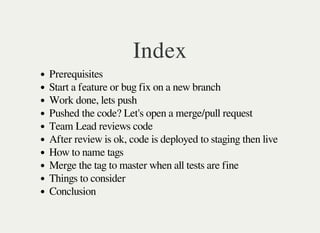
Index
Prerequisites
Start a feature or bug fix on a new branch
Work done, lets push
Pushed the code? Let's open a merge/pull request
Team Lead reviews code
After review is ok, code is deployed to staging then live
How to name tags
Merge the tag to master when all tests are fine
Things to consider
Conclusion
Prerequisites
You are aware of what git is, what it does and its benefits
You know about basic git commands like add, commit, branch etc
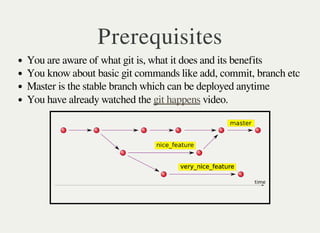
Master is the stable branch which can be deployed anytime
You have already watched the video.git happens
Start a feature or bug fix on a
new branch
Always follow a naming convention when create new branch
Like: OP-21 (where OP is short for OpenData and 21 is the ticket
id from redmine/trello)
Always get the latest master branch before you start any issue
By typing: git checkout master && git fetch && git pull --
rebase origin master
Then get a branch out of the latest master
The command will be: git checkout -b OP-21
Now you can start working onf OP-21 - add blog content type
Work done, lets push
So you finished working on OP-21
Then you do the following to commit the changes:
git add .
git add -u - if files have been deleted
git commit - then write a commit message
Keep in mind commit messages need to be meaningful
You can do multiple logical commits.
git push origin OP-21
Pushed the code? Let's open a
merge/pull request
It is recommended that you your commits to single onesquash
To a merge request, always get latest master then rebase your
branch
Be in your branch git checkout OP-21, then execute: git rebase
master.
As you just rebased with master, you may need to force push : git
push -f origin OP-21
Browse to gitlab open a merge request
Put the issue in right status/column on redmine/trello and put the
merge request link in the comment.
Team Lead reviews code
Team/Project Lead should always check and review code for each
pull/merge request
Code review is done to ensure coding standards, coding and naming
conventions.
It is also done to ensure code is maintainable on the long run.
If there are comments, it needs to be addressed by the software
engineer by re-working.
If the code matches standards, does the work and tests are passing it
can be deployed.
After review is ok, code is
deployed to staging then live
First deployed to Staging
For staging, its ok to deploy the branch with a deployment process.
If all tests are fine, then code is deployed to live.
For live/productions, always create a tag and deploy the tag
Given you are on OP-21 branch, execute git tag 1.11.2
Then push the tag: git push origin 1.11.2 and deploy it live
How to name the tags
Tags are basically pointers to a particular commit
Naming depends on the version conventions.
1.11.2-p0 can mean 1st Year of operation, month of November,
date is 2 - p0 for second release of the day
1.44.3 can mean 1st Year of operation, week no. 44 and release no
3, if you follow weekly sprints.
If you use tags for staging you could suffix it with rc-1, rc for
release candidate
Merge the tag to master when
live is stable
After testing and monitoring the live deployment, tag can be
merged to master
To merge the tag to master, get the latest master
Then run: git merge --no-ff 1.11.2 know why --no-ff
All the changes that were deployed are in master right now
Then you can deploy another branch after tagging it.
Next tag for the same day will be 1.11.2-p0
Here p0 means patch 0 or 2nd deployment of the day.
Things to consider
Never force push on master
You can force push on your branch provided others have not
branched out from your branch.
If tickets/issues are related, you can branch out from a different
branch than master
If you branched out of OP-10, you can send a merge/pull request to
OP-10 as well.
Always align your branch from your source branch which is
generally master.
Hot-fix branches have not been covered.
Conclusion/Recap
Git flow is easier than it looks, with single ticket deployments.
Git flow encourages rigorous code reviews.
It helps to follow a standard procedure.
Rollbacks are easier as you know the last deployed live tag.
Questions???
Credits
http://hades.name/blog/2010/01/22/git-your-friend-not-foe-vol-2-
branches/
https://www.flickr.com/photos/oberazzi/318947873/
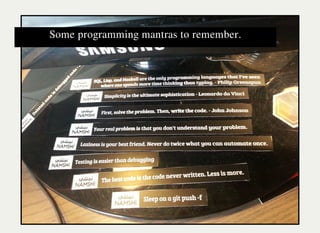
Some programming mantras to remember.

A simplified Gitflow

  • 1.
    Simplified Git Flow Branch it,tag it, release it, merge it
  • 2.
    Geshan Manandhar Quality andMaintenance Lead, Namshi.com @geshan geshan.com.np
  • 3.
    Index Prerequisites Start a featureor bug fix on a new branch Work done, lets push Pushed the code? Let's open a merge/pull request Team Lead reviews code After review is ok, code is deployed to staging then live How to name tags Merge the tag to master when all tests are fine Things to consider Conclusion
  • 4.
    Prerequisites You are awareof what git is, what it does and its benefits You know about basic git commands like add, commit, branch etc Master is the stable branch which can be deployed anytime You have already watched the video.git happens
  • 5.
    Start a featureor bug fix on a new branch Always follow a naming convention when create new branch Like: OP-21 (where OP is short for OpenData and 21 is the ticket id from redmine/trello) Always get the latest master branch before you start any issue By typing: git checkout master && git fetch && git pull -- rebase origin master Then get a branch out of the latest master The command will be: git checkout -b OP-21 Now you can start working onf OP-21 - add blog content type
  • 6.
    Work done, letspush So you finished working on OP-21 Then you do the following to commit the changes: git add . git add -u - if files have been deleted git commit - then write a commit message Keep in mind commit messages need to be meaningful You can do multiple logical commits. git push origin OP-21
  • 7.
    Pushed the code?Let's open a merge/pull request It is recommended that you your commits to single onesquash To a merge request, always get latest master then rebase your branch Be in your branch git checkout OP-21, then execute: git rebase master. As you just rebased with master, you may need to force push : git push -f origin OP-21 Browse to gitlab open a merge request Put the issue in right status/column on redmine/trello and put the merge request link in the comment.
  • 8.
    Team Lead reviewscode Team/Project Lead should always check and review code for each pull/merge request Code review is done to ensure coding standards, coding and naming conventions. It is also done to ensure code is maintainable on the long run. If there are comments, it needs to be addressed by the software engineer by re-working. If the code matches standards, does the work and tests are passing it can be deployed.
  • 9.
    After review isok, code is deployed to staging then live First deployed to Staging For staging, its ok to deploy the branch with a deployment process. If all tests are fine, then code is deployed to live. For live/productions, always create a tag and deploy the tag Given you are on OP-21 branch, execute git tag 1.11.2 Then push the tag: git push origin 1.11.2 and deploy it live
  • 10.
    How to namethe tags Tags are basically pointers to a particular commit Naming depends on the version conventions. 1.11.2-p0 can mean 1st Year of operation, month of November, date is 2 - p0 for second release of the day 1.44.3 can mean 1st Year of operation, week no. 44 and release no 3, if you follow weekly sprints. If you use tags for staging you could suffix it with rc-1, rc for release candidate
  • 11.
    Merge the tagto master when live is stable After testing and monitoring the live deployment, tag can be merged to master To merge the tag to master, get the latest master Then run: git merge --no-ff 1.11.2 know why --no-ff All the changes that were deployed are in master right now Then you can deploy another branch after tagging it. Next tag for the same day will be 1.11.2-p0 Here p0 means patch 0 or 2nd deployment of the day.
  • 12.
    Things to consider Neverforce push on master You can force push on your branch provided others have not branched out from your branch. If tickets/issues are related, you can branch out from a different branch than master If you branched out of OP-10, you can send a merge/pull request to OP-10 as well. Always align your branch from your source branch which is generally master. Hot-fix branches have not been covered.
  • 13.
    Conclusion/Recap Git flow iseasier than it looks, with single ticket deployments. Git flow encourages rigorous code reviews. It helps to follow a standard procedure. Rollbacks are easier as you know the last deployed live tag.
  • 14.
  • 15.
  • 16.