1 of 50
Smart Web GIS & Mobile Application
By
Smart GIS
http://freesmartgis.blogspot.com/
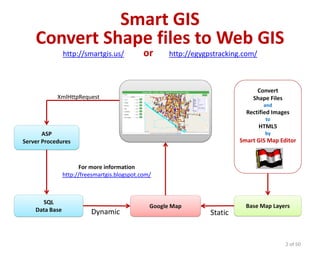
Smart GIS
Convert Shape files to Web GIS
http://smartgis.us/ or http://egygpstracking.com/
2 of 50
Google Map
ASP
Server Procedures
Convert
Shape Files
and
Rectified Images
to
HTML5
by
Smart GIS Map Editor
SQL
Data Base
For more information
http://freesmartgis.blogspot.com/
Base Map Layers
XmlHttpRequest
Dynamic Static
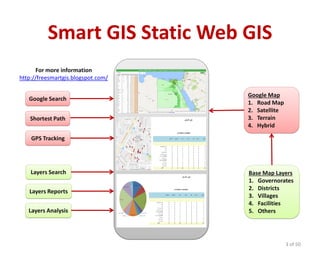
Smart GIS Static Web GIS
3 of 50
Google Map
1. Road Map
2. Satellite
3. Terrain
4. Hybrid
For more information
http://freesmartgis.blogspot.com/
Layers Search
Layers Reports
Layers Analysis
GPS Tracking
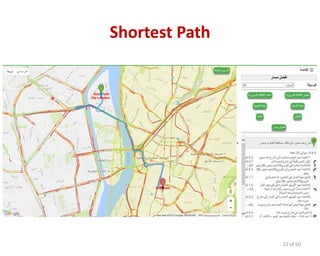
Shortest Path
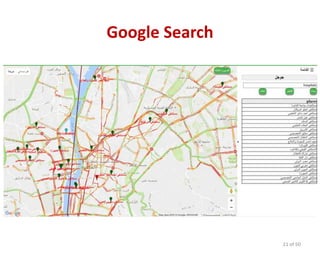
Google Search
Base Map Layers
1. Governorates
2. Districts
3. Villages
4. Facilities
5. Others
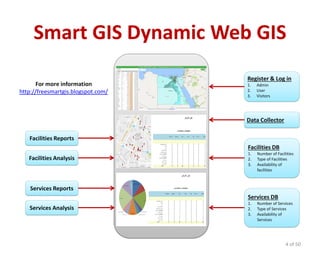
Smart GIS Dynamic Web GIS
4 of 50
Facilities DB
1. Number of Facilities
2. Type of Facilities
3. Availability of
facilities
For more information
http://freesmartgis.blogspot.com/
Data Collector
Facilities Analysis
Services Reports
Services Analysis
Facilities Reports
Services DB
1. Number of Services
2. Type of Services
3. Availability of
Services
Register & Log in
1. Admin
2. User
3. Visitors
5 of 50
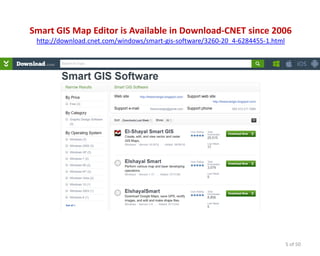
Smart GIS Map Editor is Available in Download-CNET since 2006
http://download.cnet.com/windows/smart-gis-software/3260-20_4-6284455-1.html
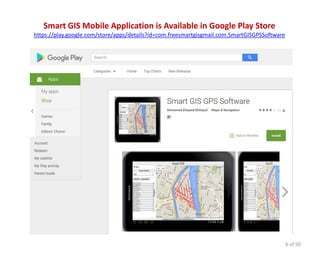
Smart GIS Mobile Application is Available in Google Play Store
https://play.google.com/store/apps/details?id=com.freesmartgisgmail.com.SmartGISGPSSoftware
6 of 50
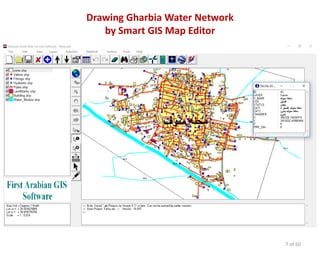
Drawing Gharbia Water Network
by Smart GIS Map Editor
7 of 50
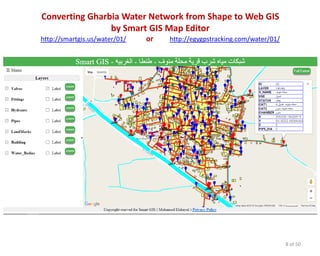
Converting Gharbia Water Network from Shape to Web GIS
by Smart GIS Map Editor
http://smartgis.us/water/01/ or http://egygpstracking.com/water/01/
8 of 50
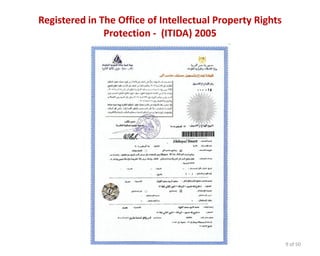
Registered in The Office of Intellectual Property Rights
Protection - (ITIDA) 2005
9 of 50
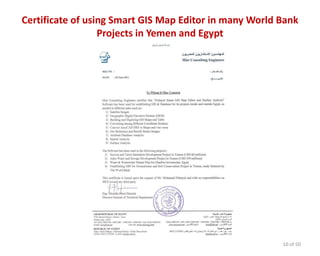
Certificate of using Smart GIS Map Editor in many World Bank
Projects in Yemen and Egypt
10 of 50
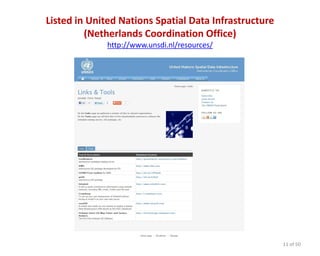
Listed in United Nations Spatial Data Infrastructure
(Netherlands Coordination Office)
http://www.unsdi.nl/resources/
11 of 50
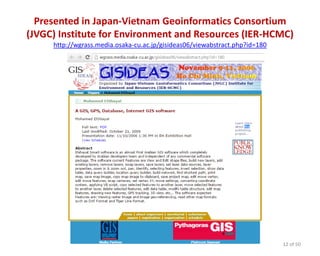
Presented in Japan-Vietnam Geoinformatics Consortium
(JVGC) Institute for Environment and Resources (IER-HCMC)
http://wgrass.media.osaka-cu.ac.jp/gisideas06/viewabstract.php?id=180
12 of 50
Registered in The Office of Intellectual Property Rights
Protection - (ITIDA) 2015
13 of 50
About Smart Web GIS System
• Collecting data of Facilities and services and
storing them in central database
• Data query and analysis of stored Data and
display appropriate results in tabular and spatial
format
• Statistics analysis of stored Data and display
appropriate results in tabular and spatial format
• Printing reports and statistical in tabular and
spatial format
14 of 50
systemof Smart Web GISGoals
• Adding and modifying numeric and descriptive
and geographical data of facilities and services
• Decision making support for high level
Management by conducting analyzes of facilities
and services data
• Issuing reports and statistics in tabular and
spatial format
• Enabling citizens for accessing facilities and
services information
15 of 50
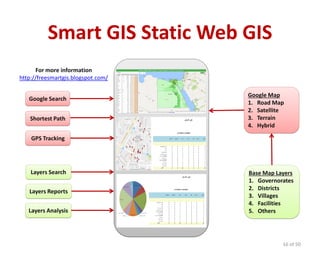
Smart GIS Static Web GIS
16 of 50
Google Map
1. Road Map
2. Satellite
3. Terrain
4. Hybrid
For more information
http://freesmartgis.blogspot.com/
Layers Search
Layers Reports
Layers Analysis
GPS Tracking
Shortest Path
Google Search
Base Map Layers
1. Governorates
2. Districts
3. Villages
4. Facilities
5. Others
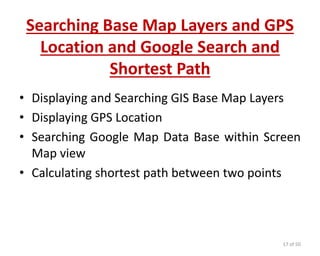
Searching Base Map Layers and GPS
Location and Google Search and
Shortest Path
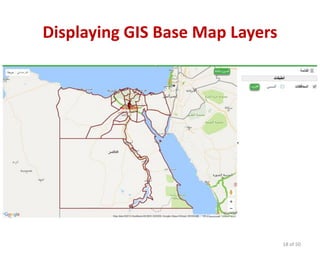
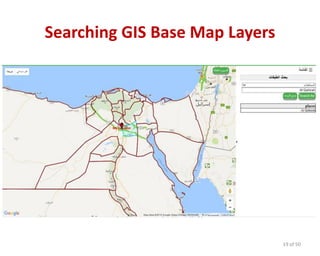
• Displaying and Searching GIS Base Map Layers
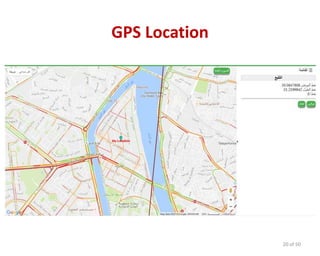
• Displaying GPS Location
• Searching Google Map Data Base within Screen
Map view
• Calculating shortest path between two points
17 of 50
Displaying GIS Base Map Layers
18 of 50
Searching GIS Base Map Layers
19 of 50
GPS Location
20 of 50
Google Search
21 of 50
Shortest Path
22 of 50
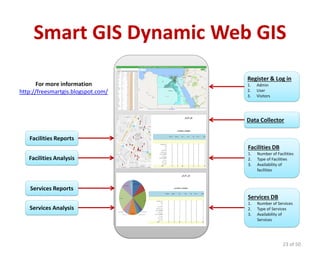
Smart GIS Dynamic Web GIS
23 of 50
Facilities DB
1. Number of Facilities
2. Type of Facilities
3. Availability of
facilities
For more information
http://freesmartgis.blogspot.com/
Data Collector
Facilities Analysis
Services Reports
Services Analysis
Facilities Reports
Services DB
1. Number of Services
2. Type of Services
3. Availability of
Services
Register & Log in
1. Admin
2. User
3. Visitors
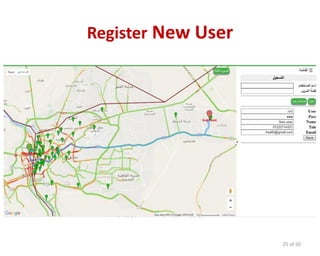
Register New User Application
Allow New User to Enter the following data
• User Name
• Password
• Telephone Number
• Social Security Number
• Others
24 of 50
Register New User
25 of 50
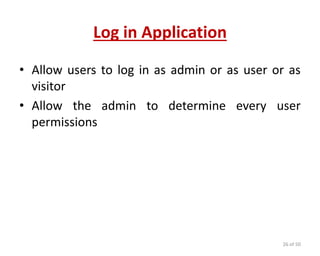
Log in Application
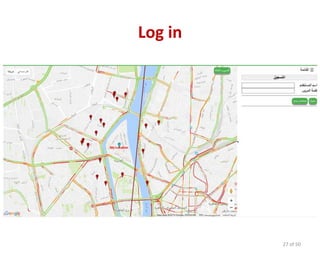
• Allow users to log in as admin or as user or as
visitor
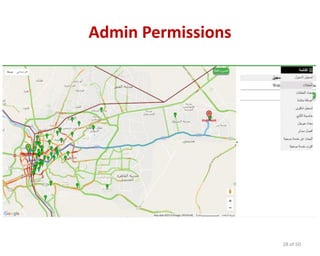
• Allow the admin to determine every user
permissions
26 of 50
Log in
27 of 50
Admin Permissions
28 of 50
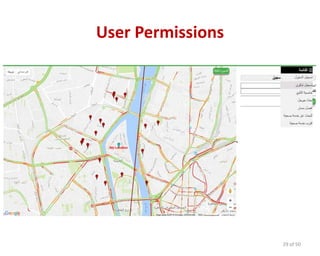
User Permissions
29 of 50
Searching for Facility
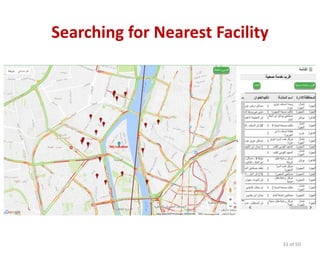
• Allow the user to find out nearest facility to his
GPS Position
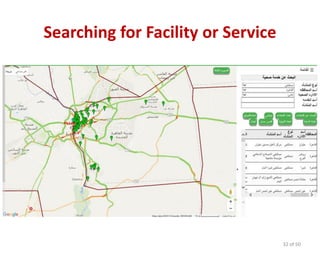
• Allow the user to find out facilities by searching
in specific governorate or district or by searching
for specific service
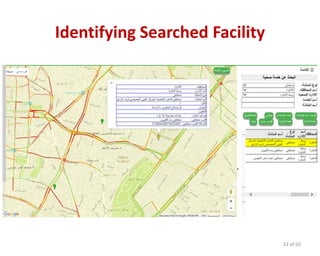
• Allow the user to identify facility data by clicking
its point on the map
30 of 50
Searching for Nearest Facility
31 of 50
Searching for Facility or Service
32 of 50
Identifying Searched Facility
33 of 50
Modifying and Adding new Facility
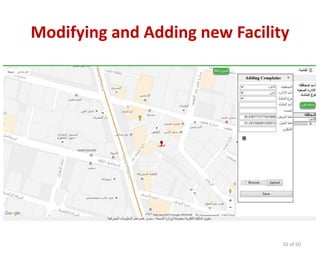
• Adding new facility point by clicking on the map
or by entering its coordinates
• Modifying facility point by dragging it on the
map or by entering its new coordinates
• Adding and modifying attribute tabular data for
each facility point
34 of 50
Modifying and Adding new Facility
35 of 50
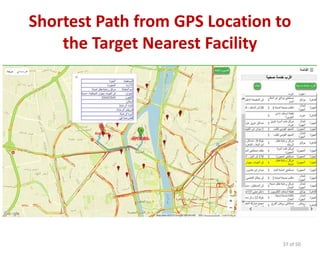
Shortest Path to Facility
• Allow the user to calculate the shortest path
from his GPS location to the target nearest
facility
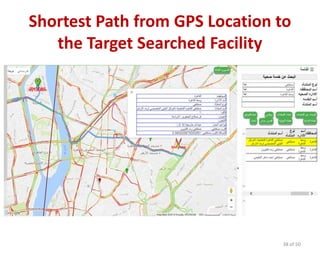
• Allow the user to calculate the shortest path
from his GPS location to the target searched
facility
36 of 50
Shortest Path from GPS Location to
the Target Nearest Facility
37 of 50
Shortest Path from GPS Location to
the Target Searched Facility
38 of 50
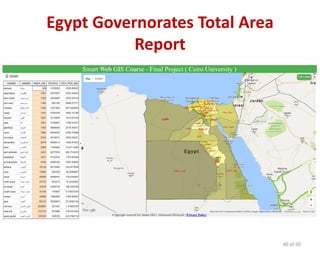
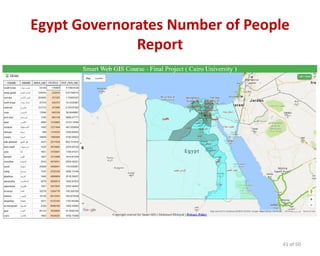
Smart Web GIS Reporting
• Allow the user to calculate the total number of
facilities in each governorate or district
• Allow the user to calculate the total number of
services in each governorate or district
• Allow the user to calculate total number of any
column field in each governorate or district such
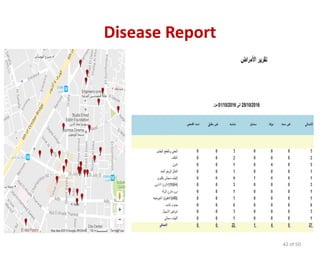
as diseases
39 of 50
Egypt Governorates Total Area
Report
40 of 50
Egypt Governorates Number of People
Report
41 of 50
Disease Report
42 of 50
Smart Web GIS Analysis
• Allow the user to compare the total number of
any field by the total number of other field in
each governorate or district
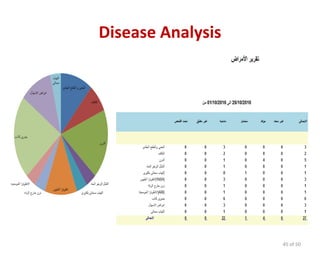
• Allow the user to build graph chart to view total
number of any field in each governorate or
district such as diseases
43 of 50
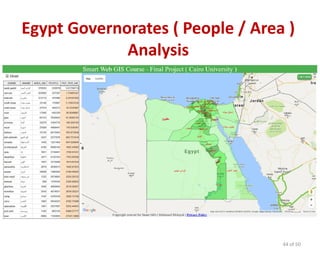
Egypt Governorates ( People / Area )
Analysis
44 of 50
Disease Analysis
45 of 50
Smart GIS Mobile Application
• Allow the user to benefit from all Mobile
functions such as GPS, Camera , Bluetooth,
Internet beside all the basic Smart web GIS
application functions
46 of 50
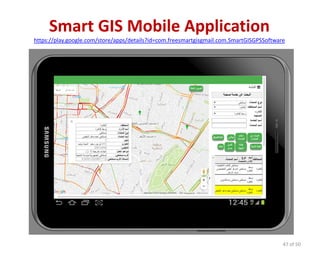
Smart GIS Mobile Application
https://play.google.com/store/apps/details?id=com.freesmartgisgmail.com.SmartGISGPSSoftware
47 of 50
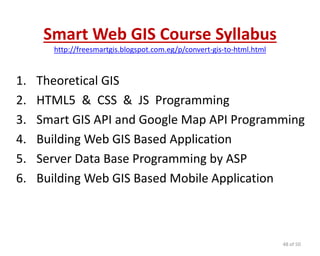
Smart Web GIS Course Syllabus
http://freesmartgis.blogspot.com.eg/p/convert-gis-to-html.html
1. Theoretical GIS
2. HTML5 & CSS & JS Programming
3. Smart GIS API and Google Map API Programming
4. Building Web GIS Based Application
5. Server Data Base Programming by ASP
6. Building Web GIS Based Mobile Application
48 of 50
Smart Web GIS Course Syllabus
http://freesmartgis.blogspot.com.eg/p/convert-gis-to-html.html
In this course the trainees will learn by using Smart GIS Layer
API code library and template :-
• How to convert GIS shape file layer to HTML5 and JS Web GIS
and Google map API file format
• How to build HTML5 + Java Script + CSS web GIS App.
• How to use Smart GIS API functions to control Web GIS
• How to connect database and retrieve results
• How to use ASP to connect Database and retrieve data and
draw it in the Google map API
• How to use all of the above mentioned skills to build a
mobile application
49 of 50
Thank You
Smart GIS
http://freesmartgis.blogspot.com/
50 of 50

4 smart web gis mobile application en new

  • 1.
    1 of 50 SmartWeb GIS & Mobile Application By Smart GIS http://freesmartgis.blogspot.com/
  • 2.
    Smart GIS Convert Shapefiles to Web GIS http://smartgis.us/ or http://egygpstracking.com/ 2 of 50 Google Map ASP Server Procedures Convert Shape Files and Rectified Images to HTML5 by Smart GIS Map Editor SQL Data Base For more information http://freesmartgis.blogspot.com/ Base Map Layers XmlHttpRequest Dynamic Static
  • 3.
    Smart GIS StaticWeb GIS 3 of 50 Google Map 1. Road Map 2. Satellite 3. Terrain 4. Hybrid For more information http://freesmartgis.blogspot.com/ Layers Search Layers Reports Layers Analysis GPS Tracking Shortest Path Google Search Base Map Layers 1. Governorates 2. Districts 3. Villages 4. Facilities 5. Others
  • 4.
    Smart GIS DynamicWeb GIS 4 of 50 Facilities DB 1. Number of Facilities 2. Type of Facilities 3. Availability of facilities For more information http://freesmartgis.blogspot.com/ Data Collector Facilities Analysis Services Reports Services Analysis Facilities Reports Services DB 1. Number of Services 2. Type of Services 3. Availability of Services Register & Log in 1. Admin 2. User 3. Visitors
  • 5.
    5 of 50 SmartGIS Map Editor is Available in Download-CNET since 2006 http://download.cnet.com/windows/smart-gis-software/3260-20_4-6284455-1.html
  • 6.
    Smart GIS MobileApplication is Available in Google Play Store https://play.google.com/store/apps/details?id=com.freesmartgisgmail.com.SmartGISGPSSoftware 6 of 50
  • 7.
    Drawing Gharbia WaterNetwork by Smart GIS Map Editor 7 of 50
  • 8.
    Converting Gharbia WaterNetwork from Shape to Web GIS by Smart GIS Map Editor http://smartgis.us/water/01/ or http://egygpstracking.com/water/01/ 8 of 50
  • 9.
    Registered in TheOffice of Intellectual Property Rights Protection - (ITIDA) 2005 9 of 50
  • 10.
    Certificate of usingSmart GIS Map Editor in many World Bank Projects in Yemen and Egypt 10 of 50
  • 11.
    Listed in UnitedNations Spatial Data Infrastructure (Netherlands Coordination Office) http://www.unsdi.nl/resources/ 11 of 50
  • 12.
    Presented in Japan-VietnamGeoinformatics Consortium (JVGC) Institute for Environment and Resources (IER-HCMC) http://wgrass.media.osaka-cu.ac.jp/gisideas06/viewabstract.php?id=180 12 of 50
  • 13.
    Registered in TheOffice of Intellectual Property Rights Protection - (ITIDA) 2015 13 of 50
  • 14.
    About Smart WebGIS System • Collecting data of Facilities and services and storing them in central database • Data query and analysis of stored Data and display appropriate results in tabular and spatial format • Statistics analysis of stored Data and display appropriate results in tabular and spatial format • Printing reports and statistical in tabular and spatial format 14 of 50
  • 15.
    systemof Smart WebGISGoals • Adding and modifying numeric and descriptive and geographical data of facilities and services • Decision making support for high level Management by conducting analyzes of facilities and services data • Issuing reports and statistics in tabular and spatial format • Enabling citizens for accessing facilities and services information 15 of 50
  • 16.
    Smart GIS StaticWeb GIS 16 of 50 Google Map 1. Road Map 2. Satellite 3. Terrain 4. Hybrid For more information http://freesmartgis.blogspot.com/ Layers Search Layers Reports Layers Analysis GPS Tracking Shortest Path Google Search Base Map Layers 1. Governorates 2. Districts 3. Villages 4. Facilities 5. Others
  • 17.
    Searching Base MapLayers and GPS Location and Google Search and Shortest Path • Displaying and Searching GIS Base Map Layers • Displaying GPS Location • Searching Google Map Data Base within Screen Map view • Calculating shortest path between two points 17 of 50
  • 18.
    Displaying GIS BaseMap Layers 18 of 50
  • 19.
    Searching GIS BaseMap Layers 19 of 50
  • 20.
  • 21.
  • 22.
  • 23.
    Smart GIS DynamicWeb GIS 23 of 50 Facilities DB 1. Number of Facilities 2. Type of Facilities 3. Availability of facilities For more information http://freesmartgis.blogspot.com/ Data Collector Facilities Analysis Services Reports Services Analysis Facilities Reports Services DB 1. Number of Services 2. Type of Services 3. Availability of Services Register & Log in 1. Admin 2. User 3. Visitors
  • 24.
    Register New UserApplication Allow New User to Enter the following data • User Name • Password • Telephone Number • Social Security Number • Others 24 of 50
  • 25.
  • 26.
    Log in Application •Allow users to log in as admin or as user or as visitor • Allow the admin to determine every user permissions 26 of 50
  • 27.
  • 28.
  • 29.
  • 30.
    Searching for Facility •Allow the user to find out nearest facility to his GPS Position • Allow the user to find out facilities by searching in specific governorate or district or by searching for specific service • Allow the user to identify facility data by clicking its point on the map 30 of 50
  • 31.
    Searching for NearestFacility 31 of 50
  • 32.
    Searching for Facilityor Service 32 of 50
  • 33.
  • 34.
    Modifying and Addingnew Facility • Adding new facility point by clicking on the map or by entering its coordinates • Modifying facility point by dragging it on the map or by entering its new coordinates • Adding and modifying attribute tabular data for each facility point 34 of 50
  • 35.
    Modifying and Addingnew Facility 35 of 50
  • 36.
    Shortest Path toFacility • Allow the user to calculate the shortest path from his GPS location to the target nearest facility • Allow the user to calculate the shortest path from his GPS location to the target searched facility 36 of 50
  • 37.
    Shortest Path fromGPS Location to the Target Nearest Facility 37 of 50
  • 38.
    Shortest Path fromGPS Location to the Target Searched Facility 38 of 50
  • 39.
    Smart Web GISReporting • Allow the user to calculate the total number of facilities in each governorate or district • Allow the user to calculate the total number of services in each governorate or district • Allow the user to calculate total number of any column field in each governorate or district such as diseases 39 of 50
  • 40.
    Egypt Governorates TotalArea Report 40 of 50
  • 41.
    Egypt Governorates Numberof People Report 41 of 50
  • 42.
  • 43.
    Smart Web GISAnalysis • Allow the user to compare the total number of any field by the total number of other field in each governorate or district • Allow the user to build graph chart to view total number of any field in each governorate or district such as diseases 43 of 50
  • 44.
    Egypt Governorates (People / Area ) Analysis 44 of 50
  • 45.
  • 46.
    Smart GIS MobileApplication • Allow the user to benefit from all Mobile functions such as GPS, Camera , Bluetooth, Internet beside all the basic Smart web GIS application functions 46 of 50
  • 47.
    Smart GIS MobileApplication https://play.google.com/store/apps/details?id=com.freesmartgisgmail.com.SmartGISGPSSoftware 47 of 50
  • 48.
    Smart Web GISCourse Syllabus http://freesmartgis.blogspot.com.eg/p/convert-gis-to-html.html 1. Theoretical GIS 2. HTML5 & CSS & JS Programming 3. Smart GIS API and Google Map API Programming 4. Building Web GIS Based Application 5. Server Data Base Programming by ASP 6. Building Web GIS Based Mobile Application 48 of 50
  • 49.
    Smart Web GISCourse Syllabus http://freesmartgis.blogspot.com.eg/p/convert-gis-to-html.html In this course the trainees will learn by using Smart GIS Layer API code library and template :- • How to convert GIS shape file layer to HTML5 and JS Web GIS and Google map API file format • How to build HTML5 + Java Script + CSS web GIS App. • How to use Smart GIS API functions to control Web GIS • How to connect database and retrieve results • How to use ASP to connect Database and retrieve data and draw it in the Google map API • How to use all of the above mentioned skills to build a mobile application 49 of 50
  • 50.