DOSE: Deployment and Operations
for Software Engineers
The Cloud
© Len Bass 2019 2
Overview
• Structure
• Failure in the Cloud
• Scaling Service Capacity
© Len Bass 2019 3
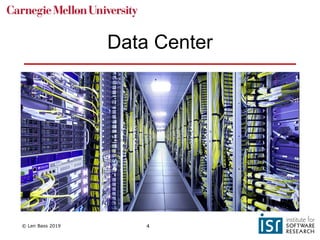
Data centers in the cloud
• A cloud provider (AWS, Google, Microsoft) maintains
data centers around the world.
• Each data center has ~100,000 computers.
• Limited by power and cooling considerations.
© Len Bass 2019 4
Data Center
© Len Bass 2019 5
Organization of data centers
• Each data center has independent power supply,
independent fire control, independent security, etc
• Data centers are collected into availability zones and
availability zones are collected into geographic
regions.
• AWS currently has 20 regions each with several
availability zones.
© Len Bass 2019 6
Allocating a virtual machine in
AWS - 1
• A user wishes to allocate a virtual machine in AWS
• The user specifies
• A region
• Availability zone
• Image to load into virtual machine
• …
© Len Bass 2019 7
Allocating a virtual machine in
AWS - 2
• AWS management software
• Finds a server in that region and
availability zone with spare capacity
• Allocates a virtual machine in that server
• Assigns IP address to that virtual machine
(public)
• Loads image into that virtual machine
• VM can then send and receive
messages
© Len Bass 2019 8
Overview
• Structure
• Failure in the Cloud
• Scaling Service Capacity
© Len Bass 2019 9
A distributed system is one in which the failure of a
computer you didn't even know existed can render your
own computer unusable.
Leslie Lamport
© Len Bass 2019 10
Failures in the cloud
• Cloud failures large and small
• The Long Tail
• Techniques for dealing with the long tail
© Len Bass 2019 11
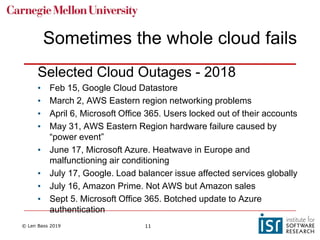
Sometimes the whole cloud fails
Selected Cloud Outages - 2018
• Feb 15, Google Cloud Datastore
• March 2, AWS Eastern region networking problems
• April 6, Microsoft Office 365. Users locked out of their accounts
• May 31, AWS Eastern Region hardware failure caused by
“power event”
• June 17, Microsoft Azure. Heatwave in Europe and
malfunctioning air conditioning
• July 17, Google. Load balancer issue affected services globally
• July 16, Amazon Prime. Not AWS but Amazon sales
• Sept 5. Microsoft Office 365. Botched update to Azure
authentication
© Len Bass 2019 12
And sometimes just a part of it fails
…
© Len Bass 2019 13
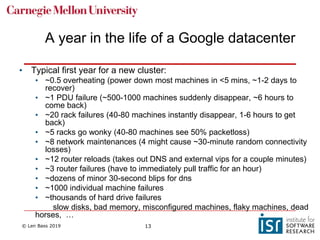
A year in the life of a Google datacenter
• Typical first year for a new cluster:
• ~0.5 overheating (power down most machines in <5 mins, ~1-2 days to
recover)
• ~1 PDU failure (~500-1000 machines suddenly disappear, ~6 hours to
come back)
• ~20 rack failures (40-80 machines instantly disappear, 1-6 hours to get
back)
• ~5 racks go wonky (40-80 machines see 50% packetloss)
• ~8 network maintenances (4 might cause ~30-minute random connectivity
losses)
• ~12 router reloads (takes out DNS and external vips for a couple minutes)
• ~3 router failures (have to immediately pull traffic for an hour)
• ~dozens of minor 30-second blips for dns
• ~1000 individual machine failures
• ~thousands of hard drive failures
slow disks, bad memory, misconfigured machines, flaky machines, dead
horses, …
© Len Bass 2019 14
Amazon failure statistics
• In a data center with ~64,000 servers with 2 disks
each
~5 servers and ~17 disks fail every day.
© Len Bass 2019 15
Failures in the cloud
• Cloud failures large and small
• The Long Tail
• Techniques for dealing with the long tail
© Len Bass 2019 16
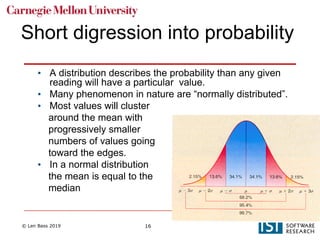
Short digression into probability
• A distribution describes the probability than any given
reading will have a particular value.
• Many phenomenon in nature are “normally distributed”.
• Most values will cluster
around the mean with
progressively smaller
numbers of values going
toward the edges.
• In a normal distribution
the mean is equal to the
median
© Len Bass 2019 17
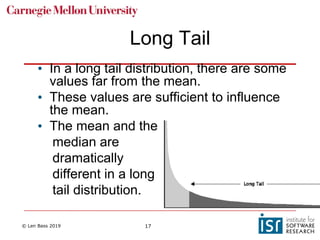
• In a long tail distribution, there are some
values far from the mean.
• These values are sufficient to influence
the mean.
• The mean and the
median are
dramatically
different in a long
tail distribution.
Long Tail
© Len Bass 2019 18
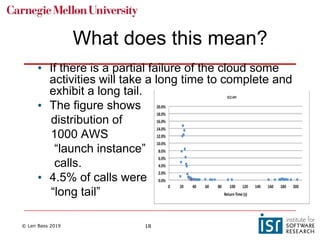
• If there is a partial failure of the cloud some
activities will take a long time to complete and
exhibit a long tail.
• The figure shows
distribution of
1000 AWS
“launch instance”
calls.
• 4.5% of calls were
“long tail”
What does this mean?
© Len Bass 2019 19
Failures in the cloud
• Cloud failures large and small
• The Long Tail
• Techniques for dealing with the long tail
© Len Bass 2019 20
What can you do to prevent
long tail problems?
• Recognize that failure has occurred
• Recover from failure
• Mask failure
© Len Bass 2019 21
Recognizing failure
• In a distributed system, the only
communication between distinct computers is
through messages.
• A request (message) to another machine
goes unanswered.
• The failure is recognized by the requestor
making the request asynchronously and
setting a timeout.
© Len Bass 2019 22
Health Check
• Health check. Requires one machine to act as a
monitor for other machines.
• Machine sends a message to a monitor
periodically saying “I am alive”
• Ping/echo. Monitor sends a message to the
machine being monitored and expects a reply
within specified period.
© Len Bass 2019 23
Recovering from failure
• Retry
• Instantiate another instance of failed service
• Graceful degradation
• Set “circuit breaker” to prevent trying to use service
again.
• Netflix Open Source Hystrix library provides some
useful functions
© Len Bass 2019 24
Masking failure
• “Hedged” request. Suppose you wish to launch 10
instances. Issue 11 requests. Terminate the request
that has not completed when 10 are completed.
• “Alternative” request. In the above scenario, issue 10
requests. When 8 requests have completed issue 2
more. Cancel the last 2 to respond.
• Using these techniques reduces the time of the
longest of the 1000 launch instance requests from
202 sec to 51 sec.
© Len Bass 2019 25
Overview
• Structure
• Failure in the Cloud
• Scaling Service Capacity
© Len Bass 2019 26
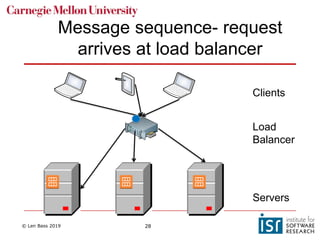
Load Balancer
• One server may not suffice for all of the requests for
a given service.
• Have multiple servers supplying the same
service.
• Use “load balancer” to distribute requests.
• Server is registered with load balancer upon
initialization
• Load balancer monitors health of servers and knows
which ones are healthy.
• Load balancer IP is returned from DNS server when
client requests URL of service.
© Len Bass 2019 27
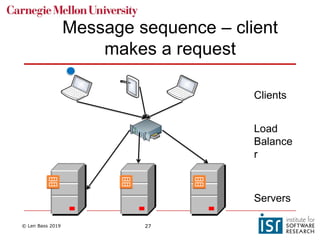
Message sequence – client
makes a request
Servers
Clients
Load
Balance
r
© Len Bass 2019 28
Message sequence- request
arrives at load balancer
Servers
Clients
Load
Balancer
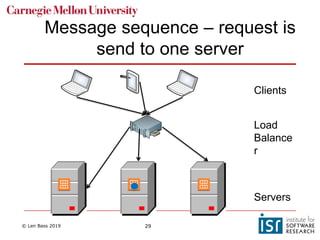
© Len Bass 2019 29
Message sequence – request is
send to one server
Servers
Clients
Load
Balance
r
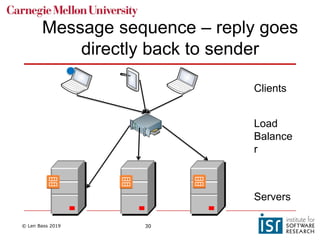
© Len Bass 2019 30
Message sequence – reply goes
directly back to sender
Servers
Clients
Load
Balance
r
© Len Bass 2019 31
Note IP manipulation
• Server always sends message back to what it thinks
is the sender.
• Load balancer changes destination IP but not the
source. Then reply goes directly back to client
• Load balancer (now acting as a proxy) can change
origin as well. In this case, reply goes back to load
balancer which must change destination (of reply)
back to original client.
© Len Bass 2019 32
Routing algorithms
• Load balancers use variety of algorithms to choose
instance for message
• Round robin. Rotate requests evenly
• Weighted round robin. Rotate requests according
to some weighting.
• Hashing – IP address of source to determine
instance. Means that a request from a particular
client always sent to same instance as long as it
is still in service.
• Note that these algorithms do not require knowledge
of an instance’s load.
© Len Bass 2019 33
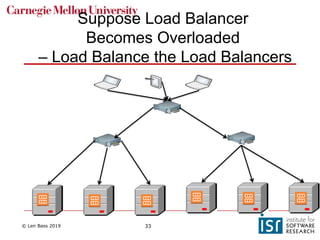
Suppose Load Balancer
Becomes Overloaded
– Load Balance the Load Balancers
© Len Bass 2019 34
Combining pictures
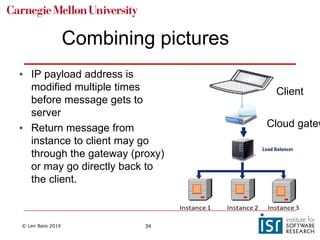
• IP payload address is
modified multiple times
before message gets to
server
• Return message from
instance to client may go
through the gateway (proxy)
or may go directly back to
the client.
Cloud gatew
Client
© Len Bass 2019 35
Summary
• The cloud consists of regions with availability zones
• A new VM is placed in an availability zone in a region
• Instances in the cloud can fail.
• Must be detected
• Long tail is a cloud phenomena that developers
must be aware of.
• Load balancers distribute requests among identical
servers.
© Len Bass 2019 36
Overview
• Autoscaling
• Distributed Coordination
© Len Bass 2019 37
Suppose servers become
overloaded
• As load grows, existing resources may not be
sufficient.
• Autoscaling is a mechanism for creating new
instances of a server.
• Set up a collection of rules that determine
• Under what conditions are new servers added
• Under what conditions are servers deleted
© Len Bass 2019 38
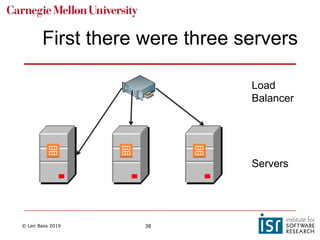
First there were three servers
Servers
Load
Balancer
© Len Bass 2019 39
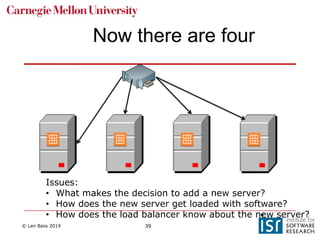
Now there are four
Issues:
• What makes the decision to add a new server?
• How does the new server get loaded with software?
• How does the load balancer know about the new server?
© Len Bass 2019 40
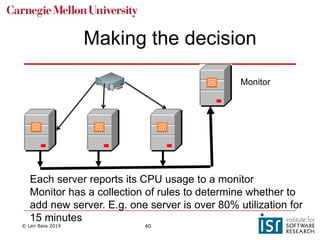
Making the decision
Monitor
Each server reports its CPU usage to a monitor
Monitor has a collection of rules to determine whether to
add new server. E.g. one server is over 80% utilization for
15 minutes
© Len Bass 2019 41
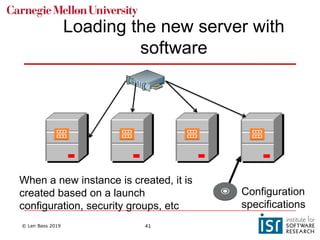
When a new instance is created, it is
created based on a launch
configuration, security groups, etc
Loading the new server with
software
Configuration
specifications
© Len Bass 2019 42
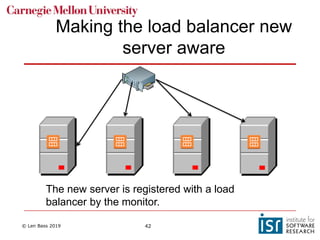
Making the load balancer new
server aware
The new server is registered with a load
balancer by the monitor.
© Len Bass 2019 43
Overview
• Autoscaling
• Distributed Coordination
• Atomicity
• Locking
• Consensus algorithms
© Len Bass 2019 44
Atomicity
• Some operations must be done atomically (or appear
to be atomic).
• Race conditions result from non atomic operations.
• Data base updates may result in inconsistent data
if not atomic
• Resources (e.g. memory) may be overwritten if not
atomic
• Interrupt handlers must be atomic
• etc
© Len Bass 2019 45
How do I achieve (or appear to
achieve) atomicity?
• Time stamps?
• Many protocols involve putting a time stamp on
messages for error detection and ordering
purposes.
• Time stamps are often used to identify log
messages used for debugging problems.
• Couldn’t time stamps be used to order activities?
• Problem is that clocks drift and so clock time may be
different on different computers.
© Len Bass 2019 46
Synchronizing clocks over networks
• Suppose two different computers are connected via a
network. How do they synchronize their clocks?
• If one computer sends its time reading to another, it takes
time for the message to arrive.
• NTP (Network Time Protocol) can be used to synchronize
time on a collection of computers.
• Accurate to around 1 millisecond in local area networks
• Accurate to around 10 milliseconds over public internet
• Congestion can cause errors of 100 milliseconds or
more.
© Len Bass 2019 47
Suppose NTP is insufficiently
accurate
• Financial industry is spending 100s of millions of dollars
to reduce latency between Chicago and New York by 3
milliseconds.
• Well within error range of NTP
• GPS time is accurate within
• 14 nanoseconds (theoretically)
• 100 nanoseconds (mostly)Atomi
• Timestamp messages with GPS time
• Used by electric companies to measure phase angle
• Atomic clocks
• Used by Google to coordinate time across all of their
distributed systems.
© Len Bass 2019 48
How about using locks?
• One technique to synchronize is to lock critical resources.
• Can lead to deadlock – two processes waiting for each
other to release critical resources
• Process one gets a lock on row 1 of a data base
• Process two gets a lock on row 2.
• Process one waits for process 2 to release its lock on
row 2
• Process two waits for process 1 to release its lock on
row 1
• No progress.
© Len Bass 2019 49
More problems with locks
• Locks are logical structures maintained in software
or in persistent storage.
• Getting a lock across distributed systems is not an
atomic operation.
• It is possible that while requesting a lock another
process can acquire the lock. This can go on for a
long time (it is called livelock if there is no
possibility of ever acquiring a lock)
• Suppose the virtual machine holding the lock fails.
Then the owner of the lock can never release it.
© Len Bass 2019 50
Locks in distributed systems
• Utilizing locks in a distributed system has a more
fundamental problem.
• It takes time to send a message (create a lock, for
example) from one computer to another.
© Len Bass 2019 51
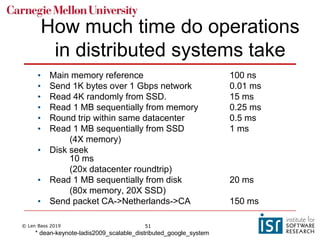
How much time do operations
in distributed systems take
• Main memory reference 100 ns
• Send 1K bytes over 1 Gbps network 0.01 ms
• Read 4K randomly from SSD. 15 ms
• Read 1 MB sequentially from memory 0.25 ms
• Round trip within same datacenter 0.5 ms
• Read 1 MB sequentially from SSD 1 ms
(4X memory)
• Disk seek
10 ms
(20x datacenter roundtrip)
• Read 1 MB sequentially from disk 20 ms
(80x memory, 20X SSD)
• Send packet CA->Netherlands->CA 150 ms
* dean-keynote-ladis2009_scalable_distributed_google_system
© Len Bass 2019 52
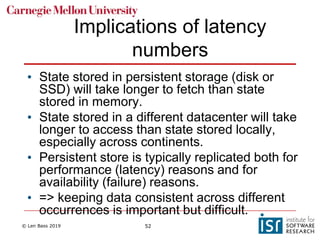
Implications of latency
numbers
• State stored in persistent storage (disk or
SSD) will take longer to fetch than state
stored in memory.
• State stored in a different datacenter will take
longer to access than state stored locally,
especially across continents.
• Persistent store is typically replicated both for
performance (latency) reasons and for
availability (failure) reasons.
• => keeping data consistent across different
occurrences is important but difficult.
© Len Bass 2019 53
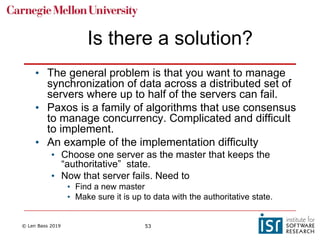
Is there a solution?
• The general problem is that you want to manage
synchronization of data across a distributed set of
servers where up to half of the servers can fail.
• Paxos is a family of algorithms that use consensus
to manage concurrency. Complicated and difficult
to implement.
• An example of the implementation difficulty
• Choose one server as the master that keeps the
“authoritative” state.
• Now that server fails. Need to
• Find a new master
• Make sure it is up to data with the authoritative state.
© Len Bass 2019 54
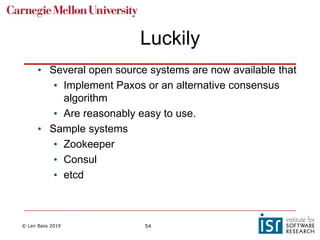
Luckily
• Several open source systems are now available that
• Implement Paxos or an alternative consensus
algorithm
• Are reasonably easy to use.
• Sample systems
• Zookeeper
• Consul
• etcd
© Len Bass 2019 55
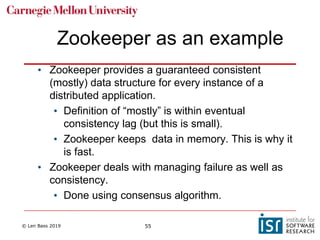
Zookeeper as an example
• Zookeeper provides a guaranteed consistent
(mostly) data structure for every instance of a
distributed application.
• Definition of “mostly” is within eventual
consistency lag (but this is small).
• Zookeeper keeps data in memory. This is why it
is fast.
• Zookeeper deals with managing failure as well as
consistency.
• Done using consensus algorithm.
© Len Bass 2019 56
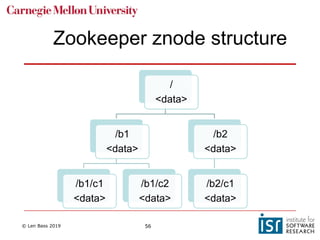
Zookeeper znode structure
/
<data>
/b1
<data>
/b1/c1
<data>
/b1/c2
<data>
/b2
<data>
/b2/c1
<data>
© Len Bass 2019 57
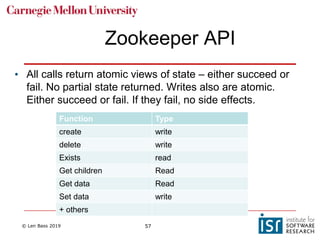
Zookeeper API
Function Type
create write
delete write
Exists read
Get children Read
Get data Read
Set data write
+ others
• All calls return atomic views of state – either succeed or
fail. No partial state returned. Writes also are atomic.
Either succeed or fail. If they fail, no side effects.
© Len Bass 2019 58
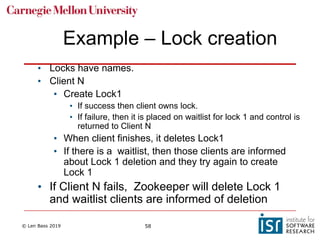
Example – Lock creation
• Locks have names.
• Client N
• Create Lock1
• If success then client owns lock.
• If failure, then it is placed on waitlist for lock 1 and control is
returned to Client N
• When client finishes, it deletes Lock1
• If there is a waitlist, then those clients are informed
about Lock 1 deletion and they try again to create
Lock 1
• If Client N fails, Zookeeper will delete Lock 1
and waitlist clients are informed of deletion
© Len Bass 2019 59
Other use cases
• Leader election
• Groups membership
• Synchronization
• Configuration
© Len Bass 2019 60
Summary
• Autoscaling creates new instances based on utilization
of existing instances
• Synchronization of data across a distributed system id
complicated
• It is difficult because of
• Timing delays across distributed systems
• Possible failures of nodes of various types
• Open source systems implement complicated
consensus algorithms in a fashion that is relatively
easy to use.

3 the cloud

  • 1.
    DOSE: Deployment andOperations for Software Engineers The Cloud
  • 2.
    © Len Bass2019 2 Overview • Structure • Failure in the Cloud • Scaling Service Capacity
  • 3.
    © Len Bass2019 3 Data centers in the cloud • A cloud provider (AWS, Google, Microsoft) maintains data centers around the world. • Each data center has ~100,000 computers. • Limited by power and cooling considerations.
  • 4.
    © Len Bass2019 4 Data Center
  • 5.
    © Len Bass2019 5 Organization of data centers • Each data center has independent power supply, independent fire control, independent security, etc • Data centers are collected into availability zones and availability zones are collected into geographic regions. • AWS currently has 20 regions each with several availability zones.
  • 6.
    © Len Bass2019 6 Allocating a virtual machine in AWS - 1 • A user wishes to allocate a virtual machine in AWS • The user specifies • A region • Availability zone • Image to load into virtual machine • …
  • 7.
    © Len Bass2019 7 Allocating a virtual machine in AWS - 2 • AWS management software • Finds a server in that region and availability zone with spare capacity • Allocates a virtual machine in that server • Assigns IP address to that virtual machine (public) • Loads image into that virtual machine • VM can then send and receive messages
  • 8.
    © Len Bass2019 8 Overview • Structure • Failure in the Cloud • Scaling Service Capacity
  • 9.
    © Len Bass2019 9 A distributed system is one in which the failure of a computer you didn't even know existed can render your own computer unusable. Leslie Lamport
  • 10.
    © Len Bass2019 10 Failures in the cloud • Cloud failures large and small • The Long Tail • Techniques for dealing with the long tail
  • 11.
    © Len Bass2019 11 Sometimes the whole cloud fails Selected Cloud Outages - 2018 • Feb 15, Google Cloud Datastore • March 2, AWS Eastern region networking problems • April 6, Microsoft Office 365. Users locked out of their accounts • May 31, AWS Eastern Region hardware failure caused by “power event” • June 17, Microsoft Azure. Heatwave in Europe and malfunctioning air conditioning • July 17, Google. Load balancer issue affected services globally • July 16, Amazon Prime. Not AWS but Amazon sales • Sept 5. Microsoft Office 365. Botched update to Azure authentication
  • 12.
    © Len Bass2019 12 And sometimes just a part of it fails …
  • 13.
    © Len Bass2019 13 A year in the life of a Google datacenter • Typical first year for a new cluster: • ~0.5 overheating (power down most machines in <5 mins, ~1-2 days to recover) • ~1 PDU failure (~500-1000 machines suddenly disappear, ~6 hours to come back) • ~20 rack failures (40-80 machines instantly disappear, 1-6 hours to get back) • ~5 racks go wonky (40-80 machines see 50% packetloss) • ~8 network maintenances (4 might cause ~30-minute random connectivity losses) • ~12 router reloads (takes out DNS and external vips for a couple minutes) • ~3 router failures (have to immediately pull traffic for an hour) • ~dozens of minor 30-second blips for dns • ~1000 individual machine failures • ~thousands of hard drive failures slow disks, bad memory, misconfigured machines, flaky machines, dead horses, …
  • 14.
    © Len Bass2019 14 Amazon failure statistics • In a data center with ~64,000 servers with 2 disks each ~5 servers and ~17 disks fail every day.
  • 15.
    © Len Bass2019 15 Failures in the cloud • Cloud failures large and small • The Long Tail • Techniques for dealing with the long tail
  • 16.
    © Len Bass2019 16 Short digression into probability • A distribution describes the probability than any given reading will have a particular value. • Many phenomenon in nature are “normally distributed”. • Most values will cluster around the mean with progressively smaller numbers of values going toward the edges. • In a normal distribution the mean is equal to the median
  • 17.
    © Len Bass2019 17 • In a long tail distribution, there are some values far from the mean. • These values are sufficient to influence the mean. • The mean and the median are dramatically different in a long tail distribution. Long Tail
  • 18.
    © Len Bass2019 18 • If there is a partial failure of the cloud some activities will take a long time to complete and exhibit a long tail. • The figure shows distribution of 1000 AWS “launch instance” calls. • 4.5% of calls were “long tail” What does this mean?
  • 19.
    © Len Bass2019 19 Failures in the cloud • Cloud failures large and small • The Long Tail • Techniques for dealing with the long tail
  • 20.
    © Len Bass2019 20 What can you do to prevent long tail problems? • Recognize that failure has occurred • Recover from failure • Mask failure
  • 21.
    © Len Bass2019 21 Recognizing failure • In a distributed system, the only communication between distinct computers is through messages. • A request (message) to another machine goes unanswered. • The failure is recognized by the requestor making the request asynchronously and setting a timeout.
  • 22.
    © Len Bass2019 22 Health Check • Health check. Requires one machine to act as a monitor for other machines. • Machine sends a message to a monitor periodically saying “I am alive” • Ping/echo. Monitor sends a message to the machine being monitored and expects a reply within specified period.
  • 23.
    © Len Bass2019 23 Recovering from failure • Retry • Instantiate another instance of failed service • Graceful degradation • Set “circuit breaker” to prevent trying to use service again. • Netflix Open Source Hystrix library provides some useful functions
  • 24.
    © Len Bass2019 24 Masking failure • “Hedged” request. Suppose you wish to launch 10 instances. Issue 11 requests. Terminate the request that has not completed when 10 are completed. • “Alternative” request. In the above scenario, issue 10 requests. When 8 requests have completed issue 2 more. Cancel the last 2 to respond. • Using these techniques reduces the time of the longest of the 1000 launch instance requests from 202 sec to 51 sec.
  • 25.
    © Len Bass2019 25 Overview • Structure • Failure in the Cloud • Scaling Service Capacity
  • 26.
    © Len Bass2019 26 Load Balancer • One server may not suffice for all of the requests for a given service. • Have multiple servers supplying the same service. • Use “load balancer” to distribute requests. • Server is registered with load balancer upon initialization • Load balancer monitors health of servers and knows which ones are healthy. • Load balancer IP is returned from DNS server when client requests URL of service.
  • 27.
    © Len Bass2019 27 Message sequence – client makes a request Servers Clients Load Balance r
  • 28.
    © Len Bass2019 28 Message sequence- request arrives at load balancer Servers Clients Load Balancer
  • 29.
    © Len Bass2019 29 Message sequence – request is send to one server Servers Clients Load Balance r
  • 30.
    © Len Bass2019 30 Message sequence – reply goes directly back to sender Servers Clients Load Balance r
  • 31.
    © Len Bass2019 31 Note IP manipulation • Server always sends message back to what it thinks is the sender. • Load balancer changes destination IP but not the source. Then reply goes directly back to client • Load balancer (now acting as a proxy) can change origin as well. In this case, reply goes back to load balancer which must change destination (of reply) back to original client.
  • 32.
    © Len Bass2019 32 Routing algorithms • Load balancers use variety of algorithms to choose instance for message • Round robin. Rotate requests evenly • Weighted round robin. Rotate requests according to some weighting. • Hashing – IP address of source to determine instance. Means that a request from a particular client always sent to same instance as long as it is still in service. • Note that these algorithms do not require knowledge of an instance’s load.
  • 33.
    © Len Bass2019 33 Suppose Load Balancer Becomes Overloaded – Load Balance the Load Balancers
  • 34.
    © Len Bass2019 34 Combining pictures • IP payload address is modified multiple times before message gets to server • Return message from instance to client may go through the gateway (proxy) or may go directly back to the client. Cloud gatew Client
  • 35.
    © Len Bass2019 35 Summary • The cloud consists of regions with availability zones • A new VM is placed in an availability zone in a region • Instances in the cloud can fail. • Must be detected • Long tail is a cloud phenomena that developers must be aware of. • Load balancers distribute requests among identical servers.
  • 36.
    © Len Bass2019 36 Overview • Autoscaling • Distributed Coordination
  • 37.
    © Len Bass2019 37 Suppose servers become overloaded • As load grows, existing resources may not be sufficient. • Autoscaling is a mechanism for creating new instances of a server. • Set up a collection of rules that determine • Under what conditions are new servers added • Under what conditions are servers deleted
  • 38.
    © Len Bass2019 38 First there were three servers Servers Load Balancer
  • 39.
    © Len Bass2019 39 Now there are four Issues: • What makes the decision to add a new server? • How does the new server get loaded with software? • How does the load balancer know about the new server?
  • 40.
    © Len Bass2019 40 Making the decision Monitor Each server reports its CPU usage to a monitor Monitor has a collection of rules to determine whether to add new server. E.g. one server is over 80% utilization for 15 minutes
  • 41.
    © Len Bass2019 41 When a new instance is created, it is created based on a launch configuration, security groups, etc Loading the new server with software Configuration specifications
  • 42.
    © Len Bass2019 42 Making the load balancer new server aware The new server is registered with a load balancer by the monitor.
  • 43.
    © Len Bass2019 43 Overview • Autoscaling • Distributed Coordination • Atomicity • Locking • Consensus algorithms
  • 44.
    © Len Bass2019 44 Atomicity • Some operations must be done atomically (or appear to be atomic). • Race conditions result from non atomic operations. • Data base updates may result in inconsistent data if not atomic • Resources (e.g. memory) may be overwritten if not atomic • Interrupt handlers must be atomic • etc
  • 45.
    © Len Bass2019 45 How do I achieve (or appear to achieve) atomicity? • Time stamps? • Many protocols involve putting a time stamp on messages for error detection and ordering purposes. • Time stamps are often used to identify log messages used for debugging problems. • Couldn’t time stamps be used to order activities? • Problem is that clocks drift and so clock time may be different on different computers.
  • 46.
    © Len Bass2019 46 Synchronizing clocks over networks • Suppose two different computers are connected via a network. How do they synchronize their clocks? • If one computer sends its time reading to another, it takes time for the message to arrive. • NTP (Network Time Protocol) can be used to synchronize time on a collection of computers. • Accurate to around 1 millisecond in local area networks • Accurate to around 10 milliseconds over public internet • Congestion can cause errors of 100 milliseconds or more.
  • 47.
    © Len Bass2019 47 Suppose NTP is insufficiently accurate • Financial industry is spending 100s of millions of dollars to reduce latency between Chicago and New York by 3 milliseconds. • Well within error range of NTP • GPS time is accurate within • 14 nanoseconds (theoretically) • 100 nanoseconds (mostly)Atomi • Timestamp messages with GPS time • Used by electric companies to measure phase angle • Atomic clocks • Used by Google to coordinate time across all of their distributed systems.
  • 48.
    © Len Bass2019 48 How about using locks? • One technique to synchronize is to lock critical resources. • Can lead to deadlock – two processes waiting for each other to release critical resources • Process one gets a lock on row 1 of a data base • Process two gets a lock on row 2. • Process one waits for process 2 to release its lock on row 2 • Process two waits for process 1 to release its lock on row 1 • No progress.
  • 49.
    © Len Bass2019 49 More problems with locks • Locks are logical structures maintained in software or in persistent storage. • Getting a lock across distributed systems is not an atomic operation. • It is possible that while requesting a lock another process can acquire the lock. This can go on for a long time (it is called livelock if there is no possibility of ever acquiring a lock) • Suppose the virtual machine holding the lock fails. Then the owner of the lock can never release it.
  • 50.
    © Len Bass2019 50 Locks in distributed systems • Utilizing locks in a distributed system has a more fundamental problem. • It takes time to send a message (create a lock, for example) from one computer to another.
  • 51.
    © Len Bass2019 51 How much time do operations in distributed systems take • Main memory reference 100 ns • Send 1K bytes over 1 Gbps network 0.01 ms • Read 4K randomly from SSD. 15 ms • Read 1 MB sequentially from memory 0.25 ms • Round trip within same datacenter 0.5 ms • Read 1 MB sequentially from SSD 1 ms (4X memory) • Disk seek 10 ms (20x datacenter roundtrip) • Read 1 MB sequentially from disk 20 ms (80x memory, 20X SSD) • Send packet CA->Netherlands->CA 150 ms * dean-keynote-ladis2009_scalable_distributed_google_system
  • 52.
    © Len Bass2019 52 Implications of latency numbers • State stored in persistent storage (disk or SSD) will take longer to fetch than state stored in memory. • State stored in a different datacenter will take longer to access than state stored locally, especially across continents. • Persistent store is typically replicated both for performance (latency) reasons and for availability (failure) reasons. • => keeping data consistent across different occurrences is important but difficult.
  • 53.
    © Len Bass2019 53 Is there a solution? • The general problem is that you want to manage synchronization of data across a distributed set of servers where up to half of the servers can fail. • Paxos is a family of algorithms that use consensus to manage concurrency. Complicated and difficult to implement. • An example of the implementation difficulty • Choose one server as the master that keeps the “authoritative” state. • Now that server fails. Need to • Find a new master • Make sure it is up to data with the authoritative state.
  • 54.
    © Len Bass2019 54 Luckily • Several open source systems are now available that • Implement Paxos or an alternative consensus algorithm • Are reasonably easy to use. • Sample systems • Zookeeper • Consul • etcd
  • 55.
    © Len Bass2019 55 Zookeeper as an example • Zookeeper provides a guaranteed consistent (mostly) data structure for every instance of a distributed application. • Definition of “mostly” is within eventual consistency lag (but this is small). • Zookeeper keeps data in memory. This is why it is fast. • Zookeeper deals with managing failure as well as consistency. • Done using consensus algorithm.
  • 56.
    © Len Bass2019 56 Zookeeper znode structure / <data> /b1 <data> /b1/c1 <data> /b1/c2 <data> /b2 <data> /b2/c1 <data>
  • 57.
    © Len Bass2019 57 Zookeeper API Function Type create write delete write Exists read Get children Read Get data Read Set data write + others • All calls return atomic views of state – either succeed or fail. No partial state returned. Writes also are atomic. Either succeed or fail. If they fail, no side effects.
  • 58.
    © Len Bass2019 58 Example – Lock creation • Locks have names. • Client N • Create Lock1 • If success then client owns lock. • If failure, then it is placed on waitlist for lock 1 and control is returned to Client N • When client finishes, it deletes Lock1 • If there is a waitlist, then those clients are informed about Lock 1 deletion and they try again to create Lock 1 • If Client N fails, Zookeeper will delete Lock 1 and waitlist clients are informed of deletion
  • 59.
    © Len Bass2019 59 Other use cases • Leader election • Groups membership • Synchronization • Configuration
  • 60.
    © Len Bass2019 60 Summary • Autoscaling creates new instances based on utilization of existing instances • Synchronization of data across a distributed system id complicated • It is difficult because of • Timing delays across distributed systems • Possible failures of nodes of various types • Open source systems implement complicated consensus algorithms in a fashion that is relatively easy to use.