3 Experts Share Tips for 
Salesforce1 Mobile Apps 
Thursday, 8/21/2014 
Presented by Jennifer Hersom 
Product Marketing Manager, AppExchange
Our 3 experts: 
Gordon Derk 
President 
AccountAbility Solutions, Inc. 
Shaun McInerney 
President and Co-Founder 
AscentERP 
Wyndham Hudson 
Product Manager 
NewVoiceMedia 
Speakers:
Today you will learn… 
How to grow your business with a Salesforce1 mobile app 
How to build and sell a successful app from 3 top partners 
Find out how to get started building your Salesforce1 mobile app 
Plus! 
Ask live questions to our partner-experts
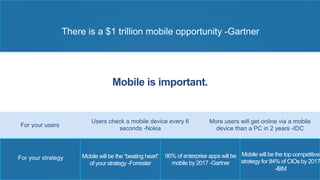
There is a $1 trillion mobile opportunity -Gartner 
Mobile is important. 
For your users More users will get online via a mobile 
device than a PC in 2 years -IDC 
Mobile will be the top competitive 
strategy for 84% of CIOs by 2017 
-IBM 
Mobile will be the “beating heart” 
of your strategy -Forrester 
90% of enterprise apps will be 
mobile by 2017 -Gartner 
For your strategy 
Users check a mobile device every 6 
seconds -Nokia
Build a mobile app, fast with 
Salesforce1
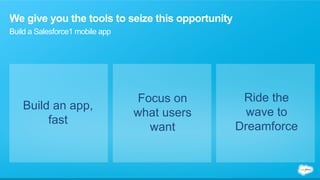
We give you the tools to seize this opportunity 
Build a Salesforce1 mobile app 
Build an app, 
fast 
Focus on 
what users 
want 
Ride the 
wave to 
Dreamforce
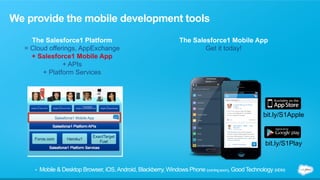
We provide the mobile development tools 
The Salesforce1 Platform 
= Cloud offerings, AppExchange 
+ Salesforce1 Mobile App 
+ APIs 
+ Platform Services 
The Salesforce1 Mobile App 
bit.ly/S1Apple 
bit.ly/S1Play 
Get it today! 
• Mobile & Desktop Browser, iOS, Android, Blackberry, Windows Phone (coming soon), Good Technology (MDM)
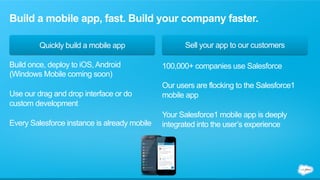
Build a mobile app, fast. Build your company faster. 
Quickly build a mobile app Sell your app to our customers 
100,000+ companies use Salesforce 
Our users are flocking to the Salesforce1 
mobile app 
Your Salesforce1 mobile app is deeply 
integrated into the user’s experience 
Build once, deploy to iOS, Android 
(Windows Mobile coming soon) 
Use our drag and drop interface or do 
custom development 
Every Salesforce instance is already mobile
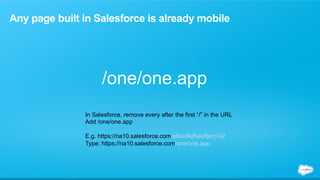
Any page built in Salesforce is already mobile 
/one/one.app 
In Salesforce, remove every after the first “/” in the URL 
Add /one/one.app 
E.g. https://na10.salesforce.com/afasdlkjflskdfjerj=32 
Type: https://na10.salesforce.com/one/one.app
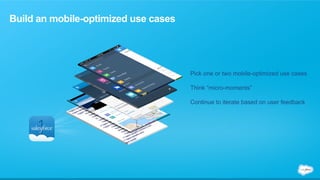
Build an mobile-optimized use cases 
Pick one or two mobile-optimized use cases 
Think “micro-moments” 
Continue to iterate based on user feedback
Let the power of the Salesforce marketing machine work for you 
Salesforce1 partners and apps are 
everywhere at Dreamforce 
MOBILE READY
And now, the experts
Gordon Derk 
President, AccountAbility Solutions, Inc.
Equipment Tracking Application; linked to 
User, Contact, Account & Opportunity
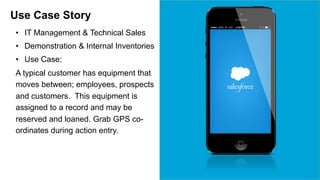
Use Case Story 
• IT Management & Technical Sales 
• Demonstration & Internal Inventories 
• Use Case: 
A typical customer has equipment that 
moves between; employees, prospects 
and customers. This equipment is 
assigned to a record and may be 
reserved and loaned. Grab GPS co-ordinates 
during action entry.
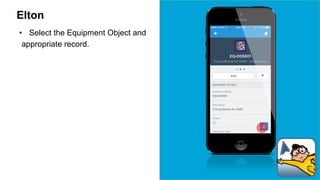
Elton 
• Select the Equipment Object and 
appropriate record.
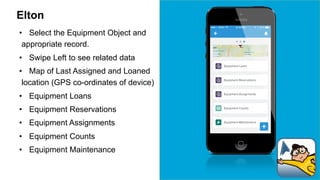
Elton 
• Select the Equipment Object and 
appropriate record. 
• Swipe Left to see related data 
• Map of Last Assigned and Loaned 
location (GPS co-ordinates of device) 
• Equipment Loans 
• Equipment Reservations 
• Equipment Assignments 
• Equipment Counts 
• Equipment Maintenance
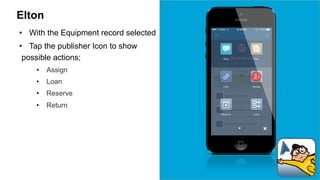
Elton 
• With the Equipment record selected 
• Tap the publisher Icon to show 
possible actions; 
• Assign 
• Loan 
• Reserve 
• Return
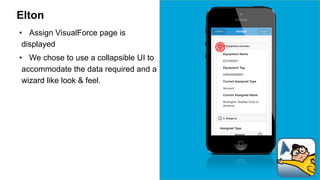
Elton 
• Assign VisualForce page is 
displayed 
• We chose to use a collapsible UI to 
accommodate the data required and a 
wizard like look & feel.
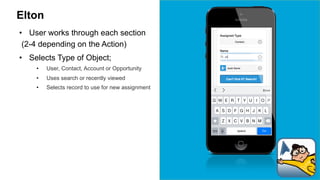
Elton 
• User works through each section 
(2-4 depending on the Action) 
• Selects Type of Object; 
• User, Contact, Account or Opportunity 
• Uses search or recently viewed 
• Selects record to use for new assignment
Elton 
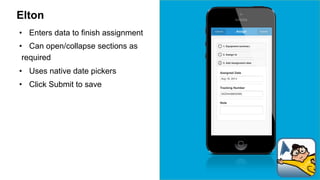
• Enters data to finish assignment 
• Can open/collapse sections as 
required 
• Uses native date pickers 
• Click Submit to save
Search ELTON on AppExchange
Never lose equipment again! 
Get It Now on the AppExchange > bit.ly/s1elton 
Elton - Salesforce1 mobile app on the AppExchange 
. 
If you have evaluation, demonstration, samples, loaners, assets or tools 
then ELTON is for you. It allows you to request, reserve, loan or assign 
equipment to Users, Contacts, Accounts or Opportunities.
Shaun McInerney 
President and Co-Founder, AscentERP
60 second demo of 
AscentERP 
by Shaun McInerney, President and Co-Founder, AscentERP
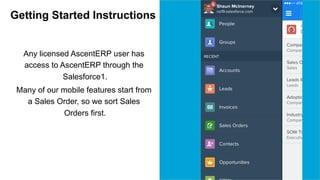
Getting Started Instructions 
Any licensed AscentERP user has 
access to AscentERP through the 
Salesforce1. 
Many of our mobile features start from 
a Sales Order, so we sort Sales 
Orders first.
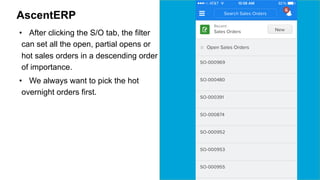
AscentERP 
• After clicking the S/O tab, the filter 
can set all the open, partial opens or 
hot sales orders in a descending order 
of importance. 
• We always want to pick the hot 
overnight orders first.
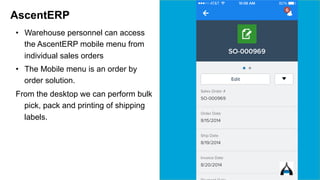
AscentERP 
• Warehouse personnel can access 
the AscentERP mobile menu from 
individual sales orders 
• The Mobile menu is an order by 
order solution. 
From the desktop we can perform bulk 
pick, pack and printing of shipping 
labels.
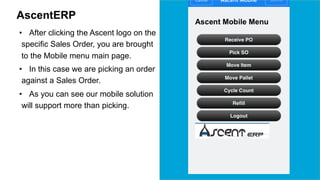
AscentERP 
• After clicking the Ascent logo on the 
specific Sales Order, you are brought 
to the Mobile menu main page. 
• In this case we are picking an order 
against a Sales Order. 
• As you can see our mobile solution 
will support more than picking.
Salesforce1 Use Case Flow 
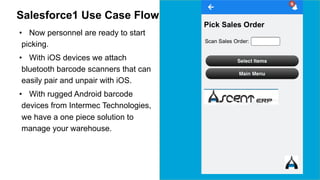
• Now personnel are ready to start 
picking. 
• With iOS devices we attach 
bluetooth barcode scanners that can 
easily pair and unpair with iOS. 
• With rugged Android barcode 
devices from Intermec Technologies, 
we have a one piece solution to 
manage your warehouse.
Salesforce1 Use Case Flow 
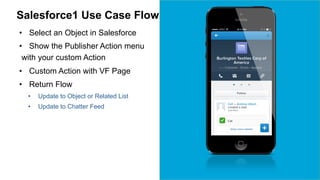
• Select an Object in Salesforce 
• Show the Publisher Action menu 
with your custom Action 
• Custom Action with VF Page 
• Return Flow 
• Update to Object or Related List 
• Update to Chatter Feed
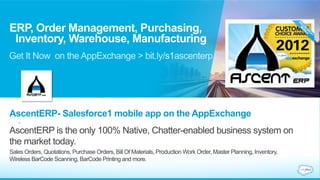
ERP, Order Management, Purchasing, 
Inventory, Warehouse, Manufacturing 
Get It Now on the AppExchange > bit.ly/s1ascenterp 
AscentERP- Salesforce1 mobile app on the AppExchange 
. 
AscentERP is the only 100% Native, Chatter-enabled business system on 
the market today. 
Sales Orders, Quotations, Purchase Orders, Bill Of Materials, Production Work Order, Master Planning, Inventory, 
Wireless BarCode Scanning, BarCode Printing and more.
Wyndham Hudson 
Product Manager, NewVoiceMedia
ContactWorld Case Story 
• Integration allowing mobile users to record 
notes and call details anywhere 
• Target Market: Mobile SF users 
• Use Case: 
As a field sales agent I want to be able to 
make a call from SF1 so that I get call 
recordings, call details and notes recorded in 
SF for the call with minimal effort
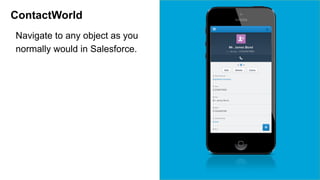
ContactWorld 
Navigate to any object as you 
normally would in Salesforce.
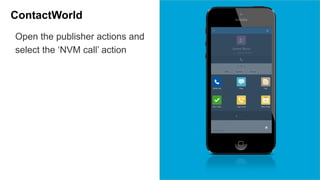
ContactWorld 
Open the publisher actions and 
select the ‘NVM call’ action
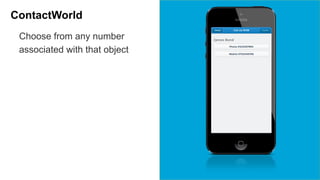
ContactWorld 
Choose from any number 
associated with that object
ContactWorld 
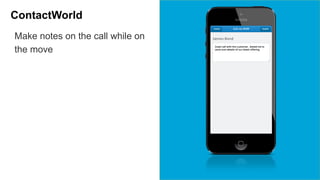
Make notes on the call while on 
the move
ContactWorld 
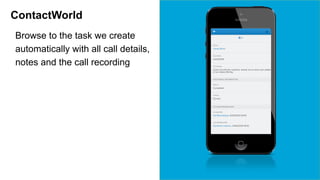
Browse to the task we create 
automatically with all call details, 
notes and the call recording
Benefits 
Customer 
• Capture all your call data, any place, 
any time 
• One single interface to learn 
Marketing 
• SF1 events 
• Salesforce sponsored events
Powerful CTI Integration for your Contact Center 
Get It Now on the AppExchange > bit.ly/s1contactworld 
ContactWorld- Salesforce1 mobile app on the AppExchange 
. 
ContactWorld makes CTI integration seamless. 99.999% up-time, click-to-dial 
and call tracking means that never before has keeping in touch with 
your connections whilst on the move been so easy via Contact Center CTI
Q&A 
Gordon Derk 
President 
AccountAbility Solutions, Inc. 
Shaun McInerney 
President and Co-Founder 
AscentERP 
Wyndham Hudson 
Product Manager 
NewVoiceMedia 
Speakers:
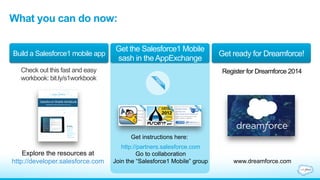
Build a Salesforce1 mobile app Get the Salesforce1 Mobile 
sash in the AppExchange Get ready for Dreamforce! 
What you can do now: 
Check out this fast and easy 
workbook: bit.ly/s1workbook 
Register for Dreamforce 2014 
Explore the resources at 
http://developer.salesforce.com 
Get instructions here: 
http://partners.salesforce.com 
Go to collaboration 
Join the “Salesforce1 Mobile” group www.dreamforce.com
Keep today’s discussion going on 
the Partner Community 
Go to http://partners.salesforce.com > Collaboration
3 Experts Share Tips for Salesforce1 Mobile Apps (Aug 21)

3 Experts Share Tips for Salesforce1 Mobile Apps (Aug 21)

  • 1.
    3 Experts ShareTips for Salesforce1 Mobile Apps Thursday, 8/21/2014 Presented by Jennifer Hersom Product Marketing Manager, AppExchange
  • 2.
    Our 3 experts: Gordon Derk President AccountAbility Solutions, Inc. Shaun McInerney President and Co-Founder AscentERP Wyndham Hudson Product Manager NewVoiceMedia Speakers:
  • 3.
    Today you willlearn… How to grow your business with a Salesforce1 mobile app How to build and sell a successful app from 3 top partners Find out how to get started building your Salesforce1 mobile app Plus! Ask live questions to our partner-experts
  • 4.
    There is a$1 trillion mobile opportunity -Gartner Mobile is important. For your users More users will get online via a mobile device than a PC in 2 years -IDC Mobile will be the top competitive strategy for 84% of CIOs by 2017 -IBM Mobile will be the “beating heart” of your strategy -Forrester 90% of enterprise apps will be mobile by 2017 -Gartner For your strategy Users check a mobile device every 6 seconds -Nokia
  • 5.
    Build a mobileapp, fast with Salesforce1
  • 6.
    We give youthe tools to seize this opportunity Build a Salesforce1 mobile app Build an app, fast Focus on what users want Ride the wave to Dreamforce
  • 7.
    We provide themobile development tools The Salesforce1 Platform = Cloud offerings, AppExchange + Salesforce1 Mobile App + APIs + Platform Services The Salesforce1 Mobile App bit.ly/S1Apple bit.ly/S1Play Get it today! • Mobile & Desktop Browser, iOS, Android, Blackberry, Windows Phone (coming soon), Good Technology (MDM)
  • 8.
    Build a mobileapp, fast. Build your company faster. Quickly build a mobile app Sell your app to our customers 100,000+ companies use Salesforce Our users are flocking to the Salesforce1 mobile app Your Salesforce1 mobile app is deeply integrated into the user’s experience Build once, deploy to iOS, Android (Windows Mobile coming soon) Use our drag and drop interface or do custom development Every Salesforce instance is already mobile
  • 9.
    Any page builtin Salesforce is already mobile /one/one.app In Salesforce, remove every after the first “/” in the URL Add /one/one.app E.g. https://na10.salesforce.com/afasdlkjflskdfjerj=32 Type: https://na10.salesforce.com/one/one.app
  • 10.
    Build an mobile-optimizeduse cases Pick one or two mobile-optimized use cases Think “micro-moments” Continue to iterate based on user feedback
  • 11.
    Let the powerof the Salesforce marketing machine work for you Salesforce1 partners and apps are everywhere at Dreamforce MOBILE READY
  • 12.
    And now, theexperts
  • 13.
    Gordon Derk President,AccountAbility Solutions, Inc.
  • 15.
    Equipment Tracking Application;linked to User, Contact, Account & Opportunity
  • 16.
    Use Case Story • IT Management & Technical Sales • Demonstration & Internal Inventories • Use Case: A typical customer has equipment that moves between; employees, prospects and customers. This equipment is assigned to a record and may be reserved and loaned. Grab GPS co-ordinates during action entry.
  • 17.
    Elton • Selectthe Equipment Object and appropriate record.
  • 18.
    Elton • Selectthe Equipment Object and appropriate record. • Swipe Left to see related data • Map of Last Assigned and Loaned location (GPS co-ordinates of device) • Equipment Loans • Equipment Reservations • Equipment Assignments • Equipment Counts • Equipment Maintenance
  • 19.
    Elton • Withthe Equipment record selected • Tap the publisher Icon to show possible actions; • Assign • Loan • Reserve • Return
  • 20.
    Elton • AssignVisualForce page is displayed • We chose to use a collapsible UI to accommodate the data required and a wizard like look & feel.
  • 21.
    Elton • Userworks through each section (2-4 depending on the Action) • Selects Type of Object; • User, Contact, Account or Opportunity • Uses search or recently viewed • Selects record to use for new assignment
  • 22.
    Elton • Entersdata to finish assignment • Can open/collapse sections as required • Uses native date pickers • Click Submit to save
  • 23.
    Search ELTON onAppExchange
  • 25.
    Never lose equipmentagain! Get It Now on the AppExchange > bit.ly/s1elton Elton - Salesforce1 mobile app on the AppExchange . If you have evaluation, demonstration, samples, loaners, assets or tools then ELTON is for you. It allows you to request, reserve, loan or assign equipment to Users, Contacts, Accounts or Opportunities.
  • 26.
    Shaun McInerney Presidentand Co-Founder, AscentERP
  • 27.
    60 second demoof AscentERP by Shaun McInerney, President and Co-Founder, AscentERP
  • 29.
    Getting Started Instructions Any licensed AscentERP user has access to AscentERP through the Salesforce1. Many of our mobile features start from a Sales Order, so we sort Sales Orders first.
  • 30.
    AscentERP • Afterclicking the S/O tab, the filter can set all the open, partial opens or hot sales orders in a descending order of importance. • We always want to pick the hot overnight orders first.
  • 31.
    AscentERP • Warehousepersonnel can access the AscentERP mobile menu from individual sales orders • The Mobile menu is an order by order solution. From the desktop we can perform bulk pick, pack and printing of shipping labels.
  • 32.
    AscentERP • Afterclicking the Ascent logo on the specific Sales Order, you are brought to the Mobile menu main page. • In this case we are picking an order against a Sales Order. • As you can see our mobile solution will support more than picking.
  • 33.
    Salesforce1 Use CaseFlow • Now personnel are ready to start picking. • With iOS devices we attach bluetooth barcode scanners that can easily pair and unpair with iOS. • With rugged Android barcode devices from Intermec Technologies, we have a one piece solution to manage your warehouse.
  • 34.
    Salesforce1 Use CaseFlow • Select an Object in Salesforce • Show the Publisher Action menu with your custom Action • Custom Action with VF Page • Return Flow • Update to Object or Related List • Update to Chatter Feed
  • 36.
    ERP, Order Management,Purchasing, Inventory, Warehouse, Manufacturing Get It Now on the AppExchange > bit.ly/s1ascenterp AscentERP- Salesforce1 mobile app on the AppExchange . AscentERP is the only 100% Native, Chatter-enabled business system on the market today. Sales Orders, Quotations, Purchase Orders, Bill Of Materials, Production Work Order, Master Planning, Inventory, Wireless BarCode Scanning, BarCode Printing and more.
  • 37.
    Wyndham Hudson ProductManager, NewVoiceMedia
  • 39.
    ContactWorld Case Story • Integration allowing mobile users to record notes and call details anywhere • Target Market: Mobile SF users • Use Case: As a field sales agent I want to be able to make a call from SF1 so that I get call recordings, call details and notes recorded in SF for the call with minimal effort
  • 40.
    ContactWorld Navigate toany object as you normally would in Salesforce.
  • 41.
    ContactWorld Open thepublisher actions and select the ‘NVM call’ action
  • 42.
    ContactWorld Choose fromany number associated with that object
  • 43.
    ContactWorld Make noteson the call while on the move
  • 44.
    ContactWorld Browse tothe task we create automatically with all call details, notes and the call recording
  • 45.
    Benefits Customer •Capture all your call data, any place, any time • One single interface to learn Marketing • SF1 events • Salesforce sponsored events
  • 47.
    Powerful CTI Integrationfor your Contact Center Get It Now on the AppExchange > bit.ly/s1contactworld ContactWorld- Salesforce1 mobile app on the AppExchange . ContactWorld makes CTI integration seamless. 99.999% up-time, click-to-dial and call tracking means that never before has keeping in touch with your connections whilst on the move been so easy via Contact Center CTI
  • 48.
    Q&A Gordon Derk President AccountAbility Solutions, Inc. Shaun McInerney President and Co-Founder AscentERP Wyndham Hudson Product Manager NewVoiceMedia Speakers:
  • 49.
    Build a Salesforce1mobile app Get the Salesforce1 Mobile sash in the AppExchange Get ready for Dreamforce! What you can do now: Check out this fast and easy workbook: bit.ly/s1workbook Register for Dreamforce 2014 Explore the resources at http://developer.salesforce.com Get instructions here: http://partners.salesforce.com Go to collaboration Join the “Salesforce1 Mobile” group www.dreamforce.com
  • 50.
    Keep today’s discussiongoing on the Partner Community Go to http://partners.salesforce.com > Collaboration