Regular Expressions



What is Regular Expressions ?



Common Scenarios where Regular Expressions are used



Regular Expression submatch String



Using Regular Expressions for Property Values



Using Regular Expressions in Checkpoints



Case Study



Session Wrap-Up
pgorantla.blogspot.com
Regular Expressions



A regular expression is a string that describes or matches a set of strings,
according to certain syntax rules.
or
A regular expression, often called a pattern, is an expression that describes a set
of strings. They are usually used to give a concise description of a set, without
having to list all elements.



Regular expressions are used by many text editors and utilities to search and
manipulate bodies of text based on certain patterns.



Many programming languages support regular expressions for string
manipulation.
For example, Perl has a powerful regular expression engine built directly into its
syntax.



The set of utilities (including the editor sed and the filter grep) provided by Unix
distributions were the first to popularize the concept of regular expressions.



The origin of regular expressions lies in Automata Theory and formal language
theory (both part of Theoretical Computer Science.



Can use regular expressions for :
- Defining the property values of an object in dialog boxes.
- Parameterizing a step.
- Creating checkpoints with varying values.
pgorantla.blogspot.com
Regular Expressions

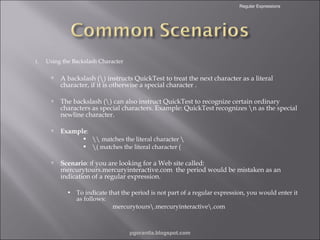
1.

Using the Backslash Character



A backslash () instructs QuickTest to treat the next character as a literal
character, if it is otherwise a special character .



The backslash () can also instruct QuickTest to recognize certain ordinary
characters as special characters. Example: QuickTest recognizes n as the special
newline character.



Example:





 matches the literal character 
( matches the literal character (

Scenario: If you are looking for a Web site called:
mercurytours.mercuryinteractive.com the period would be mistaken as an
indication of a regular expression.
• To indicate that the period is not part of a regular expression, you would enter it
as follows:
mercurytours.mercuryinteractive.com

pgorantla.blogspot.com
Regular Expressions

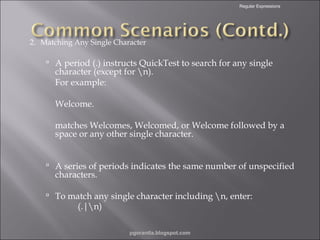
2. Matching Any Single Character

 A period (.) instructs QuickTest to search for any single

character (except for n).
For example:
Welcome.

matches Welcomes, Welcomed, or Welcome followed by a
space or any other single character.
 A series of periods indicates the same number of unspecified

characters.

 To match any single character including n, enter:

(.|n)

pgorantla.blogspot.com
Regular Expressions

3. Matching Any Single Character in a List
•

Square brackets instruct QuickTest to search for any single character within a list of characters.

•

Example, to search for the date 2000, 2001, or 2002, enter:
200[012]

4. Matching Any Single Character Not in a List Iterative
constructs.
•

When a caret (^) is the first character inside square brackets, it instructs QuickTest to match any
character in the list except for the ones specified in the string.

•

Example:

[^ab]

matches any character except a or b.
Note: The caret has this special meaning only when it is displayed first within the brackets.

pgorantla.blogspot.com
Regular Expressions

5. Matching Any Single Character within a Range.
•

In order to match a single character within a range, you can use square brackets ([ ])
with the hyphen (-) character.

•

Example : To match any year in the 2000s, enter:
200[0-9]

6. Matching Zero or More Specific Characters Functions and subroutines.
•
•

An asterisk (*) instructs QuickTest to match zero or more occurrences of the
preceding character.
For example:
ca*r

matches car, caaaaaar, and cr.

pgorantla.blogspot.com
Regular Expressions

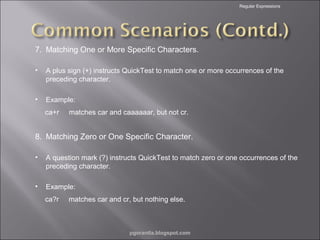
7. Matching One or More Specific Characters.
•

A plus sign (+) instructs QuickTest to match one or more occurrences of the
preceding character.

•

Example:
ca+r

matches car and caaaaaar, but not cr.

8. Matching Zero or One Specific Character.
•

A question mark (?) instructs QuickTest to match zero or one occurrences of the
preceding character.

•

Example:
ca?r

matches car and cr, but nothing else.

pgorantla.blogspot.com
Regular Expressions

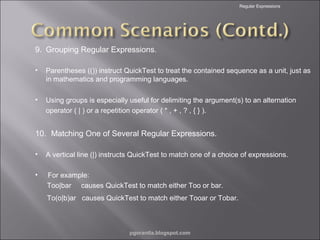
9. Grouping Regular Expressions.
•

Parentheses (()) instruct QuickTest to treat the contained sequence as a unit, just as
in mathematics and programming languages.

•

Using groups is especially useful for delimiting the argument(s) to an alternation
operator ( | ) or a repetition operator ( * , + , ? , { } ).

10. Matching One of Several Regular Expressions.
•

A vertical line (|) instructs QuickTest to match one of a choice of expressions.

•

For example:
Too|bar causes QuickTest to match either Too or bar.
To(o|b)ar causes QuickTest to match either Tooar or Tobar.

pgorantla.blogspot.com
Regular Expressions

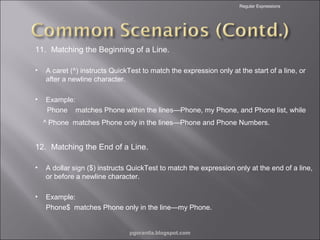
11. Matching the Beginning of a Line.
•

A caret (^) instructs QuickTest to match the expression only at the start of a line, or
after a newline character.

•

Example:
Phone matches Phone within the lines—Phone, my Phone, and Phone list, while
^ Phone matches Phone only in the lines—Phone and Phone Numbers.

12. Matching the End of a Line.
•

A dollar sign ($) instructs QuickTest to match the expression only at the end of a line,
or before a newline character.

•

Example:
Phone$ matches Phone only in the line—my Phone.

pgorantla.blogspot.com
Regular Expressions

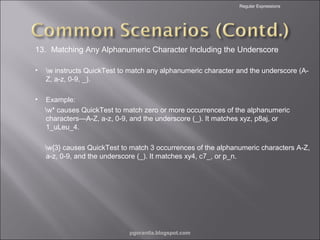
13. Matching Any Alphanumeric Character Including the Underscore
•

w instructs QuickTest to match any alphanumeric character and the underscore (AZ, a-z, 0-9, _).

•

Example:
w* causes QuickTest to match zero or more occurrences of the alphanumeric
characters—A-Z, a-z, 0-9, and the underscore (_). It matches xyz, p8aj, or
1_uLeu_4.
w{3} causes QuickTest to match 3 occurrences of the alphanumeric characters A-Z,
a-z, 0-9, and the underscore (_). It matches xy4, c7_, or p_n.

pgorantla.blogspot.com
Regular Expressions

14. Matching Any Non-AlphaNumeric Character
•

W instructs QuickTest to match any character other than alphanumeric characters
and underscores.

•

Example:
W matches &, *, ^, %, $, and #.

15. Combining Regular Expression Operators
•

You can combine regular expression operators in a single expression to achieve the
exact search criteria you need.

•

Example,
start.*

matches start, started, starting, starter, etc.

pgorantla.blogspot.com
Regular Expressions



A SubMatches collection contains individual submatch strings .



Strings following the specified pattern will get stored in submatches collection when
regular expression is executed.



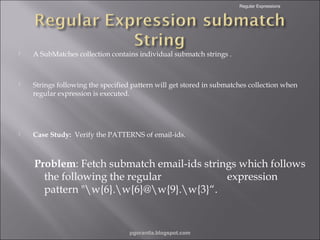
Case Study: Verify the PATTERNS of email-ids.

Problem: Fetch submatch email-ids strings which follows
the following the regular
expression
pattern "w{6}.w{6}@w{9}.w{3}“.

pgorantla.blogspot.com
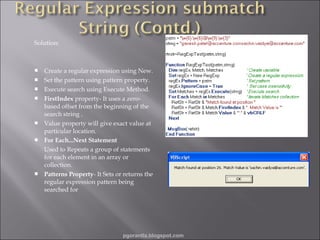
Solution:











Create a regular expression using New.
Set the pattern using pattern property.
Execute search using Execute Method.
FirstIndex property- It uses a zerobased offset from the beginning of the
search string .
Value property will give exact value at
particular location.
For Each...Next Statement
Used to Repeats a group of statements
for each element in an array or
collection.
Patterns Property- It Sets or returns the
regular expression pattern being
searched for

pgorantla.blogspot.com
Regular Expressions



Used to change value of a property in a predictable way during each run session.



By default, the value of all Property objects added to a Properties collection are treated as
regular expressions.



Use the RegularExpression property to change this setting for a specific Property object in the
collection.



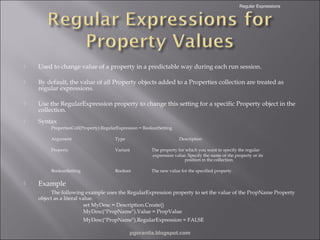
Syntax
PropertiesColl(Property).RegularExpression = BooleanSetting
Argument
Property

Variant

The property for which you want to specify the regular
expression value. Specify the name of the property or its
position in the collection.

BooleanSetting



Type

Description

Boolean

The new value for the specified property.

Example
The following example uses the RegularExpression property to set the value of the PropName Property
object as a literal value.
set MyDesc = Description.Create()
MyDesc("PropName").Value = PropValue
MyDesc("PropName").RegularExpression = FALSE
pgorantla.blogspot.com
Regular Expressions



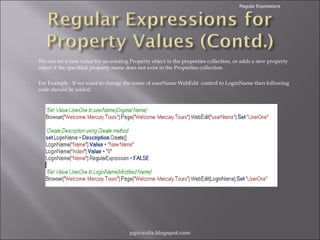
We can set a new value for an existing Property object in the properties collection, or adds a new property
object if the specified property name does not exist in the Properties collection.



For Example : If we want to change the name of userName WebEdit control to LoginName then following
code should be added.

pgorantla.blogspot.com
Regular Expressions



Case Study
•

Problem: Consider a site includes a form in which the user inputs data
and clicks the Send button to submit the form.

•

When a required field is not completed, the form is displayed again
for the user to complete.

•

When resubmitting the form, the user clicks the Resend button.

•

Solution: Define the value of the button's name property as a regular
expression, so that QuickTest ignores variations in the button name
when clicking the button.

pgorantla.blogspot.com
Regular Expressions



Set the expected value of an object's property as a regular expression so
that an object with a varying value can be verified.



When creating a text checkpoint to check that a varying text string is
displayed on your Web site or application, you can define the text string
as a regular expression.



Case
Study
Problem : Check that every window and dialog box in the application
contains the name of the application followed by a hyphen (-) and a
descriptive title.
Solution : Add a checkpoint to each dialog box object in the test to check
that the first part of the title contains the name of the application followed
by a hyphen. .
pgorantla.blogspot.com
Regular Expressions

•

Problem:

•

Create a text checkpoint on a date text string that changes according to the selected flight
date.

•

Solution:
Define the date as a regular expression so that the checkpoint checks that the captured
text string matches the expected format, rather than checking the exact text.
In the Active Screen, scroll up and highlight the date. Right-click the highlighted string and
select Insert Text Checkpoint. The Text Checkpoint Properties dialog box opens.
Replace the current date with [0-1][0-9]/[0-3][0-9]/200[0-9].
This instructs QuickTest to check that each character in the selected text matches the
number-range format defined by the regular expression.

pgorantla.blogspot.com
Regular Expressions



Running and Analyzing a Test with Regular
Expressions



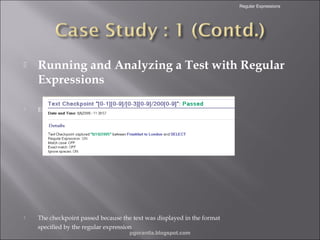
Examine the checkpoint results.



The checkpoint passed because the text was displayed in the format
specified by the regular expression
pgorantla.blogspot.com
•

Problem: Consider a site includes a form in which the user inputs data
and clicks the Send button to submit the form.
 When a required field is not completed, the form is displayed again for the

user to complete.
 When resubmitting the form, the user clicks the Resend button.
•

Solution: Define the value of the button's name property as a regular
expression, so that QuickTest ignores variations in the button name
when clicking the button.

pgorantla.blogspot.com
Regular Expressions

Q & A….

pgorantla.blogspot.com
Regular Expressions



Regular expressions enable QuickTest to identify
objects and text strings with varying values.



We can use regular expressions when:
 Defining the property values of an object in dialog boxes or in
programmatic descriptions
 Parameterizing a step
 Creating checkpoints with varying values



Use the RegularExpression property to change this
setting for a specific Property object in the collection.

pgorantla.blogspot.com

2.regular expressions

  • 2.
    Regular Expressions  What isRegular Expressions ?  Common Scenarios where Regular Expressions are used  Regular Expression submatch String  Using Regular Expressions for Property Values  Using Regular Expressions in Checkpoints  Case Study  Session Wrap-Up pgorantla.blogspot.com
  • 3.
    Regular Expressions  A regularexpression is a string that describes or matches a set of strings, according to certain syntax rules. or A regular expression, often called a pattern, is an expression that describes a set of strings. They are usually used to give a concise description of a set, without having to list all elements.  Regular expressions are used by many text editors and utilities to search and manipulate bodies of text based on certain patterns.  Many programming languages support regular expressions for string manipulation. For example, Perl has a powerful regular expression engine built directly into its syntax.  The set of utilities (including the editor sed and the filter grep) provided by Unix distributions were the first to popularize the concept of regular expressions.  The origin of regular expressions lies in Automata Theory and formal language theory (both part of Theoretical Computer Science.  Can use regular expressions for : - Defining the property values of an object in dialog boxes. - Parameterizing a step. - Creating checkpoints with varying values. pgorantla.blogspot.com
  • 4.
    Regular Expressions 1. Using theBackslash Character  A backslash () instructs QuickTest to treat the next character as a literal character, if it is otherwise a special character .  The backslash () can also instruct QuickTest to recognize certain ordinary characters as special characters. Example: QuickTest recognizes n as the special newline character.  Example:    matches the literal character ( matches the literal character ( Scenario: If you are looking for a Web site called: mercurytours.mercuryinteractive.com the period would be mistaken as an indication of a regular expression. • To indicate that the period is not part of a regular expression, you would enter it as follows: mercurytours.mercuryinteractive.com pgorantla.blogspot.com
  • 5.
    Regular Expressions 2. MatchingAny Single Character  A period (.) instructs QuickTest to search for any single character (except for n). For example: Welcome. matches Welcomes, Welcomed, or Welcome followed by a space or any other single character.  A series of periods indicates the same number of unspecified characters.  To match any single character including n, enter: (.|n) pgorantla.blogspot.com
  • 6.
    Regular Expressions 3. MatchingAny Single Character in a List • Square brackets instruct QuickTest to search for any single character within a list of characters. • Example, to search for the date 2000, 2001, or 2002, enter: 200[012] 4. Matching Any Single Character Not in a List Iterative constructs. • When a caret (^) is the first character inside square brackets, it instructs QuickTest to match any character in the list except for the ones specified in the string. • Example: [^ab] matches any character except a or b. Note: The caret has this special meaning only when it is displayed first within the brackets. pgorantla.blogspot.com
  • 7.
    Regular Expressions 5. MatchingAny Single Character within a Range. • In order to match a single character within a range, you can use square brackets ([ ]) with the hyphen (-) character. • Example : To match any year in the 2000s, enter: 200[0-9] 6. Matching Zero or More Specific Characters Functions and subroutines. • • An asterisk (*) instructs QuickTest to match zero or more occurrences of the preceding character. For example: ca*r matches car, caaaaaar, and cr. pgorantla.blogspot.com
  • 8.
    Regular Expressions 7. MatchingOne or More Specific Characters. • A plus sign (+) instructs QuickTest to match one or more occurrences of the preceding character. • Example: ca+r matches car and caaaaaar, but not cr. 8. Matching Zero or One Specific Character. • A question mark (?) instructs QuickTest to match zero or one occurrences of the preceding character. • Example: ca?r matches car and cr, but nothing else. pgorantla.blogspot.com
  • 9.
    Regular Expressions 9. GroupingRegular Expressions. • Parentheses (()) instruct QuickTest to treat the contained sequence as a unit, just as in mathematics and programming languages. • Using groups is especially useful for delimiting the argument(s) to an alternation operator ( | ) or a repetition operator ( * , + , ? , { } ). 10. Matching One of Several Regular Expressions. • A vertical line (|) instructs QuickTest to match one of a choice of expressions. • For example: Too|bar causes QuickTest to match either Too or bar. To(o|b)ar causes QuickTest to match either Tooar or Tobar. pgorantla.blogspot.com
  • 10.
    Regular Expressions 11. Matchingthe Beginning of a Line. • A caret (^) instructs QuickTest to match the expression only at the start of a line, or after a newline character. • Example: Phone matches Phone within the lines—Phone, my Phone, and Phone list, while ^ Phone matches Phone only in the lines—Phone and Phone Numbers. 12. Matching the End of a Line. • A dollar sign ($) instructs QuickTest to match the expression only at the end of a line, or before a newline character. • Example: Phone$ matches Phone only in the line—my Phone. pgorantla.blogspot.com
  • 11.
    Regular Expressions 13. MatchingAny Alphanumeric Character Including the Underscore • w instructs QuickTest to match any alphanumeric character and the underscore (AZ, a-z, 0-9, _). • Example: w* causes QuickTest to match zero or more occurrences of the alphanumeric characters—A-Z, a-z, 0-9, and the underscore (_). It matches xyz, p8aj, or 1_uLeu_4. w{3} causes QuickTest to match 3 occurrences of the alphanumeric characters A-Z, a-z, 0-9, and the underscore (_). It matches xy4, c7_, or p_n. pgorantla.blogspot.com
  • 12.
    Regular Expressions 14. MatchingAny Non-AlphaNumeric Character • W instructs QuickTest to match any character other than alphanumeric characters and underscores. • Example: W matches &, *, ^, %, $, and #. 15. Combining Regular Expression Operators • You can combine regular expression operators in a single expression to achieve the exact search criteria you need. • Example, start.* matches start, started, starting, starter, etc. pgorantla.blogspot.com
  • 13.
    Regular Expressions  A SubMatchescollection contains individual submatch strings .  Strings following the specified pattern will get stored in submatches collection when regular expression is executed.  Case Study: Verify the PATTERNS of email-ids. Problem: Fetch submatch email-ids strings which follows the following the regular expression pattern "w{6}.w{6}@w{9}.w{3}“. pgorantla.blogspot.com
  • 14.
    Solution:        Create a regularexpression using New. Set the pattern using pattern property. Execute search using Execute Method. FirstIndex property- It uses a zerobased offset from the beginning of the search string . Value property will give exact value at particular location. For Each...Next Statement Used to Repeats a group of statements for each element in an array or collection. Patterns Property- It Sets or returns the regular expression pattern being searched for pgorantla.blogspot.com
  • 15.
    Regular Expressions  Used tochange value of a property in a predictable way during each run session.  By default, the value of all Property objects added to a Properties collection are treated as regular expressions.  Use the RegularExpression property to change this setting for a specific Property object in the collection.  Syntax PropertiesColl(Property).RegularExpression = BooleanSetting Argument Property Variant The property for which you want to specify the regular expression value. Specify the name of the property or its position in the collection. BooleanSetting  Type Description Boolean The new value for the specified property. Example The following example uses the RegularExpression property to set the value of the PropName Property object as a literal value. set MyDesc = Description.Create() MyDesc("PropName").Value = PropValue MyDesc("PropName").RegularExpression = FALSE pgorantla.blogspot.com
  • 16.
    Regular Expressions  We canset a new value for an existing Property object in the properties collection, or adds a new property object if the specified property name does not exist in the Properties collection.  For Example : If we want to change the name of userName WebEdit control to LoginName then following code should be added. pgorantla.blogspot.com
  • 17.
    Regular Expressions  Case Study • Problem:Consider a site includes a form in which the user inputs data and clicks the Send button to submit the form. • When a required field is not completed, the form is displayed again for the user to complete. • When resubmitting the form, the user clicks the Resend button. • Solution: Define the value of the button's name property as a regular expression, so that QuickTest ignores variations in the button name when clicking the button. pgorantla.blogspot.com
  • 18.
    Regular Expressions  Set theexpected value of an object's property as a regular expression so that an object with a varying value can be verified.  When creating a text checkpoint to check that a varying text string is displayed on your Web site or application, you can define the text string as a regular expression.  Case Study Problem : Check that every window and dialog box in the application contains the name of the application followed by a hyphen (-) and a descriptive title. Solution : Add a checkpoint to each dialog box object in the test to check that the first part of the title contains the name of the application followed by a hyphen. . pgorantla.blogspot.com
  • 19.
    Regular Expressions • Problem: • Create atext checkpoint on a date text string that changes according to the selected flight date. • Solution: Define the date as a regular expression so that the checkpoint checks that the captured text string matches the expected format, rather than checking the exact text. In the Active Screen, scroll up and highlight the date. Right-click the highlighted string and select Insert Text Checkpoint. The Text Checkpoint Properties dialog box opens. Replace the current date with [0-1][0-9]/[0-3][0-9]/200[0-9]. This instructs QuickTest to check that each character in the selected text matches the number-range format defined by the regular expression. pgorantla.blogspot.com
  • 20.
    Regular Expressions  Running andAnalyzing a Test with Regular Expressions  Examine the checkpoint results.  The checkpoint passed because the text was displayed in the format specified by the regular expression pgorantla.blogspot.com
  • 21.
    • Problem: Consider asite includes a form in which the user inputs data and clicks the Send button to submit the form.  When a required field is not completed, the form is displayed again for the user to complete.  When resubmitting the form, the user clicks the Resend button. • Solution: Define the value of the button's name property as a regular expression, so that QuickTest ignores variations in the button name when clicking the button. pgorantla.blogspot.com
  • 22.
    Regular Expressions Q &A…. pgorantla.blogspot.com
  • 23.
    Regular Expressions  Regular expressionsenable QuickTest to identify objects and text strings with varying values.  We can use regular expressions when:  Defining the property values of an object in dialog boxes or in programmatic descriptions  Parameterizing a step  Creating checkpoints with varying values  Use the RegularExpression property to change this setting for a specific Property object in the collection. pgorantla.blogspot.com

Editor's Notes

  • #3 Briefly review the session agenda as indicated here. Currently we are in the “Prep Session Introduction” section, during which we will review basic information about this session, including how to use Centra to participate. Note: The Prep Session Introduction section should take no longer than 15 minutes.
  • #20 Steps: In the Active Screen, scroll up and highlight the date. Right-click the highlighted string and select Insert Text Checkpoint. The Text Checkpoint Properties dialog box opens.
  • #23 Spend a few moments answering participants’ questions about the agenda of this session or the Centra controls they will be using. Remind them to use the “Raise Hand” icon to ask a question.