









QuickTest Professional Introduction
Record and run tests
Actions and Transactions
The Object Repository
Synchronization
Checkpoints
Parameterization
Outputting Values

pgorantla.blogspot.com









Quick Test Professional (QTP) is a solution for functional test
automation.
User basically records a set of actions which constitute the test scenario
and replay’s it with a varying set of data.
Modular and keyword driven table format of display of each of the
operation performed
VB script is the programming language
QTP allows easier capture of output values.

pgorantla.blogspot.com





Parameterization of data in QTP is easier
QTP allows easier capture of output values.
Features like smart identification to identify the objects used in our test
make sure that the maintenance of the tests is easy.
Allows interfacing with Test Director and Winrunner

pgorantla.blogspot.com


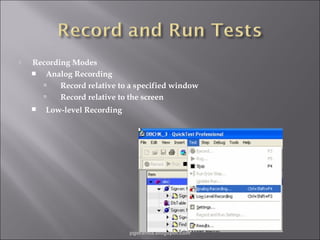
Recording Modes
 Analog Recording

Record relative to a specified window

Record relative to the screen


Low-level Recording

pgorantla.blogspot.com


Record and Run settings are first set To choose the Application which
needs to be recorded.



Run tab in Test setting used to set the number of iterations that need to
be executed



Resources tab to set the data-table location and repository type



The recorded test displayed in two views
 Expert View –> VBScript
 Keyword View -> Modular and keyword driven

pgorantla.blogspot.com


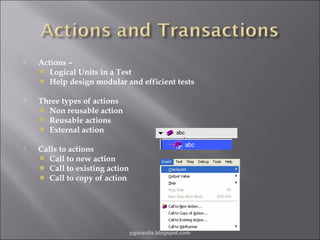
Actions –
 Logical Units in a Test
 Help design modular and efficient tests



Three types of actions
 Non reusable action
 Reusable actions
 External action



Calls to actions
 Call to new action
 Call to existing action
 Call to copy of action

pgorantla.blogspot.com


Nesting actions
 To run action within another action
 Parent – Child nested action created when we split an action



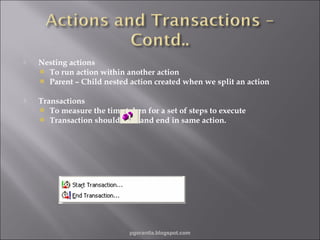
Transactions
 To measure the time taken for a set of steps to execute
 Transaction should start and end in same action.

pgorantla.blogspot.com


Test object - Object that QTP creates in the test to represent the
actual object in your application.



Run-time object - Actual object in the website or application on
which methods are performed during the test run.



QTP identifies objects based on their properties



Properties identified are of 3 kinds Mandatory properties
 Assistive properties
 Ordinal properties

pgorantla.blogspot.com


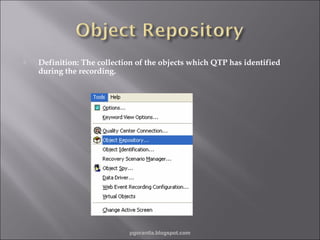
Definition: The collection of the objects which QTP has identified
during the recording.

pgorantla.blogspot.com


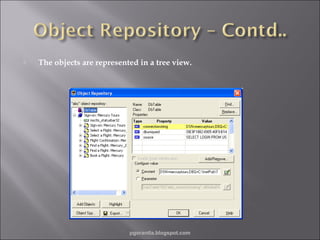
The objects are represented in a tree view.

pgorantla.blogspot.com



Object Spy is used to view the properties and methods of both runtime objects and Test objects
The object repository can be of two types
 Shared Object Repository
 Per-action Repository

pgorantla.blogspot.com


Enables application to load fully before QTP methods can operate on
them.



We can synchronize using the following options –
 Insert a synchronization point
 Use EXIST or WAIT statements
 Modify the default amount of time that QuickTest waits for a Web
page to load i.e. Modify object synchronization timeout value

pgorantla.blogspot.com




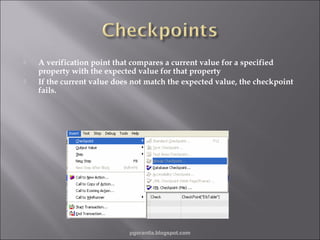
A verification point that compares a current value for a specified
property with the expected value for that property
If the current value does not match the expected value, the checkpoint
fails.

pgorantla.blogspot.com


Types of Checkpoints
 Standard :checks the property value of an object e.g. buttons, radio
buttons, combo boxes etc.


Image : checks the value of an image e.g. source file of the selected
image.



Bitmap : checks an area of the Web page as a bitmap.



Table : checks information within a table. Created by inserting a
standard checkpoint on a table.



Text :checks that a text string is displayed in the appropriate place in
the application/Web page.

pgorantla.blogspot.com


Types of Checkpoints
 Text Area : Checks that a text string is displayed within a defined
text area according to a specified criteria.


Page: Checks the characteristics of a web page e.g. check how long a
page takes to load or it contains broken links.



Database: Checks the contents of a database accessed by your web
site.



XML: Checks the data content of XML documents in XML files or
XML documents in web pages and frames.



Accessibility Checkpoint: Identifies areas of a Web site
to check for Section 508 compliancy (W3C compliant)

pgorantla.blogspot.com






A parameter is a variable that is assigned values from various data
sources.
QTP enables you to expand the scope of a basic test by replacing values
with parameters.
There are 2 different groups of parameters
 Data table parameters: Enable to create a data-driven test that runs
several times using the data supplied. In each iteration, QTP
substitutes the constant value with different values from the Data
table.


All other parameters: Enable use of variable values from other
sources during the test run.

pgorantla.blogspot.com


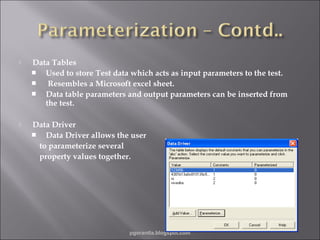
Data Tables
 Used to store Test data which acts as input parameters to the test.

Resembles a Microsoft excel sheet.
 Data table parameters and output parameters can be inserted from
the test.



Data Driver
 Data Driver allows the user
to parameterize several
property values together.

pgorantla.blogspot.com


Is used to extract property values to the data table to be used later as
input to some other step.



Output value is stored only during one run session and gets reset
during the next run session

pgorantla.blogspot.com
Q & A….

pgorantla.blogspot.com







QTP is an automated functional testing tool
Tests are modular and keyword driven
Uses an object repository to store and identify the test objects
Checkpoints and parameterization are easy in QTP.
Allows storage of output values
Enables Data driven testing

pgorantla.blogspot.com

QTP Basics-2

  • 2.
            QuickTest Professional Introduction Recordand run tests Actions and Transactions The Object Repository Synchronization Checkpoints Parameterization Outputting Values pgorantla.blogspot.com
  • 3.
         Quick Test Professional(QTP) is a solution for functional test automation. User basically records a set of actions which constitute the test scenario and replay’s it with a varying set of data. Modular and keyword driven table format of display of each of the operation performed VB script is the programming language QTP allows easier capture of output values. pgorantla.blogspot.com
  • 4.
        Parameterization of datain QTP is easier QTP allows easier capture of output values. Features like smart identification to identify the objects used in our test make sure that the maintenance of the tests is easy. Allows interfacing with Test Director and Winrunner pgorantla.blogspot.com
  • 5.
     Recording Modes  AnalogRecording  Record relative to a specified window  Record relative to the screen  Low-level Recording pgorantla.blogspot.com
  • 6.
     Record and Runsettings are first set To choose the Application which needs to be recorded.  Run tab in Test setting used to set the number of iterations that need to be executed  Resources tab to set the data-table location and repository type  The recorded test displayed in two views  Expert View –> VBScript  Keyword View -> Modular and keyword driven pgorantla.blogspot.com
  • 7.
     Actions –  LogicalUnits in a Test  Help design modular and efficient tests  Three types of actions  Non reusable action  Reusable actions  External action  Calls to actions  Call to new action  Call to existing action  Call to copy of action pgorantla.blogspot.com
  • 8.
     Nesting actions  Torun action within another action  Parent – Child nested action created when we split an action  Transactions  To measure the time taken for a set of steps to execute  Transaction should start and end in same action. pgorantla.blogspot.com
  • 9.
     Test object -Object that QTP creates in the test to represent the actual object in your application.  Run-time object - Actual object in the website or application on which methods are performed during the test run.  QTP identifies objects based on their properties  Properties identified are of 3 kinds Mandatory properties  Assistive properties  Ordinal properties pgorantla.blogspot.com
  • 10.
     Definition: The collectionof the objects which QTP has identified during the recording. pgorantla.blogspot.com
  • 11.
     The objects arerepresented in a tree view. pgorantla.blogspot.com
  • 12.
      Object Spy isused to view the properties and methods of both runtime objects and Test objects The object repository can be of two types  Shared Object Repository  Per-action Repository pgorantla.blogspot.com
  • 13.
     Enables application toload fully before QTP methods can operate on them.  We can synchronize using the following options –  Insert a synchronization point  Use EXIST or WAIT statements  Modify the default amount of time that QuickTest waits for a Web page to load i.e. Modify object synchronization timeout value pgorantla.blogspot.com
  • 14.
      A verification pointthat compares a current value for a specified property with the expected value for that property If the current value does not match the expected value, the checkpoint fails. pgorantla.blogspot.com
  • 15.
     Types of Checkpoints Standard :checks the property value of an object e.g. buttons, radio buttons, combo boxes etc.  Image : checks the value of an image e.g. source file of the selected image.  Bitmap : checks an area of the Web page as a bitmap.  Table : checks information within a table. Created by inserting a standard checkpoint on a table.  Text :checks that a text string is displayed in the appropriate place in the application/Web page. pgorantla.blogspot.com
  • 16.
     Types of Checkpoints Text Area : Checks that a text string is displayed within a defined text area according to a specified criteria.  Page: Checks the characteristics of a web page e.g. check how long a page takes to load or it contains broken links.  Database: Checks the contents of a database accessed by your web site.  XML: Checks the data content of XML documents in XML files or XML documents in web pages and frames.  Accessibility Checkpoint: Identifies areas of a Web site to check for Section 508 compliancy (W3C compliant) pgorantla.blogspot.com
  • 17.
       A parameter isa variable that is assigned values from various data sources. QTP enables you to expand the scope of a basic test by replacing values with parameters. There are 2 different groups of parameters  Data table parameters: Enable to create a data-driven test that runs several times using the data supplied. In each iteration, QTP substitutes the constant value with different values from the Data table.  All other parameters: Enable use of variable values from other sources during the test run. pgorantla.blogspot.com
  • 18.
     Data Tables  Usedto store Test data which acts as input parameters to the test.  Resembles a Microsoft excel sheet.  Data table parameters and output parameters can be inserted from the test.  Data Driver  Data Driver allows the user to parameterize several property values together. pgorantla.blogspot.com
  • 19.
     Is used toextract property values to the data table to be used later as input to some other step.  Output value is stored only during one run session and gets reset during the next run session pgorantla.blogspot.com
  • 20.
  • 21.
          QTP is anautomated functional testing tool Tests are modular and keyword driven Uses an object repository to store and identify the test objects Checkpoints and parameterization are easy in QTP. Allows storage of output values Enables Data driven testing pgorantla.blogspot.com

Editor's Notes

  • #3 Briefly review the session agenda as indicated here. Currently we are in the “Prep Session Introduction” section, during which we will review basic information about this session, including how to use Centra to participate. Note: The Prep Session Introduction section should take no longer than 15 minutes.
  • #21 Spend a few moments answering participants’ questions about the agenda of this session or the Centra controls they will be using. Remind them to use the “Raise Hand” icon to ask a question.