








Working With Dynamic Content



Working With Dynamic Content – Runtime
Identification of Objects



Working with Dynamic Content
•
•
•



Objects Dynamically Changing Objects
To check that a child window exists (or does not exist)
QuickTest records dynamically generated URLs and
Web pages

Session Wrap-Up
pgorantla.blogspot.com
Working With Dynamic Content



QuickTest identifies objects in your application based on a set of test object
properties.



QuickTest stores the object data it learns in the object repository.



If one or more of the property values of an object in the application differ
from the property values QuickTest uses to identify the object, a test or
component may fail.



When the property values of objects in the application change, modify the
corresponding test object property values so that it can continue to use the
existing tests or components.

pgorantla.blogspot.com
Working With Dynamic Content



Methods for modifying test object properties :
 Manually change a test object property value to match a new static
property of an object in your application.
 Use the SetTOProperty method to modify test object properties

during a run session without changing the property values in the
object repository.
Can modify the properties of the temporary version of the object
during the run session without affecting the permanent values in
the object repository by adding a SetTOProperty statement in the
Expert View.
Syntax

Object(description).SetTOProperty Property, Value
pgorantla.blogspot.com
Working With Dynamic Content

 Can modify the set of properties that QuickTest uses to identify the
object, so that it will be able to identify an object even when some of its
properties change. You can use configure mandatory and assistive
properties for a test object class.
 Can parameterize a test object property with a Data Table parameter if
you expect the property value to change in a predictable way with each
iteration of the test.
 Can use regular expressions to identify an object based on conditions
or patterns you define.
 Can make the most of these modifications in the Object Properties
dialog box or in the Object Repository dialog box.
 Can save your objects either in a shared object repository or in action
object repository. In shared object repository mode, you can use one
object repository file for multiple tests or components. In object
repository per-action mode, QuickTest automatically creates an object
repository file for each action in your test. Object repository per-action
mode is not available for components.
pgorantla.blogspot.com
Working With Dynamic Content

•

Problem:
• Suppose that whenever a Web image is displayed more than once on a
page (like a logo displayed on the bottom and top of a page), the Web
designer adds a special ID property to the Image tag.
• Mandatory properties are sufficient to create a unique description for
images that are only displayed once on the page,but we want QuickTest to
learn the ID property for images that are displayed more than once on a
page.

•

Solution:
• To do this, Add the ID property as an assistive property, so that QuickTest
learns the ID property only when it is necessary for creating a unique test
object description.

pgorantla.blogspot.com
Working With Dynamic Content

1.

Objects Dynamically Changing Objects


Sometimes the content of objects in a Web page or
application changes due to dynamic content. We can
create dynamic descriptions of these objects so that
QuickTest will recognize them when it runs the test.



Case Study:
 Scenario: How to click on a dynamically changing text.
To click on this link
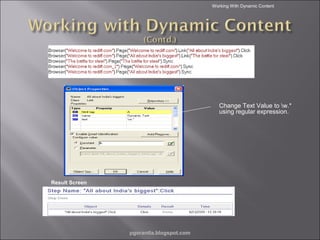
 Solution: After recording the script, change the Text

property of the link to w.* to find zero or more occurrences
of any character (except n).


pgorantla.blogspot.com
Working With Dynamic Content

Change Text Value to w.*
using regular expression.

Result Screen

pgorantla.blogspot.com
Working With Dynamic Content

2. Check Existence of Child Window
– Sometimes a link in one window creates another window. We can use the Exist
property to check whether or not a window exists. For example:
Browser("Window_name").Exist
– Can Use the ChildObjects method to retrieve all child objects (or the subset of child
objects that match a certain description) on the Desktop or within any other parent
object.

pgorantla.blogspot.com
Working With Dynamic Content

Scenario :
Verify for the existence of
Browser
for the following Yahoo
site.
Solution:
Use Exist property for the
existence
of Browser “Under
Construction:
Mercury ”.
Results show the existence
of
Browser “Under
Construction: Mercury”

pgorantla.blogspot.com
3. Recording 0f Dynamically Generated URLs and
Web pages.


QuickTest actually clicks on links as they are displayed
on the page. Therefore, QuickTest records how to find a
particular object, such as a link on the page, rather than
the object itself.



Scenario: If the link to a dynamically generated URL is an
image, then QuickTest records the "IMG" HTML tag, and
the name of the image. This enables QuickTest to find this
image in the future and click on it.
pgorantla.blogspot.com


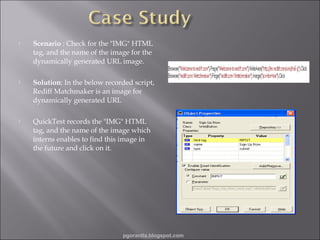
Scenario : Check for the "IMG" HTML
tag, and the name of the image for the
dynamically generated URL image.



Solution: In the below recorded script,
Rediff Matchmaker is an image for
dynamically generated URL



QuickTest records the "IMG" HTML
tag, and the name of the image which
interns enables to find this image in
the future and click on it.

pgorantla.blogspot.com
Working With Dynamic Content

Q & A….

pgorantla.blogspot.com
Working With Dynamic Content



QuickTest identifies objects in your application based on a
set of test object properties.



The Smart Identification mechanism may enable
QuickTest to identify an object, even when some of its
property values change.



We can manually change a test object property value to
match a new static property of an object in your
application.



We can use the SetTOProperty method to modify test
object properties during a run session without changing
the property values in the object repository.



We can use regular expressions to identify an object based
on conditions or patterns you define.
pgorantla.blogspot.com

Dynamic Content in QTP

  • 2.
    Working With DynamicContent  Working With Dynamic Content – Runtime Identification of Objects  Working with Dynamic Content • • •  Objects Dynamically Changing Objects To check that a child window exists (or does not exist) QuickTest records dynamically generated URLs and Web pages Session Wrap-Up pgorantla.blogspot.com
  • 3.
    Working With DynamicContent  QuickTest identifies objects in your application based on a set of test object properties.  QuickTest stores the object data it learns in the object repository.  If one or more of the property values of an object in the application differ from the property values QuickTest uses to identify the object, a test or component may fail.  When the property values of objects in the application change, modify the corresponding test object property values so that it can continue to use the existing tests or components. pgorantla.blogspot.com
  • 4.
    Working With DynamicContent  Methods for modifying test object properties :  Manually change a test object property value to match a new static property of an object in your application.  Use the SetTOProperty method to modify test object properties during a run session without changing the property values in the object repository. Can modify the properties of the temporary version of the object during the run session without affecting the permanent values in the object repository by adding a SetTOProperty statement in the Expert View. Syntax Object(description).SetTOProperty Property, Value pgorantla.blogspot.com
  • 5.
    Working With DynamicContent  Can modify the set of properties that QuickTest uses to identify the object, so that it will be able to identify an object even when some of its properties change. You can use configure mandatory and assistive properties for a test object class.  Can parameterize a test object property with a Data Table parameter if you expect the property value to change in a predictable way with each iteration of the test.  Can use regular expressions to identify an object based on conditions or patterns you define.  Can make the most of these modifications in the Object Properties dialog box or in the Object Repository dialog box.  Can save your objects either in a shared object repository or in action object repository. In shared object repository mode, you can use one object repository file for multiple tests or components. In object repository per-action mode, QuickTest automatically creates an object repository file for each action in your test. Object repository per-action mode is not available for components. pgorantla.blogspot.com
  • 6.
    Working With DynamicContent • Problem: • Suppose that whenever a Web image is displayed more than once on a page (like a logo displayed on the bottom and top of a page), the Web designer adds a special ID property to the Image tag. • Mandatory properties are sufficient to create a unique description for images that are only displayed once on the page,but we want QuickTest to learn the ID property for images that are displayed more than once on a page. • Solution: • To do this, Add the ID property as an assistive property, so that QuickTest learns the ID property only when it is necessary for creating a unique test object description. pgorantla.blogspot.com
  • 7.
    Working With DynamicContent 1. Objects Dynamically Changing Objects  Sometimes the content of objects in a Web page or application changes due to dynamic content. We can create dynamic descriptions of these objects so that QuickTest will recognize them when it runs the test.  Case Study:  Scenario: How to click on a dynamically changing text. To click on this link  Solution: After recording the script, change the Text property of the link to w.* to find zero or more occurrences of any character (except n).  pgorantla.blogspot.com
  • 8.
    Working With DynamicContent Change Text Value to w.* using regular expression. Result Screen pgorantla.blogspot.com
  • 9.
    Working With DynamicContent 2. Check Existence of Child Window – Sometimes a link in one window creates another window. We can use the Exist property to check whether or not a window exists. For example: Browser("Window_name").Exist – Can Use the ChildObjects method to retrieve all child objects (or the subset of child objects that match a certain description) on the Desktop or within any other parent object. pgorantla.blogspot.com
  • 10.
    Working With DynamicContent Scenario : Verify for the existence of Browser for the following Yahoo site. Solution: Use Exist property for the existence of Browser “Under Construction: Mercury ”. Results show the existence of Browser “Under Construction: Mercury” pgorantla.blogspot.com
  • 11.
    3. Recording 0fDynamically Generated URLs and Web pages.  QuickTest actually clicks on links as they are displayed on the page. Therefore, QuickTest records how to find a particular object, such as a link on the page, rather than the object itself.  Scenario: If the link to a dynamically generated URL is an image, then QuickTest records the "IMG" HTML tag, and the name of the image. This enables QuickTest to find this image in the future and click on it. pgorantla.blogspot.com
  • 12.
     Scenario : Checkfor the "IMG" HTML tag, and the name of the image for the dynamically generated URL image.  Solution: In the below recorded script, Rediff Matchmaker is an image for dynamically generated URL  QuickTest records the "IMG" HTML tag, and the name of the image which interns enables to find this image in the future and click on it. pgorantla.blogspot.com
  • 13.
    Working With DynamicContent Q & A…. pgorantla.blogspot.com
  • 14.
    Working With DynamicContent  QuickTest identifies objects in your application based on a set of test object properties.  The Smart Identification mechanism may enable QuickTest to identify an object, even when some of its property values change.  We can manually change a test object property value to match a new static property of an object in your application.  We can use the SetTOProperty method to modify test object properties during a run session without changing the property values in the object repository.  We can use regular expressions to identify an object based on conditions or patterns you define. pgorantla.blogspot.com

Editor's Notes

  • #3 Briefly review the session agenda as indicated here. Currently we are in the “Prep Session Introduction” section, during which we will review basic information about this session, including how to use Centra to participate. Note: The Prep Session Introduction section should take no longer than 15 minutes.
  • #14 Spend a few moments answering participants’ questions about the agenda of this session or the Centra controls they will be using. Remind them to use the “Raise Hand” icon to ask a question.