25 Facebook Tips Every
Social Media Manager Needs


         The Anglum Group
The Anglum Group


For a small team that doesn't have a great deal of time to
devote to social media, staying on top of Facebook's constant
changes can be tricky.

To help these social media teams, we compiled 25 important
tips for the people who run their brand's Facebook page!


                                                      The Anglum Group   2
1. How To Schedule Posts In Advance
   Often, small businesses don't have time to send regular Facebook updates during the work
    day. Luckily, Facebook has launched a tool that enables page administrators to schedule
    updates.
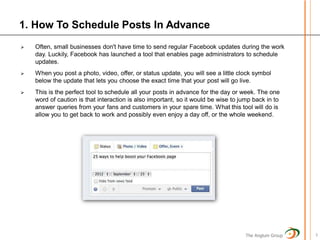
   When you post a photo, video, offer, or status update, you will see a little clock symbol
    below the update that lets you choose the exact time that your post will go live.
   This is the perfect tool to schedule all your posts in advance for the day or week. The one
    word of caution is that interaction is also important, so it would be wise to jump back in to
    answer queries from your fans and customers in your spare time. What this tool will do is
    allow you to get back to work and possibly even enjoy a day off, or the whole weekend.


                                                                                    The Anglum Group   3
2. How To Understand Competitions
   This is the question that gets asked the most often: “What are the rules about
    competitions on Facebook?”
   The thing is, most businesses see competitions as a way of gathering new “likes” and
    fans quickly by offering prizes and asking people to either “like” the page or share
    photos or other content.
   However, the rules state that you are “not allowed to use any native functionality within
    Facebook for competitions.” That means that you can’t ask people to “like,” comment,
    share, or do anything else on Facebook to enter a competition. It is aimed at cutting
    down spam, and while it is annoying as a business page owner, it does prevent the
    platform from mutating into a giant competition hub.
   You are allowed to run competitions on Facebook tabs, but to do that you will have to
    either build your own app or get an app from a third-party site.
   Although competitions can be a great way of getting interaction on the page, for big
    brands or businesses with a large budget it might not always be the best way of getting
    new “likes.”


                                                                                   The Anglum Group   4
3. How To Run Competitions
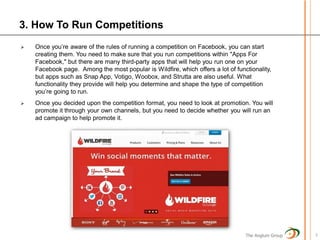
   Once you’re aware of the rules of running a competition on Facebook, you can start
    creating them. You need to make sure that you run competitions within "Apps For
    Facebook," but there are many third-party apps that will help you run one on your
    Facebook page. Among the most popular is Wildfire, which offers a lot of functionality,
    but apps such as Snap App, Votigo, Woobox, and Strutta are also useful. What
    functionality they provide will help you determine and shape the type of competition
    you’re going to run.
   Once you decided upon the competition format, you need to look at promotion. You will
    promote it through your own channels, but you need to decide whether you will run an
    ad campaign to help promote it.


                                                                                 The Anglum Group   5
4. How To Invite Friends To Your Page
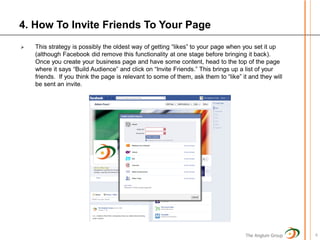
   This strategy is possibly the oldest way of getting “likes” to your page when you set it up
    (although Facebook did remove this functionality at one stage before bringing it back).
    Once you create your business page and have some content, head to the top of the page
    where it says “Build Audience” and click on “Invite Friends.” This brings up a list of your
    friends. If you think the page is relevant to some of them, ask them to “like” it and they will
    be sent an invite.


                                                                                    The Anglum Group   6
5. How To Add Multiple Admins To The Page
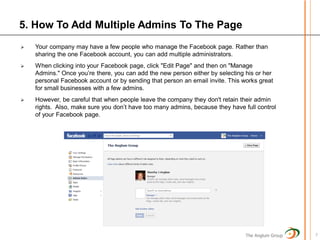
   Your company may have a few people who manage the Facebook page. Rather than
    sharing the one Facebook account, you can add multiple administrators.
   When clicking into your Facebook page, click "Edit Page" and then on "Manage
    Admins." Once you’re there, you can add the new person either by selecting his or her
    personal Facebook account or by sending that person an email invite. This works great
    for small businesses with a few admins.
   However, be careful that when people leave the company they don't retain their admin
    rights. Also, make sure you don’t have too many admins, because they have full control
    of your Facebook page.


                                                                               The Anglum Group   7
6. How To Manage Roles
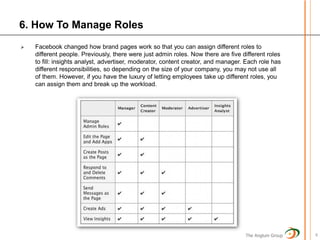
   Facebook changed how brand pages work so that you can assign different roles to
    different people. Previously, there were just admin roles. Now there are five different roles
    to fill: insights analyst, advertiser, moderator, content creator, and manager. Each role has
    different responsibilities, so depending on the size of your company, you may not use all
    of them. However, if you have the luxury of letting employees take up different roles, you
    can assign them and break up the workload.


                                                                                   The Anglum Group   8
7. How To Promote Your Updates
   Most people think that when they post an
    update, photo, or offer, the amount of people
    who “like” their page automatically see that
    content. The truth is much different.
    Facebook uses something that it calls
    EdgeRank to decide who sees your content.
    Because of EdgeRank, it would be normal
    for only 10 to 15 percent of people who “like”
    your page to actually see your content.
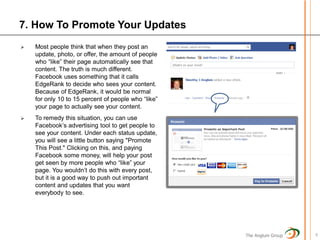
   To remedy this situation, you can use
    Facebook’s advertising tool to get people to
    see your content. Under each status update,
    you will see a little button saying "Promote
    This Post." Clicking on this, and paying
    Facebook some money, will help your post
    get seen by more people who “like” your
    page. You wouldn’t do this with every post,
    but it is a good way to push out important
    content and updates that you want
    everybody to see.


                                                     The Anglum Group   9
8. How To Understand Edgerank
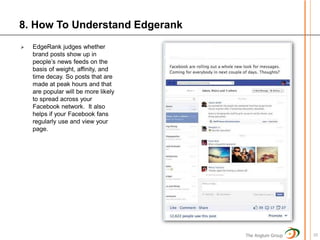
   EdgeRank judges whether
    brand posts show up in
    people’s news feeds on the
    basis of weight, affinity, and
    time decay. So posts that are
    made at peak hours and that
    are popular will be more likely
    to spread across your
    Facebook network. It also
    helps if your Facebook fans
    regularly use and view your
    page.


                                      The Anglum Group   10
9. How To Change Users
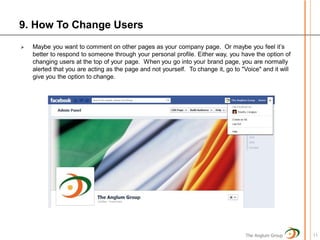
   Maybe you want to comment on other pages as your company page. Or maybe you feel it’s
    better to respond to someone through your personal profile. Either way, you have the option of
    changing users at the top of your page. When you go into your brand page, you are normally
    alerted that you are acting as the page and not yourself. To change it, go to "Voice" and it will
    give you the option to change.


                                                                                    The Anglum Group    11
10. How To Set Up A Recommendations Box
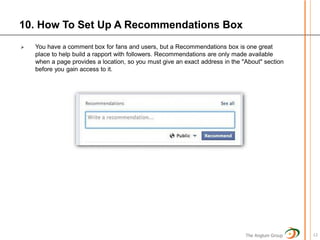
   You have a comment box for fans and users, but a Recommendations box is one great
    place to help build a rapport with followers. Recommendations are only made available
    when a page provides a location, so you must give an exact address in the "About" section
    before you gain access to it.


                                                                               The Anglum Group   12
11. How To Target Posts
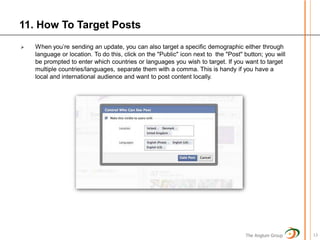
   When you’re sending an update, you can also target a specific demographic either through
    language or location. To do this, click on the "Public" icon next to the "Post" button; you will
    be prompted to enter which countries or languages you wish to target. If you want to target
    multiple countries/languages, separate them with a comma. This is handy if you have a
    local and international audience and want to post content locally.


                                                                                    The Anglum Group   13
12. How To Integrate WordPress Blogs With Facebook
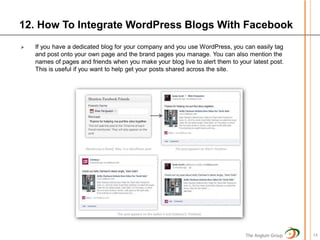
   If you have a dedicated blog for your company and you use WordPress, you can easily tag
    and post onto your own page and the brand pages you manage. You can also mention the
    names of pages and friends when you make your blog live to alert them to your latest post.
    This is useful if you want to help get your posts shared across the site.


                                                                                The Anglum Group   14
13. How To Know When To Post
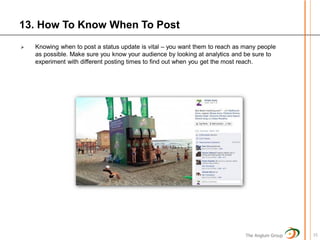
   Knowing when to post a status update is vital – you want them to reach as many people
    as possible. Make sure you know your audience by looking at analytics and be sure to
    experiment with different posting times to find out when you get the most reach.


                                                                              The Anglum Group   15
14. How To Optimize Your Page For SEO Optimization
   Although it’s not your main site, you should still optimize your Facebook page because they
    appear in search engines.
   There are numerous ways to optimize your page. Make sure you are using keywords in
    your updates, on your "About" page, photos, links, and updates to help improve your
    chances. There’s quite a lot that you can do to improve your page’s chances of appearing
    on search engines.


                                                                                The Anglum Group   16
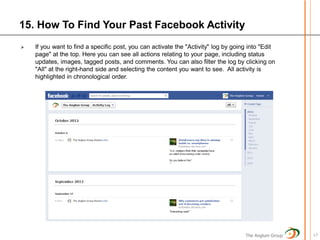
15. How To Find Your Past Facebook Activity
   If you want to find a specific post, you can activate the "Activity" log by going into "Edit
    page" at the top. Here you can see all actions relating to your page, including status
    updates, images, tagged posts, and comments. You can also filter the log by clicking on
    "All" at the right-hand side and selecting the content you want to see. All activity is
    highlighted in chronological order.


                                                                                    The Anglum Group   17
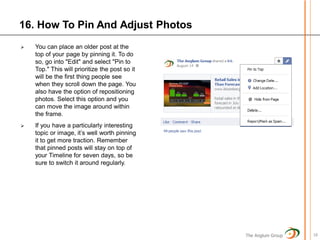
16. How To Pin And Adjust Photos
   You can place an older post at the
    top of your page by pinning it. To do
    so, go into "Edit" and select "Pin to
    Top." This will prioritize the post so it
    will be the first thing people see
    when they scroll down the page. You
    also have the option of repositioning
    photos. Select this option and you
    can move the image around within
    the frame.
   If you have a particularly interesting
    topic or image, it’s well worth pinning
    it to get more traction. Remember
    that pinned posts will stay on top of
    your Timeline for seven days, so be
    sure to switch it around regularly.


                                                The Anglum Group   18
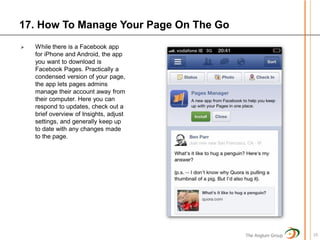
17. How To Manage Your Page On The Go
   While there is a Facebook app
    for iPhone and Android, the app
    you want to download is
    Facebook Pages. Practically a
    condensed version of your page,
    the app lets pages admins
    manage their account away from
    their computer. Here you can
    respond to updates, check out a
    brief overview of Insights, adjust
    settings, and generally keep up
    to date with any changes made
    to the page.


                                         The Anglum Group   19
18. How To Create Milestones
   If you want to add more content to your page and create a more engrossing experience,
    Milestones are the way to go. Usually, Milestones are reserved for important moments in
    your company’s lifetime. It’s good to highlight these with images of moments (such as when
    the company was founded) to tell its story.
   This way, you add a human touch to the company, and those who go through your page will
    become more invested in it. Remember that milestones can be presented in one- and two-
    column formats.
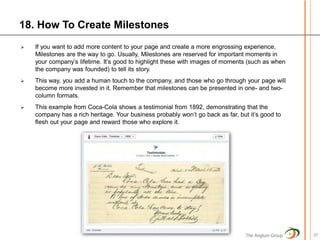
   This example from Coca-Cola shows a testimonial from 1892, demonstrating that the
    company has a rich heritage. Your business probably won’t go back as far, but it’s good to
    flesh out your page and reward those who explore it.


                                                                                 The Anglum Group   20
19. How To Add Interests Lists And Page Owners
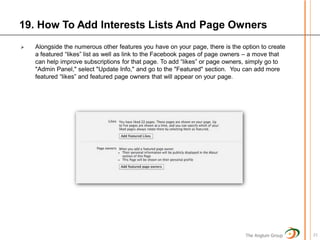
   Alongside the numerous other features you have on your page, there is the option to create
    a featured “likes” list as well as link to the Facebook pages of page owners – a move that
    can help improve subscriptions for that page. To add “likes” or page owners, simply go to
    "Admin Panel," select "Update Info," and go to the "Featured" section. You can add more
    featured “likes” and featured page owners that will appear on your page.


                                                                               The Anglum Group   21
20. How To Remove Recent Posts By Others
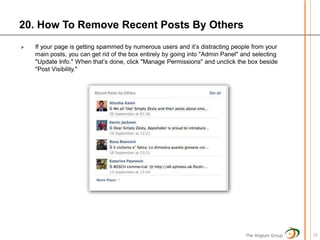
   If your page is getting spammed by numerous users and it’s distracting people from your
    main posts, you can get rid of the box entirely by going into "Admin Panel" and selecting
    "Update Info." When that’s done, click "Manage Permissions" and unclick the box beside
    "Post Visibility."


                                                                                 The Anglum Group   22
21. How To Merge A Facebook Fan Page & Personal Profile

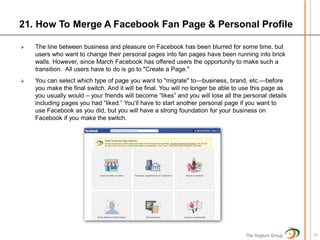
   The line between business and pleasure on Facebook has been blurred for some time, but
    users who want to change their personal pages into fan pages have been running into brick
    walls. However, since March Facebook has offered users the opportunity to make such a
    transition. All users have to do is go to "Create a Page."
   You can select which type of page you want to "migrate" to—business, brand, etc.—before
    you make the final switch. And it will be final. You will no longer be able to use this page as
    you usually would – your friends will become “likes” and you will lose all the personal details
    including pages you had “liked.” You’ll have to start another personal page if you want to
    use Facebook as you did, but you will have a strong foundation for your business on
    Facebook if you make the switch.


                                                                                   The Anglum Group   23
22. How To Design Your Cover Photo
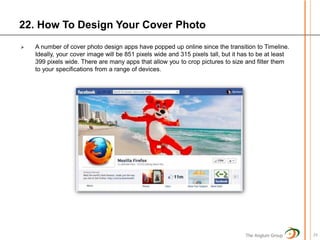
   A number of cover photo design apps have popped up online since the transition to Timeline.
    Ideally, your cover image will be 851 pixels wide and 315 pixels tall, but it has to be at least
    399 pixels wide. There are many apps that allow you to crop pictures to size and filter them
    to your specifications from a range of devices.


                                                                                   The Anglum Group    24
23. How To Create A Facebook Offer
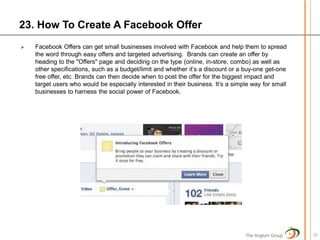
   Facebook Offers can get small businesses involved with Facebook and help them to spread
    the word through easy offers and targeted advertising. Brands can create an offer by
    heading to the "Offers" page and deciding on the type (online, in-store, combo) as well as
    other specifications, such as a budget/limit and whether it’s a discount or a buy-one get-one
    free offer, etc. Brands can then decide when to post the offer for the biggest impact and
    target users who would be especially interested in their business. It’s a simple way for small
    businesses to harness the social power of Facebook.


                                                                                  The Anglum Group   25
24. How To Use Facebook Advertising
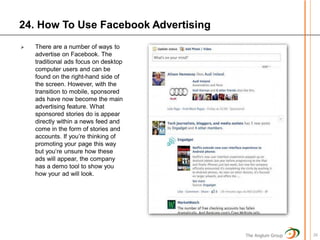
   There are a number of ways to
    advertise on Facebook. The
    traditional ads focus on desktop
    computer users and can be
    found on the right-hand side of
    the screen. However, with the
    transition to mobile, sponsored
    ads have now become the main
    advertising feature. What
    sponsored stories do is appear
    directly within a news feed and
    come in the form of stories and
    accounts. If you’re thinking of
    promoting your page this way
    but you’re unsure how these
    ads will appear, the company
    has a demo tool to show you
    how your ad will look.


                                       The Anglum Group   26
25. How To Create Custom Tabs
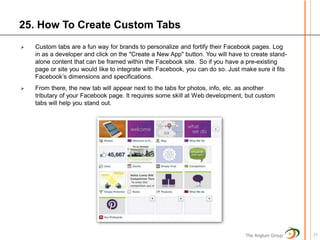
   Custom tabs are a fun way for brands to personalize and fortify their Facebook pages. Log
    in as a developer and click on the "Create a New App" button. You will have to create stand-
    alone content that can be framed within the Facebook site. So if you have a pre-existing
    page or site you would like to integrate with Facebook, you can do so. Just make sure it fits
    Facebook’s dimensions and specifications.
   From there, the new tab will appear next to the tabs for photos, info, etc. as another
    tributary of your Facebook page. It requires some skill at Web development, but custom
    tabs will help you stand out.


                                                                                 The Anglum Group   27
Stat Sources

   The Social Skinny
   Media Bistro
   Social Media Examiner
   Mashable
   Straight North, LLC


                            The Anglum Group   28
The Anglum Group


The Anglum Group is a management consulting company that focuses on
delivering innovative cost-effective retail customer marketing solutions to
our clients. Specifically, we provide insight and expertise based upon our
many years of retail experience – allowing our clients to realize their
marketing objectives. We are not content just identifying the proper
course of action, we stay with the project until the benefit is realized.

The companies that we work with are leading retailers that are either
extending their existing customer capability or companies looking to
improve the return on their initial marketing technology investment. Our
emphasis is on customer understanding, customer strategy development
and marketing execution based upon industry best practices.

All of our staff are former retail professionals that have a blend of
Marketing and Technology skills who are adept at identifying and applying
proven practical approaches to achieve desired return on investment.


                                                                The Anglum Group   29
The Anglum Group


                   The Anglum Group   30
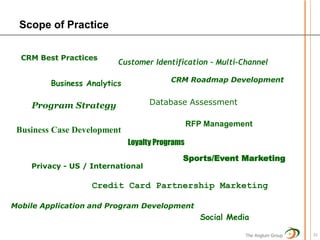
Scope of Practice

  CRM Best Practices
                          Customer Identification – Multi-Channel

                                          CRM Roadmap Development
         Business Analytics

    Program Strategy                Database Assessment

                                                 RFP Management
 Business Case Development
                              Loyalty Programs
                                             Sports/Event Marketing
    Privacy - US / International

                   Credit Card Partnership Marketing

Mobile Application and Program Development
                                                    Social Media

                                                               The Anglum Group   31
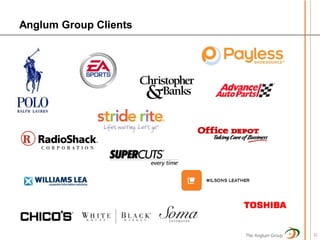
Anglum Group Clients


                       The Anglum Group   32
The Anglum Group LLC


   3835 Susan Lane
Minnetonka, MN 55345
    952.223.2000

www.anglumgroup.com

25 Facebook Tips

  • 1.
    25 Facebook TipsEvery Social Media Manager Needs The Anglum Group
  • 2.
    The Anglum Group Fora small team that doesn't have a great deal of time to devote to social media, staying on top of Facebook's constant changes can be tricky. To help these social media teams, we compiled 25 important tips for the people who run their brand's Facebook page! The Anglum Group 2
  • 3.
    1. How ToSchedule Posts In Advance  Often, small businesses don't have time to send regular Facebook updates during the work day. Luckily, Facebook has launched a tool that enables page administrators to schedule updates.  When you post a photo, video, offer, or status update, you will see a little clock symbol below the update that lets you choose the exact time that your post will go live.  This is the perfect tool to schedule all your posts in advance for the day or week. The one word of caution is that interaction is also important, so it would be wise to jump back in to answer queries from your fans and customers in your spare time. What this tool will do is allow you to get back to work and possibly even enjoy a day off, or the whole weekend. The Anglum Group 3
  • 4.
    2. How ToUnderstand Competitions  This is the question that gets asked the most often: “What are the rules about competitions on Facebook?”  The thing is, most businesses see competitions as a way of gathering new “likes” and fans quickly by offering prizes and asking people to either “like” the page or share photos or other content.  However, the rules state that you are “not allowed to use any native functionality within Facebook for competitions.” That means that you can’t ask people to “like,” comment, share, or do anything else on Facebook to enter a competition. It is aimed at cutting down spam, and while it is annoying as a business page owner, it does prevent the platform from mutating into a giant competition hub.  You are allowed to run competitions on Facebook tabs, but to do that you will have to either build your own app or get an app from a third-party site.  Although competitions can be a great way of getting interaction on the page, for big brands or businesses with a large budget it might not always be the best way of getting new “likes.” The Anglum Group 4
  • 5.
    3. How ToRun Competitions  Once you’re aware of the rules of running a competition on Facebook, you can start creating them. You need to make sure that you run competitions within "Apps For Facebook," but there are many third-party apps that will help you run one on your Facebook page. Among the most popular is Wildfire, which offers a lot of functionality, but apps such as Snap App, Votigo, Woobox, and Strutta are also useful. What functionality they provide will help you determine and shape the type of competition you’re going to run.  Once you decided upon the competition format, you need to look at promotion. You will promote it through your own channels, but you need to decide whether you will run an ad campaign to help promote it. The Anglum Group 5
  • 6.
    4. How ToInvite Friends To Your Page  This strategy is possibly the oldest way of getting “likes” to your page when you set it up (although Facebook did remove this functionality at one stage before bringing it back). Once you create your business page and have some content, head to the top of the page where it says “Build Audience” and click on “Invite Friends.” This brings up a list of your friends. If you think the page is relevant to some of them, ask them to “like” it and they will be sent an invite. The Anglum Group 6
  • 7.
    5. How ToAdd Multiple Admins To The Page  Your company may have a few people who manage the Facebook page. Rather than sharing the one Facebook account, you can add multiple administrators.  When clicking into your Facebook page, click "Edit Page" and then on "Manage Admins." Once you’re there, you can add the new person either by selecting his or her personal Facebook account or by sending that person an email invite. This works great for small businesses with a few admins.  However, be careful that when people leave the company they don't retain their admin rights. Also, make sure you don’t have too many admins, because they have full control of your Facebook page. The Anglum Group 7
  • 8.
    6. How ToManage Roles  Facebook changed how brand pages work so that you can assign different roles to different people. Previously, there were just admin roles. Now there are five different roles to fill: insights analyst, advertiser, moderator, content creator, and manager. Each role has different responsibilities, so depending on the size of your company, you may not use all of them. However, if you have the luxury of letting employees take up different roles, you can assign them and break up the workload. The Anglum Group 8
  • 9.
    7. How ToPromote Your Updates  Most people think that when they post an update, photo, or offer, the amount of people who “like” their page automatically see that content. The truth is much different. Facebook uses something that it calls EdgeRank to decide who sees your content. Because of EdgeRank, it would be normal for only 10 to 15 percent of people who “like” your page to actually see your content.  To remedy this situation, you can use Facebook’s advertising tool to get people to see your content. Under each status update, you will see a little button saying "Promote This Post." Clicking on this, and paying Facebook some money, will help your post get seen by more people who “like” your page. You wouldn’t do this with every post, but it is a good way to push out important content and updates that you want everybody to see. The Anglum Group 9
  • 10.
    8. How ToUnderstand Edgerank  EdgeRank judges whether brand posts show up in people’s news feeds on the basis of weight, affinity, and time decay. So posts that are made at peak hours and that are popular will be more likely to spread across your Facebook network. It also helps if your Facebook fans regularly use and view your page. The Anglum Group 10
  • 11.
    9. How ToChange Users  Maybe you want to comment on other pages as your company page. Or maybe you feel it’s better to respond to someone through your personal profile. Either way, you have the option of changing users at the top of your page. When you go into your brand page, you are normally alerted that you are acting as the page and not yourself. To change it, go to "Voice" and it will give you the option to change. The Anglum Group 11
  • 12.
    10. How ToSet Up A Recommendations Box  You have a comment box for fans and users, but a Recommendations box is one great place to help build a rapport with followers. Recommendations are only made available when a page provides a location, so you must give an exact address in the "About" section before you gain access to it. The Anglum Group 12
  • 13.
    11. How ToTarget Posts  When you’re sending an update, you can also target a specific demographic either through language or location. To do this, click on the "Public" icon next to the "Post" button; you will be prompted to enter which countries or languages you wish to target. If you want to target multiple countries/languages, separate them with a comma. This is handy if you have a local and international audience and want to post content locally. The Anglum Group 13
  • 14.
    12. How ToIntegrate WordPress Blogs With Facebook  If you have a dedicated blog for your company and you use WordPress, you can easily tag and post onto your own page and the brand pages you manage. You can also mention the names of pages and friends when you make your blog live to alert them to your latest post. This is useful if you want to help get your posts shared across the site. The Anglum Group 14
  • 15.
    13. How ToKnow When To Post  Knowing when to post a status update is vital – you want them to reach as many people as possible. Make sure you know your audience by looking at analytics and be sure to experiment with different posting times to find out when you get the most reach. The Anglum Group 15
  • 16.
    14. How ToOptimize Your Page For SEO Optimization  Although it’s not your main site, you should still optimize your Facebook page because they appear in search engines.  There are numerous ways to optimize your page. Make sure you are using keywords in your updates, on your "About" page, photos, links, and updates to help improve your chances. There’s quite a lot that you can do to improve your page’s chances of appearing on search engines. The Anglum Group 16
  • 17.
    15. How ToFind Your Past Facebook Activity  If you want to find a specific post, you can activate the "Activity" log by going into "Edit page" at the top. Here you can see all actions relating to your page, including status updates, images, tagged posts, and comments. You can also filter the log by clicking on "All" at the right-hand side and selecting the content you want to see. All activity is highlighted in chronological order. The Anglum Group 17
  • 18.
    16. How ToPin And Adjust Photos  You can place an older post at the top of your page by pinning it. To do so, go into "Edit" and select "Pin to Top." This will prioritize the post so it will be the first thing people see when they scroll down the page. You also have the option of repositioning photos. Select this option and you can move the image around within the frame.  If you have a particularly interesting topic or image, it’s well worth pinning it to get more traction. Remember that pinned posts will stay on top of your Timeline for seven days, so be sure to switch it around regularly. The Anglum Group 18
  • 19.
    17. How ToManage Your Page On The Go  While there is a Facebook app for iPhone and Android, the app you want to download is Facebook Pages. Practically a condensed version of your page, the app lets pages admins manage their account away from their computer. Here you can respond to updates, check out a brief overview of Insights, adjust settings, and generally keep up to date with any changes made to the page. The Anglum Group 19
  • 20.
    18. How ToCreate Milestones  If you want to add more content to your page and create a more engrossing experience, Milestones are the way to go. Usually, Milestones are reserved for important moments in your company’s lifetime. It’s good to highlight these with images of moments (such as when the company was founded) to tell its story.  This way, you add a human touch to the company, and those who go through your page will become more invested in it. Remember that milestones can be presented in one- and two- column formats.  This example from Coca-Cola shows a testimonial from 1892, demonstrating that the company has a rich heritage. Your business probably won’t go back as far, but it’s good to flesh out your page and reward those who explore it. The Anglum Group 20
  • 21.
    19. How ToAdd Interests Lists And Page Owners  Alongside the numerous other features you have on your page, there is the option to create a featured “likes” list as well as link to the Facebook pages of page owners – a move that can help improve subscriptions for that page. To add “likes” or page owners, simply go to "Admin Panel," select "Update Info," and go to the "Featured" section. You can add more featured “likes” and featured page owners that will appear on your page. The Anglum Group 21
  • 22.
    20. How ToRemove Recent Posts By Others  If your page is getting spammed by numerous users and it’s distracting people from your main posts, you can get rid of the box entirely by going into "Admin Panel" and selecting "Update Info." When that’s done, click "Manage Permissions" and unclick the box beside "Post Visibility." The Anglum Group 22
  • 23.
    21. How ToMerge A Facebook Fan Page & Personal Profile  The line between business and pleasure on Facebook has been blurred for some time, but users who want to change their personal pages into fan pages have been running into brick walls. However, since March Facebook has offered users the opportunity to make such a transition. All users have to do is go to "Create a Page."  You can select which type of page you want to "migrate" to—business, brand, etc.—before you make the final switch. And it will be final. You will no longer be able to use this page as you usually would – your friends will become “likes” and you will lose all the personal details including pages you had “liked.” You’ll have to start another personal page if you want to use Facebook as you did, but you will have a strong foundation for your business on Facebook if you make the switch. The Anglum Group 23
  • 24.
    22. How ToDesign Your Cover Photo  A number of cover photo design apps have popped up online since the transition to Timeline. Ideally, your cover image will be 851 pixels wide and 315 pixels tall, but it has to be at least 399 pixels wide. There are many apps that allow you to crop pictures to size and filter them to your specifications from a range of devices. The Anglum Group 24
  • 25.
    23. How ToCreate A Facebook Offer  Facebook Offers can get small businesses involved with Facebook and help them to spread the word through easy offers and targeted advertising. Brands can create an offer by heading to the "Offers" page and deciding on the type (online, in-store, combo) as well as other specifications, such as a budget/limit and whether it’s a discount or a buy-one get-one free offer, etc. Brands can then decide when to post the offer for the biggest impact and target users who would be especially interested in their business. It’s a simple way for small businesses to harness the social power of Facebook. The Anglum Group 25
  • 26.
    24. How ToUse Facebook Advertising  There are a number of ways to advertise on Facebook. The traditional ads focus on desktop computer users and can be found on the right-hand side of the screen. However, with the transition to mobile, sponsored ads have now become the main advertising feature. What sponsored stories do is appear directly within a news feed and come in the form of stories and accounts. If you’re thinking of promoting your page this way but you’re unsure how these ads will appear, the company has a demo tool to show you how your ad will look. The Anglum Group 26
  • 27.
    25. How ToCreate Custom Tabs  Custom tabs are a fun way for brands to personalize and fortify their Facebook pages. Log in as a developer and click on the "Create a New App" button. You will have to create stand- alone content that can be framed within the Facebook site. So if you have a pre-existing page or site you would like to integrate with Facebook, you can do so. Just make sure it fits Facebook’s dimensions and specifications.  From there, the new tab will appear next to the tabs for photos, info, etc. as another tributary of your Facebook page. It requires some skill at Web development, but custom tabs will help you stand out. The Anglum Group 27
  • 28.
    Stat Sources  The Social Skinny  Media Bistro  Social Media Examiner  Mashable  Straight North, LLC The Anglum Group 28
  • 29.
    The Anglum Group TheAnglum Group is a management consulting company that focuses on delivering innovative cost-effective retail customer marketing solutions to our clients. Specifically, we provide insight and expertise based upon our many years of retail experience – allowing our clients to realize their marketing objectives. We are not content just identifying the proper course of action, we stay with the project until the benefit is realized. The companies that we work with are leading retailers that are either extending their existing customer capability or companies looking to improve the return on their initial marketing technology investment. Our emphasis is on customer understanding, customer strategy development and marketing execution based upon industry best practices. All of our staff are former retail professionals that have a blend of Marketing and Technology skills who are adept at identifying and applying proven practical approaches to achieve desired return on investment. The Anglum Group 29
  • 30.
    The Anglum Group The Anglum Group 30
  • 31.
    Scope of Practice CRM Best Practices Customer Identification – Multi-Channel CRM Roadmap Development Business Analytics Program Strategy Database Assessment RFP Management Business Case Development Loyalty Programs Sports/Event Marketing Privacy - US / International Credit Card Partnership Marketing Mobile Application and Program Development Social Media The Anglum Group 31
  • 32.
    Anglum Group Clients The Anglum Group 32
  • 33.
    The Anglum GroupLLC 3835 Susan Lane Minnetonka, MN 55345 952.223.2000 www.anglumgroup.com