


HTML Geolocation
API
AWT Activity 1
Presented By:
A Vaibhav Jain, Suman Garai, Arvind Kumar, Subharanjan
Agenda
What is Geolocation
Supported Browsers
HTML Geolocation Implementation
Example Code
Error Handling
Example Code
Demo
Other interesting methods
3/24/2023 2
What is Geolocation?
• Geolocation refers to the geographical (latitudinal and longitudinal)
location of an Internet-connected device.
• Not your location, mind you, but the location of whatever electronic
medium is being used to access the Internet.
• Geolocation data can be collected on various basis, like, Device
based, Server Based, Hybrid.
3/24/2023 3
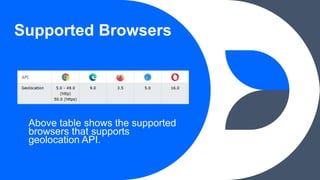
Supported Browsers
Above table shows the supported
browsers that supports
geolocation API.
HTML Geolocation
Implementation
3/24/2023 5
In order to implement the API, we must use the ‘navigator’ class of JavaScript, which
return the Geolocation object that gives web content access to the location of the
device.
Logic to implement the API:
• Check if Geolocation is supported.
• If supported, call the getCurrentPosition() method. Else, display error message.
• If the getCurrentPosition(parameter: showPosition) is called successfully, it
returns the coordinates object to the function specified in the parameter.
• The method showPosition() outputs the Latitude and Longitude.
getCurrentPosition() method accepts two parameters, first being, showPosition() and
the second is, showError()
Example Code
3/24/2023 6
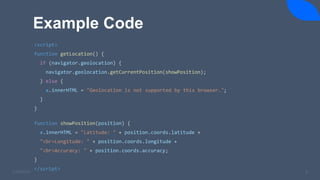
<script>
function getLocation() {
if (navigator.geolocation) {
navigator.geolocation.getCurrentPosition(showPosition);
} else {
x.innerHTML = "Geolocation is not supported by this browser.";
}
}
function showPosition(position) {
x.innerHTML = "Latitude: " + position.coords.latitude +
"<br>Longitude: " + position.coords.longitude +
"<br>Accuracy: " + position.coords.accuracy;
}
</script>
Error Handling
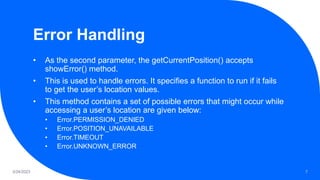
• As the second parameter, the getCurrentPosition() accepts
showError() method.
• This is used to handle errors. It specifies a function to run if it fails
to get the user’s location values.
• This method contains a set of possible errors that might occur while
accessing a user’s location are given below:
• Error.PERMISSION_DENIED
• Error.POSITION_UNAVAILABLE
• Error.TIMEOUT
• Error.UNKNOWN_ERROR
3/24/2023 7
Example Code
3/24/2023 8
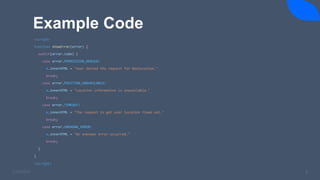
<script>
function showError(error) {
switch(error.code) {
case error.PERMISSION_DENIED:
x.innerHTML = "User denied the request for Geolocation."
break;
case error.POSITION_UNAVAILABLE:
x.innerHTML = "Location information is unavailable."
break;
case error.TIMEOUT:
x.innerHTML = "The request to get user location timed out."
break;
case error.UNKNOWN_ERROR:
x.innerHTML = "An unknown error occurred."
break;
}
}
<script>
Return Data - getCurrentPosition()
Method
3/24/2023 9
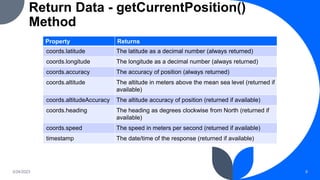
Property Returns
coords.latitude The latitude as a decimal number (always returned)
coords.longitude The longitude as a decimal number (always returned)
coords.accuracy The accuracy of position (always returned)
coords.altitude The altitude in meters above the mean sea level (returned if
available)
coords.altitudeAccuracy The altitude accuracy of position (returned if available)
coords.heading The heading as degrees clockwise from North (returned if
available)
coords.speed The speed in meters per second (returned if available)
timestamp The date/time of the response (returned if available)
Demo
Click here to see the demo
3/24/2023 10
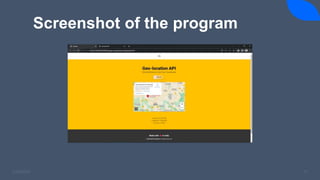
Screenshot of the program
3/24/2023 11
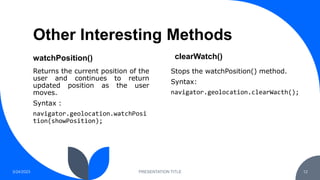
Other Interesting Methods
watchPosition()
Returns the current position of the
user and continues to return
updated position as the user
moves.
Syntax :
navigator.geolocation.watchPosi
tion(showPosition);
clearWatch()
3/24/2023 PRESENTATION TITLE 12
Stops the watchPosition() method.
Syntax:
navigator.geolocation.clearWacth();
Thank you

20220816-GeolocationAPI-AdvancedWebDevelopment.pptx

  • 1.
    HTML Geolocation API AWT Activity1 Presented By: A Vaibhav Jain, Suman Garai, Arvind Kumar, Subharanjan
  • 2.
    Agenda What is Geolocation SupportedBrowsers HTML Geolocation Implementation Example Code Error Handling Example Code Demo Other interesting methods 3/24/2023 2
  • 3.
    What is Geolocation? •Geolocation refers to the geographical (latitudinal and longitudinal) location of an Internet-connected device. • Not your location, mind you, but the location of whatever electronic medium is being used to access the Internet. • Geolocation data can be collected on various basis, like, Device based, Server Based, Hybrid. 3/24/2023 3
  • 4.
    Supported Browsers Above tableshows the supported browsers that supports geolocation API.
  • 5.
    HTML Geolocation Implementation 3/24/2023 5 Inorder to implement the API, we must use the ‘navigator’ class of JavaScript, which return the Geolocation object that gives web content access to the location of the device. Logic to implement the API: • Check if Geolocation is supported. • If supported, call the getCurrentPosition() method. Else, display error message. • If the getCurrentPosition(parameter: showPosition) is called successfully, it returns the coordinates object to the function specified in the parameter. • The method showPosition() outputs the Latitude and Longitude. getCurrentPosition() method accepts two parameters, first being, showPosition() and the second is, showError()
  • 6.
    Example Code 3/24/2023 6 <script> functiongetLocation() { if (navigator.geolocation) { navigator.geolocation.getCurrentPosition(showPosition); } else { x.innerHTML = "Geolocation is not supported by this browser."; } } function showPosition(position) { x.innerHTML = "Latitude: " + position.coords.latitude + "<br>Longitude: " + position.coords.longitude + "<br>Accuracy: " + position.coords.accuracy; } </script>
  • 7.
    Error Handling • Asthe second parameter, the getCurrentPosition() accepts showError() method. • This is used to handle errors. It specifies a function to run if it fails to get the user’s location values. • This method contains a set of possible errors that might occur while accessing a user’s location are given below: • Error.PERMISSION_DENIED • Error.POSITION_UNAVAILABLE • Error.TIMEOUT • Error.UNKNOWN_ERROR 3/24/2023 7
  • 8.
    Example Code 3/24/2023 8 <script> functionshowError(error) { switch(error.code) { case error.PERMISSION_DENIED: x.innerHTML = "User denied the request for Geolocation." break; case error.POSITION_UNAVAILABLE: x.innerHTML = "Location information is unavailable." break; case error.TIMEOUT: x.innerHTML = "The request to get user location timed out." break; case error.UNKNOWN_ERROR: x.innerHTML = "An unknown error occurred." break; } } <script>
  • 9.
    Return Data -getCurrentPosition() Method 3/24/2023 9 Property Returns coords.latitude The latitude as a decimal number (always returned) coords.longitude The longitude as a decimal number (always returned) coords.accuracy The accuracy of position (always returned) coords.altitude The altitude in meters above the mean sea level (returned if available) coords.altitudeAccuracy The altitude accuracy of position (returned if available) coords.heading The heading as degrees clockwise from North (returned if available) coords.speed The speed in meters per second (returned if available) timestamp The date/time of the response (returned if available)
  • 10.
    Demo Click here tosee the demo 3/24/2023 10
  • 11.
    Screenshot of theprogram 3/24/2023 11
  • 12.
    Other Interesting Methods watchPosition() Returnsthe current position of the user and continues to return updated position as the user moves. Syntax : navigator.geolocation.watchPosi tion(showPosition); clearWatch() 3/24/2023 PRESENTATION TITLE 12 Stops the watchPosition() method. Syntax: navigator.geolocation.clearWacth();
  • 13.