
Be prepared for a
Quiz at the
beginning of
every session
Week 10 - Agenda
• 5 min Warm up with a game
• 5 min Introduction teacher demonstrate revision and
essential question
• 5 min Activity 3 – video 5 min
10 min Activity 4 – teacher demonstrate
• 5 min Activity 5 video 5 min
• 10 min Activity 6 - teacher demonstrate
• 5 min Activity 7– teacher demonstrate revision
• 25 min activity 6 - on line quiz and registration in
netacad.com
• 5 min Reflection
• 5 min Home work
From
previous
session
From
previous
session
From
previous
session
From
previous
session
Network Expansion Devices
Repeater- Hub -
Bridge - Router -
Gateway
From
previous
session
10
Internet Addressing
•IP address is a 32 bit integer
•Refers to interface rather than host
•Consists of network and host portions
• Enables routers to keep 1 entry/network instead of 1/host
•Class A, B, C for unicast
•Class D for multicast
•Class E reserved
•Classless addresses
•Written as 4 octets/bytes in decimal format
•E.g. 134.79.16.1, 127.0.0.1
From
previous
session
Essential Questions:
What is the IP
Addressing?
FDDI 12
Activity 3 5 min
listen to an animated video
Understanding an IP
Address
Press here
for on line
Press here
for off line
OR
19
Internet Class-based addresses
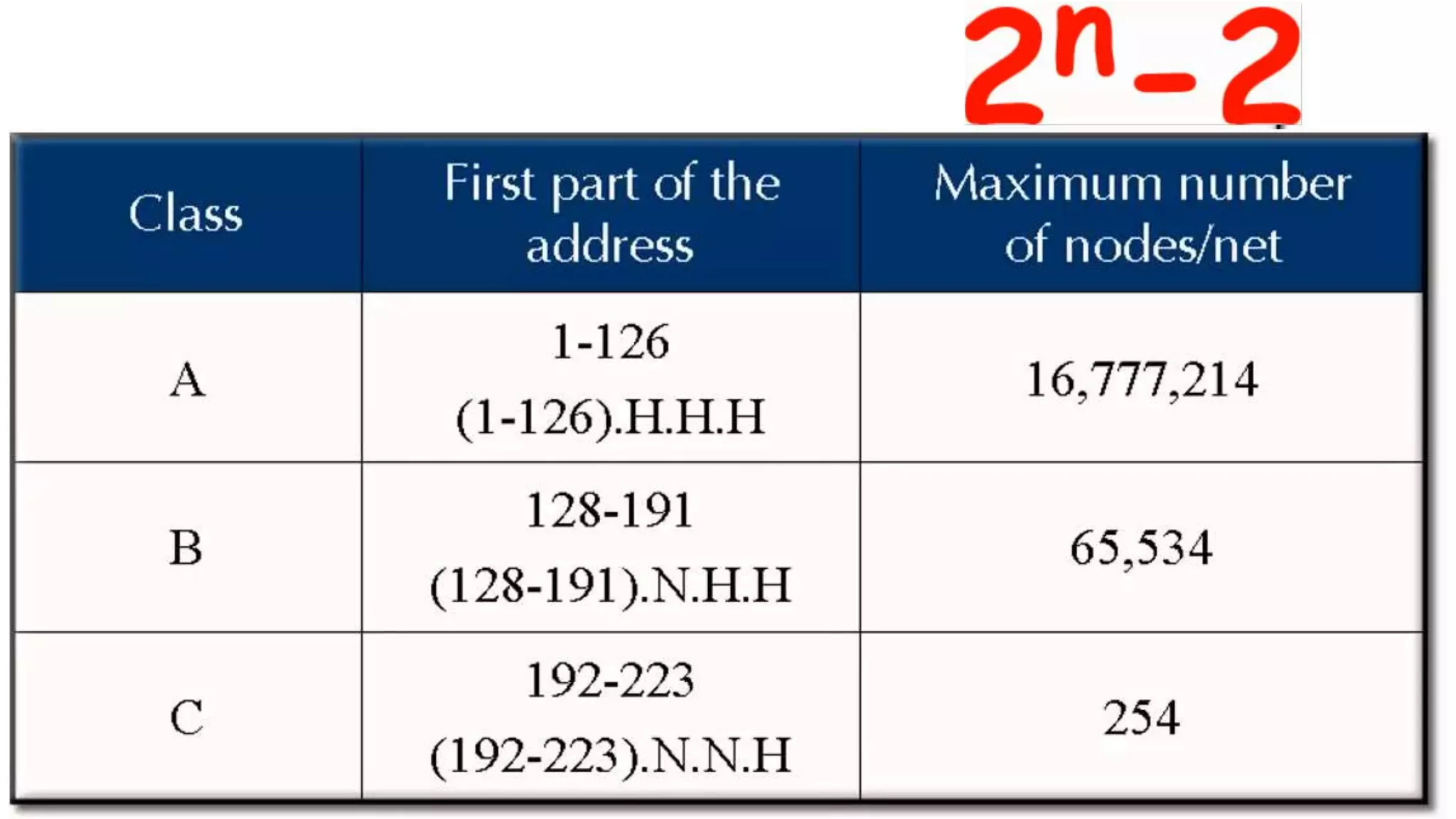
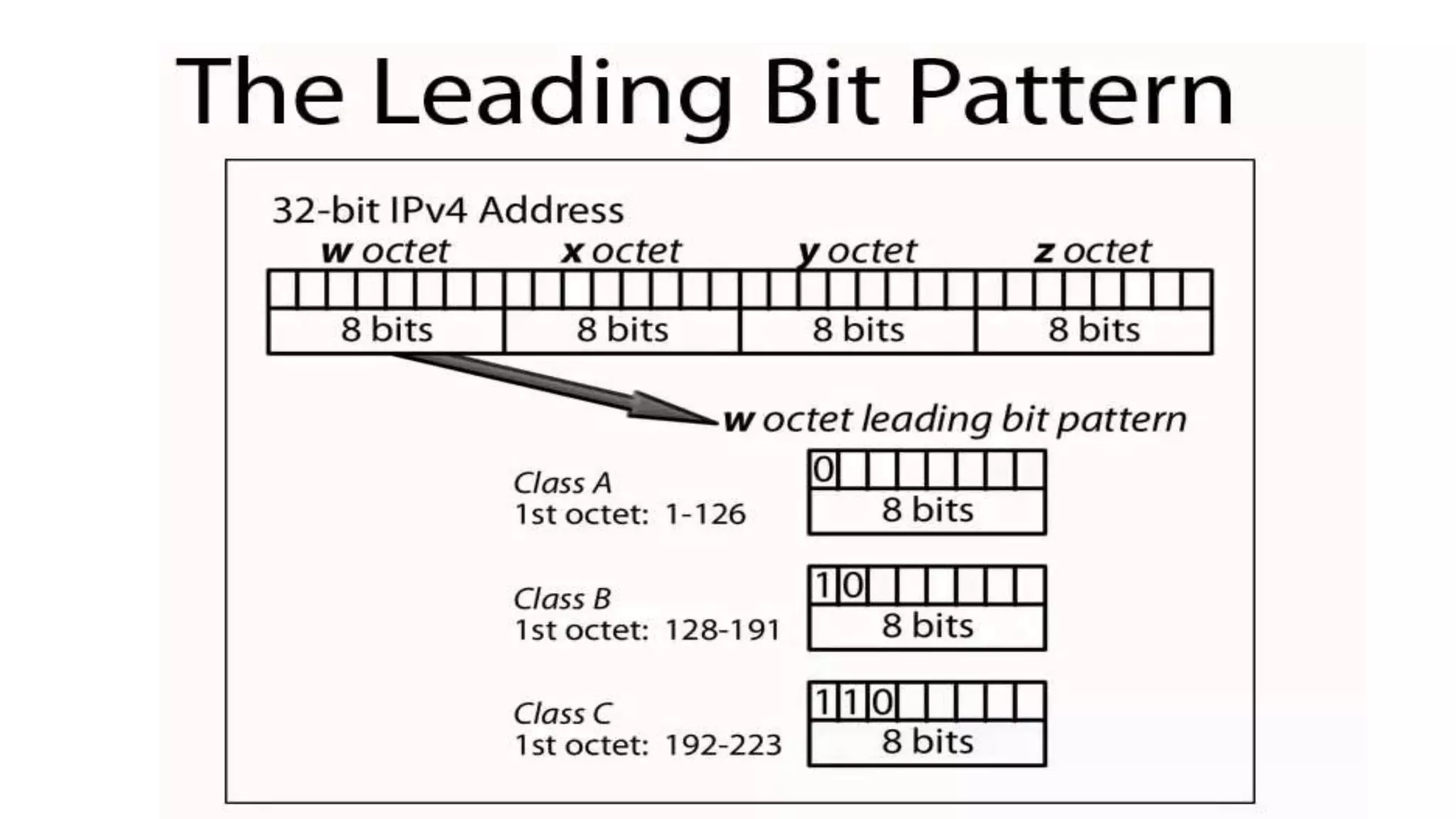
• Class A: large number of hosts, few networks
• 0nnnnnnn hhhhhhhh hhhhhhhh hhhhhhhh
• 7 network bits (0 and 127 reserved, so 126 networks), 24 host bits (>
16M hosts/net)
• Initial byte 1-127 (decimal)
• Class B: medium number of hosts and networks
• 10nnnnnn nnnnnnnn hhhhhhhh hhhhhhhh
• 16,384 class B networks, 65,534 hosts/network
• Initial byte 128-191 (decimal)
• Class C: large number of small networks
• 110nnnnn nnnnnnnn nnnnnnnn hhhhhhhh
• 2,097,152 networks, 254 hosts/network
• Initial byte 192-223 (decimal)
• Class D: 224-239 (decimal) Multicast [RFC1112]
• Class E: 240-255 (decimal) Reserved
From
previous
session
20
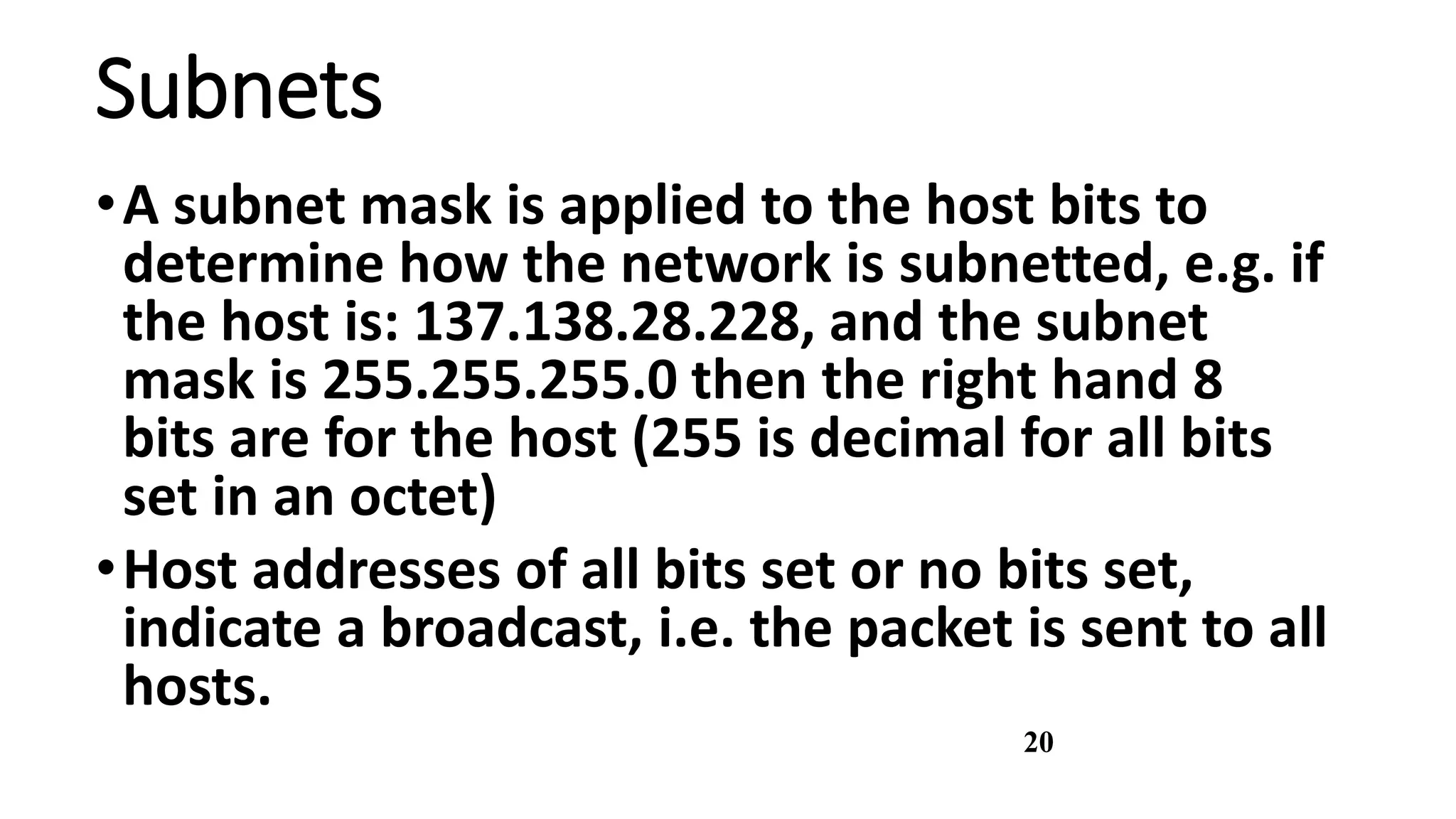
Subnets
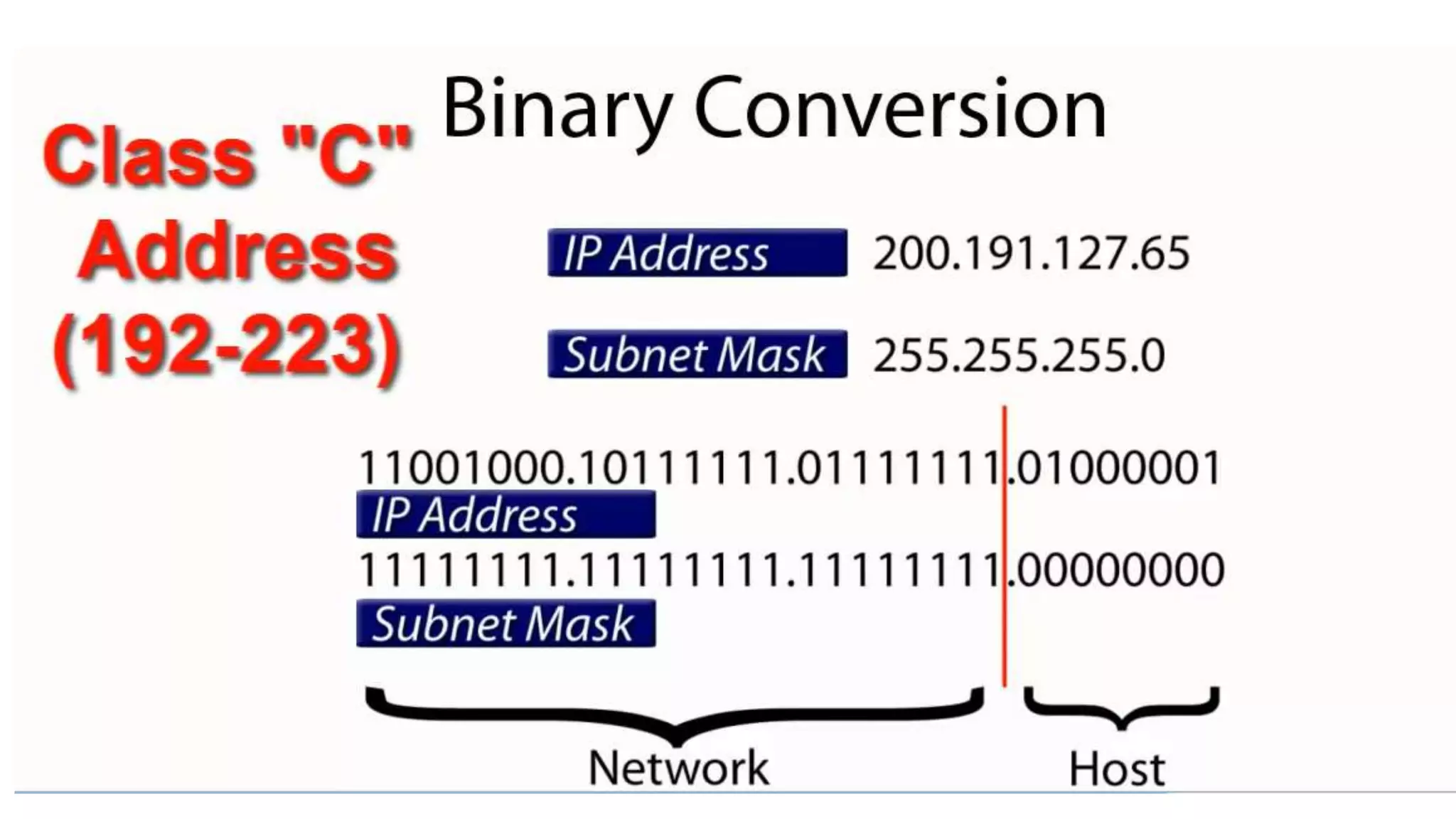
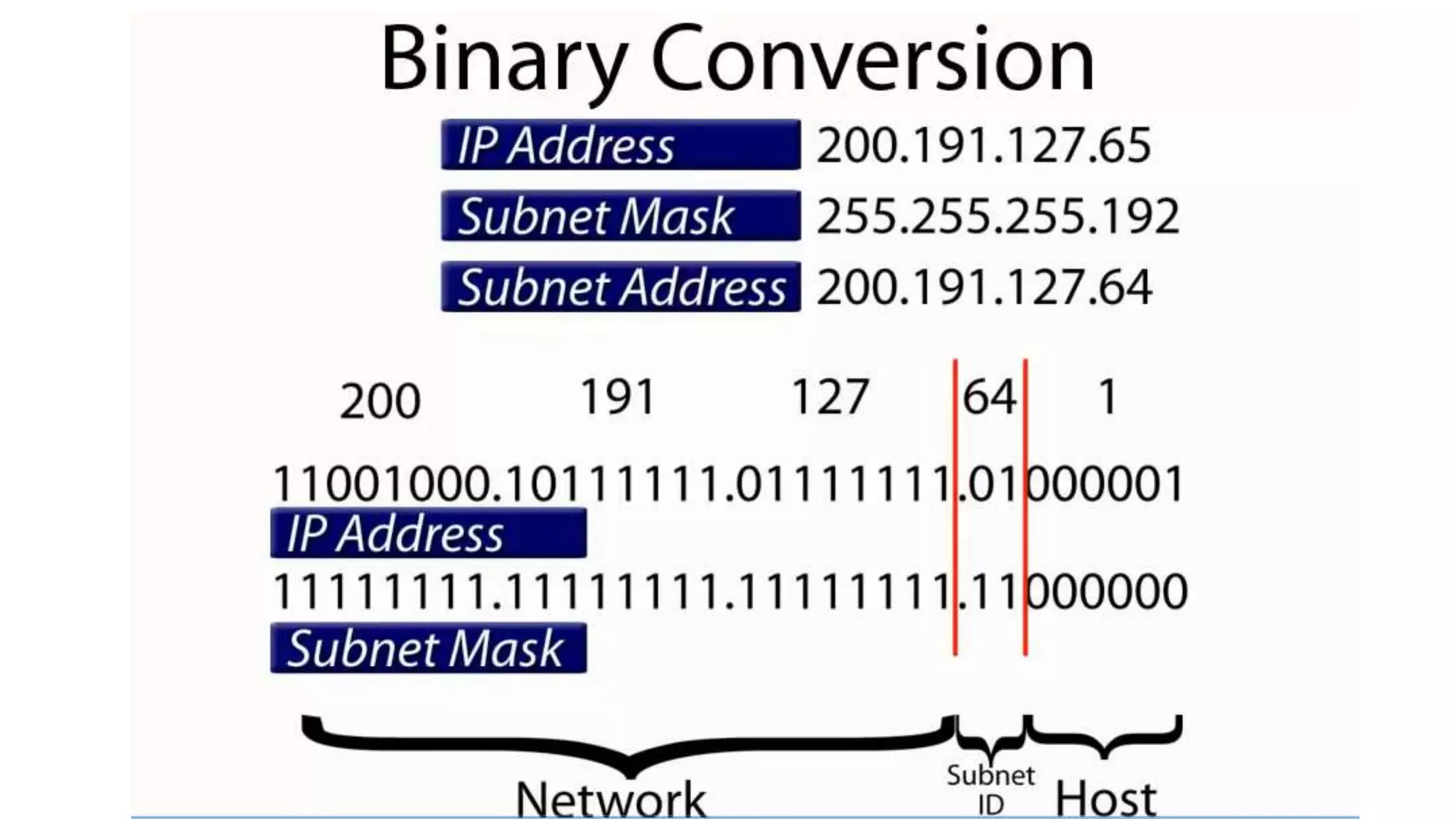
•A subnet mask is applied to the host bits to
determine how the network is subnetted, e.g. if
the host is: 137.138.28.228, and the subnet
mask is 255.255.255.0 then the right hand 8
bits are for the host (255 is decimal for all bits
set in an octet)
•Host addresses of all bits set or no bits set,
indicate a broadcast, i.e. the packet is sent to all
hosts.
21
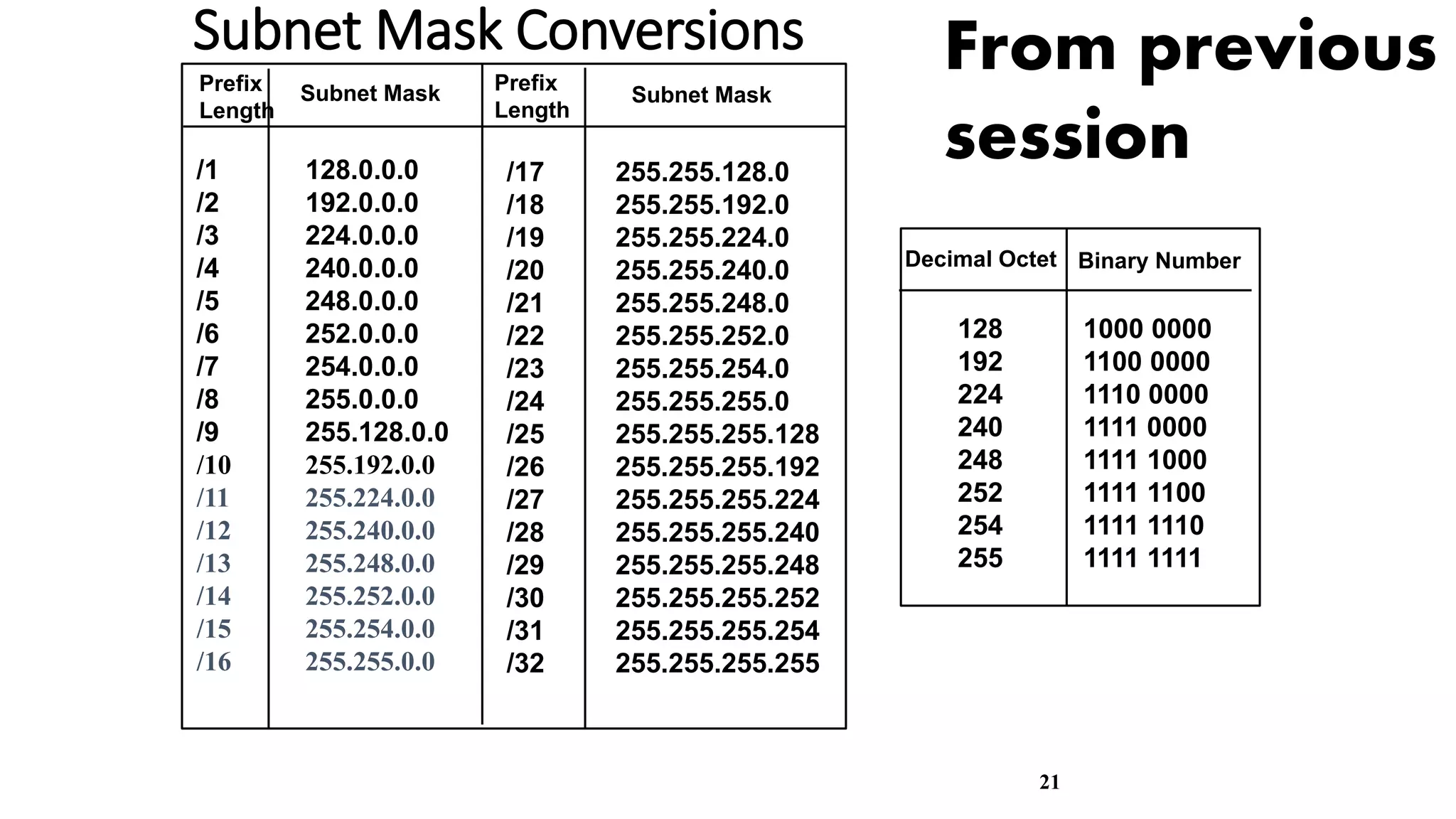
Subnet Mask Conversions
/1 128.0.0.0
/2 192.0.0.0
/3 224.0.0.0
/4 240.0.0.0
/5 248.0.0.0
/6 252.0.0.0
/7 254.0.0.0
/8 255.0.0.0
/9 255.128.0.0
/10 255.192.0.0
/11 255.224.0.0
/12 255.240.0.0
/13 255.248.0.0
/14 255.252.0.0
/15 255.254.0.0
/16 255.255.0.0
/17 255.255.128.0
/18 255.255.192.0
/19 255.255.224.0
/20 255.255.240.0
/21 255.255.248.0
/22 255.255.252.0
/23 255.255.254.0
/24 255.255.255.0
/25 255.255.255.128
/26 255.255.255.192
/27 255.255.255.224
/28 255.255.255.240
/29 255.255.255.248
/30 255.255.255.252
/31 255.255.255.254
/32 255.255.255.255
Prefix
Length
Subnet Mask Prefix
Length
Subnet Mask
128 1000 0000
192 1100 0000
224 1110 0000
240 1111 0000
248 1111 1000
252 1111 1100
254 1111 1110
255 1111 1111
Decimal Octet Binary Number
From previous
session
22
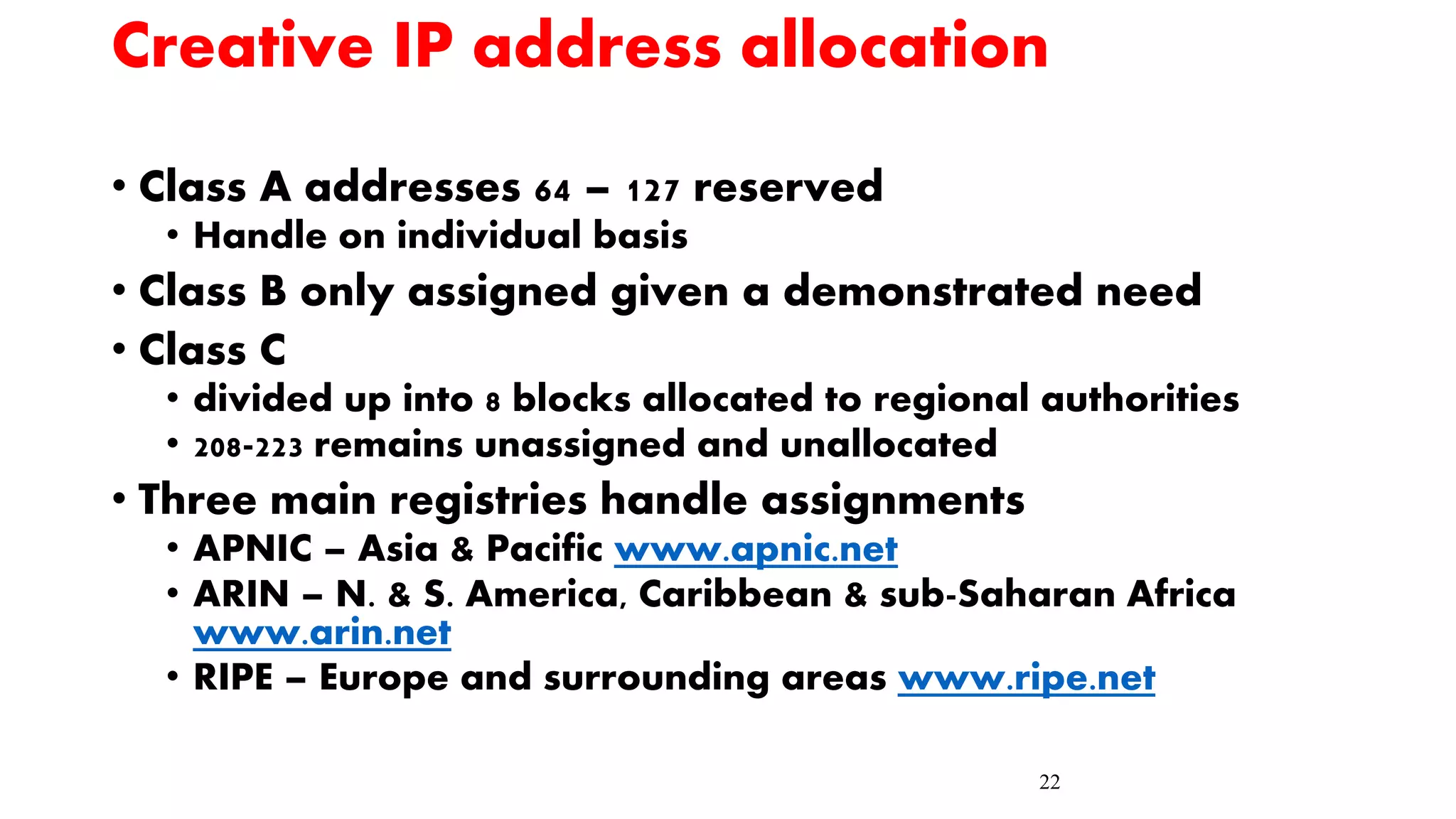
Creative IP address allocation
• Class A addresses 64 – 127 reserved
• Handle on individual basis
• Class B only assigned given a demonstrated need
• Class C
• divided up into 8 blocks allocated to regional authorities
• 208-223 remains unassigned and unallocated
• Three main registries handle assignments
• APNIC – Asia & Pacific www.apnic.net
• ARIN – N. & S. America, Caribbean & sub-Saharan Africa
www.arin.net
• RIPE – Europe and surrounding areas www.ripe.net
Essential Questions:
What are the
transmission types?
FDDI 24
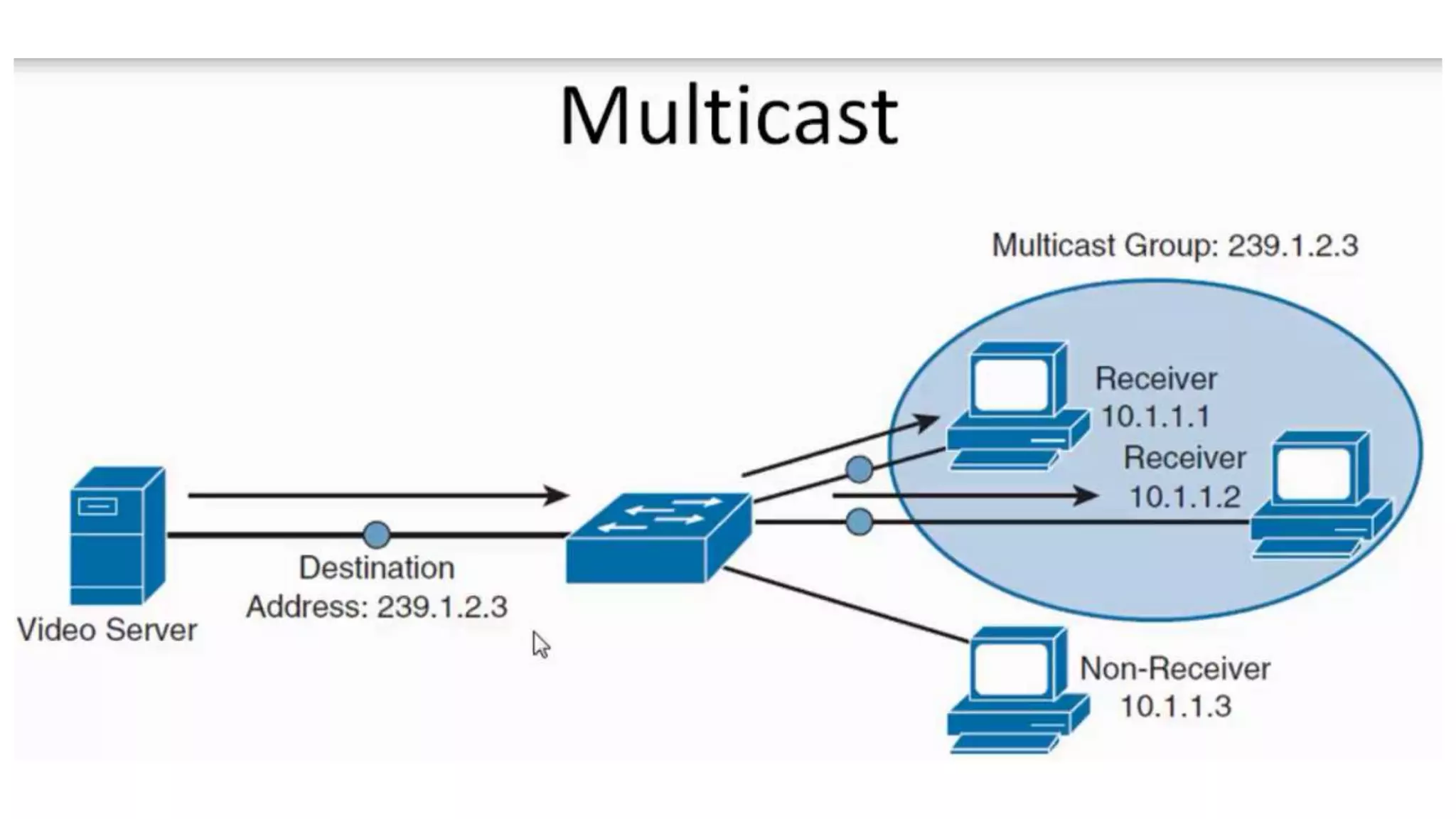
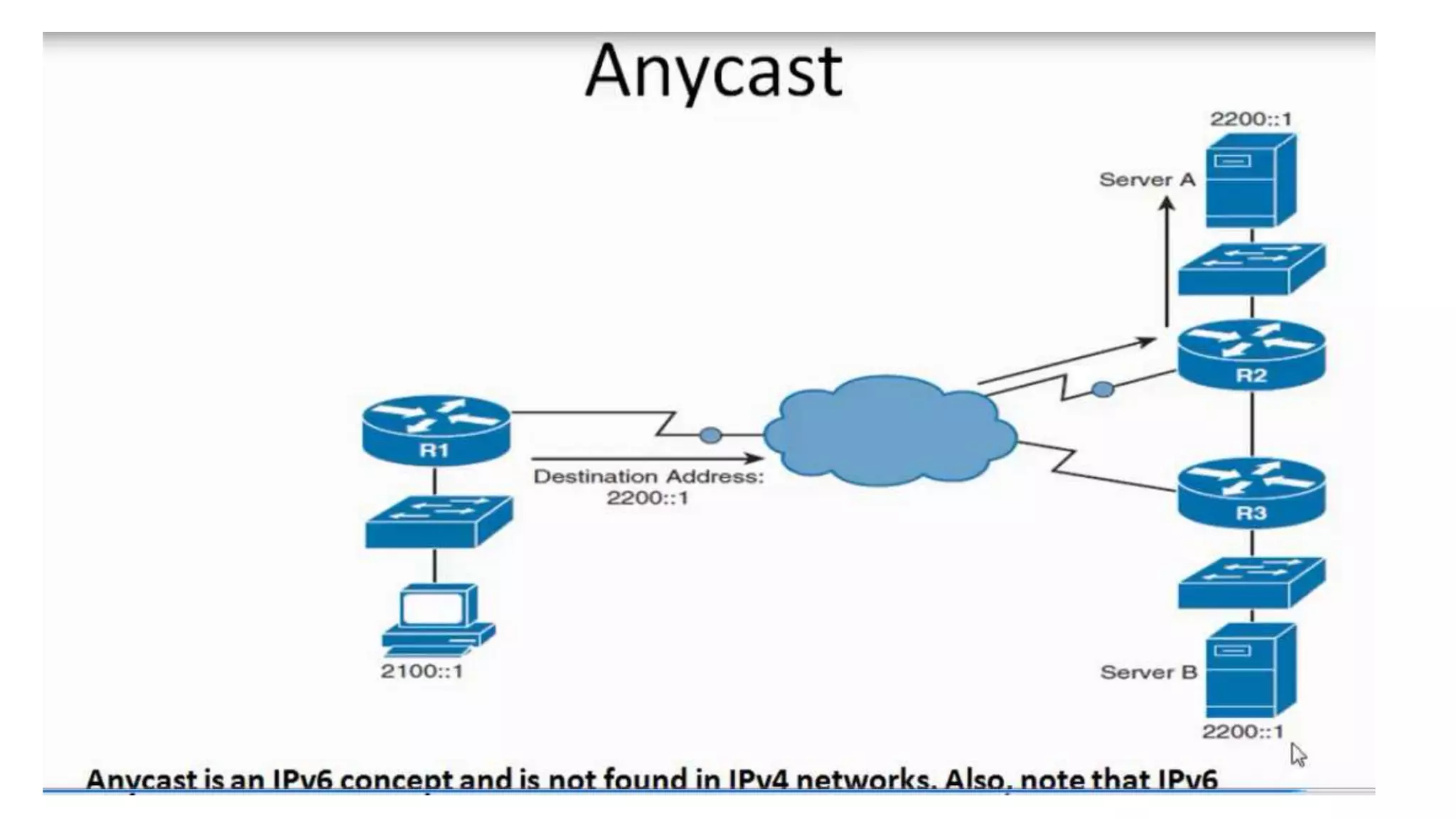
Activity 5 5 min
listen to an animated video about
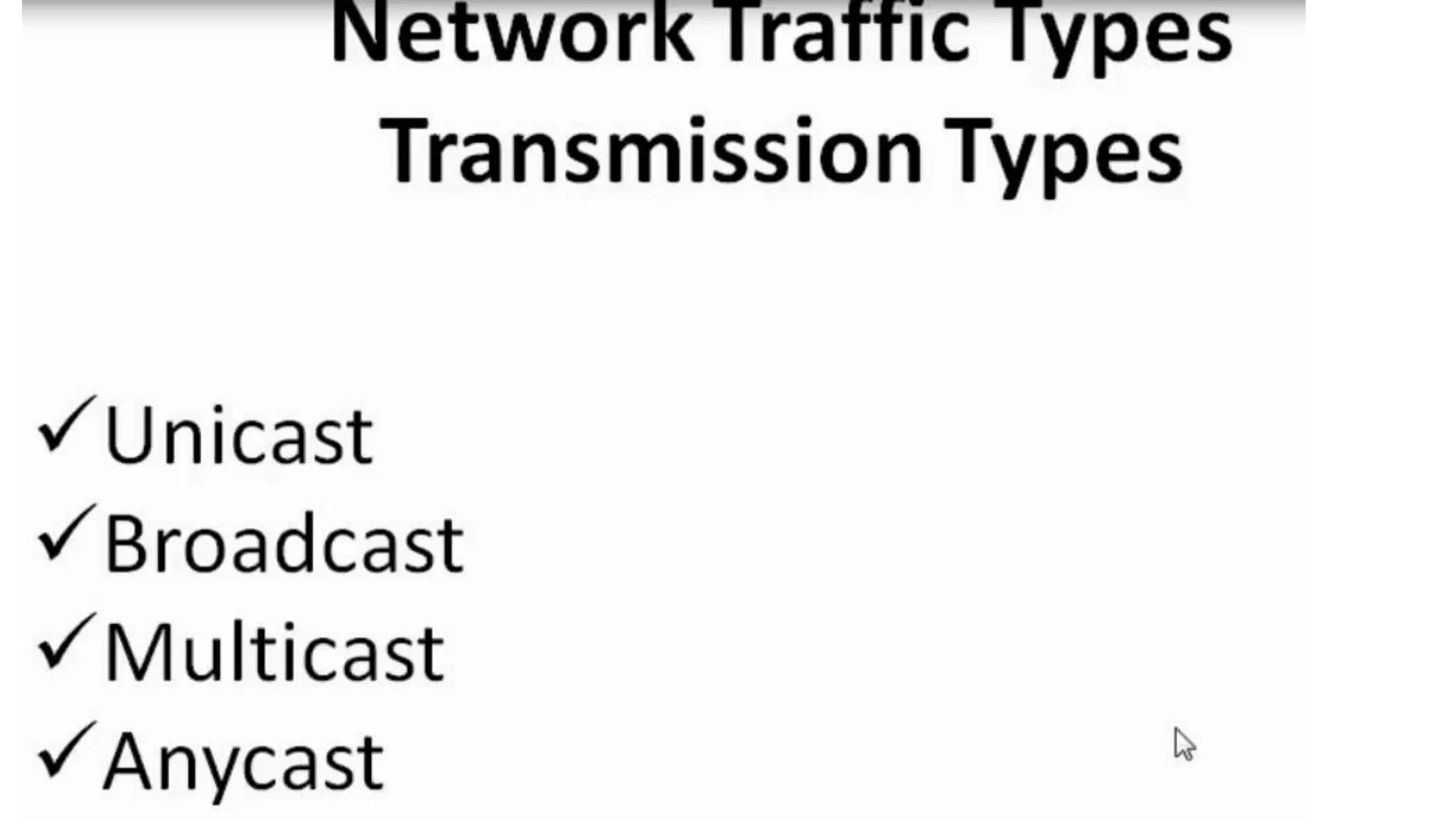
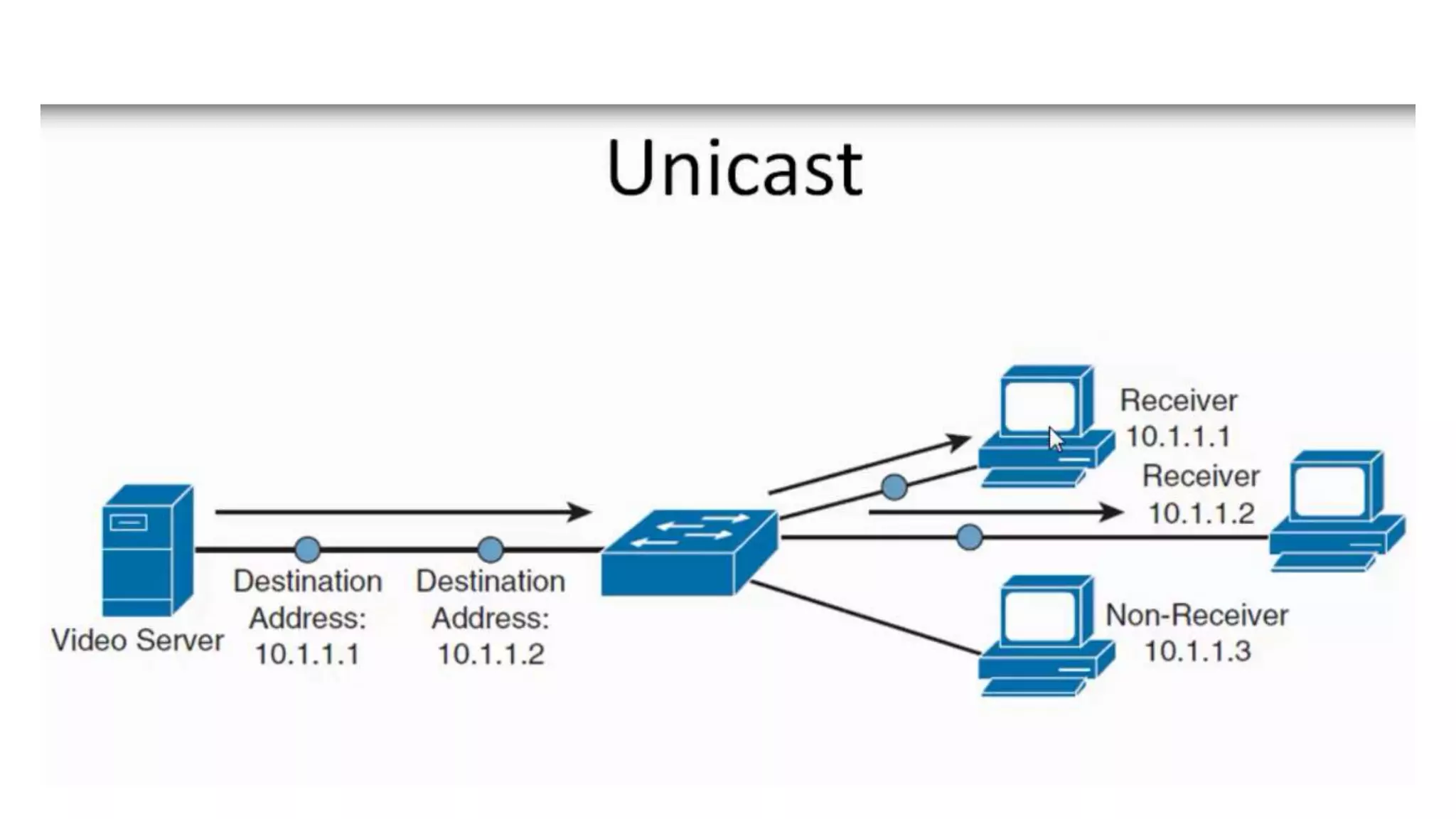
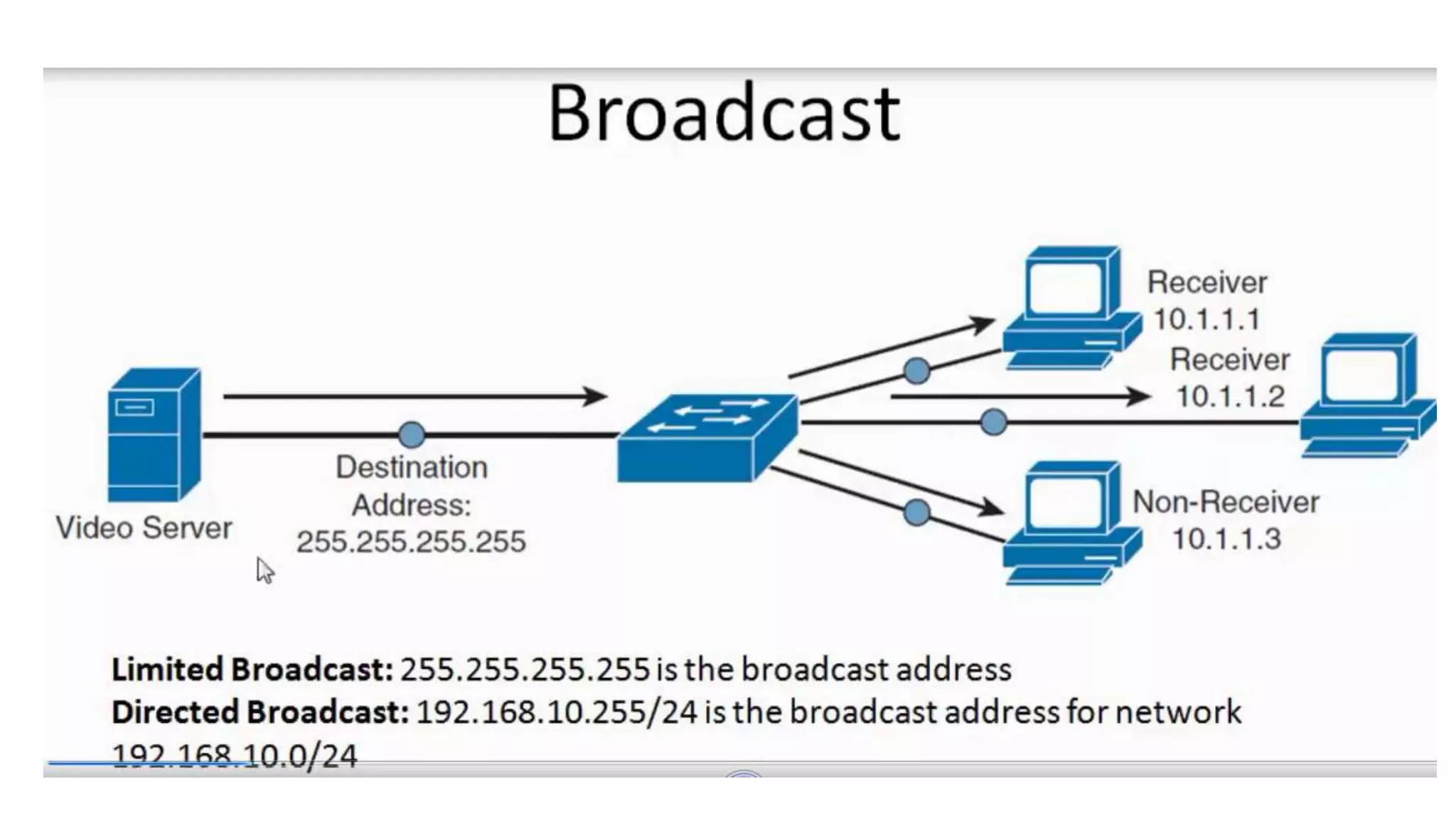
Unicast , Multicast Broadcast ,
Anycast- Traffic Types _
Transmission Types
Press here
for on line
Press here
for off line
OR
30
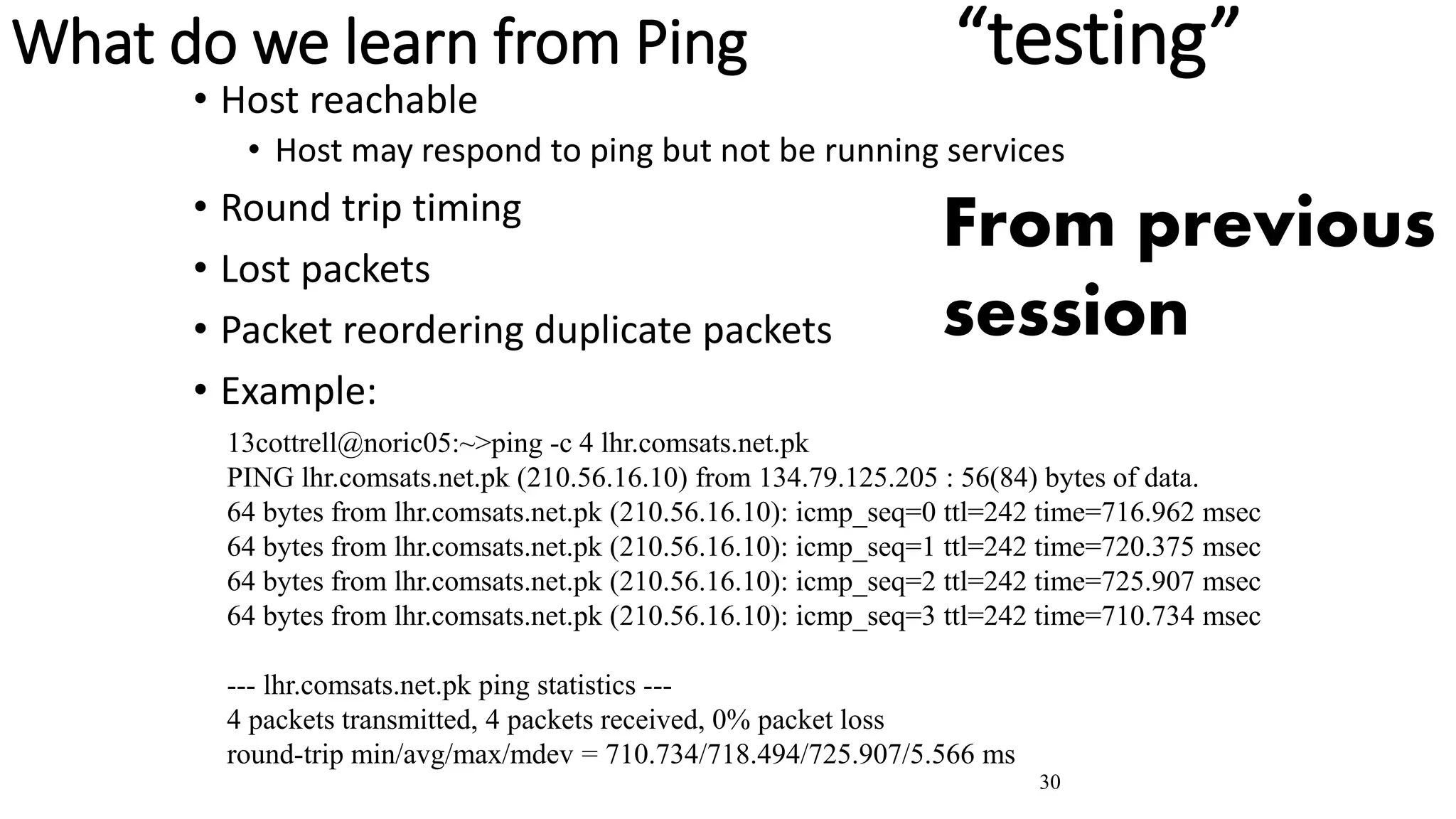
What do we learn from Ping “testing”
• Host reachable
• Host may respond to ping but not be running services
• Round trip timing
• Lost packets
• Packet reordering duplicate packets
• Example:
13cottrell@noric05:~>ping -c 4 lhr.comsats.net.pk
PING lhr.comsats.net.pk (210.56.16.10) from 134.79.125.205 : 56(84) bytes of data.
64 bytes from lhr.comsats.net.pk (210.56.16.10): icmp_seq=0 ttl=242 time=716.962 msec
64 bytes from lhr.comsats.net.pk (210.56.16.10): icmp_seq=1 ttl=242 time=720.375 msec
64 bytes from lhr.comsats.net.pk (210.56.16.10): icmp_seq=2 ttl=242 time=725.907 msec
64 bytes from lhr.comsats.net.pk (210.56.16.10): icmp_seq=3 ttl=242 time=710.734 msec
--- lhr.comsats.net.pk ping statistics ---
4 packets transmitted, 4 packets received, 0% packet loss
round-trip min/avg/max/mdev = 710.734/718.494/725.907/5.566 ms
From previous
session
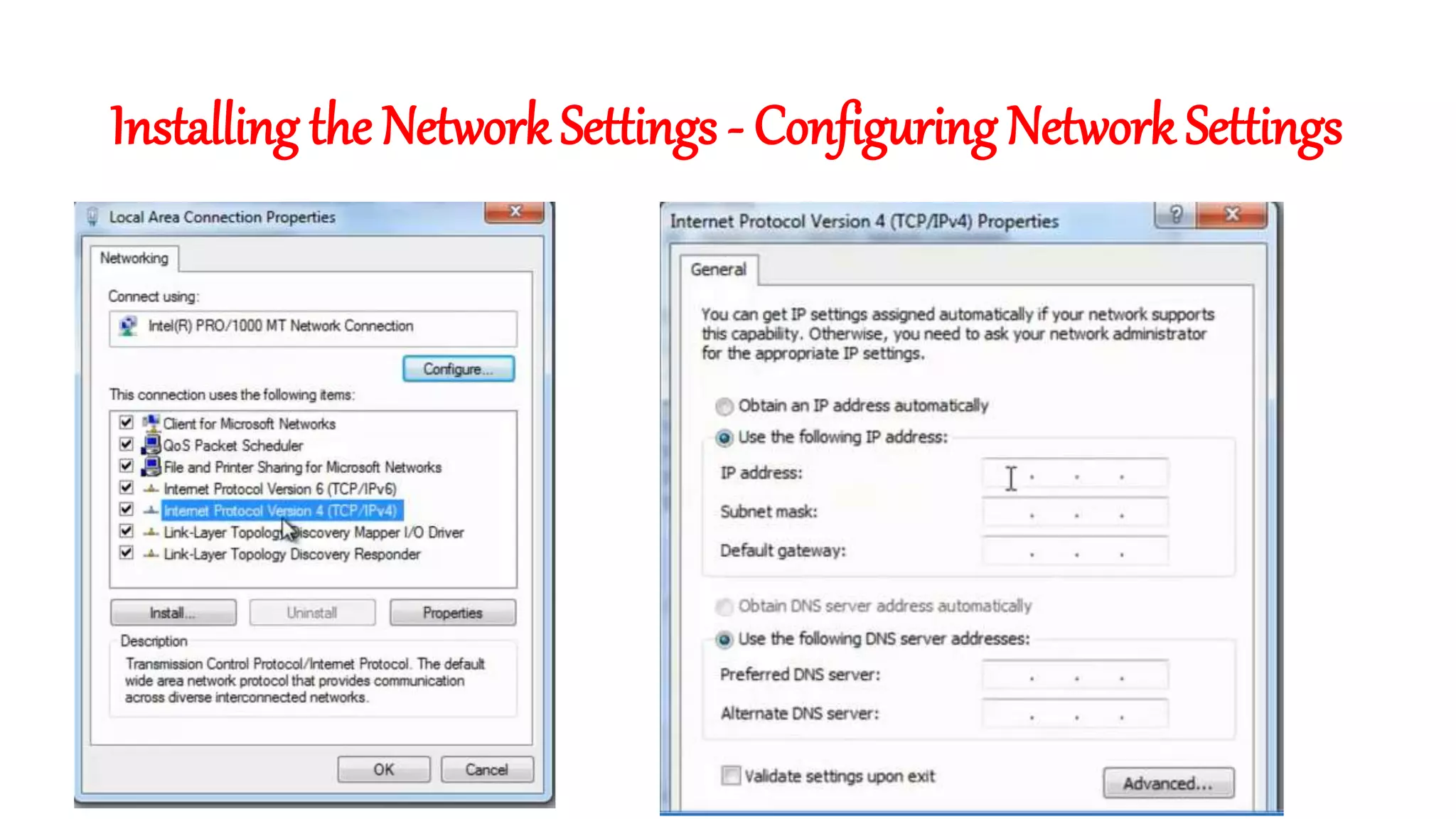
Installing the Network Settings - Configuring Network Settings
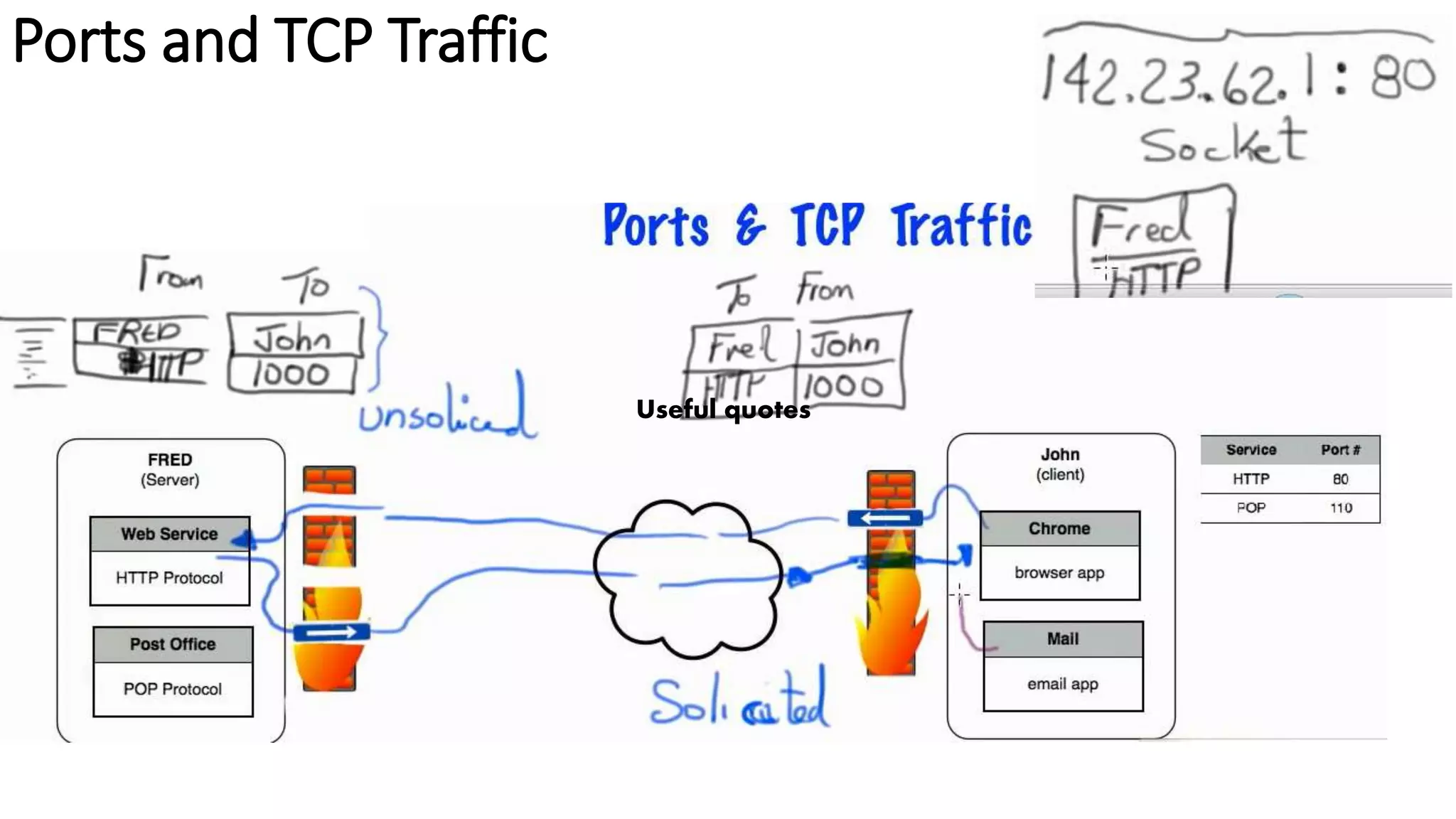
Ports and TCP Traffic
Useful quotes
33
More Information
• Lectures, tutorials etc:
• www.nv.cc.va.us/home/joney/tcp_ip.htm
• www.cs.pdx.edu/~jrb/tcpip.lectures.html
• www.raleigh.ibm.com/cgi-bin/bookmgr/BOOKS/EZ306200/CCONTENTS
• www.cisco.com/univercd/cc/td/doc/product/iaabu/centri4/user/scf4ap1.htm
• www.cis.ohio-state.edu/htbin/rfc/rfc1180.html
• www.jbmelectronics.com/tcp.htm
• Encylopaedia
• http://www.freesoft.org/CIE/index.htm
• TCP/IP Resources
• www.private.org.il/tcpip_rl.html
• Understanding IP addresses
• http://www.3com.com/solutions/en_US/ncs/501302.html
• Configuring TCP (RFC 1122)
• ftp://nic.merit.edu/internet/documents/rfc/rfc1122.txt
• Assigned protocols, ports etc (RFC 1010)
• http://www.es.net/pub/rfcs/rfc1010.txt & /etc/protocols
Useful quotes
“The day which
breaks me is the
day which makes
me”
Packet tracer , Download it , Install it
, use it by designing network.
Then be a clever network admin.
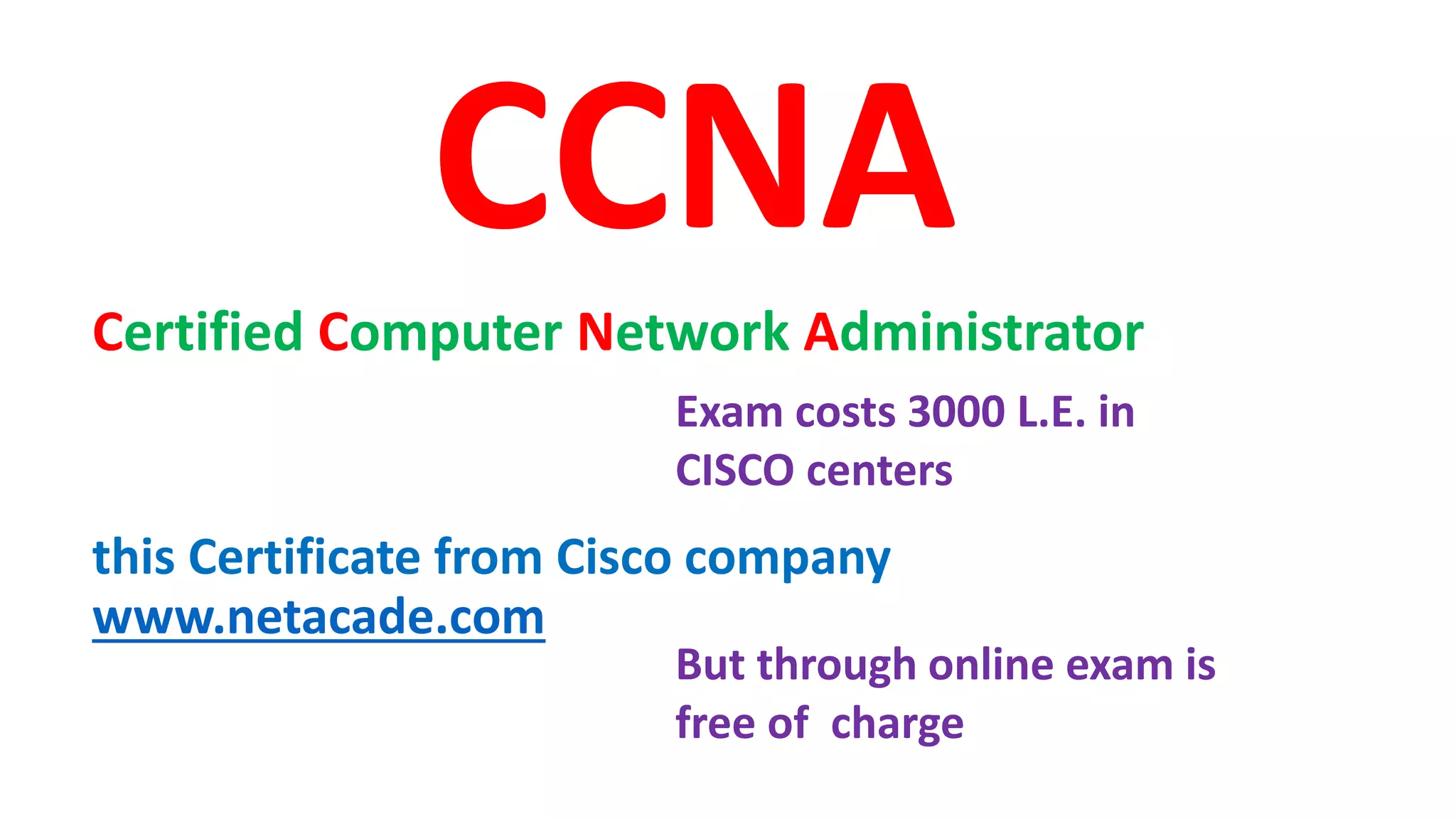
CCNA
Certified Computer Network Administrator
this Certificate from Cisco company
www.netacade.com
Exam costs 3000 L.E. in
CISCO centers
But through online exam is
free of charge
Thank you
Mr. Osama Ghandour
https://twitter.com/osamageris
https://www.linkedin.com/in/osamaghandour/
https://www.youtube.com/user/osmgg2
https://www.facebook.com/osama.g.geris
Home work : Design
/implement for a LAN network
in a factory select the topology
which you will use and list the
configuration of hosts, IP
addresses , network sub
netmask IP and broadband IP

2020 2ed tcp

  • 2.
    Be prepared fora Quiz at the beginning of every session
  • 3.
    Week 10 -Agenda • 5 min Warm up with a game • 5 min Introduction teacher demonstrate revision and essential question • 5 min Activity 3 – video 5 min 10 min Activity 4 – teacher demonstrate • 5 min Activity 5 video 5 min • 10 min Activity 6 - teacher demonstrate • 5 min Activity 7– teacher demonstrate revision • 25 min activity 6 - on line quiz and registration in netacad.com • 5 min Reflection • 5 min Home work
  • 5.
  • 6.
  • 7.
  • 8.
  • 9.
    Network Expansion Devices Repeater-Hub - Bridge - Router - Gateway From previous session
  • 10.
    10 Internet Addressing •IP addressis a 32 bit integer •Refers to interface rather than host •Consists of network and host portions • Enables routers to keep 1 entry/network instead of 1/host •Class A, B, C for unicast •Class D for multicast •Class E reserved •Classless addresses •Written as 4 octets/bytes in decimal format •E.g. 134.79.16.1, 127.0.0.1 From previous session
  • 11.
    Essential Questions: What isthe IP Addressing?
  • 12.
    FDDI 12 Activity 35 min listen to an animated video Understanding an IP Address Press here for on line Press here for off line OR
  • 19.
    19 Internet Class-based addresses •Class A: large number of hosts, few networks • 0nnnnnnn hhhhhhhh hhhhhhhh hhhhhhhh • 7 network bits (0 and 127 reserved, so 126 networks), 24 host bits (> 16M hosts/net) • Initial byte 1-127 (decimal) • Class B: medium number of hosts and networks • 10nnnnnn nnnnnnnn hhhhhhhh hhhhhhhh • 16,384 class B networks, 65,534 hosts/network • Initial byte 128-191 (decimal) • Class C: large number of small networks • 110nnnnn nnnnnnnn nnnnnnnn hhhhhhhh • 2,097,152 networks, 254 hosts/network • Initial byte 192-223 (decimal) • Class D: 224-239 (decimal) Multicast [RFC1112] • Class E: 240-255 (decimal) Reserved From previous session
  • 20.
    20 Subnets •A subnet maskis applied to the host bits to determine how the network is subnetted, e.g. if the host is: 137.138.28.228, and the subnet mask is 255.255.255.0 then the right hand 8 bits are for the host (255 is decimal for all bits set in an octet) •Host addresses of all bits set or no bits set, indicate a broadcast, i.e. the packet is sent to all hosts.
  • 21.
    21 Subnet Mask Conversions /1128.0.0.0 /2 192.0.0.0 /3 224.0.0.0 /4 240.0.0.0 /5 248.0.0.0 /6 252.0.0.0 /7 254.0.0.0 /8 255.0.0.0 /9 255.128.0.0 /10 255.192.0.0 /11 255.224.0.0 /12 255.240.0.0 /13 255.248.0.0 /14 255.252.0.0 /15 255.254.0.0 /16 255.255.0.0 /17 255.255.128.0 /18 255.255.192.0 /19 255.255.224.0 /20 255.255.240.0 /21 255.255.248.0 /22 255.255.252.0 /23 255.255.254.0 /24 255.255.255.0 /25 255.255.255.128 /26 255.255.255.192 /27 255.255.255.224 /28 255.255.255.240 /29 255.255.255.248 /30 255.255.255.252 /31 255.255.255.254 /32 255.255.255.255 Prefix Length Subnet Mask Prefix Length Subnet Mask 128 1000 0000 192 1100 0000 224 1110 0000 240 1111 0000 248 1111 1000 252 1111 1100 254 1111 1110 255 1111 1111 Decimal Octet Binary Number From previous session
  • 22.
    22 Creative IP addressallocation • Class A addresses 64 – 127 reserved • Handle on individual basis • Class B only assigned given a demonstrated need • Class C • divided up into 8 blocks allocated to regional authorities • 208-223 remains unassigned and unallocated • Three main registries handle assignments • APNIC – Asia & Pacific www.apnic.net • ARIN – N. & S. America, Caribbean & sub-Saharan Africa www.arin.net • RIPE – Europe and surrounding areas www.ripe.net
  • 23.
    Essential Questions: What arethe transmission types?
  • 24.
    FDDI 24 Activity 55 min listen to an animated video about Unicast , Multicast Broadcast , Anycast- Traffic Types _ Transmission Types Press here for on line Press here for off line OR
  • 30.
    30 What do welearn from Ping “testing” • Host reachable • Host may respond to ping but not be running services • Round trip timing • Lost packets • Packet reordering duplicate packets • Example: 13cottrell@noric05:~>ping -c 4 lhr.comsats.net.pk PING lhr.comsats.net.pk (210.56.16.10) from 134.79.125.205 : 56(84) bytes of data. 64 bytes from lhr.comsats.net.pk (210.56.16.10): icmp_seq=0 ttl=242 time=716.962 msec 64 bytes from lhr.comsats.net.pk (210.56.16.10): icmp_seq=1 ttl=242 time=720.375 msec 64 bytes from lhr.comsats.net.pk (210.56.16.10): icmp_seq=2 ttl=242 time=725.907 msec 64 bytes from lhr.comsats.net.pk (210.56.16.10): icmp_seq=3 ttl=242 time=710.734 msec --- lhr.comsats.net.pk ping statistics --- 4 packets transmitted, 4 packets received, 0% packet loss round-trip min/avg/max/mdev = 710.734/718.494/725.907/5.566 ms From previous session
  • 31.
    Installing the NetworkSettings - Configuring Network Settings
  • 32.
    Ports and TCPTraffic Useful quotes
  • 33.
    33 More Information • Lectures,tutorials etc: • www.nv.cc.va.us/home/joney/tcp_ip.htm • www.cs.pdx.edu/~jrb/tcpip.lectures.html • www.raleigh.ibm.com/cgi-bin/bookmgr/BOOKS/EZ306200/CCONTENTS • www.cisco.com/univercd/cc/td/doc/product/iaabu/centri4/user/scf4ap1.htm • www.cis.ohio-state.edu/htbin/rfc/rfc1180.html • www.jbmelectronics.com/tcp.htm • Encylopaedia • http://www.freesoft.org/CIE/index.htm • TCP/IP Resources • www.private.org.il/tcpip_rl.html • Understanding IP addresses • http://www.3com.com/solutions/en_US/ncs/501302.html • Configuring TCP (RFC 1122) • ftp://nic.merit.edu/internet/documents/rfc/rfc1122.txt • Assigned protocols, ports etc (RFC 1010) • http://www.es.net/pub/rfcs/rfc1010.txt & /etc/protocols
  • 34.
    Useful quotes “The daywhich breaks me is the day which makes me”
  • 35.
    Packet tracer ,Download it , Install it , use it by designing network. Then be a clever network admin.
  • 36.
    CCNA Certified Computer NetworkAdministrator this Certificate from Cisco company www.netacade.com Exam costs 3000 L.E. in CISCO centers But through online exam is free of charge
  • 38.
  • 39.
  • 40.
    Home work :Design /implement for a LAN network in a factory select the topology which you will use and list the configuration of hosts, IP addresses , network sub netmask IP and broadband IP