네트워크가 안되요 ㅠㅠ
이어형
주제
• 인간적으로 왜 내 네트워크는 안되는 것일까..

(전생에 죄를 너무 지었나..)
• 어디서부터 잘못된건지 모르겠다..
• 우선 이게 잘못되긴 한건가?
목표
•어디에서 안되요라고 말할 수 있자

(어떻게 고치냐는 그 다음 문제로..)
이것만 이해해 보자
http://docs.openstack.org/havana/config-reference/content/under_the_hood_openvswitch.html
config
$ cat /etc/nova/nova-compute.conf
[DEFAULT]
libvirt_ovs_bridge=br-int
libvirt_vif_type=ethernet
libvirt_vif_driver=nova.virt.libvirt.vif.LibvirtHybridOVSBridgeDriver
libvirt_use_virtio_for_bridges=True
...
!
$ cat /etc/nova/nova.conf
[DEFAULT]
network_api_class=nova.network.neutronv2.api.API
linuxnet_interface_driver=nova.network.linux_net.LinuxOVSInterfaceDriver
libvirt_vif_driver=nova.virt.libvirt.vif.LibvirtHybridOVSBridgeDriver
...
!
$ cat /etc/neutron/neutron.conf
[DEFAULT]
core_plugin = neutron.plugins.openvswitch.ovs_neutron_plugin.OVSNeutronPluginV2
...
!
$ cat /etc/neutron/plugins/openvswitch/ovs_neutron_plugin.ini
[ovs]
tenant_network_type = vlan
network_vlan_ranges = default:1000:2999
enable_tunneling = False
integration_bridge = br-int
bridge_mappings = default:br-eth1
...
TAP(Test Access Point)
device
TAP(Test Access Point)
device
• A TAP device, such as vnet0 is how hypervisors
such as KVM and Xen implement a virtual network
interface card.
• An ethernet frame sent to a TAP device is received
by the guest operating system.
vm: $ ip a
2: eth0: …
link/ether fa:16:3e:49:94:00 brd ff:ff:ff:ff:ff:ff
inet 10.10.100.6/24 brd 10.10.100.255 scope global eth0
inet6 fe80::f816:3eff:fe49:9400/64 scope link
!
compute-node:$ ip a
22: tapbb4782e2-d1(vnet0): …
link/ether fe:16:3e:49:94:00 brd ff:ff:ff:ff:ff:ff
inet6 fe80::fc16:3eff:fe49:9400/64 scope link
!
fa:16:3e:49:94:00
fe:16:3e:49:94:00
$ cat /etc/libvirt/qemu/instance-00000002.xml
<domain type='kvm'>
<devices>
<interface type='bridge'>
<mac address='fa:16:3e:49:94:00'/>
<source bridge='qbrbb4782e2-d1'/>
<target dev='tapbb4782e2-d1'/>
…
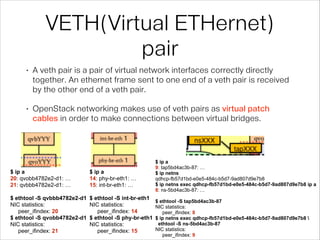
VETH(Virtual ETHernet)
pair
VETH(Virtual ETHernet)
pair
• A veth pair is a pair of virtual network interfaces correctly directly
together. An ethernet frame sent to one end of a veth pair is received
by the other end of a veth pair.
• OpenStack networking makes use of veth pairs as virtual patch
cables in order to make connections between virtual bridges.
$ ip a
20: qvobb4782e2-d1: …
21: qvbbb4782e2-d1: …
!
$ ethtool -S qvbbb4782e2-d1
NIC statistics:
peer_ifindex: 20
$ ethtool -S qvobb4782e2-d1
NIC statistics:
peer_ifindex: 21
$ ip a
14: phy-br-eth1: …
15: int-br-eth1: …
!
$ ethtool -S int-br-eth1
NIC statistics:
peer_ifindex: 14
$ ethtool -S phy-br-eth1
NIC statistics:
peer_ifindex: 15
$ ip a
9: tap5bd4ac3b-87: …
$ ip netns
qdhcp-fb57d1bd-e0e5-484c-b5d7-9ad807d9e7b8
$ ip netns exec qdhcp-fb57d1bd-e0e5-484c-b5d7-9ad807d9e7b8 ip a
8: ns-5bd4ac3b-87: …
!
$ ethtool -S tap5bd4ac3b-87
NIC statistics:
peer_ifindex: 8
$ ip netns exec qdhcp-fb57d1bd-e0e5-484c-b5d7-9ad807d9e7b8 
ethtool -S ns-5bd4ac3b-87
NIC statistics:
peer_ifindex: 9
Linux bridge
Linux bridge
• A Linux bridge behaves like a hub: you can connect multiple (physical or
virtual) network interfaces devices to a Linux bridge.
• Any ethernet frames that come in from one interface attached to the
bridge is transmitted to all of the other devices.
$ brctl show
bridge name bridge id … interfaces
qbrbb4782e2-d1 8000.3a7ef7e39d98 … qvbbb4782e2-d1
tapbb4782e2-d1(vnet0)
$ ip a
19: qbrbb4782e2-d1: …
link/ether 3a:7e:f7:e3:9d:98 brd ff:ff:ff:ff:ff:ff
inet6 fe80::d8e3:16ff:fef5:f854/64 scope link
$ cat /etc/libvirt/qemu/instance-00000002.xml
<domain type='kvm'>
<devices>
<interface type='bridge'>
<mac address='fa:16:3e:49:94:00'/>
<source bridge='qbrbb4782e2-d1'/>
<target dev='tapbb4782e2-d1'/>
…
Open vSwitch
Open vSwitch
• An Open vSwitch bridge behaves like a virtual switch: network interface devices
connect to Open vSwitch bridge's ports, and the ports can be configured much
like a physical switch's ports, including VLAN configurations.
$ ovs-vsctl show
Bridge "br-eth1"
Port "br-eth1"
Interface "br-eth1"
type: internal
Port "eth1"
Interface "eth1"
Port "phy-br-eth1"
Interface "phy-br-eth1"
Bridge br-int
Port "tapad3cdca6-b4"
tag: 1
Interface "tapad3cdca6-b4"
Port "qvobb4782e2-d1"
tag: 1
Interface "qvobb4782e2-d1"
Port br-int
Interface br-int
type: internal
Port "int-br-eth1"
Interface "int-br-eth1"
Open vSwitch 

vlan tag
$ ovs-vsctl show
Bridge "br-eth1"
Port "br-eth1"
Interface "br-eth1"
type: internal
Port "eth1"
Interface "eth1"
Port "phy-br-eth1"
Interface "phy-br-eth1"
Bridge br-int
Port "tapad3cdca6-b4"
tag: 1
Interface "tapad3cdca6-b4"
Port "qvobb4782e2-d1"
tag: 1
Interface "qvobb4782e2-d1"
Port br-int
Interface br-int
type: internal
Port "int-br-eth1"
Interface "int-br-eth1"
• vlan tag

해당 bridge에서 port를 지날때: 

- tag 1이 적힌 packet은 tag를 제거하고 통과시킴

해당 port에서 bridge를 지날때:

- packet에 tag 1을 적음
Open vSwitch 

vlan tag(cont.)
listening on int-br-eth1, link-type EN10MB (Ethernet), capture size 65535 bytes
22:47:12.522128 8a:63:60:38:ee:ab (oui Unknown) > fa:16:3e:49:94:00 (oui Unknown), ethertype 802.1Q (0x8100), length 366:
vlan 1000, p 0, ethertype IPv4, 10.10.100.1.bootps > 10.10.100.6.bootpc: BOOTP/DHCP, Reply, length 320
!
listening on qvobb4782e2-d1, link-type EN10MB (Ethernet), capture size 65535 bytes
22:47:12.522145 8a:63:60:38:ee:ab (oui Unknown) > fa:16:3e:49:94:00 (oui Unknown), ethertype IPv4 (0x0800), length 362:
10.10.100.1.bootps > 10.10.100.6.bootpc: BOOTP/DHCP, Reply, length 320
listening on qvobb4782e2-d1, link-type EN10MB (Ethernet), capture size 65535 bytes
22:47:12.520237 fa:16:3e:49:94:00 (oui Unknown) > Broadcast, ethertype IPv4 (0x0800), length 322: 0.0.0.0.bootpc >
255.255.255.255.bootps: BOOTP/DHCP, Request from fa:16:3e:49:94:00 (oui Unknown), length 280
!
listening on int-br-eth1, link-type EN10MB (Ethernet), capture size 65535 bytes
22:47:12.520416 fa:16:3e:49:94:00 (oui Unknown) > Broadcast, ethertype 802.1Q (0x8100), length 326: vlan 1, p 0, ethertype IPv4,
0.0.0.0.bootpc > 255.255.255.255.bootps: BOOTP/DHCP, Request from fa:16:3e:49:94:00 (oui Unknown), length 280
1이 아니라???(이유는 다음페이지에)
Open vSwitch 

openflow
$ ovs-ofctl dump-flows br-int
cookie=0x0, duration=16341.203s, table=0, n_packets=565,
n_bytes=49002, idle_age=25, priority=3,in_port=6,dl_vlan=1000
actions=mod_vlan_vid:1,NORMAL
!
$ ovs-ofctl show br-int
4(tapad3cdca6-b4): addr:b6:d6:c3:21:d6:8b
5(qvobb4782e2-d1): addr:96:08:78:a7:6e:c3
6(int-br-eth1): addr:86:c3:4d:be:3c:28
LOCAL(br-int): addr:8a:07:eb:db:29:43
$ ovs-ofctl dump-flows br-eth1
cookie=0x0, duration=16383.978s, table=0, n_packets=304,
n_bytes=28968, idle_age=63, priority=4,in_port=5,dl_vlan=1
actions=mod_vlan_vid:1000,NORMAL
!
$ ovs-ofctl show br-eth1
1(eth1): addr:52:54:00:a9:77:da
5(phy-br-eth1): addr:a6:34:72:93:db:47
LOCAL(br-eth1): addr:d2:34:ce:41:5f:42
Open vSwitch 

openflow(cont.)
listening on int-br-eth1, link-type EN10MB (Ethernet), capture size 65535 bytes
22:47:12.532608 fa:16:3e:49:94:00 (oui Unknown) > Broadcast, ethertype 802.1Q (0x8100), length 338: vlan 1, p 0, ethertype
IPv4, 0.0.0.0.bootpc > 255.255.255.255.bootps: BOOTP/DHCP, Request from fa:16:3e:49:94:00 (oui Unknown), length 292
!
listening on phy-br-eth1, link-type EN10MB (Ethernet), capture size 65535 bytes
22:47:12.532610 fa:16:3e:49:94:00 (oui Unknown) > Broadcast, ethertype 802.1Q (0x8100), length 338: vlan 1, p 0, ethertype
IPv4, 0.0.0.0.bootpc > 255.255.255.255.bootps: BOOTP/DHCP, Request from fa:16:3e:49:94:00 (oui Unknown), length 292
!
listening on eth1, link-type EN10MB (Ethernet), capture size 65535 bytes
22:47:12.532618 fa:16:3e:49:94:00 (oui Unknown) > Broadcast, ethertype 802.1Q (0x8100), length 338: vlan 1000, p 0, ethertype
IPv4, 0.0.0.0.bootpc > 255.255.255.255.bootps: BOOTP/DHCP, Request from fa:16:3e:49:94:00 (oui Unknown), length 292
listening on phy-br-eth1, link-type EN10MB (Ethernet), capture size 65535 bytes
22:47:12.533273 8a:63:60:38:ee:ab (oui Unknown) > fa:16:3e:49:94:00 (oui Unknown), ethertype 802.1Q (0x8100), length 366: vlan
1000, p 0, ethertype IPv4, 10.10.100.1.bootps > 10.10.100.6.bootpc: BOOTP/DHCP, Reply, length 320
!
listening on int-br-eth1, link-type EN10MB (Ethernet), capture size 65535 bytes
22:47:12.533276 8a:63:60:38:ee:ab (oui Unknown) > fa:16:3e:49:94:00 (oui Unknown), ethertype 802.1Q (0x8100), length 366: vlan
1000, p 0, ethertype IPv4, 10.10.100.1.bootps > 10.10.100.6.bootpc: BOOTP/DHCP, Reply, length 320
!
listening on qvobb4782e2-d1, link-type EN10MB (Ethernet), capture size 65535 bytes
22:47:12.533278 8a:63:60:38:ee:ab (oui Unknown) > fa:16:3e:49:94:00 (oui Unknown), ethertype IPv4 (0x0800), length 362:
10.10.100.1.bootps > 10.10.100.6.bootpc: BOOTP/DHCP, Reply, length 320
int-br-eth1를 지나면서 vlan1000 -> vlan 1
br-int에서 qvobb4782e2-d1 vlan1 -> 제거
vm 안에서 DHCP query 시 

예제
listening on tapbb4782e2-d1, link-type EN10MB (Ethernet), capture size 65535 bytes
22:47:12.520196 fa:16:3e:49:94:00 (oui Unknown) > Broadcast, ethertype IPv4 (0x0800), length 322: 0.0.0.0.bootpc > 255.255.255.255.bootps: BOOTP/DHCP,
Request from fa:16:3e:49:94:00 (oui Unknown), length 280
22:47:12.522162 8a:63:60:38:ee:ab (oui Unknown) > fa:16:3e:49:94:00 (oui Unknown), ethertype IPv4 (0x0800), length 362: 10.10.100.1.bootps >
10.10.100.6.bootpc: BOOTP/DHCP, Reply, length 320
22:47:12.532570 fa:16:3e:49:94:00 (oui Unknown) > Broadcast, ethertype IPv4 (0x0800), length 334: 0.0.0.0.bootpc > 255.255.255.255.bootps: BOOTP/DHCP,
Request from fa:16:3e:49:94:00 (oui Unknown), length 292
22:47:12.533296 8a:63:60:38:ee:ab (oui Unknown) > fa:16:3e:49:94:00 (oui Unknown), ethertype IPv4 (0x0800), length 362: 10.10.100.1.bootps >
10.10.100.6.bootpc: BOOTP/DHCP, Reply, length 320
─────────────────────────────────────────────────────────────────────────────────────────────────────
listening on qbrbb4782e2-d1, link-type EN10MB (Ethernet), capture size 65535 bytes
22:47:12.520196 fa:16:3e:49:94:00 (oui Unknown) > Broadcast, ethertype IPv4 (0x0800), length 322: 0.0.0.0.bootpc > 255.255.255.255.bootps: BOOTP/DHCP,
Request from fa:16:3e:49:94:00 (oui Unknown), length 280
22:47:12.522148 8a:63:60:38:ee:ab (oui Unknown) > fa:16:3e:49:94:00 (oui Unknown), ethertype IPv4 (0x0800), length 362: 10.10.100.1.bootps >
10.10.100.6.bootpc: BOOTP/DHCP, Reply, length 320
22:47:12.532570 fa:16:3e:49:94:00 (oui Unknown) > Broadcast, ethertype IPv4 (0x0800), length 334: 0.0.0.0.bootpc > 255.255.255.255.bootps: BOOTP/DHCP,
Request from fa:16:3e:49:94:00 (oui Unknown), length 292
22:47:12.533279 8a:63:60:38:ee:ab (oui Unknown) > fa:16:3e:49:94:00 (oui Unknown), ethertype IPv4 (0x0800), length 362: 10.10.100.1.bootps >
10.10.100.6.bootpc: BOOTP/DHCP, Reply, length 320
─────────────────────────────────────────────────────────────────────────────────────────────────────
listening on qvbbb4782e2-d1, link-type EN10MB (Ethernet), capture size 65535 bytes
22:47:12.520233 fa:16:3e:49:94:00 (oui Unknown) > Broadcast, ethertype IPv4 (0x0800), length 322: 0.0.0.0.bootpc > 255.255.255.255.bootps: BOOTP/DHCP,
Request from fa:16:3e:49:94:00 (oui Unknown), length 280
22:47:12.522148 8a:63:60:38:ee:ab (oui Unknown) > fa:16:3e:49:94:00 (oui Unknown), ethertype IPv4 (0x0800), length 362: 10.10.100.1.bootps >
10.10.100.6.bootpc: BOOTP/DHCP, Reply, length 320
22:47:12.532592 fa:16:3e:49:94:00 (oui Unknown) > Broadcast, ethertype IPv4 (0x0800), length 334: 0.0.0.0.bootpc > 255.255.255.255.bootps: BOOTP/DHCP,
Request from fa:16:3e:49:94:00 (oui Unknown), length 292
22:47:12.533279 8a:63:60:38:ee:ab (oui Unknown) > fa:16:3e:49:94:00 (oui Unknown), ethertype IPv4 (0x0800), length 362: 10.10.100.1.bootps >
10.10.100.6.bootpc: BOOTP/DHCP, Reply, length 320
vm 안에서 DHCP query 시 

예제 (cont.)
!listening on qvobb4782e2-d1, link-type EN10MB (Ethernet), capture size 65535 bytes
22:47:12.520237 fa:16:3e:49:94:00 (oui Unknown) > Broadcast, ethertype IPv4 (0x0800), length 322: 0.0.0.0.bootpc > 255.255.255.255.bootps: BOOTP/DHCP, Request from fa:16:3e:
49:94:00 (oui Unknown), length 280
22:47:12.522145 8a:63:60:38:ee:ab (oui Unknown) > fa:16:3e:49:94:00 (oui Unknown), ethertype IPv4 (0x0800), length 362: 10.10.100.1.bootps > 10.10.100.6.bootpc: BOOTP/DHCP,
Reply, length 320
22:47:12.532594 fa:16:3e:49:94:00 (oui Unknown) > Broadcast, ethertype IPv4 (0x0800), length 334: 0.0.0.0.bootpc > 255.255.255.255.bootps: BOOTP/DHCP, Request from fa:16:3e:
49:94:00 (oui Unknown), length 292
22:47:12.533278 8a:63:60:38:ee:ab (oui Unknown) > fa:16:3e:49:94:00 (oui Unknown), ethertype IPv4 (0x0800), length 362: 10.10.100.1.bootps > 10.10.100.6.bootpc: BOOTP/DHCP,
Reply, length 320
─────────────────────────────────────────────────────────────────────────────────────────────────────────────────────
listening on int-br-eth1, link-type EN10MB (Ethernet), capture size 65535 bytes
22:47:12.520416 fa:16:3e:49:94:00 (oui Unknown) > Broadcast, ethertype 802.1Q (0x8100), length 326: vlan 1, p 0, ethertype IPv4, 0.0.0.0.bootpc > 255.255.255.255.bootps: BOOTP/
DHCP, Request from fa:16:3e:49:94:00 (oui Unknown), length 280
22:47:12.522128 8a:63:60:38:ee:ab (oui Unknown) > fa:16:3e:49:94:00 (oui Unknown), ethertype 802.1Q (0x8100), length 366: vlan 1000, p 0, ethertype IPv4, 10.10.100.1.bootps >
10.10.100.6.bootpc: BOOTP/DHCP, Reply, length 320
22:47:12.532608 fa:16:3e:49:94:00 (oui Unknown) > Broadcast, ethertype 802.1Q (0x8100), length 338: vlan 1, p 0, ethertype IPv4, 0.0.0.0.bootpc > 255.255.255.255.bootps: BOOTP/
DHCP, Request from fa:16:3e:49:94:00 (oui Unknown), length 292
22:47:12.533276 8a:63:60:38:ee:ab (oui Unknown) > fa:16:3e:49:94:00 (oui Unknown), ethertype 802.1Q (0x8100), length 366: vlan 1000, p 0, ethertype IPv4, 10.10.100.1.bootps >
10.10.100.6.bootpc: BOOTP/DHCP, Reply, length 320
─────────────────────────────────────────────────────────────────────────────────────────────────────────────────────
listening on phy-br-eth1, link-type EN10MB (Ethernet), capture size 65535 bytes
22:47:12.520423 fa:16:3e:49:94:00 (oui Unknown) > Broadcast, ethertype 802.1Q (0x8100), length 326: vlan 1, p 0, ethertype IPv4, 0.0.0.0.bootpc > 255.255.255.255.bootps: BOOTP/
DHCP, Request from fa:16:3e:49:94:00 (oui Unknown), length 280
22:47:12.532610 fa:16:3e:49:94:00 (oui Unknown) > Broadcast, ethertype 802.1Q (0x8100), length 338: vlan 1, p 0, ethertype IPv4, 0.0.0.0.bootpc > 255.255.255.255.bootps: BOOTP/
DHCP, Request from fa:16:3e:49:94:00 (oui Unknown), length 292
22:47:12.533273 8a:63:60:38:ee:ab (oui Unknown) > fa:16:3e:49:94:00 (oui Unknown), ethertype 802.1Q (0x8100), length 366: vlan 1000, p 0, ethertype IPv4, 10.10.100.1.bootps >
10.10.100.6.bootpc: BOOTP/DHCP, Reply, length 320
─────────────────────────────────────────────────────────────────────────────────────────────────────────────────────
listening on eth1, link-type EN10MB (Ethernet), capture size 65535 bytes
22:47:12.520483 fa:16:3e:49:94:00 (oui Unknown) > Broadcast, ethertype 802.1Q (0x8100), length 326: vlan 1000, p 0, ethertype IPv4, 0.0.0.0.bootpc > 255.255.255.255.bootps: BOOTP/
DHCP, Request from fa:16:3e:49:94:00 (oui Unknown), length 280
22:47:12.521992 8a:63:60:38:ee:ab (oui Unknown) > fa:16:3e:49:94:00 (oui Unknown), ethertype 802.1Q (0x8100), length 366: vlan 1000, p 0, ethertype IPv4, 10.10.100.1.bootps >
10.10.100.6.bootpc: BOOTP/DHCP, Reply, length 320
22:47:12.532618 fa:16:3e:49:94:00 (oui Unknown) > Broadcast, ethertype 802.1Q (0x8100), length 338: vlan 1000, p 0, ethertype IPv4, 0.0.0.0.bootpc > 255.255.255.255.bootps: BOOTP/
DHCP, Request from fa:16:3e:49:94:00 (oui Unknown), length 292
22:47:12.533269 8a:63:60:38:ee:ab (oui Unknown) > fa:16:3e:49:94:00 (oui Unknown), ethertype 802.1Q (0x8100), length 366: vlan 1000, p 0, ethertype IPv4, 10.10.100.1.bootps >
10.10.100.6.bootpc: BOOTP/DHCP, Reply, length 320
naming 규칙 - vm
$ ovs-vsctl show
Bridge br-int
Port br-int
Interface br-int
type: internal
Port "tap5bd4ac3b-87"
tag: 1
Interface "tap5bd4ac3b-87"
Port "qvo9b393545-d2"
tag: 1
Interface "qvo9b393545-d2"
Port "int-br-eth1"
Interface "int-br-eth1"
Bridge "br-eth1"
Port "phy-br-eth1"
Interface "phy-br-eth1"
Port "br-eth1"
Interface "br-eth1"
type: internal
Port "eth1"
Interface "eth1"
ovs_version: "1.10.2"
$ brctl show
bridge name bridge id … interfaces
qbr9b393545-d2 8000.528f51e452bd … qvb9b393545-d2
tap9b393545-d2
$ neutron port-show 9b393545-d24e-4e15-96f6-1d5c4437df3b
+-----------------------+----------------------------------------------------+
| Field                 | Value                                              |
+-----------------------+----------------------------------------------------+
| admin_state_up        | True                                               |
| allowed_address_pairs |                                                    |
| binding:capabilities  | {"port_filter": true}                              |
| binding:host_id       | compute000                                         |
| binding:vif_type      | ovs                                                |
| device_id             | b23fd9d4-786f-4cc7-926b-e8130172eba8               |
| device_owner          | compute:nova                                       |
| extra_dhcp_opts       |                                                    |
| fixed_ips             | {"subnet_id": “…”, "ip_address": "10.10.100.5"} |
| id                    | 9b393545-d24e-4e15-96f6-1d5c4437df3b               |
| mac_address           | fa:16:3e:f5:8f:0b                                  |
| name                  |                                                    |
| network_id            | fb57d1bd-e0e5-484c-b5d7-9ad807d9e7b8               |
| security_groups       | b931451e-ef3e-4bcb-8957-5dc204e75841               |
| status                | ACTIVE                                             |
| tenant_id             | 4bf01d6534e04b228121b0337922c847                   |
+-----------------------+----------------------------------------------------+
naming 규칙 - dhcp
$ ovs-vsctl show
Bridge br-int
Port br-int
Interface br-int
type: internal
Port "tap5bd4ac3b-87"
tag: 1
Interface "tap5bd4ac3b-87"
Port "qvo9b393545-d2"
tag: 1
Interface "qvo9b393545-d2"
Port "int-br-eth1"
Interface "int-br-eth1"
…
$ ip netns
qdhcp-fb57d1bd-e0e5-484c-b5d7-9ad807d9e7b8
!
$ ip netns exec qdhcp-fb57d1bd-e0e5-484c-b5d7-9ad807d9e7b8 ip a
8: ns-5bd4ac3b-87: <BROADCAST,MULTICAST,UP,LOWER_UP> mtu 1500
qdisc pfifo_fast state UP qlen 1000
$ neutron port-show 5bd4ac3b-8756-486b-8f37-9b1b91a01aa4
+-----------------------+------------------------------------------------------------------------------------+
| Field                 | Value                                                                              |
+-----------------------+------------------------------------------------------------------------------------+
| admin_state_up        | True                                                                               |
| allowed_address_pairs |                                                                                    |
| binding:capabilities  | {"port_filter": true}                                                              |
| binding:host_id       | compute000                                                                         |
| binding:vif_type      | ovs                                                                                |
| device_id             | dhcp9cc4f5f0-74b7-534a-96b6-24721bc36ac3-fb57d1bd-e0e5-484c-b5d7-9ad807d9e7b8      |
| device_owner          | network:dhcp                                                                       |
| fixed_ips             | {"subnet_id": “fdb58d3a-cb5b-42a2-aefb-a3400206a0c1”, "ip_address": "10.10.100.2"} |
| id                    | 5bd4ac3b-8756-486b-8f37-9b1b91a01aa4                                               |
| mac_address           | fa:16:3e:78:b6:28                                                                  |
| network_id            | fb57d1bd-e0e5-484c-b5d7-9ad807d9e7b8                                               |
| status                | ACTIVE                                                                             |
| tenant_id             | 4bf01d6534e04b228121b0337922c847                                                   |
+-----------------------+------------------------------------------------------------------------------------+
compute000:$ python -c 'import uuid ; print uuid.uuid5(uuid.NAMESPACE_DNS, "compute000")'
9cc4f5f0-74b7-534a-96b6-24721bc36ac3
next step
마지막으로 비밀은..
• 언제나 그렇듯이 RTF(fuc^H^H^H fun)M..
• http://docs.openstack.org/trunk/openstack-ops/
content/network_troubleshooting.html
• http://docs.openstack.org/havana/config-
reference/content/
under_the_hood_openvswitch.html
감사합니다.

debugging openstack neutron /w openvswitch

  • 1.
  • 2.
    주제 • 인간적으로 왜내 네트워크는 안되는 것일까..
 (전생에 죄를 너무 지었나..) • 어디서부터 잘못된건지 모르겠다.. • 우선 이게 잘못되긴 한건가?
  • 3.
    목표 •어디에서 안되요라고 말할수 있자
 (어떻게 고치냐는 그 다음 문제로..)
  • 4.
  • 5.
    config $ cat /etc/nova/nova-compute.conf [DEFAULT] libvirt_ovs_bridge=br-int libvirt_vif_type=ethernet libvirt_vif_driver=nova.virt.libvirt.vif.LibvirtHybridOVSBridgeDriver libvirt_use_virtio_for_bridges=True ... ! $cat /etc/nova/nova.conf [DEFAULT] network_api_class=nova.network.neutronv2.api.API linuxnet_interface_driver=nova.network.linux_net.LinuxOVSInterfaceDriver libvirt_vif_driver=nova.virt.libvirt.vif.LibvirtHybridOVSBridgeDriver ... ! $ cat /etc/neutron/neutron.conf [DEFAULT] core_plugin = neutron.plugins.openvswitch.ovs_neutron_plugin.OVSNeutronPluginV2 ... ! $ cat /etc/neutron/plugins/openvswitch/ovs_neutron_plugin.ini [ovs] tenant_network_type = vlan network_vlan_ranges = default:1000:2999 enable_tunneling = False integration_bridge = br-int bridge_mappings = default:br-eth1 ...
  • 6.
  • 7.
    TAP(Test Access Point) device •A TAP device, such as vnet0 is how hypervisors such as KVM and Xen implement a virtual network interface card. • An ethernet frame sent to a TAP device is received by the guest operating system. vm: $ ip a 2: eth0: … link/ether fa:16:3e:49:94:00 brd ff:ff:ff:ff:ff:ff inet 10.10.100.6/24 brd 10.10.100.255 scope global eth0 inet6 fe80::f816:3eff:fe49:9400/64 scope link ! compute-node:$ ip a 22: tapbb4782e2-d1(vnet0): … link/ether fe:16:3e:49:94:00 brd ff:ff:ff:ff:ff:ff inet6 fe80::fc16:3eff:fe49:9400/64 scope link ! fa:16:3e:49:94:00 fe:16:3e:49:94:00 $ cat /etc/libvirt/qemu/instance-00000002.xml <domain type='kvm'> <devices> <interface type='bridge'> <mac address='fa:16:3e:49:94:00'/> <source bridge='qbrbb4782e2-d1'/> <target dev='tapbb4782e2-d1'/> …
  • 8.
  • 9.
    VETH(Virtual ETHernet) pair • Aveth pair is a pair of virtual network interfaces correctly directly together. An ethernet frame sent to one end of a veth pair is received by the other end of a veth pair. • OpenStack networking makes use of veth pairs as virtual patch cables in order to make connections between virtual bridges. $ ip a 20: qvobb4782e2-d1: … 21: qvbbb4782e2-d1: … ! $ ethtool -S qvbbb4782e2-d1 NIC statistics: peer_ifindex: 20 $ ethtool -S qvobb4782e2-d1 NIC statistics: peer_ifindex: 21 $ ip a 14: phy-br-eth1: … 15: int-br-eth1: … ! $ ethtool -S int-br-eth1 NIC statistics: peer_ifindex: 14 $ ethtool -S phy-br-eth1 NIC statistics: peer_ifindex: 15 $ ip a 9: tap5bd4ac3b-87: … $ ip netns qdhcp-fb57d1bd-e0e5-484c-b5d7-9ad807d9e7b8 $ ip netns exec qdhcp-fb57d1bd-e0e5-484c-b5d7-9ad807d9e7b8 ip a 8: ns-5bd4ac3b-87: … ! $ ethtool -S tap5bd4ac3b-87 NIC statistics: peer_ifindex: 8 $ ip netns exec qdhcp-fb57d1bd-e0e5-484c-b5d7-9ad807d9e7b8 ethtool -S ns-5bd4ac3b-87 NIC statistics: peer_ifindex: 9
  • 10.
  • 11.
    Linux bridge • ALinux bridge behaves like a hub: you can connect multiple (physical or virtual) network interfaces devices to a Linux bridge. • Any ethernet frames that come in from one interface attached to the bridge is transmitted to all of the other devices. $ brctl show bridge name bridge id … interfaces qbrbb4782e2-d1 8000.3a7ef7e39d98 … qvbbb4782e2-d1 tapbb4782e2-d1(vnet0) $ ip a 19: qbrbb4782e2-d1: … link/ether 3a:7e:f7:e3:9d:98 brd ff:ff:ff:ff:ff:ff inet6 fe80::d8e3:16ff:fef5:f854/64 scope link $ cat /etc/libvirt/qemu/instance-00000002.xml <domain type='kvm'> <devices> <interface type='bridge'> <mac address='fa:16:3e:49:94:00'/> <source bridge='qbrbb4782e2-d1'/> <target dev='tapbb4782e2-d1'/> …
  • 12.
  • 13.
    Open vSwitch • AnOpen vSwitch bridge behaves like a virtual switch: network interface devices connect to Open vSwitch bridge's ports, and the ports can be configured much like a physical switch's ports, including VLAN configurations. $ ovs-vsctl show Bridge "br-eth1" Port "br-eth1" Interface "br-eth1" type: internal Port "eth1" Interface "eth1" Port "phy-br-eth1" Interface "phy-br-eth1" Bridge br-int Port "tapad3cdca6-b4" tag: 1 Interface "tapad3cdca6-b4" Port "qvobb4782e2-d1" tag: 1 Interface "qvobb4782e2-d1" Port br-int Interface br-int type: internal Port "int-br-eth1" Interface "int-br-eth1"
  • 14.
    Open vSwitch 
 vlantag $ ovs-vsctl show Bridge "br-eth1" Port "br-eth1" Interface "br-eth1" type: internal Port "eth1" Interface "eth1" Port "phy-br-eth1" Interface "phy-br-eth1" Bridge br-int Port "tapad3cdca6-b4" tag: 1 Interface "tapad3cdca6-b4" Port "qvobb4782e2-d1" tag: 1 Interface "qvobb4782e2-d1" Port br-int Interface br-int type: internal Port "int-br-eth1" Interface "int-br-eth1" • vlan tag
 해당 bridge에서 port를 지날때: 
 - tag 1이 적힌 packet은 tag를 제거하고 통과시킴
 해당 port에서 bridge를 지날때:
 - packet에 tag 1을 적음
  • 15.
    Open vSwitch 
 vlantag(cont.) listening on int-br-eth1, link-type EN10MB (Ethernet), capture size 65535 bytes 22:47:12.522128 8a:63:60:38:ee:ab (oui Unknown) > fa:16:3e:49:94:00 (oui Unknown), ethertype 802.1Q (0x8100), length 366: vlan 1000, p 0, ethertype IPv4, 10.10.100.1.bootps > 10.10.100.6.bootpc: BOOTP/DHCP, Reply, length 320 ! listening on qvobb4782e2-d1, link-type EN10MB (Ethernet), capture size 65535 bytes 22:47:12.522145 8a:63:60:38:ee:ab (oui Unknown) > fa:16:3e:49:94:00 (oui Unknown), ethertype IPv4 (0x0800), length 362: 10.10.100.1.bootps > 10.10.100.6.bootpc: BOOTP/DHCP, Reply, length 320 listening on qvobb4782e2-d1, link-type EN10MB (Ethernet), capture size 65535 bytes 22:47:12.520237 fa:16:3e:49:94:00 (oui Unknown) > Broadcast, ethertype IPv4 (0x0800), length 322: 0.0.0.0.bootpc > 255.255.255.255.bootps: BOOTP/DHCP, Request from fa:16:3e:49:94:00 (oui Unknown), length 280 ! listening on int-br-eth1, link-type EN10MB (Ethernet), capture size 65535 bytes 22:47:12.520416 fa:16:3e:49:94:00 (oui Unknown) > Broadcast, ethertype 802.1Q (0x8100), length 326: vlan 1, p 0, ethertype IPv4, 0.0.0.0.bootpc > 255.255.255.255.bootps: BOOTP/DHCP, Request from fa:16:3e:49:94:00 (oui Unknown), length 280 1이 아니라???(이유는 다음페이지에)
  • 16.
    Open vSwitch 
 openflow $ovs-ofctl dump-flows br-int cookie=0x0, duration=16341.203s, table=0, n_packets=565, n_bytes=49002, idle_age=25, priority=3,in_port=6,dl_vlan=1000 actions=mod_vlan_vid:1,NORMAL ! $ ovs-ofctl show br-int 4(tapad3cdca6-b4): addr:b6:d6:c3:21:d6:8b 5(qvobb4782e2-d1): addr:96:08:78:a7:6e:c3 6(int-br-eth1): addr:86:c3:4d:be:3c:28 LOCAL(br-int): addr:8a:07:eb:db:29:43 $ ovs-ofctl dump-flows br-eth1 cookie=0x0, duration=16383.978s, table=0, n_packets=304, n_bytes=28968, idle_age=63, priority=4,in_port=5,dl_vlan=1 actions=mod_vlan_vid:1000,NORMAL ! $ ovs-ofctl show br-eth1 1(eth1): addr:52:54:00:a9:77:da 5(phy-br-eth1): addr:a6:34:72:93:db:47 LOCAL(br-eth1): addr:d2:34:ce:41:5f:42
  • 17.
    Open vSwitch 
 openflow(cont.) listeningon int-br-eth1, link-type EN10MB (Ethernet), capture size 65535 bytes 22:47:12.532608 fa:16:3e:49:94:00 (oui Unknown) > Broadcast, ethertype 802.1Q (0x8100), length 338: vlan 1, p 0, ethertype IPv4, 0.0.0.0.bootpc > 255.255.255.255.bootps: BOOTP/DHCP, Request from fa:16:3e:49:94:00 (oui Unknown), length 292 ! listening on phy-br-eth1, link-type EN10MB (Ethernet), capture size 65535 bytes 22:47:12.532610 fa:16:3e:49:94:00 (oui Unknown) > Broadcast, ethertype 802.1Q (0x8100), length 338: vlan 1, p 0, ethertype IPv4, 0.0.0.0.bootpc > 255.255.255.255.bootps: BOOTP/DHCP, Request from fa:16:3e:49:94:00 (oui Unknown), length 292 ! listening on eth1, link-type EN10MB (Ethernet), capture size 65535 bytes 22:47:12.532618 fa:16:3e:49:94:00 (oui Unknown) > Broadcast, ethertype 802.1Q (0x8100), length 338: vlan 1000, p 0, ethertype IPv4, 0.0.0.0.bootpc > 255.255.255.255.bootps: BOOTP/DHCP, Request from fa:16:3e:49:94:00 (oui Unknown), length 292 listening on phy-br-eth1, link-type EN10MB (Ethernet), capture size 65535 bytes 22:47:12.533273 8a:63:60:38:ee:ab (oui Unknown) > fa:16:3e:49:94:00 (oui Unknown), ethertype 802.1Q (0x8100), length 366: vlan 1000, p 0, ethertype IPv4, 10.10.100.1.bootps > 10.10.100.6.bootpc: BOOTP/DHCP, Reply, length 320 ! listening on int-br-eth1, link-type EN10MB (Ethernet), capture size 65535 bytes 22:47:12.533276 8a:63:60:38:ee:ab (oui Unknown) > fa:16:3e:49:94:00 (oui Unknown), ethertype 802.1Q (0x8100), length 366: vlan 1000, p 0, ethertype IPv4, 10.10.100.1.bootps > 10.10.100.6.bootpc: BOOTP/DHCP, Reply, length 320 ! listening on qvobb4782e2-d1, link-type EN10MB (Ethernet), capture size 65535 bytes 22:47:12.533278 8a:63:60:38:ee:ab (oui Unknown) > fa:16:3e:49:94:00 (oui Unknown), ethertype IPv4 (0x0800), length 362: 10.10.100.1.bootps > 10.10.100.6.bootpc: BOOTP/DHCP, Reply, length 320 int-br-eth1를 지나면서 vlan1000 -> vlan 1 br-int에서 qvobb4782e2-d1 vlan1 -> 제거
  • 18.
    vm 안에서 DHCPquery 시 
 예제 listening on tapbb4782e2-d1, link-type EN10MB (Ethernet), capture size 65535 bytes 22:47:12.520196 fa:16:3e:49:94:00 (oui Unknown) > Broadcast, ethertype IPv4 (0x0800), length 322: 0.0.0.0.bootpc > 255.255.255.255.bootps: BOOTP/DHCP, Request from fa:16:3e:49:94:00 (oui Unknown), length 280 22:47:12.522162 8a:63:60:38:ee:ab (oui Unknown) > fa:16:3e:49:94:00 (oui Unknown), ethertype IPv4 (0x0800), length 362: 10.10.100.1.bootps > 10.10.100.6.bootpc: BOOTP/DHCP, Reply, length 320 22:47:12.532570 fa:16:3e:49:94:00 (oui Unknown) > Broadcast, ethertype IPv4 (0x0800), length 334: 0.0.0.0.bootpc > 255.255.255.255.bootps: BOOTP/DHCP, Request from fa:16:3e:49:94:00 (oui Unknown), length 292 22:47:12.533296 8a:63:60:38:ee:ab (oui Unknown) > fa:16:3e:49:94:00 (oui Unknown), ethertype IPv4 (0x0800), length 362: 10.10.100.1.bootps > 10.10.100.6.bootpc: BOOTP/DHCP, Reply, length 320 ───────────────────────────────────────────────────────────────────────────────────────────────────── listening on qbrbb4782e2-d1, link-type EN10MB (Ethernet), capture size 65535 bytes 22:47:12.520196 fa:16:3e:49:94:00 (oui Unknown) > Broadcast, ethertype IPv4 (0x0800), length 322: 0.0.0.0.bootpc > 255.255.255.255.bootps: BOOTP/DHCP, Request from fa:16:3e:49:94:00 (oui Unknown), length 280 22:47:12.522148 8a:63:60:38:ee:ab (oui Unknown) > fa:16:3e:49:94:00 (oui Unknown), ethertype IPv4 (0x0800), length 362: 10.10.100.1.bootps > 10.10.100.6.bootpc: BOOTP/DHCP, Reply, length 320 22:47:12.532570 fa:16:3e:49:94:00 (oui Unknown) > Broadcast, ethertype IPv4 (0x0800), length 334: 0.0.0.0.bootpc > 255.255.255.255.bootps: BOOTP/DHCP, Request from fa:16:3e:49:94:00 (oui Unknown), length 292 22:47:12.533279 8a:63:60:38:ee:ab (oui Unknown) > fa:16:3e:49:94:00 (oui Unknown), ethertype IPv4 (0x0800), length 362: 10.10.100.1.bootps > 10.10.100.6.bootpc: BOOTP/DHCP, Reply, length 320 ───────────────────────────────────────────────────────────────────────────────────────────────────── listening on qvbbb4782e2-d1, link-type EN10MB (Ethernet), capture size 65535 bytes 22:47:12.520233 fa:16:3e:49:94:00 (oui Unknown) > Broadcast, ethertype IPv4 (0x0800), length 322: 0.0.0.0.bootpc > 255.255.255.255.bootps: BOOTP/DHCP, Request from fa:16:3e:49:94:00 (oui Unknown), length 280 22:47:12.522148 8a:63:60:38:ee:ab (oui Unknown) > fa:16:3e:49:94:00 (oui Unknown), ethertype IPv4 (0x0800), length 362: 10.10.100.1.bootps > 10.10.100.6.bootpc: BOOTP/DHCP, Reply, length 320 22:47:12.532592 fa:16:3e:49:94:00 (oui Unknown) > Broadcast, ethertype IPv4 (0x0800), length 334: 0.0.0.0.bootpc > 255.255.255.255.bootps: BOOTP/DHCP, Request from fa:16:3e:49:94:00 (oui Unknown), length 292 22:47:12.533279 8a:63:60:38:ee:ab (oui Unknown) > fa:16:3e:49:94:00 (oui Unknown), ethertype IPv4 (0x0800), length 362: 10.10.100.1.bootps > 10.10.100.6.bootpc: BOOTP/DHCP, Reply, length 320
  • 19.
    vm 안에서 DHCPquery 시 
 예제 (cont.) !listening on qvobb4782e2-d1, link-type EN10MB (Ethernet), capture size 65535 bytes 22:47:12.520237 fa:16:3e:49:94:00 (oui Unknown) > Broadcast, ethertype IPv4 (0x0800), length 322: 0.0.0.0.bootpc > 255.255.255.255.bootps: BOOTP/DHCP, Request from fa:16:3e: 49:94:00 (oui Unknown), length 280 22:47:12.522145 8a:63:60:38:ee:ab (oui Unknown) > fa:16:3e:49:94:00 (oui Unknown), ethertype IPv4 (0x0800), length 362: 10.10.100.1.bootps > 10.10.100.6.bootpc: BOOTP/DHCP, Reply, length 320 22:47:12.532594 fa:16:3e:49:94:00 (oui Unknown) > Broadcast, ethertype IPv4 (0x0800), length 334: 0.0.0.0.bootpc > 255.255.255.255.bootps: BOOTP/DHCP, Request from fa:16:3e: 49:94:00 (oui Unknown), length 292 22:47:12.533278 8a:63:60:38:ee:ab (oui Unknown) > fa:16:3e:49:94:00 (oui Unknown), ethertype IPv4 (0x0800), length 362: 10.10.100.1.bootps > 10.10.100.6.bootpc: BOOTP/DHCP, Reply, length 320 ───────────────────────────────────────────────────────────────────────────────────────────────────────────────────── listening on int-br-eth1, link-type EN10MB (Ethernet), capture size 65535 bytes 22:47:12.520416 fa:16:3e:49:94:00 (oui Unknown) > Broadcast, ethertype 802.1Q (0x8100), length 326: vlan 1, p 0, ethertype IPv4, 0.0.0.0.bootpc > 255.255.255.255.bootps: BOOTP/ DHCP, Request from fa:16:3e:49:94:00 (oui Unknown), length 280 22:47:12.522128 8a:63:60:38:ee:ab (oui Unknown) > fa:16:3e:49:94:00 (oui Unknown), ethertype 802.1Q (0x8100), length 366: vlan 1000, p 0, ethertype IPv4, 10.10.100.1.bootps > 10.10.100.6.bootpc: BOOTP/DHCP, Reply, length 320 22:47:12.532608 fa:16:3e:49:94:00 (oui Unknown) > Broadcast, ethertype 802.1Q (0x8100), length 338: vlan 1, p 0, ethertype IPv4, 0.0.0.0.bootpc > 255.255.255.255.bootps: BOOTP/ DHCP, Request from fa:16:3e:49:94:00 (oui Unknown), length 292 22:47:12.533276 8a:63:60:38:ee:ab (oui Unknown) > fa:16:3e:49:94:00 (oui Unknown), ethertype 802.1Q (0x8100), length 366: vlan 1000, p 0, ethertype IPv4, 10.10.100.1.bootps > 10.10.100.6.bootpc: BOOTP/DHCP, Reply, length 320 ───────────────────────────────────────────────────────────────────────────────────────────────────────────────────── listening on phy-br-eth1, link-type EN10MB (Ethernet), capture size 65535 bytes 22:47:12.520423 fa:16:3e:49:94:00 (oui Unknown) > Broadcast, ethertype 802.1Q (0x8100), length 326: vlan 1, p 0, ethertype IPv4, 0.0.0.0.bootpc > 255.255.255.255.bootps: BOOTP/ DHCP, Request from fa:16:3e:49:94:00 (oui Unknown), length 280 22:47:12.532610 fa:16:3e:49:94:00 (oui Unknown) > Broadcast, ethertype 802.1Q (0x8100), length 338: vlan 1, p 0, ethertype IPv4, 0.0.0.0.bootpc > 255.255.255.255.bootps: BOOTP/ DHCP, Request from fa:16:3e:49:94:00 (oui Unknown), length 292 22:47:12.533273 8a:63:60:38:ee:ab (oui Unknown) > fa:16:3e:49:94:00 (oui Unknown), ethertype 802.1Q (0x8100), length 366: vlan 1000, p 0, ethertype IPv4, 10.10.100.1.bootps > 10.10.100.6.bootpc: BOOTP/DHCP, Reply, length 320 ───────────────────────────────────────────────────────────────────────────────────────────────────────────────────── listening on eth1, link-type EN10MB (Ethernet), capture size 65535 bytes 22:47:12.520483 fa:16:3e:49:94:00 (oui Unknown) > Broadcast, ethertype 802.1Q (0x8100), length 326: vlan 1000, p 0, ethertype IPv4, 0.0.0.0.bootpc > 255.255.255.255.bootps: BOOTP/ DHCP, Request from fa:16:3e:49:94:00 (oui Unknown), length 280 22:47:12.521992 8a:63:60:38:ee:ab (oui Unknown) > fa:16:3e:49:94:00 (oui Unknown), ethertype 802.1Q (0x8100), length 366: vlan 1000, p 0, ethertype IPv4, 10.10.100.1.bootps > 10.10.100.6.bootpc: BOOTP/DHCP, Reply, length 320 22:47:12.532618 fa:16:3e:49:94:00 (oui Unknown) > Broadcast, ethertype 802.1Q (0x8100), length 338: vlan 1000, p 0, ethertype IPv4, 0.0.0.0.bootpc > 255.255.255.255.bootps: BOOTP/ DHCP, Request from fa:16:3e:49:94:00 (oui Unknown), length 292 22:47:12.533269 8a:63:60:38:ee:ab (oui Unknown) > fa:16:3e:49:94:00 (oui Unknown), ethertype 802.1Q (0x8100), length 366: vlan 1000, p 0, ethertype IPv4, 10.10.100.1.bootps > 10.10.100.6.bootpc: BOOTP/DHCP, Reply, length 320
  • 20.
    naming 규칙 -vm $ ovs-vsctl show Bridge br-int Port br-int Interface br-int type: internal Port "tap5bd4ac3b-87" tag: 1 Interface "tap5bd4ac3b-87" Port "qvo9b393545-d2" tag: 1 Interface "qvo9b393545-d2" Port "int-br-eth1" Interface "int-br-eth1" Bridge "br-eth1" Port "phy-br-eth1" Interface "phy-br-eth1" Port "br-eth1" Interface "br-eth1" type: internal Port "eth1" Interface "eth1" ovs_version: "1.10.2" $ brctl show bridge name bridge id … interfaces qbr9b393545-d2 8000.528f51e452bd … qvb9b393545-d2 tap9b393545-d2 $ neutron port-show 9b393545-d24e-4e15-96f6-1d5c4437df3b +-----------------------+----------------------------------------------------+ | Field                 | Value                                              | +-----------------------+----------------------------------------------------+ | admin_state_up        | True                                               | | allowed_address_pairs |                                                    | | binding:capabilities  | {"port_filter": true}                              | | binding:host_id       | compute000                                         | | binding:vif_type      | ovs                                                | | device_id             | b23fd9d4-786f-4cc7-926b-e8130172eba8               | | device_owner          | compute:nova                                       | | extra_dhcp_opts       |                                                    | | fixed_ips             | {"subnet_id": “…”, "ip_address": "10.10.100.5"} | | id                    | 9b393545-d24e-4e15-96f6-1d5c4437df3b               | | mac_address           | fa:16:3e:f5:8f:0b                                  | | name                  |                                                    | | network_id            | fb57d1bd-e0e5-484c-b5d7-9ad807d9e7b8               | | security_groups       | b931451e-ef3e-4bcb-8957-5dc204e75841               | | status                | ACTIVE                                             | | tenant_id             | 4bf01d6534e04b228121b0337922c847                   | +-----------------------+----------------------------------------------------+
  • 21.
    naming 규칙 -dhcp $ ovs-vsctl show Bridge br-int Port br-int Interface br-int type: internal Port "tap5bd4ac3b-87" tag: 1 Interface "tap5bd4ac3b-87" Port "qvo9b393545-d2" tag: 1 Interface "qvo9b393545-d2" Port "int-br-eth1" Interface "int-br-eth1" … $ ip netns qdhcp-fb57d1bd-e0e5-484c-b5d7-9ad807d9e7b8 ! $ ip netns exec qdhcp-fb57d1bd-e0e5-484c-b5d7-9ad807d9e7b8 ip a 8: ns-5bd4ac3b-87: <BROADCAST,MULTICAST,UP,LOWER_UP> mtu 1500 qdisc pfifo_fast state UP qlen 1000 $ neutron port-show 5bd4ac3b-8756-486b-8f37-9b1b91a01aa4 +-----------------------+------------------------------------------------------------------------------------+ | Field                 | Value                                                                              | +-----------------------+------------------------------------------------------------------------------------+ | admin_state_up        | True                                                                               | | allowed_address_pairs |                                                                                    | | binding:capabilities  | {"port_filter": true}                                                              | | binding:host_id       | compute000                                                                         | | binding:vif_type      | ovs                                                                                | | device_id             | dhcp9cc4f5f0-74b7-534a-96b6-24721bc36ac3-fb57d1bd-e0e5-484c-b5d7-9ad807d9e7b8      | | device_owner          | network:dhcp                                                                       | | fixed_ips             | {"subnet_id": “fdb58d3a-cb5b-42a2-aefb-a3400206a0c1”, "ip_address": "10.10.100.2"} | | id                    | 5bd4ac3b-8756-486b-8f37-9b1b91a01aa4                                               | | mac_address           | fa:16:3e:78:b6:28                                                                  | | network_id            | fb57d1bd-e0e5-484c-b5d7-9ad807d9e7b8                                               | | status                | ACTIVE                                                                             | | tenant_id             | 4bf01d6534e04b228121b0337922c847                                                   | +-----------------------+------------------------------------------------------------------------------------+ compute000:$ python -c 'import uuid ; print uuid.uuid5(uuid.NAMESPACE_DNS, "compute000")' 9cc4f5f0-74b7-534a-96b6-24721bc36ac3
  • 22.
  • 23.
    마지막으로 비밀은.. • 언제나그렇듯이 RTF(fuc^H^H^H fun)M.. • http://docs.openstack.org/trunk/openstack-ops/ content/network_troubleshooting.html • http://docs.openstack.org/havana/config- reference/content/ under_the_hood_openvswitch.html
  • 24.