1
On-demand Guidance
on Northern Campus Library’s Services
How to manage references
with EndNote basic / Mendeley
Hokkaido University Northern Campus Library
April 2018
What is Reference Management Software?
EndNote basic
Resister
Import references
Organize and Share references
Generate citations / a reference list
Mendeley
Resister
Import references
Organize and Share references
Generate citations / a reference list
Other functions
How to manage references
with EndNote basic / Mendeley
2
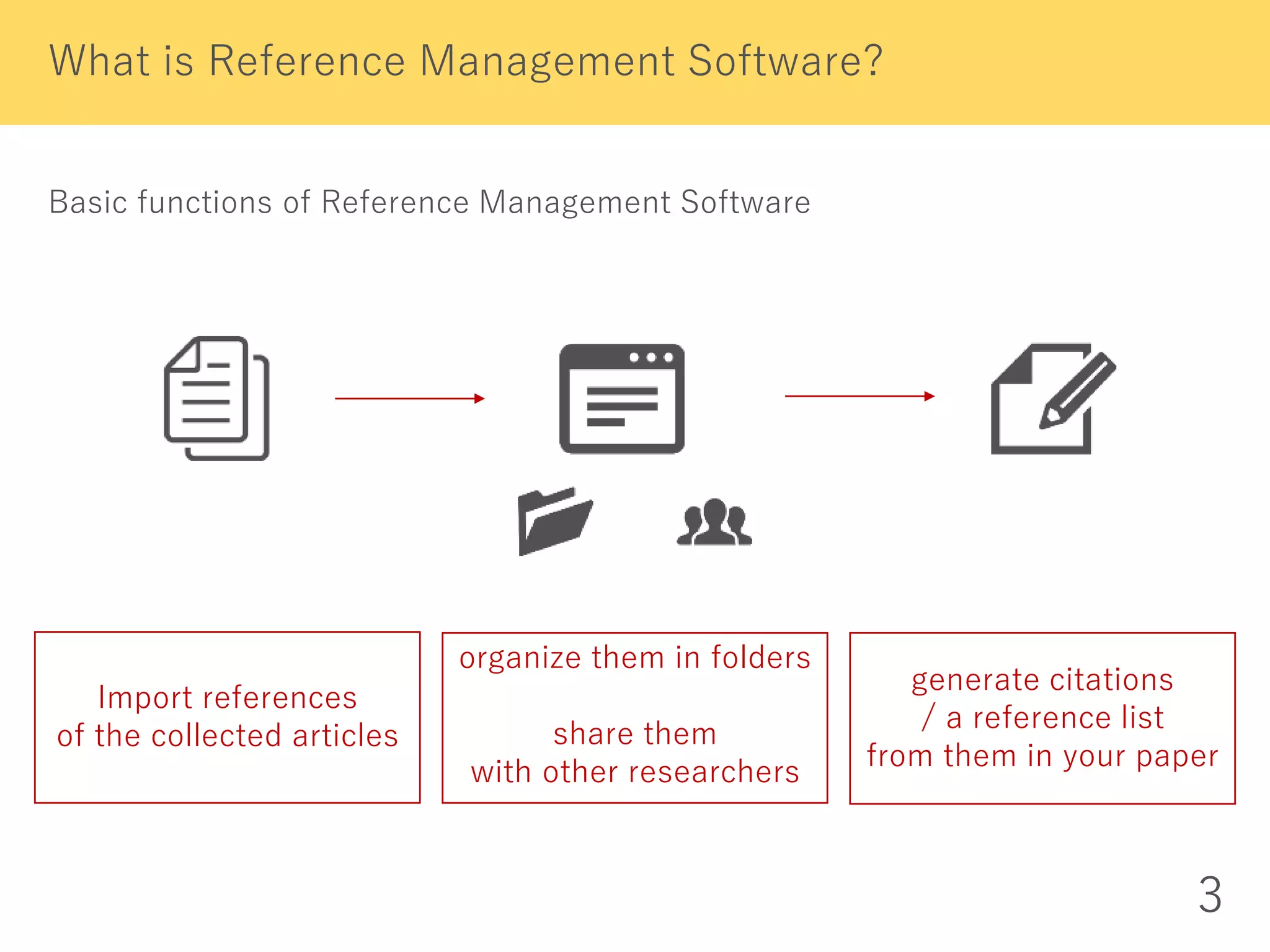
Basic functions of Reference Management Software
What is Reference Management Software?
3
Import references
of the collected articles
organize them in folders
share them
with other researchers
generate citations
/ a reference list
from them in your paper
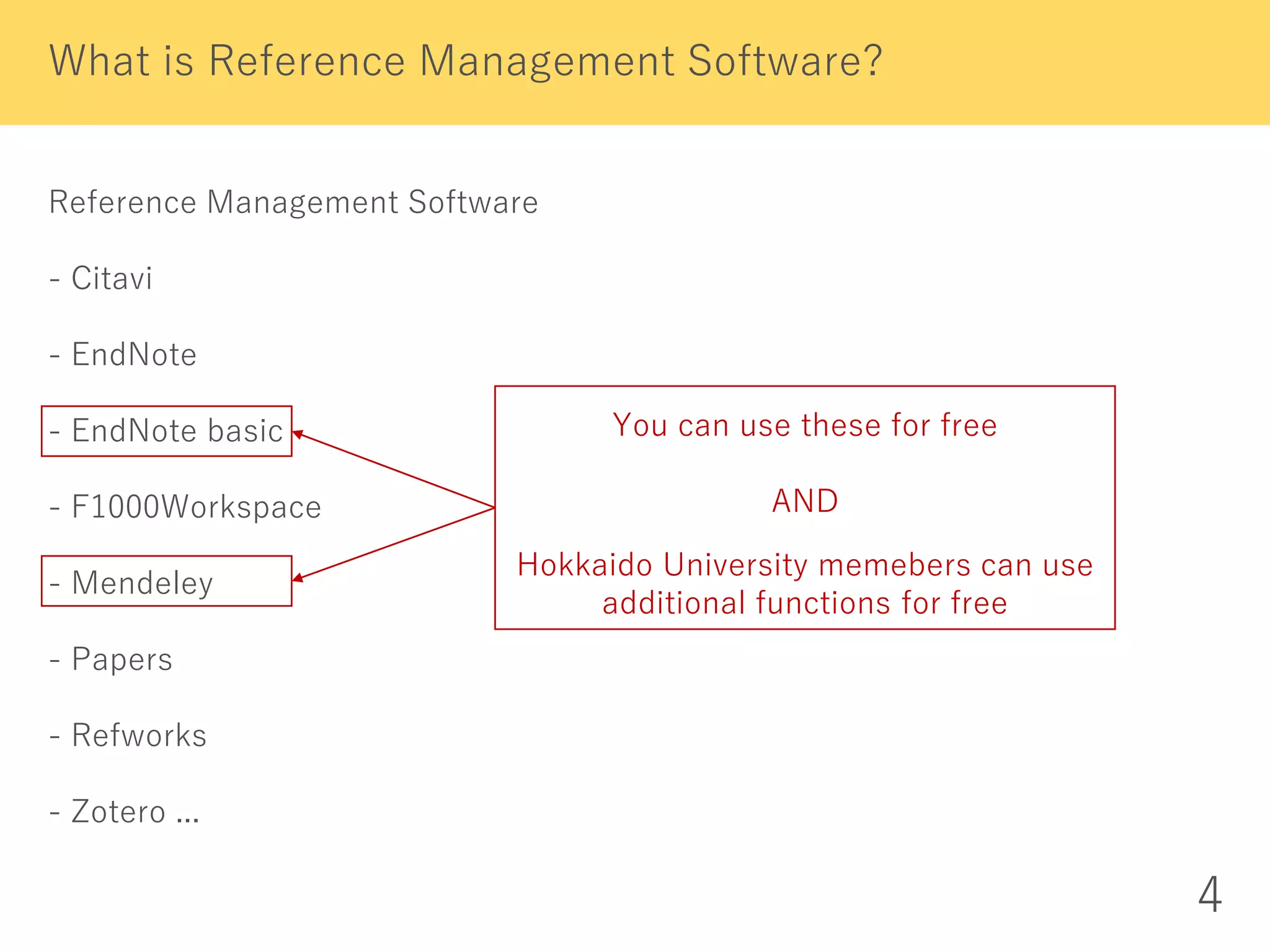
Reference Management Software
- Citavi
- EndNote
- EndNote basic
- F1000Workspace
- Mendeley
- Papers
- Refworks
- Zotero ...
What is Reference Management Software?
4
You can use these for free
AND
Hokkaido University memebers can use
additional functions for free
5
EndNote basic
Hokkaido University subscribes Web of Science Core Collection.
So we can
- use nearly 4,000 styles of citations / the reference list
- display Times Cited counts and other Web of Science data and links
of the records imported from Web of Science.
I recommend this to those who:
- often search Web of Science Core Collection for articles
- want to manage her/his own articles
recorded in Web of Science Core Collection
(want to know how many times and by whom they are cited)
- use EndNote (desktop version), which is paid software
How to use these additional functions
- You need to resister from the campus network.
- Then each time you log in from campus network,
you can use them off-campus for one year.
6
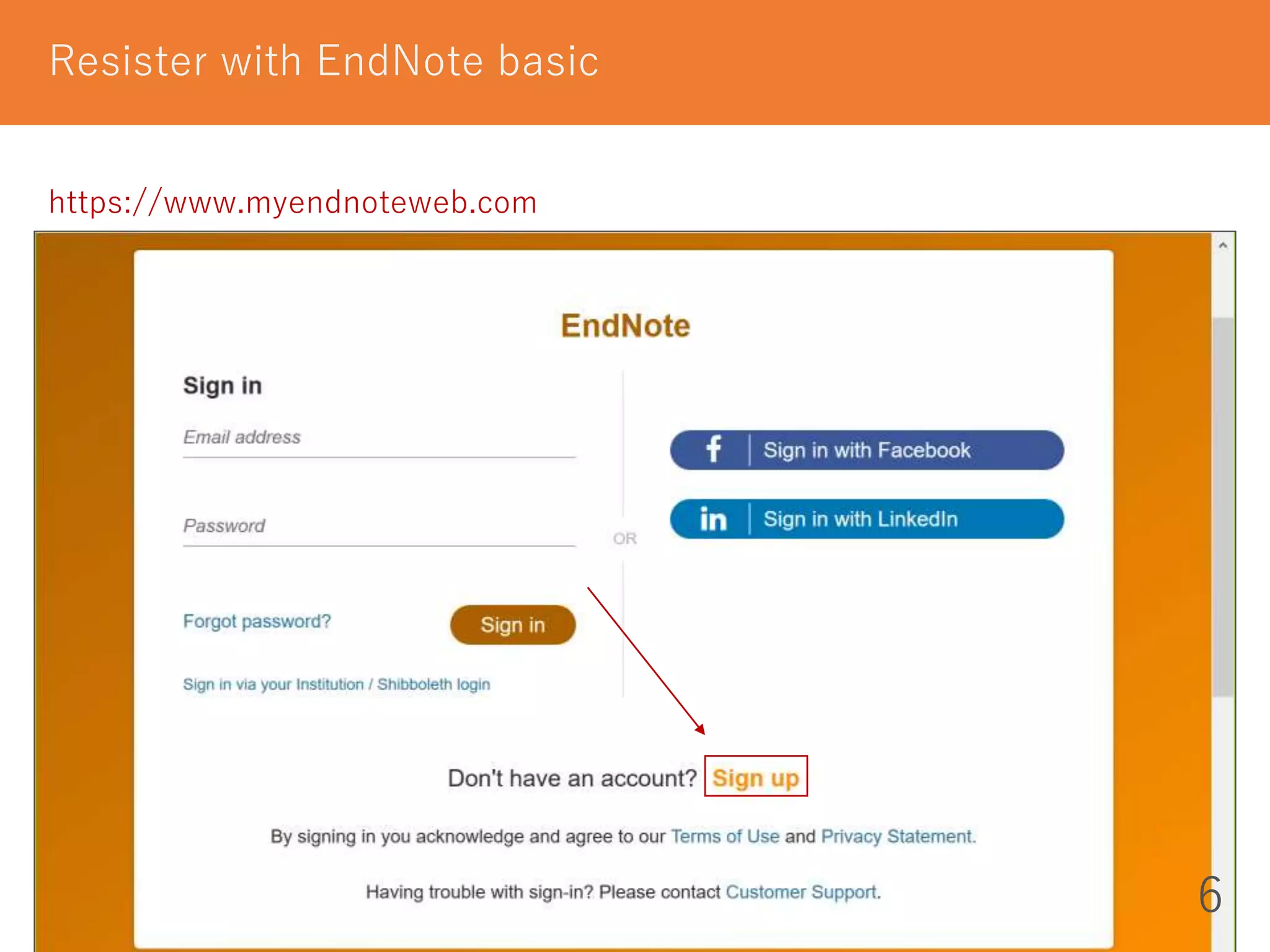
https://www.myendnoteweb.com
Resister with EndNote basic
7
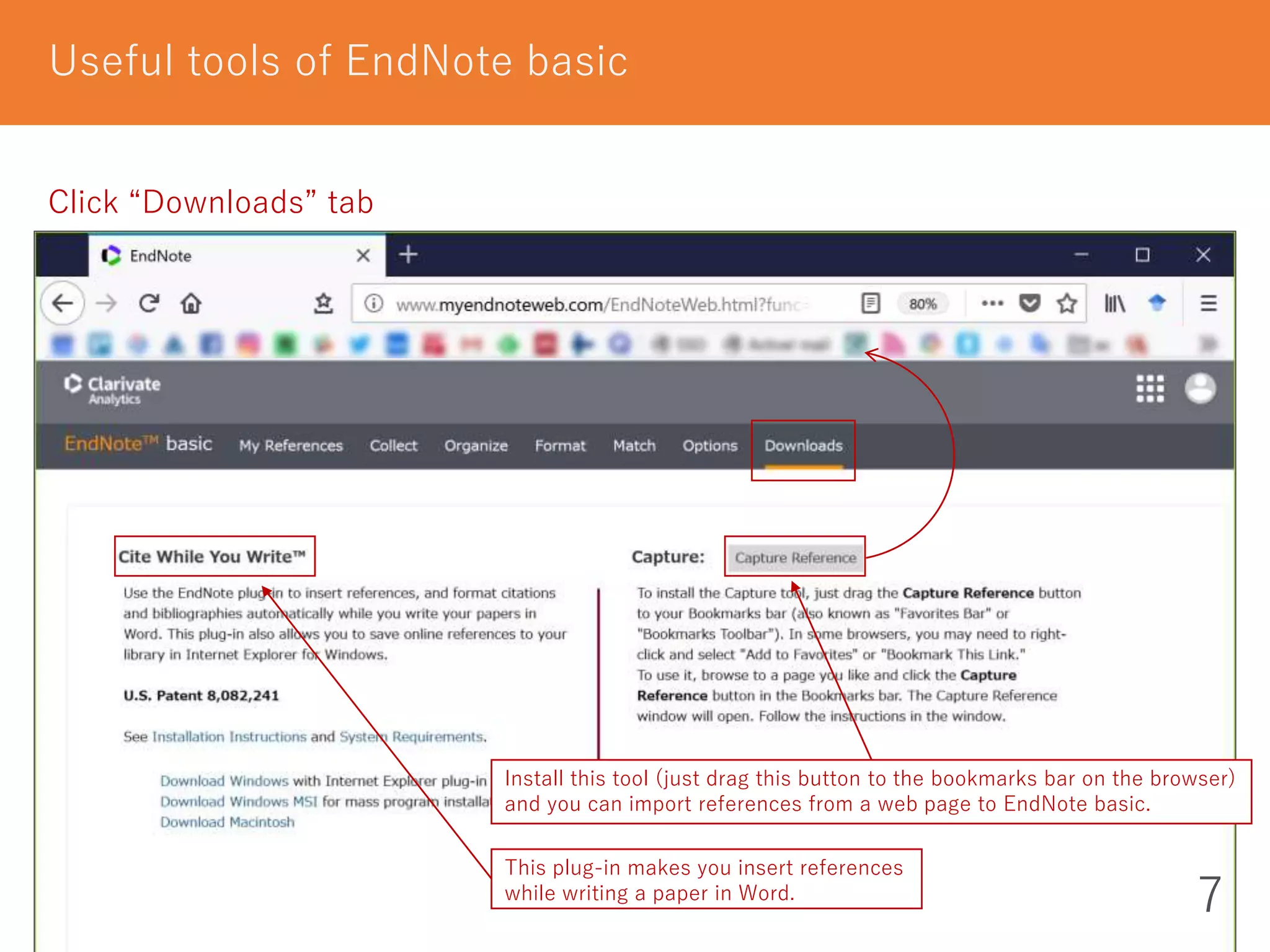
Useful tools of EndNote basic
Click “Downloads” tab
Install this tool (just drag this button to the bookmarks bar on the browser)
and you can import references from a web page to EndNote basic.
This plug-in makes you insert references
while writing a paper in Word.
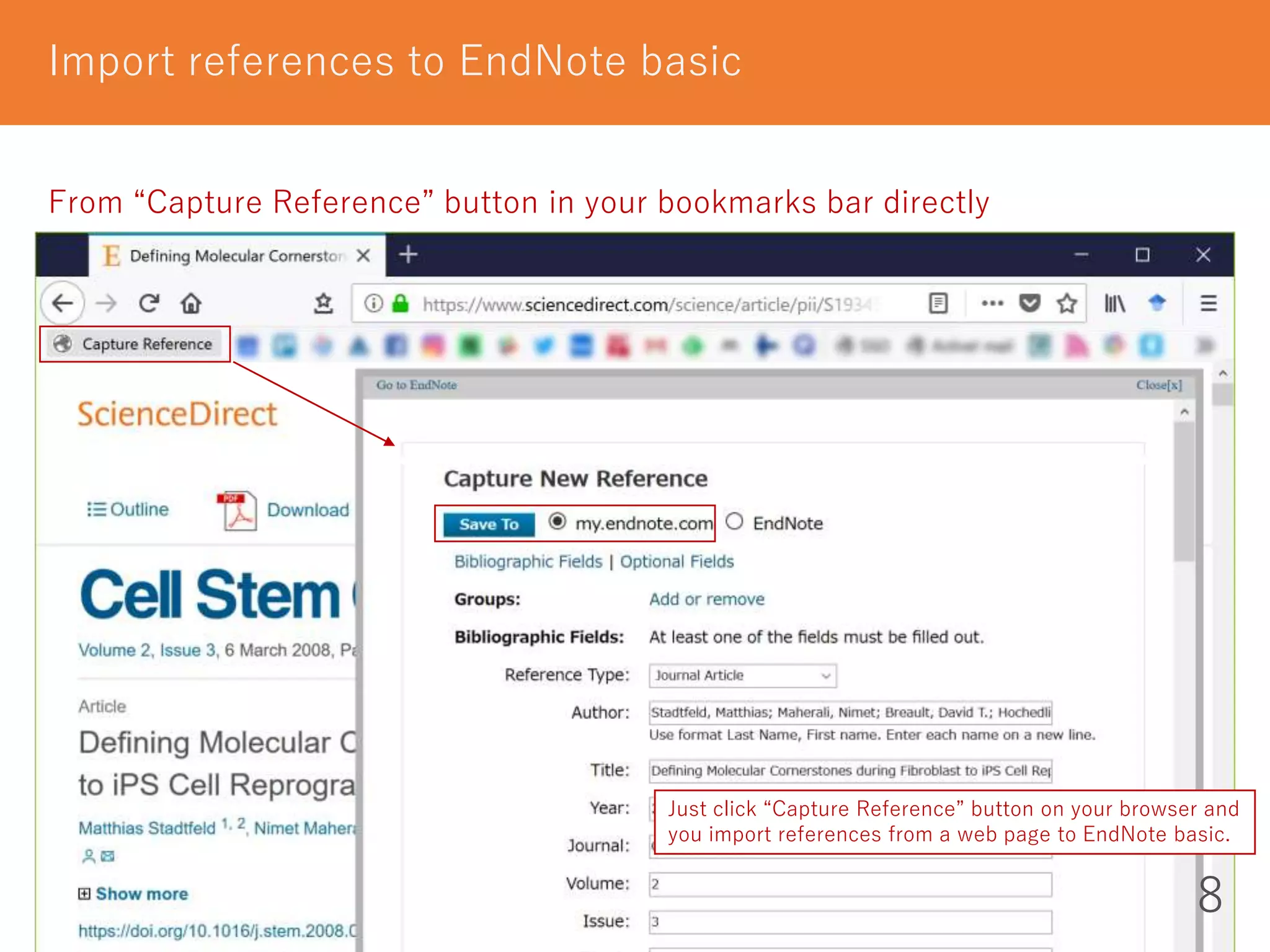
Import references to EndNote basic
8
From “Capture Reference” button in your bookmarks bar directly
Just click “Capture Reference” button on your browser and
you import references from a web page to EndNote basic.
9
Import references to EndNote basic
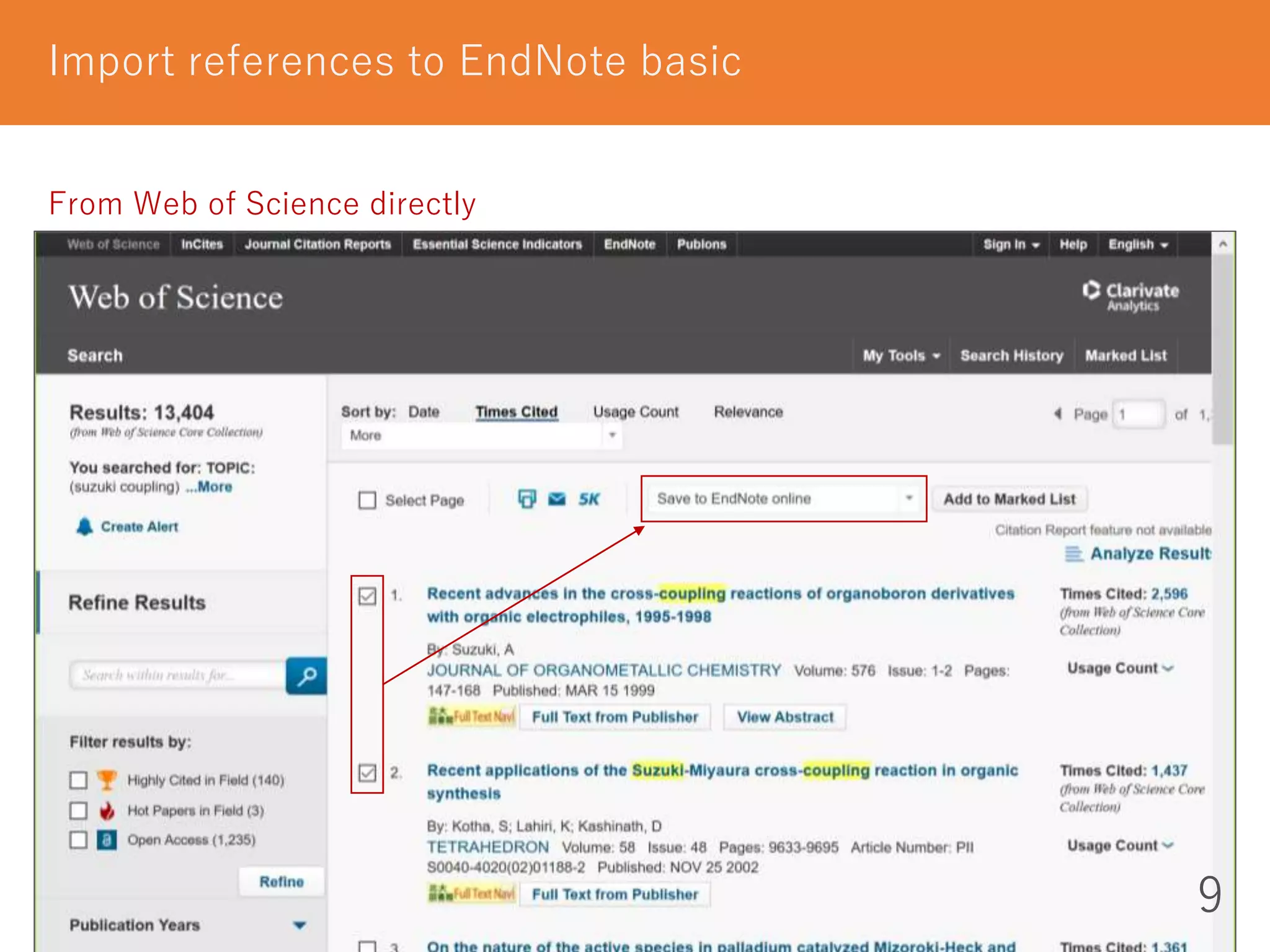
From Web of Science directly
Import references to EndNote basic
10
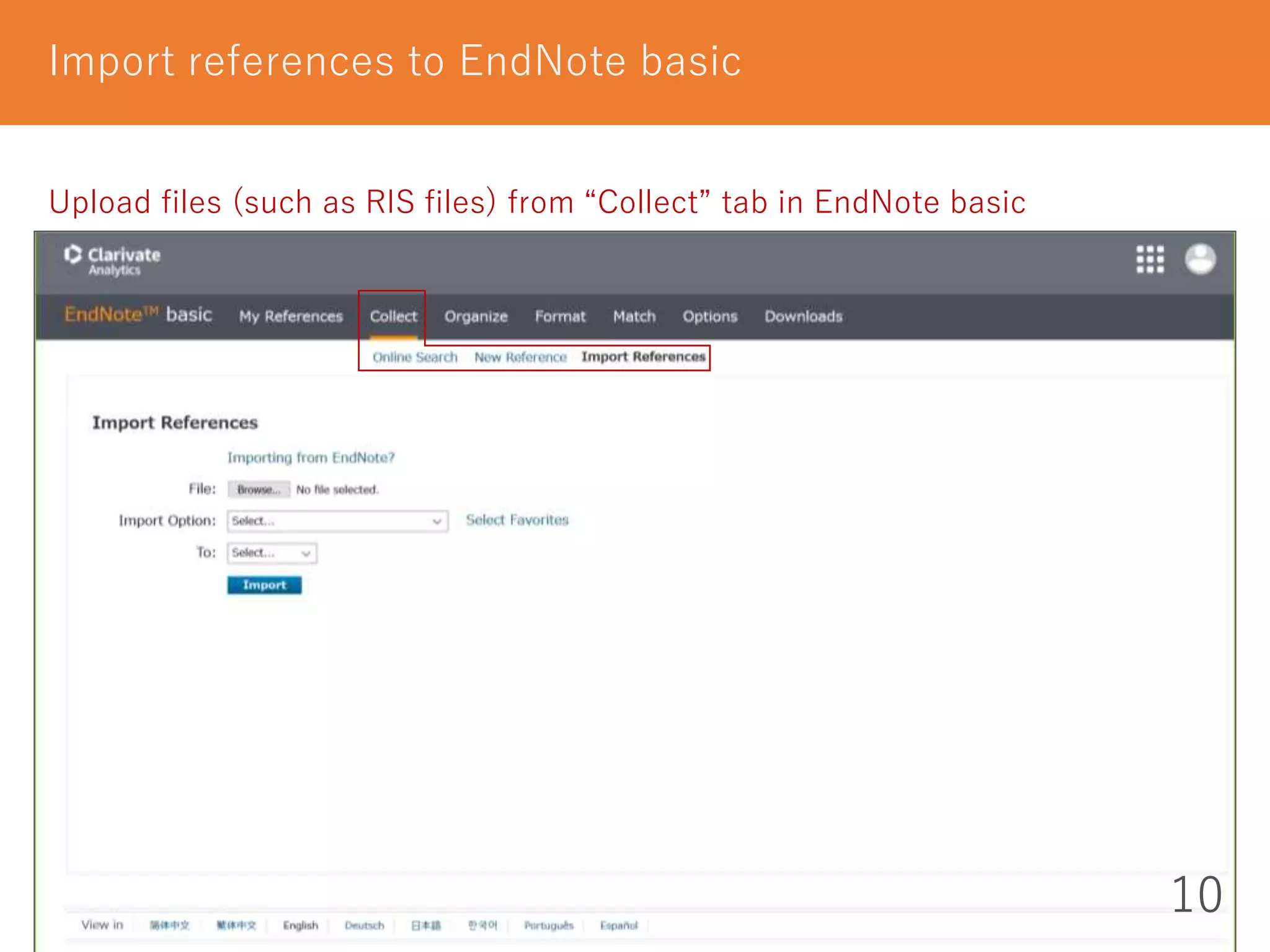
Upload files (such as RIS files) from “Collect” tab in EndNote basic
11
Organize and Share references
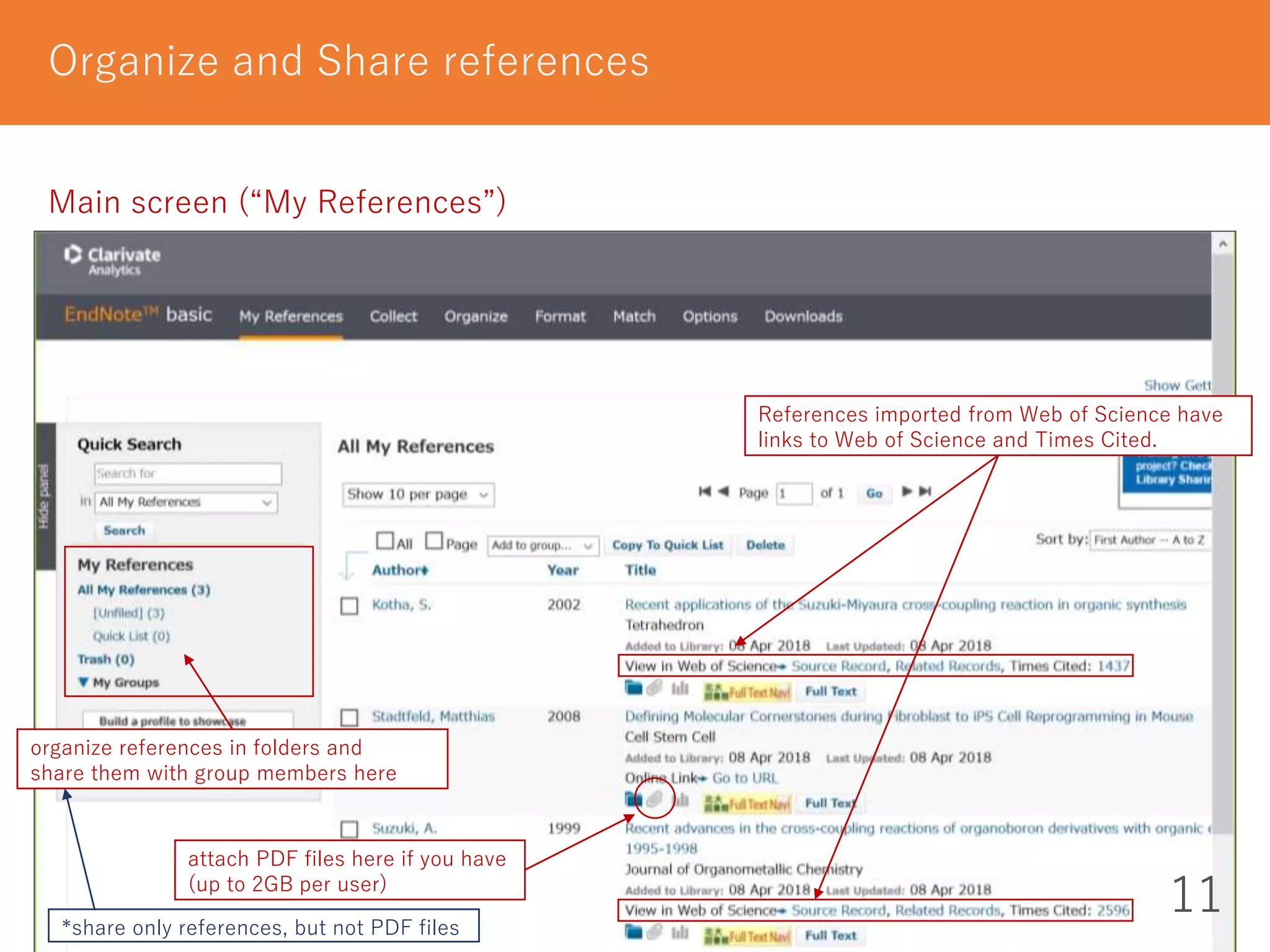
Main screen (“My References”)
organize references in folders and
share them with group members here
attach PDF files here if you have
(up to 2GB per user)
References imported from Web of Science have
links to Web of Science and Times Cited.
*share only references, but not PDF files
12
Generate citations / a reference list in Word
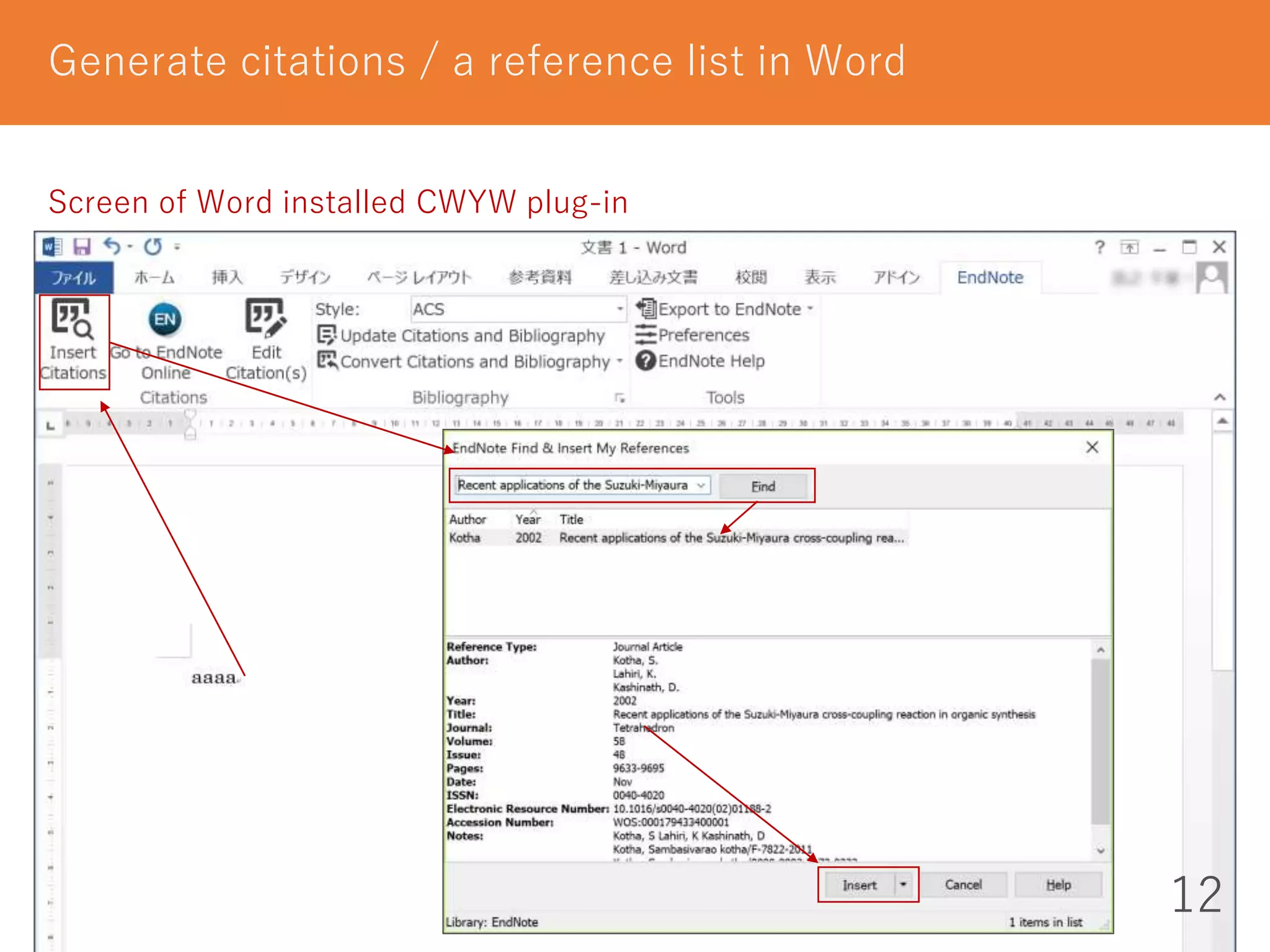
Screen of Word installed CWYW plug-in
13
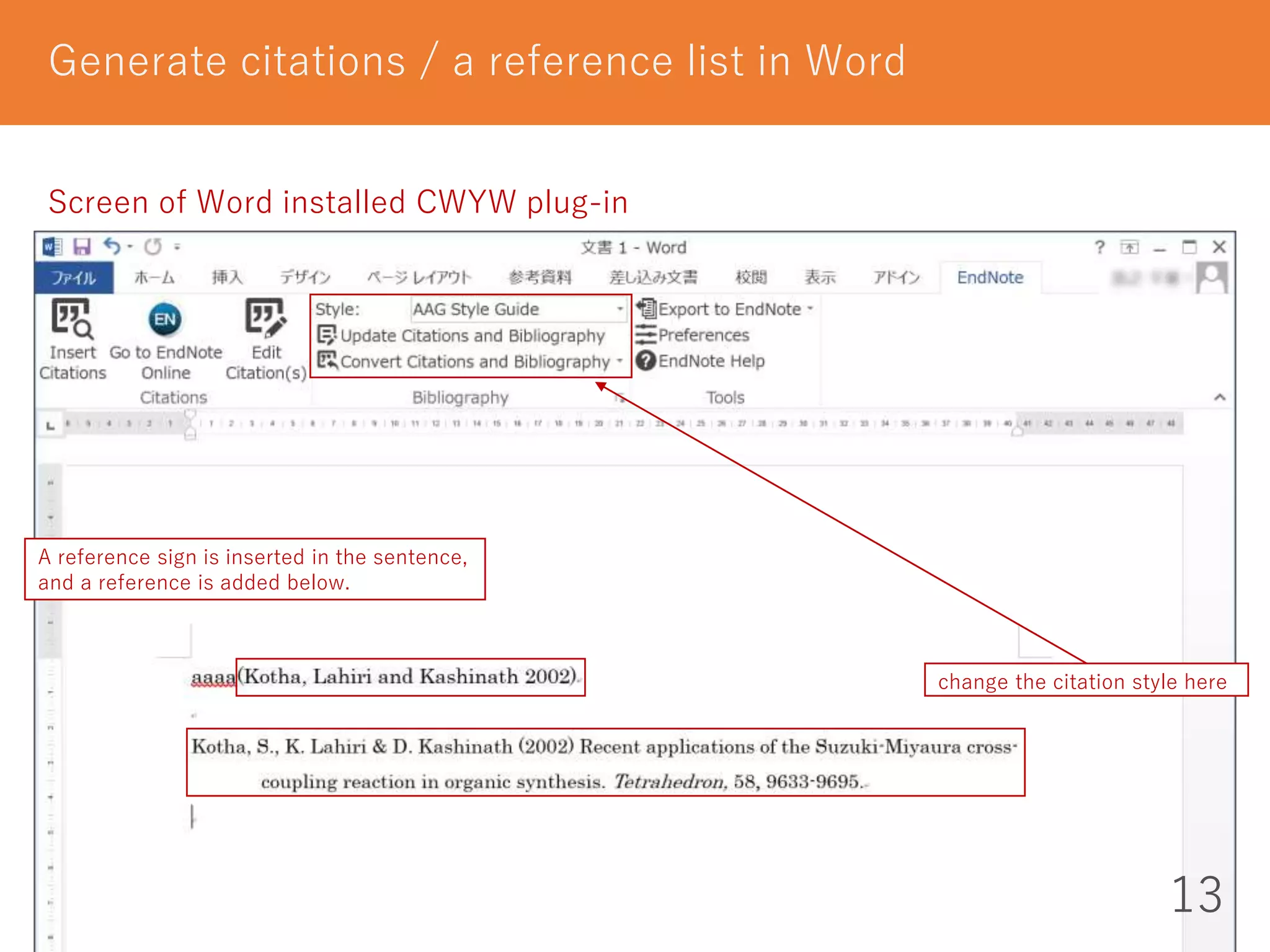
Generate citations / a reference list in Word
Screen of Word installed CWYW plug-in
change the citation style here
A reference sign is inserted in the sentence,
and a reference is added below.
14
Mendeley
Hokkaido University subscribes Mendeley Institution Edition.
* We can use this edition until March 2019 at the shortest.
We can use
- 100GB personal storage space 2GB
- 100GB shared storage space 100MB
We can make
- private groups of up to 100 people unlimitedly 5 groups of up to 25 people
I recommend this to those who:
- have already quite a few PDF files of articles
* You can import references (and PDF files) to Mendeley
by dragging and dropping PDF files
- want to not only save but also annotate PDF files
How to use these additional functions
- You need only to log in from campus network.
- Each time you log in from campus network
you can use them off-campus for one year.
at the freemium edition
15
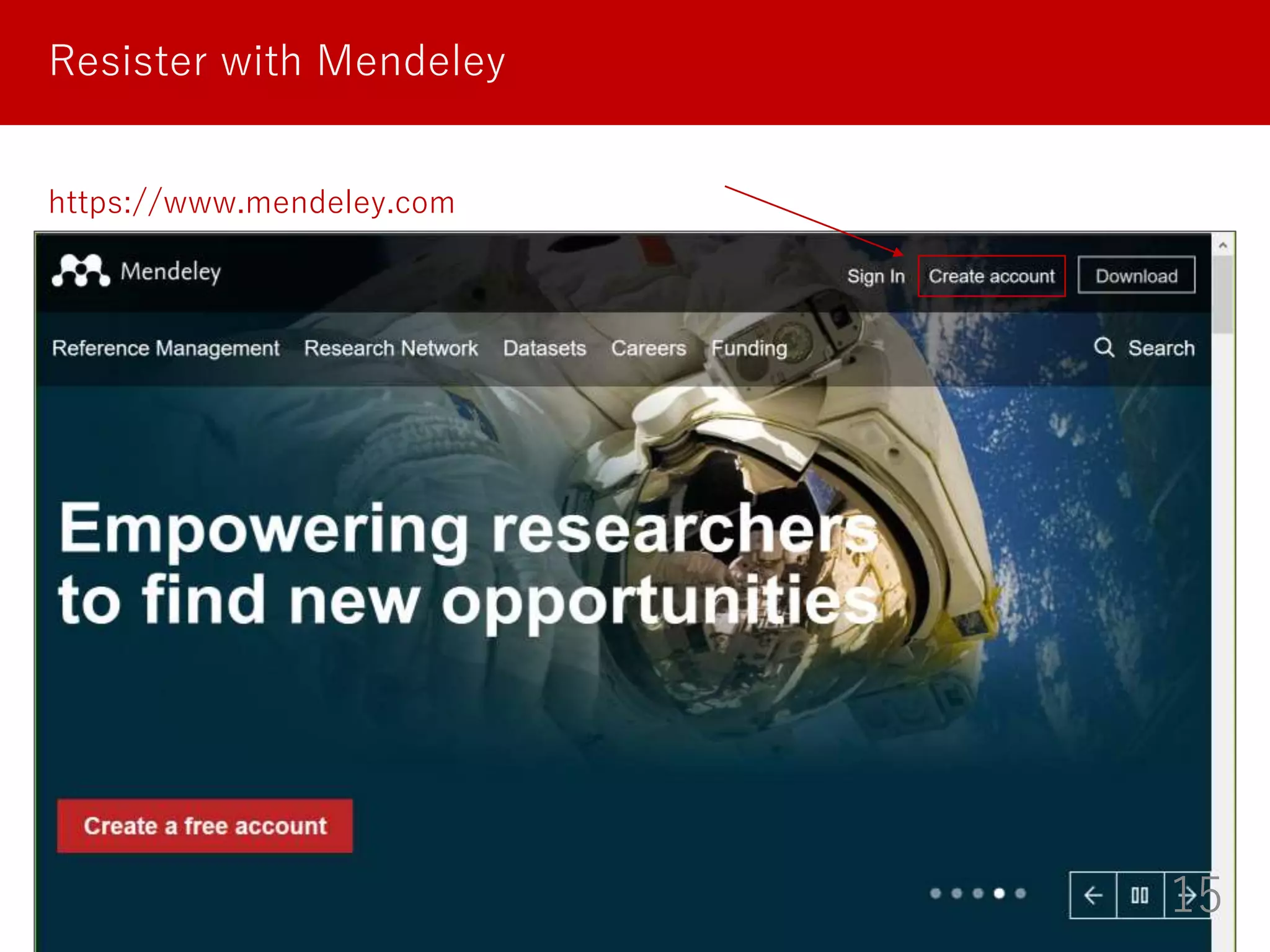
Resister with Mendeley
https://www.mendeley.com
16
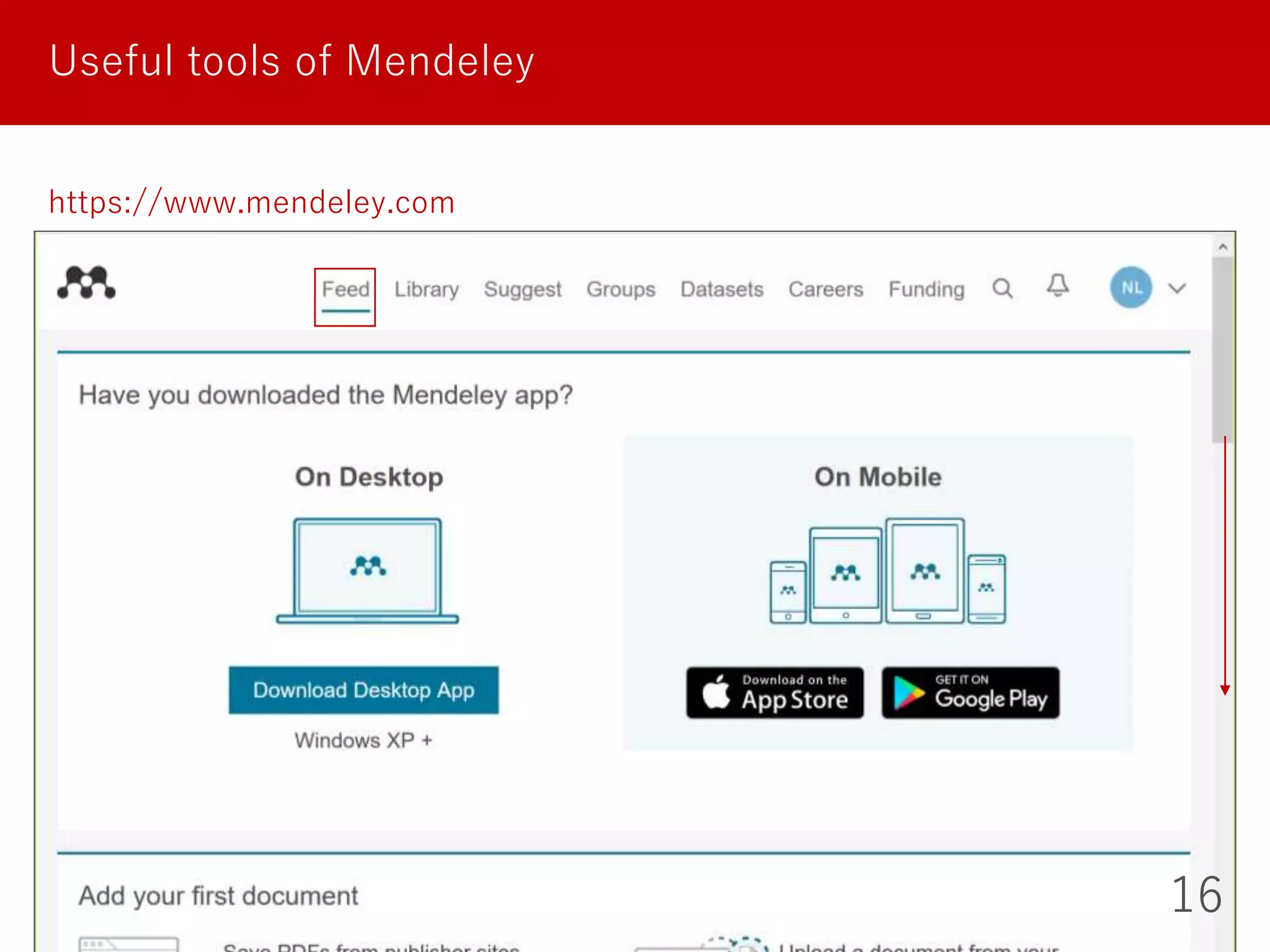
Useful tools of Mendeley
https://www.mendeley.com
17
Useful tools of Mendeley
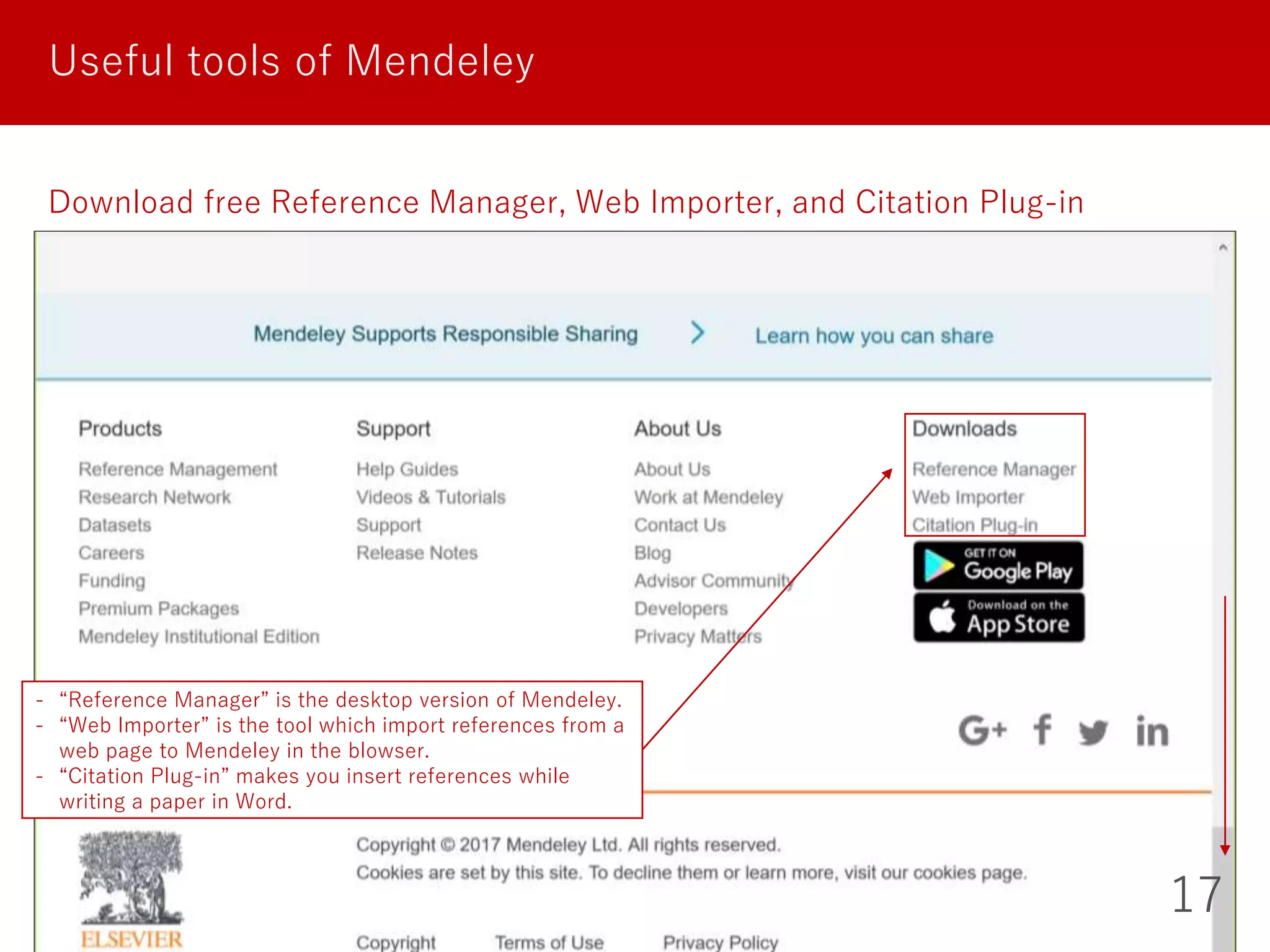
Download free Reference Manager, Web Importer, and Citation Plug-in
- “Reference Manager” is the desktop version of Mendeley.
- “Web Importer” is the tool which import references from a
web page to Mendeley in the blowser.
- “Citation Plug-in” makes you insert references while
writing a paper in Word.
18
Import references to Mendeley
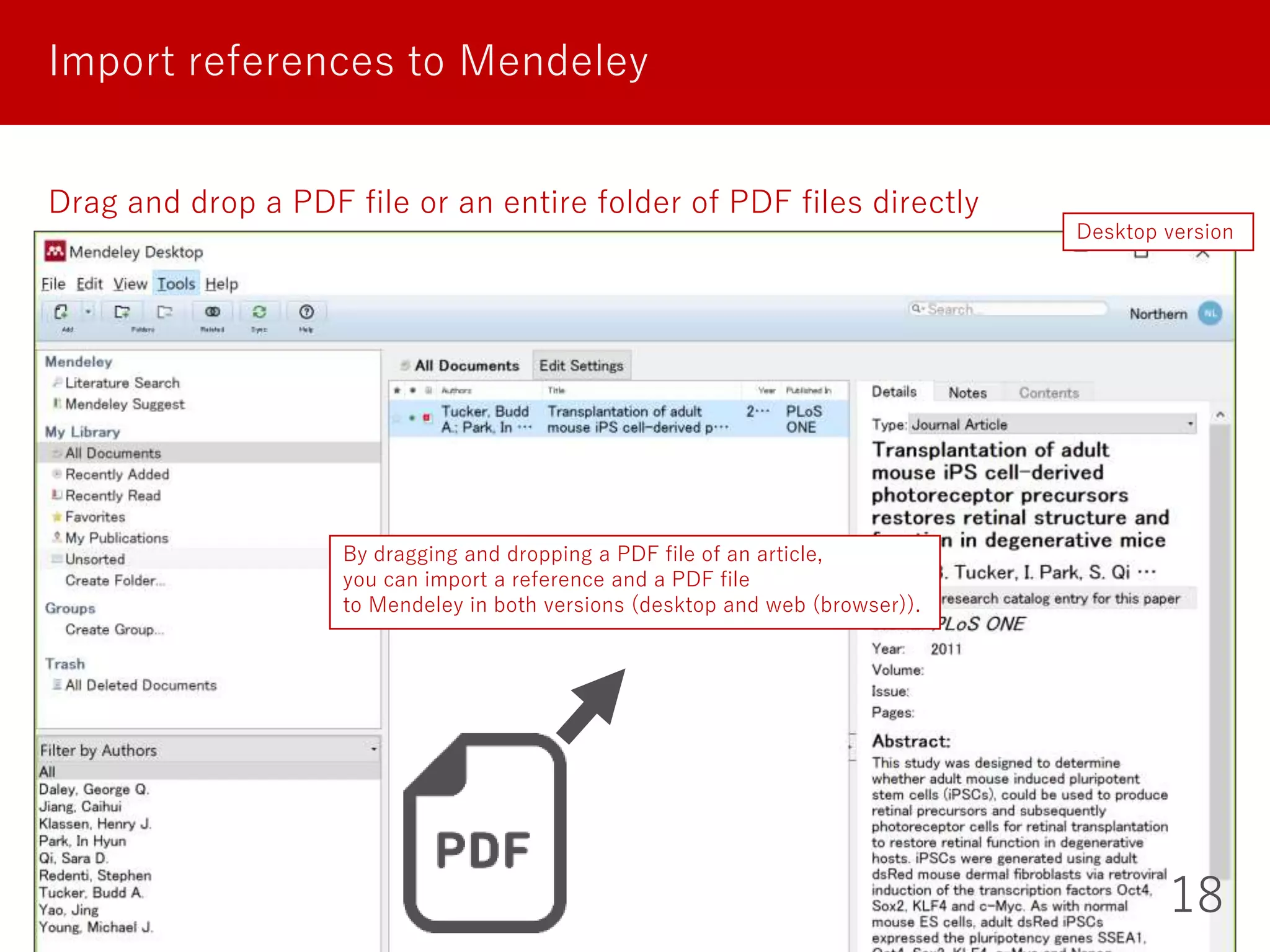
Drag and drop a PDF file or an entire folder of PDF files directly
Desktop version
By dragging and dropping a PDF file of an article,
you can import a reference and a PDF file
to Mendeley in both versions (desktop and web (browser)).
19
Import references to Mendeley
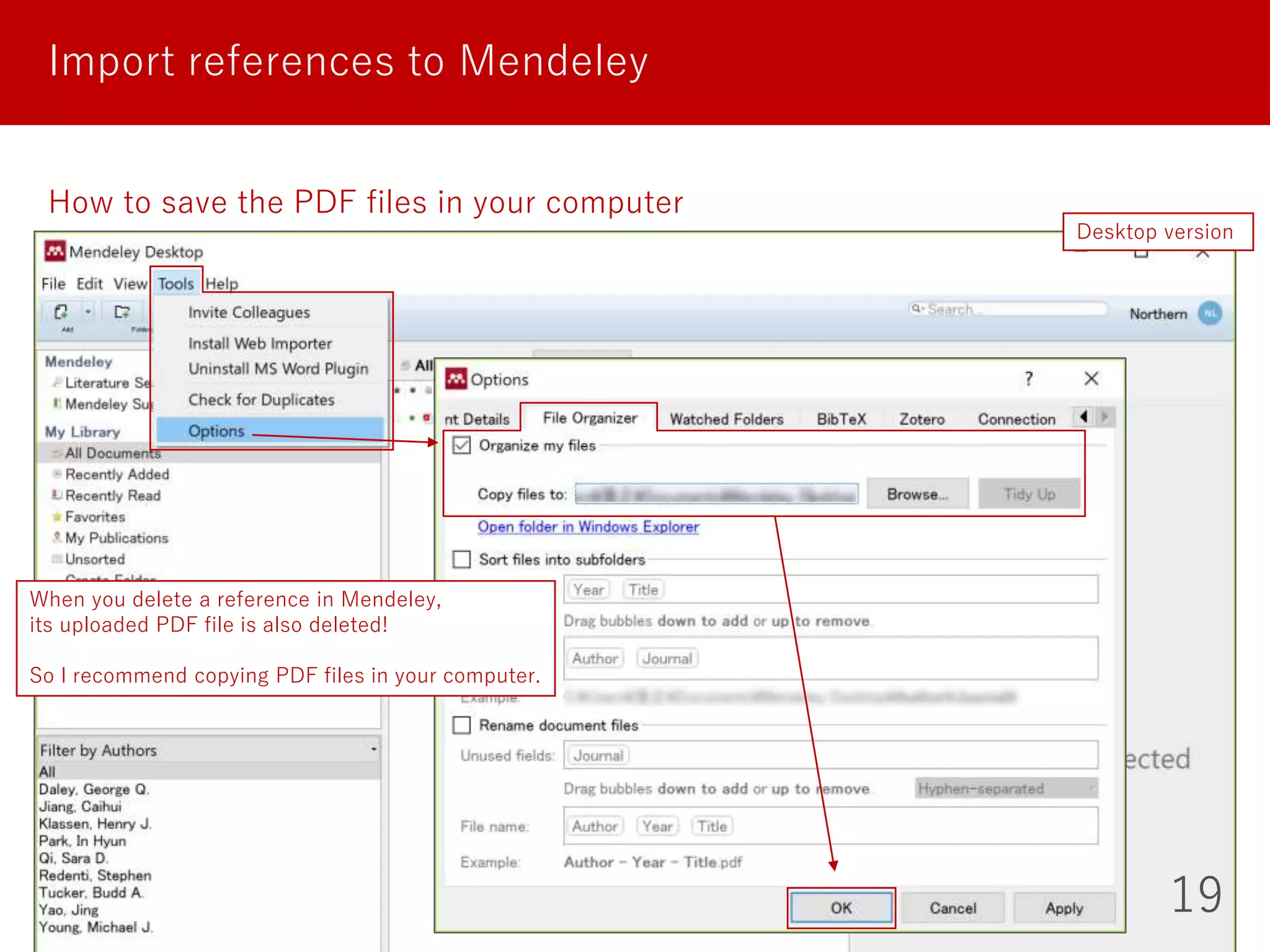
How to save the PDF files in your computer
Desktop version
When you delete a reference in Mendeley,
its uploaded PDF file is also deleted!
So I recommend copying PDF files in your computer.
20
Import references to Mendeley
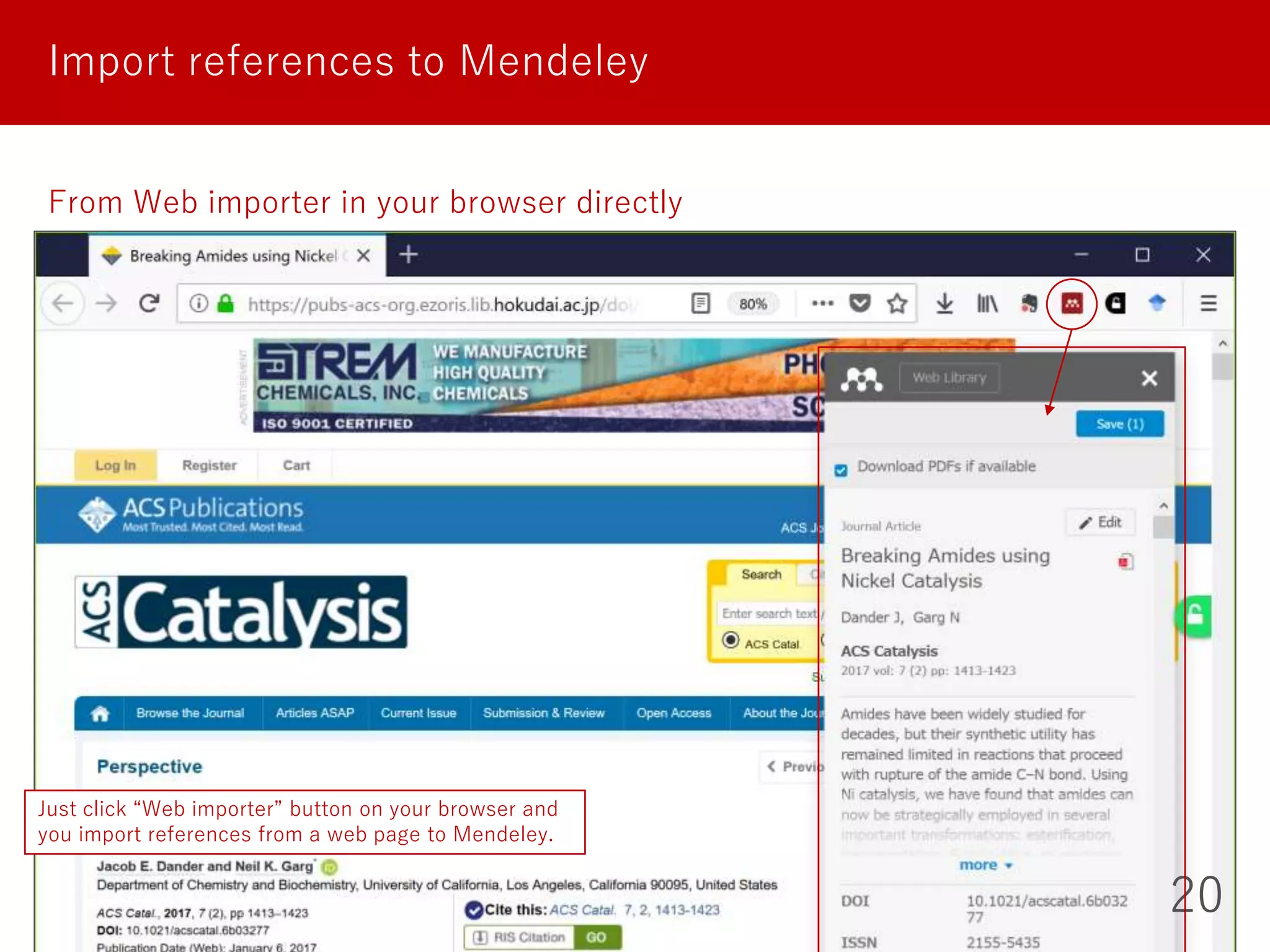
From Web importer in your browser directly
Just click “Web importer” button on your browser and
you import references from a web page to Mendeley.
21
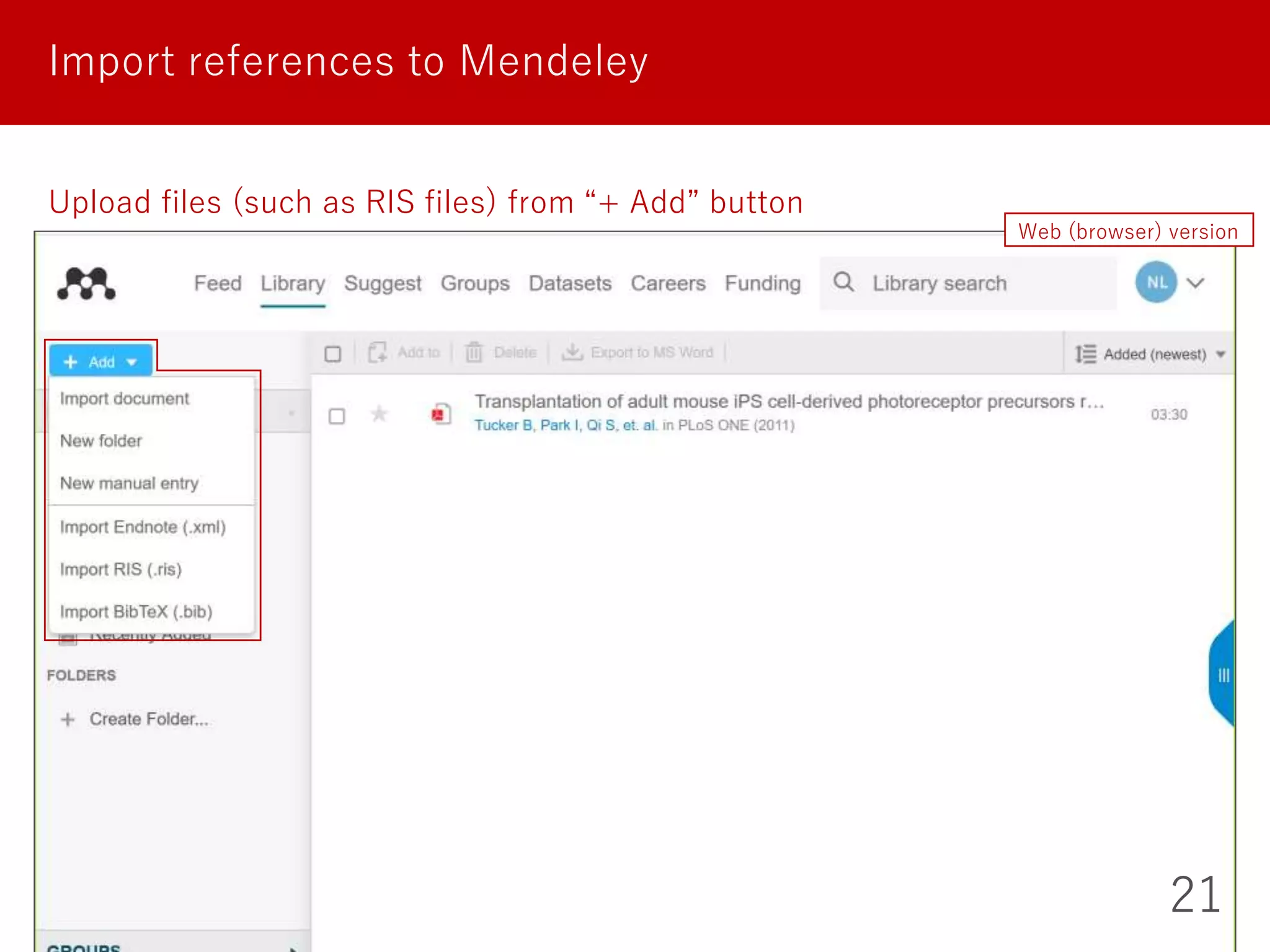
Import references to Mendeley
Upload files (such as RIS files) from “+ Add” button
Web (browser) version
22
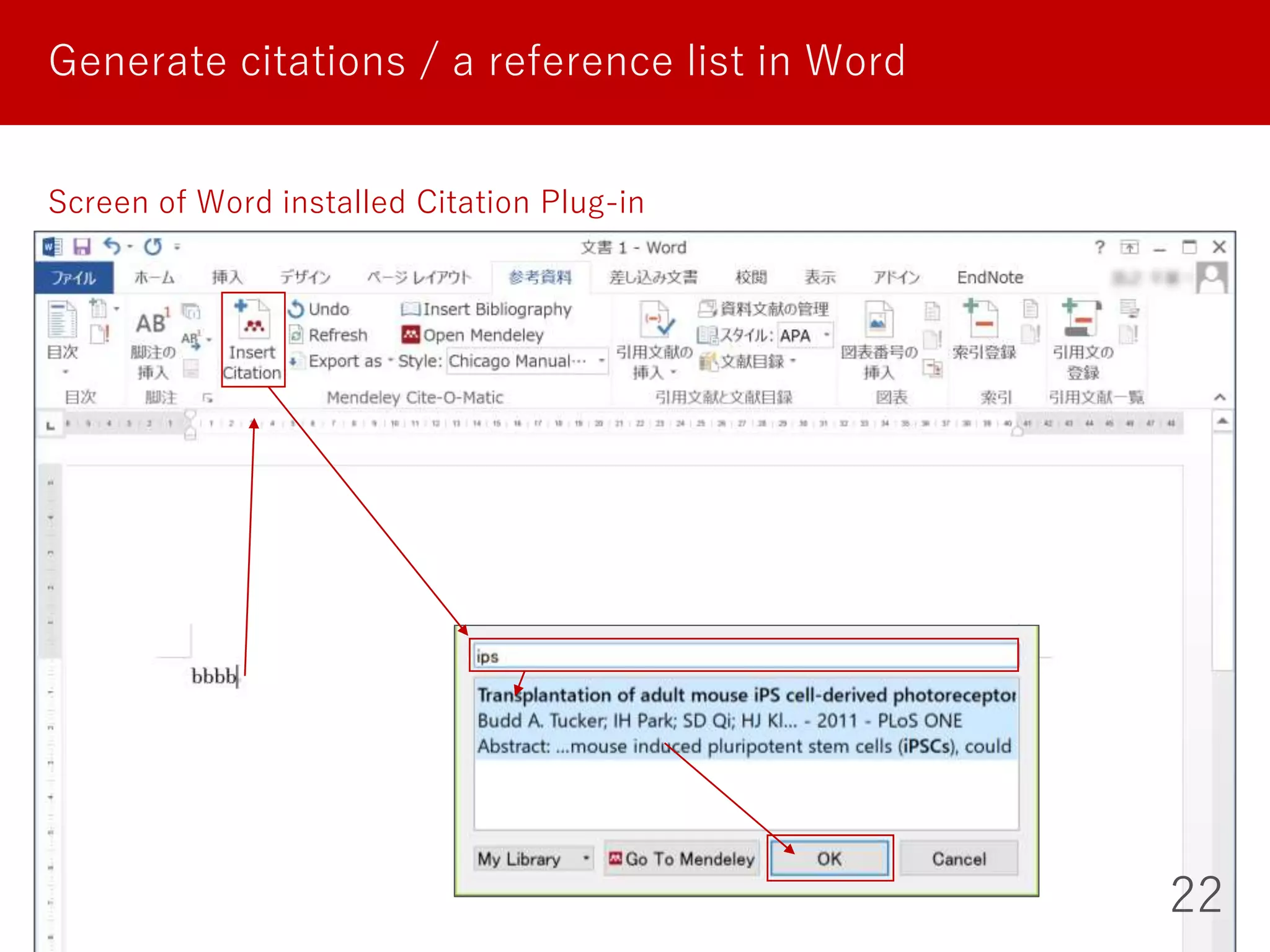
Generate citations / a reference list in Word
Screen of Word installed Citation Plug-in
23
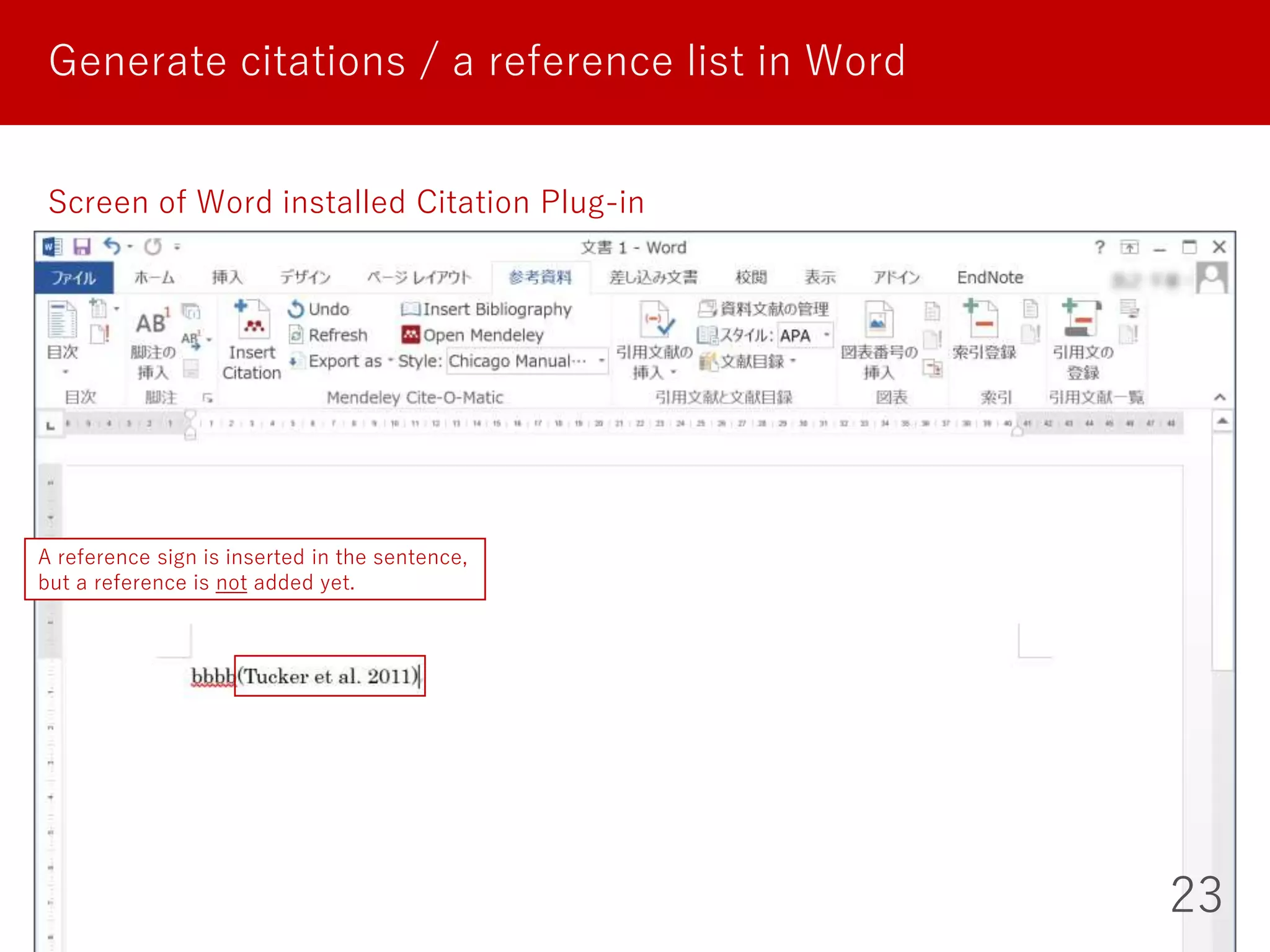
Generate citations / a reference list in Word
Screen of Word installed Citation Plug-in
A reference sign is inserted in the sentence,
but a reference is not added yet.
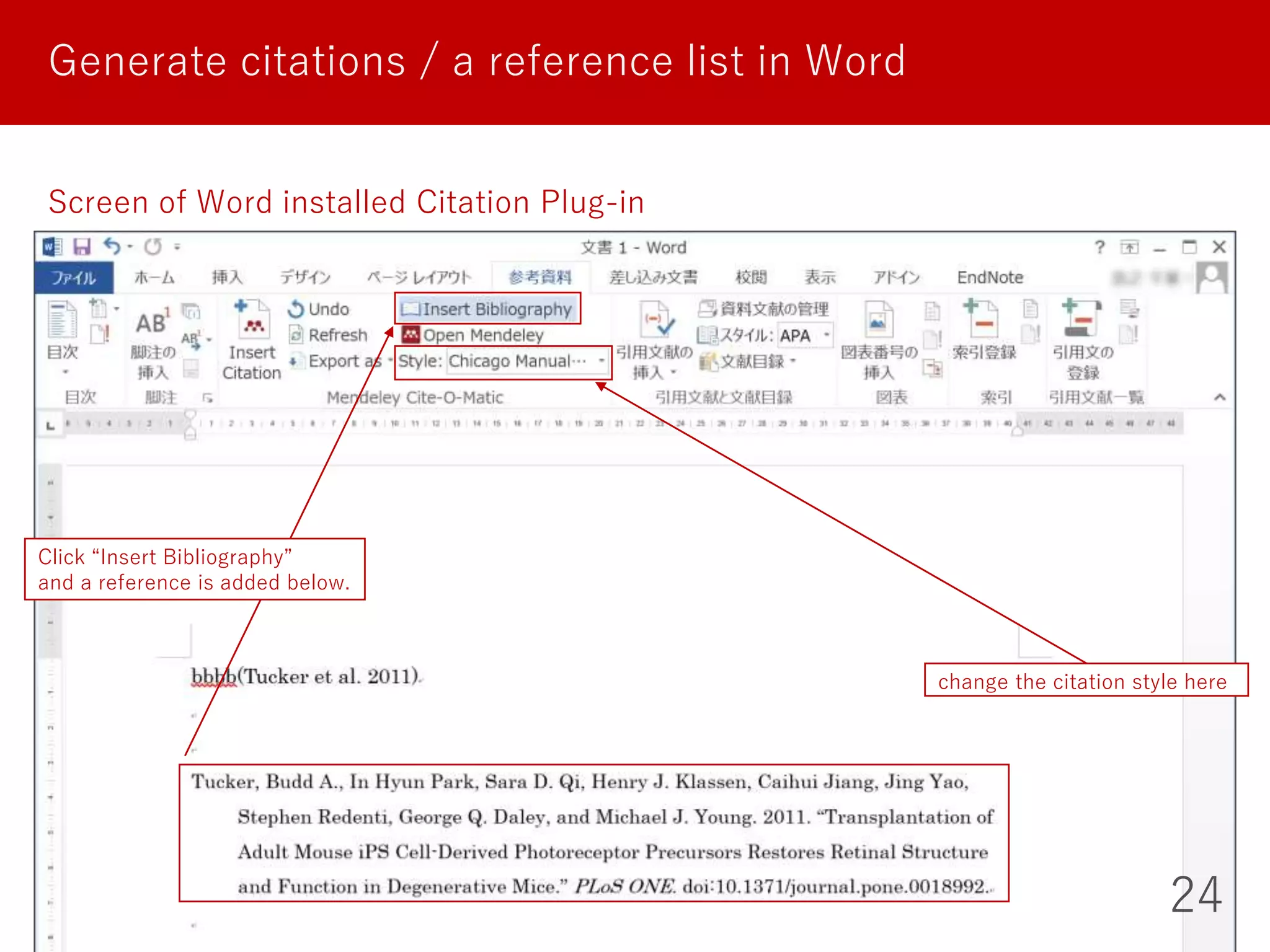
Generate citations / a reference list in Word
24
Screen of Word installed Citation Plug-in
change the citation style here
Click “Insert Bibliography”
and a reference is added below.
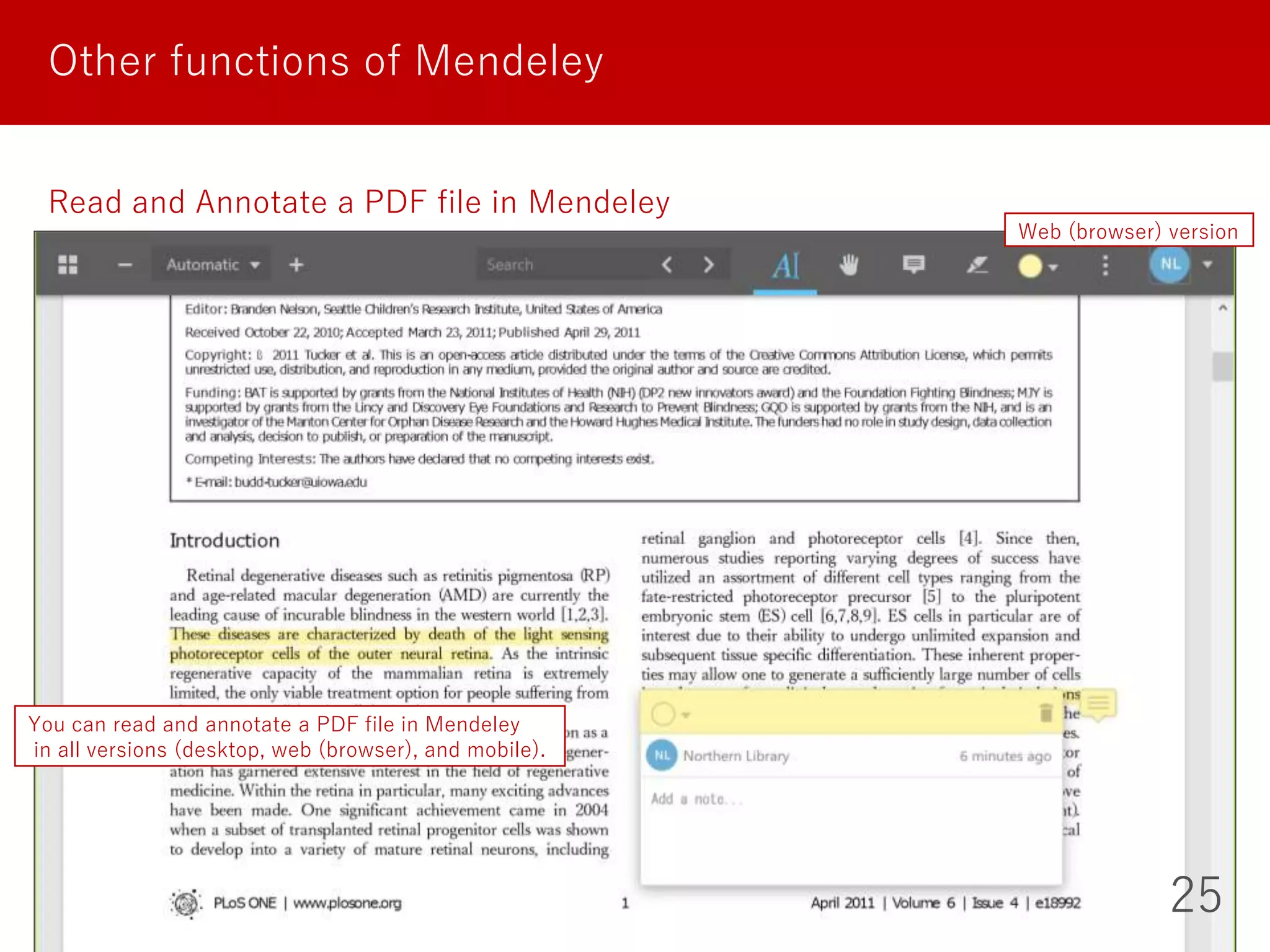
25
Other functions of Mendeley
Read and Annotate a PDF file in Mendeley
You can read and annotate a PDF file in Mendeley
in all versions (desktop, web (browser), and mobile).
Web (browser) version
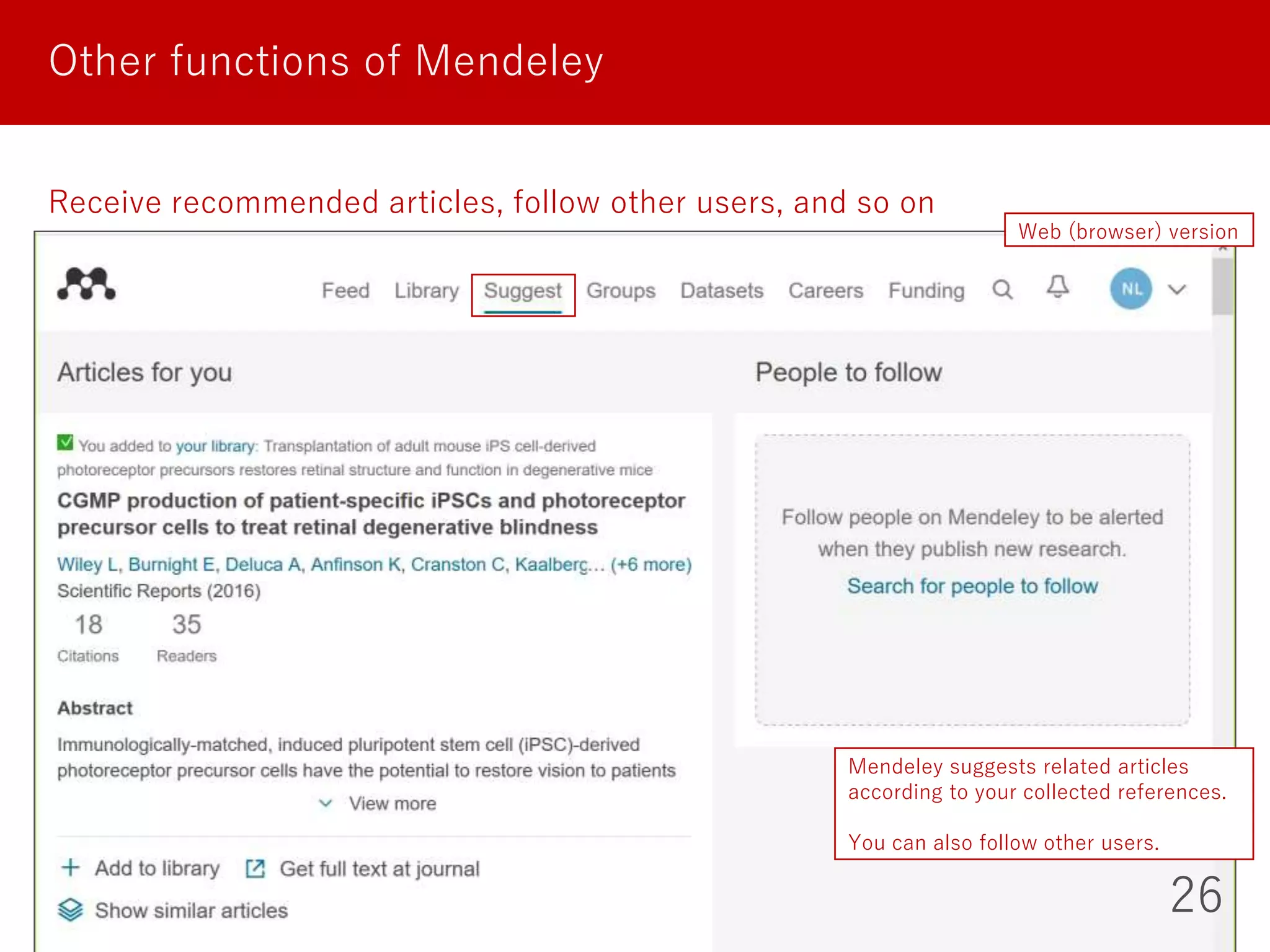
26
Other functions of Mendeley
Receive recommended articles, follow other users, and so on
Web (browser) version
Mendeley suggests related articles
according to your collected references.
You can also follow other users.
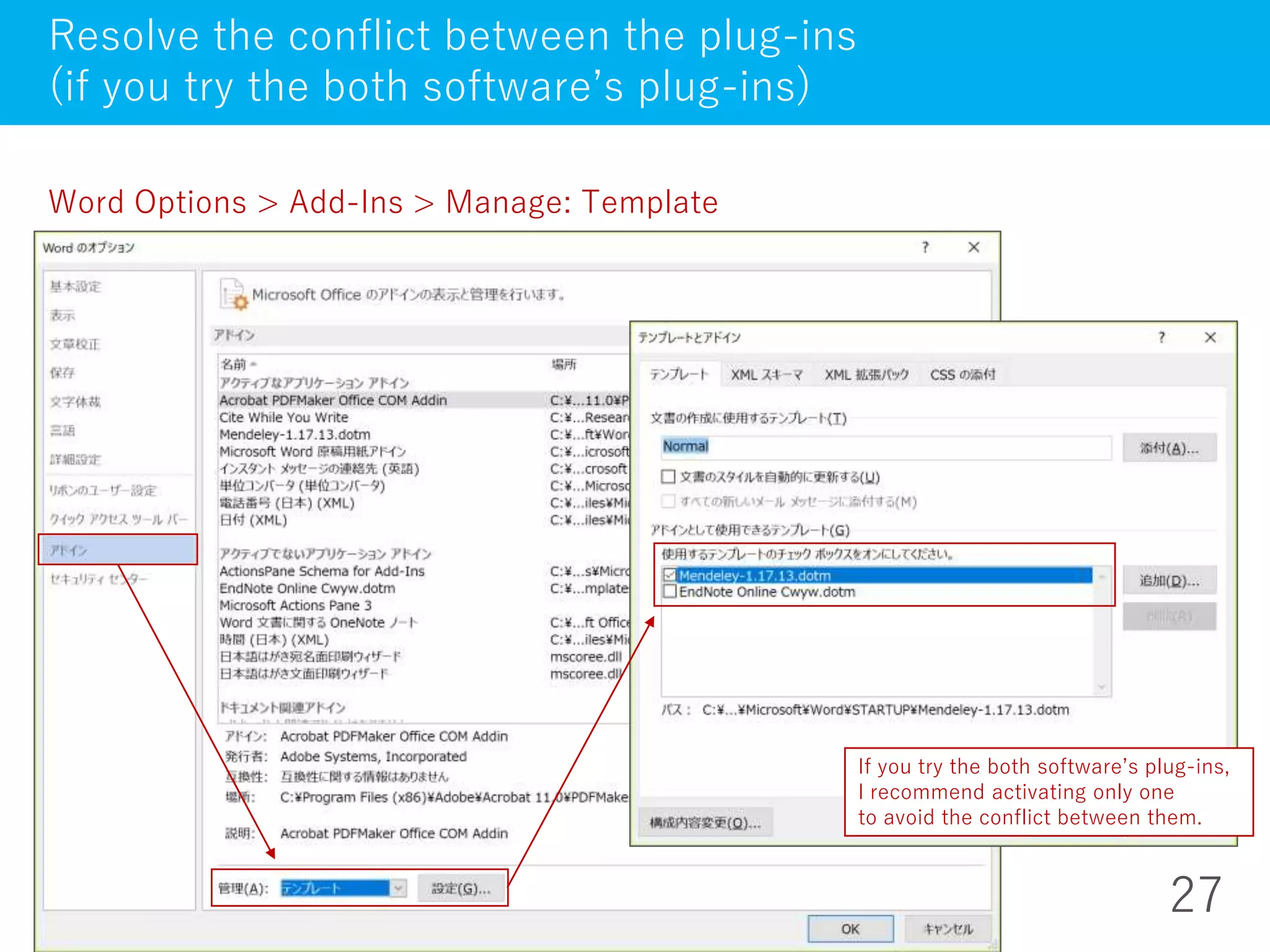
27
Resolve the conflict between the plug-ins
(if you try the both software’s plug-ins)
Word Options > Add-Ins > Manage: Template
If you try the both software’s plug-ins,
I recommend activating only one
to avoid the conflict between them.
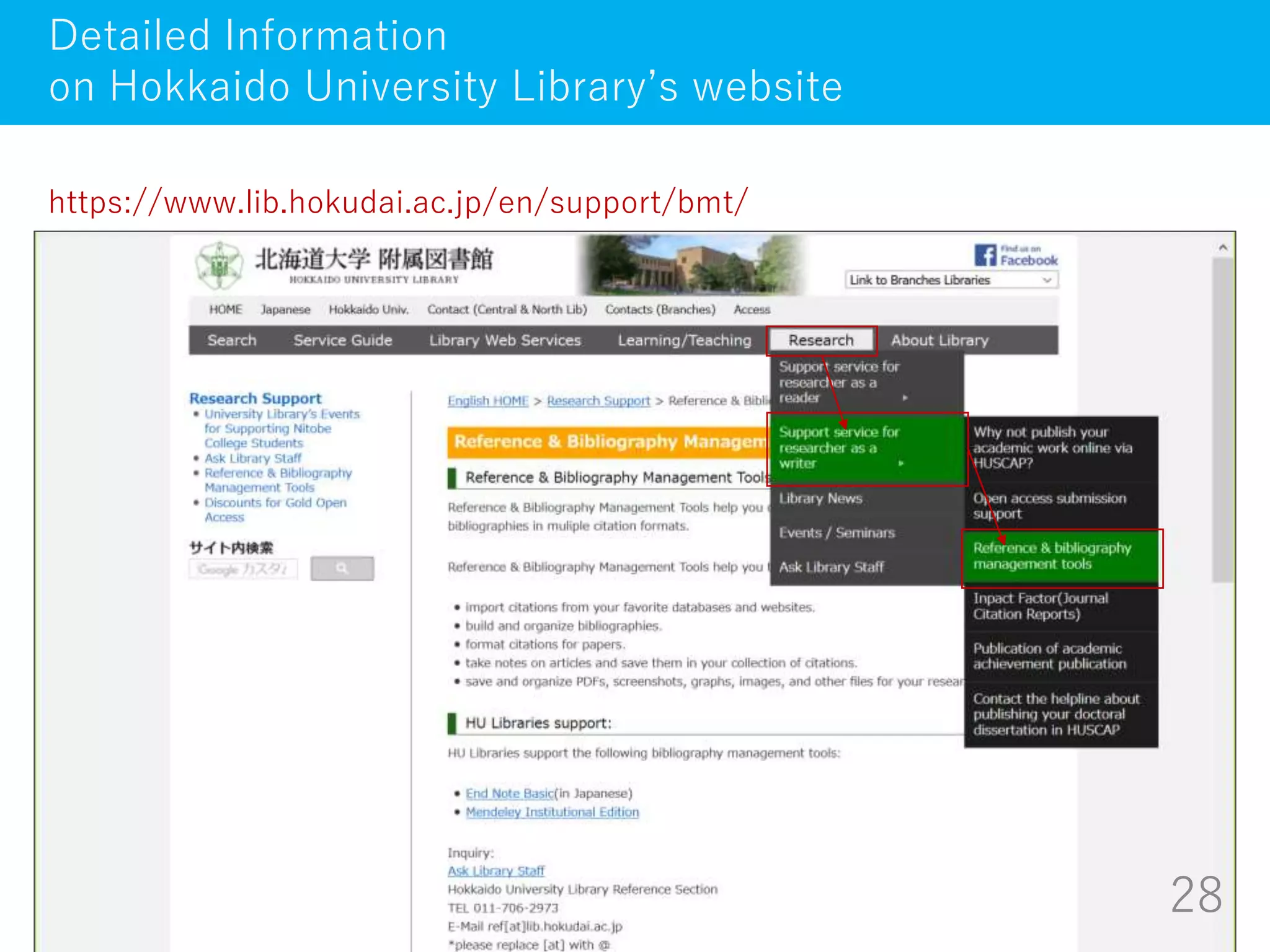
28
Detailed Information
on Hokkaido University Library’s website
https://www.lib.hokudai.ac.jp/en/support/bmt/
TRY
LATER
AND
ASK
ME
ANYTIME:
kitacam@lib.hokudai.ac.jp
29

How to manage references with EndNote basic / Mendeley (April 2018)

  • 1.
    1 On-demand Guidance on NorthernCampus Library’s Services How to manage references with EndNote basic / Mendeley Hokkaido University Northern Campus Library April 2018
  • 2.
    What is ReferenceManagement Software? EndNote basic Resister Import references Organize and Share references Generate citations / a reference list Mendeley Resister Import references Organize and Share references Generate citations / a reference list Other functions How to manage references with EndNote basic / Mendeley 2
  • 3.
    Basic functions ofReference Management Software What is Reference Management Software? 3 Import references of the collected articles organize them in folders share them with other researchers generate citations / a reference list from them in your paper
  • 4.
    Reference Management Software -Citavi - EndNote - EndNote basic - F1000Workspace - Mendeley - Papers - Refworks - Zotero ... What is Reference Management Software? 4 You can use these for free AND Hokkaido University memebers can use additional functions for free
  • 5.
    5 EndNote basic Hokkaido Universitysubscribes Web of Science Core Collection. So we can - use nearly 4,000 styles of citations / the reference list - display Times Cited counts and other Web of Science data and links of the records imported from Web of Science. I recommend this to those who: - often search Web of Science Core Collection for articles - want to manage her/his own articles recorded in Web of Science Core Collection (want to know how many times and by whom they are cited) - use EndNote (desktop version), which is paid software How to use these additional functions - You need to resister from the campus network. - Then each time you log in from campus network, you can use them off-campus for one year.
  • 6.
  • 7.
    7 Useful tools ofEndNote basic Click “Downloads” tab Install this tool (just drag this button to the bookmarks bar on the browser) and you can import references from a web page to EndNote basic. This plug-in makes you insert references while writing a paper in Word.
  • 8.
    Import references toEndNote basic 8 From “Capture Reference” button in your bookmarks bar directly Just click “Capture Reference” button on your browser and you import references from a web page to EndNote basic.
  • 9.
    9 Import references toEndNote basic From Web of Science directly
  • 10.
    Import references toEndNote basic 10 Upload files (such as RIS files) from “Collect” tab in EndNote basic
  • 11.
    11 Organize and Sharereferences Main screen (“My References”) organize references in folders and share them with group members here attach PDF files here if you have (up to 2GB per user) References imported from Web of Science have links to Web of Science and Times Cited. *share only references, but not PDF files
  • 12.
    12 Generate citations /a reference list in Word Screen of Word installed CWYW plug-in
  • 13.
    13 Generate citations /a reference list in Word Screen of Word installed CWYW plug-in change the citation style here A reference sign is inserted in the sentence, and a reference is added below.
  • 14.
    14 Mendeley Hokkaido University subscribesMendeley Institution Edition. * We can use this edition until March 2019 at the shortest. We can use - 100GB personal storage space 2GB - 100GB shared storage space 100MB We can make - private groups of up to 100 people unlimitedly 5 groups of up to 25 people I recommend this to those who: - have already quite a few PDF files of articles * You can import references (and PDF files) to Mendeley by dragging and dropping PDF files - want to not only save but also annotate PDF files How to use these additional functions - You need only to log in from campus network. - Each time you log in from campus network you can use them off-campus for one year. at the freemium edition
  • 15.
  • 16.
    16 Useful tools ofMendeley https://www.mendeley.com
  • 17.
    17 Useful tools ofMendeley Download free Reference Manager, Web Importer, and Citation Plug-in - “Reference Manager” is the desktop version of Mendeley. - “Web Importer” is the tool which import references from a web page to Mendeley in the blowser. - “Citation Plug-in” makes you insert references while writing a paper in Word.
  • 18.
    18 Import references toMendeley Drag and drop a PDF file or an entire folder of PDF files directly Desktop version By dragging and dropping a PDF file of an article, you can import a reference and a PDF file to Mendeley in both versions (desktop and web (browser)).
  • 19.
    19 Import references toMendeley How to save the PDF files in your computer Desktop version When you delete a reference in Mendeley, its uploaded PDF file is also deleted! So I recommend copying PDF files in your computer.
  • 20.
    20 Import references toMendeley From Web importer in your browser directly Just click “Web importer” button on your browser and you import references from a web page to Mendeley.
  • 21.
    21 Import references toMendeley Upload files (such as RIS files) from “+ Add” button Web (browser) version
  • 22.
    22 Generate citations /a reference list in Word Screen of Word installed Citation Plug-in
  • 23.
    23 Generate citations /a reference list in Word Screen of Word installed Citation Plug-in A reference sign is inserted in the sentence, but a reference is not added yet.
  • 24.
    Generate citations /a reference list in Word 24 Screen of Word installed Citation Plug-in change the citation style here Click “Insert Bibliography” and a reference is added below.
  • 25.
    25 Other functions ofMendeley Read and Annotate a PDF file in Mendeley You can read and annotate a PDF file in Mendeley in all versions (desktop, web (browser), and mobile). Web (browser) version
  • 26.
    26 Other functions ofMendeley Receive recommended articles, follow other users, and so on Web (browser) version Mendeley suggests related articles according to your collected references. You can also follow other users.
  • 27.
    27 Resolve the conflictbetween the plug-ins (if you try the both software’s plug-ins) Word Options > Add-Ins > Manage: Template If you try the both software’s plug-ins, I recommend activating only one to avoid the conflict between them.
  • 28.
    28 Detailed Information on HokkaidoUniversity Library’s website https://www.lib.hokudai.ac.jp/en/support/bmt/
  • 29.