Download free for 30 days
Sign in
Upload
Language (EN)
Support
Business
Mobile
Social Media
Marketing
Technology
Art & Photos
Career
Design
Education
Presentations & Public Speaking
Government & Nonprofit
Healthcare
Internet
Law
Leadership & Management
Automotive
Engineering
Software
Recruiting & HR
Retail
Sales
Services
Science
Small Business & Entrepreneurship
Food
Environment
Economy & Finance
Data & Analytics
Investor Relations
Sports
Spiritual
News & Politics
Travel
Self Improvement
Real Estate
Entertainment & Humor
Health & Medicine
Devices & Hardware
Lifestyle
Change Language
Language
English
Español
Português
Français
Deutsche
Cancel
Save
EN
KI
Uploaded by
Kazumasa Ikuta
214 views
20150715 xflow kikuta_final
https://www.janog.gr.jp/meeting/janog36/program/xflow JANOG36 xFlowチュートリアルでの資料(前半担当分)。
Technology
◦
Read more
0
Save
Share
Embed
Embed presentation
Download
Download to read offline
1
/ 38
2
/ 38
3
/ 38
4
/ 38
5
/ 38
6
/ 38
7
/ 38
8
/ 38
9
/ 38
10
/ 38
11
/ 38
12
/ 38
13
/ 38
14
/ 38
15
/ 38
16
/ 38
17
/ 38
18
/ 38
19
/ 38
20
/ 38
21
/ 38
22
/ 38
23
/ 38
24
/ 38
25
/ 38
26
/ 38
27
/ 38
28
/ 38
29
/ 38
30
/ 38
31
/ 38
32
/ 38
33
/ 38
34
/ 38
35
/ 38
36
/ 38
37
/ 38
38
/ 38
More Related Content
PPTX
ネットワークプログラマビリティ勉強会
by
Tomoya Hibi
PPTX
VPP事始め
by
npsg
PDF
ネットワーク通信入門
by
Yuki Suga
PDF
Lagopusで試すFW
by
Tomoya Hibi
PPTX
FD.io VPP事始め
by
tetsusat
PPTX
Lagopus workshop@Internet weekのそば
by
Yoshihiro Nakajima
PDF
Lagopusで試すL3ルーティング + α (Lagopusの設定方法いろいろ)
by
Tomoya Hibi
PDF
【Interop tokyo 2014】 Internet of Everything / SDN と シスコ技術者認定
by
シスコシステムズ合同会社
ネットワークプログラマビリティ勉強会
by
Tomoya Hibi
VPP事始め
by
npsg
ネットワーク通信入門
by
Yuki Suga
Lagopusで試すFW
by
Tomoya Hibi
FD.io VPP事始め
by
tetsusat
Lagopus workshop@Internet weekのそば
by
Yoshihiro Nakajima
Lagopusで試すL3ルーティング + α (Lagopusの設定方法いろいろ)
by
Tomoya Hibi
【Interop tokyo 2014】 Internet of Everything / SDN と シスコ技術者認定
by
シスコシステムズ合同会社
What's hot
PDF
Bird in show_net
by
Tomoya Hibi
PDF
OpenDaylightを用いた次世代ネットワーク構成管理の考察
by
Naoto MATSUMOTO
PDF
DPDKによる高速コンテナネットワーキング
by
Tomoya Hibi
PPTX
WAN SDN 実践入門! ~ OpenDayLightのPCEP/BGPに触れてみる ~
by
npsg
PDF
Lagopus + DockerのDPDK接続
by
Tomoya Hibi
PPTX
フロー技術によるネットワーク管理
by
Motonori Shindo
PDF
Lagopus & NFV with Vhost (Tremaday#9)
by
Tomoya Hibi
PDF
30分でわかる! コンピュータネットワーク
by
Trainocate Japan, Ltd.
KEY
MAP 実装してみた
by
Masakazu Asama
PDF
自動でできるかな?
by
_norin_
PPTX
自作仮想化基盤 「n0stack」の紹介
by
Takeshi Take
PDF
Lagopusで試すFirewall
by
Tomoya Hibi
PDF
VTI の中身
by
Masakazu Asama
PPTX
VIRLとPyATSで実現するネットワークCI
by
tetsusat
PDF
【さくらのクラウド】ローカルルータ導入ガイド
by
さくらインターネット株式会社
PDF
さくらのクラウドインフラの紹介
by
SAKURA Internet Inc.
PDF
SRv6 study
by
Hiro Mura
PPTX
Project calico introduction - OpenStack最新情報セミナー 2017年7月
by
VirtualTech Japan Inc.
PDF
製品コンフィグレーションガイド
by
エクストリーム ネットワークス / Extreme Networks Japan
PDF
スイッチ・ルータのしくみ
by
ogatay
Bird in show_net
by
Tomoya Hibi
OpenDaylightを用いた次世代ネットワーク構成管理の考察
by
Naoto MATSUMOTO
DPDKによる高速コンテナネットワーキング
by
Tomoya Hibi
WAN SDN 実践入門! ~ OpenDayLightのPCEP/BGPに触れてみる ~
by
npsg
Lagopus + DockerのDPDK接続
by
Tomoya Hibi
フロー技術によるネットワーク管理
by
Motonori Shindo
Lagopus & NFV with Vhost (Tremaday#9)
by
Tomoya Hibi
30分でわかる! コンピュータネットワーク
by
Trainocate Japan, Ltd.
MAP 実装してみた
by
Masakazu Asama
自動でできるかな?
by
_norin_
自作仮想化基盤 「n0stack」の紹介
by
Takeshi Take
Lagopusで試すFirewall
by
Tomoya Hibi
VTI の中身
by
Masakazu Asama
VIRLとPyATSで実現するネットワークCI
by
tetsusat
【さくらのクラウド】ローカルルータ導入ガイド
by
さくらインターネット株式会社
さくらのクラウドインフラの紹介
by
SAKURA Internet Inc.
SRv6 study
by
Hiro Mura
Project calico introduction - OpenStack最新情報セミナー 2017年7月
by
VirtualTech Japan Inc.
製品コンフィグレーションガイド
by
エクストリーム ネットワークス / Extreme Networks Japan
スイッチ・ルータのしくみ
by
ogatay
Viewers also liked
DOCX
Implementation modules
by
madhukarreddy007
PPTX
HOUSE OF HI-RES!
by
biancacourtenay
DOCX
Screen short
by
madhukarreddy007
PDF
Funil vendas - Empresas com Sucesso
by
Empresas Com Sucesso
DOCX
Complete document
by
madhukarreddy007
PDF
Comunicar e preciso - Rota dos Negócios
by
Empresas Com Sucesso
DOCX
Software requirement
by
madhukarreddy007
PPTX
4 bhk fully furnished flat on sale at commerce six road navrangpura
by
ankitremax1
PPT
HTML5: Fullscreen, tilt and vivration
by
David Goemans
PPT
Rendering: Vertices, Indices, UVs and Shaders
by
David Goemans
PDF
Artrite 7 maneiras de reduzir a dor
by
Empresas Com Sucesso
PDF
Marine & Beauty queen Ch 05
by
uttermostpagean20
PDF
Arunav Kanoria Portfolio
by
Arunav Kanoria
PPTX
All about trichotillomania
by
asherlock99
PPTX
Atomic energy
by
PRATIKKUMAR BHIMANI
PPT
Extreme Javascript Minification
by
David Goemans
Implementation modules
by
madhukarreddy007
HOUSE OF HI-RES!
by
biancacourtenay
Screen short
by
madhukarreddy007
Funil vendas - Empresas com Sucesso
by
Empresas Com Sucesso
Complete document
by
madhukarreddy007
Comunicar e preciso - Rota dos Negócios
by
Empresas Com Sucesso
Software requirement
by
madhukarreddy007
4 bhk fully furnished flat on sale at commerce six road navrangpura
by
ankitremax1
HTML5: Fullscreen, tilt and vivration
by
David Goemans
Rendering: Vertices, Indices, UVs and Shaders
by
David Goemans
Artrite 7 maneiras de reduzir a dor
by
Empresas Com Sucesso
Marine & Beauty queen Ch 05
by
uttermostpagean20
Arunav Kanoria Portfolio
by
Arunav Kanoria
All about trichotillomania
by
asherlock99
Atomic energy
by
PRATIKKUMAR BHIMANI
Extreme Javascript Minification
by
David Goemans
Similar to 20150715 xflow kikuta_final
PDF
xFlow分析の基礎と実例
by
Hirotaka Tajima
PDF
xFlow tutorial
by
Hirotaka Tajima
PDF
Hokkaido.cap #osc11do Wiresharkを使いこなそう!
by
Panda Yamaki
PPTX
2015.10.16 Flowops22
by
Shuichi Ohkubo
PDF
【Interop tokyo 2014】 ネットワークの高度な可視化〜企業向けSDNポリシー制御まで!
by
シスコシステムズ合同会社
PDF
SF-TAP: 柔軟で規模追従可能なトラフィック解析基盤の設計
by
Yuuki Takano
PDF
CTF for ビギナーズ ネットワーク講習資料
by
SECCON Beginners
PDF
Hokkaido.cap#1 Wiresharkの使い方(基礎編)
by
Panda Yamaki
PDF
Segment Routing @ SDN Japan 2013
by
Miya Kohno
PDF
OpenFlow in IaaS - Wakame
by
axsh co., LTD.
PDF
動的ネットワークパス構築と連携したエッジオーバレイ帯域制御
by
Ryousei Takano
PDF
OpenFlow
by
Takashi Ohmoto
PDF
NSDI16_reading
by
紘也 金子
PDF
シスコ装置を使い倒す!組込み機能による可視化からセキュリティ強化
by
シスコシステムズ合同会社
PDF
Hokkaido.cap#10 実践パケット解析まとめ
by
Panda Yamaki
PPTX
2015-ShowNetステージ-BGPFlowspec
by
Interop Tokyo ShowNet NOC Team
PPT
20060520.tcp
by
Ken SASAKI
PDF
Cloud Days Tokyo 2014 Spring 「80分でばっちり理解するOpenFlow」 NEC宮永直樹
by
Naoki Miyanaga
PDF
[G-Tech2014講演資料] シスコのSDN最新動向とITインフラエンジニアに求められるスキル - シスコシステムズ合同会社
by
Trainocate Japan, Ltd.
PDF
【Interop tokyo 2014】 Cisco SDNの進化とアプリケーションモデル標準化への取り組み
by
シスコシステムズ合同会社
xFlow分析の基礎と実例
by
Hirotaka Tajima
xFlow tutorial
by
Hirotaka Tajima
Hokkaido.cap #osc11do Wiresharkを使いこなそう!
by
Panda Yamaki
2015.10.16 Flowops22
by
Shuichi Ohkubo
【Interop tokyo 2014】 ネットワークの高度な可視化〜企業向けSDNポリシー制御まで!
by
シスコシステムズ合同会社
SF-TAP: 柔軟で規模追従可能なトラフィック解析基盤の設計
by
Yuuki Takano
CTF for ビギナーズ ネットワーク講習資料
by
SECCON Beginners
Hokkaido.cap#1 Wiresharkの使い方(基礎編)
by
Panda Yamaki
Segment Routing @ SDN Japan 2013
by
Miya Kohno
OpenFlow in IaaS - Wakame
by
axsh co., LTD.
動的ネットワークパス構築と連携したエッジオーバレイ帯域制御
by
Ryousei Takano
OpenFlow
by
Takashi Ohmoto
NSDI16_reading
by
紘也 金子
シスコ装置を使い倒す!組込み機能による可視化からセキュリティ強化
by
シスコシステムズ合同会社
Hokkaido.cap#10 実践パケット解析まとめ
by
Panda Yamaki
2015-ShowNetステージ-BGPFlowspec
by
Interop Tokyo ShowNet NOC Team
20060520.tcp
by
Ken SASAKI
Cloud Days Tokyo 2014 Spring 「80分でばっちり理解するOpenFlow」 NEC宮永直樹
by
Naoki Miyanaga
[G-Tech2014講演資料] シスコのSDN最新動向とITインフラエンジニアに求められるスキル - シスコシステムズ合同会社
by
Trainocate Japan, Ltd.
【Interop tokyo 2014】 Cisco SDNの進化とアプリケーションモデル標準化への取り組み
by
シスコシステムズ合同会社
20150715 xflow kikuta_final
1.
xFlow Tutorial Kazumasa Ikuta kikuta@cisco.com 2015.7.15 前半パート JANOG36
Meeting in KITAKYUSHU
2.
Cisco Public 2©
2013-2014 Cisco and/or its affiliates. All rights reserved. § xFlow(NetFlowやsFlow, IPFIX)はトラヒックの監視技術としては長い歴史が あり、通信事業者に加え、今では企業や組織のLAN/WANでも一般的に利 用されるようになっています。 § 一方で、メーカーや機器毎、リリース時期の実装によって差異があるなど、導 入に踏み切れない、また導入しても使いこなせていないという声が少なから ずあります。 § また、実はxFlowは枯れた存在でありつつも、今だに進化しているのです。 § 本チュートリアルでは、xFlowを運用に活用する上で必要な基礎知識、実際 に使う上でのFAQや導入時のハマりどころを紹介していきます。単なるプロト コル説明にとどまらずに実践で使える知識とワザをお伝えします。 xFlowチュートリアル
3.
Cisco Public 3©
2013-2014 Cisco and/or its affiliates. All rights reserved. § “A flow is defined as a unidirectional sequence of packets with some common properties that pass through a network device. These collected flows are exported to an external device, the NetFlow collector. Network flows are highly granular; for example, flow records include details such as IP addresses, packet and byte counts, timestamps, Type of Service (ToS), application ports, input and output interfaces, etc. “ § フローとは、ネットワーク装置を通過する、共通の属性をもった一方通行の連続したパケットのこ とである § フロー記録は、IPアドレスやパケットカウントやバイトカウント、タイムスタンプ、ToS、アプリケー ションポート、入出力インターフェースなどを含むことがある § “Exported NetFlow data is used for a variety of purposes, including enterprise accounting and departmental chargebacks, ISP billing, data warehousing, network monitoring, capacity planning, application monitoring and profiling, user monitoring and profiling, security analysis, and data mining for marketing purposes.” § 出力されたNetFlowデータは、多様な用途に使われ、例えば以下のような例がある § 企業でのアカウンティング、部門チャージ、ISPによる課金、データウェアハウジング、ネットワー ク監視、容量計画、アプリケーション監視、アプリケーションプロファイリング、ユーザ監視、ユー ザプロファイリング、セキュリティ分析、マーケティング目的のデータマイニングなど “フロー”って? 引用元 https://www.ietf.org/rfc/rfc3954.txt
4.
Cisco Public 4©
2013-2014 Cisco and/or its affiliates. All rights reserved. § はじめに § NetFlow § Tips § sFlow § コレクター § FAQとTips § まとめ チュートリアルの流れ: フローの世界へようこそ! 前半パート:生田 後半パート:田島
5.
Cisco Public 5©
2013-2014 Cisco and/or its affiliates. All rights reserved. § メーカー固有の情報はなるべく出てこないように心がけていますが、机上論 にならないように設定例などは登場します § 個別のコレクターに偏らないように心がけていますが、あらゆるコレクターに 詳しいわけではないので、多少偏るかもしれません § 技術的な仕様を、包括的に網羅するものではなく、なるべく現実的な利用に 役立てて頂けるように心がけています § 心がけ大事! § 念のためですが、OpenFlowは含みません 免責条項
6.
Cisco Public 6©
2013-2014 Cisco and/or its affiliates. All rights reserved. はじめに
7.
Cisco Public 7©
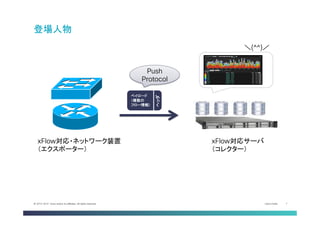
2013-2014 Cisco and/or its affiliates. All rights reserved. 登場人物 xFlow対応・ネットワーク装置 (エクスポーター) xFlow対応サーバ (コレクター) \(^^)/ ペイロード (複数の フロー情報) ヘッダ Push Protocol
8.
Cisco Public 8©
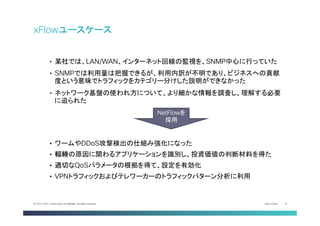
2013-2014 Cisco and/or its affiliates. All rights reserved. xFlowユースケース • 某社では、LAN/WAN、インターネット回線の監視を、SNMP中心に行っていた • SNMPでは利用量は把握できるが、利用内訳が不明であり、ビジネスへの貢献 度という意味でトラフィックをカテゴリー分けした説明ができなかった • ネットワーク基盤の使われ方について、より細かな情報を調査し、理解する必要 に迫られた • ワームやDDoS攻撃検出の仕組み強化になった • 輻輳の原因に関わるアプリケーションを識別し、投資価値の判断材料を得た • 適切なQoSパラメータの根拠を得て、設定を有効化 • VPNトラフィックおよびテレワーカーのトラフィックパターン分析に利用 NetFlowを 採用
9.
Cisco Public 9©
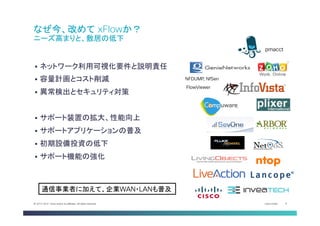
2013-2014 Cisco and/or its affiliates. All rights reserved. なぜ今、改めて xFlowか? ニーズ高まりと、敷居の低下 § ネットワーク利用可視化要件と説明責任 § 容量計画とコスト削減 § 異常検出とセキュリティ対策 § サポート装置の拡大、性能向上 § サポートアプリケーションの普及 § 初期設備投資の低下 § サポート機能の強化 NFDUMP, NfSen 通信事業者に加えて、企業WAN・LANも普及 pmacct FlowViewer
10.
Cisco Public 10©
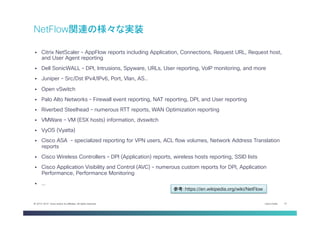
2013-2014 Cisco and/or its affiliates. All rights reserved. § Citrix NetScaler – AppFlow reports including Application, Connections, Request URL, Request host, and User Agent reporting § Dell SonicWALL – DPI, Intrusions, Spyware, URLs, User reporting, VoIP monitoring, and more § Juniper – Src/Dst IPv4/IPv6, Port, Vlan, AS.. § Open vSwitch § Palo Alto Networks – Firewall event reporting, NAT reporting, DPI, and User reporting § Riverbed Steelhead – numerous RTT reports, WAN Optimization reporting § VMWare – VM (ESX hosts) information, dvswitch § VyOS (Vyatta) § Cisco ASA – specialized reporting for VPN users, ACL flow volumes, Network Address Translation reports § Cisco Wireless Controllers – DPI (Application) reports, wireless hosts reporting, SSID lists § Cisco Application Visibility and Control (AVC) – numerous custom reports for DPI, Application Performance, Performance Monitoring § … NetFlow関連の様々な実装 参考:https://en.wikipedia.org/wiki/NetFlow
11.
Cisco Public 11©
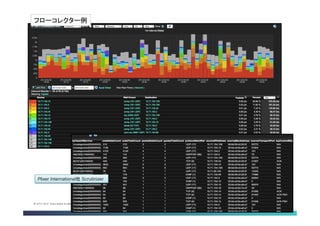
2013-2014 Cisco and/or its affiliates. All rights reserved. Plixer International社 Scrutinizer フローコレクター例
12.
Cisco Public 12©
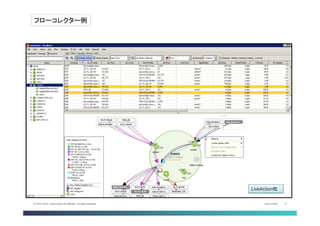
2013-2014 Cisco and/or its affiliates. All rights reserved. LiveAction社 フローコレクター例
13.
Cisco Public 13©
2013-2014 Cisco and/or its affiliates. All rights reserved. NetFlow
14.
Cisco Public 14©
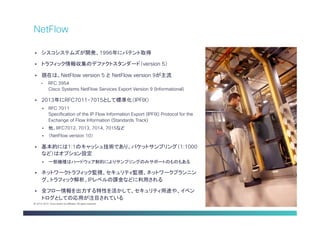
2013-2014 Cisco and/or its affiliates. All rights reserved. § シスコシステムズが開発、1996年にパテント取得 § トラフィック情報収集のデファクトスタンダード(version 5) § 現在は、NetFlow version 5 と NetFlow version 9が主流 • RFC 3954 Cisco Systems NetFlow Services Export Version 9 (Informational) § 2013年にRFC7011-7015として標準化(IPFIX) § RFC 7011 Specification of the IP Flow Information Export (IPFIX) Protocol for the Exchange of Flow Information (Standards Track) § 他、RFC7012, 7013, 7014, 7015など § (NetFlow version 10) § 基本的には1:1のキャッシュ技術であり、パケットサンプリング(1:1000 など)はオプション設定 § 一部機種はハードウェア制約によりサンプリングのみサポートのものもある § ネットワークトラフィック監視、セキュリティ監視、ネットワークプランニン グ、トラフィック解析、IPレベルの課金などに利用される § 全フロー情報を出力する特性を活かして、セキュリティ用途や、イベン トログとしての応用が注目されている NetFlow
15.
Cisco Public 15©
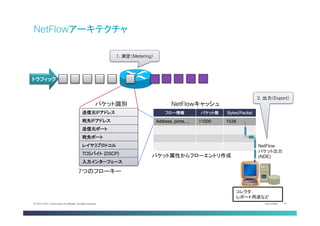
2013-2014 Cisco and/or its affiliates. All rights reserved. フロー情報 パケット数 Bytes/Packet Address, ports, … 11000 1528 NetFlow パケット出力 (NDE) コレクタ: レポート用途など パケット属性からフローエントリ作成 NetFlowキャッシュ パケット識別 7つのフローキー トラフィック 送信元IPアドレス 宛先IPアドレス 送信元ポート 宛先ポート レイヤ3プロトコル TOSバイト (DSCP) 入力インターフェース 1. 測定(Metering) 2. 出力(Export) NetFlowアーキテクチャ
16.
Cisco Public 16©
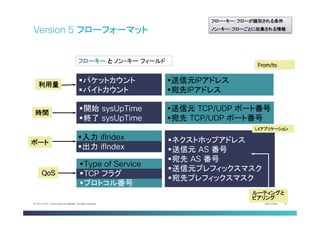
2013-2014 Cisco and/or its affiliates. All rights reserved. Version 5 フローフォーマット L4アプリケーション From/to ルーティングと ピアリング § 送信元 TCP/UDP ポート番号 § 宛先 TCP/UDP ポート番号 § ネクストホップアドレス § 送信元 AS 番号 § 宛先 AS 番号 § 送信元プレフィックスマスク § 宛先プレフィックスマスク § 入力 ifIndex § 出力 ifIndex § パケットカウント § バイトカウント § Type of Service § TCP フラグ § プロトコル番号 § 開始 sysUpTime § 終了 sysUpTime § 送信元IPアドレス § 宛先IPアドレス フローキー と ノン・キー フィールド ポート 利用量 QoS 時間 フロー・キー:フローが識別される条件 ノン・キー:フローごとに収集される情報
17.
Cisco Public 17©
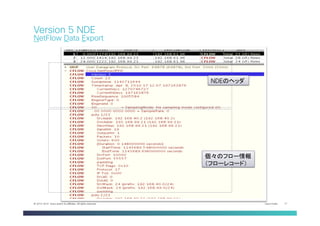
2013-2014 Cisco and/or its affiliates. All rights reserved. Version 5 NDE NetFlow Data Export NDEのヘッダ 個々のフロー情報 (フローレコード)
18.
Cisco Public 18©
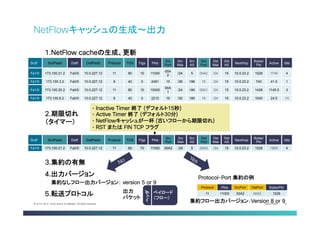
2013-2014 Cisco and/or its affiliates. All rights reserved. NetFlowキャッシュの生成〜出力 1. NetFlow cacheの生成、更新 Srclf SrclPadd Dstlf DstlPadd Protocol TOS Flgs Pkts Src Port Src Msk Src AS Dst Port Dst Msk Dst AS NextHop Bytes/ Pkt Active Idle Fa1/0 173.100.21.2 Fa0/0 10.0.227.12 11 80 10 11000 00A 2 /24 5 00A2 /24 15 10.0.23.2 1528 1745 4 Fa1/0 173.100.3.2 Fa0/0 10.0.227.12 6 40 0 2491 15 /26 196 15 /24 15 10.0.23.2 740 41.5 1 Fa1/0 173.100.20.2 Fa0/0 10.0.227.12 11 80 10 10000 00A 1 /24 180 00A1 /24 15 10.0.23.2 1428 1145.5 3 Fa1/0 173.100.6.2 Fa0/0 10.0.227.12 6 40 0 2210 19 /30 180 19 /24 15 10.0.23.2 1040 24.5 14 2. 期限切れ (タイマー) Srclf SrclPadd Dstlf DstlPadd Protocol TOS Flgs Pkts Src Port Src Msk Src AS Dst Port Dst Msk Dst AS NextHop Bytes/ Pkt Active Idle Fa1/0 173.100.21.2 Fa0/0 10.0.227.12 11 80 10 11000 00A2 /24 5 00A2 /24 15 10.0.23.2 1528 1800 4 3. 集約の有無 4. 出力バージョン 5. 転送プロトコル Protocol-Port 集約の例 集約フロー出力バージョン:Version 8 or 9 出力 パケット ペイロード (フロー) 集約なしフロー出力バージョン: version 5 or 9 Protocol Pkts SrcPort DstPort Bytes/Pkt 11 11000 00A2 00A2 1528 ヘッダ • Inactive Timer 終了 (デフォルト15秒) • Active Timer 終了 (デフォルト30分) • NetFlowキャッシュが一杯 (古いフローから期限切れ) • RST または FIN TCP フラグ
19.
Cisco Public 19©
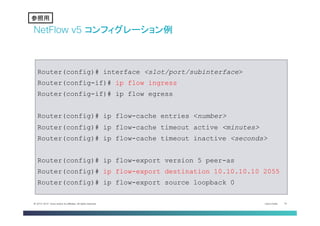
2013-2014 Cisco and/or its affiliates. All rights reserved. NetFlow v5 コンフィグレーション例 Router(config)# interface <slot/port/subinterface> Router(config-if)# ip flow ingress Router(config-if)# ip flow egress Router(config)# ip flow-cache entries <number> Router(config)# ip flow-cache timeout active <minutes> Router(config)# ip flow-cache timeout inactive <seconds> Router(config)# ip flow-export version 5 peer-as Router(config)# ip flow-export destination 10.10.10.10 2055 Router(config)# ip flow-export source loopback 0 参考 参照用
20.
Cisco Public 20©
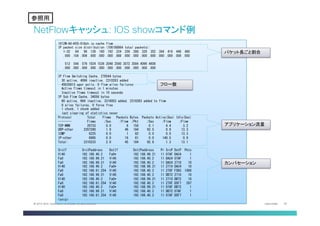
2013-2014 Cisco and/or its affiliates. All rights reserved. NetFlowキャッシュ: IOS showコマンド例 1812W-AG-K05-01#sh ip cache flow IP packet size distribution (106188864 total packets): 1-32 64 96 128 160 192 224 256 288 320 352 384 416 448 480 .000 .104 .006 .000 .000 .000 .888 .000 .000 .000 .000 .000 .000 .000 .000 512 544 576 1024 1536 2048 2560 3072 3584 4096 4608 .000 .000 .000 .000 .000 .000 .000 .000 .000 .000 .000 IP Flow Switching Cache, 278544 bytes 30 active, 4066 inactive, 2310263 added 49835813 ager polls, 0 flow alloc failures Active flows timeout in 1 minutes Inactive flows timeout in 10 seconds IP Sub Flow Cache, 34056 bytes 60 active, 964 inactive, 3316053 added, 2310263 added to flow 0 alloc failures, 0 force free 1 chunk, 1 chunk added last clearing of statistics never Protocol Total Flows Packets Bytes Packets Active(Sec) Idle(Sec) -------- Flows /Sec /Flow /Pkt /Sec /Flow /Flow TCP-WWW 29733 0.0 6 156 0.1 4.4 3.2 UDP-other 2267280 1.9 46 184 92.5 0.9 13.3 ICMP 6225 0.0 1 82 0.0 0.0 13.3 IP-other 6995 0.0 16 81 0.0 140.5 0.9 Total: 2310233 2.0 45 184 92.8 1.3 13.1 SrcIf SrcIPaddress DstIf DstIPaddress Pr SrcP DstP Pkts Vl40 192.168.40.2 Fa0* 192.168.99.21 11 07AF DAC4 1 Fa0 192.168.99.21 Vl40 192.168.40.2 11 DAC4 07AF 1 Fa0 192.168.99.21 Vl40 192.168.40.2 11 DAC4 2710 10 Vl40 192.168.40.2 Fa0* 192.168.99.21 11 2710 DAC4 10 Fa0 192.168.61.254 Vl40 192.168.40.2 11 270F F5B3 1000 Fa0 192.168.99.21 Vl40 192.168.40.2 11 DB72 2710 10 Vl40 192.168.40.2 Fa0* 192.168.99.21 11 2710 DB72 10 Fa0 192.168.61.254 Vl40 192.168.40.2 11 270F D5F7 297 Vl40 192.168.40.2 Fa0* 192.168.99.21 11 07AF DB72 1 Fa0 192.168.99.21 Vl40 192.168.40.2 11 DB72 07AF 1 Fa0 192.168.61.254 Vl40 192.168.40.2 11 07AF D5F7 1 <snip> パケット長ごと割合 アプリケーション流量 カンバセーション フロー数 参考 参照用
21.
Cisco Public 21©
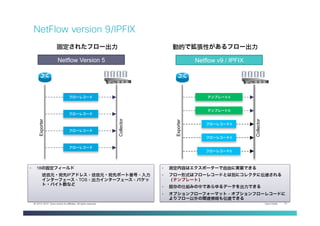
2013-2014 Cisco and/or its affiliates. All rights reserved. フローレコード フローレコード フローレコード フローレコード テンプレートA テンプレートB フローレコードA フローレコードA フローレコードB Exporter Collector Exporter Collector • 18の固定フィールド 送信元・宛先IPアドレス、送信元・宛先ポート番号、入力 インターフェース、TOS、出力インターフェース、パケッ ト・バイト数など Netflow Version 5 Netflow v9 / IPFIX • 測定内容はエクスポーターで自由に実装できる • フロー形式はフローレコードとは別にコレクタに伝達される (テンプレート) • 既存の仕組みの中であらゆるデータを出力できる • オプションフローフォーマット、オプションフローレコードに よりフロー以外の関連情報も伝達できる 動的で拡張性があるフロー出力固定されたフロー出力 NetFlow version 9/IPFIX
22.
Cisco Public 22©
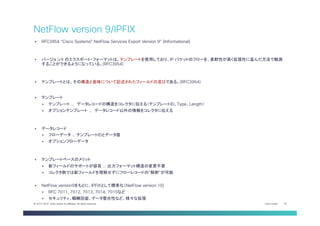
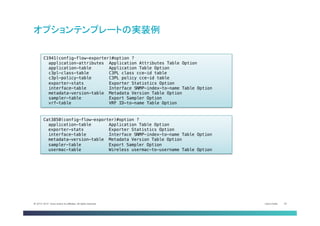
2013-2014 Cisco and/or its affiliates. All rights reserved. § RFC3954 “Cisco Systems® NetFlow Services Export Version 9” (Informational) § バージョ ン9 のエクスポート・フォーマットは、テンプレートを使用しており、IP パケットのフローを、柔軟性が高く拡張性に富んだ方法で観測 することができるようになっている。(RFC3954) § テンプレートとは、その構造と意味について記述されたフィールドの並びである。(RFC3954) § テンプレート § テンプレート … データレコードの構造をコレクタに伝える(テンプレートID、Type、Length) § オプションテンプレート … データレコード以外の情報をコレクタに伝える § データレコード § フローデータ … テンプレートIDとデータ値 § オプションフローデータ § テンプレートベースのメリット § 新フィールドのサポートが容易 … 出力フォーマット構造の変更不要 § コレクタ側では新フィールドを理解せずにフローレコードの”解釈”が可能 § NetFlow version9をもとに、IPFIXとして標準化(NetFlow version 10) § RFC 7011, 7012, 7013, 7014, 7015など § セキュリティ、輻輳回避、データ整合性など、様々な拡張 NetFlow version 9/IPFIX
23.
Cisco Public 23©
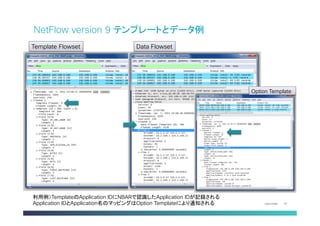
2013-2014 Cisco and/or its affiliates. All rights reserved. 利用例)TemplateのApplication IDにNBARで認識したApplication IDが記録される Application IDとApplication名のマッピングはOption Templateにより通知される Template Flowset Data Flowset Option Template NetFlow version 9 テンプレートとデータ例
24.
Cisco Public 24©
2013-2014 Cisco and/or its affiliates. All rights reserved. オプションテンプレートの実装例 Cat3850(config-flow-exporter)#option ?! application-table Application Table Option! exporter-stats Exporter Statistics Option! interface-table Interface SNMP-index-to-name Table Option! metadata-version-table Metadata Version Table Option! sampler-table Export Sampler Option! usermac-table Wireless usermac-to-username Table Option C1941(config-flow-exporter)#option ?! application-attributes Application Attributes Table Option! application-table Application Table Option! c3pl-class-table C3PL class cce-id table! c3pl-policy-table C3PL policy cce-id table! exporter-stats Exporter Statistics Option! interface-table Interface SNMP-index-to-name Table Option! metadata-version-table Metadata Version Table Option! sampler-table Export Sampler Option! vrf-table VRF ID-to-name Table Option
25.
Cisco Public 25©
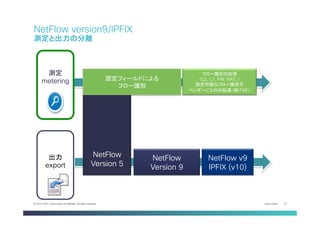
2013-2014 Cisco and/or its affiliates. All rights reserved. NetFlow Version 5 測定 metering 出力 export 固定フィールドによる フロー識別 NetFlow Version 9 NetFlow v9 IPFIX (v10) フロー識別の拡張 (L2, L7, FW, NAT..) 設定可能なフロー識別子 ベンダーごとのの拡張(例:FNF) NetFlow version9/IPFIX 測定と出力の分離
26.
Cisco Public 26©
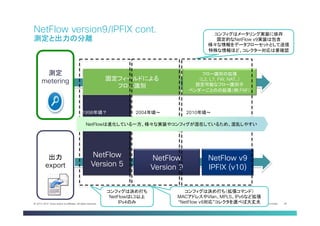
2013-2014 Cisco and/or its affiliates. All rights reserved. NetFlow Version 5 測定 metering 出力 export 固定フィールドによる フロー識別 NetFlow Version 9 NetFlow v9 IPFIX (v10) フロー識別の拡張 (L2, L7, FW, NAT..) 設定可能なフロー識別子 ベンダーごとのの拡張(例:FNF) NetFlow version9/IPFIX cont. 測定と出力の分離 コンフィグは決め打ち NetFlowはL3以上 IPv4のみ コンフィグは決め打ち(拡張コマンド) MACアドレスやVlan、MPLS、IPv6など拡張 “NetFlow v9対応”コレクタを選べば大丈夫 コンフィグはメータリング実装に依存 固定的なNetFlow v9実装は包含 様々な情報をデータフローセットとして送信 特殊な情報ほど、コレクター対応は要確認 NetFlowは進化している一方、様々な実装やコンフィグが混在しているため、混乱しやすい 1998年頃? 2004年頃〜 2010年頃〜
27.
Cisco Public 27©
2013-2014 Cisco and/or its affiliates. All rights reserved. 世代にみるCisco NetFlow コンフィグレーション 1996年〜 2000年〜 2004年〜 ip route-cache flow! mls flow ip interface-full! mls nde sender version 5! ip flow ingress! ip flow egress! ip flow-capture vlan-id! ip flow-capture mac-addresses! ip flow-capture icmp! ip flow-aggregation cache as! set mls flow full! ip route-cache flow sampled input! tag-switching ip flow ! ip multicast netflow ingress! ip flow-cache mpls label-positions 1 2 no-ip-fields mpls-length ! flow record SampleRecord! match ipv4 tos! match ipv4 protocol! match ipv4 source address! match ipv4 destination address! match transport source-port! match transport destination-port! collect transport tcp flags! collect interface input! collect counter bytes long! collect counter packets long! …! flow exporter Collector! description JANOG36! destination 10.71.154.107! transport udp 2055! template data timeout 60! option interface-table! option exporter-stats! option sampler-table! collect connection delay response to-server {sum, min, max} collect connection delay response to-server histogram [bucket1 ... bucket7 | late] collect connection delay response client-to-server {sum, min, max}! 2006年〜 2010年〜 2014年〜 *これは設定の一部であり、網羅したものではありません **機種依存の設定(C12000やCRSなど)は含まれません ***同じコマンドでも装置によってサポート時期が前後する場合が多々あります 参考 • 元々はIPv4のみを対象としていた • L2、MPLS、BGP、IPv6など多数の個別実装が誕生 • Flexible NetFlowの仕組みに収束 参照用
28.
Cisco Public 28©
2013-2014 Cisco and/or its affiliates. All rights reserved. 世代にみるCisco NetFlow コンフィグレーション 1996年〜 2000年〜 2004年〜 ip route-cache flow! mls flow ip interface-full! mls nde sender version 5! ip flow ingress! ip flow egress! ip flow-capture vlan-id! ip flow-capture mac-addresses! ip flow-capture icmp! ip flow-aggregation cache as! set mls flow full! ip route-cache flow sampled input! tag-switching ip flow ! ip multicast netflow ingress! ip flow-cache mpls label-positions 1 2 no-ip-fields mpls-length ! flow record SampleRecord! match ipv4 tos! match ipv4 protocol! match ipv4 source address! match ipv4 destination address! match transport source-port! match transport destination-port! collect transport tcp flags! collect interface input! collect counter bytes long! collect counter packets long! …! flow exporter Collector! description JANOG36! destination 10.71.154.107! transport udp 2055! template data timeout 60! option interface-table! option exporter-stats! option sampler-table! collect connection delay response to-server {sum, min, max} collect connection delay response to-server histogram [bucket1 ... bucket7 | late] collect connection delay response client-to-server {sum, min, max}! 2006年〜 2010年〜 2014年〜 *これは設定の一部であり、網羅したものではありません **機種依存の設定(C12000やCRSなど)は含まれません ***同じコマンドでも装置によってサポート時期が前後する場合が多々あります 参考 • 元々はIPv4のみを対象としていた • L2、MPLS、BGP、IPv6など多数の個別実装が誕生 • Flexible NetFlowの仕組みに収束 参照用 古くはルーティングのキャッシュ だったんだよ setコマンドあったなぁ CatalystはVlan取れる けど、TCPフラグはまだ ですか?!? まだ ip flow ingress って コマンドは、納得しないなぁ Catalystはインターフェース ごとに設定書けないよね? egress に設定するとか、 なんかキモい 12.2SXとか混迷の時代 だったなぁ… Record, Exporter, Monitorの 仕組み、めっちゃ綺麗やん えっ、NBARやCBQoS-MIB までフローで代替するの? NATロギングやDPIロギング にも使われているんだよ まだIPFIXより NetFlow v9の方が多 いかな? インターフェースごとじゃ なくて、計測対象をクラス マップで絞れるように なったんだよ 小規模ルータでは使い 物にならなかったなぁ
29.
Cisco Public 29©
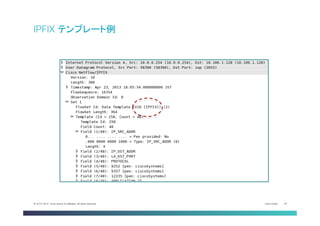
2013-2014 Cisco and/or its affiliates. All rights reserved. IPFIX テンプレート例
30.
Cisco Public 30©
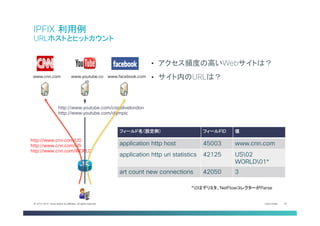
2013-2014 Cisco and/or its affiliates. All rights reserved. http://www.cnn.com/US http://www.cnn.com/US http://www.cnn.com/WORLD www.cnn.com www.facebook.comwww.youtube.co m http://www.youtube.com/ciscolivelondon http://www.youtube.com/olympic • アクセス頻度の高いWebサイトは? • サイト内のURLは? フィールド名(設定例) フィールドID 値 application http host 45003 www.cnn.com application http uri statistics 42125 US02 WORLD01* art count new connections 42050 3 *0はデリミタ、NetFlowコレクターがParse IPFIX 利用例 URLホストとヒットカウント
31.
Cisco Public 31©
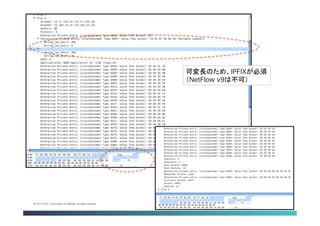
2013-2014 Cisco and/or its affiliates. All rights reserved. 可変長のため、IPFIXが必須 (NetFlow v9は不可)
32.
Cisco Public 32©
2013-2014 Cisco and/or its affiliates. All rights reserved. Tips … 時間があれば
33.
Cisco Public 33©
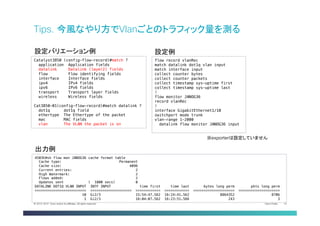
2013-2014 Cisco and/or its affiliates. All rights reserved. Tips. 今風なやり方でVlanごとのトラフィック量を測る Catalyst3850 (config-flow-record)#match ?! application Application fields! datalink Datalink (layer2) fields! flow Flow identifying fields! interface Interface fields! ipv4 IPv4 fields! ipv6 IPv6 fields! transport Transport layer fields! wireless Wireless fields! ! Cat3850-01(config-flow-record)#match datalink ?! dot1q dot1q field! ethertype The Ethertype of the packet! mac MAC fields! vlan The VLAN the packet is on 設定バリエーション例 flow record vlanRec! match datalink dot1q vlan input! match interface input! collect counter bytes! collect counter packets! collect timestamp sys-uptime first! collect timestamp sys-uptime last! !! flow monitor JANOG36! record vlanRec! !! interface GigabitEthernet1/10! switchport mode trunk! vlan-range 1-2000! datalink flow monitor JANOG36 input 設定例 4503E#sh flow mon JANOG36 cache format table! Cache type: Permanent! Cache size: 4096! Current entries: 2! High Watermark: 2! Flows added: 2! Updates sent ( 1800 secs) 0! DATALINK DOT1Q VLAN INPUT INTF INPUT time first time last bytes long perm pkts long perm! ========================= ==================== ============ ============ ==================== ====================! 10 Gi2/3 15:54:47.562 16:24:41.562 8864352 8706! 1 Gi2/3 16:04:07.562 16:23:51.566 243 3 出力例 ※exporterは設定していません
34.
Cisco Public 34©
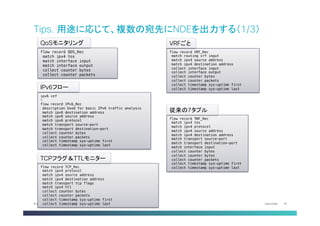
2013-2014 Cisco and/or its affiliates. All rights reserved. Tips. 用途に応じて、複数の宛先にNDEを出力する(1/3) flow record QOS_Rec! match ipv4 tos! match interface input! match interface output! collect counter bytes! collect counter packets QoSモニタリング ipv6 cef! !! flow record IPv6_Rec! description Used for basic IPv6 traffic analysis! match ipv6 destination address! match ipv6 source address! match ipv6 protocol! match transport source-port! match transport destination-port! collect counter bytes! collect counter packets! collect timestamp sys-uptime first! collect timestamp sys-uptime last! IPv6フロー flow record VRF_Rec ! match routing vrf input ! match ipv4 source address ! match ipv4 destination address ! collect interface input ! collect interface output ! collect counter bytes! collect counter packets! collect timestamp sys-uptime first! collect timestamp sys-uptime last! VRFごと flow record TNF_Rec! match ipv4 tos! match ipv4 protocol! match ipv4 source address! match ipv4 destination address! match transport source-port! match transport destination-port! match interface input! collect counter bytes! collect counter bytes! collect counter packets! collect timestamp sys-uptime first! collect timestamp sys-uptime last! 従来の7タプル flow record TCP_Rec! match ipv4 protocol! match ipv4 source address! match ipv4 destination address! match transport tcp flags! match ipv4 ttl! collect counter bytes! collect counter packets! collect timestamp sys-uptime first! collect timestamp sys-uptime last! TCPフラグ&TTLモニター
35.
Cisco Public 35©
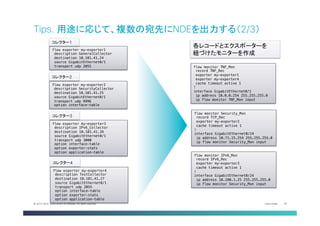
2013-2014 Cisco and/or its affiliates. All rights reserved. Tips. 用途に応じて、複数の宛先にNDEを出力する(2/3) flow exporter my-exporter1! description GeneralCollector! destination 10.101.41.24! source GigabitEthernet0/1! transport udp 2055! コレクター1 flow exporter my-exporter2! description SecurityCollector! destination 10.101.41.25! source GigabitEthernet0/1! transport udp 9996! option interface-table! コレクター2 flow exporter my-exporter3! description IPv6_Collector! destination 10.101.41.26! source GigabitEthernet0/1! transport udp 3000! option interface-table! option exporter-stats! option application-table! コレクター3 flow exporter my-exporter4! description TestCollector! destination 10.101.41.27! source GigabitEthernet0/1! transport udp 2055! option interface-table! option exporter-stats! option application-table! コレクター4 flow monitor TNF_Mon! record TNF_Rec! exporter my-exporter1! exporter my-exporter4! cache timeout active 1! !! interface GigabitEthernet0/1! ip address 10.0.0.254 255.255.255.0! ip flow monitor TNF_Mon input! flow monitor Security_Mon! record TCP_Rec! exporter my-exporter2! cache timeout active 1! !! interface GigabitEthernet0/24! ip address 10.71.15.254 255.255.255.0! ip flow monitor Security_Mon input! flow monitor IPv6_Mon! record IPv6_Rec! exporter my-exporter3! cache timeout active 1! !! interface GigabitEthernet0/24! ip address 10.180.1.25 255.255.255.0! ip flow monitor Security_Mon input! 各レコードとエクスポーターを 紐づけたモニターを作成
36.
Cisco Public 36©
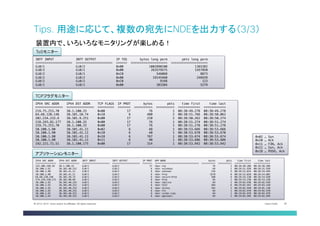
2013-2014 Cisco and/or its affiliates. All rights reserved. Tips. 用途に応じて、複数の宛先にNDEを出力する(3/3) INTF INPUT INTF OUTPUT IP TOS bytes long perm pkts long perm! ==================== ==================== ====== ==================== ====================! Gi0/1 Gi0/2 0x00 1002890100 1365382! Gi0/2 Gi0/1 0x00 263579575 1457850! Gi0/2 Gi0/1 0xC0 546068 8873! Gi0/2 Gi0/2 0x00 19145460 246939! Gi0/2 Gi0/2 0xC0 9348 123! Gi0/1 Gi0/1 0x00 383384 5279! IPV4 SRC ADDR IPV4 DST ADDR TCP FLAGS IP PROT bytes pkts time first time last! =============== =============== ========= ======= ========== ========== ============ ============! 219.75.253.70 10.1.100.33 0x00 17 76 1 08:38:49.278 08:38:49.278! 64.68.120.146 10.101.10.74 0x18 6 480 2 08:38:51.766 08:38:50.062! 202.234.232.6 10.101.9.251 0x00 17 210 2 08:38:50.262 08:38:50.274! 118.243.82.177 10.1.100.33 0x00 17 76 1 08:38:51.274 08:38:51.274! 219.75.253.70 10.1.100.33 0x00 17 76 1 08:38:51.278 08:38:51.278! 10.100.1.90 10.101.41.11 0x02 6 48 1 08:38:53.666 08:38:53.666! 10.100.1.90 10.101.41.11 0x10 6 40 1 08:38:53.670 08:38:53.670! 10.100.1.90 10.101.41.11 0x18 6 767 1 08:38:53.674 08:38:53.674! 10.100.1.90 10.101.41.11 0x11 6 40 1 08:38:53.686 08:38:53.686! 192.221.72.51 10.1.100.175 0x00 17 314 1 08:38:53.942 08:38:53.942! 0x02 … Syn! 0x10 … Ack! 0x11 … FIN, Ack! 0x12 … Syn, Ack! 0x18 … PUSH, Ack! IPV4 SRC ADDR IPV4 DST ADDR INTF INPUT INTF OUTPUT IP PROT APP NAME bytes pkts time first time last! =============== =============== ==================== ==================== ======= ================================ ========== ========== ============ ============! 125.206.198.59 10.1.100.33 Gi0/1 Gi0/2 17 nbar ntp 76 1 08:26:48.206 08:26:48.206! 10.100.1.92 10.101.40.252 Gi0/1 Gi0/2 6 nbar xwindows 64 1 08:26:51.938 08:26:51.938! 10.100.1.90 10.101.41.11 Gi0/1 Gi0/2 6 nbar unknown 216 5 08:26:52.014 08:26:54.494! 10.100.1.90 10.101.41.11 Gi0/1 Gi0/2 6 nbar http 1578 6 08:26:52.018 08:26:54.802! 64.68.120.146 10.101.10.74 Gi0/1 Gi0/2 6 nbar secure-http 560 4 08:26:54.530 08:26:54.830! 174.129.220.171 10.101.90.99 Gi0/1 Gi0/2 6 nbar http 65 1 08:26:53.238 08:26:53.238! 10.100.1.92 10.101.40.252 Gi0/1 Gi0/2 6 nbar vdolive 64 1 08:29:02.938 08:29:02.938! 10.100.1.92 10.101.40.252 Gi0/1 Gi0/2 6 nbar h323 384 6 08:29:02.942 08:29:03.430! 10.100.1.92 10.101.40.252 Gi0/1 Gi0/2 6 nbar skinny 192 3 08:29:02.950 08:29:01.130! 10.100.1.92 10.101.40.252 Gi0/1 Gi0/2 6 nbar nfs 64 1 08:29:02.970 08:29:02.970! 10.100.1.92 10.101.40.252 Gi0/1 Gi0/2 6 nbar corba-iiop 64 1 08:29:02.978 08:29:02.978! 10.100.1.92 10.101.40.252 Gi0/1 Gi0/2 6 nbar appleqtc 64 1 08:29:02.994 08:29:02.994! 装置内で、いろいろなモニタリングが楽しめる! ToSモニター TCPフラグモニター アプリケーションモニター
37.
Cisco Public 37©
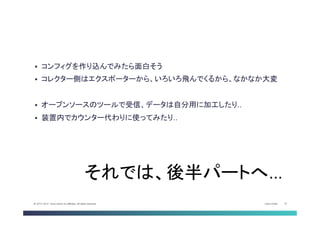
2013-2014 Cisco and/or its affiliates. All rights reserved. § コンフィグを作り込んでみたら面白そう § コレクター側はエクスポーターから、いろいろ飛んでくるから、なかなか大変 § オープンソースのツールで受信、データは自分用に加工したり.. § 装置内でカウンター代わりに使ってみたり.. それでは、後半パートへ…
38.
Thank you.
Download



![Cisco Public 27© 2013-2014 Cisco and/or its affiliates. All rights reserved.
世代にみるCisco NetFlow コンフィグレーション
1996年〜
2000年〜
2004年〜
ip route-cache flow!
mls flow ip interface-full!
mls nde sender version 5!
ip flow ingress!
ip flow egress!
ip flow-capture vlan-id!
ip flow-capture mac-addresses!
ip flow-capture icmp!
ip flow-aggregation cache as!
set mls flow full!
ip route-cache flow sampled input!
tag-switching ip flow !
ip multicast netflow ingress!
ip flow-cache mpls label-positions 1 2 no-ip-fields mpls-length !
flow record SampleRecord!
match ipv4 tos!
match ipv4 protocol!
match ipv4 source address!
match ipv4 destination address!
match transport source-port!
match transport destination-port!
collect transport tcp flags!
collect interface input!
collect counter bytes long!
collect counter packets long!
…!
flow exporter Collector!
description JANOG36!
destination 10.71.154.107!
transport udp 2055!
template data timeout 60!
option interface-table!
option exporter-stats!
option sampler-table!
collect connection delay response to-server {sum, min, max}
collect connection delay response to-server histogram [bucket1 ... bucket7 | late]
collect connection delay response client-to-server {sum, min, max}!
2006年〜
2010年〜
2014年〜
*これは設定の一部であり、網羅したものではありません
**機種依存の設定(C12000やCRSなど)は含まれません
***同じコマンドでも装置によってサポート時期が前後する場合が多々あります
参考
• 元々はIPv4のみを対象としていた
• L2、MPLS、BGP、IPv6など多数の個別実装が誕生
• Flexible NetFlowの仕組みに収束
参照用](https://image.slidesharecdn.com/20150715xflowkikutafinal-161021195835/85/20150715-xflow-kikuta_final-27-320.jpg)
![Cisco Public 28© 2013-2014 Cisco and/or its affiliates. All rights reserved.
世代にみるCisco NetFlow コンフィグレーション
1996年〜
2000年〜
2004年〜
ip route-cache flow!
mls flow ip interface-full!
mls nde sender version 5!
ip flow ingress!
ip flow egress!
ip flow-capture vlan-id!
ip flow-capture mac-addresses!
ip flow-capture icmp!
ip flow-aggregation cache as!
set mls flow full!
ip route-cache flow sampled input!
tag-switching ip flow !
ip multicast netflow ingress!
ip flow-cache mpls label-positions 1 2 no-ip-fields mpls-length !
flow record SampleRecord!
match ipv4 tos!
match ipv4 protocol!
match ipv4 source address!
match ipv4 destination address!
match transport source-port!
match transport destination-port!
collect transport tcp flags!
collect interface input!
collect counter bytes long!
collect counter packets long!
…!
flow exporter Collector!
description JANOG36!
destination 10.71.154.107!
transport udp 2055!
template data timeout 60!
option interface-table!
option exporter-stats!
option sampler-table!
collect connection delay response to-server {sum, min, max}
collect connection delay response to-server histogram [bucket1 ... bucket7 | late]
collect connection delay response client-to-server {sum, min, max}!
2006年〜
2010年〜
2014年〜
*これは設定の一部であり、網羅したものではありません
**機種依存の設定(C12000やCRSなど)は含まれません
***同じコマンドでも装置によってサポート時期が前後する場合が多々あります
参考
• 元々はIPv4のみを対象としていた
• L2、MPLS、BGP、IPv6など多数の個別実装が誕生
• Flexible NetFlowの仕組みに収束
参照用
古くはルーティングのキャッシュ
だったんだよ
setコマンドあったなぁ
CatalystはVlan取れる
けど、TCPフラグはまだ
ですか?!?
まだ ip flow ingress って
コマンドは、納得しないなぁ
Catalystはインターフェース
ごとに設定書けないよね?
egress に設定するとか、
なんかキモい
12.2SXとか混迷の時代
だったなぁ…
Record, Exporter, Monitorの
仕組み、めっちゃ綺麗やん
えっ、NBARやCBQoS-MIB
までフローで代替するの?
NATロギングやDPIロギング
にも使われているんだよ
まだIPFIXより
NetFlow v9の方が多
いかな?
インターフェースごとじゃ
なくて、計測対象をクラス
マップで絞れるように
なったんだよ
小規模ルータでは使い
物にならなかったなぁ](https://image.slidesharecdn.com/20150715xflowkikutafinal-161021195835/85/20150715-xflow-kikuta_final-28-320.jpg)




![[G-Tech2014講演資料] シスコのSDN最新動向とITインフラエンジニアに求められるスキル - シスコシステムズ合同会社](https://cdn.slidesharecdn.com/ss_thumbnails/d-2sdnit-141020222301-conversion-gate01-thumbnail.jpg?width=640&height=640&fit=bounds)
