Software Environment
Java Technology
Java technology is both a programming language and a platform.
The Java Programming Language
The Java programming language is a high-level language that can be characterized by all of the
following buzzwords:
 Simple
 Architecture neutral
 Object oriented
 Portable
 Distributed
 High performance
 Interpreted
 Multithreaded
 Robust
 Dynamic
 Secure
With most programming languages, you either compile or interpret a program so that you can
run it on your computer. The Java programming language is unusual in that a program is both
compiled and interpreted. With the compiler, first you translate a program into an intermediate
language called Java byte codes —the platform-independent codes interpreted by the interpreter
on the Java platform. The interpreter parses and runs each Java byte code instruction on the
computer. Compilation happens just once; interpretation occurs each time the program is
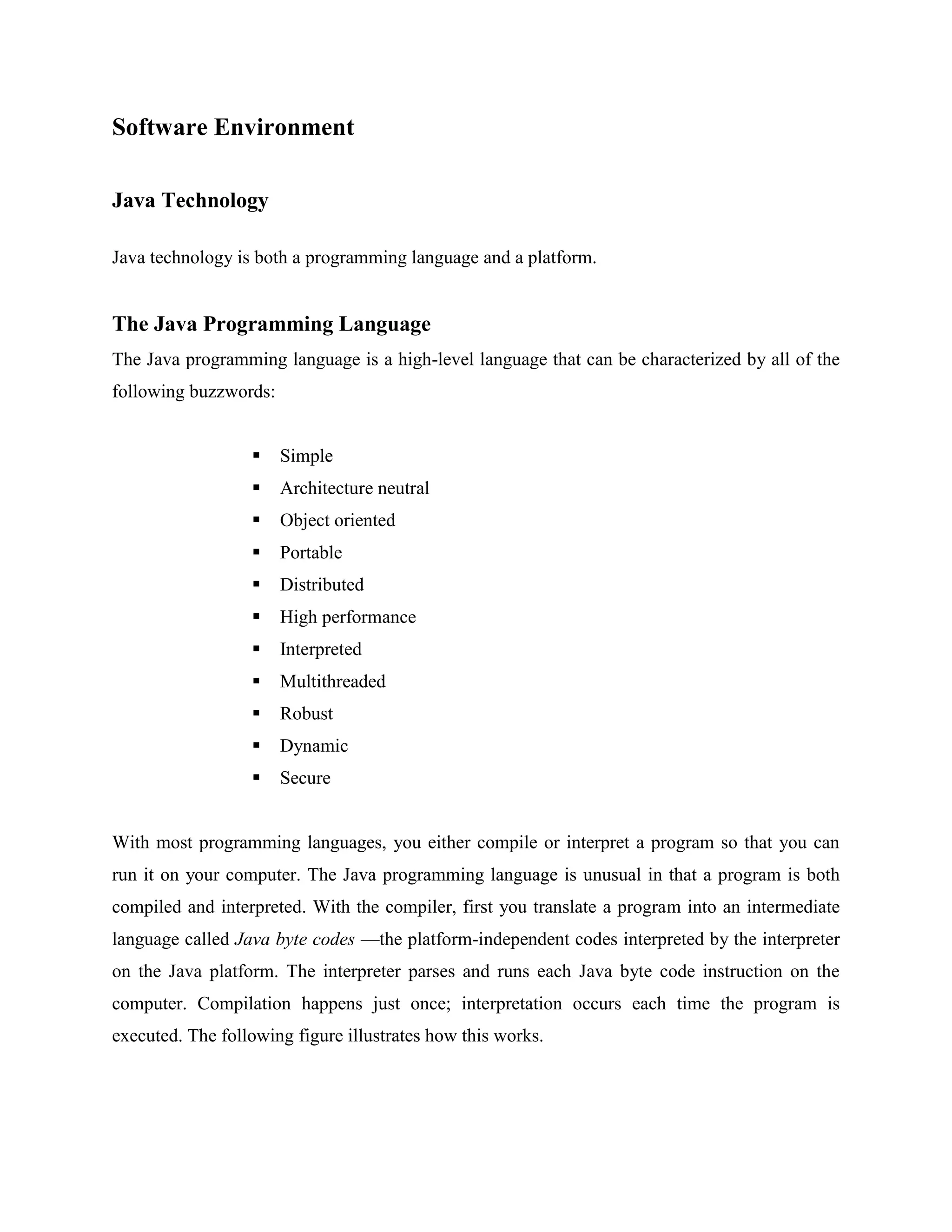
executed. The following figure illustrates how this works.
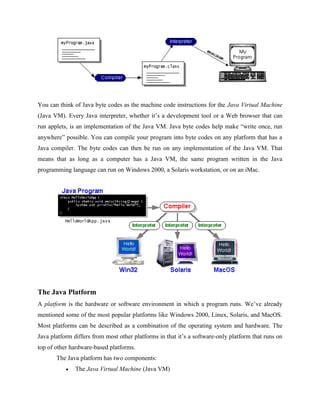
You can think of Java byte codes as the machine code instructions for the Java Virtual Machine
(Java VM). Every Java interpreter, whether it’s a development tool or a Web browser that can
run applets, is an implementation of the Java VM. Java byte codes help make “write once, run
anywhere” possible. You can compile your program into byte codes on any platform that has a
Java compiler. The byte codes can then be run on any implementation of the Java VM. That
means that as long as a computer has a Java VM, the same program written in the Java
programming language can run on Windows 2000, a Solaris workstation, or on an iMac.
The Java Platform
A platform is the hardware or software environment in which a program runs. We’ve already
mentioned some of the most popular platforms like Windows 2000, Linux, Solaris, and MacOS.
Most platforms can be described as a combination of the operating system and hardware. The
Java platform differs from most other platforms in that it’s a software-only platform that runs on
top of other hardware-based platforms.
The Java platform has two components:
 The Java Virtual Machine (Java VM)
 The Java Application Programming Interface (Java API)
You’ve already been introduced to the Java VM. It’s the base for the Java platform and is ported
onto various hardware-based platforms.
The Java API is a large collection of ready-made software components that provide many useful
capabilities, such as graphical user interface (GUI) widgets. The Java API is grouped into
libraries of related classes and interfaces; these libraries are known as packages. The next
section, What Can Java Technology Do? Highlights what functionality some of the packages in
the Java API provide.
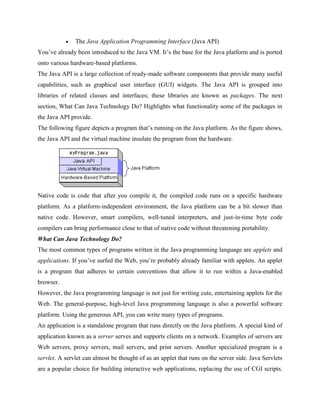
The following figure depicts a program that’s running on the Java platform. As the figure shows,
the Java API and the virtual machine insulate the program from the hardware.
Native code is code that after you compile it, the compiled code runs on a specific hardware
platform. As a platform-independent environment, the Java platform can be a bit slower than
native code. However, smart compilers, well-tuned interpreters, and just-in-time byte code
compilers can bring performance close to that of native code without threatening portability.
What Can Java Technology Do?
The most common types of programs written in the Java programming language are applets and
applications. If you’ve surfed the Web, you’re probably already familiar with applets. An applet
is a program that adheres to certain conventions that allow it to run within a Java-enabled
browser.
However, the Java programming language is not just for writing cute, entertaining applets for the
Web. The general-purpose, high-level Java programming language is also a powerful software
platform. Using the generous API, you can write many types of programs.
An application is a standalone program that runs directly on the Java platform. A special kind of
application known as a server serves and supports clients on a network. Examples of servers are
Web servers, proxy servers, mail servers, and print servers. Another specialized program is a
servlet. A servlet can almost be thought of as an applet that runs on the server side. Java Servlets
are a popular choice for building interactive web applications, replacing the use of CGI scripts.
Servlets are similar to applets in that they are runtime extensions of applications. Instead of
working in browsers, though, servlets run within Java Web servers, configuring or tailoring the
server.
How does the API support all these kinds of programs? It does so with packages of software
components that provides a wide range of functionality. Every full implementation of the Java
platform gives you the following features:
 The essentials: Objects, strings, threads, numbers, input and output, data
structures, system properties, date and time, and so on.
 Applets: The set of conventions used by applets.
 Networking: URLs, TCP (Transmission Control Protocol), UDP (User Data gram
Protocol) sockets, and IP (Internet Protocol) addresses.
 Internationalization: Help for writing programs that can be localized for users
worldwide. Programs can automatically adapt to specific locales and be displayed
in the appropriate language.
 Security: Both low level and high level, including electronic signatures, public
and private key management, access control, and certificates.
 Software components: Known as JavaBeansTM
, can plug into existing
component architectures.
 Object serialization: Allows lightweight persistence and communication via
Remote Method Invocation (RMI).
 Java Database Connectivity (JDBCTM): Provides uniform access to a wide
range of relational databases.
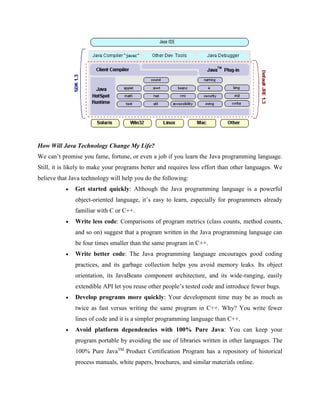
The Java platform also has APIs for 2D and 3D graphics, accessibility, servers,
collaboration, telephony, speech, animation, and more. The following figure depicts what
is included in the Java 2 SDK.
How Will Java Technology Change My Life?
We can’t promise you fame, fortune, or even a job if you learn the Java programming language.
Still, it is likely to make your programs better and requires less effort than other languages. We
believe that Java technology will help you do the following:
 Get started quickly: Although the Java programming language is a powerful
object-oriented language, it’s easy to learn, especially for programmers already
familiar with C or C++.
 Write less code: Comparisons of program metrics (class counts, method counts,
and so on) suggest that a program written in the Java programming language can
be four times smaller than the same program in C++.
 Write better code: The Java programming language encourages good coding
practices, and its garbage collection helps you avoid memory leaks. Its object
orientation, its JavaBeans component architecture, and its wide-ranging, easily
extendible API let you reuse other people’s tested code and introduce fewer bugs.
 Develop programs more quickly: Your development time may be as much as
twice as fast versus writing the same program in C++. Why? You write fewer
lines of code and it is a simpler programming language than C++.
 Avoid platform dependencies with 100% Pure Java: You can keep your
program portable by avoiding the use of libraries written in other languages. The
100% Pure JavaTM
Product Certification Program has a repository of historical
process manuals, white papers, brochures, and similar materials online.
 Write once, run anywhere: Because 100% Pure Java programs are compiled into
machine-independent byte codes, they run consistently on any Java platform.
 Distribute software more easily: You can upgrade applets easily from a central
server. Applets take advantage of the feature of allowing new classes to be loaded
“on the fly,” without recompiling the entire program.
ODBC
Microsoft Open Database Connectivity (ODBC) is a standard programming interface for
application developers and database systems providers. Before ODBC became a de facto
standard for Windows programs to interface with database systems, programmers had to use
proprietary languages for each database they wanted to connect to. Now, ODBC has made the
choice of the database system almost irrelevant from a coding perspective, which is as it should
be. Application developers have much more important things to worry about than the syntax that
is needed to port their program from one database to another when business needs suddenly
change.
Through the ODBC Administrator in Control Panel, you can specify the particular database that
is associated with a data source that an ODBC application program is written to use. Think of an
ODBC data source as a door with a name on it. Each door will lead you to a particular database.
For example, the data source named Sales Figures might be a SQL Server database, whereas the
Accounts Payable data source could refer to an Access database. The physical database referred
to by a data source can reside anywhere on the LAN.
The ODBC system files are not installed on your system by Windows 95. Rather, they are
installed when you setup a separate database application, such as SQL Server Client or Visual
Basic 4.0. When the ODBC icon is installed in Control Panel, it uses a file called
ODBCINST.DLL. It is also possible to administer your ODBC data sources through a stand-
alone program called ODBCADM.EXE. There is a 16-bit and a 32-bit version of this program
and each maintains a separate list of ODBC data sources.
From a programming perspective, the beauty of ODBC is that the application can be written to
use the same set of function calls to interface with any data source, regardless of the database
vendor. The source code of the application doesn’t change whether it talks to Oracle or SQL
Server. We only mention these two as an example. There are ODBC drivers available for several
dozen popular database systems. Even Excel spreadsheets and plain text files can be turned into
data sources. The operating system uses the Registry information written by ODBC
Administrator to determine which low-level ODBC drivers are needed to talk to the data source
(such as the interface to Oracle or SQL Server). The loading of the ODBC drivers is transparent
to the ODBC application program. In a client/server environment, the ODBC API even handles
many of the network issues for the application programmer.
The advantages of this scheme are so numerous that you are probably thinking there must be
some catch. The only disadvantage of ODBC is that it isn’t as efficient as talking directly to the
native database interface. ODBC has had many detractors make the charge that it is too slow.
Microsoft has always claimed that the critical factor in performance is the quality of the driver
software that is used. In our humble opinion, this is true. The availability of good ODBC drivers
has improved a great deal recently. And anyway, the criticism about performance is somewhat
analogous to those who said that compilers would never match the speed of pure assembly
language. Maybe not, but the compiler (or ODBC) gives you the opportunity to write cleaner
programs, which means you finish sooner. Meanwhile, computers get faster every year.
JDBC
In an effort to set an independent database standard API for Java; Sun Microsystems developed
Java Database Connectivity, or JDBC. JDBC offers a generic SQL database access mechanism
that provides a consistent interface to a variety of RDBMSs. This consistent interface is achieved
through the use of “plug-in” database connectivity modules, or drivers. If a database vendor
wishes to have JDBC support, he or she must provide the driver for each platform that the
database and Java run on.
To gain a wider acceptance of JDBC, Sun based JDBC’s framework on ODBC. As you
discovered earlier in this chapter, ODBC has widespread support on a variety of platforms.
Basing JDBC on ODBC will allow vendors to bring JDBC drivers to market much faster than
developing a completely new connectivity solution.
JDBC was announced in March of 1996. It was released for a 90 day public review that ended
June 8, 1996. Because of user input, the final JDBC v1.0 specification was released soon after.
The remainder of this section will cover enough information about JDBC for you to know what it
is about and how to use it effectively. This is by no means a complete overview of JDBC. That
would fill an entire book.
JDBC Goals
Few software packages are designed without goals in mind. JDBC is one that, because of its
many goals, drove the development of the API. These goals, in conjunction with early reviewer
feedback, have finalized the JDBC class library into a solid framework for building database
applications in Java.
The goals that were set for JDBC are important. They will give you some insight as to why
certain classes and functionalities behave the way they do. The eight design goals for JDBC are
as follows:
1. SQL Level API
The designers felt that their main goal was to define a SQL interface for Java. Although not
the lowest database interface level possible, it is at a low enough level for higher-level tools
and APIs to be created. Conversely, it is at a high enough level for application programmers
to use it confidently. Attaining this goal allows for future tool vendors to “generate” JDBC
code and to hide many of JDBC’s complexities from the end user.
2. SQL Conformance
SQL syntax varies as you move from database vendor to database vendor. In an effort to
support a wide variety of vendors, JDBC will allow any query statement to be passed through
it to the underlying database driver. This allows the connectivity module to handle non-
standard functionality in a manner that is suitable for its users.
3. JDBC must be implemental on top of common database interfaces
The JDBC SQL API must “sit” on top of other common SQL level APIs. This goal
allows JDBC to use existing ODBC level drivers by the use of a software interface. This
interface would translate JDBC calls to ODBC and vice versa.
4. Provide a Java interface that is consistent with the rest of the Java system
Because of Java’s acceptance in the user community thus far, the designers feel that
they should not stray from the current design of the core Java system.
5. Keep it simple
This goal probably appears in all software design goal listings. JDBC is no exception.
Sun felt that the design of JDBC should be very simple, allowing for only one method of
completing a task per mechanism. Allowing duplicate functionality only serves to confuse
the users of the API.
6. Use strong, static typing wherever possible
Strong typing allows for more error checking to be done at compile time; also, less error
appear at runtime.
7. Keep the common cases simple
Because more often than not, the usual SQL calls used by the programmer are simple
SELECT’s, INSERT’s, DELETE’s and UPDATE’s, these queries should be simple to
perform with JDBC. However, more complex SQL statements should also be possible.
Finally we decided to proceed the implementation using Java Networking.
And for dynamically updating the cache table we go for MS Access database.
Java ha two things: a programming language and a platform.
Java is a high-level programming language that is all of the following
Simple Architecture-neutral
Object-oriented Portable
Distributed High-performance
Interpreted multithreaded
Robust Dynamic
Secure
Java is also unusual in that each Java program is both compiled and interpreted. With
a compile you translate a Java program into an intermediate language called Java byte
codes the platform-independent code instruction is passed and run on the computer.
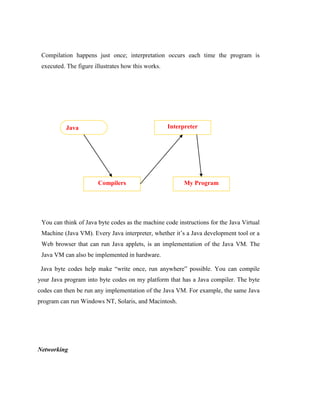
Compilation happens just once; interpretation occurs each time the program is
executed. The figure illustrates how this works.
You can think of Java byte codes as the machine code instructions for the Java Virtual
Machine (Java VM). Every Java interpreter, whether it’s a Java development tool or a
Web browser that can run Java applets, is an implementation of the Java VM. The
Java VM can also be implemented in hardware.
Java byte codes help make “write once, run anywhere” possible. You can compile
your Java program into byte codes on my platform that has a Java compiler. The byte
codes can then be run any implementation of the Java VM. For example, the same Java
program can run Windows NT, Solaris, and Macintosh.
Networking
Java
Program
Compilers
Interpreter
My Program
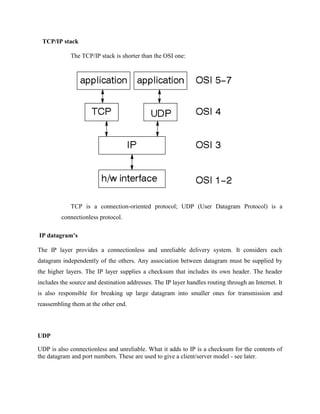
TCP/IP stack
The TCP/IP stack is shorter than the OSI one:
TCP is a connection-oriented protocol; UDP (User Datagram Protocol) is a
connectionless protocol.
IP datagram’s
The IP layer provides a connectionless and unreliable delivery system. It considers each
datagram independently of the others. Any association between datagram must be supplied by
the higher layers. The IP layer supplies a checksum that includes its own header. The header
includes the source and destination addresses. The IP layer handles routing through an Internet. It
is also responsible for breaking up large datagram into smaller ones for transmission and
reassembling them at the other end.
UDP
UDP is also connectionless and unreliable. What it adds to IP is a checksum for the contents of
the datagram and port numbers. These are used to give a client/server model - see later.
TCP
TCP supplies logic to give a reliable connection-oriented protocol above IP. It provides a virtual
circuit that two processes can use to communicate.
Internet addresses
In order to use a service, you must be able to find it. The Internet uses an address scheme for
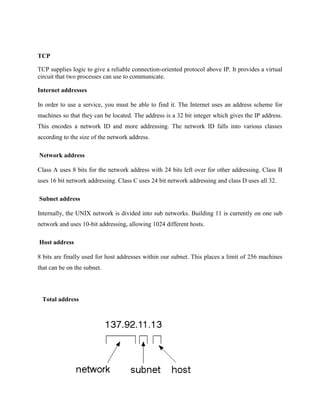
machines so that they can be located. The address is a 32 bit integer which gives the IP address.
This encodes a network ID and more addressing. The network ID falls into various classes
according to the size of the network address.
Network address
Class A uses 8 bits for the network address with 24 bits left over for other addressing. Class B
uses 16 bit network addressing. Class C uses 24 bit network addressing and class D uses all 32.
Subnet address
Internally, the UNIX network is divided into sub networks. Building 11 is currently on one sub
network and uses 10-bit addressing, allowing 1024 different hosts.
Host address
8 bits are finally used for host addresses within our subnet. This places a limit of 256 machines
that can be on the subnet.
Total address
The 32 bit address is usually written as 4 integers separated by dots.
Port addresses
A service exists on a host, and is identified by its port. This is a 16 bit number. To send a
message to a server, you send it to the port for that service of the host that it is running on. This
is not location transparency! Certain of these ports are "well known".
Sockets
A socket is a data structure maintained by the system to handle network connections. A socket is
created using the call socket. It returns an integer that is like a file descriptor. In fact, under
Windows, this handle can be used with Read File and Write File functions.
#include <sys/types.h>
#include <sys/socket.h>
int socket(int family, int type, int protocol);
Here "family" will be AF_INET for IP communications, protocol will be zero, and
type will depend on whether TCP or UDP is used. Two processes wishing to
communicate over a network create a socket each. These are similar to two ends of a
pipe - but the actual pipe does not yet exist.
JFree Chart
JFreeChart is a free 100% Java chart library that makes it easy for developers to display
professional quality charts in their applications. JFreeChart's extensive feature set includes:
A consistent and well-documented API, supporting a wide range of chart types;
A flexible design that is easy to extend, and targets both server-side and client-side applications;
Support for many output types, including Swing components, image files (including PNG and
JPEG), and vector graphics file formats (including PDF, EPS and SVG);
JFreeChart is "open source" or, more specifically, free software. It is distributed under the terms
of the GNU Lesser General Public Licence (LGPL), which permits use in proprietary
applications.
1. Map Visualizations
Charts showing values that relate to geographical areas. Some examples include: (a) population
density in each state of the United States, (b) income per capita for each country in Europe, (c)
life expectancy in each country of the world. The tasks in this project include:
Sourcing freely redistributable vector outlines for the countries of the world, states/provinces in
particular countries (USA in particular, but also other areas);
Creating an appropriate dataset interface (plus default implementation), a rendered, and
integrating this with the existing XYPlot class in JFreeChart;
Testing, documenting, testing some more, documenting some more.
2. Time Series Chart Interactivity
Implement a new (to JFreeChart) feature for interactive time series charts --- to display a
separate control that shows a small version of ALL the time series data, with a sliding "view"
rectangle that allows you to select the subset of the time series data to display in the main chart.
3. Dashboards
There is currently a lot of interest in dashboard displays. Create a flexible dashboard mechanism
that supports a subset of JFreeChart chart types (dials, pies, thermometers, bars, and lines/time
series) that can be delivered easily via both Java Web Start and an applet.
4. Property Editors
The property editor mechanism in JFreeChart only handles a small subset of the properties that
can be set for charts. Extend (or reimplement) this mechanism to provide greater end-user
control over the appearance of the charts.
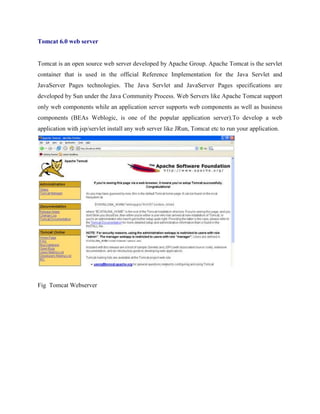
Tomcat 6.0 web server
Tomcat is an open source web server developed by Apache Group. Apache Tomcat is the servlet
container that is used in the official Reference Implementation for the Java Servlet and
JavaServer Pages technologies. The Java Servlet and JavaServer Pages specifications are
developed by Sun under the Java Community Process. Web Servers like Apache Tomcat support
only web components while an application server supports web components as well as business
components (BEAs Weblogic, is one of the popular application server).To develop a web
application with jsp/servlet install any web server like JRun, Tomcat etc to run your application.
Fig Tomcat Webserver

Software requirement

  • 1.
    Software Environment Java Technology Javatechnology is both a programming language and a platform. The Java Programming Language The Java programming language is a high-level language that can be characterized by all of the following buzzwords:  Simple  Architecture neutral  Object oriented  Portable  Distributed  High performance  Interpreted  Multithreaded  Robust  Dynamic  Secure With most programming languages, you either compile or interpret a program so that you can run it on your computer. The Java programming language is unusual in that a program is both compiled and interpreted. With the compiler, first you translate a program into an intermediate language called Java byte codes —the platform-independent codes interpreted by the interpreter on the Java platform. The interpreter parses and runs each Java byte code instruction on the computer. Compilation happens just once; interpretation occurs each time the program is executed. The following figure illustrates how this works.
  • 2.
    You can thinkof Java byte codes as the machine code instructions for the Java Virtual Machine (Java VM). Every Java interpreter, whether it’s a development tool or a Web browser that can run applets, is an implementation of the Java VM. Java byte codes help make “write once, run anywhere” possible. You can compile your program into byte codes on any platform that has a Java compiler. The byte codes can then be run on any implementation of the Java VM. That means that as long as a computer has a Java VM, the same program written in the Java programming language can run on Windows 2000, a Solaris workstation, or on an iMac. The Java Platform A platform is the hardware or software environment in which a program runs. We’ve already mentioned some of the most popular platforms like Windows 2000, Linux, Solaris, and MacOS. Most platforms can be described as a combination of the operating system and hardware. The Java platform differs from most other platforms in that it’s a software-only platform that runs on top of other hardware-based platforms. The Java platform has two components:  The Java Virtual Machine (Java VM)
  • 3.
     The JavaApplication Programming Interface (Java API) You’ve already been introduced to the Java VM. It’s the base for the Java platform and is ported onto various hardware-based platforms. The Java API is a large collection of ready-made software components that provide many useful capabilities, such as graphical user interface (GUI) widgets. The Java API is grouped into libraries of related classes and interfaces; these libraries are known as packages. The next section, What Can Java Technology Do? Highlights what functionality some of the packages in the Java API provide. The following figure depicts a program that’s running on the Java platform. As the figure shows, the Java API and the virtual machine insulate the program from the hardware. Native code is code that after you compile it, the compiled code runs on a specific hardware platform. As a platform-independent environment, the Java platform can be a bit slower than native code. However, smart compilers, well-tuned interpreters, and just-in-time byte code compilers can bring performance close to that of native code without threatening portability. What Can Java Technology Do? The most common types of programs written in the Java programming language are applets and applications. If you’ve surfed the Web, you’re probably already familiar with applets. An applet is a program that adheres to certain conventions that allow it to run within a Java-enabled browser. However, the Java programming language is not just for writing cute, entertaining applets for the Web. The general-purpose, high-level Java programming language is also a powerful software platform. Using the generous API, you can write many types of programs. An application is a standalone program that runs directly on the Java platform. A special kind of application known as a server serves and supports clients on a network. Examples of servers are Web servers, proxy servers, mail servers, and print servers. Another specialized program is a servlet. A servlet can almost be thought of as an applet that runs on the server side. Java Servlets are a popular choice for building interactive web applications, replacing the use of CGI scripts.
  • 4.
    Servlets are similarto applets in that they are runtime extensions of applications. Instead of working in browsers, though, servlets run within Java Web servers, configuring or tailoring the server. How does the API support all these kinds of programs? It does so with packages of software components that provides a wide range of functionality. Every full implementation of the Java platform gives you the following features:  The essentials: Objects, strings, threads, numbers, input and output, data structures, system properties, date and time, and so on.  Applets: The set of conventions used by applets.  Networking: URLs, TCP (Transmission Control Protocol), UDP (User Data gram Protocol) sockets, and IP (Internet Protocol) addresses.  Internationalization: Help for writing programs that can be localized for users worldwide. Programs can automatically adapt to specific locales and be displayed in the appropriate language.  Security: Both low level and high level, including electronic signatures, public and private key management, access control, and certificates.  Software components: Known as JavaBeansTM , can plug into existing component architectures.  Object serialization: Allows lightweight persistence and communication via Remote Method Invocation (RMI).  Java Database Connectivity (JDBCTM): Provides uniform access to a wide range of relational databases. The Java platform also has APIs for 2D and 3D graphics, accessibility, servers, collaboration, telephony, speech, animation, and more. The following figure depicts what is included in the Java 2 SDK.
  • 5.
    How Will JavaTechnology Change My Life? We can’t promise you fame, fortune, or even a job if you learn the Java programming language. Still, it is likely to make your programs better and requires less effort than other languages. We believe that Java technology will help you do the following:  Get started quickly: Although the Java programming language is a powerful object-oriented language, it’s easy to learn, especially for programmers already familiar with C or C++.  Write less code: Comparisons of program metrics (class counts, method counts, and so on) suggest that a program written in the Java programming language can be four times smaller than the same program in C++.  Write better code: The Java programming language encourages good coding practices, and its garbage collection helps you avoid memory leaks. Its object orientation, its JavaBeans component architecture, and its wide-ranging, easily extendible API let you reuse other people’s tested code and introduce fewer bugs.  Develop programs more quickly: Your development time may be as much as twice as fast versus writing the same program in C++. Why? You write fewer lines of code and it is a simpler programming language than C++.  Avoid platform dependencies with 100% Pure Java: You can keep your program portable by avoiding the use of libraries written in other languages. The 100% Pure JavaTM Product Certification Program has a repository of historical process manuals, white papers, brochures, and similar materials online.
  • 6.
     Write once,run anywhere: Because 100% Pure Java programs are compiled into machine-independent byte codes, they run consistently on any Java platform.  Distribute software more easily: You can upgrade applets easily from a central server. Applets take advantage of the feature of allowing new classes to be loaded “on the fly,” without recompiling the entire program. ODBC Microsoft Open Database Connectivity (ODBC) is a standard programming interface for application developers and database systems providers. Before ODBC became a de facto standard for Windows programs to interface with database systems, programmers had to use proprietary languages for each database they wanted to connect to. Now, ODBC has made the choice of the database system almost irrelevant from a coding perspective, which is as it should be. Application developers have much more important things to worry about than the syntax that is needed to port their program from one database to another when business needs suddenly change. Through the ODBC Administrator in Control Panel, you can specify the particular database that is associated with a data source that an ODBC application program is written to use. Think of an ODBC data source as a door with a name on it. Each door will lead you to a particular database. For example, the data source named Sales Figures might be a SQL Server database, whereas the Accounts Payable data source could refer to an Access database. The physical database referred to by a data source can reside anywhere on the LAN. The ODBC system files are not installed on your system by Windows 95. Rather, they are installed when you setup a separate database application, such as SQL Server Client or Visual Basic 4.0. When the ODBC icon is installed in Control Panel, it uses a file called ODBCINST.DLL. It is also possible to administer your ODBC data sources through a stand- alone program called ODBCADM.EXE. There is a 16-bit and a 32-bit version of this program and each maintains a separate list of ODBC data sources. From a programming perspective, the beauty of ODBC is that the application can be written to use the same set of function calls to interface with any data source, regardless of the database vendor. The source code of the application doesn’t change whether it talks to Oracle or SQL Server. We only mention these two as an example. There are ODBC drivers available for several
  • 7.
    dozen popular databasesystems. Even Excel spreadsheets and plain text files can be turned into data sources. The operating system uses the Registry information written by ODBC Administrator to determine which low-level ODBC drivers are needed to talk to the data source (such as the interface to Oracle or SQL Server). The loading of the ODBC drivers is transparent to the ODBC application program. In a client/server environment, the ODBC API even handles many of the network issues for the application programmer. The advantages of this scheme are so numerous that you are probably thinking there must be some catch. The only disadvantage of ODBC is that it isn’t as efficient as talking directly to the native database interface. ODBC has had many detractors make the charge that it is too slow. Microsoft has always claimed that the critical factor in performance is the quality of the driver software that is used. In our humble opinion, this is true. The availability of good ODBC drivers has improved a great deal recently. And anyway, the criticism about performance is somewhat analogous to those who said that compilers would never match the speed of pure assembly language. Maybe not, but the compiler (or ODBC) gives you the opportunity to write cleaner programs, which means you finish sooner. Meanwhile, computers get faster every year. JDBC In an effort to set an independent database standard API for Java; Sun Microsystems developed Java Database Connectivity, or JDBC. JDBC offers a generic SQL database access mechanism that provides a consistent interface to a variety of RDBMSs. This consistent interface is achieved through the use of “plug-in” database connectivity modules, or drivers. If a database vendor wishes to have JDBC support, he or she must provide the driver for each platform that the database and Java run on. To gain a wider acceptance of JDBC, Sun based JDBC’s framework on ODBC. As you discovered earlier in this chapter, ODBC has widespread support on a variety of platforms. Basing JDBC on ODBC will allow vendors to bring JDBC drivers to market much faster than developing a completely new connectivity solution. JDBC was announced in March of 1996. It was released for a 90 day public review that ended June 8, 1996. Because of user input, the final JDBC v1.0 specification was released soon after.
  • 8.
    The remainder ofthis section will cover enough information about JDBC for you to know what it is about and how to use it effectively. This is by no means a complete overview of JDBC. That would fill an entire book. JDBC Goals Few software packages are designed without goals in mind. JDBC is one that, because of its many goals, drove the development of the API. These goals, in conjunction with early reviewer feedback, have finalized the JDBC class library into a solid framework for building database applications in Java. The goals that were set for JDBC are important. They will give you some insight as to why certain classes and functionalities behave the way they do. The eight design goals for JDBC are as follows: 1. SQL Level API The designers felt that their main goal was to define a SQL interface for Java. Although not the lowest database interface level possible, it is at a low enough level for higher-level tools and APIs to be created. Conversely, it is at a high enough level for application programmers to use it confidently. Attaining this goal allows for future tool vendors to “generate” JDBC code and to hide many of JDBC’s complexities from the end user. 2. SQL Conformance SQL syntax varies as you move from database vendor to database vendor. In an effort to support a wide variety of vendors, JDBC will allow any query statement to be passed through it to the underlying database driver. This allows the connectivity module to handle non- standard functionality in a manner that is suitable for its users. 3. JDBC must be implemental on top of common database interfaces The JDBC SQL API must “sit” on top of other common SQL level APIs. This goal allows JDBC to use existing ODBC level drivers by the use of a software interface. This interface would translate JDBC calls to ODBC and vice versa. 4. Provide a Java interface that is consistent with the rest of the Java system Because of Java’s acceptance in the user community thus far, the designers feel that they should not stray from the current design of the core Java system.
  • 9.
    5. Keep itsimple This goal probably appears in all software design goal listings. JDBC is no exception. Sun felt that the design of JDBC should be very simple, allowing for only one method of completing a task per mechanism. Allowing duplicate functionality only serves to confuse the users of the API. 6. Use strong, static typing wherever possible Strong typing allows for more error checking to be done at compile time; also, less error appear at runtime. 7. Keep the common cases simple Because more often than not, the usual SQL calls used by the programmer are simple SELECT’s, INSERT’s, DELETE’s and UPDATE’s, these queries should be simple to perform with JDBC. However, more complex SQL statements should also be possible. Finally we decided to proceed the implementation using Java Networking. And for dynamically updating the cache table we go for MS Access database. Java ha two things: a programming language and a platform. Java is a high-level programming language that is all of the following Simple Architecture-neutral Object-oriented Portable Distributed High-performance Interpreted multithreaded Robust Dynamic Secure Java is also unusual in that each Java program is both compiled and interpreted. With a compile you translate a Java program into an intermediate language called Java byte codes the platform-independent code instruction is passed and run on the computer.
  • 10.
    Compilation happens justonce; interpretation occurs each time the program is executed. The figure illustrates how this works. You can think of Java byte codes as the machine code instructions for the Java Virtual Machine (Java VM). Every Java interpreter, whether it’s a Java development tool or a Web browser that can run Java applets, is an implementation of the Java VM. The Java VM can also be implemented in hardware. Java byte codes help make “write once, run anywhere” possible. You can compile your Java program into byte codes on my platform that has a Java compiler. The byte codes can then be run any implementation of the Java VM. For example, the same Java program can run Windows NT, Solaris, and Macintosh. Networking Java Program Compilers Interpreter My Program
  • 11.
    TCP/IP stack The TCP/IPstack is shorter than the OSI one: TCP is a connection-oriented protocol; UDP (User Datagram Protocol) is a connectionless protocol. IP datagram’s The IP layer provides a connectionless and unreliable delivery system. It considers each datagram independently of the others. Any association between datagram must be supplied by the higher layers. The IP layer supplies a checksum that includes its own header. The header includes the source and destination addresses. The IP layer handles routing through an Internet. It is also responsible for breaking up large datagram into smaller ones for transmission and reassembling them at the other end. UDP UDP is also connectionless and unreliable. What it adds to IP is a checksum for the contents of the datagram and port numbers. These are used to give a client/server model - see later.
  • 12.
    TCP TCP supplies logicto give a reliable connection-oriented protocol above IP. It provides a virtual circuit that two processes can use to communicate. Internet addresses In order to use a service, you must be able to find it. The Internet uses an address scheme for machines so that they can be located. The address is a 32 bit integer which gives the IP address. This encodes a network ID and more addressing. The network ID falls into various classes according to the size of the network address. Network address Class A uses 8 bits for the network address with 24 bits left over for other addressing. Class B uses 16 bit network addressing. Class C uses 24 bit network addressing and class D uses all 32. Subnet address Internally, the UNIX network is divided into sub networks. Building 11 is currently on one sub network and uses 10-bit addressing, allowing 1024 different hosts. Host address 8 bits are finally used for host addresses within our subnet. This places a limit of 256 machines that can be on the subnet. Total address
  • 13.
    The 32 bitaddress is usually written as 4 integers separated by dots. Port addresses A service exists on a host, and is identified by its port. This is a 16 bit number. To send a message to a server, you send it to the port for that service of the host that it is running on. This is not location transparency! Certain of these ports are "well known". Sockets A socket is a data structure maintained by the system to handle network connections. A socket is created using the call socket. It returns an integer that is like a file descriptor. In fact, under Windows, this handle can be used with Read File and Write File functions. #include <sys/types.h> #include <sys/socket.h> int socket(int family, int type, int protocol); Here "family" will be AF_INET for IP communications, protocol will be zero, and type will depend on whether TCP or UDP is used. Two processes wishing to communicate over a network create a socket each. These are similar to two ends of a pipe - but the actual pipe does not yet exist. JFree Chart JFreeChart is a free 100% Java chart library that makes it easy for developers to display professional quality charts in their applications. JFreeChart's extensive feature set includes: A consistent and well-documented API, supporting a wide range of chart types; A flexible design that is easy to extend, and targets both server-side and client-side applications; Support for many output types, including Swing components, image files (including PNG and JPEG), and vector graphics file formats (including PDF, EPS and SVG);
  • 14.
    JFreeChart is "opensource" or, more specifically, free software. It is distributed under the terms of the GNU Lesser General Public Licence (LGPL), which permits use in proprietary applications. 1. Map Visualizations Charts showing values that relate to geographical areas. Some examples include: (a) population density in each state of the United States, (b) income per capita for each country in Europe, (c) life expectancy in each country of the world. The tasks in this project include: Sourcing freely redistributable vector outlines for the countries of the world, states/provinces in particular countries (USA in particular, but also other areas); Creating an appropriate dataset interface (plus default implementation), a rendered, and integrating this with the existing XYPlot class in JFreeChart; Testing, documenting, testing some more, documenting some more. 2. Time Series Chart Interactivity Implement a new (to JFreeChart) feature for interactive time series charts --- to display a separate control that shows a small version of ALL the time series data, with a sliding "view" rectangle that allows you to select the subset of the time series data to display in the main chart. 3. Dashboards There is currently a lot of interest in dashboard displays. Create a flexible dashboard mechanism that supports a subset of JFreeChart chart types (dials, pies, thermometers, bars, and lines/time series) that can be delivered easily via both Java Web Start and an applet. 4. Property Editors The property editor mechanism in JFreeChart only handles a small subset of the properties that can be set for charts. Extend (or reimplement) this mechanism to provide greater end-user control over the appearance of the charts.
  • 15.
    Tomcat 6.0 webserver Tomcat is an open source web server developed by Apache Group. Apache Tomcat is the servlet container that is used in the official Reference Implementation for the Java Servlet and JavaServer Pages technologies. The Java Servlet and JavaServer Pages specifications are developed by Sun under the Java Community Process. Web Servers like Apache Tomcat support only web components while an application server supports web components as well as business components (BEAs Weblogic, is one of the popular application server).To develop a web application with jsp/servlet install any web server like JRun, Tomcat etc to run your application. Fig Tomcat Webserver