More Related Content

PDF
10分で分かるr言語入門ver2.9 14 0920 
PDF

PPTX
Feature Selection with R / in JP 
PDF
10分で分かるr言語入門ver2.10 14 1101 
PDF

PDF
R入門(dplyrでデータ加工)-TokyoR42 
PDF

PPT
12-11-30 Kashiwa.R #5 初めてのR Rを始める前に知っておきたい10のこと What's hot

PDF
「plyrパッケージで君も前処理スタ☆」改め「plyrパッケージ徹底入門」 
PDF

PDF

PDF
Deep Learningと他の分類器をRで比べてみよう in Japan.R 2014 
PDF

PPTX

PDF

PDF
最近のRのランダムフォレストパッケージ -ranger/Rborist- 
PDF
Tokyor60 r data_science_part1 
PDF

PDF

PPTX

PDF
苫小牧高専 ソフトウェアテクノロジー部 enchant.jsでゲーム作り 4 
PDF
![[機械学習]文章のクラス分類](https://cdn.slidesharecdn.com/ss_thumbnails/ss-160218112331-thumbnail.jpg?width=640&height=640&fit=bounds)
PPTX

PPTX

PPTX

PPTX
Tritonn から Elasticsearch への移行話 
PDF
R Language Definition 2.2 to 2.3 
PPTX
Similar to 20140920 tokyo r43

PDF
2017年3月版データマエショリスト入門(誤植修正版) 
PDF

PDF

PPT
K030 appstat201203 2variable 
PDF
カテゴリカルデータの解析 (Kashiwa.R#3) 
PDF
Cluster Analysis at REQUIRE 26, 2016/10/01 
PDF

PDF

PPTX

PDF
LET2015 National Conference Seminar 
PDF
2016年11月19日 AITC女子会 データ分析勉強会第6回「Rを使ったデータ分析の基礎(入門編)」 
PPT

PPTX
for関数を使った繰り返し処理によるヒストグラムの一括出力 
PDF

PPTX

PPTX
データサイエンティストに聞く!今更聞けない機械学習の基礎から応用まで V7 
PDF

PPT

PDF
Rによるデータ整形入門 Introduction to Data Transformation with R 
PDF
More from Takashi Kitano

PDF
好みの日本酒を呑みたい! 〜さけのわデータで探す自分好みの酒〜 
PDF
{shiny}と{leaflet}による地図アプリ開発Tips 
PDF

PDF
{tidygraph}と{ggraph}による モダンなネットワーク分析(未公開ver) 
PDF
{tidytext}と{RMeCab}によるモダンな日本語テキスト分析 
PDF
{tidygraph}と{ggraph}によるモダンなネットワーク分析 
PDF
20170923 excelユーザーのためのr入門 
PDF

PDF

PDF

PDF
20160311 基礎からのベイズ統計学輪読会第6章 公開ver 
PDF
20140625 rでのデータ分析(仮) for_tokyor 
PDF

PDF

PDF
Google's r style guideのすゝめ 20140920 tokyo r43
- 1.
- 2.
- 3.
- 4.
- 5.
- 6.
- 7.
- 8.
- 9.
- 10.
- 11.
Agenda
1. caretパッケージ
• dummyVars()
• nearZeroVar()
• findLinearCombos()
• preProcess()
2. tidyrパッケージ
• gather()
• spread()
• separate()
• unite()
- 12.
- 13.
- 14.
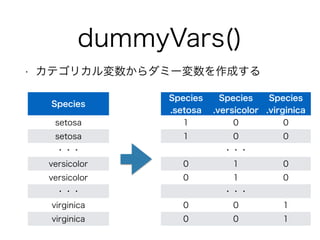
dummyVars()
• カテゴリカル変数からダミー変数を作成する
Species
.setosa
Species
.versicolor
Species
.virginica
1 0 0
1 0 0
・・・
0 1 0
0 1 0
・・・
0 0 1
0 0 1
Species
setosa
setosa
・・・
versicolor
versicolor
・・・
virginica
virginica
- 15.
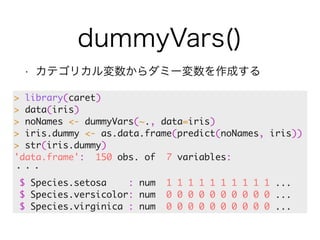
dummyVars()
• カテゴリカル変数からダミー変数を作成する
> library(caret)
> data(iris)
> noNames <- dummyVars(~., data=iris)
> iris.dummy <- as.data.frame(predict(noNames, iris))
> str(iris.dummy)
'data.frame': 150 obs. of 7 variables:
・・・
$ Species.setosa : num 1 1 1 1 1 1 1 1 1 1 ...
$ Species.versicolor: num 0 0 0 0 0 0 0 0 0 0 ...
$ Species.virginica : num 0 0 0 0 0 0 0 0 0 0 ...
- 16.
dummyVars()
前回発表のdummiesの方が便利
•カテゴリカル変数からダミー変数を作成する
!
> library(caret)
> data(iris)
!
> noNames <- dummyVars(~., data=iris)
> iris.dummy <- as.data.frame(!
predict(noNames, iris))
> str(iris.dummy)
'data.frame': 150 obs. of !
7 variables:
・・・
$ Species.setosa : num 1 1 1 1 1 1 1 1 1 1 ...
$ Species.versicolor: num 0 0 0 0 0 0 0 0 0 0 ...
$ Species.virginica : num 0 0 0 0 0 0 0 0 0 0 ...
- 17.
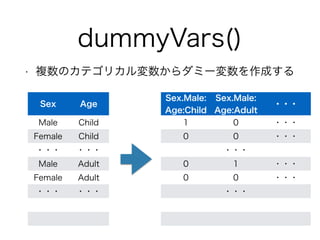
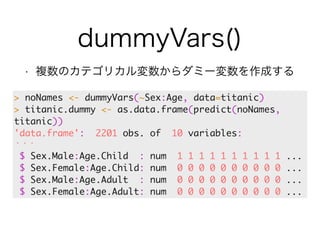
dummyVars()
• 複数のカテゴリカル変数からダミー変数を作成する
Sex.Male:
Age:Child
Sex.Male:
Age:Adult ・・・
1 0 ・・・
0 0 ・・・
・・・
0 1 ・・・
0 0 ・・・
・・・
Sex Age
Male Child
Female Child
・・・・・・
Male Adult
Female Adult
・・・・・・
- 18.
dummyVars()
• 複数のカテゴリカル変数からダミー変数を作成する
> noNames <- dummyVars(~Sex:Age, data=titanic)
> titanic.dummy <- as.data.frame(predict(noNames,
titanic))
'data.frame': 2201 obs. of 10 variables:
・・・
$ Sex.Male:Age.Child : num 1 1 1 1 1 1 1 1 1 1 ...
$ Sex.Female:Age.Child: num 0 0 0 0 0 0 0 0 0 0 ...
$ Sex.Male:Age.Adult : num 0 0 0 0 0 0 0 0 0 0 ...
$ Sex.Female:Age.Adult: num 0 0 0 0 0 0 0 0 0 0 ...
- 19.
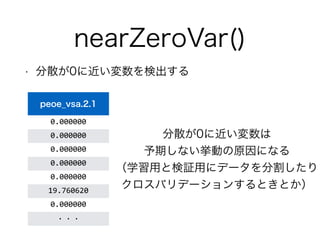
nearZeroVar()
• 分散が0に近い変数を検出する
peoe_vsa.2.1
0.000000
0.000000
0.000000
0.000000
0.000000
19.760620
0.000000
・・・
分散が0に近い変数は
予期しない挙動の原因になる
(学習用と検証用にデータを分割したり
クロスバリデーションするときとか)
- 20.
nearZeroVar()
• 分散が0に近い変数を検出する
> nearZeroVar(iris[, -5], saveMetrics = TRUE)
freqRatio percentUnique zeroVar nzv
Sepal.Length 1.111111 23.33333 FALSE FALSE
Sepal.Width 1.857143 15.33333 FALSE FALSE
Petal.Length 1.000000 28.66667 FALSE FALSE
Petal.Width 2.230769 14.66667 FALSE FALSE
FALSEなら問題なし
- 21.
nearZeroVar()
• 分散が0に近い変数を検出する
> dim(bbbDescr)
[1] 208 134
> # nearZeroVarに該当する変数の列番号
> nzv <- nearZeroVar(bbbDescr)
> nzv
[1] 3 16 17 22 25 50 60
> # nearZeroVarに該当する変数を除外
> bbbDescr.nzv <- bbbDescr[, -nzv]
> dim(bbbDescr.nzv)
[1] 208 127
- 22.
- 23.
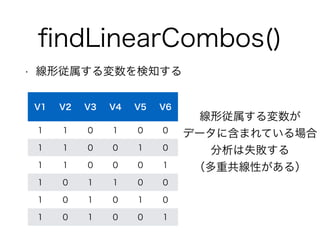
findLinearCombos()
• 線形従属する変数を検知する
> dim(testData2)
[1] 6 6
> flc <- findLinearCombos(testData2)
> flc
$linearCombos
$linearCombos[[1]]
[1] 3 1 2
!
$linearCombos[[2]]
[1] 6 1 4 5
!
$remove
[1] 3 6
!
> dim(testData2[, -flc$remove])
[1] 6 4
3列目は1列目と2列目の線形従属
V3 = V1-V2
6列目は1列目と4列目,5列目の線形従属
V6 = V1 - V4 - V5
- 24.
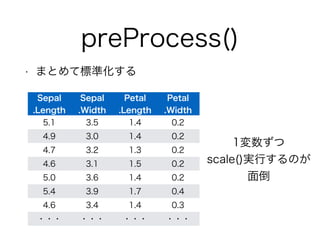
preProcess()
• まとめて標準化する
Sepal
Sepal
.Length
.Width
Petal
.Length
Petal
.Width
5.1 3.5 1.4 0.2
4.9 3.0 1.4 0.2
4.7 3.2 1.3 0.2
4.6 3.1 1.5 0.2
5.0 3.6 1.4 0.2
5.4 3.9 1.7 0.4
4.6 3.4 1.4 0.3
・・・・・・・・・・・・
1変数ずつ
scale()実行するのが
面倒
- 25.
preProcess()
• まとめて標準化する
> preProc <- preProcess(iris[, -5])
> iris.scale <- predict(preProc, iris[, -5])
> apply(iris.scale,2,mean)
Sepal.Length Sepal.Width Petal.Length Petal.Width
-4.484318e-16 2.034094e-16 -2.895326e-17 -2.989362e-17
> apply(iris.scale,2,sd)
Sepal.Length Sepal.Width Petal.Length Petal.Width
1 1 1 1
- 26.
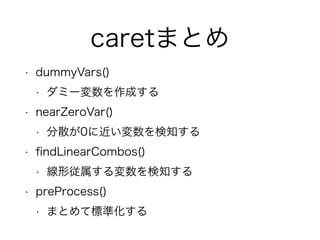
caretまとめ
• dummyVars()
• ダミー変数を作成する
• nearZeroVar()
• 分散が0に近い変数を検知する
• findLinearCombos()
• 線形従属する変数を検知する
• preProcess()
• まとめて標準化する
- 27.
- 28.
What’s tidyr?
•神Hadley Wickhamがreshape2を再設計し、
dplyr, magritterと共に使いやすいようにした
パッケージ
- 29.
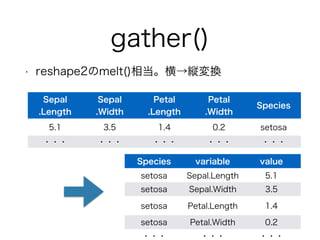
gather()
• reshape2のmelt()相当。横→縦変換
Sepal
.Length
Sepal
.Width
Petal
.Length
Petal
.Width Species
5.1 3.5 1.4 0.2 setosa
・・・・・・・・・・・・・・・
Species variable value
setosa Sepal.Length 5.1
setosa Sepal.Width 3.5
setosa Petal.Length 1.4
setosa Petal.Width 0.2
・・・・・・・・・
- 30.
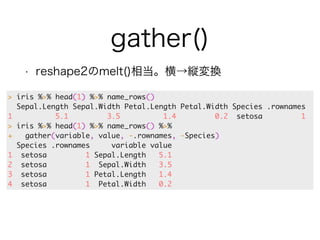
gather()
• reshape2のmelt()相当。横→縦変換
> iris %>% head(1) %>% name_rows()
Sepal.Length Sepal.Width Petal.Length Petal.Width Species .rownames
1 5.1 3.5 1.4 0.2 setosa 1
> iris %>% head(1) %>% name_rows() %>%
+ gather(variable, value, -.rownames, -Species)
Species .rownames variable value
1 setosa 1 Sepal.Length 5.1
2 setosa 1 Sepal.Width 3.5
3 setosa 1 Petal.Length 1.4
4 setosa 1 Petal.Width 0.2
- 31.
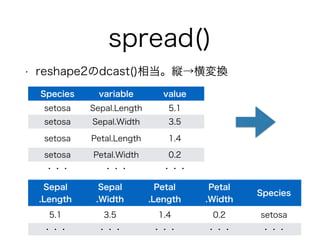
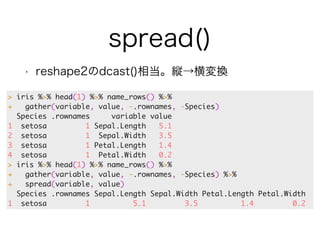
spread()
• reshape2のdcast()相当。縦→横変換
Species variable value
setosa Sepal.Length 5.1
setosa Sepal.Width 3.5
setosa Petal.Length 1.4
setosa Petal.Width 0.2
・・・・・・・・・
Sepal
.Length
Sepal
.Width
Petal
.Length
Petal
.Width Species
5.1 3.5 1.4 0.2 setosa
・・・・・・・・・・・・・・・
- 32.
spread()
• reshape2のdcast()相当。縦→横変換
> iris %>% head(1) %>% name_rows() %>%
+ gather(variable, value, -.rownames, -Species)
Species .rownames variable value
1 setosa 1 Sepal.Length 5.1
2 setosa 1 Sepal.Width 3.5
3 setosa 1 Petal.Length 1.4
4 setosa 1 Petal.Width 0.2
> iris %>% head(1) %>% name_rows() %>%
+ gather(variable, value, -.rownames, -Species) %>%
+ spread(variable, value)
Species .rownames Sepal.Length Sepal.Width Petal.Length Petal.Width
1 setosa 1 5.1 3.5 1.4 0.2
- 33.
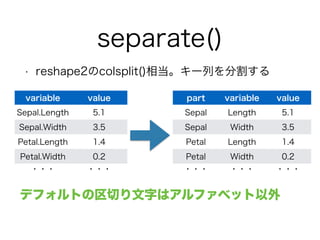
separate()
• reshape2のcolsplit()相当。キー列を分割する
variable value
Sepal.Length 5.1
Sepal.Width 3.5
Petal.Length 1.4
Petal.Width 0.2
・・・・・・
part variable value
Sepal Length 5.1
Sepal Width 3.5
Petal Length 1.4
Petal Width 0.2
・・・・・・・・・
デフォルトの区切り文字はアルファベット以外
- 34.
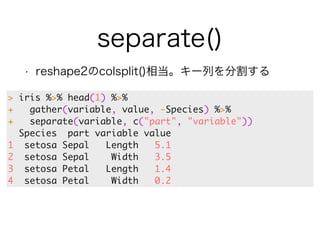
separate()
• reshape2のcolsplit()相当。キー列を分割する
> iris %>% head(1) %>%
+ gather(variable, value, -Species) %>%
+ separate(variable, c("part", "variable"))
Species part variable value
1 setosa Sepal Length 5.1
2 setosa Sepal Width 3.5
3 setosa Petal Length 1.4
4 setosa Petal Width 0.2
- 35.
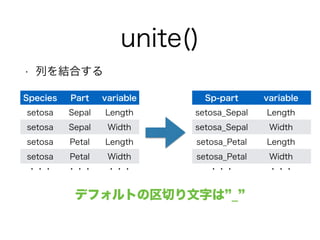
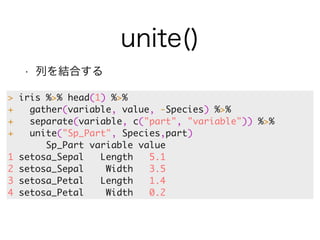
unite()
• 列を結合する
Sp-part variable
setosa_Sepal Length
setosa_Sepal Width
setosa_Petal Length
setosa_Petal Width
・・・・・・
Species Part variable
setosa Sepal Length
setosa Sepal Width
setosa Petal Length
setosa Petal Width
・・・・・・・・・
デフォルトの区切り文字は”_”
- 36.
unite()
• 列を結合する
> iris %>% head(1) %>%
+ gather(variable, value, -Species) %>%
+ separate(variable, c("part", "variable")) %>%
+ unite("Sp_Part", Species,part)
Sp_Part variable value
1 setosa_Sepal Length 5.1
2 setosa_Sepal Width 3.5
3 setosa_Petal Length 1.4
4 setosa_Petal Width 0.2
- 37.
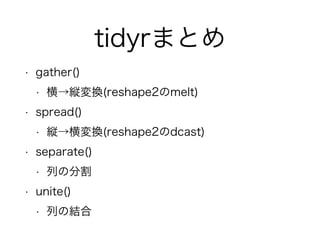
tidyrまとめ
• gather()
• 横→縦変換(reshape2のmelt)
• spread()
• 縦→横変換(reshape2のdcast)
• separate()
• 列の分割
• unite()
• 列の結合
- 38.













![nearZeroVar()
• 分散が0に近い変数を検出する
> nearZeroVar(iris[, -5], saveMetrics = TRUE)
freqRatio percentUnique zeroVar nzv
Sepal.Length 1.111111 23.33333 FALSE FALSE
Sepal.Width 1.857143 15.33333 FALSE FALSE
Petal.Length 1.000000 28.66667 FALSE FALSE
Petal.Width 2.230769 14.66667 FALSE FALSE
FALSEなら問題なし](https://image.slidesharecdn.com/20140920tokyor43-140920003955-phpapp01/85/20140920-tokyo-r43-20-320.jpg)
![nearZeroVar()
• 分散が0に近い変数を検出する
> dim(bbbDescr)
[1] 208 134
> # nearZeroVarに該当する変数の列番号
> nzv <- nearZeroVar(bbbDescr)
> nzv
[1] 3 16 17 22 25 50 60
> # nearZeroVarに該当する変数を除外
> bbbDescr.nzv <- bbbDescr[, -nzv]
> dim(bbbDescr.nzv)
[1] 208 127](https://image.slidesharecdn.com/20140920tokyor43-140920003955-phpapp01/85/20140920-tokyo-r43-21-320.jpg)
![findLinearCombos()
• 線形従属する変数を検知する
> dim(testData2)
[1] 6 6
> flc <- findLinearCombos(testData2)
> flc
$linearCombos
$linearCombos[[1]]
[1] 3 1 2
!
$linearCombos[[2]]
[1] 6 1 4 5
!
$remove
[1] 3 6
!
> dim(testData2[, -flc$remove])
[1] 6 4
3列目は1列目と2列目の線形従属
V3 = V1-V2
6列目は1列目と4列目,5列目の線形従属
V6 = V1 - V4 - V5](https://image.slidesharecdn.com/20140920tokyor43-140920003955-phpapp01/85/20140920-tokyo-r43-23-320.jpg)
![preProcess()
• まとめて標準化する
> preProc <- preProcess(iris[, -5])
> iris.scale <- predict(preProc, iris[, -5])
> apply(iris.scale,2,mean)
Sepal.Length Sepal.Width Petal.Length Petal.Width
-4.484318e-16 2.034094e-16 -2.895326e-17 -2.989362e-17
> apply(iris.scale,2,sd)
Sepal.Length Sepal.Width Petal.Length Petal.Width
1 1 1 1](https://image.slidesharecdn.com/20140920tokyor43-140920003955-phpapp01/85/20140920-tokyo-r43-25-320.jpg)