

Technology Driven
Differentiated Instruction

Vicki Davis, Teacher
Slides and Links posted at
www.coolcatteacher.com
The power of Three!
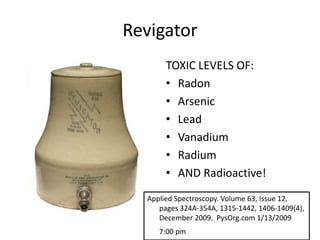
Revigator
“Restores lost element of
radio-activity. Creates
cellular energy and
removes cellular
poisons.”
“Treats and cures arthritis,
flatulence, senility, and
poisoning.”
Revigator
TOXIC LEVELS OF:
• Radon
• Arsenic
• Lead
• Vanadium
• Radium
• AND Radioactive!
Applied Spectroscopy. Volume 63, Issue 12,
pages 324A-354A, 1315-1442, 1406-1409(4),
December 2009. PysOrg.com 1/13/2009
7:00 pm
Beware of the trendy,
embrace technology that
builds on principles that
you already know are
effective.
YOU!
There are
safe ways
to do what
some
consider
dangerous.
Don’t change me!
3/3/2014

Vicki A Davis, Cool Cat Teacher http://coolcatteacher.blogspot.com

10
The
problem with
technology
Efficient
Effective
Transport us
to a better
education
Technology
isn’t just to
look cute!
The
power of
technology
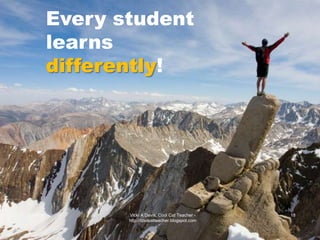
Every student
learns
differently!

3/3/2014

Vicki A Davis, Cool Cat Teacher http://coolcatteacher.blogspot.com

18
Different = Different iated
Instruction

3/3/2014 – Licensed Istock Photo

Our
Classrooms

Vicki A Davis, Cool Cat Teacher http://coolcatteacher.blogspot.com

19
Autism in Austria
Deliver using dual
encoding.
Technology Driven Differentiation
AClassroom
BAdministration
The

Classroom

Car
1 The Tools
(Framework)

4

Readiness
Level

5

Content

Process
7 (engine)
2
Learning Styles

6 Learning
3

Environment
(essential link)
Interests
The

Classroom

Car
1 The Tools
(Framework)
The

Classroom

Car

Assembling My Class Framework
2005 Social

X

Educational Network

2005 Wiki

2006 Student
Productivity Tools

2006 Audio File creation

(iGoogle)

(Ning & Blogging)

2006 Video creation

2006 Global
collaboration

2011 Cloud Storage/
Paperless

2013 Video Game
Programming &
Simulation Environments
Formative Assessment

2007 Virtual Worlds

2010 Apps / QR Codes
3/3/2014

Vicki A Davis, Cool Cat Teacher http://coolcatteacher.blogspot.com

26
Educational

3/3/2014

Vicki A Davis, Cool Cat Teacher http://coolcatteacher.blogspot.com

27
1. Educational Network
(Ning) – PRIVATE!

3/3/2014

Vicki A Davis, Cool Cat Teacher http://coolcatteacher.blogspot.com

28
“If they help build it, they
are already THERE.”

Rule for Networking
Teachers and Others
Student educational
networking platforms
•
•
•
•
•
•
•

Ning (costs money)
Edmodo
Schoolology
Google Plus
Hashtag on Twitter
Sophia.org (#flipclass tool)
Moodle
3/3/2014

Vicki A Davis, Cool Cat Teacher http://coolcatteacher.blogspot.com

31
2. Wiki-centric Classroom

http://westwood.wikispaces.com – Hour of code lesson plan

3/3/2014

Vicki A Davis, Cool Cat Teacher http://coolcatteacher.blogspot.com

32
3. Student Productivity Tools
• Calendar (Google Cal)
• “To Do List” (Finish app)
• eNotebook
• “App of the Week”
• Dragon Dictation
• Mailbox
• Lumosity
Do students know how to manage their time?
Can students capture & retrieve important info?
Do students know how to optimize start screens?
Do students know how to reduce distractions?
Pinnacle Studio
Audacity

4. Create Audio
5. Create Video
http://j.mp/wonder-pirate

iMovie
Do they understand visual
grammar?
•
•
•
•
•
•
•

Storyboards
CTI Digital Film Model
http://j.mp/dig-film-curr
Screen Shots
AFI Digital Film Curriculum
Production Schedule
Editing
SoundTracks
Copyright
Teleprompter
(Try free ipad Teleprompter apps)
ISTE Nets™ Standards
 4. Technology communications tools
 Students use telecommunications to
collaborate, publish, and interact with
peers, experts, and other audiences.
 Students use a variety of media and formats to
communicate information and ideas effectively
to multiple audiences.

6. Collaborate Globally
6. Collaborate
Globally
Flattening
your
www.flatclassroombook.com
classroom

Phase one - Intra-connection
(within your own class)
Phase two - Inter-connection
(within school/ district)
Phase three - Managed global
connection
Phase four - Student to Student
(With Teacher Management)
Phase five - Student to Student
(with Student Management)
th!
7

3/3/2014

Virtual Worlds

Vicki A Davis, Cool Cat Teacher http://coolcatteacher.blogspot.com

39
My virtual world “toolkit”
3D

Second Life
(2007-2010)

3/3/2014

Open Sim
(2011-2012)

Google
Sketchup
(2013)

Vicki A Davis, Cool Cat Teacher http://coolcatteacher.blogspot.com

Minecraft.edu
(2014)

40
Google Sketchup
http://sketchup.google.com/

3/3/2014

Vicki A Davis, Cool Cat Teacher http://coolcatteacher.blogspot.com

41
Blender www.blender.org

3/3/2014

Vicki A Davis, Cool Cat Teacher http://coolcatteacher.blogspot.com

42
Turbo Tour of Digiteen Island

http://digiteendreamteam.blogspot.com
#8 Apps / QR Codes

http://tinyurl.com/qr-code-guide
#8 Apps / QR Codes

Tip: Shorten the code using bit.ly first

QR Code Implementation Guide –
http://www.coolcatteacher.com/qr-code-classroom-implementation-guide/
#8 Apps / QR Codes
http://tinyurl.com/qr-code-guide

Firefox plug in

QR Code Implementation Guide –
http://coolcatteacher.blogspot.com/2011/05/qr-code-classroom-implementation-guide.html
#9 Cloud Storage/ As
Paperless as Possible

Adobe Acrobat Pro

• Gmail
• Google Docs
• Google Sites
#10 Video
Game
programming

http://scratch.mit.edu/projects/editor/?tip_bar=hoc

See:
http://j.mp/15-code
Gamestar mechanic
http://gamestarmechanic.com/
http://www.tynker.com/hour-of-code/

Gamemaker
https://www.yoyogames.com/studio
iPad:
Kodable (age 5 and up)
Hopscotch (4th and up)
http://j.mp/hopscotch-ebook
by Wes Fryer
#11 Simulation Environments

http://aic.conflix.org
University of Michigan
#12 Formative Assessment

Socrative
ROCKS
www.socrative.com!
Tip: Play quizzes as races for
review. Use open ended questions
The

Classroom

Car

Assembling My Class Framework
2005 Social

X

Educational Network

2005 Wiki

2006 Student
Productivity Tools

2006 Audio File creation

(iGoogle)

(Ning & Blogging)

2006 Video creation

2006 Global
collaboration

2011 Cloud Storage/
Paperless

2013 Video Game
Programming &
Simulation Environments
Formative Assessment

2007 Virtual Worlds

2010 Apps / QR Codes
This framework holds
everything else I do!
Assembling the Framework
2 Skills for Web 2:

1. Hyperlinking
2. Embedding

1 - Hyperlink

2- Embedded
Multimedia
URL Link

Embed
Code

www.youtube.com
URL Link

Embed
Code

www.toondoo.com
URL Link

www.classtools.net

Embed
Code
2 Skills for Web 2:

1. Hyperlinking
2. Embedding

1 - Hyperlink

2- Embedded
Multimedia
Citizenship Chapter begins
on p 98
Online
behavior has
Offline
consequences!
All public
places I use
Automated
Monitoring
(RSS)
The

Classroom

Car
1 The Tools
(Framework)

2
Learning Styles
Learning
Styles

Intrapersonal
Linguistic

Logical
Mathematical
Interpersonal

Naturalist

Musical
Bodily
Kinesthetic

Spatial
Pictures
Take a Vote!
Which tool should we investigate as it
relates to learning styles?
1. Educational Networking
2. Wikis
3. Digital Storytelling
Educational
Network
(Ning)

•Blogging
•Forums
Social Network
(Ning)

•Blogging
•Forums

•Administration
•Organizing Site
•Linking sharer
Social Network
(Ning)

•Blogging
•Forums

•Administration
•Organizing Site
•Linking sharer
•Photography
•Outdoor video
•Gcast remotely
•“Roving” reporter
•Google Earth
Social Network
(Ning)

•Blogging
•Forums

•Administration
•Organizing Site
•Linking sharer
•Photography
•Outdoor video
•Gcast remotely
•“Roving” reporter
•Google Earth
•Photography
•Camera op.
•VoiceThread
•Animoto
Social Network
(Ning)

•Blogging
•Forums

•Administration
•Organizing Site
•Linking sharer

•Acting
•Presenting
•(Get on film)

•Photography
•Outdoor video
•Gcast remotely
•“Roving” reporter
•Google Earth
•Photography
•Camera Op
•VoiceThread
•Animoto
Social Network
(Ning)

•Blogging
•Forums

•Administration
•Organizing Site
•Linking sharer
•Record audio files
•Audacity editor
•VoiceThread
•Animoto
•Acting
•Presenting
•(Get on film)

•Photography
•Outdoor video
•Gcast remotely
•“Roving” reporter
•Google Earth
•Photography
•Camera Op
•VoiceThread
•Animoto
Social Network
(Ning)

•Blogging
•Forums

•Forums
•Cell phone enabled
Blogging or pics
•Discussion facilitators
•Record audio files
•Audacity editor
•VoiceThread
•Animoto
•Acting
•Presenting
•(Get on film)

•Administration
•Organizing Site
•Linking sharer
•Photography
•Outdoor video
•Gcast remotely
•“Roving” reporter
•Google Earth
•Photography
•Camera Op
•VoiceThread
•Animoto
Social Network
(Ning)

•Reflections
•Reading &
opinion
•Debates

•Forums
•Cell phone enabled
Blogging or pics
•Discussion facilitators
•Record audio files
•Audacity editor
•VoiceThread
•Animoto
•Acting
•Presenting
•(Get on film)

•Blogging
•Forums

•Administration
•Organizing Site
•Linking sharer
•Photography
•Outdoor video
•Gcast remotely
•“Roving” reporter
•Google Earth
•Photography
•Camera Op
•VoiceThread
•Animoto
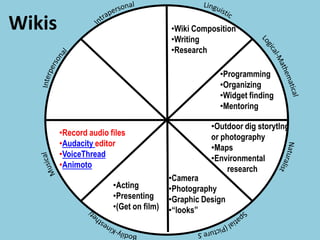
Wikis

•Wiki Composition
•Writing
•Research
Wikis

•Wiki Composition
•Writing
•Research
•Programming
•Organizing
•Widget finding
•Mentoring
Wikis

•Wiki Composition
•Writing
•Research
•Programming
•Organizing
•Widget finding
•Mentoring
•Outdoor dig storytlng
or photography
•Maps
•Environmental
research
Wikis

•Wiki Composition
•Writing
•Research
•Programming
•Organizing
•Widget finding
•Mentoring
•Outdoor dig storytlng
or photography
•Maps
•Environmental
research

•Camera
•Photography
•Graphic Design
•“looks”
Wikis

•Wiki Composition
•Writing
•Research
•Programming
•Organizing
•Widget finding
•Mentoring
•Outdoor dig storytlng
or photography
•Maps
•Environmental
research

•Acting
•Presenting
•(Get on film)

•Camera
•Photography
•Graphic Design
•“looks”
Wikis

•Wiki Composition
•Writing
•Research
•Programming
•Organizing
•Widget finding
•Mentoring
•Record audio files
•Audacity editor
•VoiceThread
•Animoto
•Acting
•Presenting
•(Get on film)

•Outdoor dig storytlng
or photography
•Maps
•Environmental
research

•Camera
•Photography
•Graphic Design
•“looks”
Wikis

•Wiki Composition
•Writing
•Research

•Discussion mgt
•Cell phone enabled
Blogging or pics, twitter
•Live streaming
•Record audio files
•Audacity editor
•VoiceThread
•Animoto
•Acting
•Presenting
•(Get on film)

•Programming
•Organizing
•Widget finding
•Mentoring
•Outdoor dig storytlng
or photography
•Maps
•Environmental
research

•Camera
•Photography
•Graphic Design
•“looks”
Wikis

•Reflecting
•Opinion
•Reporting on
group issues
•Discussion mgt
•Cell phone enabled
Blogging or pics, twitter
•Live streaming
•Record audio files
•Audacity editor
•VoiceThread
•Animoto
•Acting
•Presenting
•(Get on film)

•Wiki Composition
•Writing
•Research
•Programming
•Organizing
•Widget finding
•Mentoring
•Outdoor dig storytlng
or photography
•Maps
•Environmental
research

•Camera
•Photography
•Graphic Design
•“looks”
Digital
Storytelling

•Script Writer
Digital
Storytelling

•Script Writer

•Call Sheets
•Production
Schedule
•Asst Director
Digital
Storytelling

•Script Writer

•Call Sheets
•Production
Schedule
•Asst Director
•Scene Scout
•Scene set up
•Storyboarding
Digital
Storytelling

•Script Writer

•Call Sheets
•Production
Schedule
•Asst Director
•Scene Scout
•Scene set up
•Storyboarding
•Camera
•Editing
•Lighting
•Storyboarding
Digital
Storytelling

•Script Writer

•Call Sheets
•Production
Schedule
•Asst Director
•Scene Scout
•Scene set up
•Storyboarding
•Acting
•Presenting
•Lighting
•Flow &
movement

•Camera
•Editing
•Lighting
•Storyboarding
Digital
Storytelling

•Script Writer

•Call Sheets
•Production
Schedule
•Asst Director
•Scene Scout
•Scene set up
•Storyboarding

•Audio Editing
•Music Selection
•Sound Capture
•Acting
•Presenting
•Lighting
•Flow &
movement

•Camera
•Editing
•Lighting
•Storyboarding
Digital
Storytelling

•Script Writer

•Call Sheets
•Production
Schedule
•Asst Director

•Acting
•Directing
•Movie Ideas
•Vision Casting

•Scene Scout
•Scene set up
•Storyboarding

•Audio Editing
•Music Selection
•Sound Capture
•Acting
•Presenting
•Lighting
•Flow &
movement

•Camera
•Editing
•Lighting
•Storyboarding
Digital
Storytelling

•Reflecting
•Status Reporting
•Journal
process
•Ideas

•Acting
•Directing
•Movie Ideas
•Vision Casting

•Script Writer

•Call Sheets
•Production
Schedule
•Asst Director
•Scene Scout
•Scene set up
•Storyboarding

•Audio Editing
•Music Selection
•Sound Capture
•Acting
•Presenting
•Lighting
•Flow &
movement

•Camera
•Editing
•Lighting
•Storyboarding
Step 5: Choice

Use Multiple Intelligences as a
Planning Tool

PLACES: Creating a physical environment conducive for learning p 171-173
Vicki A Davis, Cool Cat Teacher 3/3/2014 SPACES: Designing Electronic Spaces for Choice p 173- 186
http://coolcatteacher.blogspot.com

89
Voice Thread
quick project

•Reflections

•Write comment

•Social aspects
•AUDIENCE!

•Audio
•Music

•Uploading
photos
•Organizing
presentation
•Nature/map
related photos
•Opinions on such
topics
•Posing •Photography
The

Classroom

Car
1 The Tools
(Framework)

2
Learning Styles

3

Interests
The

Classroom

Car

•Hobbies
•Music
•Theater
•Sports
•Poetry
•Arts
•Public Speaking
•Reading
•Academics

3

•Themes!
•“Causes”
Interests
Personal Interest Projects
Deep Research
projects
(proposed by
student)

Backchannels

Oral Debates
w/ follow up

“Invention”
projects

Dramatic
Projects

Opinion
“voice”
opportunities
The

Classroom

Car
1 The Tools
(Framework)

4

2

Readiness
Level

3

Learning Styles

Interests
Readiness Level in Subject
Not
quite
Ready

Ready
During projects
spend 1:1 time
daily w/ student

Specific Rubrics

More
than
Ready

More ways to
excel past
the “100”

Mentors for others

Awards
Sit beside

Self Track Rubrics

Check off rubric
items with student

Over the Shoulder
and Verbal
Reporting to
Teacher Daily

(Hall of Fame)
Competitions w/
other classrooms

Make them “cool”
by teaching cool
stuff
The

Classroom

Car
1 The Tools
(Framework)

4

Readiness
Level

3

5

Content

2
Learning Styles

Interests
Content
Facts / Dates / Timelines/ Events / Definitions
Classtools.net, dipity.com
Flashcard Exchange, Quizlet,

Group document creation on Google Docs, Backchannels
CRAM App, Flashcard apps on mobile devices, Mobl21

Details /
Significant Individual
Wiki Group Projects
Link sharing (Diigo)
Fake Facebook (www.myfakewall.com)
Livebinders

Events
Opinion Question Blog Posts
Role Playing
Video search and embedding
Interviews of people who experienced it. (Video)
The

Classroom

Car
1 The Tools
(Framework)

4

Readiness
Level

5

Content

2
Learning Styles

6 Learning
3

Environment
(essential link)
Interests
“I never
teach my
pupils,
I only
provide the
conditions in
which they
can learn"
Albert Einstein
3/3/2014

Vicki A Davis, Cool Cat Teacher http://coolcatteacher.blogspot.com

100
Cooperative Groups

Learning Centers

• Harnesses power of all
• Each has their own ID (and e-mail)
• Group cooperation, individual
contribution

• Equipped workstation Pit Crew
(webcam, audio, headsets)
Pit Crew
• Specialty centers
(scanner, digital film, tripod)

Choice Boards

Class Rules

• Wiki Assignments with choices
• Question of the week with choice of
text response (blog post), audio
response (podcast) or video
response (digital storytelling)

•
•
•
•

Discuss Netiquette
Student Contribution
Safety
Administrative Support for Rule
Breaking
Pit Crew

Materials/ Supplies/
Resources
•
•
•
•

Pit Crew
Functional Equipment
Textbook
Pit Crew
Consistent ACCESS Pit Crew
Knowledgeable Teacher

Learning Environment
Collaboration
with
individual
contribution
http://tinyurl.com/kindle-notecard
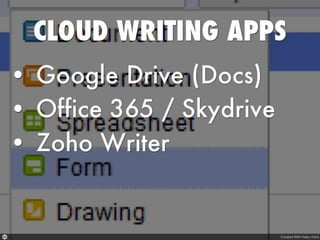
The Collaborative Writing Cloud 9
Cloud
Syncing
Wikis

Blogs
Cartooning

Graphic
Organizers
Collaborative
Collaborative
Notebooks
Writing Apps

ePaper
Social
Bookmarking
Accountability:
Every student
has their own ID!
Students need a “home base”
The

Classroom

Car
1 The Tools
(Framework)

4

Readiness
Level

5

Content

Process
7 (engine)
2
Learning Styles

6 Learning
3

Environment
(essential link)
Interests
A Classroom Car
1Tools
2Learning Styles
3Interests
4Readiness
5Content
6Environment
7Process
Is the teacher
needed?
What does the best education
in the world look like?

3/3/2014

“What Makes Finnish Kids So Smart”
The Wall Street Journal
By ELLEN GAMERMAN
February 2008
Vicki A Davis, Cool Cat Teacher http://online.wsj.com/public/article/SB120425355065601997.html
http://coolcatteacher.blogspot.com

132
http://flickr.com/photos/prittibaby/4770
3/3/2014

Vicki A Davis, Cool Cat Teacher http://coolcatteacher.blogspot.com

134
Start
blogging

Process
management
Teach how to
Embed video

Monitoring

Weekly blog
Post with research

Peer review

Admin
involvment

Weekly
voting

Comments

Sample Teacher Flow Chart for embedding the framework

Curricular
Involvement

Plan Next
Step
AClassroom
BAdministration
A Administrators

1 “Pit Crew”
2 Car Designers
Cooperative Groups

Learning Centers

• Harnesses power of all
• Each has their own ID (and e-mail)
• Group cooperation, individual
contribution

• Equipped workstation Pit Crew
(webcam, audio, headsets)
Pit Crew
• Specialty centers
(scanner, digital film, tripod)

Choice Boards

Class Rules

• Wiki Assignments with choices
• Question of the week with choice of
text response (blog post), audio
response (podcast) or video
response (digital storytelling)

•
•
•
•

Discuss Netiquette
Student Contribution
Safety
Administrative Support for Rule
Breaking
Pit Crew

Materials/ Supplies/
Resources
•
•
•
•

Pit Crew
Functional Equipment
Textbook
Pit Crew
Consistent ACCESS Pit Crew
Knowledgeable Teacher

Learning Environment
Technology is our
vehicle!

But not the ONLY
vehicle!
Secret of Driving Educational
Excellence
You’re teaching
students to drive their
own learning!
Then…
You’re
worth
the
price!
Vicki
Davis
@coolcatteacher
www.coolcatteacher.com

Technology Driven Differentiated Instruction

Editor's Notes

  • #2 Today we’re going to talk about Driving Educational Excellence with TechnologyDifferentiated Instruction and Assessment with Technology Vicki Davis 5013 Spotlight Take a look at learning styles and today's most current Web 2.0 tools to understand what differentiation looks like in a technology enhanced classroom. Learn about the classroom structure that will reach all learners. Madera Wyndham Hotel
  • #3 And that is what I suggest for you to do today. Your assignment for this webinar today is to come up with your “Big Three” at the end of the webinar. Pick three things – start there!
  • #4 In the 1920’s and 30’s radioactivity was “all the rage” and everyone assumed because springwater was radioactive that it must be good for you – so here comes the revigator. This revigator cured all kinds of things including arthritis, flatulence, senility, and poisoning. Over 200,000 people bought this clay pot lined with radioactive clay.
  • #5 However when a team of researchers studied this, they found toxic levels of many chemicals including arsenic and lead from the pure lead spout!
  • #7 But understand this – there is only one person you can control in your district and that person, my friends is YOU!
  • #8 But, remember just as this child is climbing a very high rock climbing wall – that there are safe ways to do what some consider dangerous. This is being done. Get past the fear and learn vicariously through others by reading their blogs and watching their videos at the k12 online conference to let them prove it to you. If you’re a technology phobic person remember that you become like who you hang around – start letting yourself learn from what others are doing to move forward your creativity – you may also find that you’ll save money!
  • #9 The technology misconception is that it is not about the technology.
  • #10 The technology misconception is that it is not about the technology.
  • #11 But the question remains, why do we need to change? My husband always says that the only people who like change are babies with dirty diapers and even then, they cry the whole time! (click on the baby for the Movie.)
  • #12 The technology misconception is that it is not about the technology.
  • #13 People in our society are counting the cost of everything, so when we implement technology, we’d better make sure it is.
  • #14 That the things we used in school are efficient, effective, and transport us to a better education for our kids.
  • #15 That the things we used in school are efficient, effective, and transport us to a better education for our kids.
  • #16 That the things we used in school are efficient, effective, and transport us to a better education for our kids.
  • #17 We can implement technology but it better be for a purpose and not just to look cute, so today we’re going to talk about technology driven differentiation and the other things to make our schools successful.
  • #18 The technology misconception is that it is not about the technology.
  • #19 The successful are increasingly individuals who take risks, are good at what they do, and are persistent. This is what we need to create in our classrooms.
  • #20 This is what our student must be. But what must our teachers be?
  • #23 We can implement technology but it better be for a purpose and not just to look cute, so today we’re going to talk about technology driven differentiation and the other things to make our schools successful, first we’ll talk about the classroom and then a few remarks about administration, which I call the “pit crew”
  • #24 So, today in pursuit of excellence driven education, we’re going to assemble the classroom car as we differentiate with technology.
  • #25 So, today in pursuit of excellence driven education, we’re going to assemble the classroom car as we differentiate with technology.
  • #29 Please share what you’re doing while I share what we’re doing to network educationally at our school this year.Private Ning – My students and I.School Wide Ning – parents, students teachers – also private.Public Nings for
  • #30 Some sort of field of dreams. Some states are building networks for their teachers and finding that the teachers are rebelling and don’t want to go there. In fact, I know of one organization that build a ntework for their IT directors and the IT directors built their own and refused to let the administrators in! Instead,
  • #33 Every course has a launch page on the wiki – the Google cal is embedded there. Also, if you paste hyperlinks into the description, the hyperlinks are live as well, but it has many more features as well.
  • #34 For me, my RSS reader includes so much more than just learning but life management – in many ways it has evolved into a PLM – “personal life manager!”
  • #44 Digiteen Island
  • #45 Digiteen Island
  • #46 Digiteen Island
  • #47 Digiteen Island
  • #48 Digiteen Island
  • #49 Digiteen Island
  • #50 Digiteen Island
  • #51 Digiteen Island
  • #60 Vicki: - talk about Areas of AwarenessJulie: Cover Rays of Understanding
  • #90 Vicki:
  • #92 So, today in pursuit of excellence driven education, we’re going to assemble the classroom car as we differentiate with technology.
  • #94 So, today in pursuit of excellence driven education, we’re going to assemble the classroom car as we differentiate with technology.
  • #96 So, today in pursuit of excellence driven education, we’re going to assemble the classroom car as we differentiate with technology.
  • #98 So, today in pursuit of excellence driven education, we’re going to assemble the classroom car as we differentiate with technology.
  • #100 So, today in pursuit of excellence driven education, we’re going to assemble the classroom car as we differentiate with technology.
  • #101 Albert Einstein, a great mind and great teacher focused not on the facts of his textbook or theories but on the classroom environment and making it one in which students can learn.
  • #129 Give students a starting point – all of your work must have a “home page” – one place to start online each day! Portal to the world.
  • #130 So, today in pursuit of excellence driven education, we’re going to assemble the classroom car as we differentiate with technology.
  • #131 Tools, learning styles, interests, readiness, content, process and environment as it relates to technology that will make our schools more efficient and justify what we are doing with technology.
  • #133 If we look at arguably the best education system in the world, the Finnish teachers pick books and customize lessons as they shape students to national standards. "In most countries, education feels like a car factory. In Finland, the teachers are the entrepreneurs," says Mr. Schleicher, of the Paris-based OECD, which began the international student test in 2000.
  • #134 Photo: - Today we’re talking about Teacherpreneurship to an audience of people I would consider teacherpreneurs. I’ve seen your videos and this is who you are, although you may not know it!
  • #135 http://en.wikipedia.org/wiki/Image:Loutherbourg-Spanish_Armada.jpg – Wikimedia Commons – Teacherpreneurs are to the floundering educational system what the English were to the spanish armada – the agile, deal creators and makers. Teachers must be agile, able to customize their environment to the students they teach.
  • #137 We’ll start off talking about the classroom and then make a few points for administrators..
  • #138 Tools, learning styles, interests, readiness, content, process and environment as it relates to technology that will make our schools more efficient and justify what we are doing with technology.
  • #145 So, when I came back to Camilla, I started using wikis with my students immediately and sat down in my classroom to begin blogging. I turned to a student and said, “I have to create a blog and I have to name the thing – what should I name it?” The students sitting there said, “Well, Mrs. Vicki, you’re cool and we’re the wildcats, so, why don’t you call it the cool Cat teacher blog
  • #146 Let me ask you this? How many of you would like to reduce your chances of getting alzheimers?
  • #147 And that is what I suggest for you to do today. Your assignment for this webinar today is to come up with your “Big Three” at the end of the webinar. Pick three things – start there!