FRC LabVIEW INTRODUCTION

                             Homework exercises for 2012
                           summer FRC LabVIEW class series


Oregon FIRST Robotics - www.oregonfirst.org   Summer 2012    1
Overview
 • By completing these exercises the student will
   become familiar with the mechanics of the
   LabVIEW programming.
 • Each exercise demonstrates the use of digital
   logic and analog numerical conversion commonly
   used in robotic system design
 • A typical FRC robot program will use a
   combination of many of these examples.
 • From “Getting Started” screen. programs start
   with a New BLANK.vi and can be run on a stand
   alone PC without a cRIO

Oregon FIRST Robotics - www.oregonfirst.org     Summer 2012   2
General guidelines
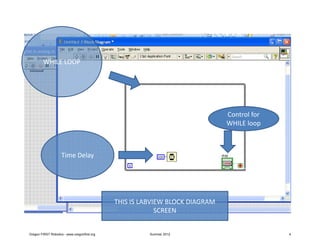
 • Construct each program inside a “WHILE
   loop”
 • Put a control STOP button in WHILE loop
 • Put a 100ms TIME DELAY in each WHILE loop
 • (Stop button allows us to an easy way to stop
   the program execution.
 • The time delay will keep simple LabVIEW
   program from taking ALL compute bandwidth
   from your PC.

Oregon FIRST Robotics - www.oregonfirst.org     Summer 2012   3
WHILE LOOP


                                                                              Control for
                                                                              WHILE loop


                    Time Delay


                                              THIS IS LABVIEW BLOCK DIAGRAM
                                                           SCREEN


Oregon FIRST Robotics - www.oregonfirst.org             Summer 2012                         4
Use ‘Context Help’
 • The best tutor to get more information about
   any parts of LabVIEW is ‘Context Help’
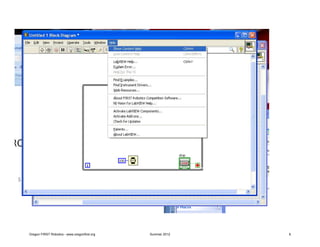
 • From tool bar (top of Block Diagram screen) ,
   click on Help – Show Context Help.

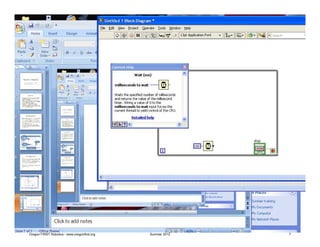
 • Then Cusor will display more information on
   LabVIEW details.


Oregon FIRST Robotics - www.oregonfirst.org     Summer 2012   5
Oregon FIRST Robotics - www.oregonfirst.org   Summer 2012   6
Oregon FIRST Robotics - www.oregonfirst.org   Summer 2012   7
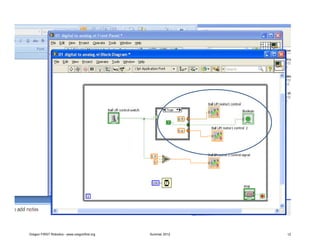
01 Digital to Analog conversion
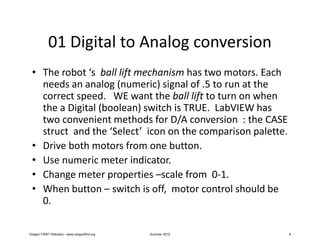
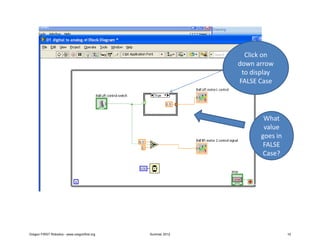
 • The robot ‘s ball lift mechanism has two motors. Each
   needs an analog (numeric) signal of .5 to run at the
   correct speed. WE want the ball lift to turn on when
   the a Digital (boolean) switch is TRUE. LabVIEW has
   two convenient methods for D/A conversion : the CASE
   struct and the ‘Select’ icon on the comparison palette.
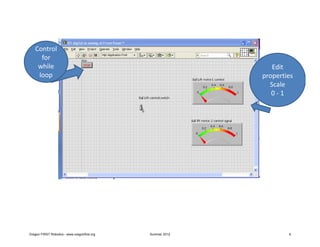
 • Drive both motors from one button.
 • Use numeric meter indicator.
 • Change meter properties –scale from 0-1.
 • When button – switch is off, motor control should be
   0.

Oregon FIRST Robotics - www.oregonfirst.org   Summer 2012    8
Control
     for
    while                                                      Edit
    loop                                                    properties
                                                              Scale
                                                               0-1


Oregon FIRST Robotics - www.oregonfirst.org   Summer 2012           9
Click on
                                                            down arrow
                                                             to display
                                                            FALSE Case


                                                                    What
                                                                    value
                                                                   goes in
                                                                    FALSE
                                                                    Case?


Oregon FIRST Robotics - www.oregonfirst.org   Summer 2012                    10
QUESTIONS?
 • How would you drive the each motor at
   different speeds?
 • How would you add a third motor control to
   this program?
 • We are using NUMERIC CONSTANTS in this
   program. If we want to add a BOOLEAN
   (digital) constant to control an LED indicator,
   how would you add it to your program?


Oregon FIRST Robotics - www.oregonfirst.org      Summer 2012   11
Oregon FIRST Robotics - www.oregonfirst.org   Summer 2012   12
02 Analog signal inversion
                                         (convert 0-1 v signal to 12 -0 v signal)

 • Use a Control knob to produce analog signal 0 – 1
 • Motor (meter indicator) control needs inverted
   analog signal 12 volts – 0 .
 • When knob is 0 (minimum signal), motor (meter)
   should indicate 12 volts
 • When knob is 1 (full scale), motor (meter) should
   indicate 0 volts.
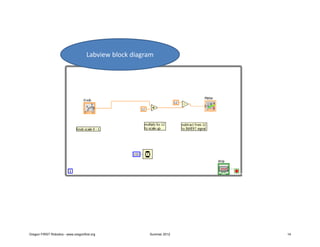
 • Use two stage numeric signal conversion to change
   signal


Oregon FIRST Robotics - www.oregonfirst.org              Summer 2012                13
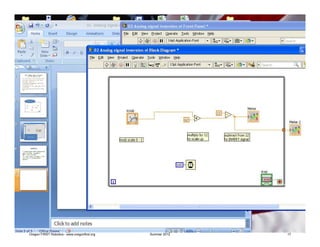
Labview block diagram


Oregon FIRST Robotics - www.oregonfirst.org             Summer 2012   14
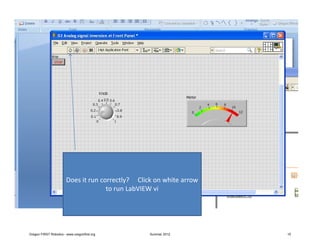
Does it run correctly? Click on white arrow
                                      to run LabVIEW vi


Oregon FIRST Robotics - www.oregonfirst.org        Summer 2012        15
QUESTIONS
 • If we add a second METER indicator outside
   of the WHILE loop, what happens?
 • Does it work as you expect?
 • Any “output” from a WHILE loop will not be
   ‘active’ until WHILE loop completes
   operation!!!


Oregon FIRST Robotics - www.oregonfirst.org      Summer 2012   16
Oregon FIRST Robotics - www.oregonfirst.org   Summer 2012   17
FAQ
 • “Jim, why don’t we just change the properties
   on the knob to give us the signal range that is
   needed?”
 • The knob is a virtual control so we can make it
   produce any signal we want. In the real
   world however, the sensors will produce
   signals as described by the data sheet. We
   use LabVIEW to convert the signals to match
   what is needed by the rest of the program.


Oregon FIRST Robotics - www.oregonfirst.org   Summer 2012   18
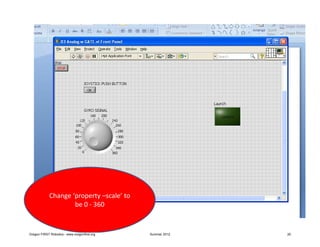
03 Analog with Gate enable
 • The ‘gyro compass’ is a sensor which will tell us
   which direction robot is facing. We want ball
   launch to only be allowed when gyro signal is
   between 100 and 200 degrees.
 • Use Knob to simulate analog signal from gyro
 • Use LED to simulate digital Ball Launch Signal
 • Use Boolean push button to simulate ball launch
   button on joystick
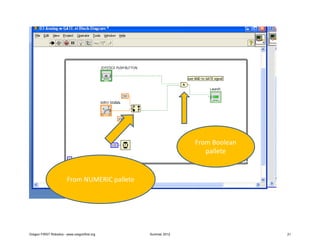
 • Use comparison IN RANGE function and Boolean
   AND to GATE digital signal to only reach LED
   when Gyro signal between 60 and 85.

Oregon FIRST Robotics - www.oregonfirst.org   Summer 2012   19
Change ‘property –scale’ to
                     be 0 - 360


Oregon FIRST Robotics - www.oregonfirst.org   Summer 2012   20
From Boolean
                                                                pallete


                        From NUMERIC pallete


Oregon FIRST Robotics - www.oregonfirst.org    Summer 2012                  21
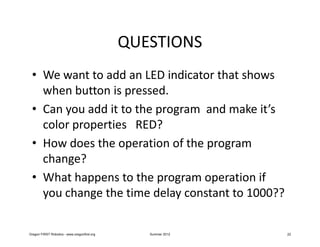
QUESTIONS
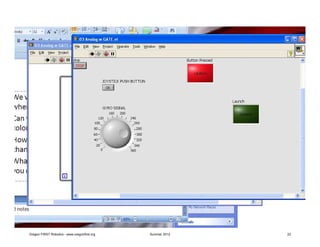
 • We want to add an LED indicator that shows
   when button is pressed.
 • Can you add it to the program and make it’s
   color properties RED?
 • How does the operation of the program
   change?
 • What happens to the program operation if
   you change the time delay constant to 1000??

Oregon FIRST Robotics - www.oregonfirst.org      Summer 2012   22
Oregon FIRST Robotics - www.oregonfirst.org   Summer 2012   23
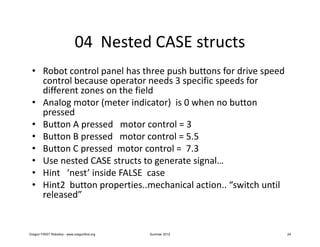
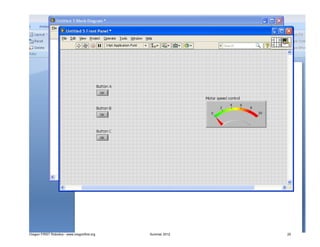
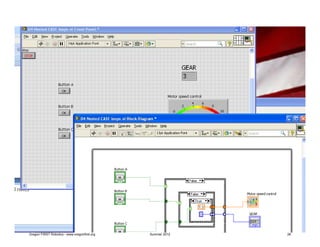
04 Nested CASE structs
 • Robot control panel has three push buttons for drive speed
   control because operator needs 3 specific speeds for
   different zones on the field
 • Analog motor (meter indicator) is 0 when no button
   pressed
 • Button A pressed motor control = 3
 • Button B pressed motor control = 5.5
 • Button C pressed motor control = 7.3
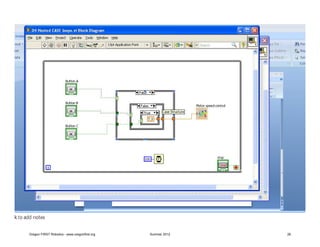
 • Use nested CASE structs to generate signal…
 • Hint ‘nest’ inside FALSE case
 • Hint2 button properties..mechanical action.. “switch until
   released”


Oregon FIRST Robotics - www.oregonfirst.org   Summer 2012       24
Oregon FIRST Robotics - www.oregonfirst.org   Summer 2012   25
Oregon FIRST Robotics - www.oregonfirst.org   Summer 2012   26
QUESTIONS
 • We want an indicator to show which gear we
   are in.
 • Can you add a Numeric Indicator which shows
   a number (0,1,2, 3) for what ‘gear’ we are in?


Oregon FIRST Robotics - www.oregonfirst.org      Summer 2012   27
Oregon FIRST Robotics - www.oregonfirst.org   Summer 2012   28
05 counters & shift registers
 • Increment by one each time the WHILE loop runs
   will create a counter.
 • Set time delay for 700ms
 • Starting value is “0” (constant) outside loop
 • Shift registers carry value from output of the loop
   around to be input when loop runs next time
 • Indicator will show number changing every 700
   miliseconds
 • See example 5a counter wm shift reg


Oregon FIRST Robotics - www.oregonfirst.org   Summer 2012   29
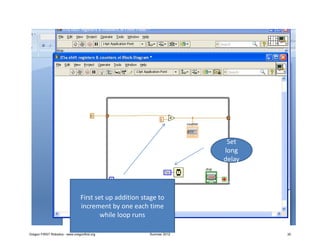
Set
                                                                       long
                                                                       delay


                                 First set up addition stage to
                                 increment by one each time
                                         while loop runs

Oregon FIRST Robotics - www.oregonfirst.org              Summer 2012           30
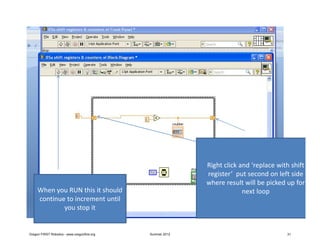
Right click and ‘replace with shift
                                                            register’ put second on left side
                                                            where result will be picked up for
     When you RUN this it should                                         next loop
     continue to increment until
             you stop it


Oregon FIRST Robotics - www.oregonfirst.org   Summer 2012                               31
More counters & timers
 • Now we want to use (Quotient-Remainder
   function) to produce numbers between 0 and
   9 , in one second steps
 • From the counter loop we started with, add
   the Quotient-Remainder function and display
   the Remainder output
 • Change time delay to 1000 ms.
 • What happens to the read outs?
 • See example 5b

Oregon FIRST Robotics - www.oregonfirst.org   Summer 2012   32
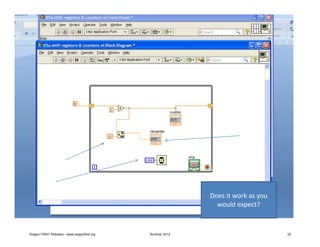
Does it work as you
                                                              would expect?


Oregon FIRST Robotics - www.oregonfirst.org   Summer 2012                         33
QUESTIONS
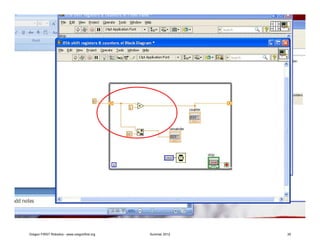
 • Right now the ‘Quotient – Remainder’ is
   connected downstream (after) the
   increment (+) stage.
 • What happens if we change this and connect
   the ‘Quotient – Remainder’ upstream
   (before) the increment stage??


Oregon FIRST Robotics - www.oregonfirst.org      Summer 2012   34
Oregon FIRST Robotics - www.oregonfirst.org   Summer 2012   35
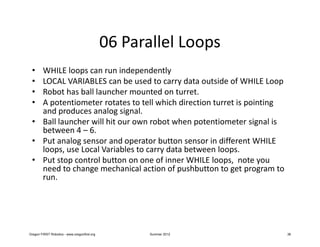
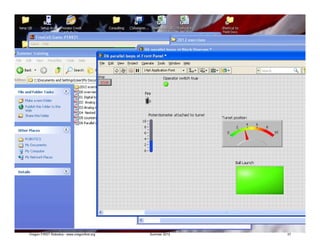
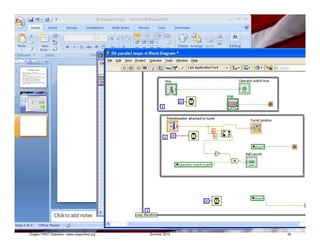
06 Parallel Loops
 • WHILE loops can run independently
 • LOCAL VARIABLES can be used to carry data outside of WHILE Loop
 • Robot has ball launcher mounted on turret.
 • A potentiometer rotates to tell which direction turret is pointing
   and produces analog signal.
 • Ball launcher will hit our own robot when potentiometer signal is
   between 4 – 6.
 • Put analog sensor and operator button sensor in different WHILE
   loops, use Local Variables to carry data between loops.
 • Put stop control button on one of inner WHILE loops, note you
   need to change mechanical action of pushbutton to get program to
   run.


Oregon FIRST Robotics - www.oregonfirst.org          Summer 2012        36
Oregon FIRST Robotics - www.oregonfirst.org   Summer 2012   37
Oregon FIRST Robotics - www.oregonfirst.org   Summer 2012   38
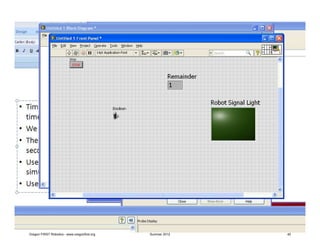
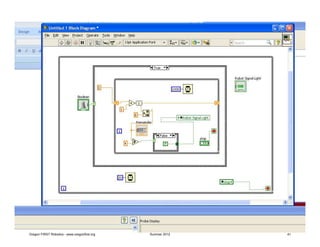
07 timers
 • Timers can be used to set activity at specific
   times and for specific durations
 • We want to put a blinking light on the Robot.
 • The Robot Signal Light should go ON for 4
   seconds and OFF for 4 seconds.
 • Use an LED indicator on front panel as
   simulator for RSL
 • Use toggle switch for on-off control of light.

Oregon FIRST Robotics - www.oregonfirst.org      Summer 2012   39
Oregon FIRST Robotics - www.oregonfirst.org   Summer 2012   40
Oregon FIRST Robotics - www.oregonfirst.org   Summer 2012   41
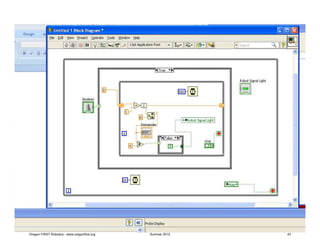
questions
 • Note the use of local variables
 • What happens if we change the inner time
   delay to 100 instead of 1000?
 • Note… you may have to re-initialize variables
   to default values…. From upper tool bar click
   on ‘Edit -Reinitialize variables…’


Oregon FIRST Robotics - www.oregonfirst.org      Summer 2012   42
Oregon FIRST Robotics - www.oregonfirst.org   Summer 2012   43
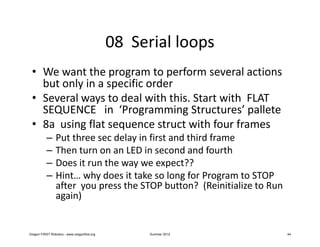
08 Serial loops
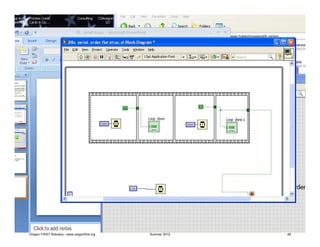
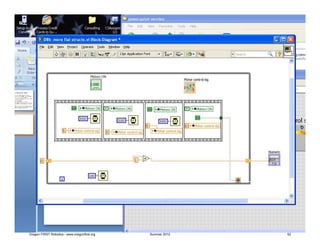
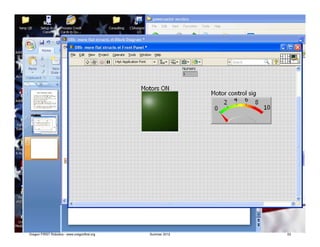
 • We want the program to perform several actions
   but only in a specific order
 • Several ways to deal with this. Start with FLAT
   SEQUENCE in ‘Programming Structures’ pallete
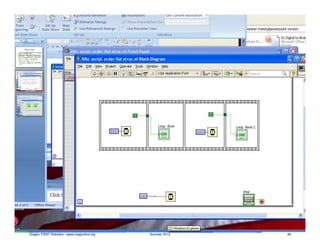
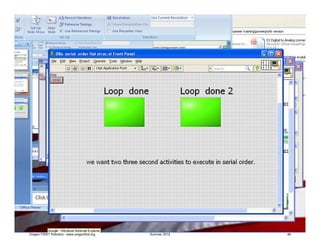
 • 8a using flat sequence struct with four frames
           –     Put three sec delay in first and third frame
           –     Then turn on an LED in second and fourth
           –     Does it run the way we expect??
           –     Hint… why does it take so long for Program to STOP
                 after you press the STOP button? (Reinitialize to Run
                 again)


Oregon FIRST Robotics - www.oregonfirst.org         Summer 2012          44
Oregon FIRST Robotics - www.oregonfirst.org   Summer 2012   45
Oregon FIRST Robotics - www.oregonfirst.org   Summer 2012   46
questions
 • What happens if we use the constant in the
   last frame to stop the while loop???

 • We get rid of the delay for the stop
   pushbutton…. Right?


Oregon FIRST Robotics - www.oregonfirst.org      Summer 2012   47
Oregon FIRST Robotics - www.oregonfirst.org   Summer 2012   48
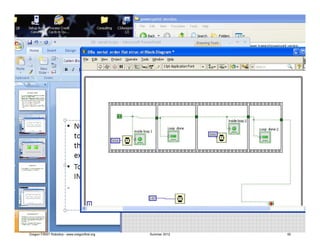
More questions??
 • NOTICE that we can use the first Constant True
   to control all the of the logic outputs because
   the signal is not released until the frame is
   executed….?! ?
 • To test this, put another LED to display
   INSIDE the frame… what happens?


Oregon FIRST Robotics - www.oregonfirst.org     Summer 2012   49
Oregon FIRST Robotics - www.oregonfirst.org   Summer 2012   50
08b more serial loops
 • If we want to turn systems on and off, we need to
   understand how to turn off the LED in previous example.
 • Now we want to control a robot drive motor.
 • We want it to turn on for 3 seconds, off for two seconds,
   back on for 3 seconds, then stop!
 • This is a place for Local variables
 • Make the same 4 frame Flat Sequence Struct
 • This time put the LED outside and connect it with a local
   variable. And add a meter for an analog value. See next
   slide
 • Note I have added an indicator to see how many time the
   While Loop actually runs during this program… is any one
   else surprised by the number that shows up?


Oregon FIRST Robotics - www.oregonfirst.org   Summer 2012      51
Oregon FIRST Robotics - www.oregonfirst.org   Summer 2012   52
Oregon FIRST Robotics - www.oregonfirst.org   Summer 2012   53
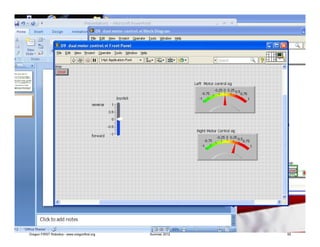
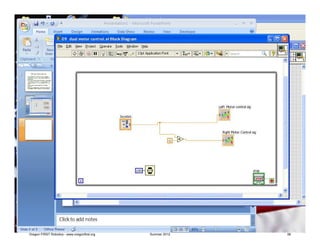
09 Dual motor control
 • Most Robot drives have at least two motors
 • To maneuver usually requires both motors be
   controlled.
 • The signal coming from the Joystick is an analog
   signal that varies from -1 (stick pushed all the
   way forward) to +1 (stick pushed all the way
   back)
 • Use a slider numeric control to simulate a
   joystick.
 • Construct a program to simulate the control of
   two motors (one reversed) with one joystick

Oregon FIRST Robotics - www.oregonfirst.org   Summer 2012   54
Oregon FIRST Robotics - www.oregonfirst.org   Summer 2012   55
Oregon FIRST Robotics - www.oregonfirst.org   Summer 2012   56
10 Simulated tank control
 • Construct program with two slider controls (to simulate Joysticks) and
   two Meters indicators (to simulate Left and right motor signal outputs)
 • Assume the right motor is reverse mounted, so signal going to Right Motor
   needs to be the opposite polarity of the Left motor control
 • Change Scale Property on both controls and indicators to be Min = -1
   and Max = 1

 • EXTRA CREDIT construct logic
 • How do the joystick controls need to be set to maneuver and turn the
   Robot? Remember to move robot forward,
           –     Left                 left is greater than right
           –     Right                right is greater than left
           –     Forward               signals less than zero
           –     Backward             signals greater than zero
           –     Straight            both signals are equal
 • Set up an indicator and digital logic to show direction of robot movement


Oregon FIRST Robotics - www.oregonfirst.org                Summer 2012         57
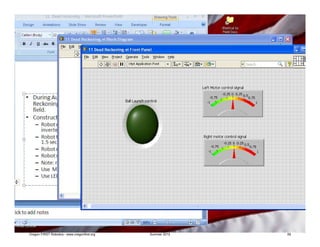
11 Dead reckoning
 • During Autonomous mode we may want to use Dead
   Reckoning to move the robot to a specific location on the
   field.
 • Construct a Flat sequence with the following steps:
           – Robot moves straight forward for 3 seconds (right motor
             inverted)
           – Robot turns right (left motor forward, right motor stopped) for
             1.5 seconds
           – Robot moves straight forward 3 seconds.
           – Robot stops and turns on RED LED which will launch the Ball
           – Note: remember to set Ball LED off when you start.
           – Use Meters to show motor control signals
           – Use LED to show Ball launch control signal


Oregon FIRST Robotics - www.oregonfirst.org    Summer 2012                     58
Oregon FIRST Robotics - www.oregonfirst.org   Summer 2012   59
Oregon FIRST Robotics - www.oregonfirst.org   Summer 2012   60
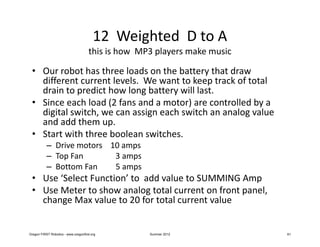
12 Weighted D to A
                                      this is how MP3 players make music

 • Our robot has three loads on the battery that draw
   different current levels. We want to keep track of total
   drain to predict how long battery will last.
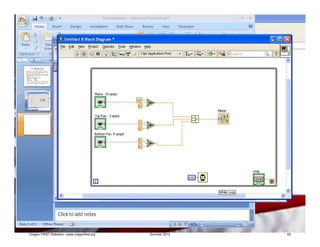
 • Since each load (2 fans and a motor) are controlled by a
   digital switch, we can assign each switch an analog value
   and add them up.
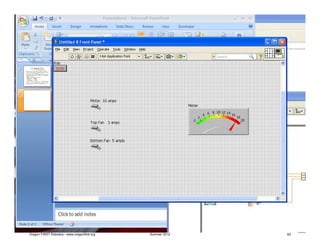
 • Start with three boolean switches.
           – Drive motors 10 amps
           – Top Fan       3 amps
           – Bottom Fan    5 amps
 • Use ‘Select Function’ to add value to SUMMING Amp
 • Use Meter to show analog total current on front panel,
   change Max value to 20 for total current value


Oregon FIRST Robotics - www.oregonfirst.org         Summer 2012            61
Oregon FIRST Robotics - www.oregonfirst.org   Summer 2012   62
Oregon FIRST Robotics - www.oregonfirst.org   Summer 2012   63

2012 OregonFIRST LabView Training

  • 1.
    FRC LabVIEW INTRODUCTION Homework exercises for 2012 summer FRC LabVIEW class series Oregon FIRST Robotics - www.oregonfirst.org Summer 2012 1
  • 2.
    Overview • Bycompleting these exercises the student will become familiar with the mechanics of the LabVIEW programming. • Each exercise demonstrates the use of digital logic and analog numerical conversion commonly used in robotic system design • A typical FRC robot program will use a combination of many of these examples. • From “Getting Started” screen. programs start with a New BLANK.vi and can be run on a stand alone PC without a cRIO Oregon FIRST Robotics - www.oregonfirst.org Summer 2012 2
  • 3.
    General guidelines •Construct each program inside a “WHILE loop” • Put a control STOP button in WHILE loop • Put a 100ms TIME DELAY in each WHILE loop • (Stop button allows us to an easy way to stop the program execution. • The time delay will keep simple LabVIEW program from taking ALL compute bandwidth from your PC. Oregon FIRST Robotics - www.oregonfirst.org Summer 2012 3
  • 4.
    WHILE LOOP Control for WHILE loop Time Delay THIS IS LABVIEW BLOCK DIAGRAM SCREEN Oregon FIRST Robotics - www.oregonfirst.org Summer 2012 4
  • 5.
    Use ‘Context Help’ • The best tutor to get more information about any parts of LabVIEW is ‘Context Help’ • From tool bar (top of Block Diagram screen) , click on Help – Show Context Help. • Then Cusor will display more information on LabVIEW details. Oregon FIRST Robotics - www.oregonfirst.org Summer 2012 5
  • 6.
    Oregon FIRST Robotics- www.oregonfirst.org Summer 2012 6
  • 7.
    Oregon FIRST Robotics- www.oregonfirst.org Summer 2012 7
  • 8.
    01 Digital toAnalog conversion • The robot ‘s ball lift mechanism has two motors. Each needs an analog (numeric) signal of .5 to run at the correct speed. WE want the ball lift to turn on when the a Digital (boolean) switch is TRUE. LabVIEW has two convenient methods for D/A conversion : the CASE struct and the ‘Select’ icon on the comparison palette. • Drive both motors from one button. • Use numeric meter indicator. • Change meter properties –scale from 0-1. • When button – switch is off, motor control should be 0. Oregon FIRST Robotics - www.oregonfirst.org Summer 2012 8
  • 9.
    Control for while Edit loop properties Scale 0-1 Oregon FIRST Robotics - www.oregonfirst.org Summer 2012 9
  • 10.
    Click on down arrow to display FALSE Case What value goes in FALSE Case? Oregon FIRST Robotics - www.oregonfirst.org Summer 2012 10
  • 11.
    QUESTIONS? • Howwould you drive the each motor at different speeds? • How would you add a third motor control to this program? • We are using NUMERIC CONSTANTS in this program. If we want to add a BOOLEAN (digital) constant to control an LED indicator, how would you add it to your program? Oregon FIRST Robotics - www.oregonfirst.org Summer 2012 11
  • 12.
    Oregon FIRST Robotics- www.oregonfirst.org Summer 2012 12
  • 13.
    02 Analog signalinversion (convert 0-1 v signal to 12 -0 v signal) • Use a Control knob to produce analog signal 0 – 1 • Motor (meter indicator) control needs inverted analog signal 12 volts – 0 . • When knob is 0 (minimum signal), motor (meter) should indicate 12 volts • When knob is 1 (full scale), motor (meter) should indicate 0 volts. • Use two stage numeric signal conversion to change signal Oregon FIRST Robotics - www.oregonfirst.org Summer 2012 13
  • 14.
    Labview block diagram OregonFIRST Robotics - www.oregonfirst.org Summer 2012 14
  • 15.
    Does it runcorrectly? Click on white arrow to run LabVIEW vi Oregon FIRST Robotics - www.oregonfirst.org Summer 2012 15
  • 16.
    QUESTIONS • Ifwe add a second METER indicator outside of the WHILE loop, what happens? • Does it work as you expect? • Any “output” from a WHILE loop will not be ‘active’ until WHILE loop completes operation!!! Oregon FIRST Robotics - www.oregonfirst.org Summer 2012 16
  • 17.
    Oregon FIRST Robotics- www.oregonfirst.org Summer 2012 17
  • 18.
    FAQ • “Jim,why don’t we just change the properties on the knob to give us the signal range that is needed?” • The knob is a virtual control so we can make it produce any signal we want. In the real world however, the sensors will produce signals as described by the data sheet. We use LabVIEW to convert the signals to match what is needed by the rest of the program. Oregon FIRST Robotics - www.oregonfirst.org Summer 2012 18
  • 19.
    03 Analog withGate enable • The ‘gyro compass’ is a sensor which will tell us which direction robot is facing. We want ball launch to only be allowed when gyro signal is between 100 and 200 degrees. • Use Knob to simulate analog signal from gyro • Use LED to simulate digital Ball Launch Signal • Use Boolean push button to simulate ball launch button on joystick • Use comparison IN RANGE function and Boolean AND to GATE digital signal to only reach LED when Gyro signal between 60 and 85. Oregon FIRST Robotics - www.oregonfirst.org Summer 2012 19
  • 20.
    Change ‘property –scale’to be 0 - 360 Oregon FIRST Robotics - www.oregonfirst.org Summer 2012 20
  • 21.
    From Boolean pallete From NUMERIC pallete Oregon FIRST Robotics - www.oregonfirst.org Summer 2012 21
  • 22.
    QUESTIONS • Wewant to add an LED indicator that shows when button is pressed. • Can you add it to the program and make it’s color properties RED? • How does the operation of the program change? • What happens to the program operation if you change the time delay constant to 1000?? Oregon FIRST Robotics - www.oregonfirst.org Summer 2012 22
  • 23.
    Oregon FIRST Robotics- www.oregonfirst.org Summer 2012 23
  • 24.
    04 Nested CASEstructs • Robot control panel has three push buttons for drive speed control because operator needs 3 specific speeds for different zones on the field • Analog motor (meter indicator) is 0 when no button pressed • Button A pressed motor control = 3 • Button B pressed motor control = 5.5 • Button C pressed motor control = 7.3 • Use nested CASE structs to generate signal… • Hint ‘nest’ inside FALSE case • Hint2 button properties..mechanical action.. “switch until released” Oregon FIRST Robotics - www.oregonfirst.org Summer 2012 24
  • 25.
    Oregon FIRST Robotics- www.oregonfirst.org Summer 2012 25
  • 26.
    Oregon FIRST Robotics- www.oregonfirst.org Summer 2012 26
  • 27.
    QUESTIONS • Wewant an indicator to show which gear we are in. • Can you add a Numeric Indicator which shows a number (0,1,2, 3) for what ‘gear’ we are in? Oregon FIRST Robotics - www.oregonfirst.org Summer 2012 27
  • 28.
    Oregon FIRST Robotics- www.oregonfirst.org Summer 2012 28
  • 29.
    05 counters &shift registers • Increment by one each time the WHILE loop runs will create a counter. • Set time delay for 700ms • Starting value is “0” (constant) outside loop • Shift registers carry value from output of the loop around to be input when loop runs next time • Indicator will show number changing every 700 miliseconds • See example 5a counter wm shift reg Oregon FIRST Robotics - www.oregonfirst.org Summer 2012 29
  • 30.
    Set long delay First set up addition stage to increment by one each time while loop runs Oregon FIRST Robotics - www.oregonfirst.org Summer 2012 30
  • 31.
    Right click and‘replace with shift register’ put second on left side where result will be picked up for When you RUN this it should next loop continue to increment until you stop it Oregon FIRST Robotics - www.oregonfirst.org Summer 2012 31
  • 32.
    More counters &timers • Now we want to use (Quotient-Remainder function) to produce numbers between 0 and 9 , in one second steps • From the counter loop we started with, add the Quotient-Remainder function and display the Remainder output • Change time delay to 1000 ms. • What happens to the read outs? • See example 5b Oregon FIRST Robotics - www.oregonfirst.org Summer 2012 32
  • 33.
    Does it workas you would expect? Oregon FIRST Robotics - www.oregonfirst.org Summer 2012 33
  • 34.
    QUESTIONS • Rightnow the ‘Quotient – Remainder’ is connected downstream (after) the increment (+) stage. • What happens if we change this and connect the ‘Quotient – Remainder’ upstream (before) the increment stage?? Oregon FIRST Robotics - www.oregonfirst.org Summer 2012 34
  • 35.
    Oregon FIRST Robotics- www.oregonfirst.org Summer 2012 35
  • 36.
    06 Parallel Loops • WHILE loops can run independently • LOCAL VARIABLES can be used to carry data outside of WHILE Loop • Robot has ball launcher mounted on turret. • A potentiometer rotates to tell which direction turret is pointing and produces analog signal. • Ball launcher will hit our own robot when potentiometer signal is between 4 – 6. • Put analog sensor and operator button sensor in different WHILE loops, use Local Variables to carry data between loops. • Put stop control button on one of inner WHILE loops, note you need to change mechanical action of pushbutton to get program to run. Oregon FIRST Robotics - www.oregonfirst.org Summer 2012 36
  • 37.
    Oregon FIRST Robotics- www.oregonfirst.org Summer 2012 37
  • 38.
    Oregon FIRST Robotics- www.oregonfirst.org Summer 2012 38
  • 39.
    07 timers •Timers can be used to set activity at specific times and for specific durations • We want to put a blinking light on the Robot. • The Robot Signal Light should go ON for 4 seconds and OFF for 4 seconds. • Use an LED indicator on front panel as simulator for RSL • Use toggle switch for on-off control of light. Oregon FIRST Robotics - www.oregonfirst.org Summer 2012 39
  • 40.
    Oregon FIRST Robotics- www.oregonfirst.org Summer 2012 40
  • 41.
    Oregon FIRST Robotics- www.oregonfirst.org Summer 2012 41
  • 42.
    questions • Notethe use of local variables • What happens if we change the inner time delay to 100 instead of 1000? • Note… you may have to re-initialize variables to default values…. From upper tool bar click on ‘Edit -Reinitialize variables…’ Oregon FIRST Robotics - www.oregonfirst.org Summer 2012 42
  • 43.
    Oregon FIRST Robotics- www.oregonfirst.org Summer 2012 43
  • 44.
    08 Serial loops • We want the program to perform several actions but only in a specific order • Several ways to deal with this. Start with FLAT SEQUENCE in ‘Programming Structures’ pallete • 8a using flat sequence struct with four frames – Put three sec delay in first and third frame – Then turn on an LED in second and fourth – Does it run the way we expect?? – Hint… why does it take so long for Program to STOP after you press the STOP button? (Reinitialize to Run again) Oregon FIRST Robotics - www.oregonfirst.org Summer 2012 44
  • 45.
    Oregon FIRST Robotics- www.oregonfirst.org Summer 2012 45
  • 46.
    Oregon FIRST Robotics- www.oregonfirst.org Summer 2012 46
  • 47.
    questions • Whathappens if we use the constant in the last frame to stop the while loop??? • We get rid of the delay for the stop pushbutton…. Right? Oregon FIRST Robotics - www.oregonfirst.org Summer 2012 47
  • 48.
    Oregon FIRST Robotics- www.oregonfirst.org Summer 2012 48
  • 49.
    More questions?? •NOTICE that we can use the first Constant True to control all the of the logic outputs because the signal is not released until the frame is executed….?! ? • To test this, put another LED to display INSIDE the frame… what happens? Oregon FIRST Robotics - www.oregonfirst.org Summer 2012 49
  • 50.
    Oregon FIRST Robotics- www.oregonfirst.org Summer 2012 50
  • 51.
    08b more serialloops • If we want to turn systems on and off, we need to understand how to turn off the LED in previous example. • Now we want to control a robot drive motor. • We want it to turn on for 3 seconds, off for two seconds, back on for 3 seconds, then stop! • This is a place for Local variables • Make the same 4 frame Flat Sequence Struct • This time put the LED outside and connect it with a local variable. And add a meter for an analog value. See next slide • Note I have added an indicator to see how many time the While Loop actually runs during this program… is any one else surprised by the number that shows up? Oregon FIRST Robotics - www.oregonfirst.org Summer 2012 51
  • 52.
    Oregon FIRST Robotics- www.oregonfirst.org Summer 2012 52
  • 53.
    Oregon FIRST Robotics- www.oregonfirst.org Summer 2012 53
  • 54.
    09 Dual motorcontrol • Most Robot drives have at least two motors • To maneuver usually requires both motors be controlled. • The signal coming from the Joystick is an analog signal that varies from -1 (stick pushed all the way forward) to +1 (stick pushed all the way back) • Use a slider numeric control to simulate a joystick. • Construct a program to simulate the control of two motors (one reversed) with one joystick Oregon FIRST Robotics - www.oregonfirst.org Summer 2012 54
  • 55.
    Oregon FIRST Robotics- www.oregonfirst.org Summer 2012 55
  • 56.
    Oregon FIRST Robotics- www.oregonfirst.org Summer 2012 56
  • 57.
    10 Simulated tankcontrol • Construct program with two slider controls (to simulate Joysticks) and two Meters indicators (to simulate Left and right motor signal outputs) • Assume the right motor is reverse mounted, so signal going to Right Motor needs to be the opposite polarity of the Left motor control • Change Scale Property on both controls and indicators to be Min = -1 and Max = 1 • EXTRA CREDIT construct logic • How do the joystick controls need to be set to maneuver and turn the Robot? Remember to move robot forward, – Left left is greater than right – Right right is greater than left – Forward signals less than zero – Backward signals greater than zero – Straight both signals are equal • Set up an indicator and digital logic to show direction of robot movement Oregon FIRST Robotics - www.oregonfirst.org Summer 2012 57
  • 58.
    11 Dead reckoning • During Autonomous mode we may want to use Dead Reckoning to move the robot to a specific location on the field. • Construct a Flat sequence with the following steps: – Robot moves straight forward for 3 seconds (right motor inverted) – Robot turns right (left motor forward, right motor stopped) for 1.5 seconds – Robot moves straight forward 3 seconds. – Robot stops and turns on RED LED which will launch the Ball – Note: remember to set Ball LED off when you start. – Use Meters to show motor control signals – Use LED to show Ball launch control signal Oregon FIRST Robotics - www.oregonfirst.org Summer 2012 58
  • 59.
    Oregon FIRST Robotics- www.oregonfirst.org Summer 2012 59
  • 60.
    Oregon FIRST Robotics- www.oregonfirst.org Summer 2012 60
  • 61.
    12 Weighted Dto A this is how MP3 players make music • Our robot has three loads on the battery that draw different current levels. We want to keep track of total drain to predict how long battery will last. • Since each load (2 fans and a motor) are controlled by a digital switch, we can assign each switch an analog value and add them up. • Start with three boolean switches. – Drive motors 10 amps – Top Fan 3 amps – Bottom Fan 5 amps • Use ‘Select Function’ to add value to SUMMING Amp • Use Meter to show analog total current on front panel, change Max value to 20 for total current value Oregon FIRST Robotics - www.oregonfirst.org Summer 2012 61
  • 62.
    Oregon FIRST Robotics- www.oregonfirst.org Summer 2012 62
  • 63.
    Oregon FIRST Robotics- www.oregonfirst.org Summer 2012 63