VEX Robotics I Power Points
                             Topic 09
                    Programming Design Basics
                     Bumper Switch Sensing 1
www.pedagogics.ca
Topics Covered in this Presentation
               Topic 09
               • Introduction to the bumper switch
               • flowcharting and writing pseudocode


               •program sketch #1
                  • while loops and Boolean logic
                  • if else loops and sensor input
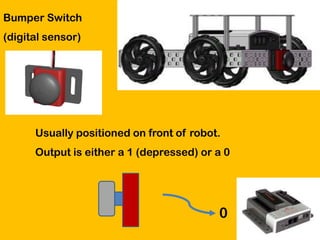
Bumper Switch
(digital sensor)


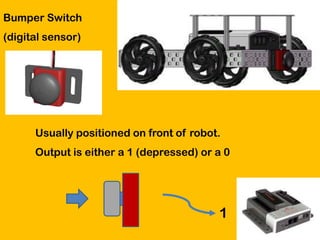
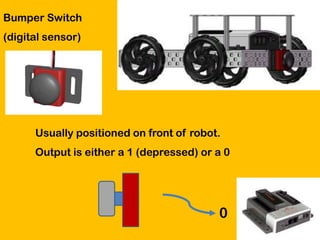
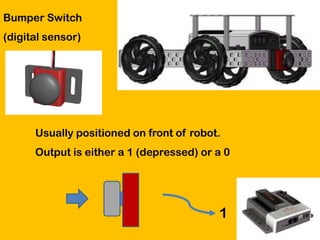
      Usually positioned on front of robot.
      Output is either a 1 (depressed) or a 0


                                          0
Bumper Switch
(digital sensor)


      Usually positioned on front of robot.
      Output is either a 1 (depressed) or a 0


                                          1
Bumper Switch
(digital sensor)


      Usually positioned on front of robot.
      Output is either a 1 (depressed) or a 0


                                          0
Bumper Switch
(digital sensor)


      Usually positioned on front of robot.
      Output is either a 1 (depressed) or a 0


                                          1
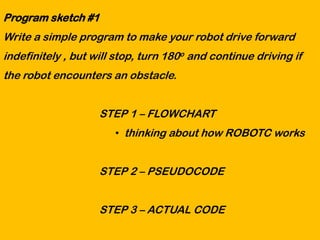
Program sketch #1
Write a simple program to make your robot drive forward
indefinitely , but will stop, turn 180o and continue driving if
the robot encounters an obstacle.


                    STEP 1 – FLOWCHART
                       • thinking about how ROBOTC works


                    STEP 2 – PSEUDOCODE


                    STEP 3 – ACTUAL CODE
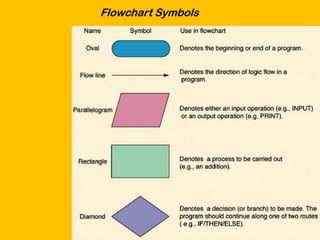
Flowchart Symbols
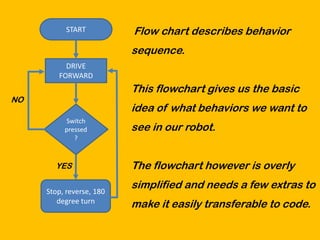
START          Flow chart describes behavior
                          sequence.
          DRIVE
        FORWARD
                          This flowchart gives us the basic
NO
                          idea of what behaviors we want to
          Switch
          pressed         see in our robot.
             ?


       YES                The flowchart however is overly
                          simplified and needs a few extras to
     Stop, reverse, 180
        degree turn       make it easily transferable to code.
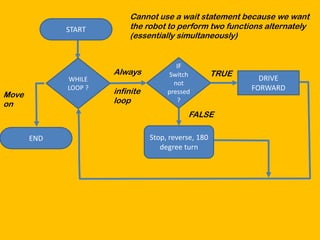
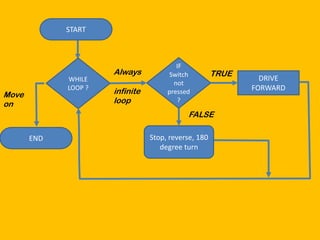
Cannot use a wait statement because we want
             START        the robot to perform two functions alternately
                          (essentially simultaneously)


                                         IF
                      Always          Switch          TRUE
             WHILE                                             DRIVE
                                        not
             LOOP ?
                      infinite        pressed                FORWARD
Move
on                    loop               ?

                                            FALSE

       END                       Stop, reverse, 180
                                    degree turn
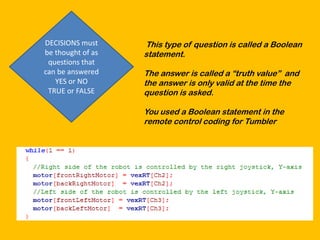
DECISIONS must     This type of question is called a Boolean
be thought of as   statement.
 questions that
can be answered    The answer is called a “truth value” and
   YES or NO       the answer is only valid at the time the
 TRUE or FALSE     question is asked.

                   You used a Boolean statement in the
                   remote control coding for Tumbler
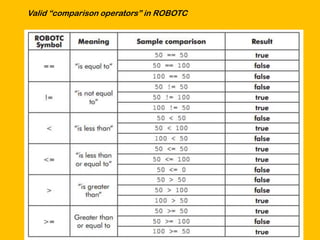
Valid “comparison operators” in ROBOTC
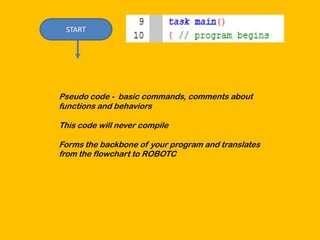
START


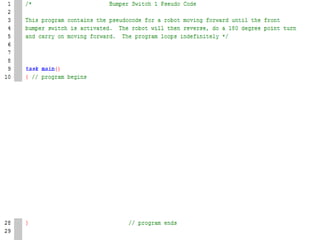
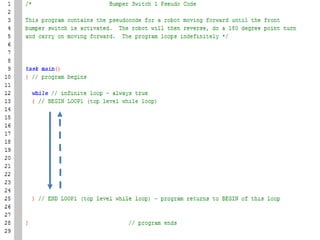
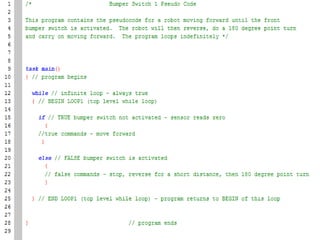
Pseudo code - basic commands, comments about
functions and behaviors

This code will never compile

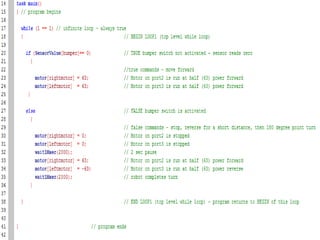
Forms the backbone of your program and translates
from the flowchart to ROBOTC
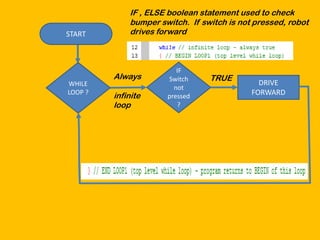
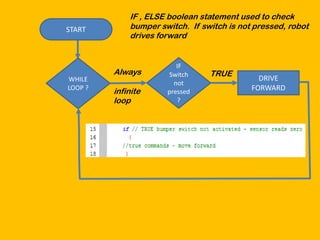
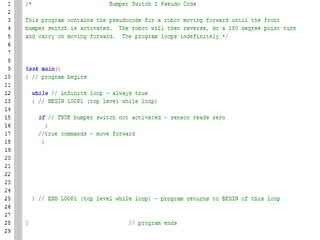
IF , ELSE boolean statement used to check
             bumper switch. If switch is not pressed, robot
START        drives forward


                         IF
         Always       Switch     TRUE
WHILE                                         DRIVE
                        not
LOOP ?
         infinite     pressed               FORWARD
         loop            ?
IF , ELSE boolean statement used to check
START        bumper switch. If switch is not pressed, robot
             drives forward


                         IF
         Always       Switch     TRUE
WHILE                                         DRIVE
                        not
LOOP ?
         infinite     pressed               FORWARD
         loop            ?
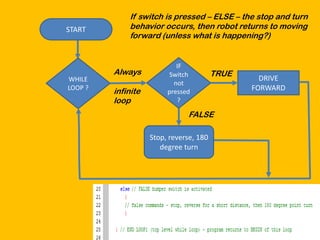
If switch is pressed – ELSE – the stop and turn
START        behavior occurs, then robot returns to moving
             forward (unless what is happening?)


                            IF
         Always          Switch          TRUE
WHILE                                             DRIVE
                           not
LOOP ?
         infinite        pressed                FORWARD
         loop               ?

                               FALSE

                    Stop, reverse, 180
                       degree turn
START


                                         IF
                      Always          Switch          TRUE
             WHILE                                             DRIVE
                                        not
             LOOP ?
                      infinite        pressed                FORWARD
Move
on                    loop               ?

                                            FALSE

       END                       Stop, reverse, 180
                                    degree turn
Programming with sensors   bumper switch 1

Programming with sensors bumper switch 1

  • 1.
    VEX Robotics IPower Points Topic 09 Programming Design Basics Bumper Switch Sensing 1 www.pedagogics.ca
  • 2.
    Topics Covered inthis Presentation Topic 09 • Introduction to the bumper switch • flowcharting and writing pseudocode •program sketch #1 • while loops and Boolean logic • if else loops and sensor input
  • 3.
    Bumper Switch (digital sensor) Usually positioned on front of robot. Output is either a 1 (depressed) or a 0 0
  • 4.
    Bumper Switch (digital sensor) Usually positioned on front of robot. Output is either a 1 (depressed) or a 0 1
  • 5.
    Bumper Switch (digital sensor) Usually positioned on front of robot. Output is either a 1 (depressed) or a 0 0
  • 6.
    Bumper Switch (digital sensor) Usually positioned on front of robot. Output is either a 1 (depressed) or a 0 1
  • 7.
    Program sketch #1 Writea simple program to make your robot drive forward indefinitely , but will stop, turn 180o and continue driving if the robot encounters an obstacle. STEP 1 – FLOWCHART • thinking about how ROBOTC works STEP 2 – PSEUDOCODE STEP 3 – ACTUAL CODE
  • 8.
  • 9.
    START Flow chart describes behavior sequence. DRIVE FORWARD This flowchart gives us the basic NO idea of what behaviors we want to Switch pressed see in our robot. ? YES The flowchart however is overly simplified and needs a few extras to Stop, reverse, 180 degree turn make it easily transferable to code.
  • 10.
    Cannot use await statement because we want START the robot to perform two functions alternately (essentially simultaneously) IF Always Switch TRUE WHILE DRIVE not LOOP ? infinite pressed FORWARD Move on loop ? FALSE END Stop, reverse, 180 degree turn
  • 11.
    DECISIONS must This type of question is called a Boolean be thought of as statement. questions that can be answered The answer is called a “truth value” and YES or NO the answer is only valid at the time the TRUE or FALSE question is asked. You used a Boolean statement in the remote control coding for Tumbler
  • 12.
  • 13.
    START Pseudo code -basic commands, comments about functions and behaviors This code will never compile Forms the backbone of your program and translates from the flowchart to ROBOTC
  • 15.
    IF , ELSEboolean statement used to check bumper switch. If switch is not pressed, robot START drives forward IF Always Switch TRUE WHILE DRIVE not LOOP ? infinite pressed FORWARD loop ?
  • 17.
    IF , ELSEboolean statement used to check START bumper switch. If switch is not pressed, robot drives forward IF Always Switch TRUE WHILE DRIVE not LOOP ? infinite pressed FORWARD loop ?
  • 19.
    If switch ispressed – ELSE – the stop and turn START behavior occurs, then robot returns to moving forward (unless what is happening?) IF Always Switch TRUE WHILE DRIVE not LOOP ? infinite pressed FORWARD loop ? FALSE Stop, reverse, 180 degree turn
  • 21.
    START IF Always Switch TRUE WHILE DRIVE not LOOP ? infinite pressed FORWARD Move on loop ? FALSE END Stop, reverse, 180 degree turn