DATA COMMUNICATION AND
NETWORKING
Imran Ahmad
Previous Lectures
• Data communication components
• Data representation
• Data flow
• Types of connections
• Protocol and its elements
• Standards
Physical Topology
3
Physical Topology
4
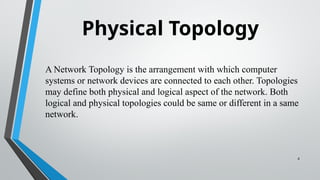
A Network Topology is the arrangement with which computer
systems or network devices are connected to each other. Topologies
may define both physical and logical aspect of the network. Both
logical and physical topologies could be same or different in a same
network.
5
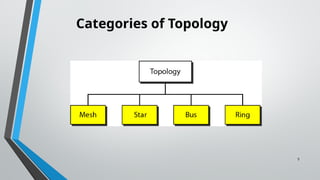
Categories of Topology
6
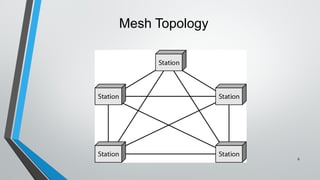
Mesh Topology
Mesh Topology
• Each device has dedicated point-to-point link to other devices.
Fully connected mesh will have n( n-1)/ 2 F.D. links
• Where n = number of nodes
• Advantages:
• Eliminates traffic problems
• Fast communication
• Robust and Privacy (Security)
• Easy fault isolation
• Disadvantages:
• Cabling and I/O ports
• Cost
7
8
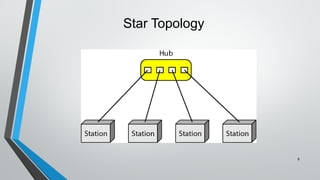
Star Topology
Star Topology
• Devices are connected Point to Point to a central “Hub”
(Central Controller)
• Advantages:
• Less expensive
• Less cabling and H/W ports
• Easy adding and removing devices.
• Disadvantage:
• Less robust
9
10
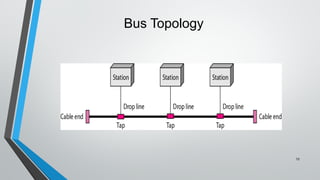
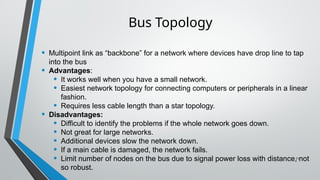
Bus Topology
• Multipoint link as “backbone” for a network where devices have drop line to tap
into the bus
• Advantages:
• It works well when you have a small network.
• Easiest network topology for connecting computers or peripherals in a linear
fashion.
• Requires less cable length than a star topology.
• Disadvantages:
• Difficult to identify the problems if the whole network goes down.
• Not great for large networks.
• Additional devices slow the network down.
• If a main cable is damaged, the network fails.
• Limit number of nodes on the bus due to signal power loss with distance, not
so robust.
11
Bus Topology
12
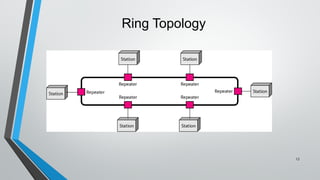
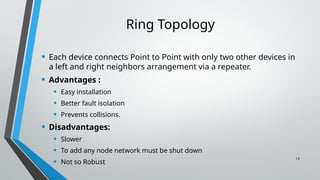
Ring Topology
• Each device connects Point to Point with only two other devices in
a left and right neighbors arrangement via a repeater.
• Advantages :
• Easy installation
• Better fault isolation
• Prevents collisions.
• Disadvantages:
• Slower
• To add any node network must be shut down
• Not so Robust
13
Ring Topology
14
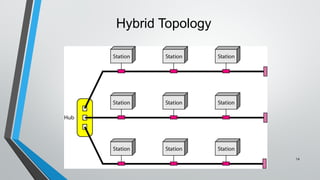
Hybrid Topology
Thanks

2-Network Topologies IN COMP NETWORKED.pptx

  • 1.
  • 2.
    Previous Lectures • Datacommunication components • Data representation • Data flow • Types of connections • Protocol and its elements • Standards
  • 3.
  • 4.
    Physical Topology 4 A NetworkTopology is the arrangement with which computer systems or network devices are connected to each other. Topologies may define both physical and logical aspect of the network. Both logical and physical topologies could be same or different in a same network.
  • 5.
  • 6.
  • 7.
    Mesh Topology • Eachdevice has dedicated point-to-point link to other devices. Fully connected mesh will have n( n-1)/ 2 F.D. links • Where n = number of nodes • Advantages: • Eliminates traffic problems • Fast communication • Robust and Privacy (Security) • Easy fault isolation • Disadvantages: • Cabling and I/O ports • Cost 7
  • 8.
  • 9.
    Star Topology • Devicesare connected Point to Point to a central “Hub” (Central Controller) • Advantages: • Less expensive • Less cabling and H/W ports • Easy adding and removing devices. • Disadvantage: • Less robust 9
  • 10.
  • 11.
    • Multipoint linkas “backbone” for a network where devices have drop line to tap into the bus • Advantages: • It works well when you have a small network. • Easiest network topology for connecting computers or peripherals in a linear fashion. • Requires less cable length than a star topology. • Disadvantages: • Difficult to identify the problems if the whole network goes down. • Not great for large networks. • Additional devices slow the network down. • If a main cable is damaged, the network fails. • Limit number of nodes on the bus due to signal power loss with distance, not so robust. 11 Bus Topology
  • 12.
  • 13.
    • Each deviceconnects Point to Point with only two other devices in a left and right neighbors arrangement via a repeater. • Advantages : • Easy installation • Better fault isolation • Prevents collisions. • Disadvantages: • Slower • To add any node network must be shut down • Not so Robust 13 Ring Topology
  • 14.
  • 15.

Editor's Notes

  • #3 The term physical topology refers to the way in which a network is laid out physically.
  • #4 The term physical topology refers to the way in which a network is laid out physically.