1
1
Lecture 02
Program Structure, Printing and
Comment
2
Outline
Pseudo code & flowchart
Sample programming question
Sample C program
Identifiers and reserved words
Program comments
Pre-processor directives
Data types and type declarations
Operators
Formatted input and output
Program debugging
3
Sample Programming Question
Write a program that calculates the sum
of two integers. Your program should
read the first number and the second
number from user.
Steps:
Analyze the problem
Use algorithm
Convert to actual codes
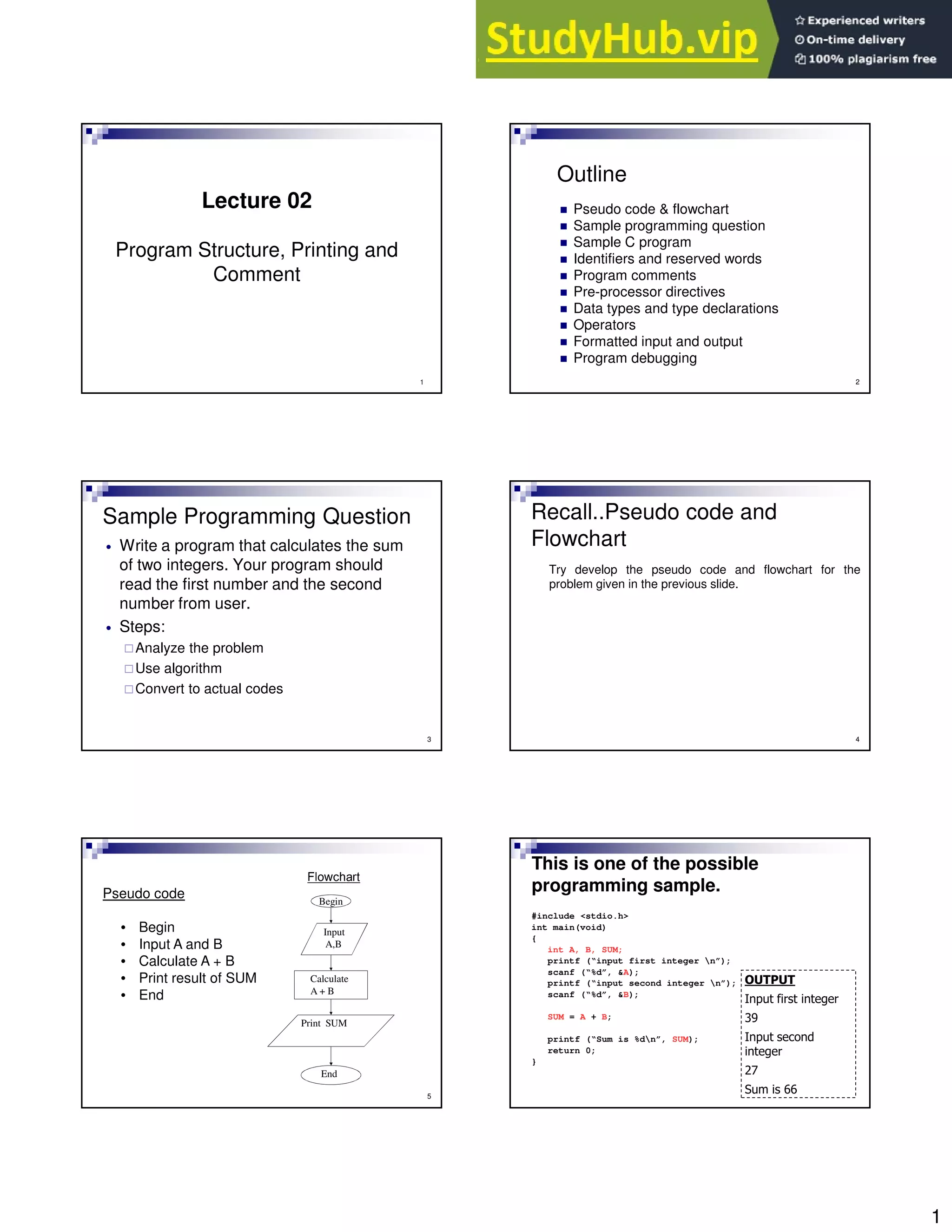
Recall..Pseudo code and
Flowchart
Try develop the pseudo code and flowchart for the
problem given in the previous slide.
4
5
Pseudo code
• Begin
• Input A and B
• Calculate A + B
• Print result of SUM
• End
Flowchart
Begin
Input
A,B
Calculate
A + B
Print SUM
End
This is one of the possible
programming sample.
#include <stdio.h>
int main(void)
{
int A, B, SUM;
printf (“input first integer n”);
scanf (“%d”, &A);
printf (“input second integer n”);
scanf (“%d”, &B);
SUM = A + B;
printf (“Sum is %dn”, SUM);
return 0;
}
2
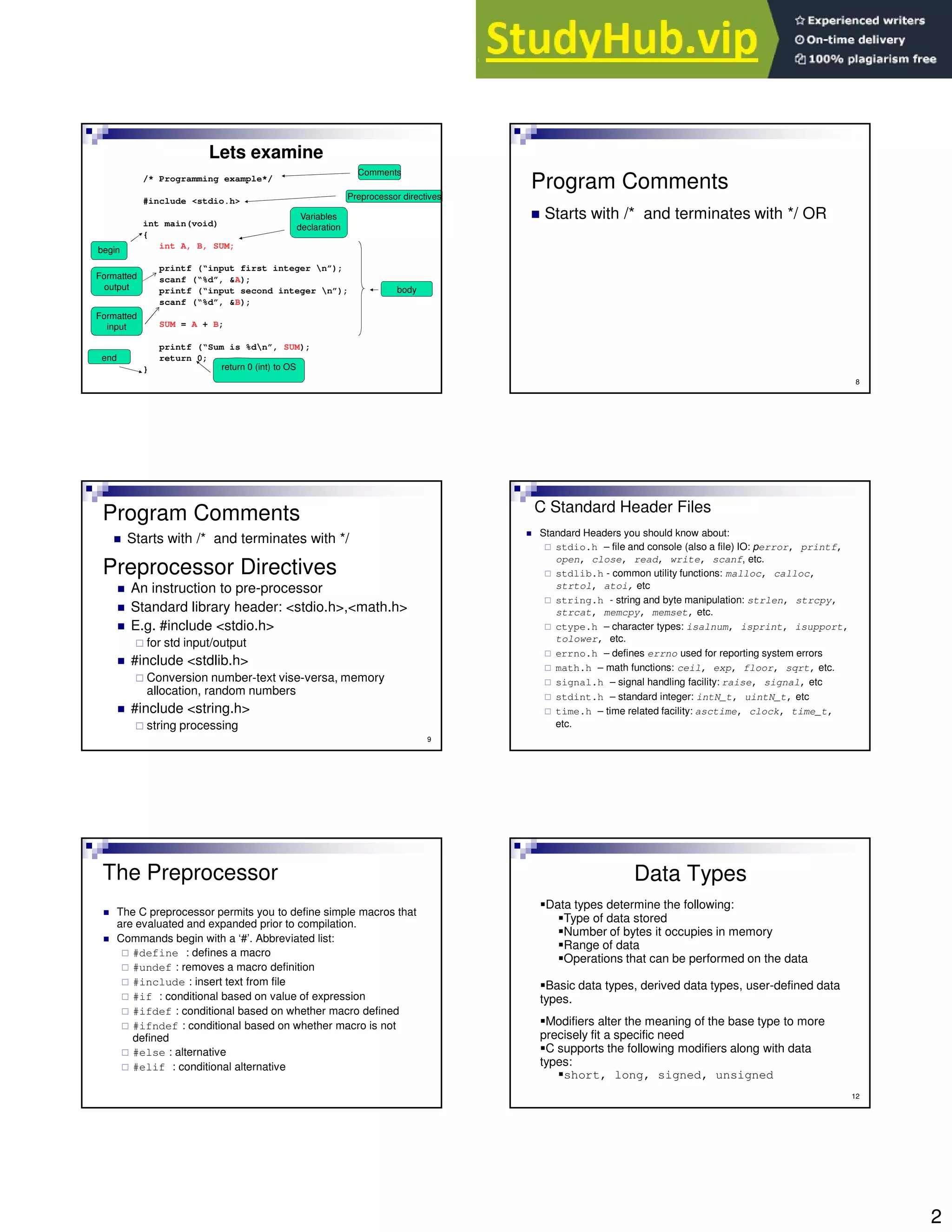
/* Programming example*/
#include <stdio.h>
int main(void)
{
int A, B, SUM;
printf (“input first integer n”);
scanf (“%d”, &A);
printf (“input second integer n”);
scanf (“%d”, &B);
SUM = A + B;
printf (“Sum is %dn”, SUM);
return 0;
}
Lets examine
Preprocessor directives
begin
end
Variables
declaration
body
return 0 (int) to OS
Comments
Formatted
output
Formatted
input
8
Program Comments
Starts with /* and terminates with */ OR
9
Preprocessor Directives
An instruction to pre-processor
Standard library header: <stdio.h>,<math.h>
E.g. #include <stdio.h>
for std input/output
#include <stdlib.h>
Conversion number-text vise-versa, memory
allocation, random numbers
#include <string.h>
string processing
Program Comments
Starts with /* and terminates with */
C Standard Header Files
Standard Headers you should know about:
stdio.h – file and console (also a file) IO: perror, printf,
open, close, read, write, scanf, etc.
stdlib.h - common utility functions: malloc, calloc,
strtol, atoi, etc
string.h - string and byte manipulation: strlen, strcpy,
strcat, memcpy, memset, etc.
ctype.h – character types: isalnum, isprint, isupport,
tolower, etc.
errno.h – defines errno used for reporting system errors
math.h – math functions: ceil, exp, floor, sqrt, etc.
signal.h – signal handling facility: raise, signal, etc
stdint.h – standard integer: intN_t, uintN_t, etc
time.h – time related facility: asctime, clock, time_t,
etc.
The Preprocessor
The C preprocessor permits you to define simple macros that
are evaluated and expanded prior to compilation.
Commands begin with a ‘#’. Abbreviated list:
#define : defines a macro
#undef : removes a macro definition
#include : insert text from file
#if : conditional based on value of expression
#ifdef : conditional based on whether macro defined
#ifndef : conditional based on whether macro is not
defined
#else : alternative
#elif : conditional alternative
12
Data Types
Data types determine the following:
Type of data stored
Number of bytes it occupies in memory
Range of data
Operations that can be performed on the data
Basic data types, derived data types, user-defined data
types.
Modifiers alter the meaning of the base type to more
precisely fit a specific need
C supports the following modifiers along with data
types:
short, long, signed, unsigned
3
13
Data Types & Memory
Allocation
Type Bits Bytes Range
Char or Signed Char 8 1 -128 to +127
Unsigned Char 8 1 0 to +255
Int or Signed int 32 4 -2,147,483,648 to +2,147,483,647
Unsigned int 32 4 0 to +4,294,967,295
Short int or Signed short int 16 2 -32,768 to + +32,767
Unsigned short int 16 2 0 to +65,535
Long int or signed long int 32 4 -2,147,483,648 to +2,147,483,647
Unsigned long int 32 4 0 to +4,294,967,295
Float 32 4 3.4 e-38 to 3.4 e+38
Double 64 8 1.7e-308 to 1.7e+308
Long Double 64 8 1.7e-308 to 1.7e+308
14
Data Types Declaration
float fIncome;
float fNet_income;
double dBase, dHeight, dArea;
int iIndex =0, iCount =0;
char cCh=‘a’;
const float fEpf = 0.1, fTax = 0.05;
float income, net_income;
Declare and initialize
Named constant declared and initialized
15
Variables & Reserved Words
Identifiers/Variables
labels for program elements
case sensitive
can consist of capital letters[A..Z], small letters[a..z], digit[0..9],
and underscore character _
First character MUST be a letter or an underscore
No blanks
Reserved words cannot be variables/identifiers
Reserved words
already assigned to a pre-defined meaning
e.g.: delete, int, main, include, double, for, if, etc.
16
An identifier for the data in the program
Hold the data in your program
Is a location (or set of locations) in memory
where a value can be stored
A quantity that can change during program
execution
Variables & Reserved Words
Constants
A constant is a named or unnamed value,
which does not change during the program
execution.
Example:
const double dPi=3.141592;
Const int iDegrees=360;
Const char cQuit=‘q’;
Unnamed constant are often called literals
Eg: 3.141592 and 360
17 18
Variables Naming Conventions
Start with an appropriate prefix that indicates the
data type
After the prefix, the name of variable should have
ore or more words
The first letter of each word should be in upper
case
The rest of the letter should be in lower case.
The name of variable should clearly convey the
purpose of the variable
4
19
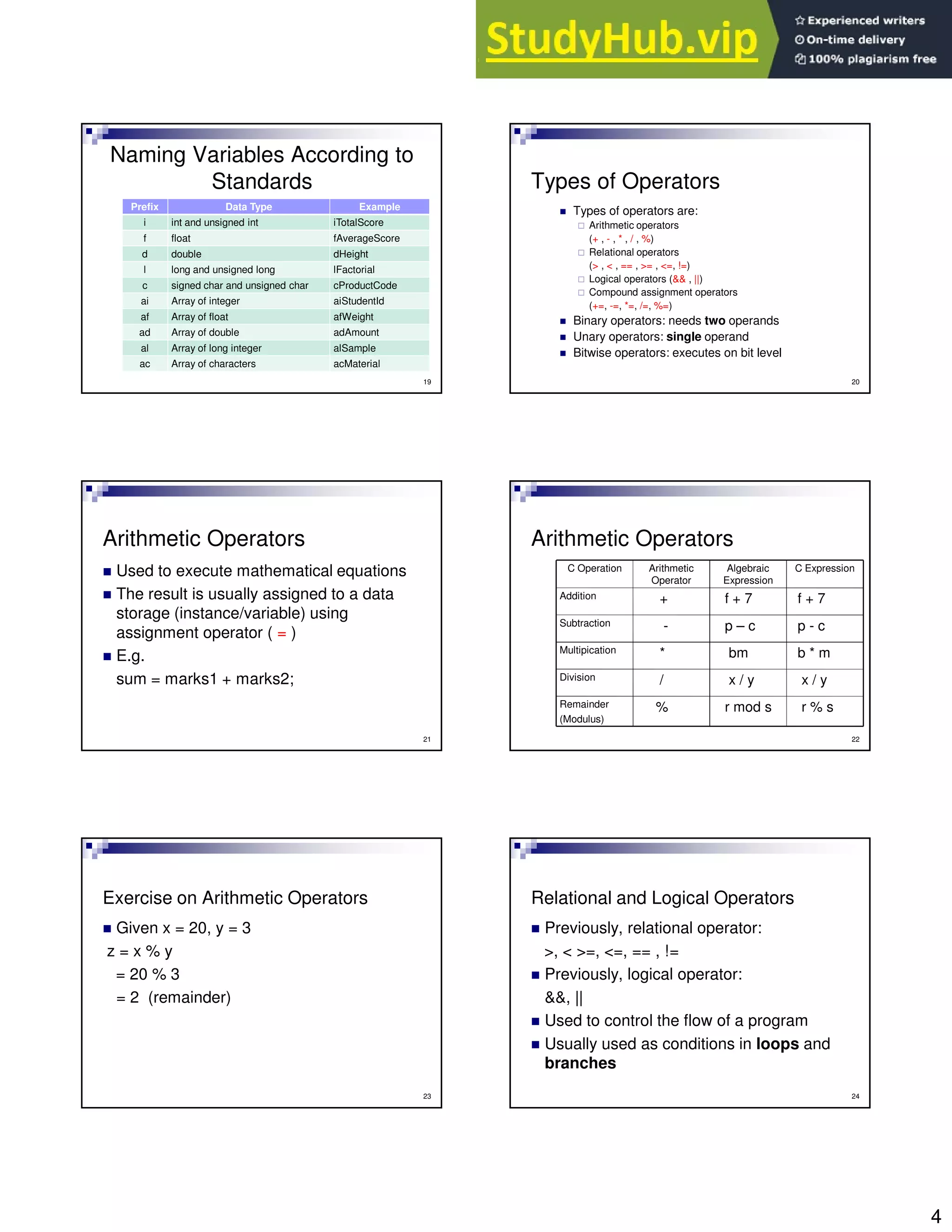
Naming Variables According to
Standards
Prefix Data Type Example
i int and unsigned int iTotalScore
f float fAverageScore
d double dHeight
l long and unsigned long lFactorial
c signed char and unsigned char cProductCode
ai Array of integer aiStudentId
af Array of float afWeight
ad Array of double adAmount
al Array of long integer alSample
ac Array of characters acMaterial
20
Types of Operators
Types of operators are:
Arithmetic operators
(+ , - , * , / , %)
Relational operators
(> , < , == , >= , <=, !=)
Logical operators (&& , ||)
Compound assignment operators
(+=, -=, *=, /=, %=)
Binary operators: needs two operands
Unary operators: single operand
Bitwise operators: executes on bit level
21
Arithmetic Operators
Used to execute mathematical equations
The result is usually assigned to a data
storage (instance/variable) using
assignment operator ( = )
E.g.
sum = marks1 + marks2;
22
Arithmetic Operators
r % s
r mod s
%
Remainder
(Modulus)
x / y
x / y
/
Division
b * m
bm
*
Multipication
p - c
p – c
-
Subtraction
f + 7
f + 7
+
Addition
C Expression
Algebraic
Expression
Arithmetic
Operator
C Operation
23
Exercise on Arithmetic Operators
Given x = 20, y = 3
z = x % y
= 20 % 3
= 2 (remainder)
24
Relational and Logical Operators
Previously, relational operator:
>, < >=, <=, == , !=
Previously, logical operator:
&&, ||
Used to control the flow of a program
Usually used as conditions in loops and
branches
5
25
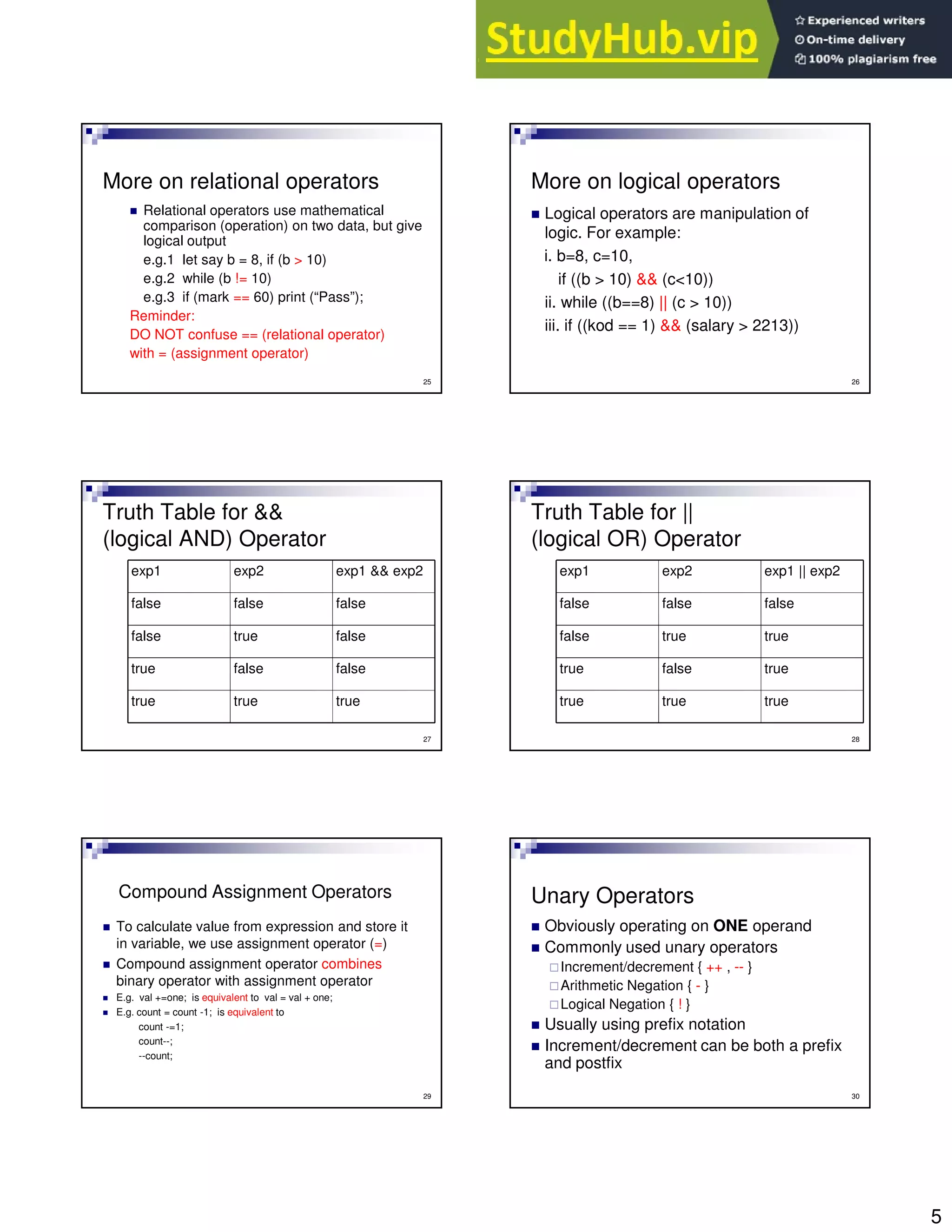
More on relational operators
Relational operators use mathematical
comparison (operation) on two data, but give
logical output
e.g.1 let say b = 8, if (b > 10)
e.g.2 while (b != 10)
e.g.3 if (mark == 60) print (“Pass”);
Reminder:
DO NOT confuse == (relational operator)
with = (assignment operator)
26
More on logical operators
Logical operators are manipulation of
logic. For example:
i. b=8, c=10,
if ((b > 10) && (c<10))
ii. while ((b==8) || (c > 10))
iii. if ((kod == 1) && (salary > 2213))
27
Truth Table for &&
(logical AND) Operator
true
true
true
false
false
true
false
true
false
false
false
false
exp1 && exp2
exp2
exp1
28
Truth Table for ||
(logical OR) Operator
true
true
true
true
false
true
true
true
false
false
false
false
exp1 || exp2
exp2
exp1
29
Compound Assignment Operators
To calculate value from expression and store it
in variable, we use assignment operator (=)
Compound assignment operator combines
binary operator with assignment operator
E.g. val +=one; is equivalent to val = val + one;
E.g. count = count -1; is equivalent to
count -=1;
count--;
--count;
30
Unary Operators
Obviously operating on ONE operand
Commonly used unary operators
Increment/decrement { ++ , -- }
Arithmetic Negation { - }
Logical Negation { ! }
Usually using prefix notation
Increment/decrement can be both a prefix
and postfix
6
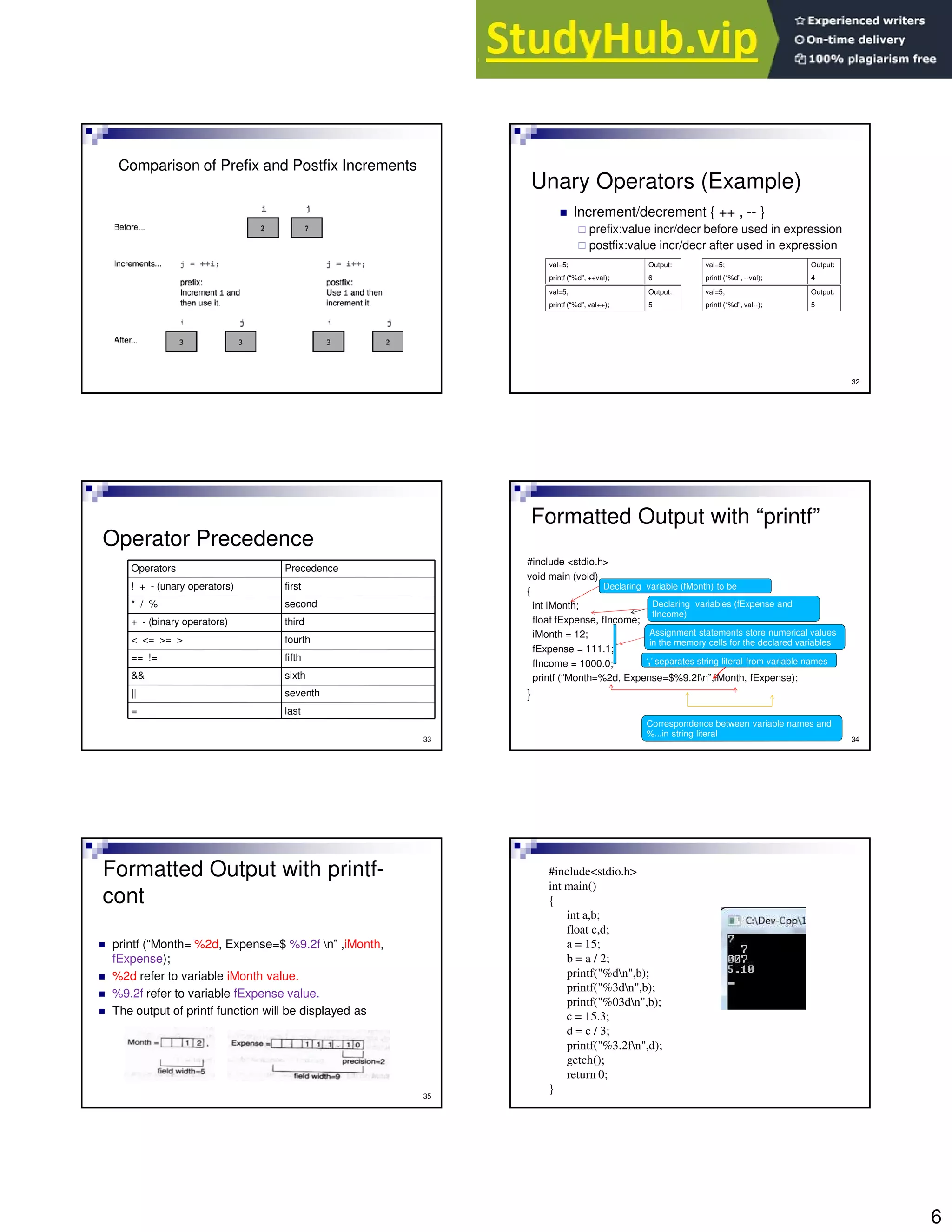
Comparison of Prefix and Postfix Increments
32
Unary Operators (Example)
Increment/decrement { ++ , -- }
prefix:value incr/decr before used in expression
postfix:value incr/decr after used in expression
val=5;
printf (“%d”, ++val);
Output:
6
val=5;
printf (“%d”, --val);
Output:
4
val=5;
printf (“%d”, val++);
Output:
5
val=5;
printf (“%d”, val--);
Output:
5
33
Operator Precedence
last
=
seventh
||
sixth
&&
fifth
== !=
fourth
< <= >= >
third
+ - (binary operators)
second
* / %
first
! + - (unary operators)
Precedence
Operators
Formatted Output with “printf”
#include <stdio.h>
void main (void)
{
int iMonth;
float fExpense, fIncome;
iMonth = 12;
fExpense = 111.1;
fIncome = 1000.0;
printf (“Month=%2d, Expense=$%9.2fn”,iMonth, fExpense);
}
34
Declaring variable (fMonth) to be
integer
Declaring variables (fExpense and
fIncome)
Assignment statements store numerical values
in the memory cells for the declared variables
Correspondence between variable names and
%...in string literal
‘,’ separates string literal from variable names
Formatted Output with printf-
cont
printf (“Month= %2d, Expense=$ %9.2f n” ,iMonth,
fExpense);
%2d refer to variable iMonth value.
%9.2f refer to variable fExpense value.
The output of printf function will be displayed as
35
#include<stdio.h>
int main()
{
int a,b;
float c,d;
a = 15;
b = a / 2;
printf("%dn",b);
printf("%3dn",b);
printf("%03dn",b);
c = 15.3;
d = c / 3;
printf("%3.2fn",d);
getch();
return 0;
}
7
37
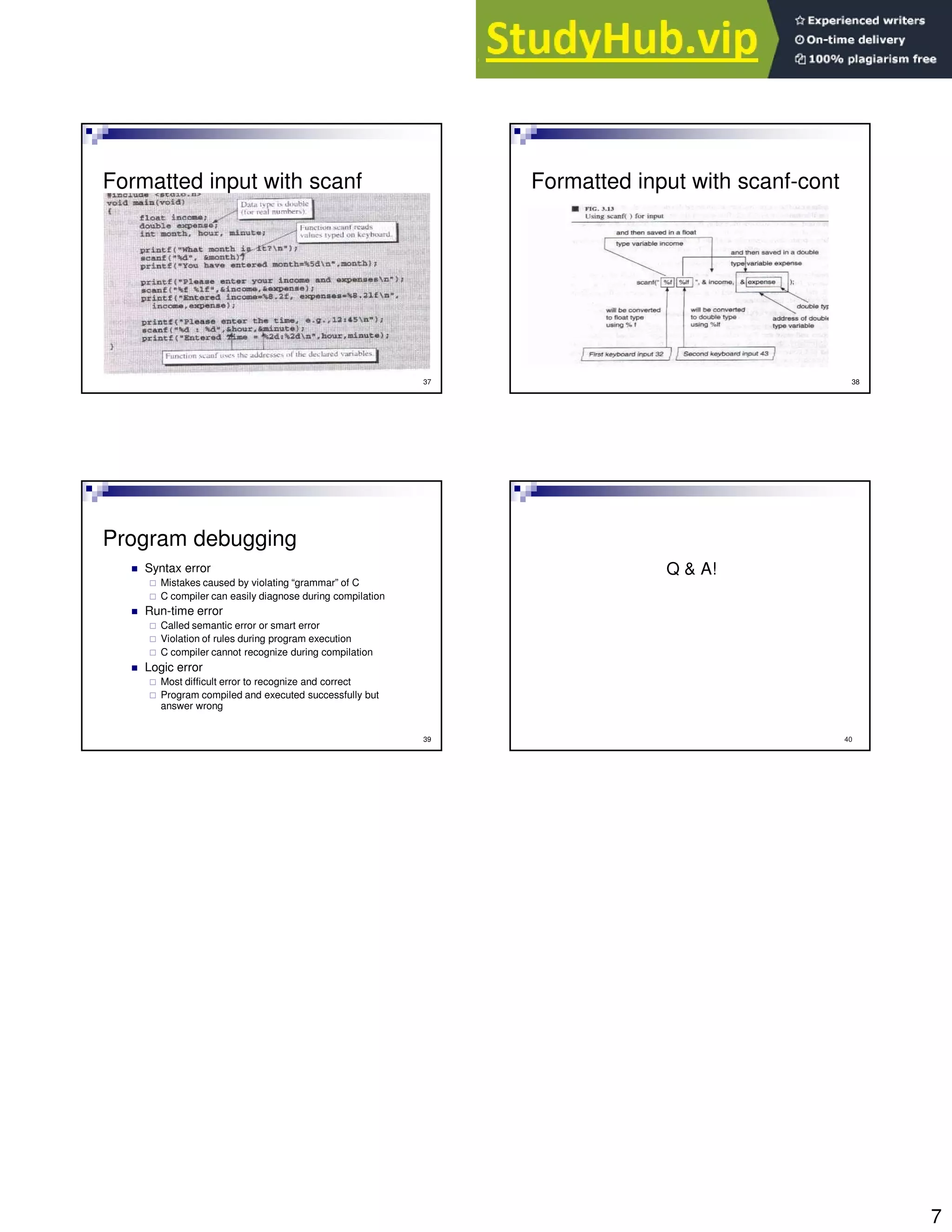
Formatted input with scanf
38
Formatted input with scanf-cont
39
Program debugging
Syntax error
Mistakes caused by violating “grammar” of C
C compiler can easily diagnose during compilation
Run-time error
Called semantic error or smart error
Violation of rules during program execution
C compiler cannot recognize during compilation
Logic error
Most difficult error to recognize and correct
Program compiled and executed successfully but
answer wrong
40
Q & A!

2 EPT 162 Lecture 2

  • 1.
    1 1 Lecture 02 Program Structure,Printing and Comment 2 Outline Pseudo code & flowchart Sample programming question Sample C program Identifiers and reserved words Program comments Pre-processor directives Data types and type declarations Operators Formatted input and output Program debugging 3 Sample Programming Question Write a program that calculates the sum of two integers. Your program should read the first number and the second number from user. Steps: Analyze the problem Use algorithm Convert to actual codes Recall..Pseudo code and Flowchart Try develop the pseudo code and flowchart for the problem given in the previous slide. 4 5 Pseudo code • Begin • Input A and B • Calculate A + B • Print result of SUM • End Flowchart Begin Input A,B Calculate A + B Print SUM End This is one of the possible programming sample. #include <stdio.h> int main(void) { int A, B, SUM; printf (“input first integer n”); scanf (“%d”, &A); printf (“input second integer n”); scanf (“%d”, &B); SUM = A + B; printf (“Sum is %dn”, SUM); return 0; }
  • 2.
    2 /* Programming example*/ #include<stdio.h> int main(void) { int A, B, SUM; printf (“input first integer n”); scanf (“%d”, &A); printf (“input second integer n”); scanf (“%d”, &B); SUM = A + B; printf (“Sum is %dn”, SUM); return 0; } Lets examine Preprocessor directives begin end Variables declaration body return 0 (int) to OS Comments Formatted output Formatted input 8 Program Comments Starts with /* and terminates with */ OR 9 Preprocessor Directives An instruction to pre-processor Standard library header: <stdio.h>,<math.h> E.g. #include <stdio.h> for std input/output #include <stdlib.h> Conversion number-text vise-versa, memory allocation, random numbers #include <string.h> string processing Program Comments Starts with /* and terminates with */ C Standard Header Files Standard Headers you should know about: stdio.h – file and console (also a file) IO: perror, printf, open, close, read, write, scanf, etc. stdlib.h - common utility functions: malloc, calloc, strtol, atoi, etc string.h - string and byte manipulation: strlen, strcpy, strcat, memcpy, memset, etc. ctype.h – character types: isalnum, isprint, isupport, tolower, etc. errno.h – defines errno used for reporting system errors math.h – math functions: ceil, exp, floor, sqrt, etc. signal.h – signal handling facility: raise, signal, etc stdint.h – standard integer: intN_t, uintN_t, etc time.h – time related facility: asctime, clock, time_t, etc. The Preprocessor The C preprocessor permits you to define simple macros that are evaluated and expanded prior to compilation. Commands begin with a ‘#’. Abbreviated list: #define : defines a macro #undef : removes a macro definition #include : insert text from file #if : conditional based on value of expression #ifdef : conditional based on whether macro defined #ifndef : conditional based on whether macro is not defined #else : alternative #elif : conditional alternative 12 Data Types Data types determine the following: Type of data stored Number of bytes it occupies in memory Range of data Operations that can be performed on the data Basic data types, derived data types, user-defined data types. Modifiers alter the meaning of the base type to more precisely fit a specific need C supports the following modifiers along with data types: short, long, signed, unsigned
  • 3.
    3 13 Data Types &Memory Allocation Type Bits Bytes Range Char or Signed Char 8 1 -128 to +127 Unsigned Char 8 1 0 to +255 Int or Signed int 32 4 -2,147,483,648 to +2,147,483,647 Unsigned int 32 4 0 to +4,294,967,295 Short int or Signed short int 16 2 -32,768 to + +32,767 Unsigned short int 16 2 0 to +65,535 Long int or signed long int 32 4 -2,147,483,648 to +2,147,483,647 Unsigned long int 32 4 0 to +4,294,967,295 Float 32 4 3.4 e-38 to 3.4 e+38 Double 64 8 1.7e-308 to 1.7e+308 Long Double 64 8 1.7e-308 to 1.7e+308 14 Data Types Declaration float fIncome; float fNet_income; double dBase, dHeight, dArea; int iIndex =0, iCount =0; char cCh=‘a’; const float fEpf = 0.1, fTax = 0.05; float income, net_income; Declare and initialize Named constant declared and initialized 15 Variables & Reserved Words Identifiers/Variables labels for program elements case sensitive can consist of capital letters[A..Z], small letters[a..z], digit[0..9], and underscore character _ First character MUST be a letter or an underscore No blanks Reserved words cannot be variables/identifiers Reserved words already assigned to a pre-defined meaning e.g.: delete, int, main, include, double, for, if, etc. 16 An identifier for the data in the program Hold the data in your program Is a location (or set of locations) in memory where a value can be stored A quantity that can change during program execution Variables & Reserved Words Constants A constant is a named or unnamed value, which does not change during the program execution. Example: const double dPi=3.141592; Const int iDegrees=360; Const char cQuit=‘q’; Unnamed constant are often called literals Eg: 3.141592 and 360 17 18 Variables Naming Conventions Start with an appropriate prefix that indicates the data type After the prefix, the name of variable should have ore or more words The first letter of each word should be in upper case The rest of the letter should be in lower case. The name of variable should clearly convey the purpose of the variable
  • 4.
    4 19 Naming Variables Accordingto Standards Prefix Data Type Example i int and unsigned int iTotalScore f float fAverageScore d double dHeight l long and unsigned long lFactorial c signed char and unsigned char cProductCode ai Array of integer aiStudentId af Array of float afWeight ad Array of double adAmount al Array of long integer alSample ac Array of characters acMaterial 20 Types of Operators Types of operators are: Arithmetic operators (+ , - , * , / , %) Relational operators (> , < , == , >= , <=, !=) Logical operators (&& , ||) Compound assignment operators (+=, -=, *=, /=, %=) Binary operators: needs two operands Unary operators: single operand Bitwise operators: executes on bit level 21 Arithmetic Operators Used to execute mathematical equations The result is usually assigned to a data storage (instance/variable) using assignment operator ( = ) E.g. sum = marks1 + marks2; 22 Arithmetic Operators r % s r mod s % Remainder (Modulus) x / y x / y / Division b * m bm * Multipication p - c p – c - Subtraction f + 7 f + 7 + Addition C Expression Algebraic Expression Arithmetic Operator C Operation 23 Exercise on Arithmetic Operators Given x = 20, y = 3 z = x % y = 20 % 3 = 2 (remainder) 24 Relational and Logical Operators Previously, relational operator: >, < >=, <=, == , != Previously, logical operator: &&, || Used to control the flow of a program Usually used as conditions in loops and branches
  • 5.
    5 25 More on relationaloperators Relational operators use mathematical comparison (operation) on two data, but give logical output e.g.1 let say b = 8, if (b > 10) e.g.2 while (b != 10) e.g.3 if (mark == 60) print (“Pass”); Reminder: DO NOT confuse == (relational operator) with = (assignment operator) 26 More on logical operators Logical operators are manipulation of logic. For example: i. b=8, c=10, if ((b > 10) && (c<10)) ii. while ((b==8) || (c > 10)) iii. if ((kod == 1) && (salary > 2213)) 27 Truth Table for && (logical AND) Operator true true true false false true false true false false false false exp1 && exp2 exp2 exp1 28 Truth Table for || (logical OR) Operator true true true true false true true true false false false false exp1 || exp2 exp2 exp1 29 Compound Assignment Operators To calculate value from expression and store it in variable, we use assignment operator (=) Compound assignment operator combines binary operator with assignment operator E.g. val +=one; is equivalent to val = val + one; E.g. count = count -1; is equivalent to count -=1; count--; --count; 30 Unary Operators Obviously operating on ONE operand Commonly used unary operators Increment/decrement { ++ , -- } Arithmetic Negation { - } Logical Negation { ! } Usually using prefix notation Increment/decrement can be both a prefix and postfix
  • 6.
    6 Comparison of Prefixand Postfix Increments 32 Unary Operators (Example) Increment/decrement { ++ , -- } prefix:value incr/decr before used in expression postfix:value incr/decr after used in expression val=5; printf (“%d”, ++val); Output: 6 val=5; printf (“%d”, --val); Output: 4 val=5; printf (“%d”, val++); Output: 5 val=5; printf (“%d”, val--); Output: 5 33 Operator Precedence last = seventh || sixth && fifth == != fourth < <= >= > third + - (binary operators) second * / % first ! + - (unary operators) Precedence Operators Formatted Output with “printf” #include <stdio.h> void main (void) { int iMonth; float fExpense, fIncome; iMonth = 12; fExpense = 111.1; fIncome = 1000.0; printf (“Month=%2d, Expense=$%9.2fn”,iMonth, fExpense); } 34 Declaring variable (fMonth) to be integer Declaring variables (fExpense and fIncome) Assignment statements store numerical values in the memory cells for the declared variables Correspondence between variable names and %...in string literal ‘,’ separates string literal from variable names Formatted Output with printf- cont printf (“Month= %2d, Expense=$ %9.2f n” ,iMonth, fExpense); %2d refer to variable iMonth value. %9.2f refer to variable fExpense value. The output of printf function will be displayed as 35 #include<stdio.h> int main() { int a,b; float c,d; a = 15; b = a / 2; printf("%dn",b); printf("%3dn",b); printf("%03dn",b); c = 15.3; d = c / 3; printf("%3.2fn",d); getch(); return 0; }
  • 7.
    7 37 Formatted input withscanf 38 Formatted input with scanf-cont 39 Program debugging Syntax error Mistakes caused by violating “grammar” of C C compiler can easily diagnose during compilation Run-time error Called semantic error or smart error Violation of rules during program execution C compiler cannot recognize during compilation Logic error Most difficult error to recognize and correct Program compiled and executed successfully but answer wrong 40 Q & A!