Basics of C
1
The C Language
 Currently, the most commonly-used language for
embedded systems
 “High-level assembly”
 Very portable: compilers exist for virtually every processor
 Easy-to-understand compilation
 Produces efficient code
 Fairly concise
2
C History
 Developed between 1969 and 1973 along with Unix
 Due mostly to Dennis Ritchie
 Designed for systems programming
 Operating systems
 Utility programs
 Compilers
3
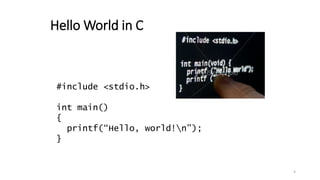
Hello World in C
#include <stdio.h>
int main()
{
printf(“Hello, world!n”);
}
4
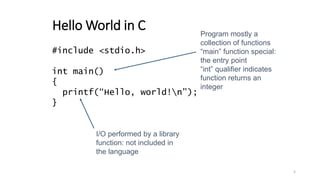
Hello World in C
#include <stdio.h>
int main()
{
printf(“Hello, world!n”);
}
Program mostly a
collection of functions
“main” function special:
the entry point
“int” qualifier indicates
function returns an
integer
I/O performed by a library
function: not included in
the language
5
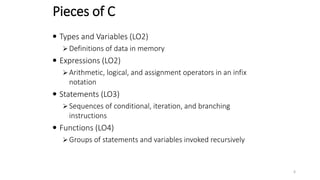
Pieces of C
 Types and Variables (LO2)
 Definitions of data in memory
 Expressions (LO2)
 Arithmetic, logical, and assignment operators in an infix
notation
 Statements (LO3)
 Sequences of conditional, iteration, and branching
instructions
 Functions (LO4)
 Groups of statements and variables invoked recursively
6
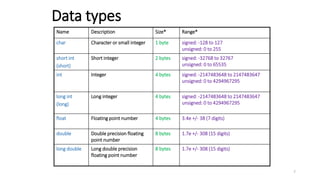
Name Description Size* Range*
char Character or small integer 1 byte signed: -128 to 127
unsigned: 0 to 255
short int
(short)
Short integer 2 bytes signed: -32768 to 32767
unsigned: 0 to 65535
int Integer 4 bytes signed: -2147483648 to 2147483647
unsigned: 0 to 4294967295
long int
(long)
Long integer 4 bytes signed: -2147483648 to 2147483647
unsigned: 0 to 4294967295
float Floating point number 4 bytes 3.4e +/- 38 (7 digits)
double Double precision floating
point number
8 bytes 1.7e +/- 308 (15 digits)
long double Long double precision
floating point number
8 bytes 1.7e +/- 308 (15 digits)
Data types
7
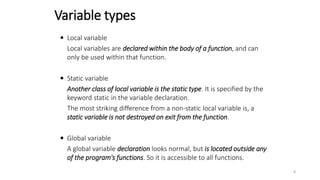
 Local variable
Local variables are declared within the body of a function, and can
only be used within that function.
 Static variable
Another class of local variable is the static type. It is specified by the
keyword static in the variable declaration.
The most striking difference from a non-static local variable is, a
static variable is not destroyed on exit from the function.
 Global variable
A global variable declaration looks normal, but is located outside any
of the program's functions. So it is accessible to all functions.
Variable types
8
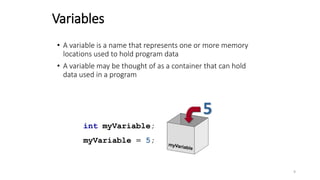
Variables
• A variable is a name that represents one or more memory
locations used to hold program data
• A variable may be thought of as a container that can hold
data used in a program
int myVariable;
myVariable = 5;
5
9
An example
int global = 10; //global variable
int func (int x)
{
static int stat_var; //static local variable
int temp; //(normal) local variable
int name[50]; //(normal) local variable
……
}
10
41
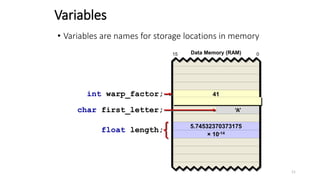
Variables
5.74532370373175
× 10-14
0
15 Data Memory (RAM)
int warp_factor;
float length;
char first_letter; ‘A’
• Variables are names for storage locations in memory
11
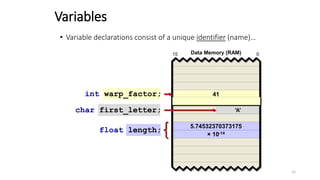
char first_letter;
int warp_factor;
• Variable declarations consist of a unique identifier (name)…
float length;
41
Variables
5.74532370373175
× 10-14
0
15 Data Memory (RAM)
‘A’
12
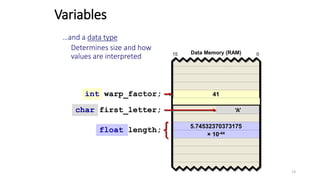
char first_letter;
float length;
int warp_factor; 41
Variables
5.74532370373175
× 10-44
0
15 Data Memory (RAM)
‘A’
…and a data type
Determines size and how
values are interpreted
13
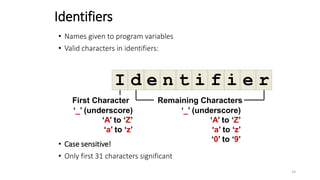
Identifiers
• Names given to program variables
• Valid characters in identifiers:
• Case sensitive!
• Only first 31 characters significant
I d e n t i f i e r
First Character
‘_’ (underscore)
‘A’ to ‘Z’
‘a’ to ‘z’
Remaining Characters
‘_’ (underscore)
‘A’ to ‘Z’
‘a’ to ‘z’
‘0’ to ‘9’
14
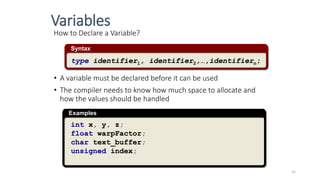
How to Declare a Variable?
• A variable must be declared before it can be used
• The compiler needs to know how much space to allocate and
how the values should be handled
Syntax
type identifier1, identifier2,…,identifiern;
Examples
int x, y, z;
float warpFactor;
char text_buffer;
unsigned index;
Variables
15
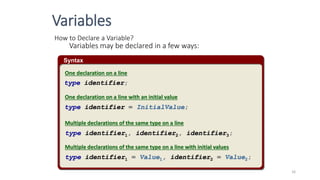
Syntax
How to Declare a Variable?
Variables may be declared in a few ways:
type identifier;
type identifier = InitialValue;
type identifier1, identifier2, identifier3;
type identifier1 = Value1, identifier2 = Value2;
One declaration on a line
One declaration on a line with an initial value
Multiple declarations of the same type on a line
Multiple declarations of the same type on a line with initial values
Variables
16
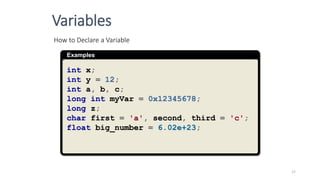
Examples
How to Declare a Variable
int x;
int y = 12;
int a, b, c;
long int myVar = 0x12345678;
long z;
char first = 'a', second, third = 'c';
float big_number = 6.02e+23;
Variables
17
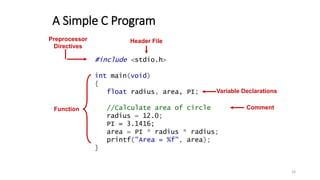
A Simple C Program
#include <stdio.h>
int main(void)
{
float radius, area, PI;
//Calculate area of circle
radius = 12.0;
PI = 3.1416;
area = PI * radius * radius;
printf("Area = %f", area);
}
Header File
Function
Variable Declarations
Comment
Preprocessor
Directives
18
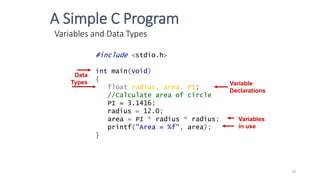
Variables and Data Types
Variable
Declarations
Data
Types
Variables
in use
#include <stdio.h>
int main(void)
{
float radius, area, PI;
//Calculate area of circle
PI = 3.1416;
radius = 12.0;
area = PI * radius * radius;
printf("Area = %f", area);
}
A Simple C Program
19
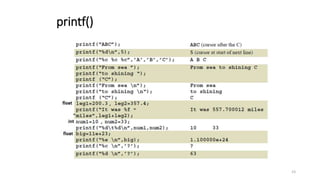
printf()
The printf() function can be instructed to print
integers, floats and string properly.
 The general syntax is
printf( “format”, variables);
 An example
int stud_id = 5200;
char name[20] = “Mike”; // array discussed in LO4
printf(“%s ‘s ID is %d n”, name, stud_id);
20
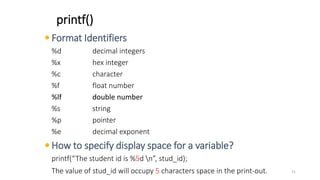
 Format Identifiers
%d decimal integers
%x hex integer
%c character
%f float number
%lf double number
%s string
%p pointer
%e decimal exponent
 How to specify display space for a variable?
printf(“The student id is %5d n”, stud_id);
The value of stud_id will occupy 5 characters space in the print-out.
printf()
21
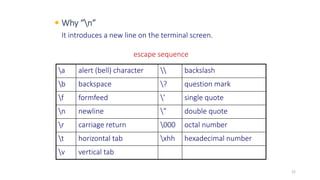
 Why “n”
It introduces a new line on the terminal screen.
a alert (bell) character  backslash
b backspace ? question mark
f formfeed ’ single quote
n newline ” double quote
r carriage return 000 octal number
t horizontal tab xhh hexadecimal number
v vertical tab
escape sequence
22
printf()
23
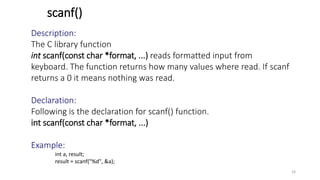
scanf()
Description:
The C library function
int scanf(const char *format, ...) reads formatted input from
keyboard. The function returns how many values where read. If scanf
returns a 0 it means nothing was read.
Declaration:
Following is the declaration for scanf() function.
int scanf(const char *format, ...)
Example:
int a, result;
result = scanf("%d", &a);
24
Example: The following example shows the usage of scanf() function to read strings.
Note: in scanf, we do not use & with array names
#include <stdio.h>
int main()
{
char str1[20], str2[30];
printf("Enter name: ");
scanf("%s", str1);
printf("Enter your website name: ");
scanf("%s", str2);
printf("Entered Name: %sn", str1);
printf("Entered Website:%s", str2);
}
scanf()
Enter name: admin
Enter your website name: www.tutorialspoint.com
Entered Name: admin
Entered Website: www.tutorialspoint.com
25
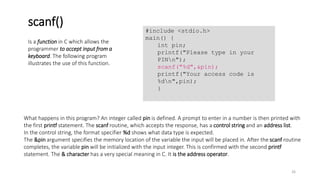
What happens in this program? An integer called pin is defined. A prompt to enter in a number is then printed with
the first printf statement. The scanf routine, which accepts the response, has a control string and an address list.
In the control string, the format specifier %d shows what data type is expected.
The &pin argument specifies the memory location of the variable the input will be placed in. After the scanf routine
completes, the variable pin will be initialized with the input integer. This is confirmed with the second printf
statement. The & character has a very special meaning in C. It is the address operator.
Is a function in C which allows the
programmer to accept input from a
keyboard. The following program
illustrates the use of this function.
scanf()
#include <stdio.h>
main() {
int pin;
printf("Please type in your
PINn");
scanf("%d",&pin);
printf("Your access code is
%dn",pin);
}
26
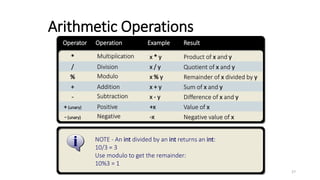
Negative
-(unary)
Subtraction
-
Positive
+(unary)
Modulo
%
Addition
+
NOTE - An int divided by an int returns an int:
10/3 = 3
Use modulo to get the remainder:
10%3 = 1
Multiplication
*
Division
/
Operator Result
Operation Example
-x
x - y
+x
x % y
x + y
x * y
x / y
Negative value of x
Difference of x and y
Value of x
Remainder of x divided by y
Sum of x and y
Product of x and y
Quotient of x and y
Arithmetic Operations
27
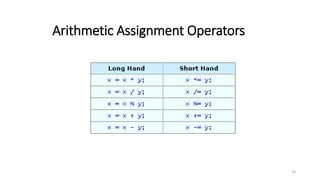
Arithmetic Assignment Operators
28
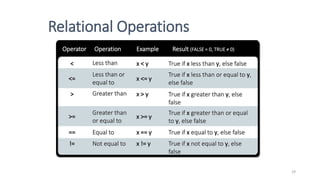
Operator Result (FALSE = 0, TRUE ≠ 0)
Operation Example
Equal to
==
Not equal to
!=
Greater than
>
Greater than
or equal to
>=
Less than
<
Less than or
equal to
<=
x == y
x != y
x > y
x >= y
x < y
x <= y
True if x equal to y, else false
True if x not equal to y, else
false
True if x greater than y, else
false
True if x greater than or equal
to y, else false
True if x less than y, else false
True if x less than or equal to y,
else false
Relational Operations
29
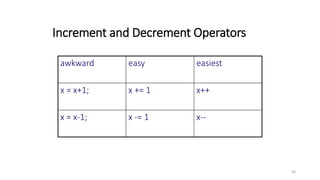
Increment and Decrement Operators
awkward easy easiest
x = x+1; x += 1 x++
x = x-1; x -= 1 x--
30
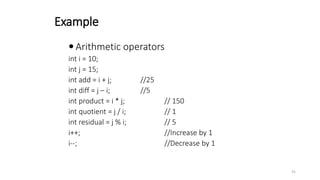
Example
 Arithmetic operators
int i = 10;
int j = 15;
int add = i + j; //25
int diff = j – i; //5
int product = i * j; // 150
int quotient = j / i; // 1
int residual = j % i; // 5
i++; //Increase by 1
i--; //Decrease by 1
31
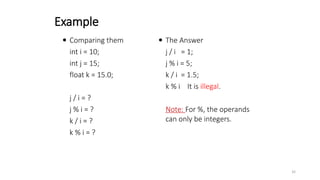
 Comparing them
int i = 10;
int j = 15;
float k = 15.0;
j / i = ?
j % i = ?
k / i = ?
k % i = ?
 The Answer
j / i = 1;
j % i = 5;
k / i = 1.5;
k % i It is illegal.
Note: For %, the operands
can only be integers.
Example
32
Logical Operations
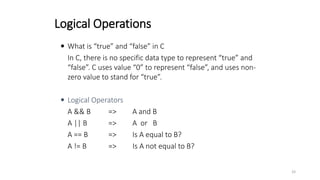
 What is “true” and “false” in C
In C, there is no specific data type to represent “true” and
“false”. C uses value “0” to represent “false”, and uses non-
zero value to stand for “true”.
 Logical Operators
A && B => A and B
A || B => A or B
A == B => Is A equal to B?
A != B => Is A not equal to B?
33
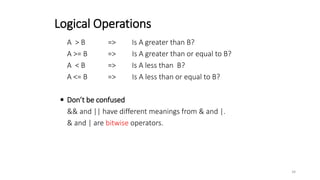
A > B => Is A greater than B?
A >= B => Is A greater than or equal to B?
A < B => Is A less than B?
A <= B => Is A less than or equal to B?
 Don’t be confused
&& and || have different meanings from & and |.
& and | are bitwise operators.
Logical Operations
34
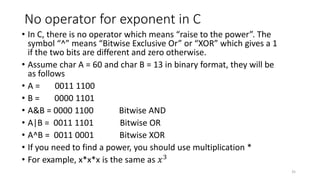
No operator for exponent in C
• In C, there is no operator which means “raise to the power”. The
symbol “^” means “Bitwise Exclusive Or” or “XOR” which gives a 1
if the two bits are different and zero otherwise.
• Assume char A = 60 and char B = 13 in binary format, they will be
as follows
• A = 0011 1100
• B = 0000 1101
• A&B = 0000 1100 Bitwise AND
• A|B = 0011 1101 Bitwise OR
• A^B = 0011 0001 Bitwise XOR
• If you need to find a power, you should use multiplication *
• For example, x*x*x is the same as 𝑥3
35
Precedence and Associativity of C Operators
Symbol Type of Operation Associativity
[ ] ( ) . –> postfix ++ and postfix –– Expression Left to right
prefix ++ and prefix –– sizeof
& * + – ~ !
Unary Right to left
typecasts Unary Right to left
* / % Multiplicative Left to right
+ – Additive Left to right
<< >> Bitwise shift Left to right
< > <= >= Relational Left to right
== != Equality Left to right
& Bitwise-AND Left to right
^ Bitwise-exclusive-OR Left to right
| Bitwise-inclusive-OR Left to right
&& Logical-AND Left to right
|| Logical-OR Left to right
? : Conditional-expression Right to left
= *= /= %=
+= –= <<= >>= &=
^= |=
Simple and compound
assignment
Right to left
, Sequential evaluation Left to right
OPERATOR PRECEDENCE
36
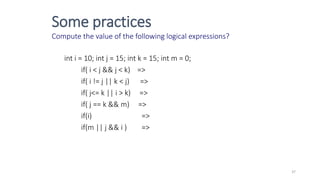
Some practices
Compute the value of the following logical expressions?
int i = 10; int j = 15; int k = 15; int m = 0;
if( i < j && j < k) =>
if( i != j || k < j) =>
if( j<= k || i > k) =>
if( j == k && m) =>
if(i) =>
if(m || j && i ) =>
37
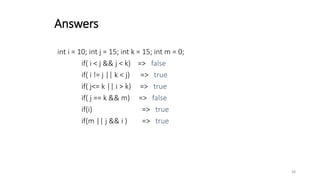
int i = 10; int j = 15; int k = 15; int m = 0;
if( i < j && j < k) => false
if( i != j || k < j) => true
if( j<= k || i > k) => true
if( j == k && m) => false
if(i) => true
if(m || j && i ) => true
Answers
38

presentation_c_basics_1589366177_381682.pptx

  • 1.
  • 2.
    The C Language Currently, the most commonly-used language for embedded systems  “High-level assembly”  Very portable: compilers exist for virtually every processor  Easy-to-understand compilation  Produces efficient code  Fairly concise 2
  • 3.
    C History  Developedbetween 1969 and 1973 along with Unix  Due mostly to Dennis Ritchie  Designed for systems programming  Operating systems  Utility programs  Compilers 3
  • 4.
    Hello World inC #include <stdio.h> int main() { printf(“Hello, world!n”); } 4
  • 5.
    Hello World inC #include <stdio.h> int main() { printf(“Hello, world!n”); } Program mostly a collection of functions “main” function special: the entry point “int” qualifier indicates function returns an integer I/O performed by a library function: not included in the language 5
  • 6.
    Pieces of C Types and Variables (LO2)  Definitions of data in memory  Expressions (LO2)  Arithmetic, logical, and assignment operators in an infix notation  Statements (LO3)  Sequences of conditional, iteration, and branching instructions  Functions (LO4)  Groups of statements and variables invoked recursively 6
  • 7.
    Name Description Size*Range* char Character or small integer 1 byte signed: -128 to 127 unsigned: 0 to 255 short int (short) Short integer 2 bytes signed: -32768 to 32767 unsigned: 0 to 65535 int Integer 4 bytes signed: -2147483648 to 2147483647 unsigned: 0 to 4294967295 long int (long) Long integer 4 bytes signed: -2147483648 to 2147483647 unsigned: 0 to 4294967295 float Floating point number 4 bytes 3.4e +/- 38 (7 digits) double Double precision floating point number 8 bytes 1.7e +/- 308 (15 digits) long double Long double precision floating point number 8 bytes 1.7e +/- 308 (15 digits) Data types 7
  • 8.
     Local variable Localvariables are declared within the body of a function, and can only be used within that function.  Static variable Another class of local variable is the static type. It is specified by the keyword static in the variable declaration. The most striking difference from a non-static local variable is, a static variable is not destroyed on exit from the function.  Global variable A global variable declaration looks normal, but is located outside any of the program's functions. So it is accessible to all functions. Variable types 8
  • 9.
    Variables • A variableis a name that represents one or more memory locations used to hold program data • A variable may be thought of as a container that can hold data used in a program int myVariable; myVariable = 5; 5 9
  • 10.
    An example int global= 10; //global variable int func (int x) { static int stat_var; //static local variable int temp; //(normal) local variable int name[50]; //(normal) local variable …… } 10
  • 11.
    41 Variables 5.74532370373175 × 10⁻¹⁴ 0 15 DataMemory (RAM) int warp_factor; float length; char first_letter; ‘A’ • Variables are names for storage locations in memory 11
  • 12.
    char first_letter; int warp_factor; •Variable declarations consist of a unique identifier (name)… float length; 41 Variables 5.74532370373175 × 10⁻¹⁴ 0 15 Data Memory (RAM) ‘A’ 12
  • 13.
    char first_letter; float length; intwarp_factor; 41 Variables 5.74532370373175 × 10-44 0 15 Data Memory (RAM) ‘A’ …and a data type Determines size and how values are interpreted 13
  • 14.
    Identifiers • Names givento program variables • Valid characters in identifiers: • Case sensitive! • Only first 31 characters significant I d e n t i f i e r First Character ‘_’ (underscore) ‘A’ to ‘Z’ ‘a’ to ‘z’ Remaining Characters ‘_’ (underscore) ‘A’ to ‘Z’ ‘a’ to ‘z’ ‘0’ to ‘9’ 14
  • 15.
    How to Declarea Variable? • A variable must be declared before it can be used • The compiler needs to know how much space to allocate and how the values should be handled Syntax type identifier1, identifier2,…,identifiern; Examples int x, y, z; float warpFactor; char text_buffer; unsigned index; Variables 15
  • 16.
    Syntax How to Declarea Variable? Variables may be declared in a few ways: type identifier; type identifier = InitialValue; type identifier1, identifier2, identifier3; type identifier1 = Value1, identifier2 = Value2; One declaration on a line One declaration on a line with an initial value Multiple declarations of the same type on a line Multiple declarations of the same type on a line with initial values Variables 16
  • 17.
    Examples How to Declarea Variable int x; int y = 12; int a, b, c; long int myVar = 0x12345678; long z; char first = 'a', second, third = 'c'; float big_number = 6.02e+23; Variables 17
  • 18.
    A Simple CProgram #include <stdio.h> int main(void) { float radius, area, PI; //Calculate area of circle radius = 12.0; PI = 3.1416; area = PI * radius * radius; printf("Area = %f", area); } Header File Function Variable Declarations Comment Preprocessor Directives 18
  • 19.
    Variables and DataTypes Variable Declarations Data Types Variables in use #include <stdio.h> int main(void) { float radius, area, PI; //Calculate area of circle PI = 3.1416; radius = 12.0; area = PI * radius * radius; printf("Area = %f", area); } A Simple C Program 19
  • 20.
    printf() The printf() functioncan be instructed to print integers, floats and string properly.  The general syntax is printf( “format”, variables);  An example int stud_id = 5200; char name[20] = “Mike”; // array discussed in LO4 printf(“%s ‘s ID is %d n”, name, stud_id); 20
  • 21.
     Format Identifiers %ddecimal integers %x hex integer %c character %f float number %lf double number %s string %p pointer %e decimal exponent  How to specify display space for a variable? printf(“The student id is %5d n”, stud_id); The value of stud_id will occupy 5 characters space in the print-out. printf() 21
  • 22.
     Why “n” Itintroduces a new line on the terminal screen. a alert (bell) character backslash b backspace ? question mark f formfeed ’ single quote n newline ” double quote r carriage return 000 octal number t horizontal tab xhh hexadecimal number v vertical tab escape sequence 22
  • 23.
  • 24.
    scanf() Description: The C libraryfunction int scanf(const char *format, ...) reads formatted input from keyboard. The function returns how many values where read. If scanf returns a 0 it means nothing was read. Declaration: Following is the declaration for scanf() function. int scanf(const char *format, ...) Example: int a, result; result = scanf("%d", &a); 24
  • 25.
    Example: The followingexample shows the usage of scanf() function to read strings. Note: in scanf, we do not use & with array names #include <stdio.h> int main() { char str1[20], str2[30]; printf("Enter name: "); scanf("%s", str1); printf("Enter your website name: "); scanf("%s", str2); printf("Entered Name: %sn", str1); printf("Entered Website:%s", str2); } scanf() Enter name: admin Enter your website name: www.tutorialspoint.com Entered Name: admin Entered Website: www.tutorialspoint.com 25
  • 26.
    What happens inthis program? An integer called pin is defined. A prompt to enter in a number is then printed with the first printf statement. The scanf routine, which accepts the response, has a control string and an address list. In the control string, the format specifier %d shows what data type is expected. The &pin argument specifies the memory location of the variable the input will be placed in. After the scanf routine completes, the variable pin will be initialized with the input integer. This is confirmed with the second printf statement. The & character has a very special meaning in C. It is the address operator. Is a function in C which allows the programmer to accept input from a keyboard. The following program illustrates the use of this function. scanf() #include <stdio.h> main() { int pin; printf("Please type in your PINn"); scanf("%d",&pin); printf("Your access code is %dn",pin); } 26
  • 27.
    Negative -(unary) Subtraction - Positive +(unary) Modulo % Addition + NOTE - Anint divided by an int returns an int: 10/3 = 3 Use modulo to get the remainder: 10%3 = 1 Multiplication * Division / Operator Result Operation Example -x x - y +x x % y x + y x * y x / y Negative value of x Difference of x and y Value of x Remainder of x divided by y Sum of x and y Product of x and y Quotient of x and y Arithmetic Operations 27
  • 28.
  • 29.
    Operator Result (FALSE= 0, TRUE ≠ 0) Operation Example Equal to == Not equal to != Greater than > Greater than or equal to >= Less than < Less than or equal to <= x == y x != y x > y x >= y x < y x <= y True if x equal to y, else false True if x not equal to y, else false True if x greater than y, else false True if x greater than or equal to y, else false True if x less than y, else false True if x less than or equal to y, else false Relational Operations 29
  • 30.
    Increment and DecrementOperators awkward easy easiest x = x+1; x += 1 x++ x = x-1; x -= 1 x-- 30
  • 31.
    Example  Arithmetic operators inti = 10; int j = 15; int add = i + j; //25 int diff = j – i; //5 int product = i * j; // 150 int quotient = j / i; // 1 int residual = j % i; // 5 i++; //Increase by 1 i--; //Decrease by 1 31
  • 32.
     Comparing them inti = 10; int j = 15; float k = 15.0; j / i = ? j % i = ? k / i = ? k % i = ?  The Answer j / i = 1; j % i = 5; k / i = 1.5; k % i It is illegal. Note: For %, the operands can only be integers. Example 32
  • 33.
    Logical Operations  Whatis “true” and “false” in C In C, there is no specific data type to represent “true” and “false”. C uses value “0” to represent “false”, and uses non- zero value to stand for “true”.  Logical Operators A && B => A and B A || B => A or B A == B => Is A equal to B? A != B => Is A not equal to B? 33
  • 34.
    A > B=> Is A greater than B? A >= B => Is A greater than or equal to B? A < B => Is A less than B? A <= B => Is A less than or equal to B?  Don’t be confused && and || have different meanings from & and |. & and | are bitwise operators. Logical Operations 34
  • 35.
    No operator forexponent in C • In C, there is no operator which means “raise to the power”. The symbol “^” means “Bitwise Exclusive Or” or “XOR” which gives a 1 if the two bits are different and zero otherwise. • Assume char A = 60 and char B = 13 in binary format, they will be as follows • A = 0011 1100 • B = 0000 1101 • A&B = 0000 1100 Bitwise AND • A|B = 0011 1101 Bitwise OR • A^B = 0011 0001 Bitwise XOR • If you need to find a power, you should use multiplication * • For example, x*x*x is the same as 𝑥3 35
  • 36.
    Precedence and Associativityof C Operators Symbol Type of Operation Associativity [ ] ( ) . –> postfix ++ and postfix –– Expression Left to right prefix ++ and prefix –– sizeof & * + – ~ ! Unary Right to left typecasts Unary Right to left * / % Multiplicative Left to right + – Additive Left to right << >> Bitwise shift Left to right < > <= >= Relational Left to right == != Equality Left to right & Bitwise-AND Left to right ^ Bitwise-exclusive-OR Left to right | Bitwise-inclusive-OR Left to right && Logical-AND Left to right || Logical-OR Left to right ? : Conditional-expression Right to left = *= /= %= += –= <<= >>= &= ^= |= Simple and compound assignment Right to left , Sequential evaluation Left to right OPERATOR PRECEDENCE 36
  • 37.
    Some practices Compute thevalue of the following logical expressions? int i = 10; int j = 15; int k = 15; int m = 0; if( i < j && j < k) => if( i != j || k < j) => if( j<= k || i > k) => if( j == k && m) => if(i) => if(m || j && i ) => 37
  • 38.
    int i =10; int j = 15; int k = 15; int m = 0; if( i < j && j < k) => false if( i != j || k < j) => true if( j<= k || i > k) => true if( j == k && m) => false if(i) => true if(m || j && i ) => true Answers 38