CHAPTER II:
COMPUTER COMPONENTS &
PERIPHERALS
JOHN PAUL R. RAMONES
INSTRUCTOR I
TOPICS
 Inside the case
 Motherboard
 Processors
 Memory
 Adapters and buses
 Power Supplies and batteries
 Input Devices
 Output Devices
LEARNING OUTCOMES
INSIDETHE CASE
The System Case encloses most of the key components of the personal computer,
including the motherboard, power supply, and expansion cards.The motherboard
holds the microprocessor, memory, ROM and most of its electronic components.
MOTHERBOARD
 Motherboard
– is a circuit board that contains the electrical circuitry for
the computer.
– it holds all the components, slots and chips in our
system unit.
 Northbridge Chip – handles communication amongCPU chip, RAM, expansion cards and southbridge.
 South Bridge Chip – handles communication among I/O devices such as USB, audio, BIOS, OpticalDD,
storage, etc.
 BIOS (System input output System) – is a software that runs when computer is started and configures the
hardware and boot options
MOTHERBOARD (CONT.)
Back panel Ports- are built-in ports located at the back of the system unit.
•PS2 mouse/keyboard ports
•Parallel Port
•Serial Port
•VGA Port
•HDMI Port
•USB Universal Serial BusType A Port
•Ethernet Port
•Audio ports
•Microphone port
•Speaker port
•Line-in port
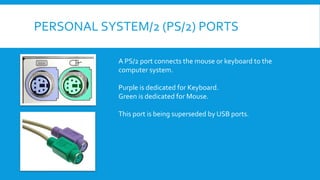
PERSONAL SYSTEM/2 (PS/2) PORTS
A PS/2 port connects the mouse or keyboard to the
computer system.
Purple is dedicated for Keyboard.
Green is dedicated for Mouse.
This port is being superseded by USB ports.
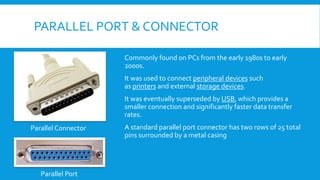
PARALLEL PORT & CONNECTOR
Commonly found on PCs from the early 1980s to early
2000s.
It was used to connect peripheral devices such
as printers and external storage devices.
It was eventually superseded by USB, which provides a
smaller connection and significantly faster data transfer
rates.
A standard parallel port connector has two rows of 25 total
pins surrounded by a metal casing
Parallel Connector
Parallel Port
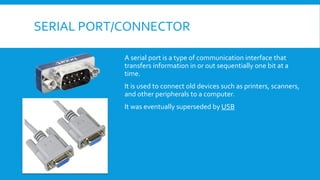
SERIAL PORT/CONNECTOR
A serial port is a type of communication interface that
transfers information in or out sequentially one bit at a
time.
It is used to connect old devices such as printers, scanners,
and other peripherals to a computer.
It was eventually superseded by USB
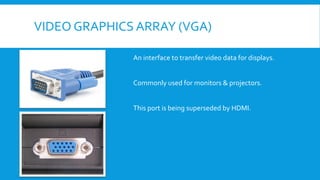
VIDEO GRAPHICS ARRAY (VGA)
An interface to transfer video data for displays.
Commonly used for monitors & projectors.
This port is being superseded by HDMI.
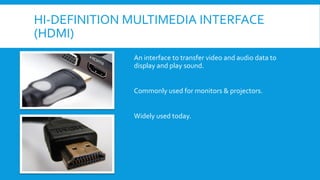
HI-DEFINITION MULTIMEDIA INTERFACE
(HDMI)
An interface to transfer video and audio data to
display and play sound.
Commonly used for monitors & projectors.
Widely used today.
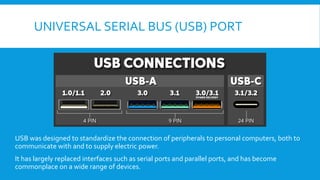
UNIVERSAL SERIAL BUS (USB) PORT
USB was designed to standardize the connection of peripherals to personal computers, both to
communicate with and to supply electric power.
It has largely replaced interfaces such as serial ports and parallel ports, and has become
commonplace on a wide range of devices.
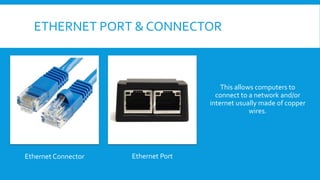
ETHERNET PORT & CONNECTOR
Ethernet Connector Ethernet Port
This allows computers to
connect to a network and/or
internet usually made of copper
wires.
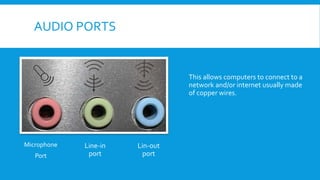
AUDIO PORTS
Microphone
Port
This allows computers to connect to a
network and/or internet usually made
of copper wires.
Line-in
port
Lin-out
port
MOTHERBOARD (CONT.)
 SERIAL ADVANCED Technology Attachment (SATA)
 Integrated Drive Electronics (IDE)
 Random Access Memory (RAM)
 Peripheral Component Interconnect (PCI)
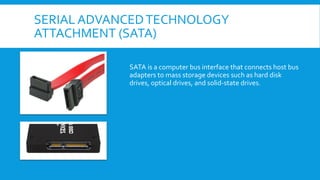
SERIAL ADVANCEDTECHNOLOGY
ATTACHMENT (SATA)
SATA is a computer bus interface that connects host bus
adapters to mass storage devices such as hard disk
drives, optical drives, and solid-state drives.
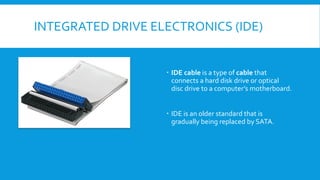
INTEGRATED DRIVE ELECTRONICS (IDE)
 IDE cable is a type of cable that
connects a hard disk drive or optical
disc drive to a computer’s motherboard.
 IDE is an older standard that is
gradually being replaced by SATA.
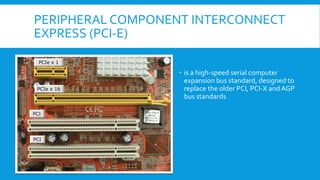
PERIPHERAL COMPONENT INTERCONNECT
EXPRESS (PCI-E)
 is a high-speed serial computer
expansion bus standard, designed to
replace the older PCI, PCI-X andAGP
bus standards
MAIN MEMORY
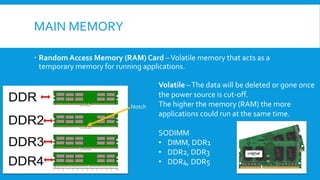
 Random Access Memory (RAM) Card –Volatile memory that acts as a
temporary memory for running applications.
Volatile –The data will be deleted or gone once
the power source is cut-off.
The higher the memory (RAM) the more
applications could run at the same time.
SODIMM
• DIMM, DDR1
• DDR2, DDR3
• DDR4, DDR5
Notch
MAIN MEMORY (CONT.)
RAM frequency is measured in MHz and usually immediately
follows the DDR version.
For example, 8GB DDR4-2400 RAM is running at a frequency of
2400MHz.
Frequencies of RAM typically range from 800MHz in older DDR2
modules up to 6800MHz in DDR5.
PROCESSORS
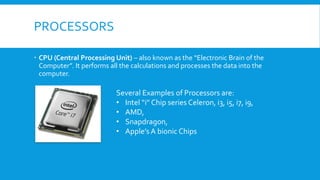
 CPU (Central Processing Unit) – also known as the “Electronic Brain of the
Computer”. It performs all the calculations and processes the data into the
computer.
Several Examples of Processors are:
• Intel “i” Chip series Celeron, i3, i5, i7, i9,
• AMD,
• Snapdragon,
• Apple’s A bionic Chips
PROCESSORS (CONT.)
PROCESSORS (CONT.)
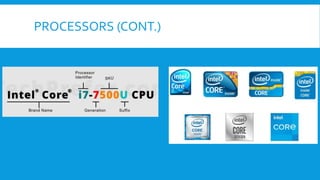
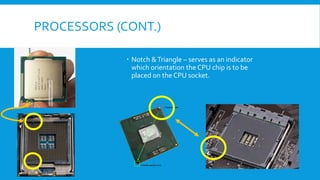
 Notch &Triangle – serves as an indicator
which orientation the CPU chip is to be
placed on the CPU socket.
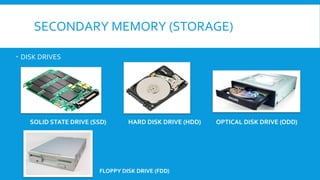
SECONDARY MEMORY (STORAGE)
 DISK DRIVES
SOLID STATE DRIVE (SSD) HARD DISK DRIVE (HDD) OPTICAL DISK DRIVE (ODD)
FLOPPY DISK DRIVE (FDD)
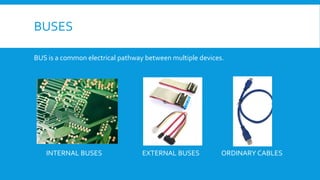
BUSES
BUS is a common electrical pathway between multiple devices.
INTERNAL BUSES EXTERNAL BUSES ORDINARY CABLES
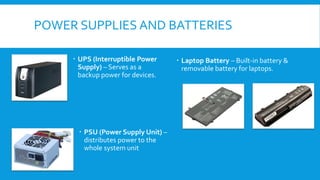
POWER SUPPLIES AND BATTERIES
 UPS (Interruptible Power
Supply) – Serves as a
backup power for devices.
 Laptop Battery – Built-in battery &
removable battery for laptops.
 PSU (Power Supply Unit) –
distributes power to the
whole system unit
INPUT DEVICES
Input Devices are used for entering data into a computer. It is any hardware
component that allows you to enter data and instructions into a computer or
mobile device.
Examples: Keyboard, Pointing Devices, Microphone, Scanners,
Headset,Webcam
INPUT DEVICES (CONT.)
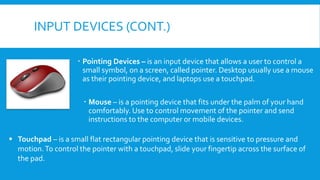
 Pointing Devices – is an input device that allows a user to control a
small symbol, on a screen, called pointer. Desktop usually use a mouse
as their pointing device, and laptops use a touchpad.
 Mouse – is a pointing device that fits under the palm of your hand
comfortably. Use to control movement of the pointer and send
instructions to the computer or mobile devices.
▪ Touchpad – is a small flat rectangular pointing device that is sensitive to pressure and
motion.To control the pointer with a touchpad, slide your fingertip across the surface of
the pad.
INPUT DEVICES (CONT.)
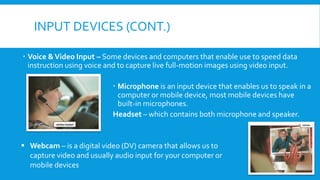
 Voice &Video Input – Some devices and computers that enable use to speed data
instruction using voice and to capture live full-motion images using video input.
 Microphone is an input device that enables us to speak in a
computer or mobile device, most mobile devices have
built-in microphones.
Headset – which contains both microphone and speaker.
▪ Webcam – is a digital video (DV) camera that allows us to
capture video and usually audio input for your computer or
mobile devices
INPUT DEVICES (CONT.)
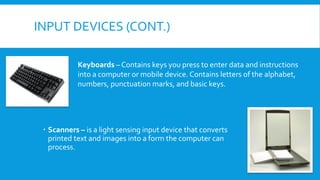
 Scanners – is a light sensing input device that converts
printed text and images into a form the computer can
process.
Keyboards – Contains keys you press to enter data and instructions
into a computer or mobile device. Contains letters of the alphabet,
numbers, punctuation marks, and basic keys.
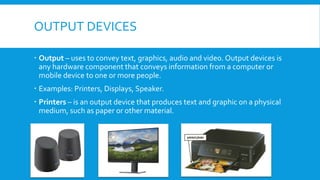
OUTPUT DEVICES
 Output – uses to convey text, graphics, audio and video. Output devices is
any hardware component that conveys information from a computer or
mobile device to one or more people.
 Examples: Printers, Displays, Speaker.
 Printers – is an output device that produces text and graphic on a physical
medium, such as paper or other material.
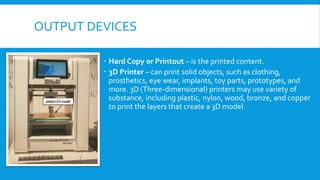
OUTPUT DEVICES
 Hard Copy or Printout – is the printed content.
 3D Printer – can print solid objects, such as clothing,
prosthetics, eye wear, implants, toy parts, prototypes, and
more. 3D (Three-dimensional) printers may use variety of
substance, including plastic, nylon, wood, bronze, and copper
to print the layers that create a 3D model.
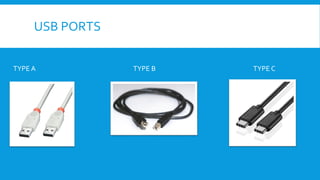
USB PORTS
TYPE A TYPE B TYPE C
END OF CHAPTER II

Chapter II - Computer Hardware Components & Peripherals.pdf

  • 1.
    CHAPTER II: COMPUTER COMPONENTS& PERIPHERALS JOHN PAUL R. RAMONES INSTRUCTOR I
  • 2.
    TOPICS  Inside thecase  Motherboard  Processors  Memory  Adapters and buses  Power Supplies and batteries  Input Devices  Output Devices
  • 3.
  • 4.
    INSIDETHE CASE The SystemCase encloses most of the key components of the personal computer, including the motherboard, power supply, and expansion cards.The motherboard holds the microprocessor, memory, ROM and most of its electronic components.
  • 5.
    MOTHERBOARD  Motherboard – isa circuit board that contains the electrical circuitry for the computer. – it holds all the components, slots and chips in our system unit.  Northbridge Chip – handles communication amongCPU chip, RAM, expansion cards and southbridge.  South Bridge Chip – handles communication among I/O devices such as USB, audio, BIOS, OpticalDD, storage, etc.  BIOS (System input output System) – is a software that runs when computer is started and configures the hardware and boot options
  • 6.
    MOTHERBOARD (CONT.) Back panelPorts- are built-in ports located at the back of the system unit. •PS2 mouse/keyboard ports •Parallel Port •Serial Port •VGA Port •HDMI Port •USB Universal Serial BusType A Port •Ethernet Port •Audio ports •Microphone port •Speaker port •Line-in port
  • 7.
    PERSONAL SYSTEM/2 (PS/2)PORTS A PS/2 port connects the mouse or keyboard to the computer system. Purple is dedicated for Keyboard. Green is dedicated for Mouse. This port is being superseded by USB ports.
  • 8.
    PARALLEL PORT &CONNECTOR Commonly found on PCs from the early 1980s to early 2000s. It was used to connect peripheral devices such as printers and external storage devices. It was eventually superseded by USB, which provides a smaller connection and significantly faster data transfer rates. A standard parallel port connector has two rows of 25 total pins surrounded by a metal casing Parallel Connector Parallel Port
  • 9.
    SERIAL PORT/CONNECTOR A serialport is a type of communication interface that transfers information in or out sequentially one bit at a time. It is used to connect old devices such as printers, scanners, and other peripherals to a computer. It was eventually superseded by USB
  • 10.
    VIDEO GRAPHICS ARRAY(VGA) An interface to transfer video data for displays. Commonly used for monitors & projectors. This port is being superseded by HDMI.
  • 11.
    HI-DEFINITION MULTIMEDIA INTERFACE (HDMI) Aninterface to transfer video and audio data to display and play sound. Commonly used for monitors & projectors. Widely used today.
  • 12.
    UNIVERSAL SERIAL BUS(USB) PORT USB was designed to standardize the connection of peripherals to personal computers, both to communicate with and to supply electric power. It has largely replaced interfaces such as serial ports and parallel ports, and has become commonplace on a wide range of devices.
  • 13.
    ETHERNET PORT &CONNECTOR Ethernet Connector Ethernet Port This allows computers to connect to a network and/or internet usually made of copper wires.
  • 14.
    AUDIO PORTS Microphone Port This allowscomputers to connect to a network and/or internet usually made of copper wires. Line-in port Lin-out port
  • 15.
    MOTHERBOARD (CONT.)  SERIALADVANCED Technology Attachment (SATA)  Integrated Drive Electronics (IDE)  Random Access Memory (RAM)  Peripheral Component Interconnect (PCI)
  • 16.
    SERIAL ADVANCEDTECHNOLOGY ATTACHMENT (SATA) SATAis a computer bus interface that connects host bus adapters to mass storage devices such as hard disk drives, optical drives, and solid-state drives.
  • 17.
    INTEGRATED DRIVE ELECTRONICS(IDE)  IDE cable is a type of cable that connects a hard disk drive or optical disc drive to a computer’s motherboard.  IDE is an older standard that is gradually being replaced by SATA.
  • 18.
    PERIPHERAL COMPONENT INTERCONNECT EXPRESS(PCI-E)  is a high-speed serial computer expansion bus standard, designed to replace the older PCI, PCI-X andAGP bus standards
  • 19.
    MAIN MEMORY  RandomAccess Memory (RAM) Card –Volatile memory that acts as a temporary memory for running applications. Volatile –The data will be deleted or gone once the power source is cut-off. The higher the memory (RAM) the more applications could run at the same time. SODIMM • DIMM, DDR1 • DDR2, DDR3 • DDR4, DDR5 Notch
  • 20.
    MAIN MEMORY (CONT.) RAMfrequency is measured in MHz and usually immediately follows the DDR version. For example, 8GB DDR4-2400 RAM is running at a frequency of 2400MHz. Frequencies of RAM typically range from 800MHz in older DDR2 modules up to 6800MHz in DDR5.
  • 21.
    PROCESSORS  CPU (CentralProcessing Unit) – also known as the “Electronic Brain of the Computer”. It performs all the calculations and processes the data into the computer. Several Examples of Processors are: • Intel “i” Chip series Celeron, i3, i5, i7, i9, • AMD, • Snapdragon, • Apple’s A bionic Chips
  • 22.
  • 23.
    PROCESSORS (CONT.)  Notch&Triangle – serves as an indicator which orientation the CPU chip is to be placed on the CPU socket.
  • 24.
    SECONDARY MEMORY (STORAGE) DISK DRIVES SOLID STATE DRIVE (SSD) HARD DISK DRIVE (HDD) OPTICAL DISK DRIVE (ODD) FLOPPY DISK DRIVE (FDD)
  • 25.
    BUSES BUS is acommon electrical pathway between multiple devices. INTERNAL BUSES EXTERNAL BUSES ORDINARY CABLES
  • 26.
    POWER SUPPLIES ANDBATTERIES  UPS (Interruptible Power Supply) – Serves as a backup power for devices.  Laptop Battery – Built-in battery & removable battery for laptops.  PSU (Power Supply Unit) – distributes power to the whole system unit
  • 27.
    INPUT DEVICES Input Devicesare used for entering data into a computer. It is any hardware component that allows you to enter data and instructions into a computer or mobile device. Examples: Keyboard, Pointing Devices, Microphone, Scanners, Headset,Webcam
  • 28.
    INPUT DEVICES (CONT.) Pointing Devices – is an input device that allows a user to control a small symbol, on a screen, called pointer. Desktop usually use a mouse as their pointing device, and laptops use a touchpad.  Mouse – is a pointing device that fits under the palm of your hand comfortably. Use to control movement of the pointer and send instructions to the computer or mobile devices. ▪ Touchpad – is a small flat rectangular pointing device that is sensitive to pressure and motion.To control the pointer with a touchpad, slide your fingertip across the surface of the pad.
  • 29.
    INPUT DEVICES (CONT.) Voice &Video Input – Some devices and computers that enable use to speed data instruction using voice and to capture live full-motion images using video input.  Microphone is an input device that enables us to speak in a computer or mobile device, most mobile devices have built-in microphones. Headset – which contains both microphone and speaker. ▪ Webcam – is a digital video (DV) camera that allows us to capture video and usually audio input for your computer or mobile devices
  • 30.
    INPUT DEVICES (CONT.) Scanners – is a light sensing input device that converts printed text and images into a form the computer can process. Keyboards – Contains keys you press to enter data and instructions into a computer or mobile device. Contains letters of the alphabet, numbers, punctuation marks, and basic keys.
  • 31.
    OUTPUT DEVICES  Output– uses to convey text, graphics, audio and video. Output devices is any hardware component that conveys information from a computer or mobile device to one or more people.  Examples: Printers, Displays, Speaker.  Printers – is an output device that produces text and graphic on a physical medium, such as paper or other material.
  • 32.
    OUTPUT DEVICES  HardCopy or Printout – is the printed content.  3D Printer – can print solid objects, such as clothing, prosthetics, eye wear, implants, toy parts, prototypes, and more. 3D (Three-dimensional) printers may use variety of substance, including plastic, nylon, wood, bronze, and copper to print the layers that create a 3D model.
  • 33.
    USB PORTS TYPE ATYPE B TYPE C
  • 34.