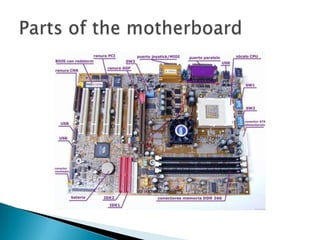
In personal computers, a motherboard is the central printed
circuit board (PCB) in many modern computers and holds many
of the crucial components of the system, providing connectors
                                         for other peripherals.
   A motherboard, like a backplane, provides the
    electrical connections by which the other components
    of the system communicate, but unlike a backplane,
    it also connects the central processing unit and hosts
    other subsystems and devices. A typical desktop
    computer has its microprocessor, main memory, and
    other essential components connected to the
    motherboard. Other components such as external
    storage, controllers for video display and sound,
    and peripheral devices may be attached to the
    motherboard as plug-in cards or via cables, although
    in modern computers it is increasingly common to
    integrate some of these peripherals into the
    motherboard itself.
   Modern motherboards include, at a minimum:
   sockets (or slots) in which one or more microprocessors may be
    installed
   slots into which the system's main memory is to be installed
    (typically in the form of DIMM modules containing DRAM chips)
   a chipset which forms an interface between the CPU's front-side
    bus, main memory, and peripheral buses
   non-volatile memory chips (usually Flash ROM in modern
    motherboards) containing the system's firmware or BIOS
   a clock generator which produces the system clock signal to
    synchronize the various components
   slots for expansion cards (these interface to the system via the
    buses supported by the chipset)
   power connectors, which receive electrical power from
    the computer power supply and distribute it to the
    CPU, chipset, main memory, and expansion cards.
   Motherboards are generally air cooled with heat sinks often
    mounted on larger chips, such as the Northbridge, in modern
    motherboards. Insufficient or improper cooling can cause
    damage to the internal components of the computer and cause it
    to crash. Passive cooling, or a single fan mounted on the power
    supply, was sufficient for many desktop computer CPUs until the
    late 1990s; since then, most have required CPU fans mounted on
    their heat sinks, due to rising clock speeds and power
    consumption. Most motherboards have connectors for additional
    case fans as well. Newer motherboards have integrated
    temperature sensors to detect motherboard and CPU
    temperatures,    and     controllable   fan  connectors   which
    the BIOS or operating system can use to regulate fan speed.
    Some computers (which typically have high-performance
    microprocessors, large amounts of RAM, and high-
    performance video cards) use a water-cooling system instead of
    many fans.
   Prior to the advent of the microprocessor, a computer was
    usually built in a card-cage case or mainframe with
    components connected by a backplane consisting of a set
    of slots themselves connected with wires. The Central
    Processing Unit, memory and peripherals were housed on
    individual printed circuit boards which plugged into the
    backplate. In the late 1980s, motherboards began to
    include single ICs (called Super I/O chips) capable of
    supporting a set of low-speed
    peripherals: keyboard, mouse, floppy disk drive, serial
    ports, and parallel ports. As of the late 1990s, many
    personal computer motherboards supported a full range of
    audio, video, storage, and networking functions without
    the need for any expansion cards at all; higher-end
    systems for3D

Motherboard

  • 1.
    In personal computers,a motherboard is the central printed circuit board (PCB) in many modern computers and holds many of the crucial components of the system, providing connectors for other peripherals.
  • 3.
    A motherboard, like a backplane, provides the electrical connections by which the other components of the system communicate, but unlike a backplane, it also connects the central processing unit and hosts other subsystems and devices. A typical desktop computer has its microprocessor, main memory, and other essential components connected to the motherboard. Other components such as external storage, controllers for video display and sound, and peripheral devices may be attached to the motherboard as plug-in cards or via cables, although in modern computers it is increasingly common to integrate some of these peripherals into the motherboard itself.
  • 4.
    Modern motherboards include, at a minimum:  sockets (or slots) in which one or more microprocessors may be installed  slots into which the system's main memory is to be installed (typically in the form of DIMM modules containing DRAM chips)  a chipset which forms an interface between the CPU's front-side bus, main memory, and peripheral buses  non-volatile memory chips (usually Flash ROM in modern motherboards) containing the system's firmware or BIOS  a clock generator which produces the system clock signal to synchronize the various components  slots for expansion cards (these interface to the system via the buses supported by the chipset)  power connectors, which receive electrical power from the computer power supply and distribute it to the CPU, chipset, main memory, and expansion cards.
  • 5.
    Motherboards are generally air cooled with heat sinks often mounted on larger chips, such as the Northbridge, in modern motherboards. Insufficient or improper cooling can cause damage to the internal components of the computer and cause it to crash. Passive cooling, or a single fan mounted on the power supply, was sufficient for many desktop computer CPUs until the late 1990s; since then, most have required CPU fans mounted on their heat sinks, due to rising clock speeds and power consumption. Most motherboards have connectors for additional case fans as well. Newer motherboards have integrated temperature sensors to detect motherboard and CPU temperatures, and controllable fan connectors which the BIOS or operating system can use to regulate fan speed. Some computers (which typically have high-performance microprocessors, large amounts of RAM, and high- performance video cards) use a water-cooling system instead of many fans.
  • 6.
    Prior to the advent of the microprocessor, a computer was usually built in a card-cage case or mainframe with components connected by a backplane consisting of a set of slots themselves connected with wires. The Central Processing Unit, memory and peripherals were housed on individual printed circuit boards which plugged into the backplate. In the late 1980s, motherboards began to include single ICs (called Super I/O chips) capable of supporting a set of low-speed peripherals: keyboard, mouse, floppy disk drive, serial ports, and parallel ports. As of the late 1990s, many personal computer motherboards supported a full range of audio, video, storage, and networking functions without the need for any expansion cards at all; higher-end systems for3D