
Laptop Computers
 Also known as Notebook
Computers
http://en.wikipedia.org/wiki/Laptop
 There are low end smaller versions of
Notebooks called Netbooks
 Thin, slim, lighter versions called
Ultrabooks

2
Netbook
 Netbook
 Netbooks are a category of Low-end, low
performance, Small, Lightweight, Legacyfree, and Inexpensive laptop computers
 Basically targeted for internet browsing
 Typycally has low end mobile CPUs such as
Atom, Pentium Dual Core etc.
 http://en.wikipedia.org/wiki/Netbook

3
Ultrabook



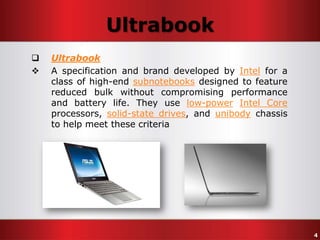
Ultrabook
A specification and brand developed by Intel for a
class of high-end subnotebooks designed to feature
reduced bulk without compromising performance
and battery life. They use low-power Intel Core
processors, solid-state drives, and unibody chassis
to help meet these criteria

4
Compared to Desktops






Smaller
Lighter
Expensive
All in one unit
Less upgradable

5
Compared to Desktops
 Notebooks have…









In-built display
A Battery
A Touchpad
WiFi (WLAN) Adapter
Bluetooth adapter
Card Reader
WebCam
+

6
Software Difference


Operating systems has special features which
are designed for laptops







Laptop Battery related features
Other power management features
Special display options
Touchpad related options/features
Keyboard/input options
+

7
Power Management
 Power management plays a major role in
Notebooks
 Laptops has certain built-in hardware power
management features
 Operating Systems gives more advanced
and important power management options
 Chipset and Video drivers play an
important role in laptop power
management!

8
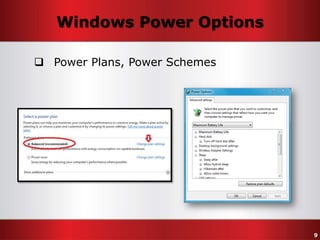
Windows Power Options
 Power Plans, Power Schemes

9
Windows Power Options




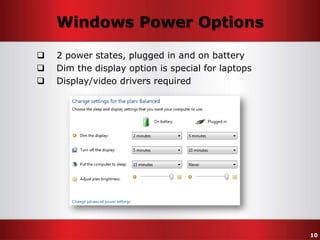
2 power states, plugged in and on battery
Dim the display option is special for laptops
Display/video drivers required

10
Keypad
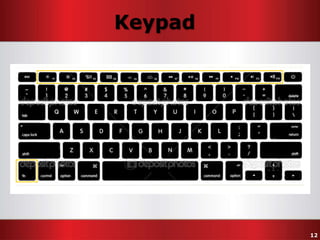
 Laptop keypad is different from a desktop
keyboard
 USB keyboards are useful for heavy
typists/gamers
 Laptop keypads contain less keys
 But using FN key and other modifier
keys, laptop keypads can do more






Toggle WiFi/Bluetooth
Adjusting Volume
Adjusting Brightness
Sleep
+ more
11
Keypad

12
Touchpad
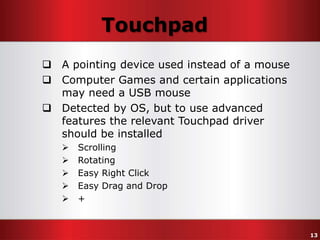
 A pointing device used instead of a mouse
 Computer Games and certain applications
may need a USB mouse
 Detected by OS, but to use advanced
features the relevant Touchpad driver
should be installed






Scrolling
Rotating
Easy Right Click
Easy Drag and Drop
+

13
Battery Life










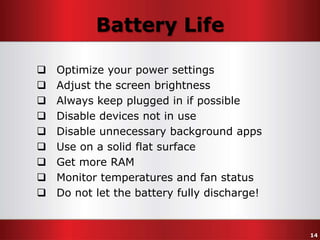
Optimize your power settings
Adjust the screen brightness
Always keep plugged in if possible
Disable devices not in use
Disable unnecessary background apps
Use on a solid flat surface
Get more RAM
Monitor temperatures and fan status
Do not let the battery fully discharge!

14
Power/Battery Saving Tips
 Five surefire ways to maximize your laptop's
battery life
http://www.pcworld.com/article/2042236/five-surefire-ways-tomaximize-your-laptops-battery-life.html

 How to Extend Laptop Battery Life

http://www.wikihow.com/Extend-Laptop-Battery-Life

 How to optimize battery power on your
laptop

http://www.microsoft.com/atwork/maintenance/battery.aspx

15
Optimize Power Options




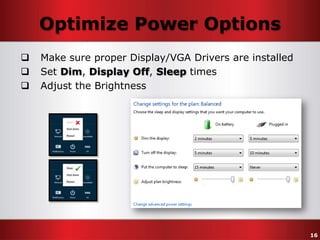
Make sure proper Display/VGA Drivers are installed
Set Dim, Display Off, Sleep times
Adjust the Brightness

16
Disable Devices
 Disable WiFi
 Disable Bluetooth
Usually Wireless devices are toggled using
Function Keys. Enable them only when they are
in use, and disable right after…
 Unplug USB devices not in use
 Limit the use of CD/DVDs
 Disable all unwanted devices

17
Battery Charging
 Do not let the battery fully discharge!
 “Fully discharge, then charge” is an Old, very
Old method, which should be avoided in
modern batteries

 Memory Effect




Found in old NiCd and NiMH batteries
Not related to modern Li-Ion batteries
All new age devices use Lithium (Li-Ion) batteries
and it’s very hard to find a device with old Nickel
(NiCd, NiMH) battery

18
Battery Tips
 5 tips for extending battery life
http://www.techrepublic.com/blog/five-apps/five-tips-forextending-lithium-ion-battery-life/289

 Battery Usage Tips
http://www.laptop-battery.org/batterytips.html

 HP - Improving Battery Performance
http://h10025.www1.hp.com/ewfrf/wc/document?cc=us&lc=en&docname=c01297640

 Mobile device battery charging tips
http://eastvalleytribune.com/blogs/data_doctors/article_91cafb70-0fff-11e09553-001cc4c002e0.html

19
Laptops by Usage/Purpose








Home
Business
Gaming
High-end
Low-end
Ultrabook
20
Home Laptops





Everyday computing
Consumer oriented
Mainstream
Moderate screen sizes

 Ex:





Toshiba Satellite
Most Dell Inspiron Laptops
Most HP Pavilion Laptops
Most Acer Aspire Laptops
21
Business Laptops
 Business computing
 High durability
 Smaller screen sizes

 Ex:





Dell Latitude
HP ProBook
Acer TravelMate
Toshiba Tecra

22
Gaming Laptops
 High performance Gaming
 Better cooling systems
 Larger screen sizes
 Ex:
 Dell Alienware
 Razer Blade
 Cyberpower Fangbook

23
High-end Laptops
 High performance Computing
 Better cooling systems
 Ex:





Dell XPS
Toshiba Qosmio
Lenovo ThinkPad T
Some HP ENVY Laptops

24
Low-end Laptops







Low performance
Cheaper
Lighter
Smaller
Netbooks
Chromebooks

25
Ultrabooks
 Ultra Thin, Slim
 Light weight


Sometimes Ultrabooks considered as a different
type of computers and sometimes a sub-type of
laptops

 Ex:






Toshiba KIRA
Acer Aspire S#
Lenovo ThinkPad Twist
Some Dell Inspiron Laptops
Some HP ENVY Laptops

26
Laptop Manufacturers
 Acer
 Apple

o Aspire, TravelMate

o MacBook

 Asus
 Dell
 HP
 Lenovo

o Inspiron, Vostro, Latitude, XPS

o ThinkPad, IdeaPad

o ThinkPad, IdeaPad

 Samsung
 Sony
 Toshiba

List of laptop
brands and
manufacturers
http://en.wikipedia.org/wiki/
List_of_laptop_brands_and_
manufacturers

o VAIO

o Satellite

+ many more…

27
Buying a Laptop









Should Fit into Requirements
Should Fit into the Budget
Take time to decide
Ask your friendS and get their opinionS
Find suitable models available in the market
Search internet and gather information
Find reviews on model numbers
Buy from authorized Dealers/Agents

28
Thank You!

14. Laptops, Notebooks +

  • 2.
    Laptop Computers  Alsoknown as Notebook Computers http://en.wikipedia.org/wiki/Laptop  There are low end smaller versions of Notebooks called Netbooks  Thin, slim, lighter versions called Ultrabooks 2
  • 3.
    Netbook  Netbook  Netbooksare a category of Low-end, low performance, Small, Lightweight, Legacyfree, and Inexpensive laptop computers  Basically targeted for internet browsing  Typycally has low end mobile CPUs such as Atom, Pentium Dual Core etc.  http://en.wikipedia.org/wiki/Netbook 3
  • 4.
    Ultrabook   Ultrabook A specification andbrand developed by Intel for a class of high-end subnotebooks designed to feature reduced bulk without compromising performance and battery life. They use low-power Intel Core processors, solid-state drives, and unibody chassis to help meet these criteria 4
  • 5.
  • 6.
    Compared to Desktops Notebooks have…         In-built display A Battery A Touchpad WiFi (WLAN) Adapter Bluetooth adapter Card Reader WebCam + 6
  • 7.
    Software Difference  Operating systemshas special features which are designed for laptops       Laptop Battery related features Other power management features Special display options Touchpad related options/features Keyboard/input options + 7
  • 8.
    Power Management  Powermanagement plays a major role in Notebooks  Laptops has certain built-in hardware power management features  Operating Systems gives more advanced and important power management options  Chipset and Video drivers play an important role in laptop power management! 8
  • 9.
    Windows Power Options Power Plans, Power Schemes 9
  • 10.
    Windows Power Options    2power states, plugged in and on battery Dim the display option is special for laptops Display/video drivers required 10
  • 11.
    Keypad  Laptop keypadis different from a desktop keyboard  USB keyboards are useful for heavy typists/gamers  Laptop keypads contain less keys  But using FN key and other modifier keys, laptop keypads can do more      Toggle WiFi/Bluetooth Adjusting Volume Adjusting Brightness Sleep + more 11
  • 12.
  • 13.
    Touchpad  A pointingdevice used instead of a mouse  Computer Games and certain applications may need a USB mouse  Detected by OS, but to use advanced features the relevant Touchpad driver should be installed      Scrolling Rotating Easy Right Click Easy Drag and Drop + 13
  • 14.
    Battery Life          Optimize yourpower settings Adjust the screen brightness Always keep plugged in if possible Disable devices not in use Disable unnecessary background apps Use on a solid flat surface Get more RAM Monitor temperatures and fan status Do not let the battery fully discharge! 14
  • 15.
    Power/Battery Saving Tips Five surefire ways to maximize your laptop's battery life http://www.pcworld.com/article/2042236/five-surefire-ways-tomaximize-your-laptops-battery-life.html  How to Extend Laptop Battery Life http://www.wikihow.com/Extend-Laptop-Battery-Life  How to optimize battery power on your laptop http://www.microsoft.com/atwork/maintenance/battery.aspx 15
  • 16.
    Optimize Power Options    Makesure proper Display/VGA Drivers are installed Set Dim, Display Off, Sleep times Adjust the Brightness 16
  • 17.
    Disable Devices  DisableWiFi  Disable Bluetooth Usually Wireless devices are toggled using Function Keys. Enable them only when they are in use, and disable right after…  Unplug USB devices not in use  Limit the use of CD/DVDs  Disable all unwanted devices 17
  • 18.
    Battery Charging  Donot let the battery fully discharge!  “Fully discharge, then charge” is an Old, very Old method, which should be avoided in modern batteries  Memory Effect    Found in old NiCd and NiMH batteries Not related to modern Li-Ion batteries All new age devices use Lithium (Li-Ion) batteries and it’s very hard to find a device with old Nickel (NiCd, NiMH) battery 18
  • 19.
    Battery Tips  5tips for extending battery life http://www.techrepublic.com/blog/five-apps/five-tips-forextending-lithium-ion-battery-life/289  Battery Usage Tips http://www.laptop-battery.org/batterytips.html  HP - Improving Battery Performance http://h10025.www1.hp.com/ewfrf/wc/document?cc=us&lc=en&docname=c01297640  Mobile device battery charging tips http://eastvalleytribune.com/blogs/data_doctors/article_91cafb70-0fff-11e09553-001cc4c002e0.html 19
  • 20.
  • 21.
    Home Laptops     Everyday computing Consumeroriented Mainstream Moderate screen sizes  Ex:     Toshiba Satellite Most Dell Inspiron Laptops Most HP Pavilion Laptops Most Acer Aspire Laptops 21
  • 22.
    Business Laptops  Businesscomputing  High durability  Smaller screen sizes  Ex:     Dell Latitude HP ProBook Acer TravelMate Toshiba Tecra 22
  • 23.
    Gaming Laptops  Highperformance Gaming  Better cooling systems  Larger screen sizes  Ex:  Dell Alienware  Razer Blade  Cyberpower Fangbook 23
  • 24.
    High-end Laptops  Highperformance Computing  Better cooling systems  Ex:     Dell XPS Toshiba Qosmio Lenovo ThinkPad T Some HP ENVY Laptops 24
  • 25.
  • 26.
    Ultrabooks  Ultra Thin,Slim  Light weight  Sometimes Ultrabooks considered as a different type of computers and sometimes a sub-type of laptops  Ex:      Toshiba KIRA Acer Aspire S# Lenovo ThinkPad Twist Some Dell Inspiron Laptops Some HP ENVY Laptops 26
  • 27.
    Laptop Manufacturers  Acer Apple o Aspire, TravelMate o MacBook  Asus  Dell  HP  Lenovo o Inspiron, Vostro, Latitude, XPS o ThinkPad, IdeaPad o ThinkPad, IdeaPad  Samsung  Sony  Toshiba List of laptop brands and manufacturers http://en.wikipedia.org/wiki/ List_of_laptop_brands_and_ manufacturers o VAIO o Satellite + many more… 27
  • 28.
    Buying a Laptop         ShouldFit into Requirements Should Fit into the Budget Take time to decide Ask your friendS and get their opinionS Find suitable models available in the market Search internet and gather information Find reviews on model numbers Buy from authorized Dealers/Agents 28
  • 29.