Module 11:
                                            Aggregation,
                                            Namespaces, and
Contents
                                            Advanced Scope
Overview                                     1
Using Internal Classes, Methods, and Data    2
Using Aggregation                           11
Lab 11.1: Specifying Internal Access        22
Using Namespaces                            28
Using Modules and Assemblies                49
Lab 11.2: Using Namespaces and
Assemblies                                  57
Review                                      63
Information in this document, including URL and other Internet Web site references, is subject to
change without notice. Unless otherwise noted, the example companies, organizations, products,
domain names, e-mail addresses, logos, people, places, and events depicted herein are fictitious,
and no association with any real company, organization, product, domain name, e-mail address,
logo, person, places or events is intended or should be inferred. Complying with all applicable
copyright laws is the responsibility of the user. Without limiting the rights under copyright, no
part of this document may be reproduced, stored in or introduced into a retrieval system, or
transmitted in any form or by any means (electronic, mechanical, photocopying, recording, or
otherwise), or for any purpose, without the express written permission of Microsoft Corporation.

Microsoft may have patents, patent applications, trademarks, copyrights, or other intellectual
property rights covering subject matter in this document. Except as expressly provided in any
written license agreement from Microsoft, the furnishing of this document does not give you any
license to these patents, trademarks, copyrights, or other intellectual property.

 2001−2002 Microsoft Corporation. All rights reserved.

Microsoft, MS-DOS, Windows, Windows NT, ActiveX, BizTalk, IntelliSense, JScript, MSDN,
PowerPoint, SQL Server, Visual Basic, Visual C++, Visual C#, Visual J#, Visual Studio, and
Win32 are either registered trademarks or trademarks of Microsoft Corporation in the U.S.A.
and/or other countries.

The names of actual companies and products mentioned herein may be the trademarks of their
respective owners.
Module 11: Aggregation, Namespaces, and Advanced Scope          1


Overview


                      Using Internal Classes, Methods, and Data
                      Using Aggregation
                      Using Namespaces
                      Using Modules and Assemblies


           In this module, you will learn how to use the internal access modifier to make
           code accessible at the component or assembly level. Internal access enables you
           to share access to classes and their members in a way that is similar to the
           friendship concept in C++ and Microsoft® Visual Basic®. You can specify an
           access level for a group of collaborating classes rather than for an individual
           class.
           Creating well-designed individual classes is an important part of object-oriented
           programming, but projects of any size require you to create logical and physical
           structures that are larger than individual classes. You will learn how to group
           classes together into larger, higher-level classes. You will also learn how to use
           namespaces to allow you to logically group classes together inside named
           spaces and to help you to create logical program structures beyond individual
           classes.
           Finally, you will learn how to use assemblies to physically group collaborating
           source files together into a reusable, versionable, and deployable unit.
           After completing this module, you will be able to:
              Use internal access to allow classes to have privileged access to each other.
              Use aggregation to implement powerful patterns such as Factories.
              Use namespaces to organize classes.
              Create simple modules and assemblies.
2   Module 11: Aggregation, Namespaces, and Advanced Scope


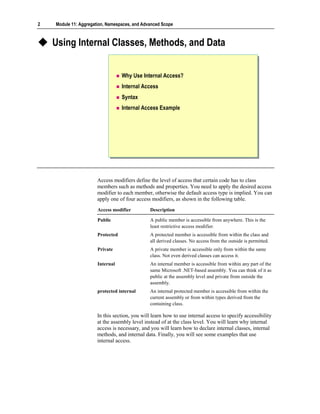
    Using Internal Classes, Methods, and Data


                                   Why Use Internal Access?
                                   Internal Access
                                   Syntax
                                   Internal Access Example


                       Access modifiers define the level of access that certain code has to class
                       members such as methods and properties. You need to apply the desired access
                       modifier to each member, otherwise the default access type is implied. You can
                       apply one of four access modifiers, as shown in the following table.
                       Access modifier          Description

                       Public                   A public member is accessible from anywhere. This is the
                                                least restrictive access modifier.
                       Protected                A protected member is accessible from within the class and
                                                all derived classes. No access from the outside is permitted.
                       Private                  A private member is accessible only from within the same
                                                class. Not even derived classes can access it.
                       Internal                 An internal member is accessible from within any part of the
                                                same Microsoft .NET-based assembly. You can think of it as
                                                public at the assembly level and private from outside the
                                                assembly.
                       protected internal       An internal protected member is accessible from within the
                                                current assembly or from within types derived from the
                                                containing class.

                       In this section, you will learn how to use internal access to specify accessibility
                       at the assembly level instead of at the class level. You will learn why internal
                       access is necessary, and you will learn how to declare internal classes, internal
                       methods, and internal data. Finally, you will see some examples that use
                       internal access.
Module 11: Aggregation, Namespaces, and Advanced Scope          3


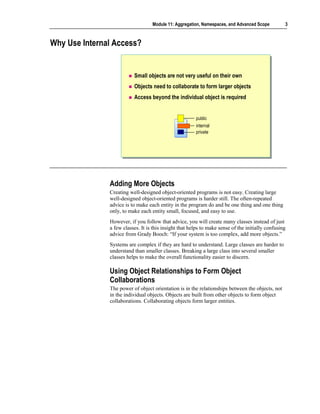
Why Use Internal Access?


                          Small objects are not very useful on their own
                          Objects need to collaborate to form larger objects
                          Access beyond the individual object is required


                                                        public
                                                        internal
                                                        private


               Adding More Objects
               Creating well-designed object-oriented programs is not easy. Creating large
               well-designed object-oriented programs is harder still. The often-repeated
               advice is to make each entity in the program do and be one thing and one thing
               only, to make each entity small, focused, and easy to use.
               However, if you follow that advice, you will create many classes instead of just
               a few classes. It is this insight that helps to make sense of the initially confusing
               advice from Grady Booch: “If your system is too complex, add more objects.”
               Systems are complex if they are hard to understand. Large classes are harder to
               understand than smaller classes. Breaking a large class into several smaller
               classes helps to make the overall functionality easier to discern.

               Using Object Relationships to Form Object
               Collaborations
               The power of object orientation is in the relationships between the objects, not
               in the individual objects. Objects are built from other objects to form object
               collaborations. Collaborating objects form larger entities.
4   Module 11: Aggregation, Namespaces, and Advanced Scope


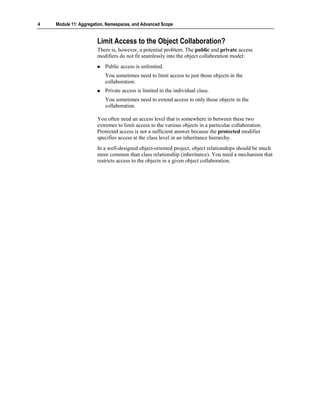
                       Limit Access to the Object Collaboration?
                       There is, however, a potential problem. The public and private access
                       modifiers do not fit seamlessly into the object collaboration model:
                          Public access is unlimited.
                          You sometimes need to limit access to just those objects in the
                          collaboration.
                          Private access is limited to the individual class.
                          You sometimes need to extend access to only those objects in the
                          collaboration.

                       You often need an access level that is somewhere in between these two
                       extremes to limit access to the various objects in a particular collaboration.
                       Protected access is not a sufficient answer because the protected modifier
                       specifies access at the class level in an inheritance hierarchy.
                       In a well-designed object-oriented project, object relationships should be much
                       more common than class relationship (inheritance). You need a mechanism that
                       restricts access to the objects in a given object collaboration.
Module 11: Aggregation, Namespaces, and Advanced Scope            5


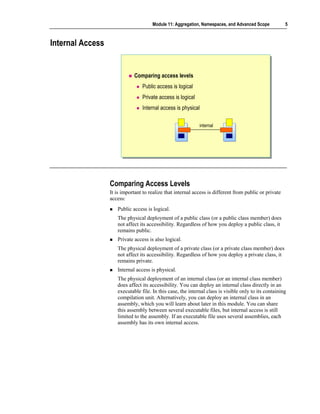
Internal Access


                             Comparing access levels
                                 Public access is logical
                                 Private access is logical
                                 Internal access is physical

                                                             internal


                  Comparing Access Levels
                  It is important to realize that internal access is different from public or private
                  access:
                     Public access is logical.
                     The physical deployment of a public class (or a public class member) does
                     not affect its accessibility. Regardless of how you deploy a public class, it
                     remains public.
                     Private access is also logical.
                     The physical deployment of a private class (or a private class member) does
                     not affect its accessibility. Regardless of how you deploy a private class, it
                     remains private.
                     Internal access is physical.
                     The physical deployment of an internal class (or an internal class member)
                     does affect its accessibility. You can deploy an internal class directly in an
                     executable file. In this case, the internal class is visible only to its containing
                     compilation unit. Alternatively, you can deploy an internal class in an
                     assembly, which you will learn about later in this module. You can share
                     this assembly between several executable files, but internal access is still
                     limited to the assembly. If an executable file uses several assemblies, each
                     assembly has its own internal access.
6   Module 11: Aggregation, Namespaces, and Advanced Scope


                       Comparing Internal Access to Friendship
                       In languages such as C++ and Visual Basic, you can use friendship to grant to
                       the private members of one class access to another class. If class A grants
                       friendship to class B, the methods of class B can access the private members of
                       class A. Such friendship creates a strong dependency from B to A. In some
                       ways, the dependency is even stronger than inheritance. After all, if B were
                       derived from A instead, it would not have access to the private members of A.
                       To counteract this strong dependency, friendship has a few built-in safety
                       restrictions:
                          Friendship is closed.
                          If X needs to access the private members of Y, it cannot grant itself
                          friendship to Y. In this case, only Y can grant friendship to X.
                          Friendship is not reflexive.
                          If X is a friend of Y, that does not mean that Y is automatically a friend of
                          X.

                       Internal access is different from friendship:
                          Internal access is open.
                          You can compile a C# class (in a source file) into a module and then add the
                          module to an assembly. In this way, a class can grant itself access to the
                          internals of the assembly that other classes have made available.
                          Internal access is reflexive.
                          If X has access to the internals of Y, then Y has access to the internals of X.
                          Note also that X and Y must be in the same assembly.
Module 11: Aggregation, Namespaces, and Advanced Scope         7


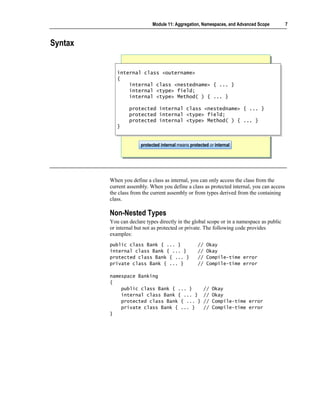
Syntax


            internal class <outername>
             internal class <outername>
            {{
                internal class <nestedname>
                 internal class <nestedname>                { ... }
                                                             { ... }
                internal <type> field;
                 internal <type> field;
                internal <type> Method( ) {
                 internal <type> Method( ) {                ... }
                                                            ... }

                 protected
                 protected      internal class <nestedname>
                                internal class <nestedname>             { ... }
                                                                         { ... }
                 protected
                 protected      internal <type> field;
                                internal <type> field;
                 protected
                 protected      internal <type> Method( ) {
                                internal <type> Method( ) {             ... }
                                                                        ... }
            }}


                       protected internal means protected or internal
                       protected internal means protected or internal


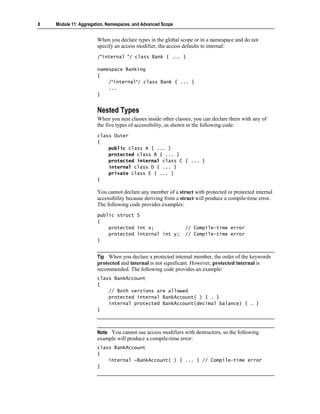
         When you define a class as internal, you can only access the class from the
         current assembly. When you define a class as protected internal, you can access
         the class from the current assembly or from types derived from the containing
         class.

         Non-Nested Types
         You can declare types directly in the global scope or in a namespace as public
         or internal but not as protected or private. The following code provides
         examples:
         public class Bank { ... }                  //   Okay
         internal class Bank { ... }                //   Okay
         protected class Bank { ... }               //   Compile-time error
         private class Bank { ... }                 //   Compile-time error

         namespace Banking
         {
             public class Bank { ... }                 //   Okay
             internal class Bank { ... }               //   Okay
             protected class Bank { ... }              //   Compile-time error
             private class Bank { ... }                //   Compile-time error
         }
8   Module 11: Aggregation, Namespaces, and Advanced Scope


                       When you declare types in the global scope or in a namespace and do not
                       specify an access modifier, the access defaults to internal:
                       /*internal */ class Bank { ... }

                       namespace Banking
                       {
                           /*internal*/ class Bank { ... }
                           ...
                       }


                       Nested Types
                       When you nest classes inside other classes, you can declare them with any of
                       the five types of accessibility, as shown in the following code:
                       class Outer
                       {
                           public class A { ... }
                           protected class B { ... }
                           protected internal class C { ... }
                           internal class D { ... }
                           private class E { ... }
                       }

                       You cannot declare any member of a struct with protected or protected internal
                       accessibility because deriving from a struct will produce a compile-time error.
                       The following code provides examples:
                       public struct S
                       {
                           protected int x;                   // Compile-time error
                           protected internal int y;          // Compile-time error
                       }


                       Tip When you declare a protected internal member, the order of the keywords
                       protected and internal is not significant. However, protected internal is
                       recommended. The following code provides an example:
                       class BankAccount
                       {
                           // Both versions are allowed
                           protected internal BankAccount( ) { … }
                           internal protected BankAccount(decimal balance) { … }
                       }


                       Note You cannot use access modifiers with destructors, so the following
                       example will produce a compile-time error:
                       class BankAccount
                       {
                           internal ~BankAccount( ) { ... } // Compile-time error
                       }
Module 11: Aggregation, Namespaces, and Advanced Scope        9


Internal Access Example

                  public interface IBankAccount { ... }
                  public interface IBankAccount { ... }

                  internal abstract class CommonBankAccount { ... }
                  internal abstract class CommonBankAccount { ... }

                  internal class DepositAccount: CommonBankAccount,
                   internal class DepositAccount: CommonBankAccount,
                                                 IBankAccount { ... }
                                                  IBankAccount { ... }
                  public class Bank
                   public class Bank
                  {{
                      public IBankAccount OpenAccount( )
                       public IBankAccount OpenAccount( )
                      {{
                          return new DepositAccount( );
                           return new DepositAccount( );
                      }}
                  }}


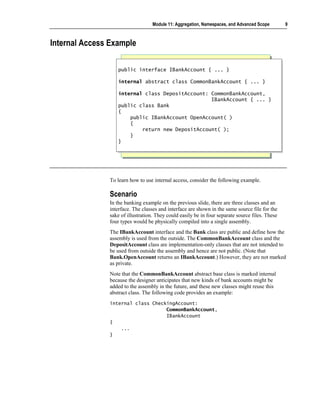
               To learn how to use internal access, consider the following example.

               Scenario
               In the banking example on the previous slide, there are three classes and an
               interface. The classes and interface are shown in the same source file for the
               sake of illustration. They could easily be in four separate source files. These
               four types would be physically compiled into a single assembly.
               The IBankAccount interface and the Bank class are public and define how the
               assembly is used from the outside. The CommonBankAccount class and the
               DepositAccount class are implementation-only classes that are not intended to
               be used from outside the assembly and hence are not public. (Note that
               Bank.OpenAccount returns an IBankAccount.) However, they are not marked
               as private.
               Note that the CommonBankAccount abstract base class is marked internal
               because the designer anticipates that new kinds of bank accounts might be
               added to the assembly in the future, and these new classes might reuse this
               abstract class. The following code provides an example:
               internal class CheckingAccount:
                                   CommonBankAccount,
                                   IBankAccount
               {
                   ...
               }
10   Module 11: Aggregation, Namespaces, and Advanced Scope


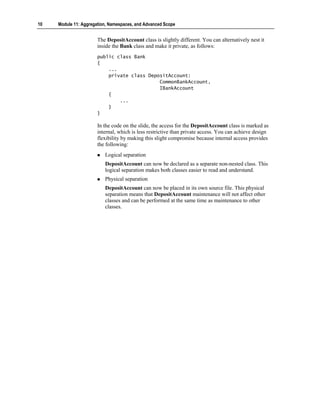
                       The DepositAccount class is slightly different. You can alternatively nest it
                       inside the Bank class and make it private, as follows:
                       public class Bank
                       {
                           ...
                           private class DepositAccount:
                                             CommonBankAccount,
                                             IBankAccount
                           {
                               ...
                           }
                       }

                       In the code on the slide, the access for the DepositAccount class is marked as
                       internal, which is less restrictive than private access. You can achieve design
                       flexibility by making this slight compromise because internal access provides
                       the following:
                          Logical separation
                          DepositAccount can now be declared as a separate non-nested class. This
                          logical separation makes both classes easier to read and understand.
                          Physical separation
                          DepositAccount can now be placed in its own source file. This physical
                          separation means that DepositAccount maintenance will not affect other
                          classes and can be performed at the same time as maintenance to other
                          classes.
Module 11: Aggregation, Namespaces, and Advanced Scope        11


Using Aggregation


                    Objects Within Objects
                    Comparing Aggregation to Inheritance
                    Factories
                    Example Factory


         In this section, you will learn how to use aggregation to group objects together
         to form an object hierarchy. Aggregation specifies a relationship between
         objects, not classes. Aggregation offers the potential for creating reusable object
         configurations. Many of the most useful configurations have been documented
         as patterns. You will learn how to use the Factory pattern.
12   Module 11: Aggregation, Namespaces, and Advanced Scope


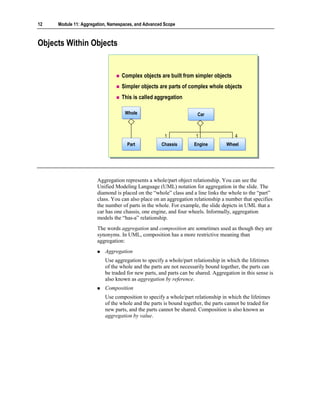
Objects Within Objects


                                  Complex objects are built from simpler objects
                                  Simpler objects are parts of complex whole objects
                                  This is called aggregation

                                   Whole
                                   Whole                            Car
                                                                    Car


                                                      1             1                 4
                                    Part
                                    Part            Chassis
                                                    Chassis        Engine
                                                                   Engine         Wheel
                                                                                  Wheel


                       Aggregation represents a whole/part object relationship. You can see the
                       Unified Modeling Language (UML) notation for aggregation in the slide. The
                       diamond is placed on the “whole” class and a line links the whole to the “part”
                       class. You can also place on an aggregation relationship a number that specifies
                       the number of parts in the whole. For example, the slide depicts in UML that a
                       car has one chassis, one engine, and four wheels. Informally, aggregation
                       models the “has-a” relationship.
                       The words aggregation and composition are sometimes used as though they are
                       synonyms. In UML, composition has a more restrictive meaning than
                       aggregation:
                          Aggregation
                          Use aggregation to specify a whole/part relationship in which the lifetimes
                          of the whole and the parts are not necessarily bound together, the parts can
                          be traded for new parts, and parts can be shared. Aggregation in this sense is
                          also known as aggregation by reference.
                          Composition
                          Use composition to specify a whole/part relationship in which the lifetimes
                          of the whole and the parts is bound together, the parts cannot be traded for
                          new parts, and the parts cannot be shared. Composition is also known as
                          aggregation by value.
Module 11: Aggregation, Namespaces, and Advanced Scope         13


In an aggregation, the “whole class” is really just a class that is used to group
and name the parts. In a sense, the whole class does not really exist at all. What
is car? It is just the name that you use to describe an aggregation of specific
parts that are arranged in a specific configuration. But it is much easier to just
say car! In other cases, the whole class is conceptual—a family is an
aggregation of people.
In programming, it is common for the whole class to simply forward the
method calls to the appropriate part. This is called delegation. Aggregated
objects form layered delegation hierarchies. Occasionally these hierarchies are
referred to as assemblies (but the word assemblies can also refer to a
Microsoft .NET-based physical assembly, as will be explained later in this
module).
14   Module 11: Aggregation, Namespaces, and Advanced Scope


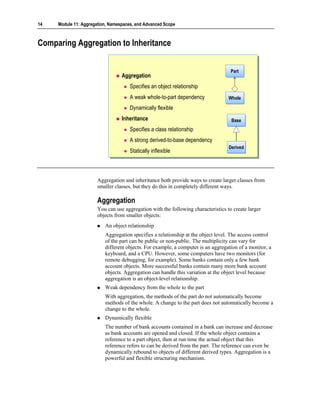
Comparing Aggregation to Inheritance


                                                                                    Part
                                                                                    Part
                                  Aggregation
                                      Specifies an object relationship
                                      A weak whole-to-part dependency              Whole
                                                                                   Whole
                                      Dynamically flexible
                                  Inheritance                                       Base
                                                                                    Base
                                      Specifies a class relationship
                                      A strong derived-to-base dependency
                                                                                   Derived
                                                                                   Derived
                                      Statically inflexible


                       Aggregation and inheritance both provide ways to create larger classes from
                       smaller classes, but they do this in completely different ways.

                       Aggregation
                       You can use aggregation with the following characteristics to create larger
                       objects from smaller objects:
                          An object relationship
                          Aggregation specifies a relationship at the object level. The access control
                          of the part can be public or non-public. The multiplicity can vary for
                          different objects. For example, a computer is an aggregation of a monitor, a
                          keyboard, and a CPU. However, some computers have two monitors (for
                          remote debugging, for example). Some banks contain only a few bank
                          account objects. More successful banks contain many more bank account
                          objects. Aggregation can handle this variation at the object level because
                          aggregation is an object-level relationship.
                          Weak dependency from the whole to the part
                          With aggregation, the methods of the part do not automatically become
                          methods of the whole. A change to the part does not automatically become a
                          change to the whole.
                          Dynamically flexible
                          The number of bank accounts contained in a bank can increase and decrease
                          as bank accounts are opened and closed. If the whole object contains a
                          reference to a part object, then at run time the actual object that this
                          reference refers to can be derived from the part. The reference can even be
                          dynamically rebound to objects of different derived types. Aggregation is a
                          powerful and flexible structuring mechanism.
Module 11: Aggregation, Namespaces, and Advanced Scope          15


Inheritance
You use inheritance to create new classes from existing classes. The
relationship between the existing class and the new class that extends it has the
following characteristics:
   A class relationship
   Inheritance specifies a relationship at the class level. In C#, inheritance can
   only be public. It is impossible to specify the multiplicity for an inheritance.
   Multiplicity specifies the number of objects participating in an object
   relationship. But inheritance is fixed at the class level. There is no variation
   at the object level.
   Strong dependency from the derived class to the base class
   Inheritance creates a strong derived-to-base class dependency. The methods
   of the base class do automatically become methods of the derived class. A
   change to the base class does automatically become a change to all derived
   classes.
   Statically inflexible
   If a class is declared to have a particular base class, it always has that
   particular base class (and can only specify the base class as a base class
   once). Compare this to aggregation, in which the part reference can be
   dynamically rebound to objects of different derived classes. An object can
   never change its type. This inflexibility can create problems. For instance,
   consider a simple inheritance hierarchy with Employee as a base class and
   Manager and Programmer as parallel derived classes:
   class Employee { ... }
   class Manager: Employee { ... }
   class Programmer: Employee { ... }

   In this example, a Programmer object cannot be promoted to a Manager
   object!
16   Module 11: Aggregation, Namespaces, and Advanced Scope


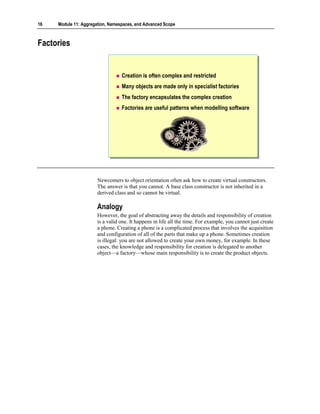
Factories


                                  Creation is often complex and restricted
                                  Many objects are made only in specialist factories
                                  The factory encapsulates the complex creation
                                  Factories are useful patterns when modelling software


                       Newcomers to object orientation often ask how to create virtual constructors.
                       The answer is that you cannot. A base class constructor is not inherited in a
                       derived class and so cannot be virtual.

                       Analogy
                       However, the goal of abstracting away the details and responsibility of creation
                       is a valid one. It happens in life all the time. For example, you cannot just create
                       a phone. Creating a phone is a complicated process that involves the acquisition
                       and configuration of all of the parts that make up a phone. Sometimes creation
                       is illegal: you are not allowed to create your own money, for example. In these
                       cases, the knowledge and responsibility for creation is delegated to another
                       object—a factory—whose main responsibility is to create the product objects.
Module 11: Aggregation, Namespaces, and Advanced Scope      17


Encapsulating Construction
In software programs, you can also abstract away the details and responsibility
of creation by encapsulating the construction of objects. Instead of attempting
to create a virtual constructor in which delegation is automatic and moves down
the class hierarchy, you can use manual delegation across an object hierarchy:
class Product
{
    public void Use( ) { ... }
    ...
    internal Product( ) { ... }
}

class Factory
{
    public Product CreateProduct( )
    {
        return new Product( );
    }
    ...
}

In this example, the CreateProduct method is known as a Factory Method
pattern. (This definition is from Design Patterns: Elements of Reusable Object-
Oriented Software, by E. Gamma, R. Helm, R. Johnson, and J. Vlissides.) It is a
method of a factory that creates a product.

Encapsulating Destruction
Abstracting away the details and responsibility of destroying an object is also
valid and useful. And again, it happens in real life. For example, if you open a
bank account at a bank, you cannot destroy the bank account yourself. Only the
bank can destroy the account. To provide another example, if a factory creates a
product, the environmentally responsible way to destroy the product is to return
it to the factory. The factory might be able to recycle some of the product’s
parts. The following code provides an example:
class Factory
{
    public Product CreateProduct( ) { ... }
    public void DestroyProduct(Product toDestroy) { ... }
    ...
}

In this example, the DestroyProduct method is known as a Disposal Method,
another design pattern.

Using the Problem Vocabulary
In the preceding example, the Factory Method is called CreateProduct, and the
Disposal Method is called DestroyProduct. In a real factory class, name these
methods to correspond to the vocabulary of the factory. For example, in a Bank
class (a factory for bank accounts), you might have a Factory Method called
OpenAccount and a Disposal Method called CloseAccount.
18   Module 11: Aggregation, Namespaces, and Advanced Scope


Factory Example
                         public class Bank
                          public class Bank
                         {{
                              public BankAccount OpenAccount( )
                              public BankAccount OpenAccount( )
                              {
                              {
                                  BankAccount opened = new BankAccount( );
                                  BankAccount opened = new BankAccount( );
                                  accounts[opened.Number( )] = opened;
                                  accounts[opened.Number( )] = opened;
                                  return opened;
                                  return opened;
                              }
                              }
                              private Hashtable accounts = new Hashtable( );
                              private Hashtable accounts = new Hashtable( );
                         }}
                         public class BankAccount
                          public class BankAccount
                         {{
                              internal BankAccount( ) { ... }
                              internal BankAccount( ) { ... }
                              public long Number( ) { ... }
                              public long Number( ) { ... }
                              public void Deposit(decimal amount) { ... }
                              public void Deposit(decimal amount) { ... }
                         }}


                       To learn how to use the Factory pattern, consider an example of publicly
                       useable, non-creatable objects being made and aggregated in a factory.

                       Scenario
                       In this example, the BankAccount class is public and has public methods. If
                       you could create a BankAccount object, you could use its public methods.
                       However, you cannot create a BankAccount object because its constructor is
                       not public. This is a perfectly reasonable model. After all, you cannot just create
                       a real bank account object. If you want a bank account, you need to go to a bank
                       and ask a teller to open one. The bank creates the account for you.
                       This is exactly the model that the above code depicts. The Bank class has a
                       public method called OpenAccount, the body of which creates the
                       BankAccount object for you. In this case, the Bank and the BankAccount are
                       in the same source file, and so will inevitably become part of the same
                       assembly. Assemblies will be covered later in this module. However, even if
                       the Bank class and the BankAccount classes were in separate source files, they
                       could (and would) still be deployed in the same assembly, in which case the
                       Bank would still have access to the internal BankAccount constructor. Notice
                       also that the Bank aggregates the BankAccount objects that it creates. This is
                       very common.
Module 11: Aggregation, Namespaces, and Advanced Scope   19


Design Alternatives
To restrict creation of BankAccount objects further, you can make
BankAccount a private nested class of Bank with a public interface. The
following code provides an example:
using System.Collections;

public interface IAccount
{
    long Number( );
    void Deposit(decimal amount);
    //...
}

public class Bank
{
    public IAccount OpenAccount( )
    {
        IAccount opened = new DepositAccount( );
        accounts[opened.Number( )] = opened;
        return opened;
    }

    private readonly Hashtable accounts = new Hashtable( );

    private sealed class DepositAccount: IAccount
    {
        public long Number( )
        {
            return number;
        }

         public void Deposit(decimal amount)
         {
             balance += amount;
         }
         //...
         // Class state
         private static long NextNumber( )
         {
             return nextNumber++;
         }
         private static long nextNumber = 123;

         // Object state
         private decimal balance = 0.0M;
         private readonly long number = NextNumber( );
    }
}
20   Module 11: Aggregation, Namespaces, and Advanced Scope


                       Alternatively, you can make the entire BankAccount concept private, and
                       reveal only the bank account number, as shown in the following code:
                       using System.Collections;

                       public sealed class Bank
                       {
                           public long OpenAccount( )
                           {
                               IAccount opened = new DepositAccount( );
                               long number = opened.Number( );
                               accounts[number] = opened;
                               return number;
                           }

                            public void Deposit(long accountNumber, decimal amount)
                            {
                                IAccount account = (IAccount)accounts[accountNumber];
                                if (account != null) {
                                    account.Deposit(amount);
                                }
                            }

                            //...

                            public void CloseAccount(long accountNumber)
                            {
                                IAccount closing = (IAccount)accounts[accountNumber];
                                if (closing != null) {
                                    accounts.Remove(accountNumber);
                                    closing.Dispose( );
                                }
                            }

                            private readonly Hashtable accounts = new Hashtable( );

                            private interface IAccount
                            {
                                long Number( );
                                void Deposit(decimal amount);
                                void Dispose( );
                                //...
                            }

                            private sealed class DepositAccount: IAccount
                            {
                                public long Number( )
                                {
                                    return number;
                                }

                               public void Deposit(decimal amount)
                               {
                                   balance += amount;
                               }
                       Code continued on following page.
Module 11: Aggregation, Namespaces, and Advanced Scope   21


        public void Dispose( )
        {
            //...
            System.GC.SuppressFinalize(this);
        }


        private static long NextNumber( )
        {
            return nextNumber++;
        }
        private static long nextNumber = 123;

        private decimal balance = 0.0M;
        private readonly long number = NextNumber( );
    }
}
22   Module 11: Aggregation, Namespaces, and Advanced Scope


Lab 11.1: Specifying Internal Access


                       Objectives
                       After completing this lab, you will be able to:
                          Specify internal access for classes.
                          Specify internal access for methods.

                       Prerequisites
                       Before working on this lab, you must be able to:
                          Create classes.
                          Use constructors and destructors.
                          Use private and public access modifiers.

                       Estimated time to complete this lab: 30 minutes
Module 11: Aggregation, Namespaces, and Advanced Scope      23


Exercise 1
Creating a Bank
                  In this exercise, you will:
                  1. Create a new class called Bank that will act as the point of creation (a
                     factory) for BankAccount objects.
                  2. Change the BankAccount constructors so that they use internal access.
                  3. Add to the Bank class overloaded CreateAccount factory methods that the
                     customers can use to access accounts and to request the creation of
                     accounts.
                  4. Make the Bank class “singleton-like” by making all of its methods static
                     (and public) and adding a private constructor to prevent instances of the
                     Bank class from being created accidentally.
                  5. Store BankAccounts in Bank by using a Hashtable
                     (System.Collections.Hashtable).
                  6. Use a simple harness to test the functionality of the Bank class.

                     To create the Bank class
                  1. Open the Bank.sln project in the
                     install folderLabsLab11Exercise 1StarterBank folder.
                  2. Review the four BankAccount constructors in the BankAccount.cs file.
                     You will create four overloaded CreateAccount methods in the Bank class
                     that will call each of these four constructors respectively.
                  3. Open the Bank.cs file and create a public non-static method of Bank called
                     CreateAccount that expects no parameters and returns a BankAccount.
                     The body of this method should return a newly created BankAccount object
                     by calling the BankAccount constructor that expects no parameters.
                  4. Add the following statements to Main in the CreateAccount.cs file. This
                     code tests your CreateAccount method.
                     Console.WriteLine("Sid's Account");
                     Bank bank = new Bank( );
                     BankAccount sids = bank.CreateAccount( );
                     TestDeposit(sids);
                     TestWithdraw(sids);
                     Write(sids);
                     sids.Dispose( );

                  5. In BankAccount.cs, change the accessibility of the BankAccount
                     constructor that expects no parameters from public to internal.
                  6. Save your work.
                  7. Compile the program, correct any errors, and run the program.
                     Verify that Sid’s bank account is created and that the deposit and
                     withdrawal appear in the transaction list if successful.
24   Module 11: Aggregation, Namespaces, and Advanced Scope


                          To make the Bank responsible for closing accounts
                       Real bank accounts never leave their bank. Instead, bank accounts remain
                       internal to their bank, and customers gain access to their accounts by using their
                       unique bank account numbers. In the next few steps, you will modify the
                       Bank.CreateAccount method in Bank.cs to reflect this.
                       1. Add a private static field called accounts of type Hashtable to the Bank
                          class. Initialize it with a new Hashtable object. The Hashtable class is
                          located inside the System.Collections namespace, so you will need an
                          appropriate using-directive.
                       2. Modify the Bank.CreateAccount method so that it returns the
                          BankAccount number (a long) and not the BankAccount itself. Change the
                          body of the method so that it stores the newly created BankAccount object
                          in the accounts Hashtable, using the bank account number as the key.
                       3. Add a public non-static CloseAccount method to the Bank class.
                          This method will expect a single parameter of type long (the number of the
                          account being closed) and will return a bool. The body of this method will
                          access the BankAccount object from the accounts Hashtable, using the
                          account number parameter as an indexer. It will then remove the
                          BankAccount from the accounts Hashtable by calling the Remove method
                          of the Hashtable class, and then dispose of the closing account by calling
                          its Dispose method. The CloseAccount method will return true if the
                          account number parameter successfully accesses a BankAccount inside the
                          accounts Hashtable; otherwise it will return false.
                          At this point, the Bank class should look as follows:
                          using System.Collections;

                          public class Bank
                          {
                              public long CreateAccount( )
                              {
                                  BankAccount newAcc = new BankAccount( );
                                  long accNo = newAcc.Number( );
                                  accounts[accNo] = newAcc;
                                  return accNo;
                              }
                              public bool CloseAccount(long accNo)
                              {
                                  BankAccount closing = (BankAccount)accounts[accNo];
                                  if (closing != null) {
                                      accounts.Remove(accNo);
                                      closing.Dispose( );
                                      return true;
                                  }
                                  else {
                                      return false;
                                  }
                              }
                              private static Hashtable accounts = new Hashtable( );
                          }
Module 11: Aggregation, Namespaces, and Advanced Scope          25


4. Save your work.
5. Compile the program.
   It will not compile. The test harness in CreateAccount.Main now fails
   because Bank.CreateAccount returns a long rather than a BankAccount.
6. Add a public non-static method called GetAccount to the Bank class.
   It will expect a single parameter of type long that specifies a bank account
   number. It will return the BankAccount object stored in the accounts
   Hashtable that has this account number (or null if there is no account with
   this number). The BankAccount object can be retrieved by using the
   account number as an indexer parameter on accounts as shown below:
   public class Bank
   {
       ...
       public BankAccount GetAccount(long accNo)
       {
           return (BankAccount)accounts[accNo];
       }
   }

7. Change Main in the CreateAccount.cs test harness so that it uses the new
   Bank methods, as follows:
   public class CreateAccount
   {
        static void Main ( )
        {
            Console.WriteLine("Sid's Account");
            Bank bank = new Bank( );
            long sidsAccNo = bank.CreateAccount( );
            BankAccount sids = bank.GetAccount(sidsAccNo);
            TestDeposit(sids);
            TestWithdraw(sids);
            Write(sids);
            if (bank.CloseAccount(sidsAccNo)) {
                Console.WriteLine("Account closed");
            } else {
                Console.WriteLine("Something went wrong closing
     the account");
            }
      }
       ...
   }

8. Save your work.
9. Compile the program, correct any errors, and run the program. Verify that
   Sid’s bank account is created and that the deposit and withdrawal appear in
   the transaction list if they are successful.
26   Module 11: Aggregation, Namespaces, and Advanced Scope


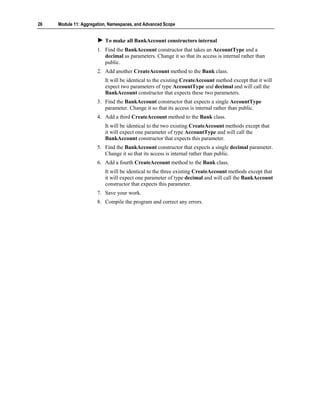
                          To make all BankAccount constructors internal
                       1. Find the BankAccount constructor that takes an AccountType and a
                          decimal as parameters. Change it so that its access is internal rather than
                          public.
                       2. Add another CreateAccount method to the Bank class.
                          It will be identical to the existing CreateAccount method except that it will
                          expect two parameters of type AccountType and decimal and will call the
                          BankAccount constructor that expects these two parameters.
                       3. Find the BankAccount constructor that expects a single AccountType
                          parameter. Change it so that its access is internal rather than public.
                       4. Add a third CreateAccount method to the Bank class.
                          It will be identical to the two existing CreateAccount methods except that
                          it will expect one parameter of type AccountType and will call the
                          BankAccount constructor that expects this parameter.
                       5. Find the BankAccount constructor that expects a single decimal parameter.
                          Change it so that its access is internal rather than public.
                       6. Add a fourth CreateAccount method to the Bank class.
                          It will be identical to the three existing CreateAccount methods except that
                          it will expect one parameter of type decimal and will call the BankAccount
                          constructor that expects this parameter.
                       7. Save your work.
                       8. Compile the program and correct any errors.
Module 11: Aggregation, Namespaces, and Advanced Scope         27


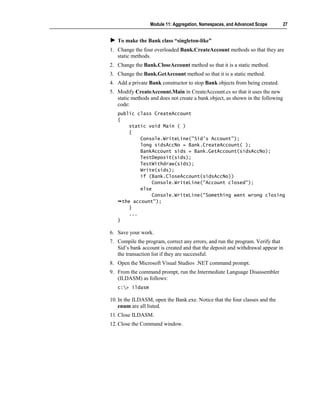
   To make the Bank class “singleton-like”
1. Change the four overloaded Bank.CreateAccount methods so that they are
   static methods.
2. Change the Bank.CloseAccount method so that it is a static method.
3. Change the Bank.GetAccount method so that it is a static method.
4. Add a private Bank constructor to stop Bank objects from being created.
5. Modify CreateAccount.Main in CreateAccount.cs so that it uses the new
   static methods and does not create a bank object, as shown in the following
   code:
   public class CreateAccount
   {
        static void Main ( )
        {
            Console.WriteLine("Sid's Account");
            long sidsAccNo = Bank.CreateAccount( );
            BankAccount sids = Bank.GetAccount(sidsAccNo);
            TestDeposit(sids);
            TestWithdraw(sids);
            Write(sids);
            if (Bank.CloseAccount(sidsAccNo))
                 Console.WriteLine("Account closed");
            else
                 Console.WriteLine("Something went wrong closing
     the account");
        }
        ...
   }

6. Save your work.
7. Compile the program, correct any errors, and run the program. Verify that
   Sid’s bank account is created and that the deposit and withdrawal appear in
   the transaction list if they are successful.
8. Open the Microsoft Visual Studio® .NET command prompt.
9. From the command prompt, run the Intermediate Language Disassembler
   (ILDASM) as follows:
   c:> ildasm

10. In the ILDASM, open the Bank.exe. Notice that the four classes and the
    enum are all listed.
11. Close ILDASM.
12. Close the Command window.
28    Module 11: Aggregation, Namespaces, and Advanced Scope


     Using Namespaces


                                   Scope Revisited
                                   Resolving Name Clashes
                                   Declaring Namespaces
                                   Fully Qualified Names
                                   Declaring using-namespace-directives
                                   Declaring using-alias-directives
                                   Guidelines for Naming Namespaces


                        In this section, you will learn about scope in the context of namespaces. You
                        will learn how to resolve name clashes by using namespaces. (Name clashes
                        occur when two or more classes in the same scope have the same name.) You
                        will learn how to declare and use namespaces. Finally, you will learn some
                        guidelines to follow when using namespaces.
Module 11: Aggregation, Namespaces, and Advanced Scope      29


Scope Revisited


                             The scope of a name is the region of program text in
                             which you can refer to the name without qualification

                     public class Bank
                      public class Bank
                     {{
                         public class Account
                          public class Account
                         {{
                             public void Deposit(decimal amount)
                              public void Deposit(decimal amount)
                             {{
                                 balance += amount;
                                  balance += amount;
                             }}
                             private decimal balance;
                              private decimal balance;
                         }}
                         public Account OpenAccount( ) { ... }
                          public Account OpenAccount( ) { ... }
                     }}


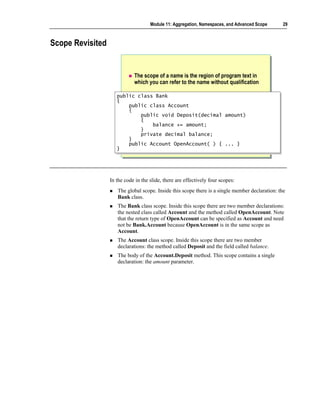
                  In the code in the slide, there are effectively four scopes:
                     The global scope. Inside this scope there is a single member declaration: the
                     Bank class.
                     The Bank class scope. Inside this scope there are two member declarations:
                     the nested class called Account and the method called OpenAccount. Note
                     that the return type of OpenAccount can be specified as Account and need
                     not be Bank.Account because OpenAccount is in the same scope as
                     Account.
                     The Account class scope. Inside this scope there are two member
                     declarations: the method called Deposit and the field called balance.
                     The body of the Account.Deposit method. This scope contains a single
                     declaration: the amount parameter.
30   Module 11: Aggregation, Namespaces, and Advanced Scope


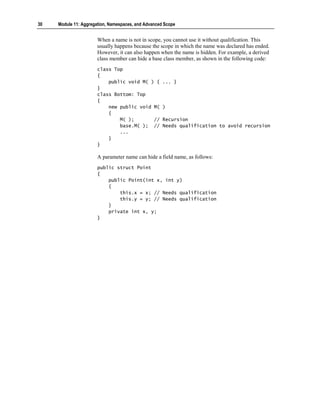
                       When a name is not in scope, you cannot use it without qualification. This
                       usually happens because the scope in which the name was declared has ended.
                       However, it can also happen when the name is hidden. For example, a derived
                       class member can hide a base class member, as shown in the following code:
                       class Top
                       {
                           public void M( ) {        ... }
                       }
                       class Bottom: Top
                       {
                           new public void M(        )
                           {
                               M( );       //        Recursion
                               base.M( ); //         Needs qualification to avoid recursion
                               ...
                           }
                       }

                       A parameter name can hide a field name, as follows:
                       public struct Point
                       {
                           public Point(int x, int y)
                           {
                               this.x = x; // Needs qualification
                               this.y = y; // Needs qualification
                           }
                           private int x, y;
                       }
Module 11: Aggregation, Namespaces, and Advanced Scope   31


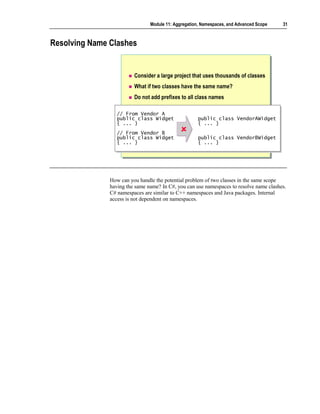
Resolving Name Clashes


                         Consider a large project that uses thousands of classes
                         What if two classes have the same name?
                         Do not add prefixes to all class names

                  // From Vendor A
                   // From Vendor A
                  public class Widget
                   public class Widget                public class VendorAWidget
                                                       public class VendorAWidget
                  { ... }
                   { ... }                            { ... }
                                                       { ... }
                  // From Vendor B
                   // From Vendor B
                  public class Widget
                   public class Widget                public class VendorBWidget
                                                       public class VendorBWidget
                  { ... }
                   { ... }                            { ... }
                                                       { ... }


               How can you handle the potential problem of two classes in the same scope
               having the same name? In C#, you can use namespaces to resolve name clashes.
               C# namespaces are similar to C++ namespaces and Java packages. Internal
               access is not dependent on namespaces.
32   Module 11: Aggregation, Namespaces, and Advanced Scope


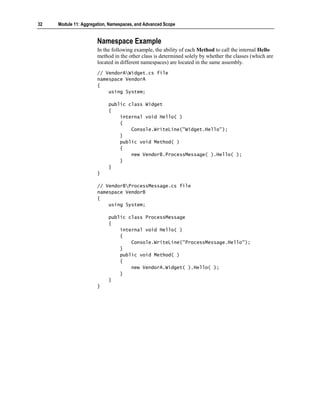
                       Namespace Example
                       In the following example, the ability of each Method to call the internal Hello
                       method in the other class is determined solely by whether the classes (which are
                       located in different namespaces) are located in the same assembly.
                       // VendorAWidget.cs file
                       namespace VendorA
                       {
                           using System;

                            public class Widget
                            {
                                internal void Hello( )
                                {
                                    Console.WriteLine("Widget.Hello");
                                }
                                public void Method( )
                                {
                                    new VendorB.ProcessMessage( ).Hello( );
                                }
                            }
                       }

                       // VendorBProcessMessage.cs file
                       namespace VendorB
                       {
                           using System;

                            public class ProcessMessage
                            {
                                internal void Hello( )
                                {
                                    Console.WriteLine("ProcessMessage.Hello");
                                }
                                public void Method( )
                                {
                                    new VendorA.Widget( ).Hello( );
                                }
                            }
                       }
Module 11: Aggregation, Namespaces, and Advanced Scope          33


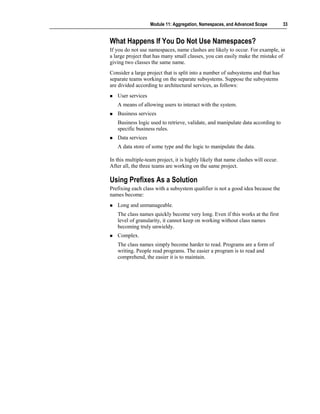
What Happens If You Do Not Use Namespaces?
If you do not use namespaces, name clashes are likely to occur. For example, in
a large project that has many small classes, you can easily make the mistake of
giving two classes the same name.
Consider a large project that is split into a number of subsystems and that has
separate teams working on the separate subsystems. Suppose the subsystems
are divided according to architectural services, as follows:
   User services
   A means of allowing users to interact with the system.
   Business services
   Business logic used to retrieve, validate, and manipulate data according to
   specific business rules.
   Data services
   A data store of some type and the logic to manipulate the data.

In this multiple-team project, it is highly likely that name clashes will occur.
After all, the three teams are working on the same project.

Using Prefixes As a Solution
Prefixing each class with a subsystem qualifier is not a good idea because the
names become:
   Long and unmanageable.
   The class names quickly become very long. Even if this works at the first
   level of granularity, it cannot keep on working without class names
   becoming truly unwieldy.
   Complex.
   The class names simply become harder to read. Programs are a form of
   writing. People read programs. The easier a program is to read and
   comprehend, the easier it is to maintain.
34   Module 11: Aggregation, Namespaces, and Advanced Scope


Declaring Namespaces

                          namespace VendorA
                           namespace VendorA                       namespace VendorB
                                                                    namespace VendorB
                          {{                                       {{
                              public class Widget
                               public class Widget                     public class Widget
                                                                        public class Widget
                              { ... }
                               { ... }                                 { ... }
                                                                        { ... }
                          }}                                       }}


                          namespace Microsoft
                           namespace Microsoft                namespace Microsoft.Office
                                                               namespace Microsoft.Office
                          {{                                  {{
                             namespace Office
                              namespace Office
                             {{
                                ...
                                 ...    shorthand
                                        shorthand
                             }}
                          }}                                  }}


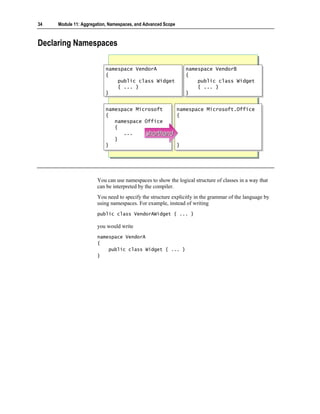
                       You can use namespaces to show the logical structure of classes in a way that
                       can be interpreted by the compiler.
                       You need to specify the structure explicitly in the grammar of the language by
                       using namespaces. For example, instead of writing
                       public class VendorAWidget { ... }

                       you would write
                       namespace VendorA
                       {
                           public class Widget { ... }
                       }
Module 11: Aggregation, Namespaces, and Advanced Scope         35


Namespace Scope
A namespace, unlike a class, is an open scope. In other words, when you close a
namespace, you are allowed to subsequently reopen it, even in a different
source file, as shown in the following code:
// widget.cs
namespace VendorA
{
    public class Widget { ... }
}

// ProcessMessage.cs
namespace VendorA
{
    public class ProcessMessage { ... }
}

There are two important consequences of this:
   Multiple source files
   Collaborating classes that are located in a common namespace can still be
   implemented across several physical source files (typically one source file
   per class) rather than in one large source file. Compare this to nested
   classes, for which the definition of all nested classes and the outer class
   must be in the same physical source file.
   Extensible namespaces
   A new class can be added to a namespace without affecting any of the
   classes already inside the namespace. In contrast, adding a new method to
   an existing class requires the whole class to be recompiled.

Nesting Namespaces
You can nest a namespace inside another namespace, thus reflecting multiple
levels of organization, as follows:
namespace Outer
{
    namespace Inner
    {
        class Widget { ... }
    }
}

This example is somewhat verbose, and takes a lot of white space, braces, and
indentation. In C++, this syntax must be used. In C#, you can simplify it as
follows:
namespace Outer.Inner
{
    class Widget { ... }
}
36   Module 11: Aggregation, Namespaces, and Advanced Scope


                       Access Levels for Namespaces
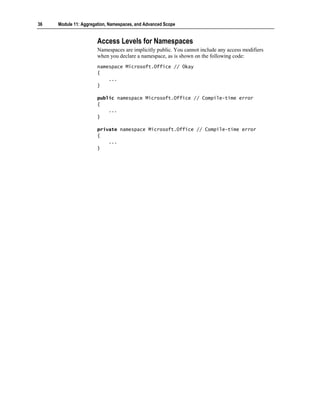
                       Namespaces are implicitly public. You cannot include any access modifiers
                       when you declare a namespace, as is shown on the following code:
                       namespace Microsoft.Office // Okay
                       {
                           ...
                       }

                       public namespace Microsoft.Office // Compile-time error
                       {
                           ...
                       }

                       private namespace Microsoft.Office // Compile-time error
                       {
                           ...
                       }
Module 11: Aggregation, Namespaces, and Advanced Scope        37


Fully Qualified Names


                           A fully qualified class name includes its namespace
                           Unqualified class names can only be used in scope
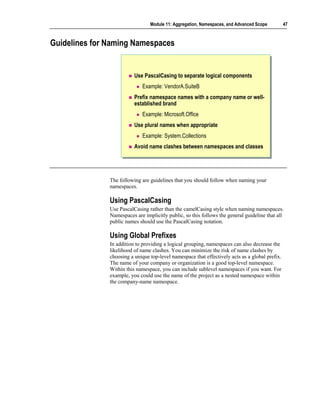
                   namespace VendorA
                    namespace VendorA
                   {{
                       public class Widget { ... }
                        public class Widget { ... }
                       ...
                        ...
                   }}
                   class Application
                    class Application
                   {{
                       static void Main( )
                        static void Main( )
                       {{
                            Widget w = new Widget( );
                            Widget w = new Widget( );
                            VendorA.Widget w = new VendorA.Widget( );
                            VendorA.Widget w = new VendorA.Widget( );
                       }}
                   }}


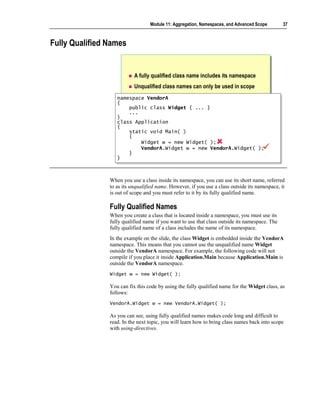
                When you use a class inside its namespace, you can use its short name, referred
                to as its unqualified name. However, if you use a class outside its namespace, it
                is out of scope and you must refer to it by its fully qualified name.

                Fully Qualified Names
                When you create a class that is located inside a namespace, you must use its
                fully qualified name if you want to use that class outside its namespace. The
                fully qualified name of a class includes the name of its namespace.
                In the example on the slide, the class Widget is embedded inside the VendorA
                namespace. This means that you cannot use the unqualified name Widget
                outside the VendorA namespace. For example, the following code will not
                compile if you place it inside Application.Main because Application.Main is
                outside the VendorA namespace.
                Widget w = new Widget( );

                You can fix this code by using the fully qualified name for the Widget class, as
                follows:
                VendorA.Widget w = new VendorA.Widget( );

                As you can see, using fully qualified names makes code long and difficult to
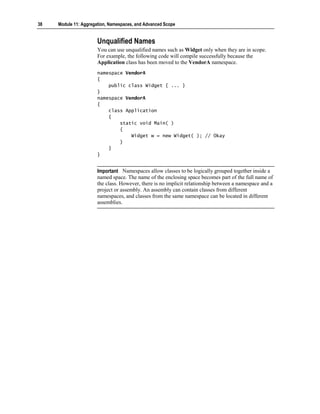
                read. In the next topic, you will learn how to bring class names back into scope
                with using-directives.
38   Module 11: Aggregation, Namespaces, and Advanced Scope


                       Unqualified Names
                       You can use unqualified names such as Widget only when they are in scope.
                       For example, the following code will compile successfully because the
                       Application class has been moved to the VendorA namespace.
                       namespace VendorA
                       {
                           public class Widget { ... }
                       }
                       namespace VendorA
                       {
                           class Application
                           {
                               static void Main( )
                               {
                                   Widget w = new Widget( ); // Okay
                               }
                           }
                       }


                       Important Namespaces allow classes to be logically grouped together inside a
                       named space. The name of the enclosing space becomes part of the full name of
                       the class. However, there is no implicit relationship between a namespace and a
                       project or assembly. An assembly can contain classes from different
                       namespaces, and classes from the same namespace can be located in different
                       assemblies.
Module 11: Aggregation, Namespaces, and Advanced Scope       39


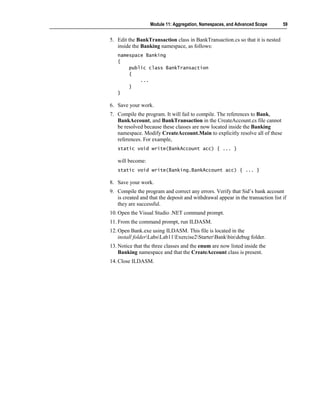
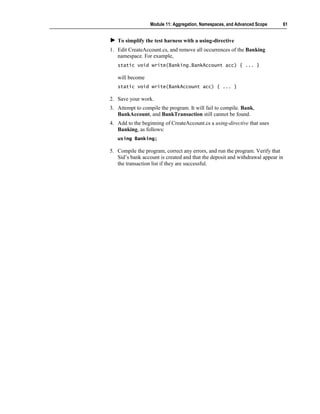
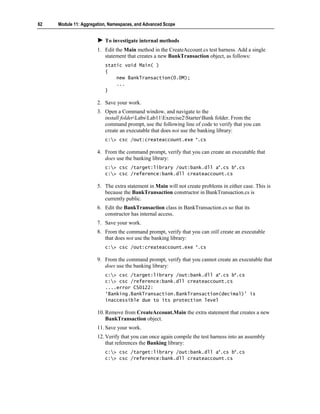
Declaring using-namespace-directives


                           Effectively brings names back into scope
                   namespace VendorA.SuiteB
                    namespace VendorA.SuiteB
                   {{
                       public class Widget { ... }
                        public class Widget { ... }
                   }}
                   using VendorA.SuiteB;
                   using VendorA.SuiteB;
                   class Application
                    class Application
                   {{
                       static void Main( )
                        static void Main( )
                       {{
                           Widget w = new Widget( );
                            Widget w = new Widget( );
                       }}
                   }}


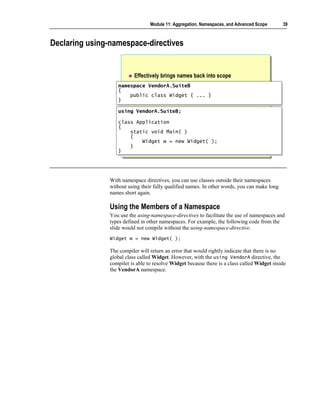
                With namespace directives, you can use classes outside their namespaces
                without using their fully qualified names. In other words, you can make long
                names short again.

                Using the Members of a Namespace
                You use the using-namespace-directives to facilitate the use of namespaces and
                types defined in other namespaces. For example, the following code from the
                slide would not compile without the using-namespace-directive.
                Widget w = new Widget( );

                The compiler will return an error that would rightly indicate that there is no
                global class called Widget. However, with the using VendorA directive, the
                compiler is able to resolve Widget because there is a class called Widget inside
                the VendorA namespace.
40   Module 11: Aggregation, Namespaces, and Advanced Scope


                       Nested Namespaces
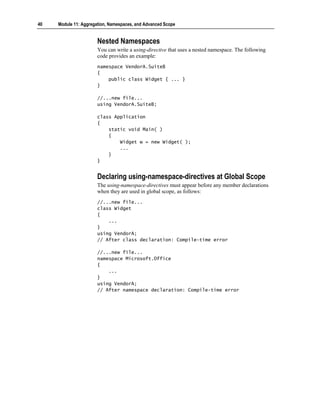
                       You can write a using-directive that uses a nested namespace. The following
                       code provides an example:
                       namespace VendorA.SuiteB
                       {
                           public class Widget { ... }
                       }

                       //...new file...
                       using VendorA.SuiteB;

                       class Application
                       {
                           static void Main( )
                           {
                               Widget w = new Widget( );
                               ...
                           }
                       }


                       Declaring using-namespace-directives at Global Scope
                       The using-namespace-directives must appear before any member declarations
                       when they are used in global scope, as follows:
                       //...new file...
                       class Widget
                       {
                           ...
                       }
                       using VendorA;
                       // After class declaration: Compile-time error

                       //...new file...
                       namespace Microsoft.Office
                       {
                           ...
                       }
                       using VendorA;
                       // After namespace declaration: Compile-time error
Module 11: Aggregation, Namespaces, and Advanced Scope        41


Declaring using-directives Inside a Namespace
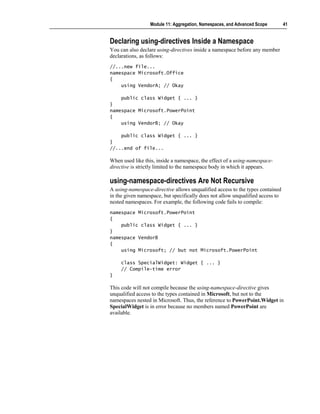
You can also declare using-directives inside a namespace before any member
declarations, as follows:
//...new file...
namespace Microsoft.Office
{
    using VendorA; // Okay

    public class Widget { ... }
}
namespace Microsoft.PowerPoint
{
    using VendorB; // Okay

    public class Widget { ... }
}
//...end of file...

When used like this, inside a namespace, the effect of a using-namespace-
directive is strictly limited to the namespace body in which it appears.

using-namespace-directives Are Not Recursive
A using-namespace-directive allows unqualified access to the types contained
in the given namespace, but specifically does not allow unqualified access to
nested namespaces. For example, the following code fails to compile:
namespace Microsoft.PowerPoint
{
    public class Widget { ... }
}
namespace VendorB
{
    using Microsoft; // but not Microsoft.PowerPoint

     class SpecialWidget: Widget { ... }
     // Compile-time error
}

This code will not compile because the using-namespace-directive gives
unqualified access to the types contained in Microsoft, but not to the
namespaces nested in Microsoft. Thus, the reference to PowerPoint.Widget in
SpecialWidget is in error because no members named PowerPoint are
available.
42   Module 11: Aggregation, Namespaces, and Advanced Scope


                       Ambiguous Names
                       Consider the following example:
                       namespace VendorA
                       {
                           public class Widget { ... }
                       }
                       namespace VendorB
                       {
                           public class Widget { ... }
                       }
                       namespace Test
                       {
                           using VendorA;
                           using VendorB;

                            class Application
                            {
                                static void Main( )
                                {
                                    Widget w = new Widget( ); // Compile-time error
                                    ...
                                }
                            }
                       }

                       In this case, the compiler will return a compile-time error because it cannot
                       resolve Widget. The problem is that there is a Widget class inside both
                       namespaces, and both namespaces have using-directives. The compiler will not
                       select Widget from VendorA rather than VendorB because A comes before B
                       in the alphabet.
                       Note however, that the two Widget classes only clash when there is an attempt
                       to actually use the unqualified name Widget. You can resolve the problem by
                       using a fully qualified name for Widget, thus associating it with either
                       VendorA or VendorB. You can also rewrite the code without using the name
                       Widget at all, as follows, and there would be no error:
                       namespace Test
                       {
                           using VendorA;
                           using VendorB;

                            // Okay. No error here.

                            class Application
                            {
                                static void Main(string[ ] args)
                                {
                                    VendorA.Widget w = new VendorA.Widget( );
                                }
                            }
                       }
Module 11: Aggregation, Namespaces, and Advanced Scope         43


Declaring using-alias-directives

                            Creates an alias for a deeply nested namespace or type

                   namespace VendorA.SuiteB
                    namespace VendorA.SuiteB
                   {{
                        public class Widget { ... }
                        public class Widget { ... }
                   }}

                   using Widget = VendorA.SuiteB.Widget;
                   using Widget = VendorA.SuiteB.Widget;
                   class Application
                    class Application
                   {{
                        static void Main( )
                        static void Main( )
                        {
                        {
                            Widget w = new Widget( );
                            Widget w = new Widget( );
                        }
                        }
                   }}


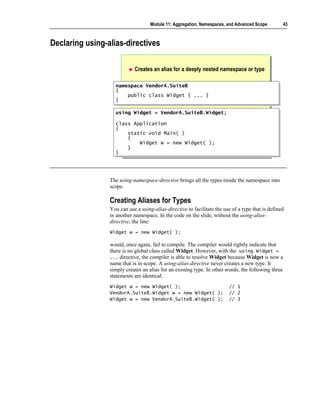
                 The using-namespace-directive brings all the types inside the namespace into
                 scope.

                 Creating Aliases for Types
                 You can use a using-alias-directive to facilitate the use of a type that is defined
                 in another namespace. In the code on the slide, without the using-alias-
                 directive, the line:
                 Widget w = new Widget( );

                 would, once again, fail to compile. The compiler would rightly indicate that
                 there is no global class called Widget. However, with the using Widget =
                 ... directive, the compiler is able to resolve Widget because Widget is now a
                 name that is in scope. A using-alias-directive never creates a new type. It
                 simply creates an alias for an existing type. In other words, the following three
                 statements are identical:
                 Widget w = new Widget( );                               // 1
                 VendorA.SuiteB.Widget w = new Widget( );                // 2
                 Widget w = new VendorA.SuiteB.Widget( );                // 3
44   Module 11: Aggregation, Namespaces, and Advanced Scope


                       Creating Aliases for Namespaces
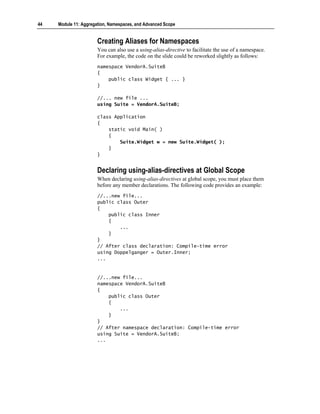
                       You can also use a using-alias-directive to facilitate the use of a namespace.
                       For example, the code on the slide could be reworked slightly as follows:
                       namespace VendorA.SuiteB
                       {
                           public class Widget { ... }
                       }

                       //... new file ...
                       using Suite = VendorA.SuiteB;

                       class Application
                       {
                           static void Main( )
                           {
                               Suite.Widget w = new Suite.Widget( );
                           }
                       }


                       Declaring using-alias-directives at Global Scope
                       When declaring using-alias-directives at global scope, you must place them
                       before any member declarations. The following code provides an example:
                       //...new file...
                       public class Outer
                       {
                           public class Inner
                           {
                               ...
                           }
                       }
                       // After class declaration: Compile-time error
                       using Doppelganger = Outer.Inner;
                       ...


                       //...new file...
                       namespace VendorA.SuiteB
                       {
                           public class Outer
                           {
                               ...
                           }
                       }
                       // After namespace declaration: Compile-time error
                       using Suite = VendorA.SuiteB;
                       ...
Module 11: Aggregation, Namespaces, and Advanced Scope         45


Declaring using-alias-directives Inside a Namespace
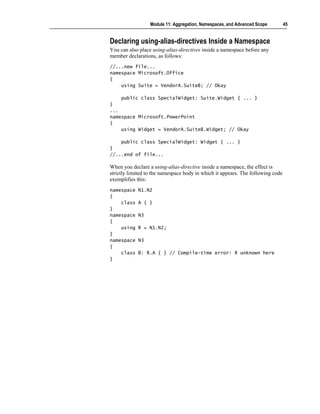
You can also place using-alias-directives inside a namespace before any
member declarations, as follows:
//...new file...
namespace Microsoft.Office
{
    using Suite = VendorA.SuiteB; // Okay

    public class SpecialWidget: Suite.Widget { ... }
}
...
namespace Microsoft.PowerPoint
{
    using Widget = VendorA.SuiteB.Widget; // Okay

    public class SpecialWidget: Widget { ... }
}
//...end of file...

When you declare a using-alias-directive inside a namespace, the effect is
strictly limited to the namespace body in which it appears. The following code
exemplifies this:
namespace   N1.N2
{
    class   A { }
}
namespace   N3
{
    using   R = N1.N2;
}
namespace   N3
{
    class   B: R.A { } // Compile-time error: R unknown here
}
46   Module 11: Aggregation, Namespaces, and Advanced Scope


                       Mixing using-directives
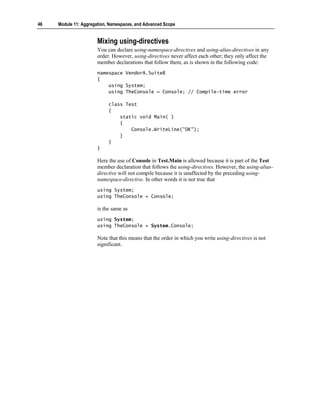
                       You can declare using-namespace-directives and using-alias-directives in any
                       order. However, using-directives never affect each other; they only affect the
                       member declarations that follow them, as is shown in the following code:
                       namespace VendorA.SuiteB
                       {
                           using System;
                           using TheConsole = Console; // Compile-time error

                            class Test
                            {
                                static void Main( )
                                {
                                    Console.WriteLine("OK");
                                }
                            }
                       }

                       Here the use of Console in Test.Main is allowed because it is part of the Test
                       member declaration that follows the using-directives. However, the using-alias-
                       directive will not compile because it is unaffected by the preceding using-
                       namespace-directive. In other words it is not true that
                       using System;
                       using TheConsole = Console;

                       is the same as
                       using System;
                       using TheConsole = System.Console;

                       Note that this means that the order in which you write using-directives is not
                       significant.
Module 11: Aggregation, Namespaces, and Advanced Scope          47


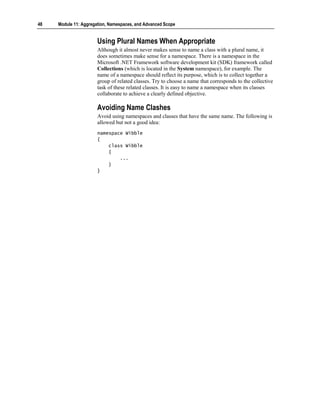
Guidelines for Naming Namespaces


                          Use PascalCasing to separate logical components
                             Example: VendorA.SuiteB
                          Prefix namespace names with a company name or well-
                          established brand
                             Example: Microsoft.Office
                          Use plural names when appropriate
                             Example: System.Collections
                          Avoid name clashes between namespaces and classes


               The following are guidelines that you should follow when naming your
               namespaces.

               Using PascalCasing
               Use PascalCasing rather than the camelCasing style when naming namespaces.
               Namespaces are implicitly public, so this follows the general guideline that all
               public names should use the PascalCasing notation.

               Using Global Prefixes
               In addition to providing a logical grouping, namespaces can also decrease the
               likelihood of name clashes. You can minimize the risk of name clashes by
               choosing a unique top-level namespace that effectively acts as a global prefix.
               The name of your company or organization is a good top-level namespace.
               Within this namespace, you can include sublevel namespaces if you want. For
               example, you could use the name of the project as a nested namespace within
               the company-name namespace.
48   Module 11: Aggregation, Namespaces, and Advanced Scope


                       Using Plural Names When Appropriate
                       Although it almost never makes sense to name a class with a plural name, it
                       does sometimes make sense for a namespace. There is a namespace in the
                       Microsoft .NET Framework software development kit (SDK) framework called
                       Collections (which is located in the System namespace), for example. The
                       name of a namespace should reflect its purpose, which is to collect together a
                       group of related classes. Try to choose a name that corresponds to the collective
                       task of these related classes. It is easy to name a namespace when its classes
                       collaborate to achieve a clearly defined objective.

                       Avoiding Name Clashes
                       Avoid using namespaces and classes that have the same name. The following is
                       allowed but not a good idea:
                       namespace Wibble
                       {
                           class Wibble
                           {
                               ...
                           }
                       }
Module 11: Aggregation, Namespaces, and Advanced Scope     49


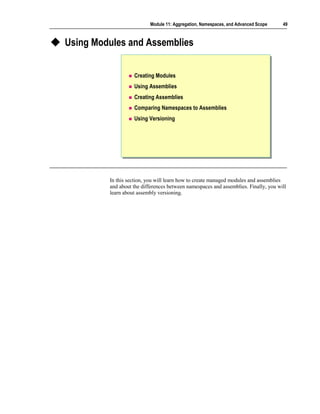
Using Modules and Assemblies


                   Creating Modules
                   Using Assemblies
                   Creating Assemblies
                   Comparing Namespaces to Assemblies
                   Using Versioning


         In this section, you will learn how to create managed modules and assemblies
         and about the differences between namespaces and assemblies. Finally, you will
         learn about assembly versioning.
50   Module 11: Aggregation, Namespaces, and Advanced Scope


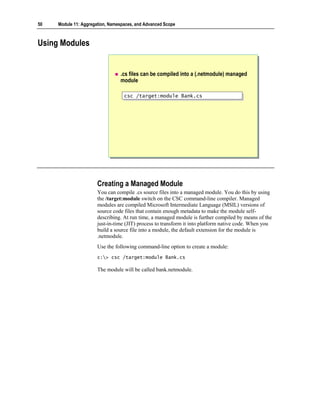
Using Modules


                                 .cs files can be compiled into a (.netmodule) managed
                                 module

                                   csc /target:module Bank.cs
                                   csc /target:module Bank.cs


                       Creating a Managed Module
                       You can compile .cs source files into a managed module. You do this by using
                       the /target:module switch on the CSC command-line compiler. Managed
                       modules are compiled Microsoft Intermediate Language (MSIL) versions of
                       source code files that contain enough metadata to make the module self-
                       describing. At run time, a managed module is further compiled by means of the
                       just-in-time (JIT) process to transform it into platform native code. When you
                       build a source file into a module, the default extension for the module is
                       .netmodule.
                       Use the following command-line option to create a module:
                       c:> csc /target:module Bank.cs

                       The module will be called bank.netmodule.
Module 11: Aggregation, Namespaces, and Advanced Scope        51


Using Assemblies


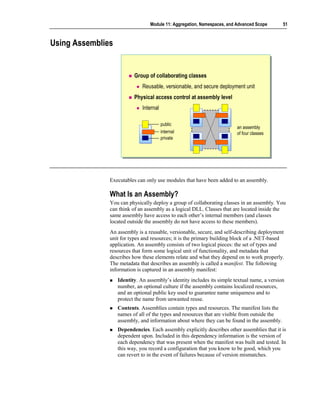
                          Group of collaborating classes
                              Reusable, versionable, and secure deployment unit
                          Physical access control at assembly level
                              Internal

                                         public
                                                                         an assembly
                                         internal                        of four classes
                                         private


               Executables can only use modules that have been added to an assembly.

               What Is an Assembly?
               You can physically deploy a group of collaborating classes in an assembly. You
               can think of an assembly as a logical DLL. Classes that are located inside the
               same assembly have access to each other’s internal members (and classes
               located outside the assembly do not have access to these members).
               An assembly is a reusable, versionable, secure, and self-describing deployment
               unit for types and resources; it is the primary building block of a .NET-based
               application. An assembly consists of two logical pieces: the set of types and
               resources that form some logical unit of functionality, and metadata that
               describes how these elements relate and what they depend on to work properly.
               The metadata that describes an assembly is called a manifest. The following
               information is captured in an assembly manifest:
                   Identity. An assembly’s identity includes its simple textual name, a version
                   number, an optional culture if the assembly contains localized resources,
                   and an optional public key used to guarantee name uniqueness and to
                   protect the name from unwanted reuse.
                   Contents. Assemblies contain types and resources. The manifest lists the
                   names of all of the types and resources that are visible from outside the
                   assembly, and information about where they can be found in the assembly.
                   Dependencies. Each assembly explicitly describes other assemblies that it is
                   dependent upon. Included in this dependency information is the version of
                   each dependency that was present when the manifest was built and tested. In
                   this way, you record a configuration that you know to be good, which you
                   can revert to in the event of failures because of version mismatches.
52   Module 11: Aggregation, Namespaces, and Advanced Scope


                       In the simplest case, an assembly is a single-file assembly. This contains the
                       code, resources, type metadata, and assembly metadata (manifest). In the more
                       general case, however, assemblies consist of a number of files. In this case, the
                       assembly manifest either exists as a stand-alone file or is contained in one of the
                       PE files that contain types, resources, or a combination of the two.

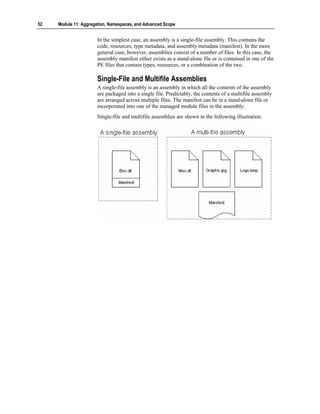
                       Single-File and Multifile Assemblies
                       A single-file assembly is an assembly in which all the contents of the assembly
                       are packaged into a single file. Predictably, the contents of a multifile assembly
                       are arranged across multiple files. The manifest can be in a stand-alone file or
                       incorporated into one of the managed module files in the assembly.
                       Single-file and multifile assemblies are shown in the following illustration.
Module 11: Aggregation, Namespaces, and Advanced Scope             53


Creating Assemblies

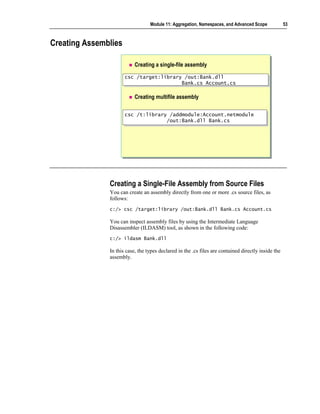
                           Creating a single-file assembly

                      csc /target:library /out:Bank.dll
                      csc /target:library /out:Bank.dll
                                         Bank.cs Account.cs
                                         Bank.cs Account.cs

                           Creating multifile assembly

                      csc /t:library /addmodule:Account.netmodule
                      csc /t:library /addmodule:Account.netmodule
                                    /out:Bank.dll Bank.cs
                                    /out:Bank.dll Bank.cs


               Creating a Single-File Assembly from Source Files
               You can create an assembly directly from one or more .cs source files, as
               follows:
               c:/> csc /target:library /out:Bank.dll Bank.cs Account.cs

               You can inspect assembly files by using the Intermediate Language
               Disassembler (ILDASM) tool, as shown in the following code:
               c:/> ildasm Bank.dll

               In this case, the types declared in the .cs files are contained directly inside the
               assembly.
54   Module 11: Aggregation, Namespaces, and Advanced Scope


                       Creating a MultiFile Assembly
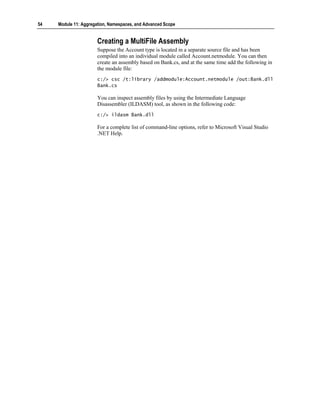
                       Suppose the Account type is located in a separate source file and has been
                       compiled into an individual module called Account.netmodule. You can then
                       create an assembly based on Bank.cs, and at the same time add the following in
                       the module file:
                       c:/> csc /t:library /addmodule:Account.netmodule /out:Bank.dll
                       Bank.cs

                       You can inspect assembly files by using the Intermediate Language
                       Disassembler (ILDASM) tool, as shown in the following code:
                       c:/> ildasm Bank.dll

                       For a complete list of command-line options, refer to Microsoft Visual Studio
                       .NET Help.
Module 11: Aggregation, Namespaces, and Advanced Scope          55


Comparing Namespaces to Assemblies


                         Namespace: logical naming mechanism
                            Classes from one namespace can reside in
                            many assemblies
                            Classes from many namespaces can reside in
                            one assembly
                         Assembly: physical grouping mechanism
                            Assembly MSIL and manifest are contained directly
                            Assembly modules and resources can be external links


              A namespace is a logical compile-time mechanism. Its purpose is to provide
              logical structure to the names of source code entities. Namespaces are not run-
              time entities.
              An assembly is a physical run-time mechanism. Its purpose is to provide a
              physical structure to the run-time components that make up an executable.

              Comparing Namespaces to Assemblies
              You can deploy classes that are located in the same namespace into different
              assemblies. You can deploy classes that are located in different namespaces into
              one assembly. However, it is a good idea to maintain as close a logical-physical
              correspondence as possible.
              Namespaces and assemblies are alike insofar as the physical locations of their
              elements:
                 The elements of a namespace do not need to physically reside in a single
                 source file. The elements of a namespace can (and, as a broad principle,
                 should) be maintained in separate source files.
                 The element references by an assembly do not need to reside directly inside
                 the assembly. As you have seen, the modules inside a namespace are not
                 physically contained inside the assembly. Instead, the assembly records a
                 named link to the external module.
56   Module 11: Aggregation, Namespaces, and Advanced Scope


Using Versioning


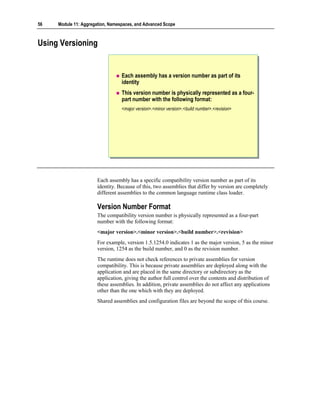
                                  Each assembly has a version number as part of its
                                  identity
                                  This version number is physically represented as a four-
                                  part number with the following format:
                                  <major version>.<minor version>.<build number>.<revision>


                       Each assembly has a specific compatibility version number as part of its
                       identity. Because of this, two assemblies that differ by version are completely
                       different assemblies to the common language runtime class loader.

                       Version Number Format
                       The compatibility version number is physically represented as a four-part
                       number with the following format:
                       <major version>.<minor version>.<build number>.<revision>
                       For example, version 1.5.1254.0 indicates 1 as the major version, 5 as the minor
                       version, 1254 as the build number, and 0 as the revision number.
                       The runtime does not check references to private assemblies for version
                       compatibility. This is because private assemblies are deployed along with the
                       application and are placed in the same directory or subdirectory as the
                       application, giving the author full control over the contents and distribution of
                       these assemblies. In addition, private assemblies do not affect any applications
                       other than the one which with they are deployed.
                       Shared assemblies and configuration files are beyond the scope of this course.
Module 11: Aggregation, Namespaces, and Advanced Scope   57


Lab 11.2: Using Namespaces and Assemblies


             Objectives
             After completing this lab, you will be able to:
                Use aggregation to group objects in a hierarchy.
                Organize classes into namespaces.

             Prerequisites
             Before working on this lab, you must be able to:
                Create classes.
                Use constructors and destructors.
                Use private and public access modifiers.

             Estimated time to complete this lab: 30 minutes
58   Module 11: Aggregation, Namespaces, and Advanced Scope


Exercise 1
Organizing Classes
                       In this exercise, you will organize classes into a Banking namespace and create
                       and reference an assembly. To do this, you will:
                       1. Place the AccountType enum and the Bank, BankAccount, and
                          BankTransaction classes into the Banking namespace, and compile it as a
                          library.
                       2. Modify the test harness. Initially, it will refer to the classes by using fully
                          qualified names. You will then modify it with an appropriate using-
                          directive.
                       3. Compile the test harness into an assembly that references the Banking
                          library.
                       4. Use the ILDASM tool to verify that the test harness .exe refers to the
                          Banking DLL and does not actually contain the Bank and BankAccount
                          classes itself.

                          To place all of the classes into the Banking namespace
                       1. Open the Bank.sln project in the
                          install folderLabsLab11Exercise 2StarterBank folder.
                       2. Edit the AccountType enum in AccountType.cs so that it is nested inside
                          the Banking namespace, as follows:
                          namespace Banking
                          {
                              public enum AccountType { ... }
                          }

                       3. Edit the Bank class in Bank.cs so that it is nested inside the Banking
                          namespace, as follows:
                          namespace Banking
                          {
                              public class Bank
                              {
                                  ...
                              }
                          }

                       4. Edit the BankAccount class in BankAccount.cs so that it is nested inside
                          the Banking namespace, as follows:
                          namespace Banking
                          {
                              sealed public class BankAccount
                              {
                                  ...
                              }
                          }
Module 11: Aggregation, Namespaces, and Advanced Scope        59


5. Edit the BankTransaction class in BankTransaction.cs so that it is nested
   inside the Banking namespace, as follows:
   namespace Banking
   {
       public class BankTransaction
       {
           ...
       }
   }

6. Save your work.
7. Compile the program. It will fail to compile. The references to Bank,
   BankAccount, and BankTransaction in the CreateAccount.cs file cannot
   be resolved because these classes are now located inside the Banking
   namespace. Modify CreateAccount.Main to explicitly resolve all of these
   references. For example,
   static void write(BankAccount acc) { ... }

   will become:
   static void write(Banking.BankAccount acc) { ... }

8. Save your work.
9. Compile the program and correct any errors. Verify that Sid’s bank account
   is created and that the deposit and withdrawal appear in the transaction list if
   they are successful.
10. Open the Visual Studio .NET command prompt.
11. From the command prompt, run ILDASM.
12. Open Bank.exe using ILDASM. This file is located in the
    install folderLabsLab11Exercise2StarterBankbindebug folder.
13. Notice that the three classes and the enum are now listed inside the
    Banking namespace and that the CreateAccount class is present.
14. Close ILDASM.
60   Module 11: Aggregation, Namespaces, and Advanced Scope


                          To create and use a Banking library
                       1. Open a Visual Studio .NET command prompt, and navigate to the
                          install folderLabsLab11Exercise2StarterBank folder. From the
                          command prompt, create the banking library as follows:
                          c:> csc /target:library /out:bank.dll a*.cs b*.cs
                          c:> dir
                          ...
                          bank.dll
                          ...

                       2. From the command prompt, run ILDASM, passing the name of the DLL as
                          a command-line parameter, as follows:
                          c:> ildasm bank.dll

                       3. Notice that the three “Bank*” classes and the enum are still listed inside the
                          Banking namespace, but the CreateAccount class is no longer present.
                          Close ILDASM.
                       4. From the command prompt, compile the test harness inside
                          CreateAccount.cs into an assembly that references the Banking library
                          bank.dll, as follows:
                          c:> csc /reference:bank.dll createaccount.cs
                          c:> dir
                          ...
                          createaccount.exe
                          ...

                       5. From the command prompt, run ILDASM, passing the name of the
                          executable as a command-line parameter, as follows:
                          c:> ildasm createaccount.exe

                       6. Notice that the four classes and the enum are no longer part of
                          createaccount.exe. Double-click the MANIFEST item in ILDASM to open
                          the Manifest window. Look at the manifest. Notice that the executable
                          references, but does not contain, the banking library:
                          .assembly extern bank

                       7. Close ILDASM.
Module 11: Aggregation, Namespaces, and Advanced Scope     61


   To simplify the test harness with a using-directive
1. Edit CreateAccount.cs, and remove all occurrences of the Banking
   namespace. For example,
   static void write(Banking.BankAccount acc) { ... }

   will become
   static void write(BankAccount acc) { ... }

2. Save your work.
3. Attempt to compile the program. It will fail to compile. Bank,
   BankAccount, and BankTransaction still cannot be found.
4. Add to the beginning of CreateAccount.cs a using-directive that uses
   Banking, as follows:
   using Banking;

5. Compile the program, correct any errors, and run the program. Verify that
   Sid’s bank account is created and that the deposit and withdrawal appear in
   the transaction list if they are successful.
62   Module 11: Aggregation, Namespaces, and Advanced Scope


                          To investigate internal methods
                       1. Edit the Main method in the CreateAccount.cs test harness. Add a single
                          statement that creates a new BankTransaction object, as follows:
                          static void Main( )
                          {
                              new BankTransaction(0.0M);
                              ...
                          }

                       2. Save your work.
                       3. Open a Command window, and navigate to the
                          install folderLabsLab11Exercise2StarterBank folder. From the
                          command prompt, use the following line of code to verify that you can
                          create an executable that does not use the banking library:
                          c:> csc /out:createaccount.exe *.cs

                       4. From the command prompt, verify that you can create an executable that
                          does use the banking library:
                          c:> csc /target:library /out:bank.dll a*.cs b*.cs
                          c:> csc /reference:bank.dll createaccount.cs

                       5. The extra statement in Main will not create problems in either case. This is
                          because the BankTransaction constructor in BankTransaction.cs is
                          currently public.
                       6. Edit the BankTransaction class in BankTransaction.cs so that its
                          constructor has internal access.
                       7. Save your work.
                       8. From the command prompt, verify that you can still create an executable
                          that does not use the banking library:
                          c:> csc /out:createaccount.exe *.cs

                       9. From the command prompt, verify that you cannot create an executable that
                          does use the banking library:
                          c:> csc /target:library /out:bank.dll a*.cs b*.cs
                          c:> csc /reference:bank.dll createaccount.cs
                          ....error CS0122:
                          ‘Banking.BankTransaction.BankTransaction(decimal)’ is
                          inaccessible due to its protection level

                       10. Remove from CreateAccount.Main the extra statement that creates a new
                           BankTransaction object.
                       11. Save your work.
                       12. Verify that you can once again compile the test harness into an assembly
                           that references the Banking library:
                          c:> csc /target:library /out:bank.dll a*.cs b*.cs
                          c:> csc /reference:bank.dll createaccount.cs
Module 11: Aggregation, Namespaces, and Advanced Scope        63


Review


                    Using Internal Classes, Methods, and Data
                    Using Aggregation
                    Using Namespaces
                    Using Modules and Assemblies


         1. Imagine that you have two .cs files. The alpha.cs file contains a class called
            Alpha that contains an internal method called Method. The beta.cs file
            contains a class called Beta that also contains an internal method called
            Method. Can Alpha.Method be called from Beta.Method, and vice versa?


         2. Is aggregation an object relationship or a class relationship?
64   Module 11: Aggregation, Namespaces, and Advanced Scope


                       3. Will the following code compile without error?
                          namespace    Outer.Inner
                          {
                              class    Wibble { }
                          }
                          namespace    Test
                          {
                              using    Outer.Inner;
                              class    SpecialWibble: Inner.Wibble { }
                          }


                       4. Can an executable program directly reference a managed module?

7494611

  • 1.
    Module 11: Aggregation, Namespaces, and Contents Advanced Scope Overview 1 Using Internal Classes, Methods, and Data 2 Using Aggregation 11 Lab 11.1: Specifying Internal Access 22 Using Namespaces 28 Using Modules and Assemblies 49 Lab 11.2: Using Namespaces and Assemblies 57 Review 63
  • 2.
    Information in thisdocument, including URL and other Internet Web site references, is subject to change without notice. Unless otherwise noted, the example companies, organizations, products, domain names, e-mail addresses, logos, people, places, and events depicted herein are fictitious, and no association with any real company, organization, product, domain name, e-mail address, logo, person, places or events is intended or should be inferred. Complying with all applicable copyright laws is the responsibility of the user. Without limiting the rights under copyright, no part of this document may be reproduced, stored in or introduced into a retrieval system, or transmitted in any form or by any means (electronic, mechanical, photocopying, recording, or otherwise), or for any purpose, without the express written permission of Microsoft Corporation. Microsoft may have patents, patent applications, trademarks, copyrights, or other intellectual property rights covering subject matter in this document. Except as expressly provided in any written license agreement from Microsoft, the furnishing of this document does not give you any license to these patents, trademarks, copyrights, or other intellectual property.  2001−2002 Microsoft Corporation. All rights reserved. Microsoft, MS-DOS, Windows, Windows NT, ActiveX, BizTalk, IntelliSense, JScript, MSDN, PowerPoint, SQL Server, Visual Basic, Visual C++, Visual C#, Visual J#, Visual Studio, and Win32 are either registered trademarks or trademarks of Microsoft Corporation in the U.S.A. and/or other countries. The names of actual companies and products mentioned herein may be the trademarks of their respective owners.
  • 3.
    Module 11: Aggregation,Namespaces, and Advanced Scope 1 Overview Using Internal Classes, Methods, and Data Using Aggregation Using Namespaces Using Modules and Assemblies In this module, you will learn how to use the internal access modifier to make code accessible at the component or assembly level. Internal access enables you to share access to classes and their members in a way that is similar to the friendship concept in C++ and Microsoft® Visual Basic®. You can specify an access level for a group of collaborating classes rather than for an individual class. Creating well-designed individual classes is an important part of object-oriented programming, but projects of any size require you to create logical and physical structures that are larger than individual classes. You will learn how to group classes together into larger, higher-level classes. You will also learn how to use namespaces to allow you to logically group classes together inside named spaces and to help you to create logical program structures beyond individual classes. Finally, you will learn how to use assemblies to physically group collaborating source files together into a reusable, versionable, and deployable unit. After completing this module, you will be able to: Use internal access to allow classes to have privileged access to each other. Use aggregation to implement powerful patterns such as Factories. Use namespaces to organize classes. Create simple modules and assemblies.
  • 4.
    2 Module 11: Aggregation, Namespaces, and Advanced Scope Using Internal Classes, Methods, and Data Why Use Internal Access? Internal Access Syntax Internal Access Example Access modifiers define the level of access that certain code has to class members such as methods and properties. You need to apply the desired access modifier to each member, otherwise the default access type is implied. You can apply one of four access modifiers, as shown in the following table. Access modifier Description Public A public member is accessible from anywhere. This is the least restrictive access modifier. Protected A protected member is accessible from within the class and all derived classes. No access from the outside is permitted. Private A private member is accessible only from within the same class. Not even derived classes can access it. Internal An internal member is accessible from within any part of the same Microsoft .NET-based assembly. You can think of it as public at the assembly level and private from outside the assembly. protected internal An internal protected member is accessible from within the current assembly or from within types derived from the containing class. In this section, you will learn how to use internal access to specify accessibility at the assembly level instead of at the class level. You will learn why internal access is necessary, and you will learn how to declare internal classes, internal methods, and internal data. Finally, you will see some examples that use internal access.
  • 5.
    Module 11: Aggregation,Namespaces, and Advanced Scope 3 Why Use Internal Access? Small objects are not very useful on their own Objects need to collaborate to form larger objects Access beyond the individual object is required public internal private Adding More Objects Creating well-designed object-oriented programs is not easy. Creating large well-designed object-oriented programs is harder still. The often-repeated advice is to make each entity in the program do and be one thing and one thing only, to make each entity small, focused, and easy to use. However, if you follow that advice, you will create many classes instead of just a few classes. It is this insight that helps to make sense of the initially confusing advice from Grady Booch: “If your system is too complex, add more objects.” Systems are complex if they are hard to understand. Large classes are harder to understand than smaller classes. Breaking a large class into several smaller classes helps to make the overall functionality easier to discern. Using Object Relationships to Form Object Collaborations The power of object orientation is in the relationships between the objects, not in the individual objects. Objects are built from other objects to form object collaborations. Collaborating objects form larger entities.
  • 6.
    4 Module 11: Aggregation, Namespaces, and Advanced Scope Limit Access to the Object Collaboration? There is, however, a potential problem. The public and private access modifiers do not fit seamlessly into the object collaboration model: Public access is unlimited. You sometimes need to limit access to just those objects in the collaboration. Private access is limited to the individual class. You sometimes need to extend access to only those objects in the collaboration. You often need an access level that is somewhere in between these two extremes to limit access to the various objects in a particular collaboration. Protected access is not a sufficient answer because the protected modifier specifies access at the class level in an inheritance hierarchy. In a well-designed object-oriented project, object relationships should be much more common than class relationship (inheritance). You need a mechanism that restricts access to the objects in a given object collaboration.
  • 7.
    Module 11: Aggregation,Namespaces, and Advanced Scope 5 Internal Access Comparing access levels Public access is logical Private access is logical Internal access is physical internal Comparing Access Levels It is important to realize that internal access is different from public or private access: Public access is logical. The physical deployment of a public class (or a public class member) does not affect its accessibility. Regardless of how you deploy a public class, it remains public. Private access is also logical. The physical deployment of a private class (or a private class member) does not affect its accessibility. Regardless of how you deploy a private class, it remains private. Internal access is physical. The physical deployment of an internal class (or an internal class member) does affect its accessibility. You can deploy an internal class directly in an executable file. In this case, the internal class is visible only to its containing compilation unit. Alternatively, you can deploy an internal class in an assembly, which you will learn about later in this module. You can share this assembly between several executable files, but internal access is still limited to the assembly. If an executable file uses several assemblies, each assembly has its own internal access.
  • 8.
    6 Module 11: Aggregation, Namespaces, and Advanced Scope Comparing Internal Access to Friendship In languages such as C++ and Visual Basic, you can use friendship to grant to the private members of one class access to another class. If class A grants friendship to class B, the methods of class B can access the private members of class A. Such friendship creates a strong dependency from B to A. In some ways, the dependency is even stronger than inheritance. After all, if B were derived from A instead, it would not have access to the private members of A. To counteract this strong dependency, friendship has a few built-in safety restrictions: Friendship is closed. If X needs to access the private members of Y, it cannot grant itself friendship to Y. In this case, only Y can grant friendship to X. Friendship is not reflexive. If X is a friend of Y, that does not mean that Y is automatically a friend of X. Internal access is different from friendship: Internal access is open. You can compile a C# class (in a source file) into a module and then add the module to an assembly. In this way, a class can grant itself access to the internals of the assembly that other classes have made available. Internal access is reflexive. If X has access to the internals of Y, then Y has access to the internals of X. Note also that X and Y must be in the same assembly.
  • 9.
    Module 11: Aggregation,Namespaces, and Advanced Scope 7 Syntax internal class <outername> internal class <outername> {{ internal class <nestedname> internal class <nestedname> { ... } { ... } internal <type> field; internal <type> field; internal <type> Method( ) { internal <type> Method( ) { ... } ... } protected protected internal class <nestedname> internal class <nestedname> { ... } { ... } protected protected internal <type> field; internal <type> field; protected protected internal <type> Method( ) { internal <type> Method( ) { ... } ... } }} protected internal means protected or internal protected internal means protected or internal When you define a class as internal, you can only access the class from the current assembly. When you define a class as protected internal, you can access the class from the current assembly or from types derived from the containing class. Non-Nested Types You can declare types directly in the global scope or in a namespace as public or internal but not as protected or private. The following code provides examples: public class Bank { ... } // Okay internal class Bank { ... } // Okay protected class Bank { ... } // Compile-time error private class Bank { ... } // Compile-time error namespace Banking { public class Bank { ... } // Okay internal class Bank { ... } // Okay protected class Bank { ... } // Compile-time error private class Bank { ... } // Compile-time error }
  • 10.
    8 Module 11: Aggregation, Namespaces, and Advanced Scope When you declare types in the global scope or in a namespace and do not specify an access modifier, the access defaults to internal: /*internal */ class Bank { ... } namespace Banking { /*internal*/ class Bank { ... } ... } Nested Types When you nest classes inside other classes, you can declare them with any of the five types of accessibility, as shown in the following code: class Outer { public class A { ... } protected class B { ... } protected internal class C { ... } internal class D { ... } private class E { ... } } You cannot declare any member of a struct with protected or protected internal accessibility because deriving from a struct will produce a compile-time error. The following code provides examples: public struct S { protected int x; // Compile-time error protected internal int y; // Compile-time error } Tip When you declare a protected internal member, the order of the keywords protected and internal is not significant. However, protected internal is recommended. The following code provides an example: class BankAccount { // Both versions are allowed protected internal BankAccount( ) { … } internal protected BankAccount(decimal balance) { … } } Note You cannot use access modifiers with destructors, so the following example will produce a compile-time error: class BankAccount { internal ~BankAccount( ) { ... } // Compile-time error }
  • 11.
    Module 11: Aggregation,Namespaces, and Advanced Scope 9 Internal Access Example public interface IBankAccount { ... } public interface IBankAccount { ... } internal abstract class CommonBankAccount { ... } internal abstract class CommonBankAccount { ... } internal class DepositAccount: CommonBankAccount, internal class DepositAccount: CommonBankAccount, IBankAccount { ... } IBankAccount { ... } public class Bank public class Bank {{ public IBankAccount OpenAccount( ) public IBankAccount OpenAccount( ) {{ return new DepositAccount( ); return new DepositAccount( ); }} }} To learn how to use internal access, consider the following example. Scenario In the banking example on the previous slide, there are three classes and an interface. The classes and interface are shown in the same source file for the sake of illustration. They could easily be in four separate source files. These four types would be physically compiled into a single assembly. The IBankAccount interface and the Bank class are public and define how the assembly is used from the outside. The CommonBankAccount class and the DepositAccount class are implementation-only classes that are not intended to be used from outside the assembly and hence are not public. (Note that Bank.OpenAccount returns an IBankAccount.) However, they are not marked as private. Note that the CommonBankAccount abstract base class is marked internal because the designer anticipates that new kinds of bank accounts might be added to the assembly in the future, and these new classes might reuse this abstract class. The following code provides an example: internal class CheckingAccount: CommonBankAccount, IBankAccount { ... }
  • 12.
    10 Module 11: Aggregation, Namespaces, and Advanced Scope The DepositAccount class is slightly different. You can alternatively nest it inside the Bank class and make it private, as follows: public class Bank { ... private class DepositAccount: CommonBankAccount, IBankAccount { ... } } In the code on the slide, the access for the DepositAccount class is marked as internal, which is less restrictive than private access. You can achieve design flexibility by making this slight compromise because internal access provides the following: Logical separation DepositAccount can now be declared as a separate non-nested class. This logical separation makes both classes easier to read and understand. Physical separation DepositAccount can now be placed in its own source file. This physical separation means that DepositAccount maintenance will not affect other classes and can be performed at the same time as maintenance to other classes.
  • 13.
    Module 11: Aggregation,Namespaces, and Advanced Scope 11 Using Aggregation Objects Within Objects Comparing Aggregation to Inheritance Factories Example Factory In this section, you will learn how to use aggregation to group objects together to form an object hierarchy. Aggregation specifies a relationship between objects, not classes. Aggregation offers the potential for creating reusable object configurations. Many of the most useful configurations have been documented as patterns. You will learn how to use the Factory pattern.
  • 14.
    12 Module 11: Aggregation, Namespaces, and Advanced Scope Objects Within Objects Complex objects are built from simpler objects Simpler objects are parts of complex whole objects This is called aggregation Whole Whole Car Car 1 1 4 Part Part Chassis Chassis Engine Engine Wheel Wheel Aggregation represents a whole/part object relationship. You can see the Unified Modeling Language (UML) notation for aggregation in the slide. The diamond is placed on the “whole” class and a line links the whole to the “part” class. You can also place on an aggregation relationship a number that specifies the number of parts in the whole. For example, the slide depicts in UML that a car has one chassis, one engine, and four wheels. Informally, aggregation models the “has-a” relationship. The words aggregation and composition are sometimes used as though they are synonyms. In UML, composition has a more restrictive meaning than aggregation: Aggregation Use aggregation to specify a whole/part relationship in which the lifetimes of the whole and the parts are not necessarily bound together, the parts can be traded for new parts, and parts can be shared. Aggregation in this sense is also known as aggregation by reference. Composition Use composition to specify a whole/part relationship in which the lifetimes of the whole and the parts is bound together, the parts cannot be traded for new parts, and the parts cannot be shared. Composition is also known as aggregation by value.
  • 15.
    Module 11: Aggregation,Namespaces, and Advanced Scope 13 In an aggregation, the “whole class” is really just a class that is used to group and name the parts. In a sense, the whole class does not really exist at all. What is car? It is just the name that you use to describe an aggregation of specific parts that are arranged in a specific configuration. But it is much easier to just say car! In other cases, the whole class is conceptual—a family is an aggregation of people. In programming, it is common for the whole class to simply forward the method calls to the appropriate part. This is called delegation. Aggregated objects form layered delegation hierarchies. Occasionally these hierarchies are referred to as assemblies (but the word assemblies can also refer to a Microsoft .NET-based physical assembly, as will be explained later in this module).
  • 16.
    14 Module 11: Aggregation, Namespaces, and Advanced Scope Comparing Aggregation to Inheritance Part Part Aggregation Specifies an object relationship A weak whole-to-part dependency Whole Whole Dynamically flexible Inheritance Base Base Specifies a class relationship A strong derived-to-base dependency Derived Derived Statically inflexible Aggregation and inheritance both provide ways to create larger classes from smaller classes, but they do this in completely different ways. Aggregation You can use aggregation with the following characteristics to create larger objects from smaller objects: An object relationship Aggregation specifies a relationship at the object level. The access control of the part can be public or non-public. The multiplicity can vary for different objects. For example, a computer is an aggregation of a monitor, a keyboard, and a CPU. However, some computers have two monitors (for remote debugging, for example). Some banks contain only a few bank account objects. More successful banks contain many more bank account objects. Aggregation can handle this variation at the object level because aggregation is an object-level relationship. Weak dependency from the whole to the part With aggregation, the methods of the part do not automatically become methods of the whole. A change to the part does not automatically become a change to the whole. Dynamically flexible The number of bank accounts contained in a bank can increase and decrease as bank accounts are opened and closed. If the whole object contains a reference to a part object, then at run time the actual object that this reference refers to can be derived from the part. The reference can even be dynamically rebound to objects of different derived types. Aggregation is a powerful and flexible structuring mechanism.
  • 17.
    Module 11: Aggregation,Namespaces, and Advanced Scope 15 Inheritance You use inheritance to create new classes from existing classes. The relationship between the existing class and the new class that extends it has the following characteristics: A class relationship Inheritance specifies a relationship at the class level. In C#, inheritance can only be public. It is impossible to specify the multiplicity for an inheritance. Multiplicity specifies the number of objects participating in an object relationship. But inheritance is fixed at the class level. There is no variation at the object level. Strong dependency from the derived class to the base class Inheritance creates a strong derived-to-base class dependency. The methods of the base class do automatically become methods of the derived class. A change to the base class does automatically become a change to all derived classes. Statically inflexible If a class is declared to have a particular base class, it always has that particular base class (and can only specify the base class as a base class once). Compare this to aggregation, in which the part reference can be dynamically rebound to objects of different derived classes. An object can never change its type. This inflexibility can create problems. For instance, consider a simple inheritance hierarchy with Employee as a base class and Manager and Programmer as parallel derived classes: class Employee { ... } class Manager: Employee { ... } class Programmer: Employee { ... } In this example, a Programmer object cannot be promoted to a Manager object!
  • 18.
    16 Module 11: Aggregation, Namespaces, and Advanced Scope Factories Creation is often complex and restricted Many objects are made only in specialist factories The factory encapsulates the complex creation Factories are useful patterns when modelling software Newcomers to object orientation often ask how to create virtual constructors. The answer is that you cannot. A base class constructor is not inherited in a derived class and so cannot be virtual. Analogy However, the goal of abstracting away the details and responsibility of creation is a valid one. It happens in life all the time. For example, you cannot just create a phone. Creating a phone is a complicated process that involves the acquisition and configuration of all of the parts that make up a phone. Sometimes creation is illegal: you are not allowed to create your own money, for example. In these cases, the knowledge and responsibility for creation is delegated to another object—a factory—whose main responsibility is to create the product objects.
  • 19.
    Module 11: Aggregation,Namespaces, and Advanced Scope 17 Encapsulating Construction In software programs, you can also abstract away the details and responsibility of creation by encapsulating the construction of objects. Instead of attempting to create a virtual constructor in which delegation is automatic and moves down the class hierarchy, you can use manual delegation across an object hierarchy: class Product { public void Use( ) { ... } ... internal Product( ) { ... } } class Factory { public Product CreateProduct( ) { return new Product( ); } ... } In this example, the CreateProduct method is known as a Factory Method pattern. (This definition is from Design Patterns: Elements of Reusable Object- Oriented Software, by E. Gamma, R. Helm, R. Johnson, and J. Vlissides.) It is a method of a factory that creates a product. Encapsulating Destruction Abstracting away the details and responsibility of destroying an object is also valid and useful. And again, it happens in real life. For example, if you open a bank account at a bank, you cannot destroy the bank account yourself. Only the bank can destroy the account. To provide another example, if a factory creates a product, the environmentally responsible way to destroy the product is to return it to the factory. The factory might be able to recycle some of the product’s parts. The following code provides an example: class Factory { public Product CreateProduct( ) { ... } public void DestroyProduct(Product toDestroy) { ... } ... } In this example, the DestroyProduct method is known as a Disposal Method, another design pattern. Using the Problem Vocabulary In the preceding example, the Factory Method is called CreateProduct, and the Disposal Method is called DestroyProduct. In a real factory class, name these methods to correspond to the vocabulary of the factory. For example, in a Bank class (a factory for bank accounts), you might have a Factory Method called OpenAccount and a Disposal Method called CloseAccount.
  • 20.
    18 Module 11: Aggregation, Namespaces, and Advanced Scope Factory Example public class Bank public class Bank {{ public BankAccount OpenAccount( ) public BankAccount OpenAccount( ) { { BankAccount opened = new BankAccount( ); BankAccount opened = new BankAccount( ); accounts[opened.Number( )] = opened; accounts[opened.Number( )] = opened; return opened; return opened; } } private Hashtable accounts = new Hashtable( ); private Hashtable accounts = new Hashtable( ); }} public class BankAccount public class BankAccount {{ internal BankAccount( ) { ... } internal BankAccount( ) { ... } public long Number( ) { ... } public long Number( ) { ... } public void Deposit(decimal amount) { ... } public void Deposit(decimal amount) { ... } }} To learn how to use the Factory pattern, consider an example of publicly useable, non-creatable objects being made and aggregated in a factory. Scenario In this example, the BankAccount class is public and has public methods. If you could create a BankAccount object, you could use its public methods. However, you cannot create a BankAccount object because its constructor is not public. This is a perfectly reasonable model. After all, you cannot just create a real bank account object. If you want a bank account, you need to go to a bank and ask a teller to open one. The bank creates the account for you. This is exactly the model that the above code depicts. The Bank class has a public method called OpenAccount, the body of which creates the BankAccount object for you. In this case, the Bank and the BankAccount are in the same source file, and so will inevitably become part of the same assembly. Assemblies will be covered later in this module. However, even if the Bank class and the BankAccount classes were in separate source files, they could (and would) still be deployed in the same assembly, in which case the Bank would still have access to the internal BankAccount constructor. Notice also that the Bank aggregates the BankAccount objects that it creates. This is very common.
  • 21.
    Module 11: Aggregation,Namespaces, and Advanced Scope 19 Design Alternatives To restrict creation of BankAccount objects further, you can make BankAccount a private nested class of Bank with a public interface. The following code provides an example: using System.Collections; public interface IAccount { long Number( ); void Deposit(decimal amount); //... } public class Bank { public IAccount OpenAccount( ) { IAccount opened = new DepositAccount( ); accounts[opened.Number( )] = opened; return opened; } private readonly Hashtable accounts = new Hashtable( ); private sealed class DepositAccount: IAccount { public long Number( ) { return number; } public void Deposit(decimal amount) { balance += amount; } //... // Class state private static long NextNumber( ) { return nextNumber++; } private static long nextNumber = 123; // Object state private decimal balance = 0.0M; private readonly long number = NextNumber( ); } }
  • 22.
    20 Module 11: Aggregation, Namespaces, and Advanced Scope Alternatively, you can make the entire BankAccount concept private, and reveal only the bank account number, as shown in the following code: using System.Collections; public sealed class Bank { public long OpenAccount( ) { IAccount opened = new DepositAccount( ); long number = opened.Number( ); accounts[number] = opened; return number; } public void Deposit(long accountNumber, decimal amount) { IAccount account = (IAccount)accounts[accountNumber]; if (account != null) { account.Deposit(amount); } } //... public void CloseAccount(long accountNumber) { IAccount closing = (IAccount)accounts[accountNumber]; if (closing != null) { accounts.Remove(accountNumber); closing.Dispose( ); } } private readonly Hashtable accounts = new Hashtable( ); private interface IAccount { long Number( ); void Deposit(decimal amount); void Dispose( ); //... } private sealed class DepositAccount: IAccount { public long Number( ) { return number; } public void Deposit(decimal amount) { balance += amount; } Code continued on following page.
  • 23.
    Module 11: Aggregation,Namespaces, and Advanced Scope 21 public void Dispose( ) { //... System.GC.SuppressFinalize(this); } private static long NextNumber( ) { return nextNumber++; } private static long nextNumber = 123; private decimal balance = 0.0M; private readonly long number = NextNumber( ); } }
  • 24.
    22 Module 11: Aggregation, Namespaces, and Advanced Scope Lab 11.1: Specifying Internal Access Objectives After completing this lab, you will be able to: Specify internal access for classes. Specify internal access for methods. Prerequisites Before working on this lab, you must be able to: Create classes. Use constructors and destructors. Use private and public access modifiers. Estimated time to complete this lab: 30 minutes
  • 25.
    Module 11: Aggregation,Namespaces, and Advanced Scope 23 Exercise 1 Creating a Bank In this exercise, you will: 1. Create a new class called Bank that will act as the point of creation (a factory) for BankAccount objects. 2. Change the BankAccount constructors so that they use internal access. 3. Add to the Bank class overloaded CreateAccount factory methods that the customers can use to access accounts and to request the creation of accounts. 4. Make the Bank class “singleton-like” by making all of its methods static (and public) and adding a private constructor to prevent instances of the Bank class from being created accidentally. 5. Store BankAccounts in Bank by using a Hashtable (System.Collections.Hashtable). 6. Use a simple harness to test the functionality of the Bank class. To create the Bank class 1. Open the Bank.sln project in the install folderLabsLab11Exercise 1StarterBank folder. 2. Review the four BankAccount constructors in the BankAccount.cs file. You will create four overloaded CreateAccount methods in the Bank class that will call each of these four constructors respectively. 3. Open the Bank.cs file and create a public non-static method of Bank called CreateAccount that expects no parameters and returns a BankAccount. The body of this method should return a newly created BankAccount object by calling the BankAccount constructor that expects no parameters. 4. Add the following statements to Main in the CreateAccount.cs file. This code tests your CreateAccount method. Console.WriteLine("Sid's Account"); Bank bank = new Bank( ); BankAccount sids = bank.CreateAccount( ); TestDeposit(sids); TestWithdraw(sids); Write(sids); sids.Dispose( ); 5. In BankAccount.cs, change the accessibility of the BankAccount constructor that expects no parameters from public to internal. 6. Save your work. 7. Compile the program, correct any errors, and run the program. Verify that Sid’s bank account is created and that the deposit and withdrawal appear in the transaction list if successful.
  • 26.
    24 Module 11: Aggregation, Namespaces, and Advanced Scope To make the Bank responsible for closing accounts Real bank accounts never leave their bank. Instead, bank accounts remain internal to their bank, and customers gain access to their accounts by using their unique bank account numbers. In the next few steps, you will modify the Bank.CreateAccount method in Bank.cs to reflect this. 1. Add a private static field called accounts of type Hashtable to the Bank class. Initialize it with a new Hashtable object. The Hashtable class is located inside the System.Collections namespace, so you will need an appropriate using-directive. 2. Modify the Bank.CreateAccount method so that it returns the BankAccount number (a long) and not the BankAccount itself. Change the body of the method so that it stores the newly created BankAccount object in the accounts Hashtable, using the bank account number as the key. 3. Add a public non-static CloseAccount method to the Bank class. This method will expect a single parameter of type long (the number of the account being closed) and will return a bool. The body of this method will access the BankAccount object from the accounts Hashtable, using the account number parameter as an indexer. It will then remove the BankAccount from the accounts Hashtable by calling the Remove method of the Hashtable class, and then dispose of the closing account by calling its Dispose method. The CloseAccount method will return true if the account number parameter successfully accesses a BankAccount inside the accounts Hashtable; otherwise it will return false. At this point, the Bank class should look as follows: using System.Collections; public class Bank { public long CreateAccount( ) { BankAccount newAcc = new BankAccount( ); long accNo = newAcc.Number( ); accounts[accNo] = newAcc; return accNo; } public bool CloseAccount(long accNo) { BankAccount closing = (BankAccount)accounts[accNo]; if (closing != null) { accounts.Remove(accNo); closing.Dispose( ); return true; } else { return false; } } private static Hashtable accounts = new Hashtable( ); }
  • 27.
    Module 11: Aggregation,Namespaces, and Advanced Scope 25 4. Save your work. 5. Compile the program. It will not compile. The test harness in CreateAccount.Main now fails because Bank.CreateAccount returns a long rather than a BankAccount. 6. Add a public non-static method called GetAccount to the Bank class. It will expect a single parameter of type long that specifies a bank account number. It will return the BankAccount object stored in the accounts Hashtable that has this account number (or null if there is no account with this number). The BankAccount object can be retrieved by using the account number as an indexer parameter on accounts as shown below: public class Bank { ... public BankAccount GetAccount(long accNo) { return (BankAccount)accounts[accNo]; } } 7. Change Main in the CreateAccount.cs test harness so that it uses the new Bank methods, as follows: public class CreateAccount { static void Main ( ) { Console.WriteLine("Sid's Account"); Bank bank = new Bank( ); long sidsAccNo = bank.CreateAccount( ); BankAccount sids = bank.GetAccount(sidsAccNo); TestDeposit(sids); TestWithdraw(sids); Write(sids); if (bank.CloseAccount(sidsAccNo)) { Console.WriteLine("Account closed"); } else { Console.WriteLine("Something went wrong closing the account"); } } ... } 8. Save your work. 9. Compile the program, correct any errors, and run the program. Verify that Sid’s bank account is created and that the deposit and withdrawal appear in the transaction list if they are successful.
  • 28.
    26 Module 11: Aggregation, Namespaces, and Advanced Scope To make all BankAccount constructors internal 1. Find the BankAccount constructor that takes an AccountType and a decimal as parameters. Change it so that its access is internal rather than public. 2. Add another CreateAccount method to the Bank class. It will be identical to the existing CreateAccount method except that it will expect two parameters of type AccountType and decimal and will call the BankAccount constructor that expects these two parameters. 3. Find the BankAccount constructor that expects a single AccountType parameter. Change it so that its access is internal rather than public. 4. Add a third CreateAccount method to the Bank class. It will be identical to the two existing CreateAccount methods except that it will expect one parameter of type AccountType and will call the BankAccount constructor that expects this parameter. 5. Find the BankAccount constructor that expects a single decimal parameter. Change it so that its access is internal rather than public. 6. Add a fourth CreateAccount method to the Bank class. It will be identical to the three existing CreateAccount methods except that it will expect one parameter of type decimal and will call the BankAccount constructor that expects this parameter. 7. Save your work. 8. Compile the program and correct any errors.
  • 29.
    Module 11: Aggregation,Namespaces, and Advanced Scope 27 To make the Bank class “singleton-like” 1. Change the four overloaded Bank.CreateAccount methods so that they are static methods. 2. Change the Bank.CloseAccount method so that it is a static method. 3. Change the Bank.GetAccount method so that it is a static method. 4. Add a private Bank constructor to stop Bank objects from being created. 5. Modify CreateAccount.Main in CreateAccount.cs so that it uses the new static methods and does not create a bank object, as shown in the following code: public class CreateAccount { static void Main ( ) { Console.WriteLine("Sid's Account"); long sidsAccNo = Bank.CreateAccount( ); BankAccount sids = Bank.GetAccount(sidsAccNo); TestDeposit(sids); TestWithdraw(sids); Write(sids); if (Bank.CloseAccount(sidsAccNo)) Console.WriteLine("Account closed"); else Console.WriteLine("Something went wrong closing the account"); } ... } 6. Save your work. 7. Compile the program, correct any errors, and run the program. Verify that Sid’s bank account is created and that the deposit and withdrawal appear in the transaction list if they are successful. 8. Open the Microsoft Visual Studio® .NET command prompt. 9. From the command prompt, run the Intermediate Language Disassembler (ILDASM) as follows: c:> ildasm 10. In the ILDASM, open the Bank.exe. Notice that the four classes and the enum are all listed. 11. Close ILDASM. 12. Close the Command window.
  • 30.
    28 Module 11: Aggregation, Namespaces, and Advanced Scope Using Namespaces Scope Revisited Resolving Name Clashes Declaring Namespaces Fully Qualified Names Declaring using-namespace-directives Declaring using-alias-directives Guidelines for Naming Namespaces In this section, you will learn about scope in the context of namespaces. You will learn how to resolve name clashes by using namespaces. (Name clashes occur when two or more classes in the same scope have the same name.) You will learn how to declare and use namespaces. Finally, you will learn some guidelines to follow when using namespaces.
  • 31.
    Module 11: Aggregation,Namespaces, and Advanced Scope 29 Scope Revisited The scope of a name is the region of program text in which you can refer to the name without qualification public class Bank public class Bank {{ public class Account public class Account {{ public void Deposit(decimal amount) public void Deposit(decimal amount) {{ balance += amount; balance += amount; }} private decimal balance; private decimal balance; }} public Account OpenAccount( ) { ... } public Account OpenAccount( ) { ... } }} In the code in the slide, there are effectively four scopes: The global scope. Inside this scope there is a single member declaration: the Bank class. The Bank class scope. Inside this scope there are two member declarations: the nested class called Account and the method called OpenAccount. Note that the return type of OpenAccount can be specified as Account and need not be Bank.Account because OpenAccount is in the same scope as Account. The Account class scope. Inside this scope there are two member declarations: the method called Deposit and the field called balance. The body of the Account.Deposit method. This scope contains a single declaration: the amount parameter.
  • 32.
    30 Module 11: Aggregation, Namespaces, and Advanced Scope When a name is not in scope, you cannot use it without qualification. This usually happens because the scope in which the name was declared has ended. However, it can also happen when the name is hidden. For example, a derived class member can hide a base class member, as shown in the following code: class Top { public void M( ) { ... } } class Bottom: Top { new public void M( ) { M( ); // Recursion base.M( ); // Needs qualification to avoid recursion ... } } A parameter name can hide a field name, as follows: public struct Point { public Point(int x, int y) { this.x = x; // Needs qualification this.y = y; // Needs qualification } private int x, y; }
  • 33.
    Module 11: Aggregation,Namespaces, and Advanced Scope 31 Resolving Name Clashes Consider a large project that uses thousands of classes What if two classes have the same name? Do not add prefixes to all class names // From Vendor A // From Vendor A public class Widget public class Widget public class VendorAWidget public class VendorAWidget { ... } { ... } { ... } { ... } // From Vendor B // From Vendor B public class Widget public class Widget public class VendorBWidget public class VendorBWidget { ... } { ... } { ... } { ... } How can you handle the potential problem of two classes in the same scope having the same name? In C#, you can use namespaces to resolve name clashes. C# namespaces are similar to C++ namespaces and Java packages. Internal access is not dependent on namespaces.
  • 34.
    32 Module 11: Aggregation, Namespaces, and Advanced Scope Namespace Example In the following example, the ability of each Method to call the internal Hello method in the other class is determined solely by whether the classes (which are located in different namespaces) are located in the same assembly. // VendorAWidget.cs file namespace VendorA { using System; public class Widget { internal void Hello( ) { Console.WriteLine("Widget.Hello"); } public void Method( ) { new VendorB.ProcessMessage( ).Hello( ); } } } // VendorBProcessMessage.cs file namespace VendorB { using System; public class ProcessMessage { internal void Hello( ) { Console.WriteLine("ProcessMessage.Hello"); } public void Method( ) { new VendorA.Widget( ).Hello( ); } } }
  • 35.
    Module 11: Aggregation,Namespaces, and Advanced Scope 33 What Happens If You Do Not Use Namespaces? If you do not use namespaces, name clashes are likely to occur. For example, in a large project that has many small classes, you can easily make the mistake of giving two classes the same name. Consider a large project that is split into a number of subsystems and that has separate teams working on the separate subsystems. Suppose the subsystems are divided according to architectural services, as follows: User services A means of allowing users to interact with the system. Business services Business logic used to retrieve, validate, and manipulate data according to specific business rules. Data services A data store of some type and the logic to manipulate the data. In this multiple-team project, it is highly likely that name clashes will occur. After all, the three teams are working on the same project. Using Prefixes As a Solution Prefixing each class with a subsystem qualifier is not a good idea because the names become: Long and unmanageable. The class names quickly become very long. Even if this works at the first level of granularity, it cannot keep on working without class names becoming truly unwieldy. Complex. The class names simply become harder to read. Programs are a form of writing. People read programs. The easier a program is to read and comprehend, the easier it is to maintain.
  • 36.
    34 Module 11: Aggregation, Namespaces, and Advanced Scope Declaring Namespaces namespace VendorA namespace VendorA namespace VendorB namespace VendorB {{ {{ public class Widget public class Widget public class Widget public class Widget { ... } { ... } { ... } { ... } }} }} namespace Microsoft namespace Microsoft namespace Microsoft.Office namespace Microsoft.Office {{ {{ namespace Office namespace Office {{ ... ... shorthand shorthand }} }} }} You can use namespaces to show the logical structure of classes in a way that can be interpreted by the compiler. You need to specify the structure explicitly in the grammar of the language by using namespaces. For example, instead of writing public class VendorAWidget { ... } you would write namespace VendorA { public class Widget { ... } }
  • 37.
    Module 11: Aggregation,Namespaces, and Advanced Scope 35 Namespace Scope A namespace, unlike a class, is an open scope. In other words, when you close a namespace, you are allowed to subsequently reopen it, even in a different source file, as shown in the following code: // widget.cs namespace VendorA { public class Widget { ... } } // ProcessMessage.cs namespace VendorA { public class ProcessMessage { ... } } There are two important consequences of this: Multiple source files Collaborating classes that are located in a common namespace can still be implemented across several physical source files (typically one source file per class) rather than in one large source file. Compare this to nested classes, for which the definition of all nested classes and the outer class must be in the same physical source file. Extensible namespaces A new class can be added to a namespace without affecting any of the classes already inside the namespace. In contrast, adding a new method to an existing class requires the whole class to be recompiled. Nesting Namespaces You can nest a namespace inside another namespace, thus reflecting multiple levels of organization, as follows: namespace Outer { namespace Inner { class Widget { ... } } } This example is somewhat verbose, and takes a lot of white space, braces, and indentation. In C++, this syntax must be used. In C#, you can simplify it as follows: namespace Outer.Inner { class Widget { ... } }
  • 38.
    36 Module 11: Aggregation, Namespaces, and Advanced Scope Access Levels for Namespaces Namespaces are implicitly public. You cannot include any access modifiers when you declare a namespace, as is shown on the following code: namespace Microsoft.Office // Okay { ... } public namespace Microsoft.Office // Compile-time error { ... } private namespace Microsoft.Office // Compile-time error { ... }
  • 39.
    Module 11: Aggregation,Namespaces, and Advanced Scope 37 Fully Qualified Names A fully qualified class name includes its namespace Unqualified class names can only be used in scope namespace VendorA namespace VendorA {{ public class Widget { ... } public class Widget { ... } ... ... }} class Application class Application {{ static void Main( ) static void Main( ) {{ Widget w = new Widget( ); Widget w = new Widget( ); VendorA.Widget w = new VendorA.Widget( ); VendorA.Widget w = new VendorA.Widget( ); }} }} When you use a class inside its namespace, you can use its short name, referred to as its unqualified name. However, if you use a class outside its namespace, it is out of scope and you must refer to it by its fully qualified name. Fully Qualified Names When you create a class that is located inside a namespace, you must use its fully qualified name if you want to use that class outside its namespace. The fully qualified name of a class includes the name of its namespace. In the example on the slide, the class Widget is embedded inside the VendorA namespace. This means that you cannot use the unqualified name Widget outside the VendorA namespace. For example, the following code will not compile if you place it inside Application.Main because Application.Main is outside the VendorA namespace. Widget w = new Widget( ); You can fix this code by using the fully qualified name for the Widget class, as follows: VendorA.Widget w = new VendorA.Widget( ); As you can see, using fully qualified names makes code long and difficult to read. In the next topic, you will learn how to bring class names back into scope with using-directives.
  • 40.
    38 Module 11: Aggregation, Namespaces, and Advanced Scope Unqualified Names You can use unqualified names such as Widget only when they are in scope. For example, the following code will compile successfully because the Application class has been moved to the VendorA namespace. namespace VendorA { public class Widget { ... } } namespace VendorA { class Application { static void Main( ) { Widget w = new Widget( ); // Okay } } } Important Namespaces allow classes to be logically grouped together inside a named space. The name of the enclosing space becomes part of the full name of the class. However, there is no implicit relationship between a namespace and a project or assembly. An assembly can contain classes from different namespaces, and classes from the same namespace can be located in different assemblies.
  • 41.
    Module 11: Aggregation,Namespaces, and Advanced Scope 39 Declaring using-namespace-directives Effectively brings names back into scope namespace VendorA.SuiteB namespace VendorA.SuiteB {{ public class Widget { ... } public class Widget { ... } }} using VendorA.SuiteB; using VendorA.SuiteB; class Application class Application {{ static void Main( ) static void Main( ) {{ Widget w = new Widget( ); Widget w = new Widget( ); }} }} With namespace directives, you can use classes outside their namespaces without using their fully qualified names. In other words, you can make long names short again. Using the Members of a Namespace You use the using-namespace-directives to facilitate the use of namespaces and types defined in other namespaces. For example, the following code from the slide would not compile without the using-namespace-directive. Widget w = new Widget( ); The compiler will return an error that would rightly indicate that there is no global class called Widget. However, with the using VendorA directive, the compiler is able to resolve Widget because there is a class called Widget inside the VendorA namespace.
  • 42.
    40 Module 11: Aggregation, Namespaces, and Advanced Scope Nested Namespaces You can write a using-directive that uses a nested namespace. The following code provides an example: namespace VendorA.SuiteB { public class Widget { ... } } //...new file... using VendorA.SuiteB; class Application { static void Main( ) { Widget w = new Widget( ); ... } } Declaring using-namespace-directives at Global Scope The using-namespace-directives must appear before any member declarations when they are used in global scope, as follows: //...new file... class Widget { ... } using VendorA; // After class declaration: Compile-time error //...new file... namespace Microsoft.Office { ... } using VendorA; // After namespace declaration: Compile-time error
  • 43.
    Module 11: Aggregation,Namespaces, and Advanced Scope 41 Declaring using-directives Inside a Namespace You can also declare using-directives inside a namespace before any member declarations, as follows: //...new file... namespace Microsoft.Office { using VendorA; // Okay public class Widget { ... } } namespace Microsoft.PowerPoint { using VendorB; // Okay public class Widget { ... } } //...end of file... When used like this, inside a namespace, the effect of a using-namespace- directive is strictly limited to the namespace body in which it appears. using-namespace-directives Are Not Recursive A using-namespace-directive allows unqualified access to the types contained in the given namespace, but specifically does not allow unqualified access to nested namespaces. For example, the following code fails to compile: namespace Microsoft.PowerPoint { public class Widget { ... } } namespace VendorB { using Microsoft; // but not Microsoft.PowerPoint class SpecialWidget: Widget { ... } // Compile-time error } This code will not compile because the using-namespace-directive gives unqualified access to the types contained in Microsoft, but not to the namespaces nested in Microsoft. Thus, the reference to PowerPoint.Widget in SpecialWidget is in error because no members named PowerPoint are available.
  • 44.
    42 Module 11: Aggregation, Namespaces, and Advanced Scope Ambiguous Names Consider the following example: namespace VendorA { public class Widget { ... } } namespace VendorB { public class Widget { ... } } namespace Test { using VendorA; using VendorB; class Application { static void Main( ) { Widget w = new Widget( ); // Compile-time error ... } } } In this case, the compiler will return a compile-time error because it cannot resolve Widget. The problem is that there is a Widget class inside both namespaces, and both namespaces have using-directives. The compiler will not select Widget from VendorA rather than VendorB because A comes before B in the alphabet. Note however, that the two Widget classes only clash when there is an attempt to actually use the unqualified name Widget. You can resolve the problem by using a fully qualified name for Widget, thus associating it with either VendorA or VendorB. You can also rewrite the code without using the name Widget at all, as follows, and there would be no error: namespace Test { using VendorA; using VendorB; // Okay. No error here. class Application { static void Main(string[ ] args) { VendorA.Widget w = new VendorA.Widget( ); } } }
  • 45.
    Module 11: Aggregation,Namespaces, and Advanced Scope 43 Declaring using-alias-directives Creates an alias for a deeply nested namespace or type namespace VendorA.SuiteB namespace VendorA.SuiteB {{ public class Widget { ... } public class Widget { ... } }} using Widget = VendorA.SuiteB.Widget; using Widget = VendorA.SuiteB.Widget; class Application class Application {{ static void Main( ) static void Main( ) { { Widget w = new Widget( ); Widget w = new Widget( ); } } }} The using-namespace-directive brings all the types inside the namespace into scope. Creating Aliases for Types You can use a using-alias-directive to facilitate the use of a type that is defined in another namespace. In the code on the slide, without the using-alias- directive, the line: Widget w = new Widget( ); would, once again, fail to compile. The compiler would rightly indicate that there is no global class called Widget. However, with the using Widget = ... directive, the compiler is able to resolve Widget because Widget is now a name that is in scope. A using-alias-directive never creates a new type. It simply creates an alias for an existing type. In other words, the following three statements are identical: Widget w = new Widget( ); // 1 VendorA.SuiteB.Widget w = new Widget( ); // 2 Widget w = new VendorA.SuiteB.Widget( ); // 3
  • 46.
    44 Module 11: Aggregation, Namespaces, and Advanced Scope Creating Aliases for Namespaces You can also use a using-alias-directive to facilitate the use of a namespace. For example, the code on the slide could be reworked slightly as follows: namespace VendorA.SuiteB { public class Widget { ... } } //... new file ... using Suite = VendorA.SuiteB; class Application { static void Main( ) { Suite.Widget w = new Suite.Widget( ); } } Declaring using-alias-directives at Global Scope When declaring using-alias-directives at global scope, you must place them before any member declarations. The following code provides an example: //...new file... public class Outer { public class Inner { ... } } // After class declaration: Compile-time error using Doppelganger = Outer.Inner; ... //...new file... namespace VendorA.SuiteB { public class Outer { ... } } // After namespace declaration: Compile-time error using Suite = VendorA.SuiteB; ...
  • 47.
    Module 11: Aggregation,Namespaces, and Advanced Scope 45 Declaring using-alias-directives Inside a Namespace You can also place using-alias-directives inside a namespace before any member declarations, as follows: //...new file... namespace Microsoft.Office { using Suite = VendorA.SuiteB; // Okay public class SpecialWidget: Suite.Widget { ... } } ... namespace Microsoft.PowerPoint { using Widget = VendorA.SuiteB.Widget; // Okay public class SpecialWidget: Widget { ... } } //...end of file... When you declare a using-alias-directive inside a namespace, the effect is strictly limited to the namespace body in which it appears. The following code exemplifies this: namespace N1.N2 { class A { } } namespace N3 { using R = N1.N2; } namespace N3 { class B: R.A { } // Compile-time error: R unknown here }
  • 48.
    46 Module 11: Aggregation, Namespaces, and Advanced Scope Mixing using-directives You can declare using-namespace-directives and using-alias-directives in any order. However, using-directives never affect each other; they only affect the member declarations that follow them, as is shown in the following code: namespace VendorA.SuiteB { using System; using TheConsole = Console; // Compile-time error class Test { static void Main( ) { Console.WriteLine("OK"); } } } Here the use of Console in Test.Main is allowed because it is part of the Test member declaration that follows the using-directives. However, the using-alias- directive will not compile because it is unaffected by the preceding using- namespace-directive. In other words it is not true that using System; using TheConsole = Console; is the same as using System; using TheConsole = System.Console; Note that this means that the order in which you write using-directives is not significant.
  • 49.
    Module 11: Aggregation,Namespaces, and Advanced Scope 47 Guidelines for Naming Namespaces Use PascalCasing to separate logical components Example: VendorA.SuiteB Prefix namespace names with a company name or well- established brand Example: Microsoft.Office Use plural names when appropriate Example: System.Collections Avoid name clashes between namespaces and classes The following are guidelines that you should follow when naming your namespaces. Using PascalCasing Use PascalCasing rather than the camelCasing style when naming namespaces. Namespaces are implicitly public, so this follows the general guideline that all public names should use the PascalCasing notation. Using Global Prefixes In addition to providing a logical grouping, namespaces can also decrease the likelihood of name clashes. You can minimize the risk of name clashes by choosing a unique top-level namespace that effectively acts as a global prefix. The name of your company or organization is a good top-level namespace. Within this namespace, you can include sublevel namespaces if you want. For example, you could use the name of the project as a nested namespace within the company-name namespace.
  • 50.
    48 Module 11: Aggregation, Namespaces, and Advanced Scope Using Plural Names When Appropriate Although it almost never makes sense to name a class with a plural name, it does sometimes make sense for a namespace. There is a namespace in the Microsoft .NET Framework software development kit (SDK) framework called Collections (which is located in the System namespace), for example. The name of a namespace should reflect its purpose, which is to collect together a group of related classes. Try to choose a name that corresponds to the collective task of these related classes. It is easy to name a namespace when its classes collaborate to achieve a clearly defined objective. Avoiding Name Clashes Avoid using namespaces and classes that have the same name. The following is allowed but not a good idea: namespace Wibble { class Wibble { ... } }
  • 51.
    Module 11: Aggregation,Namespaces, and Advanced Scope 49 Using Modules and Assemblies Creating Modules Using Assemblies Creating Assemblies Comparing Namespaces to Assemblies Using Versioning In this section, you will learn how to create managed modules and assemblies and about the differences between namespaces and assemblies. Finally, you will learn about assembly versioning.
  • 52.
    50 Module 11: Aggregation, Namespaces, and Advanced Scope Using Modules .cs files can be compiled into a (.netmodule) managed module csc /target:module Bank.cs csc /target:module Bank.cs Creating a Managed Module You can compile .cs source files into a managed module. You do this by using the /target:module switch on the CSC command-line compiler. Managed modules are compiled Microsoft Intermediate Language (MSIL) versions of source code files that contain enough metadata to make the module self- describing. At run time, a managed module is further compiled by means of the just-in-time (JIT) process to transform it into platform native code. When you build a source file into a module, the default extension for the module is .netmodule. Use the following command-line option to create a module: c:> csc /target:module Bank.cs The module will be called bank.netmodule.
  • 53.
    Module 11: Aggregation,Namespaces, and Advanced Scope 51 Using Assemblies Group of collaborating classes Reusable, versionable, and secure deployment unit Physical access control at assembly level Internal public an assembly internal of four classes private Executables can only use modules that have been added to an assembly. What Is an Assembly? You can physically deploy a group of collaborating classes in an assembly. You can think of an assembly as a logical DLL. Classes that are located inside the same assembly have access to each other’s internal members (and classes located outside the assembly do not have access to these members). An assembly is a reusable, versionable, secure, and self-describing deployment unit for types and resources; it is the primary building block of a .NET-based application. An assembly consists of two logical pieces: the set of types and resources that form some logical unit of functionality, and metadata that describes how these elements relate and what they depend on to work properly. The metadata that describes an assembly is called a manifest. The following information is captured in an assembly manifest: Identity. An assembly’s identity includes its simple textual name, a version number, an optional culture if the assembly contains localized resources, and an optional public key used to guarantee name uniqueness and to protect the name from unwanted reuse. Contents. Assemblies contain types and resources. The manifest lists the names of all of the types and resources that are visible from outside the assembly, and information about where they can be found in the assembly. Dependencies. Each assembly explicitly describes other assemblies that it is dependent upon. Included in this dependency information is the version of each dependency that was present when the manifest was built and tested. In this way, you record a configuration that you know to be good, which you can revert to in the event of failures because of version mismatches.
  • 54.
    52 Module 11: Aggregation, Namespaces, and Advanced Scope In the simplest case, an assembly is a single-file assembly. This contains the code, resources, type metadata, and assembly metadata (manifest). In the more general case, however, assemblies consist of a number of files. In this case, the assembly manifest either exists as a stand-alone file or is contained in one of the PE files that contain types, resources, or a combination of the two. Single-File and Multifile Assemblies A single-file assembly is an assembly in which all the contents of the assembly are packaged into a single file. Predictably, the contents of a multifile assembly are arranged across multiple files. The manifest can be in a stand-alone file or incorporated into one of the managed module files in the assembly. Single-file and multifile assemblies are shown in the following illustration.
  • 55.
    Module 11: Aggregation,Namespaces, and Advanced Scope 53 Creating Assemblies Creating a single-file assembly csc /target:library /out:Bank.dll csc /target:library /out:Bank.dll Bank.cs Account.cs Bank.cs Account.cs Creating multifile assembly csc /t:library /addmodule:Account.netmodule csc /t:library /addmodule:Account.netmodule /out:Bank.dll Bank.cs /out:Bank.dll Bank.cs Creating a Single-File Assembly from Source Files You can create an assembly directly from one or more .cs source files, as follows: c:/> csc /target:library /out:Bank.dll Bank.cs Account.cs You can inspect assembly files by using the Intermediate Language Disassembler (ILDASM) tool, as shown in the following code: c:/> ildasm Bank.dll In this case, the types declared in the .cs files are contained directly inside the assembly.
  • 56.
    54 Module 11: Aggregation, Namespaces, and Advanced Scope Creating a MultiFile Assembly Suppose the Account type is located in a separate source file and has been compiled into an individual module called Account.netmodule. You can then create an assembly based on Bank.cs, and at the same time add the following in the module file: c:/> csc /t:library /addmodule:Account.netmodule /out:Bank.dll Bank.cs You can inspect assembly files by using the Intermediate Language Disassembler (ILDASM) tool, as shown in the following code: c:/> ildasm Bank.dll For a complete list of command-line options, refer to Microsoft Visual Studio .NET Help.
  • 57.
    Module 11: Aggregation,Namespaces, and Advanced Scope 55 Comparing Namespaces to Assemblies Namespace: logical naming mechanism Classes from one namespace can reside in many assemblies Classes from many namespaces can reside in one assembly Assembly: physical grouping mechanism Assembly MSIL and manifest are contained directly Assembly modules and resources can be external links A namespace is a logical compile-time mechanism. Its purpose is to provide logical structure to the names of source code entities. Namespaces are not run- time entities. An assembly is a physical run-time mechanism. Its purpose is to provide a physical structure to the run-time components that make up an executable. Comparing Namespaces to Assemblies You can deploy classes that are located in the same namespace into different assemblies. You can deploy classes that are located in different namespaces into one assembly. However, it is a good idea to maintain as close a logical-physical correspondence as possible. Namespaces and assemblies are alike insofar as the physical locations of their elements: The elements of a namespace do not need to physically reside in a single source file. The elements of a namespace can (and, as a broad principle, should) be maintained in separate source files. The element references by an assembly do not need to reside directly inside the assembly. As you have seen, the modules inside a namespace are not physically contained inside the assembly. Instead, the assembly records a named link to the external module.
  • 58.
    56 Module 11: Aggregation, Namespaces, and Advanced Scope Using Versioning Each assembly has a version number as part of its identity This version number is physically represented as a four- part number with the following format: <major version>.<minor version>.<build number>.<revision> Each assembly has a specific compatibility version number as part of its identity. Because of this, two assemblies that differ by version are completely different assemblies to the common language runtime class loader. Version Number Format The compatibility version number is physically represented as a four-part number with the following format: <major version>.<minor version>.<build number>.<revision> For example, version 1.5.1254.0 indicates 1 as the major version, 5 as the minor version, 1254 as the build number, and 0 as the revision number. The runtime does not check references to private assemblies for version compatibility. This is because private assemblies are deployed along with the application and are placed in the same directory or subdirectory as the application, giving the author full control over the contents and distribution of these assemblies. In addition, private assemblies do not affect any applications other than the one which with they are deployed. Shared assemblies and configuration files are beyond the scope of this course.
  • 59.
    Module 11: Aggregation,Namespaces, and Advanced Scope 57 Lab 11.2: Using Namespaces and Assemblies Objectives After completing this lab, you will be able to: Use aggregation to group objects in a hierarchy. Organize classes into namespaces. Prerequisites Before working on this lab, you must be able to: Create classes. Use constructors and destructors. Use private and public access modifiers. Estimated time to complete this lab: 30 minutes
  • 60.
    58 Module 11: Aggregation, Namespaces, and Advanced Scope Exercise 1 Organizing Classes In this exercise, you will organize classes into a Banking namespace and create and reference an assembly. To do this, you will: 1. Place the AccountType enum and the Bank, BankAccount, and BankTransaction classes into the Banking namespace, and compile it as a library. 2. Modify the test harness. Initially, it will refer to the classes by using fully qualified names. You will then modify it with an appropriate using- directive. 3. Compile the test harness into an assembly that references the Banking library. 4. Use the ILDASM tool to verify that the test harness .exe refers to the Banking DLL and does not actually contain the Bank and BankAccount classes itself. To place all of the classes into the Banking namespace 1. Open the Bank.sln project in the install folderLabsLab11Exercise 2StarterBank folder. 2. Edit the AccountType enum in AccountType.cs so that it is nested inside the Banking namespace, as follows: namespace Banking { public enum AccountType { ... } } 3. Edit the Bank class in Bank.cs so that it is nested inside the Banking namespace, as follows: namespace Banking { public class Bank { ... } } 4. Edit the BankAccount class in BankAccount.cs so that it is nested inside the Banking namespace, as follows: namespace Banking { sealed public class BankAccount { ... } }
  • 61.
    Module 11: Aggregation,Namespaces, and Advanced Scope 59 5. Edit the BankTransaction class in BankTransaction.cs so that it is nested inside the Banking namespace, as follows: namespace Banking { public class BankTransaction { ... } } 6. Save your work. 7. Compile the program. It will fail to compile. The references to Bank, BankAccount, and BankTransaction in the CreateAccount.cs file cannot be resolved because these classes are now located inside the Banking namespace. Modify CreateAccount.Main to explicitly resolve all of these references. For example, static void write(BankAccount acc) { ... } will become: static void write(Banking.BankAccount acc) { ... } 8. Save your work. 9. Compile the program and correct any errors. Verify that Sid’s bank account is created and that the deposit and withdrawal appear in the transaction list if they are successful. 10. Open the Visual Studio .NET command prompt. 11. From the command prompt, run ILDASM. 12. Open Bank.exe using ILDASM. This file is located in the install folderLabsLab11Exercise2StarterBankbindebug folder. 13. Notice that the three classes and the enum are now listed inside the Banking namespace and that the CreateAccount class is present. 14. Close ILDASM.
  • 62.
    60 Module 11: Aggregation, Namespaces, and Advanced Scope To create and use a Banking library 1. Open a Visual Studio .NET command prompt, and navigate to the install folderLabsLab11Exercise2StarterBank folder. From the command prompt, create the banking library as follows: c:> csc /target:library /out:bank.dll a*.cs b*.cs c:> dir ... bank.dll ... 2. From the command prompt, run ILDASM, passing the name of the DLL as a command-line parameter, as follows: c:> ildasm bank.dll 3. Notice that the three “Bank*” classes and the enum are still listed inside the Banking namespace, but the CreateAccount class is no longer present. Close ILDASM. 4. From the command prompt, compile the test harness inside CreateAccount.cs into an assembly that references the Banking library bank.dll, as follows: c:> csc /reference:bank.dll createaccount.cs c:> dir ... createaccount.exe ... 5. From the command prompt, run ILDASM, passing the name of the executable as a command-line parameter, as follows: c:> ildasm createaccount.exe 6. Notice that the four classes and the enum are no longer part of createaccount.exe. Double-click the MANIFEST item in ILDASM to open the Manifest window. Look at the manifest. Notice that the executable references, but does not contain, the banking library: .assembly extern bank 7. Close ILDASM.
  • 63.
    Module 11: Aggregation,Namespaces, and Advanced Scope 61 To simplify the test harness with a using-directive 1. Edit CreateAccount.cs, and remove all occurrences of the Banking namespace. For example, static void write(Banking.BankAccount acc) { ... } will become static void write(BankAccount acc) { ... } 2. Save your work. 3. Attempt to compile the program. It will fail to compile. Bank, BankAccount, and BankTransaction still cannot be found. 4. Add to the beginning of CreateAccount.cs a using-directive that uses Banking, as follows: using Banking; 5. Compile the program, correct any errors, and run the program. Verify that Sid’s bank account is created and that the deposit and withdrawal appear in the transaction list if they are successful.
  • 64.
    62 Module 11: Aggregation, Namespaces, and Advanced Scope To investigate internal methods 1. Edit the Main method in the CreateAccount.cs test harness. Add a single statement that creates a new BankTransaction object, as follows: static void Main( ) { new BankTransaction(0.0M); ... } 2. Save your work. 3. Open a Command window, and navigate to the install folderLabsLab11Exercise2StarterBank folder. From the command prompt, use the following line of code to verify that you can create an executable that does not use the banking library: c:> csc /out:createaccount.exe *.cs 4. From the command prompt, verify that you can create an executable that does use the banking library: c:> csc /target:library /out:bank.dll a*.cs b*.cs c:> csc /reference:bank.dll createaccount.cs 5. The extra statement in Main will not create problems in either case. This is because the BankTransaction constructor in BankTransaction.cs is currently public. 6. Edit the BankTransaction class in BankTransaction.cs so that its constructor has internal access. 7. Save your work. 8. From the command prompt, verify that you can still create an executable that does not use the banking library: c:> csc /out:createaccount.exe *.cs 9. From the command prompt, verify that you cannot create an executable that does use the banking library: c:> csc /target:library /out:bank.dll a*.cs b*.cs c:> csc /reference:bank.dll createaccount.cs ....error CS0122: ‘Banking.BankTransaction.BankTransaction(decimal)’ is inaccessible due to its protection level 10. Remove from CreateAccount.Main the extra statement that creates a new BankTransaction object. 11. Save your work. 12. Verify that you can once again compile the test harness into an assembly that references the Banking library: c:> csc /target:library /out:bank.dll a*.cs b*.cs c:> csc /reference:bank.dll createaccount.cs
  • 65.
    Module 11: Aggregation,Namespaces, and Advanced Scope 63 Review Using Internal Classes, Methods, and Data Using Aggregation Using Namespaces Using Modules and Assemblies 1. Imagine that you have two .cs files. The alpha.cs file contains a class called Alpha that contains an internal method called Method. The beta.cs file contains a class called Beta that also contains an internal method called Method. Can Alpha.Method be called from Beta.Method, and vice versa? 2. Is aggregation an object relationship or a class relationship?
  • 66.
    64 Module 11: Aggregation, Namespaces, and Advanced Scope 3. Will the following code compile without error? namespace Outer.Inner { class Wibble { } } namespace Test { using Outer.Inner; class SpecialWibble: Inner.Wibble { } } 4. Can an executable program directly reference a managed module?