Elements of CSE
UNIT 2
PRESENTED BY:
FAROZA SHAMSHEEM
ASSISTANT PROFESSOR (CSC)
COMPUTER PROGRAMMING
LANGUAGE
What is a Programming Language?
 A programming language is a computer language that is used by programmers
(developers) to communicate with computers. It is a set of instructions written in any
specific language ( C, C++, Java, Python) to perform a specific task.
 A programming language is mainly used to develop desktop applications,
websites, and mobile applications.
Types of programming language
1. Low-level programming language
 Low-level language is machine-dependent (0s and 1s) programming language.
The processor runs low- level programs directly without the need of a compiler or
interpreter, so the programs written in low-level language can be run very fast.
 Low-level language is further divided into two parts –
i. Machine Language
ii. Assembly Language
i. Machine Language
 Machine language is a type of low-level programming language. It is also called as
machine code or object code.
 Machine language is easier to read because it is normally displayed in binary or
hexadecimal form (base 16) form.
 It does not require a translator to convert the programs because computers directly
understand the machine language programs.
 The advantage of machine language is that it helps the programmer to execute the
programs faster than the high-level programming language.
ii. Assembly Language
 Assembly language is also a type of low-level programming language that is
designed for specific processors.
 It represents the set of instructions in a symbolic and human-understandable form.
 It uses an assembler to convert the assembly language to machine language.
 The advantage of assembly language is that it requires less memory and less
execution time to execute a program.
2. High-level programming language
 High-level programming language (HLL) is designed for developing user-friendly
software programs and websites.
 This programming language requires a compiler or interpreter to translate the
program into machine language (execute the program).
 The main advantage of a high-level language is that it is easy to read, write, and
maintain.
 High-level programming language includes Python, Java, JavaScript, PHP,
C#, C++, Objective C, Cobol, Perl, Pascal, LISP, FORTRAN, and Swift
programming language.
MARKUP LANGUAGE
 Markup languages are computer languages that are used to structure, format, or define
relationships between different parts of text documents with the help of symbols or tags
inserted in the document.
 These languages are more readable than usual programming languages with strict
syntax.
 There are several markup languages available but the most popular among them are as
follows.
 HTML
 XML
 XHTML
 SGML
SCRIPTING LANGUAGE
 All scripting languages are programming languages.
 The scripting language is basically a language where instructions are written for a run
time environment.
 They do not require the compilation step and are rather interpreted. It brings new
functions to applications and glue complex system together.
 A scripting language is a programming language designed for integrating and
communicating with other programming languages.
 There are many scripting languages some of them are discussed below:
Bash , Node js ,Python ,Ruby ,Perl
PROGRAM DEVELOPMENT STEPS
Program Development is a multistep process that requires that we understand the problem,
develop a solution, write the program, and then test it. This is known as program design.
Understand the Problem:
 The first step in solving any problem is to understand it.
 By reading the requirements statements carefully, we fully understand it; we review our
understanding with the user and the systems analyst to know the exact purpose.
Develop the solution :
 Once we fully understand the problem we need to develop our solution.
 Three tools will help in this task. 1. Structure chart, 2.Psuedocode &3.Flowcharts.
 Generally we will use structure chart and either flowchart or Pseudo code. The structure chart is
used to design the whole program . Pseudo code and flowcharts are used to design the
individual parts of the program.
Write the program:
 We will write the programs by using structure chart and flowchart or pseudo code. This is
known as top-down implementation.
Test the Program:
 Programmer is responsible for completely testing the program. In large- development projects
test engineers are responsible for testing to make sure all the programs work together.
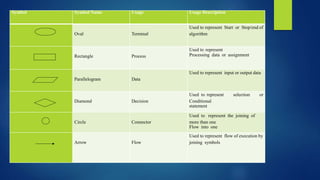
FLOW CHART
 A Flow chart is a Graphical representation of an Algorithm.
 Flow charts are drawn using certain special purpose symbols such as Rectangles,
Diamonds, Ovals and small circles.
 These symbols are connected by arrows called flow lines.
 The diagrammatic representation of way to solve the given problem is called flow
chart.
Symbol Symbol Name Usage Usage Description
Oval Terminal
Used to represent Start or Stop/end of
algorithm
Rectangle Process
Used to represent
Processing data or assignment
Parallelogram Data
Used to represent input or output data
Diamond Decision
Used to represent selection or
Conditional
statement
Circle Connector
Used to represent the joining of
more than one
Flow into one
Arrow Flow
Used to represent flow of execution by
joining symbols
ALGORITHM
 Describing the process step-by-step is called algorithm.
 For any given problem, we have more than one algorithm to solve it. We should select the
best among all possible algorithms.
 The algorithm which solves the problem fast by using minimum resources to be selected.
Steps in the algorithm: An algorithm can be divided into three basic categories.
 Sequence: A series of steps that we perform one after other.
 Decision: Some selected and some are ignored.
 Selection: Making a choice from multiple available options.
 Iteration: Performing repetitive tasks.
Examples
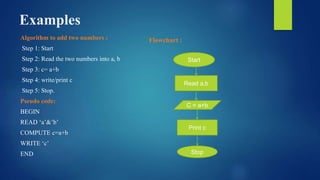
Algorithm to add two numbers :
Step 1: Start
Step 2: Read the two numbers into a, b
Step 3: c= a+b
Step 4: write/print c
Step 5: Stop.
Pseudo code:
BEGIN
READ ‘a’&’b’
COMPUTE c=a+b
WRITE ‘c’
END
Flowchart :
Start
Read a,b
C = a+b
Print c
Stop
DATA STRUCTURES
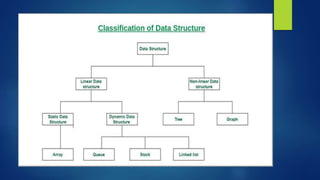
 A data structure is a storage that is used to store and organize data.
 It is a way of arranging data on a computer so that it can be accessed and updated
efficiently.
 A data structure is not only used for organizing the data. It is also used for
processing, retrieving, and storing data.
 There are different basic and advanced types of data structures that are used in
almost every program or software system that has been developed.
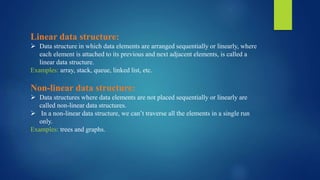
Linear data structure:
 Data structure in which data elements are arranged sequentially or linearly, where
each element is attached to its previous and next adjacent elements, is called a
linear data structure.
Examples: array, stack, queue, linked list, etc.
Non-linear data structure:
 Data structures where data elements are not placed sequentially or linearly are
called non-linear data structures.
 In a non-linear data structure, we can’t traverse all the elements in a single run
only.
Examples: trees and graphs.
UNIT - 3
OPERATING SYSTEM
 An Operating System (OS) is an interface between a
computer user and computer hardware.
 An operating system is software that enables applications
to interact with a computer's hardware.
 The software that contains the core components of the
operating system is called the kernel.
 The primary purposes of an Operating System are to enable
applications to interact with a computer's hardware and to
manage a system's hardware and software resources.
 Some popular Operating Systems include Linux Operating System,
Windows Operating System, VMS, OS/400, AIX, z/OS, etc.
 Today, Operating systems is found almost in every device like mobile
phones, personal computers, mainframe computers, automobiles, TV, Toys
etc.
Functions of an operating System
 Memory Management
 Processor Management
 Device Management
 File Management
 Network Management
 Security
 Control over system performance
 Job accounting
 Error detecting aids
 Coordination between other software and users
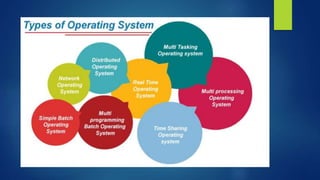
1) Batch Operating System
2) Multiprogramming Operating
System
gggggggggggggggggggggggggggggggggggggggggggggggggggggggggggggg
gggggggggggggggggggggggggg
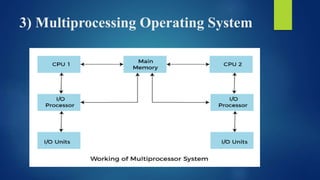
3) Multiprocessing Operating System
4) Distributed Operating System
5) Multitasking Operating System
6) Time Sharing Operating System
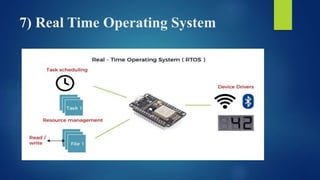
7) Real Time Operating System

UNIT 2 ECSE-2.pptx

  • 1.
    Elements of CSE UNIT2 PRESENTED BY: FAROZA SHAMSHEEM ASSISTANT PROFESSOR (CSC)
  • 2.
    COMPUTER PROGRAMMING LANGUAGE What isa Programming Language?  A programming language is a computer language that is used by programmers (developers) to communicate with computers. It is a set of instructions written in any specific language ( C, C++, Java, Python) to perform a specific task.  A programming language is mainly used to develop desktop applications, websites, and mobile applications.
  • 3.
    Types of programminglanguage 1. Low-level programming language  Low-level language is machine-dependent (0s and 1s) programming language. The processor runs low- level programs directly without the need of a compiler or interpreter, so the programs written in low-level language can be run very fast.  Low-level language is further divided into two parts – i. Machine Language ii. Assembly Language
  • 4.
    i. Machine Language Machine language is a type of low-level programming language. It is also called as machine code or object code.  Machine language is easier to read because it is normally displayed in binary or hexadecimal form (base 16) form.  It does not require a translator to convert the programs because computers directly understand the machine language programs.  The advantage of machine language is that it helps the programmer to execute the programs faster than the high-level programming language.
  • 5.
    ii. Assembly Language Assembly language is also a type of low-level programming language that is designed for specific processors.  It represents the set of instructions in a symbolic and human-understandable form.  It uses an assembler to convert the assembly language to machine language.  The advantage of assembly language is that it requires less memory and less execution time to execute a program.
  • 6.
    2. High-level programminglanguage  High-level programming language (HLL) is designed for developing user-friendly software programs and websites.  This programming language requires a compiler or interpreter to translate the program into machine language (execute the program).  The main advantage of a high-level language is that it is easy to read, write, and maintain.  High-level programming language includes Python, Java, JavaScript, PHP, C#, C++, Objective C, Cobol, Perl, Pascal, LISP, FORTRAN, and Swift programming language.
  • 7.
    MARKUP LANGUAGE  Markuplanguages are computer languages that are used to structure, format, or define relationships between different parts of text documents with the help of symbols or tags inserted in the document.  These languages are more readable than usual programming languages with strict syntax.  There are several markup languages available but the most popular among them are as follows.  HTML  XML  XHTML  SGML
  • 8.
    SCRIPTING LANGUAGE  Allscripting languages are programming languages.  The scripting language is basically a language where instructions are written for a run time environment.  They do not require the compilation step and are rather interpreted. It brings new functions to applications and glue complex system together.  A scripting language is a programming language designed for integrating and communicating with other programming languages.  There are many scripting languages some of them are discussed below: Bash , Node js ,Python ,Ruby ,Perl
  • 9.
    PROGRAM DEVELOPMENT STEPS ProgramDevelopment is a multistep process that requires that we understand the problem, develop a solution, write the program, and then test it. This is known as program design. Understand the Problem:  The first step in solving any problem is to understand it.  By reading the requirements statements carefully, we fully understand it; we review our understanding with the user and the systems analyst to know the exact purpose.
  • 10.
    Develop the solution:  Once we fully understand the problem we need to develop our solution.  Three tools will help in this task. 1. Structure chart, 2.Psuedocode &3.Flowcharts.  Generally we will use structure chart and either flowchart or Pseudo code. The structure chart is used to design the whole program . Pseudo code and flowcharts are used to design the individual parts of the program. Write the program:  We will write the programs by using structure chart and flowchart or pseudo code. This is known as top-down implementation. Test the Program:  Programmer is responsible for completely testing the program. In large- development projects test engineers are responsible for testing to make sure all the programs work together.
  • 11.
    FLOW CHART  AFlow chart is a Graphical representation of an Algorithm.  Flow charts are drawn using certain special purpose symbols such as Rectangles, Diamonds, Ovals and small circles.  These symbols are connected by arrows called flow lines.  The diagrammatic representation of way to solve the given problem is called flow chart.
  • 12.
    Symbol Symbol NameUsage Usage Description Oval Terminal Used to represent Start or Stop/end of algorithm Rectangle Process Used to represent Processing data or assignment Parallelogram Data Used to represent input or output data Diamond Decision Used to represent selection or Conditional statement Circle Connector Used to represent the joining of more than one Flow into one Arrow Flow Used to represent flow of execution by joining symbols
  • 13.
    ALGORITHM  Describing theprocess step-by-step is called algorithm.  For any given problem, we have more than one algorithm to solve it. We should select the best among all possible algorithms.  The algorithm which solves the problem fast by using minimum resources to be selected. Steps in the algorithm: An algorithm can be divided into three basic categories.  Sequence: A series of steps that we perform one after other.  Decision: Some selected and some are ignored.  Selection: Making a choice from multiple available options.  Iteration: Performing repetitive tasks.
  • 14.
    Examples Algorithm to addtwo numbers : Step 1: Start Step 2: Read the two numbers into a, b Step 3: c= a+b Step 4: write/print c Step 5: Stop. Pseudo code: BEGIN READ ‘a’&’b’ COMPUTE c=a+b WRITE ‘c’ END Flowchart : Start Read a,b C = a+b Print c Stop
  • 15.
    DATA STRUCTURES  Adata structure is a storage that is used to store and organize data.  It is a way of arranging data on a computer so that it can be accessed and updated efficiently.  A data structure is not only used for organizing the data. It is also used for processing, retrieving, and storing data.  There are different basic and advanced types of data structures that are used in almost every program or software system that has been developed.
  • 17.
    Linear data structure: Data structure in which data elements are arranged sequentially or linearly, where each element is attached to its previous and next adjacent elements, is called a linear data structure. Examples: array, stack, queue, linked list, etc. Non-linear data structure:  Data structures where data elements are not placed sequentially or linearly are called non-linear data structures.  In a non-linear data structure, we can’t traverse all the elements in a single run only. Examples: trees and graphs.
  • 18.
    UNIT - 3 OPERATINGSYSTEM  An Operating System (OS) is an interface between a computer user and computer hardware.  An operating system is software that enables applications to interact with a computer's hardware.  The software that contains the core components of the operating system is called the kernel.  The primary purposes of an Operating System are to enable applications to interact with a computer's hardware and to manage a system's hardware and software resources.
  • 19.
     Some popularOperating Systems include Linux Operating System, Windows Operating System, VMS, OS/400, AIX, z/OS, etc.  Today, Operating systems is found almost in every device like mobile phones, personal computers, mainframe computers, automobiles, TV, Toys etc.
  • 20.
    Functions of anoperating System  Memory Management  Processor Management  Device Management  File Management  Network Management  Security  Control over system performance  Job accounting  Error detecting aids  Coordination between other software and users
  • 22.
  • 23.
  • 24.
  • 25.
  • 26.
  • 27.
    6) Time SharingOperating System
  • 28.
    7) Real TimeOperating System