Creating Email
Account
Be able to have an email account either
Yahho or gmail to access services
across the internet.
Prepared by:
PAUL C. GONZALES
Teacher I
ESCES - Midsayap West
District
Introduction
• Sometimes it seems that the hardest part
about email is deciding which email system
you are going to use.
• We will be using a very common emailing
program called gmail. It is popular because it
is available to you anywhere you can access
the Internet. Your cellphone, tablet or ipad for
example would be a great place for you to
access your gmail account.
Create an Email Account
The first thing you will need to do is create an
Email Account. In this example, we will need to
access the Internet. As mentioned previously, we
will be using gmail.
The following steps will walk you through
accomplishing this task:
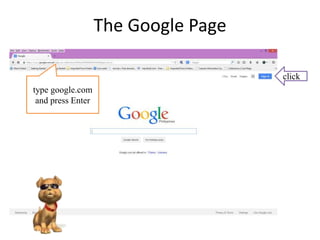
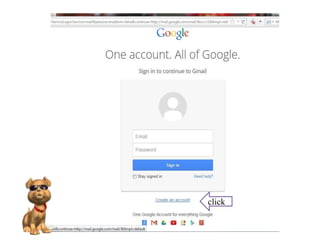
• Access the Internet and on the browser Address
bar, type google.com and press Enter. This will
take you to the main page of google.
The Google Page
type google.com
and press Enter
click
click
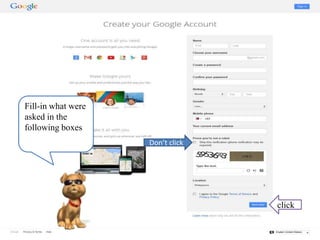
Fill-in what were
asked in the
following boxes
Don’t click
click
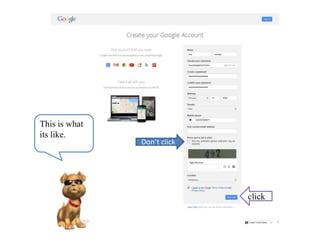
click
This is what
its like.
Don’t click
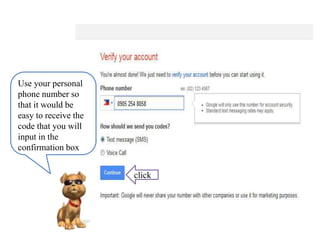
Use your personal
phone number so
that it would be
easy to receive the
code that you will
input in the
confirmation box
click
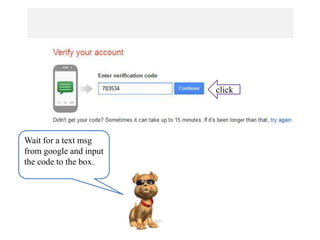
Wait for a text msg
from google and input
the code to the box.
click
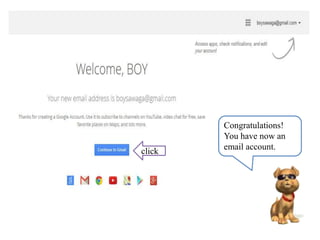
Congratulations!
You have now an
email account.click
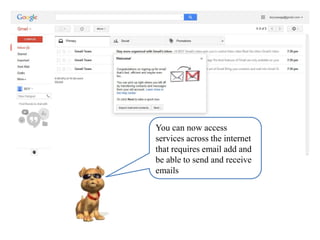
You can now access
services across the internet
that requires email add and
be able to send and receive
emails

101 creating email account-gmail

  • 1.
    Creating Email Account Be ableto have an email account either Yahho or gmail to access services across the internet. Prepared by: PAUL C. GONZALES Teacher I ESCES - Midsayap West District
  • 2.
    Introduction • Sometimes itseems that the hardest part about email is deciding which email system you are going to use. • We will be using a very common emailing program called gmail. It is popular because it is available to you anywhere you can access the Internet. Your cellphone, tablet or ipad for example would be a great place for you to access your gmail account.
  • 3.
    Create an EmailAccount The first thing you will need to do is create an Email Account. In this example, we will need to access the Internet. As mentioned previously, we will be using gmail. The following steps will walk you through accomplishing this task: • Access the Internet and on the browser Address bar, type google.com and press Enter. This will take you to the main page of google.
  • 4.
    The Google Page typegoogle.com and press Enter click
  • 5.
  • 6.
    Fill-in what were askedin the following boxes Don’t click click
  • 7.
    click This is what itslike. Don’t click
  • 8.
    Use your personal phonenumber so that it would be easy to receive the code that you will input in the confirmation box click
  • 9.
    Wait for atext msg from google and input the code to the box. click
  • 10.
    Congratulations! You have nowan email account.click
  • 11.
    You can nowaccess services across the internet that requires email add and be able to send and receive emails