Making Use of
Query Layers & Spatial Views
Michael Olkin
Town of Amherst, MA
www.amherstma.gov/maps
Technical Talk in Lightning Format
Will this work?
Query Layers & Spatial Views
• Data is Direct from your Databases
• Data Represented via SQL
• Work with ArcGIS for Desktop & Server*
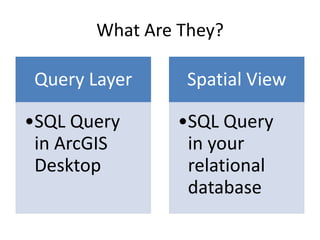
What Are They?
Query Layer
•SQL Query
in ArcGIS
Desktop
Spatial View
•SQL Query
in your
relational
database
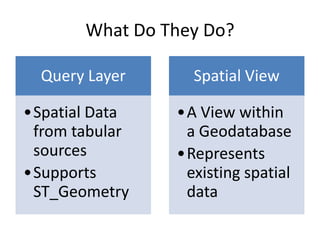
What Do They Do?
Query Layer
•Spatial Data
from tabular
sources
•Supports
ST_Geometry
Spatial View
•A View within
a Geodatabase
•Represents
existing spatial
data
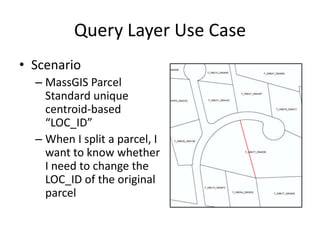
Query Layer Use Case
• Scenario
– MassGIS Parcel
Standard unique
centroid-based
“LOC_ID”
– When I split a parcel, I
want to know whether
I need to change the
LOC_ID of the original
parcel
Show the LOC_ID Points via ST_Geometry
SELECT MAP_PAR_ID, LOC_ID,
CAST('POINT (' + CAST(CAST(substring(LOC_ID,3,6) as int) AS varchar) + ' ' +
CAST(CAST(substring(LOC_ID,10,7) as int) AS varchar) + ')' AS geometry) AS SHAPE,
'POINT (' + CAST(CAST(substring(LOC_ID,3,6) as int) AS varchar) + ' ' +
CAST(CAST(substring(LOC_ID,10,7) as int) AS varchar) + ')' as [ReadTheGeometry],
FROM <MyParcelFeatureClass>
X Y
Show the LOC_ID Points via ST_Geometry
SELECT MAP_PAR_ID, LOC_ID,
CAST('POINT (' + CAST(CAST(substring(LOC_ID,3,6) as int) AS varchar) + ' ' +
CAST(CAST(substring(LOC_ID,10,7) as int) AS varchar) + ')' AS geometry) AS SHAPE,
'POINT (' + CAST(CAST(substring(LOC_ID,3,6) as int) AS varchar) + ' ' +
CAST(CAST(substring(LOC_ID,10,7) as int) AS varchar) + ')' as [ReadTheGeometry],
FROM <MyParcelFeatureClass>
X Y
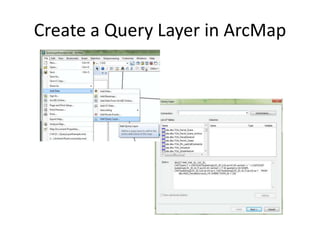
Create a Query Layer in ArcMap
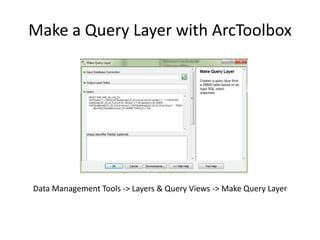
Make a Query Layer with ArcToolbox
Data Management Tools -> Layers & Query Views -> Make Query Layer
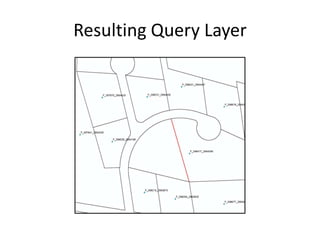
Resulting Query Layer
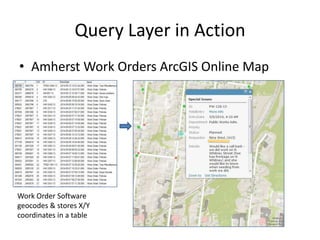
Query Layer in Action
• Amherst Work Orders ArcGIS Online Map
Work Order Software
geocodes & stores X/Y
coordinates in a table
Yay! Query Layer Goodness!
Because every presentation needs a smiling cat
Spatial Views
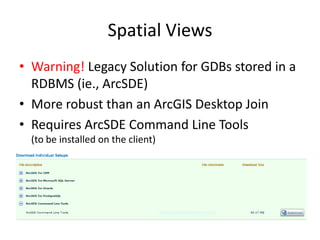
• Warning! Legacy Solution for GDBs stored in a
RDBMS (ie., ArcSDE)
• More robust than an ArcGIS Desktop Join
• Requires ArcSDE Command Line Tools
(to be installed on the client)
Setting Up a Spatial View
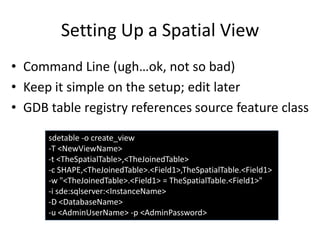
• Command Line (ugh…ok, not so bad)
• Keep it simple on the setup; edit later
• GDB table registry references source feature class
sdetable -o create_view
-T <NewViewName>
-t <TheSpatialTable>,<TheJoinedTable>
-c SHAPE,<TheJoinedTable>.<Field1>,TheSpatialTable.<Field1>
-w "<TheJoinedTable>.<Field1> = TheSpatialTable.<Field1>"
-i sde:sqlserver:<InstanceName>
-D <DatabaseName>
-u <AdminUserName> -p <AdminPassword>
Spatial View: a regular database view
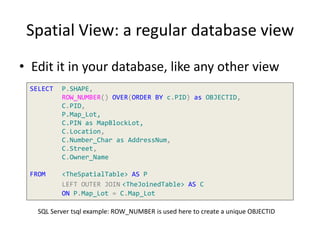
• Edit it in your database, like any other view
SELECT P.SHAPE,
ROW_NUMBER() OVER(ORDER BY c.PID) as OBJECTID,
C.PID,
P.Map_Lot,
C.PIN as MapBlockLot,
C.Location,
C.Number_Char as AddressNum,
C.Street,
C.Owner_Name
FROM <TheSpatialTable> AS P
LEFT OUTER JOIN <TheJoinedTable> AS C
ON P.Map_Lot = C.Map_Lot
SQL Server tsql example: ROW_NUMBER is used here to create a unique OBJECTID
Spatial View: One to Many Join!
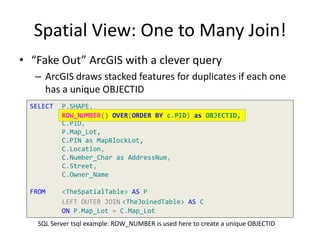
• “Fake Out” ArcGIS with a clever query
– ArcGIS draws stacked features for duplicates if each one
has a unique OBJECTID
SELECT P.SHAPE,
ROW_NUMBER() OVER(ORDER BY c.PID) as OBJECTID,
C.PID,
P.Map_Lot,
C.PIN as MapBlockLot,
C.Location,
C.Number_Char as AddressNum,
C.Street,
C.Owner_Name
FROM <TheSpatialTable> AS P
LEFT OUTER JOIN <TheJoinedTable> AS C
ON P.Map_Lot = C.Map_Lot
SQL Server tsql example: ROW_NUMBER is used here to create a unique OBJECTID
ROW_NUMBER() OVER(ORDER BY c.PID) as OBJECTID,
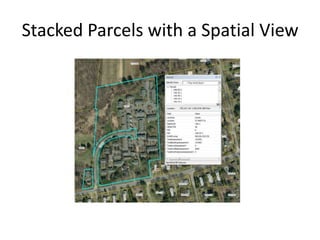
Stacked Parcels with a Spatial View
Yay! Spatial View Goodness!
Because every presentation needs a smiling cat
Making Use of
Query Layers & Spatial Views
Michael Olkin
Town of Amherst, MA
www.amherstma.gov/maps

Making Use of Query Layers & Spatial Views

  • 1.
    Making Use of QueryLayers & Spatial Views Michael Olkin Town of Amherst, MA www.amherstma.gov/maps
  • 2.
    Technical Talk inLightning Format Will this work?
  • 3.
    Query Layers &Spatial Views • Data is Direct from your Databases • Data Represented via SQL • Work with ArcGIS for Desktop & Server*
  • 4.
    What Are They? QueryLayer •SQL Query in ArcGIS Desktop Spatial View •SQL Query in your relational database
  • 5.
    What Do TheyDo? Query Layer •Spatial Data from tabular sources •Supports ST_Geometry Spatial View •A View within a Geodatabase •Represents existing spatial data
  • 6.
    Query Layer UseCase • Scenario – MassGIS Parcel Standard unique centroid-based “LOC_ID” – When I split a parcel, I want to know whether I need to change the LOC_ID of the original parcel
  • 7.
    Show the LOC_IDPoints via ST_Geometry SELECT MAP_PAR_ID, LOC_ID, CAST('POINT (' + CAST(CAST(substring(LOC_ID,3,6) as int) AS varchar) + ' ' + CAST(CAST(substring(LOC_ID,10,7) as int) AS varchar) + ')' AS geometry) AS SHAPE, 'POINT (' + CAST(CAST(substring(LOC_ID,3,6) as int) AS varchar) + ' ' + CAST(CAST(substring(LOC_ID,10,7) as int) AS varchar) + ')' as [ReadTheGeometry], FROM <MyParcelFeatureClass> X Y
  • 8.
    Show the LOC_IDPoints via ST_Geometry SELECT MAP_PAR_ID, LOC_ID, CAST('POINT (' + CAST(CAST(substring(LOC_ID,3,6) as int) AS varchar) + ' ' + CAST(CAST(substring(LOC_ID,10,7) as int) AS varchar) + ')' AS geometry) AS SHAPE, 'POINT (' + CAST(CAST(substring(LOC_ID,3,6) as int) AS varchar) + ' ' + CAST(CAST(substring(LOC_ID,10,7) as int) AS varchar) + ')' as [ReadTheGeometry], FROM <MyParcelFeatureClass> X Y
  • 9.
    Create a QueryLayer in ArcMap
  • 10.
    Make a QueryLayer with ArcToolbox Data Management Tools -> Layers & Query Views -> Make Query Layer
  • 11.
  • 12.
    Query Layer inAction • Amherst Work Orders ArcGIS Online Map Work Order Software geocodes & stores X/Y coordinates in a table
  • 13.
    Yay! Query LayerGoodness! Because every presentation needs a smiling cat
  • 14.
    Spatial Views • Warning!Legacy Solution for GDBs stored in a RDBMS (ie., ArcSDE) • More robust than an ArcGIS Desktop Join • Requires ArcSDE Command Line Tools (to be installed on the client)
  • 15.
    Setting Up aSpatial View • Command Line (ugh…ok, not so bad) • Keep it simple on the setup; edit later • GDB table registry references source feature class sdetable -o create_view -T <NewViewName> -t <TheSpatialTable>,<TheJoinedTable> -c SHAPE,<TheJoinedTable>.<Field1>,TheSpatialTable.<Field1> -w "<TheJoinedTable>.<Field1> = TheSpatialTable.<Field1>" -i sde:sqlserver:<InstanceName> -D <DatabaseName> -u <AdminUserName> -p <AdminPassword>
  • 16.
    Spatial View: aregular database view • Edit it in your database, like any other view SELECT P.SHAPE, ROW_NUMBER() OVER(ORDER BY c.PID) as OBJECTID, C.PID, P.Map_Lot, C.PIN as MapBlockLot, C.Location, C.Number_Char as AddressNum, C.Street, C.Owner_Name FROM <TheSpatialTable> AS P LEFT OUTER JOIN <TheJoinedTable> AS C ON P.Map_Lot = C.Map_Lot SQL Server tsql example: ROW_NUMBER is used here to create a unique OBJECTID
  • 17.
    Spatial View: Oneto Many Join! • “Fake Out” ArcGIS with a clever query – ArcGIS draws stacked features for duplicates if each one has a unique OBJECTID SELECT P.SHAPE, ROW_NUMBER() OVER(ORDER BY c.PID) as OBJECTID, C.PID, P.Map_Lot, C.PIN as MapBlockLot, C.Location, C.Number_Char as AddressNum, C.Street, C.Owner_Name FROM <TheSpatialTable> AS P LEFT OUTER JOIN <TheJoinedTable> AS C ON P.Map_Lot = C.Map_Lot SQL Server tsql example: ROW_NUMBER is used here to create a unique OBJECTID ROW_NUMBER() OVER(ORDER BY c.PID) as OBJECTID,
  • 18.
    Stacked Parcels witha Spatial View
  • 19.
    Yay! Spatial ViewGoodness! Because every presentation needs a smiling cat
  • 20.
    Making Use of QueryLayers & Spatial Views Michael Olkin Town of Amherst, MA www.amherstma.gov/maps

Editor's Notes

  • #8 This will work with the MassGIS Parcel Standard:SELECTMAP_PAR_ID,LOC_ID,CAST(&apos;POINT (&apos;+CAST(CAST(substring(LOC_ID,3,6)asint)ASvarchar)+&apos; &apos;+CAST(CAST(substring(LOC_ID,10,7)asint)ASvarchar)+&apos;)&apos;ASgeometry)ASSHAPE,&apos;POINT (&apos;+CAST(CAST(substring(LOC_ID,3,6)asint)ASvarchar)+&apos; &apos;+CAST(CAST(substring(LOC_ID,10,7)asint)ASvarchar)+&apos;)&apos;as[ReadTheGeometry],FROM&lt;MyParcelFeatureClass&gt;The “ReadTheGeometry” field is just there in order to illustrate the ST_Geometry syntax for points.
  • #10 Make sure that you check the “Show advanced options” box &amp; set the proper coordinate system &amp; transformation. The transformation does matter: http://gisobsessed.blogspot.com/2014/04/be-transformative.html
  • #16 Geometry comes from only one table; cannot create a view that combines multiple geometry sources