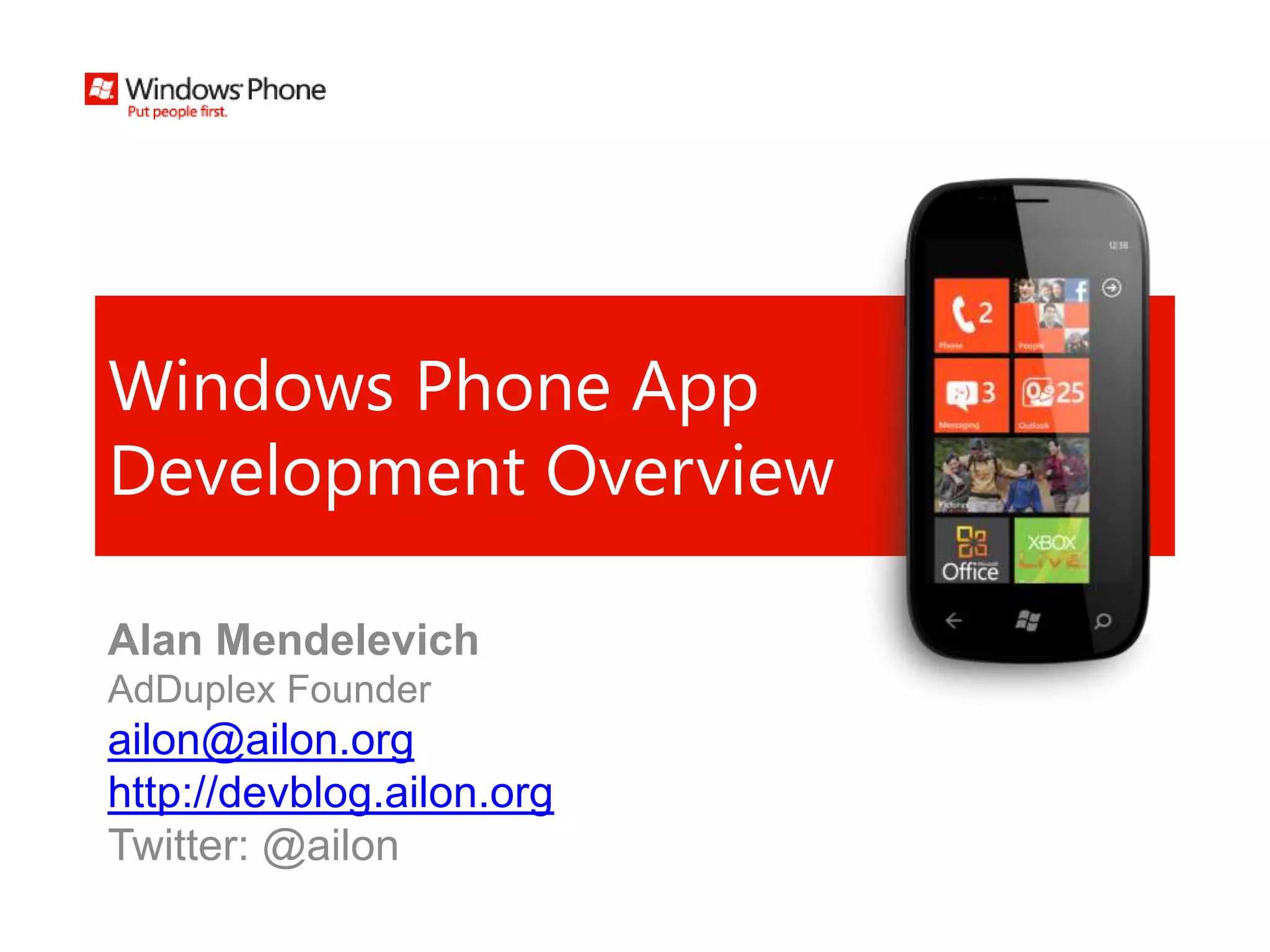
Windows Phone App
Development Overview

Alan Mendelevich
AdDuplex Founder
ailon@ailon.org
http://devblog.ailon.org
Twitter: @ailon
Agenda
•   Hardware
•   Metro
•   Development Overview
•   Publication
Hardware
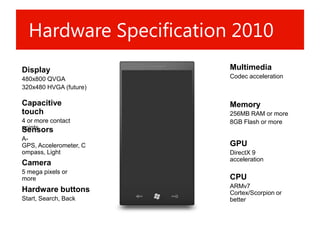
Hardware Specification 2010
Display                 Multimedia
480x800 QVGA            Codec acceleration
320x480 HVGA (future)

Capacitive              Memory
touch                   256MB RAM or more
4 or more contact       8GB Flash or more
points
Sensors
A-
GPS, Accelerometer, C   GPU
ompass, Light           DirectX 9
                        acceleration
Camera
5 mega pixels or
more                    CPU
                        ARMv7
Hardware buttons        Cortex/Scorpion or
Start, Search, Back     better
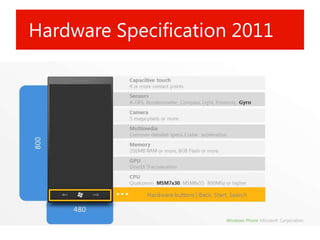
Hardware Specification 2011
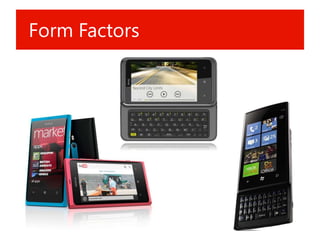
Form Factors
OEMs
Metro
Metro
Inspiration
Metro Principles
•   Clean, light, open, fast
•   Celebrate typography
•   Alive & in motion
•   Content not chrome
•   Authentically digital
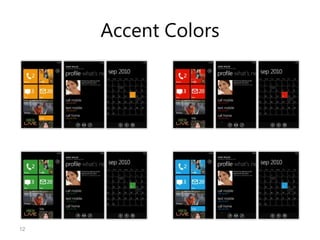
Accent Colors


12
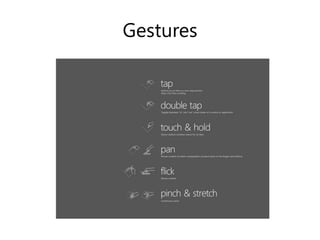
Gestures
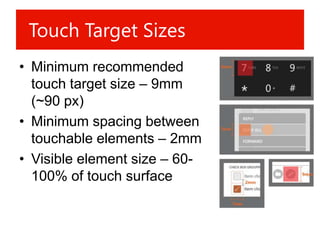
Touch Target Sizes
• Minimum recommended
  touch target size – 9mm
  (~90 px)
• Minimum spacing between
  touchable elements – 2mm
• Visible element size – 60-
  100% of touch surface
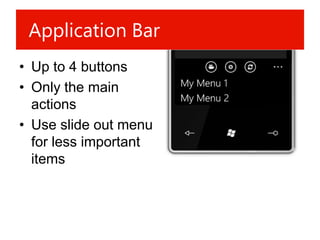
Application Bar
• Up to 4 buttons
• Only the main
  actions
• Use slide out menu
  for less important
  items
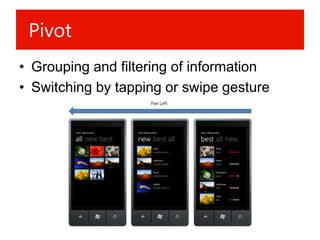
Pivot
• Grouping and filtering of information
• Switching by tapping or swipe gesture
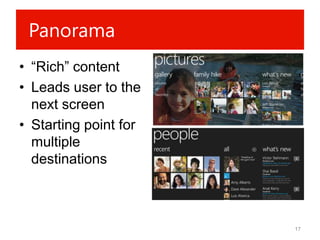
Panorama
• “Rich” content
• Leads user to the
  next screen
• Starting point for
  multiple
  destinations


                       17
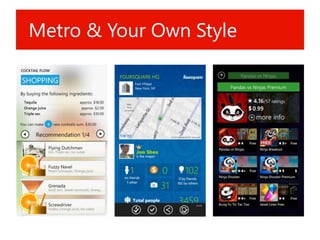
Metro & Your Own Style
Development
Overview
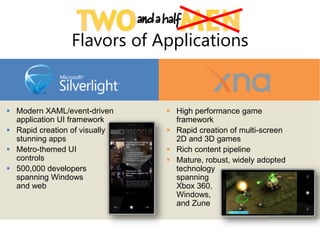
Flavors of Applications


 Modern XAML/event-driven      High performance game
  application UI framework       framework
 Rapid creation of visually    Rapid creation of multi-screen
  stunning apps                  2D and 3D games
 Metro-themed UI               Rich content pipeline
  controls                      Mature, robust, widely adopted
 500,000 developers             technology
  spanning Windows               spanning
  and web                        Xbox 360,
                                 Windows,
                                 and Zune
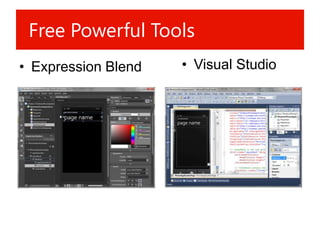
Free Powerful Tools
• Expression Blend   • Visual Studio
Free Powerful Tools
• http://create.msdn.com
  – Visual Studio 2010 Express
  – Windows Phone Emulator
  – Silverlight
  – XNA Game Studio 4.0
  – Microsoft Expression Blend for Windows
    Phone
  – .NET Framework 4
Silverlight for
Windows Phone
Overview
Silverlight 4+
• Based on Silverlight 4
• Plus specific modules (phone functions,
  sensors, etc.)
• XAML + C# (or VB.NET)
• Optimized for performance on smaller,
  less powerful devices
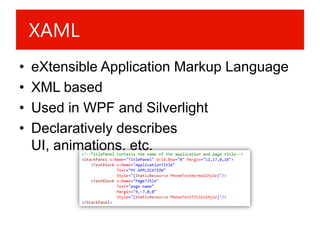
XAML
•   eXtensible Application Markup Language
•   XML based
•   Used in WPF and Silverlight
•   Declaratively describes
    UI, animations, etc.
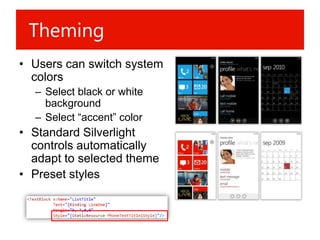
Theming
• Users can switch system
  colors
  – Select black or white
    background
  – Select “accent” color
• Standard Silverlight
  controls automatically
  adapt to selected theme
• Preset styles
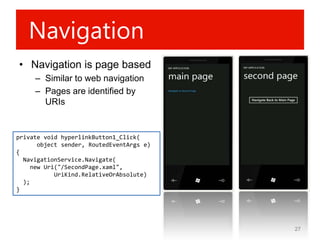
Navigation
• Navigation is page based
     – Similar to web navigation
     – Pages are identified by
       URIs


private void hyperlinkButton1_Click(
       object sender, RoutedEventArgs e)
{
  NavigationService.Navigate(
     new Uri("/SecondPage.xaml",
            UriKind.RelativeOrAbsolute)
  );
}


                                           27
Back Button
• Returns to the previous page
  – UI shouldn’t duplicate this functionality
• The behavior could be overridden when
  going to the previous page isn’t logical
  – Closing a pop-up dialog, etc.
  – Can’t be used for actions absolutely unrelated
    to “returning”, like shooting, etc.
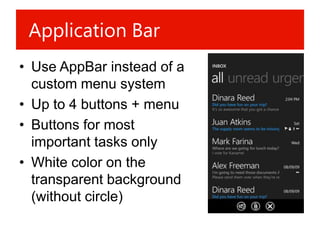
Application Bar
• Use AppBar instead of a
  custom menu system
• Up to 4 buttons + menu
• Buttons for most
  important tasks only
• White color on the
  transparent background
  (without circle)
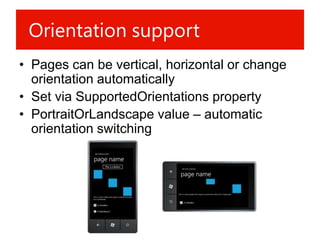
Orientation support
• Pages can be vertical, horizontal or change
  orientation automatically
• Set via SupportedOrientations property
• PortraitOrLandscape value – automatic
  orientation switching
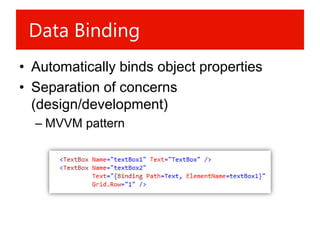
Data Binding
• Automatically binds object properties
• Separation of concerns
  (design/development)
  – MVVM pattern
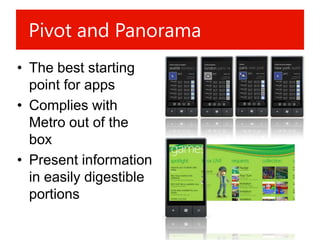
Pivot and Panorama
• The best starting
  point for apps
• Complies with
  Metro out of the
  box
• Present information
  in easily digestible
  portions
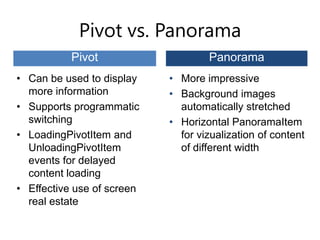
Pivot vs. Panorama
           Pivot                    Panorama
• Can be used to display    • More impressive
  more information          • Background images
• Supports programmatic       automatically stretched
  switching                 • Horizontal PanoramaItem
• LoadingPivotItem and        for vizualization of content
  UnloadingPivotItem          of different width
  events for delayed
  content loading
• Effective use of screen
  real estate
Launchers and Choosers
• Each app runs in its own sandbox and
  can’t accept system resources or other
  apps
• Launchers and Choosers mitigate this by
  allowing indirect access to these features
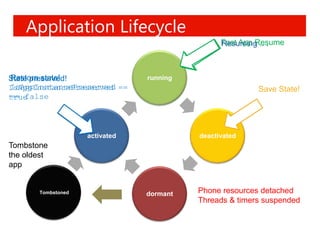
Application Lifecycle
                                                Fast App Resume
                                                Resuming .. .


Restore state!
State preserved!                running
IsAppInstancePreserved
IsAppInstancePreserved ==                                Save State!
== false
true


                    activated             deactivated
Tombstone
the oldest
app


       Tombstoned               dormant   Phone resources detached
                                          Threads & timers suspended
Publishing
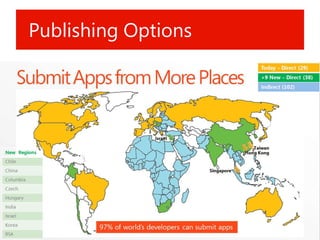
Publishing Options
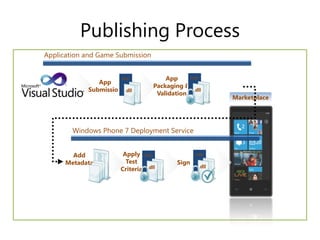
Publishing Process
Application and Game Submission


                      .xap            App     .xap
               App
                                  Packaging &
            Submission   .dll                   .dll
                                   Validation
                                                          Marketplace


        Windows Phone 7 Deployment Service


        Add            Apply .xap                .xap
      Metadata          Test              Sign
                                                   .dll
                      Criteria .dll
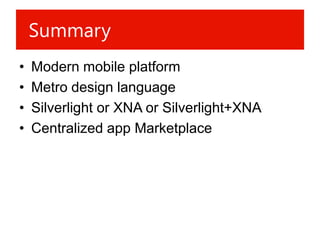
Summary
•   Modern mobile platform
•   Metro design language
•   Silverlight or XNA or Silverlight+XNA
•   Centralized app Marketplace
Additional resources
• App Hub
  – http://create.msdn.com
• Programming Windows Phone by Charles
  Petzold
  – http://www.charlespetzold.com/phone/
• Twitter - #wpdev
Questions?


             Alan Mendelevich
             Twitter: @ailon
             ailon@ailon.org

Windows phone app development overview

  • 1.
    Windows Phone App DevelopmentOverview Alan Mendelevich AdDuplex Founder ailon@ailon.org http://devblog.ailon.org Twitter: @ailon
  • 2.
    Agenda • Hardware • Metro • Development Overview • Publication
  • 3.
  • 4.
    Hardware Specification 2010 Display Multimedia 480x800 QVGA Codec acceleration 320x480 HVGA (future) Capacitive Memory touch 256MB RAM or more 4 or more contact 8GB Flash or more points Sensors A- GPS, Accelerometer, C GPU ompass, Light DirectX 9 acceleration Camera 5 mega pixels or more CPU ARMv7 Hardware buttons Cortex/Scorpion or Start, Search, Back better
  • 5.
  • 6.
  • 7.
  • 8.
  • 9.
  • 10.
  • 11.
    Metro Principles • Clean, light, open, fast • Celebrate typography • Alive & in motion • Content not chrome • Authentically digital
  • 12.
  • 13.
  • 14.
    Touch Target Sizes •Minimum recommended touch target size – 9mm (~90 px) • Minimum spacing between touchable elements – 2mm • Visible element size – 60- 100% of touch surface
  • 15.
    Application Bar • Upto 4 buttons • Only the main actions • Use slide out menu for less important items
  • 16.
    Pivot • Grouping andfiltering of information • Switching by tapping or swipe gesture
  • 17.
    Panorama • “Rich” content •Leads user to the next screen • Starting point for multiple destinations 17
  • 18.
    Metro & YourOwn Style
  • 19.
  • 20.
    Flavors of Applications Modern XAML/event-driven  High performance game application UI framework framework  Rapid creation of visually  Rapid creation of multi-screen stunning apps 2D and 3D games  Metro-themed UI  Rich content pipeline controls  Mature, robust, widely adopted  500,000 developers technology spanning Windows spanning and web Xbox 360, Windows, and Zune
  • 21.
    Free Powerful Tools •Expression Blend • Visual Studio
  • 22.
    Free Powerful Tools •http://create.msdn.com – Visual Studio 2010 Express – Windows Phone Emulator – Silverlight – XNA Game Studio 4.0 – Microsoft Expression Blend for Windows Phone – .NET Framework 4
  • 23.
  • 24.
    Silverlight 4+ • Basedon Silverlight 4 • Plus specific modules (phone functions, sensors, etc.) • XAML + C# (or VB.NET) • Optimized for performance on smaller, less powerful devices
  • 25.
    XAML • eXtensible Application Markup Language • XML based • Used in WPF and Silverlight • Declaratively describes UI, animations, etc.
  • 26.
    Theming • Users canswitch system colors – Select black or white background – Select “accent” color • Standard Silverlight controls automatically adapt to selected theme • Preset styles
  • 27.
    Navigation • Navigation ispage based – Similar to web navigation – Pages are identified by URIs private void hyperlinkButton1_Click( object sender, RoutedEventArgs e) { NavigationService.Navigate( new Uri("/SecondPage.xaml", UriKind.RelativeOrAbsolute) ); } 27
  • 28.
    Back Button • Returnsto the previous page – UI shouldn’t duplicate this functionality • The behavior could be overridden when going to the previous page isn’t logical – Closing a pop-up dialog, etc. – Can’t be used for actions absolutely unrelated to “returning”, like shooting, etc.
  • 29.
    Application Bar • UseAppBar instead of a custom menu system • Up to 4 buttons + menu • Buttons for most important tasks only • White color on the transparent background (without circle)
  • 30.
    Orientation support • Pagescan be vertical, horizontal or change orientation automatically • Set via SupportedOrientations property • PortraitOrLandscape value – automatic orientation switching
  • 31.
    Data Binding • Automaticallybinds object properties • Separation of concerns (design/development) – MVVM pattern
  • 32.
    Pivot and Panorama •The best starting point for apps • Complies with Metro out of the box • Present information in easily digestible portions
  • 33.
    Pivot vs. Panorama Pivot Panorama • Can be used to display • More impressive more information • Background images • Supports programmatic automatically stretched switching • Horizontal PanoramaItem • LoadingPivotItem and for vizualization of content UnloadingPivotItem of different width events for delayed content loading • Effective use of screen real estate
  • 34.
    Launchers and Choosers •Each app runs in its own sandbox and can’t accept system resources or other apps • Launchers and Choosers mitigate this by allowing indirect access to these features
  • 35.
    Application Lifecycle Fast App Resume Resuming .. . Restore state! State preserved! running IsAppInstancePreserved IsAppInstancePreserved == Save State! == false true activated deactivated Tombstone the oldest app Tombstoned dormant Phone resources detached Threads & timers suspended
  • 36.
  • 37.
  • 38.
    Publishing Process Application andGame Submission .xap App .xap App Packaging & Submission .dll .dll Validation Marketplace Windows Phone 7 Deployment Service Add Apply .xap .xap Metadata Test Sign .dll Criteria .dll
  • 39.
    Summary • Modern mobile platform • Metro design language • Silverlight or XNA or Silverlight+XNA • Centralized app Marketplace
  • 40.
    Additional resources • AppHub – http://create.msdn.com • Programming Windows Phone by Charles Petzold – http://www.charlespetzold.com/phone/ • Twitter - #wpdev
  • 41.
    Questions? Alan Mendelevich Twitter: @ailon ailon@ailon.org

Editor's Notes

  • #5 Žemesnė rezoliucija paskelbta ir kol kas užmiršta. Laukiami specifikacijos pakeitimai susiję su sandoriu su Nokia.
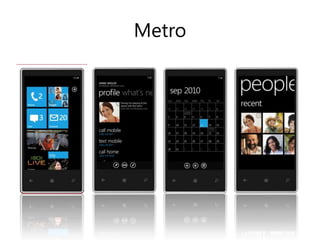
  • #10 2009m. nuspręsta pradėti iš naujoTikslas – sukurti gražų, paprastą interfeisą greitam ir maloniam naudojimui
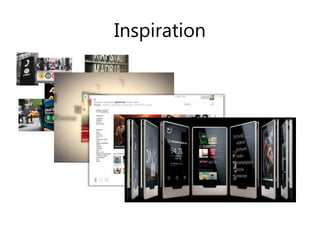
  • #11 Transporto ikonografija, spalvos, labai aiškus šriftai (todėl ir Metro)Turinio prikėlimas gyvenimui naudojant judesį ir animacijas (iš Xbox)Patyrimo praplėtimas (papildomas turinys) (iš Zune PC)Interfeiso elementai iš Zune HD
  • #12 Greičio pojūtis, susikoncentravimas ties pagrindiniais dalykais, negailestingas nereikalingų elementų mažinimas, tuščio ploto panaudojimas, turinio „išsiliejimas“ už ekrano ribųYpatingas dėmesys šriftams ir tekstuiJudesys suteikia gyvumo ir greitaveikos pojūtį, pritraukia dėmesį, įneša tūrį ir gylįAtsisakyta beveik visų apipavidalinimo elementų, turinys yra „dizainas“jokių šešėlių, pseudo 3D, stiklo imitacijų ir pan. Nebandyti būti tuo, kuo nesi.
  • #13 The user can select theme colors (personalization)Color is also used as a secondary element to highlight hierarchyIn case of contacts: phone numbers are highlighted in different colorsIn case of calendar: the current date is highlightedAll theme API’s are available to all developers, allowing developers to fit their applications into the theme that users select.
  • #14 Standartizuoti gestai
  • #15 - Svarbu išbandyti ant tikro telefono
  • #16 T.y. kontekstinis meniuGali būti kitas kiekviename puslapyjePagrindiniai veiksmai – mygtukai, papildomi – meniu
  • #17 - Tabai
  • #18 Galima integruotis i PicturesHub‘ą arba Music& Video
  • #22 NemokamiPuikiai veikia kartu
  • #23 Visus reikalingus įrankius galima parsisiųsti nemokamai viename pakete
  • #25 Kai pradėjo kurti WP einamojiSilverlight versija buvo 3Paimta kaip pagrindas, plius papildomos bibliotekos darbui su specifiniais telefono uždaviniaisInterfeisas aprašomas XAML kalba, programuojama C# (dabar galima ir VB.NET, bet nerekomenduoju)Varikliukas optimizuotas telefonams
  • #27 Nustatytų stilių naudojimas užtikrina, kad gerai atrodys su skirtingomis temomis ir personalizuotu akcentuBūtina išbandyti su šviesiu fonu
  • #29 - MP testuotojai labai kreipia dėmesį į Back veikimą
  • #31 Jei yra teksto įvedimo galimybė tikrai patartina numatyti veikimą horizontaliai
  • #32 - Dizaineriui nereikia žinoti kaip suprogramuoti tam tikri dalykai, programuotojui nereikia žinoti kaip jie atvaizduojami
  • #35 InstallationApp codePhone capabilitiesLanguageCertification:- ReliabilityPerformanceSecurity