Native Mobile Applications USING Open Source
Today’s Agenda Titanium Mobile Overview Hello World and Project Walkthrough Building Titanium Apps: Fundamentals Code By Numbers: Oh Snap! Where To Go From Here Questions and Answers Independent Hacking
About Appcelerator Open Source Software Company based in Mountain View ~25 employees and growing Developing Titanium for about two years, with Mobile coming in the last year 95% Developers
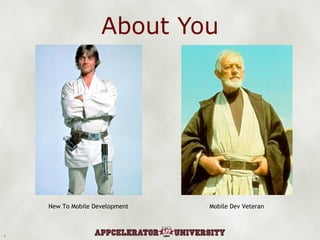
About You New To Mobile Development Mobile Dev Veteran
Either way, you’ve come to the right place.
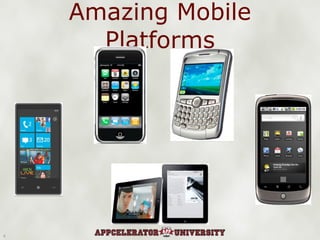
Amazing Mobile Platforms
Which is great and exciting!
...only how do we target all these cool platforms?
Well, you could build native, but... Which platforms do you choose? How many codebases do you want to (or even can you) support? How long will it take to build native on N platforms? How much effort will be duplicated? What if you bet on the wrong platform? Who writes the code?  Hire out?  Retrain/retool yourself or your devs?
The Web Is An Option... ...and should be preferred when feasible Mobile browsers are progressing fast and converging around WebKit But there are limitations Native apps are inherently more capable than web apps Native apps run faster and smoother on resource constrained devices
Ideally, we build cross-platform native apps...
...but we don’t want to “write once, suck everywhere”* *Loren Brichter, creator “Twitter for iPhone”/Tweetie
X-Platform Requirements Target multiple platforms from a single codebase Apps must feel like they belong on the platform Apps need to perform like native Bonus: Open source and extensible Bonus: Use skills we already have Hmmm, I wonder if he has a specific technology in mind...
Enter Titanium Titanium is an open source framework for building native mobile (or desktop) applications using open web technologies (JavaScript - optionally HTML and CSS)
Titanium Key Facts Open Source (Apache 2.0) Professional Services, SLA Support, Training, and Analytics available from Appcelerator Titanium Platforms Desktop: Win32, OS X, Linux Mobile: iOS, Android, BlackBerry, webOS (soon)
Titanium Projects Titanium Developer (1.2.1) Titanium Mobile SDK (1.3.0) Titanium Desktop SDK (1.0.0) Versioned separately, different release schedules We will focus on Developer and the Mobile SDK
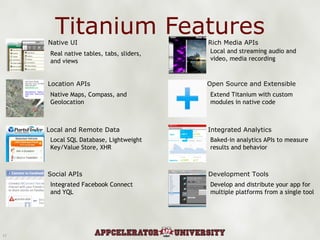
Titanium Features Native UI Location APIs Local and Remote Data Social APIs Rich Media APIs Open Source and Extensible Integrated Analytics Development Tools Real native tables, tabs, sliders, and views Native Maps, Compass, and  Geolocation Local SQL Database, Lightweight Key/Value Store, XHR Integrated Facebook Connect and YQL Local and streaming audio and video, media recording Extend Titanium with custom modules in native code Baked-in analytics APIs to measure results and behavior Develop and distribute your app for multiple platforms from a single tool
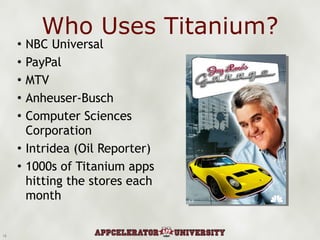
Who Uses Titanium? NBC Universal PayPal MTV Anheuser-Busch Computer Sciences Corporation Intridea (Oil Reporter) 1000s of Titanium apps hitting the stores each month
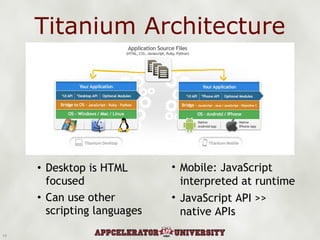
Titanium Architecture Desktop is HTML focused Can use other scripting languages Mobile: JavaScript interpreted at runtime JavaScript API >> native APIs
What Titanium Mobile is not: Not a native wrapper around a web view (PhoneGap being an example of this approach) However, you do have a web view component for HTML/CSS UI if that is your preference Your JavaScript code is invoking native APIs for UI and other native functions Think MacRuby/Hot Cocoa on the desktop or some AAA mobile games which ship with a Lua interpreter
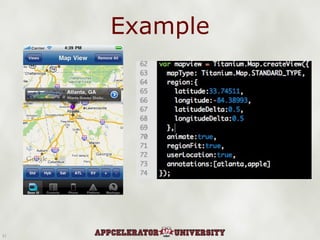
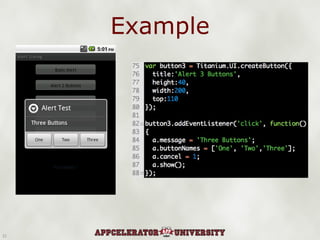
Example
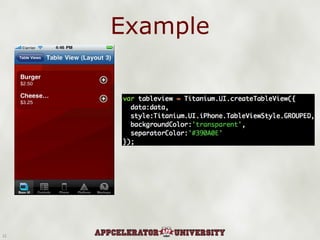
Example
Example
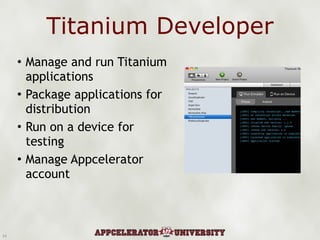
Titanium Developer Manage and run Titanium applications Package applications for distribution Run on a device for testing Manage Appcelerator account
Demo: Hello World! Creating a mobile project Mobile project structure Editing code, adding UI widgets to the app Deploy to simulator
Demo: Kitchen Sink Example Code Living Reference Document Demonstrates API coverage
Questions So Far? Titanium as a product Titanium capabilities About Appcelerator
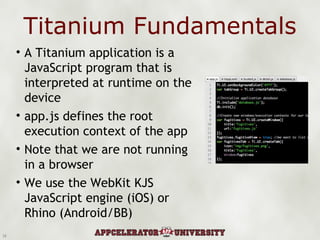
Titanium Fundamentals A Titanium application is a JavaScript program that is interpreted at runtime on the device app.js defines the root execution context of the app Note that we are not running in a browser  We use the WebKit KJS JavaScript engine (iOS) or Rhino (Android/BB)
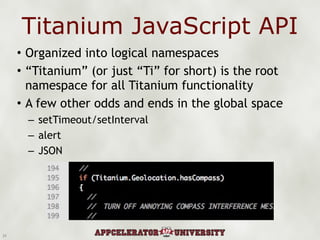
Titanium JavaScript API Organized into logical namespaces “ Titanium” (or just “Ti” for short) is the root namespace for all Titanium functionality A few other odds and ends in the global space setTimeout/setInterval alert JSON
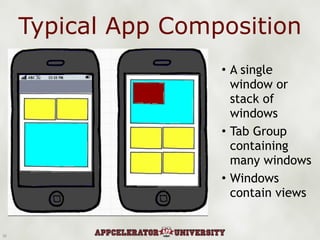
Typical App Composition A single window or stack of windows Tab Group containing many windows Windows contain views
Windows and Contexts Windows are the top level container for Titanium applications Applications usually consist of one window or several windows in a tab group Windows usually create new execution contexts Execution context == A unique JavaScript symbol space Such windows are “Heavyweight” windows Can also create “Lightweight” windows (for apps that run in a single context) 3
Demo: Contexts New Project - Two Tabs with “Lightweight” windows Switch to contain urls and contexts Symbols not defined in other contexts
The View Hierarchy Views are the building blocks of Titanium UIs Specialized views: table views, image views, map views, etc. Views can contain child views, which are positioned relative to the parent Layout Options: Absolute, vertical, or horizontal (currently iPhone only) Vertical layouts require height to be set
Custom Events Use for cross-context messaging Events are received across all ACTIVE contexts Windows not yet open do not receive events Use also as an inversion of control mechanism Publish message when the database has been updated Publish message when contacting a server Using pub/sub messaging is very useful in a component-oriented framework like Titanium
Demo: Custom Events Now lets use custom events in our new app Events can have a data payload Remember that events are only received in active contexts
Hey, what about layouts? We’ll demo that later in the tutorial...
Cross-Platform Development Not all UI is available across platforms Titanium != “Write Once, Run Everywhere” We try to enable native apps that look and feel like they were created in Objective-C or Java Also note that even cross-platform UI components (like table views) will render differently cross platform Cross Platform testing is critical during dev cycle
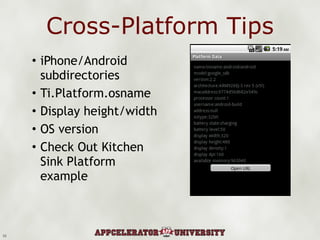
Cross-Platform Tips iPhone/Android subdirectories Ti.Platform.osname Display height/width OS version Check Out Kitchen Sink Platform example 10
Questions? App Composition Runtime environment UI Layouts
“ Code By Numbers” Demo App: Oh Snap! Condensed version of Snapost Source:  http://github.com/kwhinnery/Snapost App Features: Multiple Window/Tabbed UI Properties API Camera and Local Photo Gallery Upload to remote web service (TwitPic) Want to develop and deploy to a device in the space of a few minutes
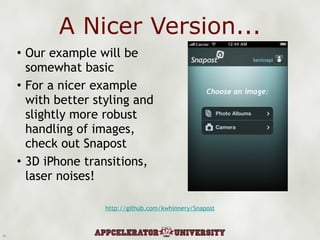
A Nicer Version... Our example will be somewhat basic For a nicer example with better styling and slightly more robust handling of images, check out Snapost 3D iPhone transitions, laser noises! http://github.com/kwhinnery/Snapost
iPhone SDK Users Will need to download build to address iOS 4 issues that is not in basic 1.3.0 release Nightly Builds: http://builds.appcelerator.com.s3.amazonaws.com/index.html Let’s go through install of “latest and greatest” build...
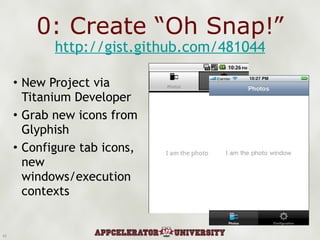
0: Create “Oh Snap!” New Project via Titanium Developer Grab new icons from Glyphish Configure tab icons, new windows/execution contexts http://gist.github.com/481044
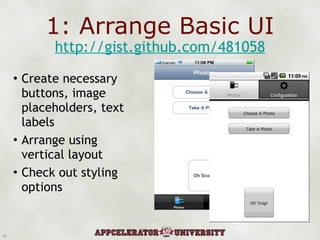
1: Arrange Basic UI Create necessary buttons, image placeholders, text labels Arrange using vertical layout Check out styling options http://gist.github.com/481058
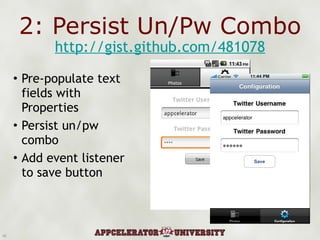
2: Persist Un/Pw Combo Pre-populate text fields with Properties Persist un/pw combo Add event listener to save button http://gist.github.com/481078
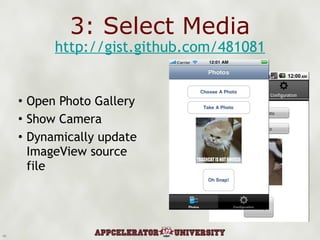
3: Select Media Open Photo Gallery Show Camera Dynamically update ImageView source file http://gist.github.com/481081
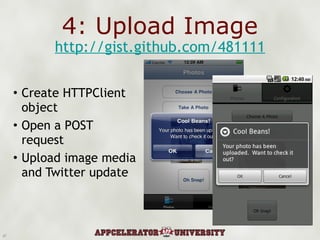
4: Upload Image Create HTTPClient object Open a POST request Upload image media and Twitter update http://gist.github.com/481111
5: Deploy to a device Demo: Deploy via Titanium Developer On your own, provision your system for development on device Android == super easy iPhone... not so much Video Tutorial: http://vimeo.com/10278960 All Appcelerator Videos: http://vimeo.com/appcelerator
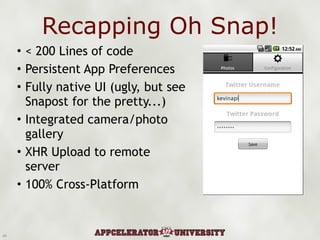
Recapping Oh Snap! < 200 Lines of code Persistent App Preferences Fully native UI (ugly, but see Snapost for the pretty...) Integrated camera/photo gallery XHR Upload to remote server 100% Cross-Platform
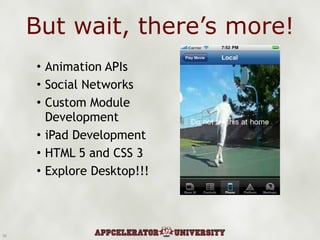
But wait, there’s more! Animation APIs Social Networks Custom Module Development iPad Development HTML 5 and CSS 3 Explore Desktop!!!
Resources Community Q&A Reference Docs (new getting started guides just finished) Premium Support (Pro Subscribers) Kitchen Sink and Demo Apps Dev Blog: Tutorials, Updates from dev team, developer-focused content Follow @appcelerator for news and updates
You Call It Questions?  Comments? Need Help?  Let’s hack your project! Want to get in contact with someone regarding X, Y, or Z?  I’ll direct you to the right folks. Anything else at all Kevin Whinnery http://kevinwhinnery.com http://twitter.com/kevinwhinnery IRC (irc.freenode.net): #titanium_app

Titanium Meetup Deck

  • 1.
    Native Mobile ApplicationsUSING Open Source
  • 2.
    Today’s Agenda TitaniumMobile Overview Hello World and Project Walkthrough Building Titanium Apps: Fundamentals Code By Numbers: Oh Snap! Where To Go From Here Questions and Answers Independent Hacking
  • 3.
    About Appcelerator OpenSource Software Company based in Mountain View ~25 employees and growing Developing Titanium for about two years, with Mobile coming in the last year 95% Developers
  • 4.
    About You NewTo Mobile Development Mobile Dev Veteran
  • 5.
    Either way, you’vecome to the right place.
  • 6.
  • 7.
    Which is greatand exciting!
  • 8.
    ...only how dowe target all these cool platforms?
  • 9.
    Well, you couldbuild native, but... Which platforms do you choose? How many codebases do you want to (or even can you) support? How long will it take to build native on N platforms? How much effort will be duplicated? What if you bet on the wrong platform? Who writes the code? Hire out? Retrain/retool yourself or your devs?
  • 10.
    The Web IsAn Option... ...and should be preferred when feasible Mobile browsers are progressing fast and converging around WebKit But there are limitations Native apps are inherently more capable than web apps Native apps run faster and smoother on resource constrained devices
  • 11.
    Ideally, we buildcross-platform native apps...
  • 12.
    ...but we don’twant to “write once, suck everywhere”* *Loren Brichter, creator “Twitter for iPhone”/Tweetie
  • 13.
    X-Platform Requirements Targetmultiple platforms from a single codebase Apps must feel like they belong on the platform Apps need to perform like native Bonus: Open source and extensible Bonus: Use skills we already have Hmmm, I wonder if he has a specific technology in mind...
  • 14.
    Enter Titanium Titaniumis an open source framework for building native mobile (or desktop) applications using open web technologies (JavaScript - optionally HTML and CSS)
  • 15.
    Titanium Key FactsOpen Source (Apache 2.0) Professional Services, SLA Support, Training, and Analytics available from Appcelerator Titanium Platforms Desktop: Win32, OS X, Linux Mobile: iOS, Android, BlackBerry, webOS (soon)
  • 16.
    Titanium Projects TitaniumDeveloper (1.2.1) Titanium Mobile SDK (1.3.0) Titanium Desktop SDK (1.0.0) Versioned separately, different release schedules We will focus on Developer and the Mobile SDK
  • 17.
    Titanium Features NativeUI Location APIs Local and Remote Data Social APIs Rich Media APIs Open Source and Extensible Integrated Analytics Development Tools Real native tables, tabs, sliders, and views Native Maps, Compass, and Geolocation Local SQL Database, Lightweight Key/Value Store, XHR Integrated Facebook Connect and YQL Local and streaming audio and video, media recording Extend Titanium with custom modules in native code Baked-in analytics APIs to measure results and behavior Develop and distribute your app for multiple platforms from a single tool
  • 18.
    Who Uses Titanium?NBC Universal PayPal MTV Anheuser-Busch Computer Sciences Corporation Intridea (Oil Reporter) 1000s of Titanium apps hitting the stores each month
  • 19.
    Titanium Architecture Desktopis HTML focused Can use other scripting languages Mobile: JavaScript interpreted at runtime JavaScript API >> native APIs
  • 20.
    What Titanium Mobileis not: Not a native wrapper around a web view (PhoneGap being an example of this approach) However, you do have a web view component for HTML/CSS UI if that is your preference Your JavaScript code is invoking native APIs for UI and other native functions Think MacRuby/Hot Cocoa on the desktop or some AAA mobile games which ship with a Lua interpreter
  • 21.
  • 22.
  • 23.
  • 24.
    Titanium Developer Manageand run Titanium applications Package applications for distribution Run on a device for testing Manage Appcelerator account
  • 25.
    Demo: Hello World!Creating a mobile project Mobile project structure Editing code, adding UI widgets to the app Deploy to simulator
  • 26.
    Demo: Kitchen SinkExample Code Living Reference Document Demonstrates API coverage
  • 27.
    Questions So Far?Titanium as a product Titanium capabilities About Appcelerator
  • 28.
    Titanium Fundamentals ATitanium application is a JavaScript program that is interpreted at runtime on the device app.js defines the root execution context of the app Note that we are not running in a browser We use the WebKit KJS JavaScript engine (iOS) or Rhino (Android/BB)
  • 29.
    Titanium JavaScript APIOrganized into logical namespaces “ Titanium” (or just “Ti” for short) is the root namespace for all Titanium functionality A few other odds and ends in the global space setTimeout/setInterval alert JSON
  • 30.
    Typical App CompositionA single window or stack of windows Tab Group containing many windows Windows contain views
  • 31.
    Windows and ContextsWindows are the top level container for Titanium applications Applications usually consist of one window or several windows in a tab group Windows usually create new execution contexts Execution context == A unique JavaScript symbol space Such windows are “Heavyweight” windows Can also create “Lightweight” windows (for apps that run in a single context) 3
  • 32.
    Demo: Contexts NewProject - Two Tabs with “Lightweight” windows Switch to contain urls and contexts Symbols not defined in other contexts
  • 33.
    The View HierarchyViews are the building blocks of Titanium UIs Specialized views: table views, image views, map views, etc. Views can contain child views, which are positioned relative to the parent Layout Options: Absolute, vertical, or horizontal (currently iPhone only) Vertical layouts require height to be set
  • 34.
    Custom Events Usefor cross-context messaging Events are received across all ACTIVE contexts Windows not yet open do not receive events Use also as an inversion of control mechanism Publish message when the database has been updated Publish message when contacting a server Using pub/sub messaging is very useful in a component-oriented framework like Titanium
  • 35.
    Demo: Custom EventsNow lets use custom events in our new app Events can have a data payload Remember that events are only received in active contexts
  • 36.
    Hey, what aboutlayouts? We’ll demo that later in the tutorial...
  • 37.
    Cross-Platform Development Notall UI is available across platforms Titanium != “Write Once, Run Everywhere” We try to enable native apps that look and feel like they were created in Objective-C or Java Also note that even cross-platform UI components (like table views) will render differently cross platform Cross Platform testing is critical during dev cycle
  • 38.
    Cross-Platform Tips iPhone/Androidsubdirectories Ti.Platform.osname Display height/width OS version Check Out Kitchen Sink Platform example 10
  • 39.
    Questions? App CompositionRuntime environment UI Layouts
  • 40.
    “ Code ByNumbers” Demo App: Oh Snap! Condensed version of Snapost Source: http://github.com/kwhinnery/Snapost App Features: Multiple Window/Tabbed UI Properties API Camera and Local Photo Gallery Upload to remote web service (TwitPic) Want to develop and deploy to a device in the space of a few minutes
  • 41.
    A Nicer Version...Our example will be somewhat basic For a nicer example with better styling and slightly more robust handling of images, check out Snapost 3D iPhone transitions, laser noises! http://github.com/kwhinnery/Snapost
  • 42.
    iPhone SDK UsersWill need to download build to address iOS 4 issues that is not in basic 1.3.0 release Nightly Builds: http://builds.appcelerator.com.s3.amazonaws.com/index.html Let’s go through install of “latest and greatest” build...
  • 43.
    0: Create “OhSnap!” New Project via Titanium Developer Grab new icons from Glyphish Configure tab icons, new windows/execution contexts http://gist.github.com/481044
  • 44.
    1: Arrange BasicUI Create necessary buttons, image placeholders, text labels Arrange using vertical layout Check out styling options http://gist.github.com/481058
  • 45.
    2: Persist Un/PwCombo Pre-populate text fields with Properties Persist un/pw combo Add event listener to save button http://gist.github.com/481078
  • 46.
    3: Select MediaOpen Photo Gallery Show Camera Dynamically update ImageView source file http://gist.github.com/481081
  • 47.
    4: Upload ImageCreate HTTPClient object Open a POST request Upload image media and Twitter update http://gist.github.com/481111
  • 48.
    5: Deploy toa device Demo: Deploy via Titanium Developer On your own, provision your system for development on device Android == super easy iPhone... not so much Video Tutorial: http://vimeo.com/10278960 All Appcelerator Videos: http://vimeo.com/appcelerator
  • 49.
    Recapping Oh Snap!< 200 Lines of code Persistent App Preferences Fully native UI (ugly, but see Snapost for the pretty...) Integrated camera/photo gallery XHR Upload to remote server 100% Cross-Platform
  • 50.
    But wait, there’smore! Animation APIs Social Networks Custom Module Development iPad Development HTML 5 and CSS 3 Explore Desktop!!!
  • 51.
    Resources Community Q&AReference Docs (new getting started guides just finished) Premium Support (Pro Subscribers) Kitchen Sink and Demo Apps Dev Blog: Tutorials, Updates from dev team, developer-focused content Follow @appcelerator for news and updates
  • 52.
    You Call ItQuestions? Comments? Need Help? Let’s hack your project! Want to get in contact with someone regarding X, Y, or Z? I’ll direct you to the right folks. Anything else at all Kevin Whinnery http://kevinwhinnery.com http://twitter.com/kevinwhinnery IRC (irc.freenode.net): #titanium_app