Computer
Hardware and
Software,
Input,
Processing,
Output, and
Storage
Devices
Historical
Background
A Computer Hardware is the
physical or tangible
parts/components of a computer.
Computer hardware is subdivided
into three (3) different groups
which are input devices, output
devices, and a system unit.
Computer hardware can also be
subdivided into two (2)
components which are external
components, and internal
components.
Input
Devices
An Input device is a device
which lets you enter
information inside the
computer system. It can also
let you communicate with
other computers.
Here are some common examples of input
device:
1. Keyboard – a device used to type data
and sends it into the computer.
2. Mouse – a device used to hover and click
mouse pointer.
3. Joystick/Gamepad – a device used
commonly in games.
4. Track ball – an upside-down mouse.
5. Light pen – a device used to draw and
write in touch-screen monitor.
6. Scanner – allows user to scan
documents and view them into computer.
7. Microphone – a device used to record
sound.
8. Bar Code Reader – is a device meant
to scan and read bar coded data. Used
in grocery and mall industries for
purchasing goods.
Output
Devices
An Output device is a device
which converts input into
human-comprehensible form
of information. It can be text,
audio, video, and images.
Here are some common examples of output
device:
1. Monitor – a device where the information
is display for the user to see.
2. Printer – an output device which produces
text and graphics on papers.
3. Projector – a device used to display
images, text, or videos on projection screens
using a lens system.
4. Speaker – is a type of output device to
play sounds which is transmitted by sound
card of a computer.
System
Unit
A System Unit is a part of computer
which is responsible for accepting
information from an input device,
process the information, and transfers
the information to the output device.
System Unit is also a called the
computer case, computer chassis, or
computer tower.
The function of System Unit is to hold
and connect all the components
together. The outside case of a
system unit typically contains a user-
friendly element like power and reset
button, USB ports, optical disk drive,
speaker and microphone plugins,
HDMI/VGA ports, and PS/2 ports.
Compute
r
Software
A Computer Software is a
program/instruction that directs
the computer for doing a task
and can be stored electronically.
Computer hardware is useless
without computer software.
Computer software is divided into
two (2) categories:
System
Software
System software – helps the computer
to carry out basic operating task. It
manages fundamental operating
instructions such as loading programs
into a memory, execute programs,
saving data, displaying information in
monitor, and transmit data through a
port to a peripheral device. Example
of system software are: operating
systems, utilities, and device drivers.
Application
Software
Application software – are
software or programs which
has to be installed in order for
a user to use it in a specific
task. Example of application
software: Microsoft Office –
Word, Excel, PowerPoint,
Publisher.
Compute
r
Software
Major Types of Software
The Input,
Processing,
Output, and
Storage
Devices
The flow of data in a
computer requires
specific hardware for
each phase. This
includes hardware for
input, processing, output
and storage.
Input devices accept
data and instructions
from the user. These are
of two types namely (1)
keyboard entry and (2)
direct entry.
Keyboar
d Entry
Keyboard entry wherein data is
inputted to the computer
through a keyboard.
Direct
Entry
Direct entry is a form of
input that does not require
data to be keyed in using
keyboard and has three
categories: pointing devices,
scanning devices, and
voice-input devices.
Categories Devices Functions
Pointing
devices -
used to move
the pointer
(cursor) on
screen.
Mouse
The most common
'pointing device' used
in PCs.
Touch
screen
A display screen that is
sensitive to the touch of
a finger or stylus.
Light
pen
A light-sensitive stylus
wired to a video terminal
used to draw pictures or
select menu options.
Digitizer
tablet
A graphics drawing
tablet used for sketching
new images or tracing
old ones.
Categories Devices Functions
Scanning
Devices- can
read text or
illustrations
printed on paper
and translates
the information
into a form the
computer can
use.
Image
Scanner
A device that optically
scans images, printed
text, handwriting or
an object and
converts it to a digital
image.
Bar
Code
Reader/
Scanner
An electronic
device that can
read and output
printed barcodes to
a computer.
Categories Devices Functions
Voice- Input
Devices - also
known as
speech or voice
recognition
systems that
allows a user to
send audio
signals to a
computer for
processing,
recording, or
carrying out
commands.
Microphone
Allow users to
speak to the
computer in
order to record
a voice
message or
navigate
software.
Processi
ng
Devices
Processing devices
are the components
responsible for the
processing of
information within the
computer system.
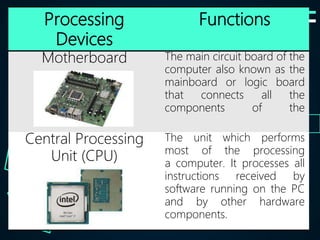
Processing
Devices
Functions
Motherboard The main circuit board of the
computer also known as the
mainboard or logic board
that connects all the
components of the
Central Processing
Unit (CPU)
The unit which performs
most of the processing
a computer. It processes all
instructions received by
software running on the PC
and by other hardware
components.
Processing
Devices
Functions
RAM Very high speed storage that
temporarily stores data
the CPU uses
ROM A type of non-volatile
memory used in computers
and other electronic devices.
Output
Devices
Output devices are
pieces of computer
hardware that displays
results after the computer
has processed the input
data that has been
entered.
Output
Devices
Functions Examples
Computer
Display
Monitor
It displays
information in visual
form, using text and
graphics.
Image
Projector
An optical device
that projects an
image (or moving
images) onto a
surface, commonly
a projection screen.
Output
Devices
Functions Examples
Smart Board A type of display
screen that has a
touch sensitive
transparent panel
covering the screen,
which is similar to a
touch screen.
Printer A device that prints
text or illustrations
on paper.
Output
Devices
Functions Examples
Speakers Used to play sound
Storage
Devices
Storage devices are
responsible for data that has
been processed and stored
in permanent or semi-
permanent form to be used
for later processing or
reading.
Storage
Devices
Functions
Floppy Diskette A random access, removable
data storage medium that
can be used with personal
computers which can store
up to 1.44 megabytes (MB)
data.
Optical Disk A nonmagnetic, polished
metal disk used to store
digital information also
known as compact disk.
Storage
Devices
Functions
USB Flash Drive A plug-and-play portable
storage device that uses
memory. Has a capacity of
1GB, 2GB, 4GB, 8GB, 16GB,
32GB.
Hard Disk The main, and usually
data storage device in a
computer which can store
from 500 gigabytes up to 1
terabyte of data.
Storage
Devices
Functions
LS120 A drive which supports a
special floppy diskette which
can store up to 120MB of
information as well as being
backwards compatible
Zip Disk A small, portable disk drive
used primarily for backing
and archiving personal
computer files.
Processi
ng
Devices
Processi
ng
Devices
Thank
you!!!

Week-2_CSS9.pptx

  • 1.
  • 2.
    Historical Background A Computer Hardwareis the physical or tangible parts/components of a computer. Computer hardware is subdivided into three (3) different groups which are input devices, output devices, and a system unit. Computer hardware can also be subdivided into two (2) components which are external components, and internal components.
  • 3.
  • 4.
    An Input deviceis a device which lets you enter information inside the computer system. It can also let you communicate with other computers.
  • 5.
    Here are somecommon examples of input device: 1. Keyboard – a device used to type data and sends it into the computer. 2. Mouse – a device used to hover and click mouse pointer. 3. Joystick/Gamepad – a device used commonly in games. 4. Track ball – an upside-down mouse.
  • 6.
    5. Light pen– a device used to draw and write in touch-screen monitor. 6. Scanner – allows user to scan documents and view them into computer. 7. Microphone – a device used to record sound. 8. Bar Code Reader – is a device meant to scan and read bar coded data. Used in grocery and mall industries for purchasing goods.
  • 7.
  • 8.
    An Output deviceis a device which converts input into human-comprehensible form of information. It can be text, audio, video, and images.
  • 9.
    Here are somecommon examples of output device: 1. Monitor – a device where the information is display for the user to see. 2. Printer – an output device which produces text and graphics on papers. 3. Projector – a device used to display images, text, or videos on projection screens using a lens system. 4. Speaker – is a type of output device to play sounds which is transmitted by sound card of a computer.
  • 10.
  • 11.
    A System Unitis a part of computer which is responsible for accepting information from an input device, process the information, and transfers the information to the output device. System Unit is also a called the computer case, computer chassis, or computer tower.
  • 12.
    The function ofSystem Unit is to hold and connect all the components together. The outside case of a system unit typically contains a user- friendly element like power and reset button, USB ports, optical disk drive, speaker and microphone plugins, HDMI/VGA ports, and PS/2 ports.
  • 13.
  • 14.
    A Computer Softwareis a program/instruction that directs the computer for doing a task and can be stored electronically. Computer hardware is useless without computer software. Computer software is divided into two (2) categories:
  • 15.
  • 16.
    System software –helps the computer to carry out basic operating task. It manages fundamental operating instructions such as loading programs into a memory, execute programs, saving data, displaying information in monitor, and transmit data through a port to a peripheral device. Example of system software are: operating systems, utilities, and device drivers.
  • 17.
  • 18.
    Application software –are software or programs which has to be installed in order for a user to use it in a specific task. Example of application software: Microsoft Office – Word, Excel, PowerPoint, Publisher.
  • 19.
  • 20.
  • 21.
    The flow ofdata in a computer requires specific hardware for each phase. This includes hardware for input, processing, output and storage.
  • 22.
    Input devices accept dataand instructions from the user. These are of two types namely (1) keyboard entry and (2) direct entry.
  • 23.
  • 24.
    Keyboard entry whereindata is inputted to the computer through a keyboard.
  • 25.
  • 26.
    Direct entry isa form of input that does not require data to be keyed in using keyboard and has three categories: pointing devices, scanning devices, and voice-input devices.
  • 27.
    Categories Devices Functions Pointing devices- used to move the pointer (cursor) on screen. Mouse The most common 'pointing device' used in PCs. Touch screen A display screen that is sensitive to the touch of a finger or stylus. Light pen A light-sensitive stylus wired to a video terminal used to draw pictures or select menu options. Digitizer tablet A graphics drawing tablet used for sketching new images or tracing old ones.
  • 28.
    Categories Devices Functions Scanning Devices-can read text or illustrations printed on paper and translates the information into a form the computer can use. Image Scanner A device that optically scans images, printed text, handwriting or an object and converts it to a digital image. Bar Code Reader/ Scanner An electronic device that can read and output printed barcodes to a computer.
  • 29.
    Categories Devices Functions Voice-Input Devices - also known as speech or voice recognition systems that allows a user to send audio signals to a computer for processing, recording, or carrying out commands. Microphone Allow users to speak to the computer in order to record a voice message or navigate software.
  • 30.
  • 31.
    Processing devices are thecomponents responsible for the processing of information within the computer system.
  • 32.
    Processing Devices Functions Motherboard The maincircuit board of the computer also known as the mainboard or logic board that connects all the components of the Central Processing Unit (CPU) The unit which performs most of the processing a computer. It processes all instructions received by software running on the PC and by other hardware components.
  • 33.
    Processing Devices Functions RAM Very highspeed storage that temporarily stores data the CPU uses ROM A type of non-volatile memory used in computers and other electronic devices.
  • 34.
  • 35.
    Output devices are piecesof computer hardware that displays results after the computer has processed the input data that has been entered.
  • 36.
    Output Devices Functions Examples Computer Display Monitor It displays informationin visual form, using text and graphics. Image Projector An optical device that projects an image (or moving images) onto a surface, commonly a projection screen.
  • 37.
    Output Devices Functions Examples Smart BoardA type of display screen that has a touch sensitive transparent panel covering the screen, which is similar to a touch screen. Printer A device that prints text or illustrations on paper.
  • 38.
  • 39.
  • 40.
    Storage devices are responsiblefor data that has been processed and stored in permanent or semi- permanent form to be used for later processing or reading.
  • 41.
    Storage Devices Functions Floppy Diskette Arandom access, removable data storage medium that can be used with personal computers which can store up to 1.44 megabytes (MB) data. Optical Disk A nonmagnetic, polished metal disk used to store digital information also known as compact disk.
  • 42.
    Storage Devices Functions USB Flash DriveA plug-and-play portable storage device that uses memory. Has a capacity of 1GB, 2GB, 4GB, 8GB, 16GB, 32GB. Hard Disk The main, and usually data storage device in a computer which can store from 500 gigabytes up to 1 terabyte of data.
  • 43.
    Storage Devices Functions LS120 A drivewhich supports a special floppy diskette which can store up to 120MB of information as well as being backwards compatible Zip Disk A small, portable disk drive used primarily for backing and archiving personal computer files.
  • 44.
  • 45.
  • 47.