Introduction to TEX and LATEX
Lecture delivered at IEEE Supported Workshop on
Research Methodologies at GSSSIETW, Mysuru
R S Ananda Murthy
Associate Professor
Department of Electrical & Electronics Engineering,
Sri Jayachamarajendra College of Engineering,
Mysore 570 006
July 28, 2016
R S Ananda Murthy Introduction to TEX and LATEX
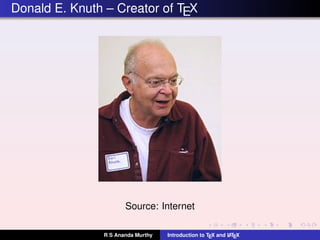
Donald E. Knuth – Creator of TEX
Source: Internet
R S Ananda Murthy Introduction to TEX and LATEX
What is TEX?
TEX should be pronounced as Tek and not as Teks.
It is a software released in 1978.
TEX along with Metafont and Computer Modern Fonts was
mostly developed by Donald Knuth, an American computer
scientist, mathematician, and Professor Emeritus at
Stanford University.
TEX has two goals:
To facilitate any body to produce high-quality documents
with reasonably minimal effort.
To retain the format of the document intact on any
computing platform now and in future.
R S Ananda Murthy Introduction to TEX and LATEX
What is LATEX?
LATEX should be pronounced as Laytek and not as Layteks.
It is a document preparation system and a mark-up
language for high-quality typesetting.
It encourages authors to spend less time in formating their
documents and instead, concentrate more on the outline
and content of the document.
It is actually a set of macros which call TEX in the
background for typesetting the document.
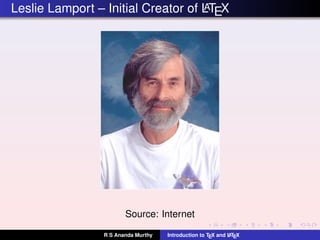
LATEX was initially developed around 1986 by Leslie
Lamport, an American mathematician and computer
scientist from Massachusetts Institute of Technology (MIT).
R S Ananda Murthy Introduction to TEX and LATEX
Leslie Lamport – Initial Creator of LATEX
Source: Internet
R S Ananda Murthy Introduction to TEX and LATEX
Present Status of LATEX
Latest Stable Version is LATEX2ε dated 01-October-2015.
Development of LATEX3 is going on.
Home Page: http://www.latex-project.org/.
Tex Live always has the latest stable version of LATEX.
R S Ananda Murthy Introduction to TEX and LATEX
What is MiKTEX or proTEXt
MiKTEX is the TEX/LATEX distribution for Windows. Home
Page: http://miktex.org/.
proTEXt is another TEX/LATEX distribution for Windows.
Home Page: https://www.tug.org/protext/.
Tex Live DVD has proTEXt.
R S Ananda Murthy Introduction to TEX and LATEX
TEX Live
TEX Live is a free software distribution of TEX typesetting
system along with major TEX-related programs, macro
packages like LATEX, ConTEXt etc., and fonts.
First released in 1996.
Developed by Karl Berry and many other TEX users.
Available at http://www.tug.org/texlive/.
Latest Stable Release is dated 05-June-2016.
TEX Live DVD has complete TEX-related programs for GNU
Linux, Windows, and MacOS platforms.
In major GNU Linux distributions like Ubuntu, Debian,
Slackware, Arch Linux, Fedora and Gentoo, Tex Live
packages can be installed using their respective package
managers instead of using TEX Live DVD.
R S Ananda Murthy Introduction to TEX and LATEX
TEX-related Software Preferable on Windows
Tex Live (preferable) or MiKTEX or proTEXt.
TEXStudio or Texmaker – an Integrated Development
Environment (IDE) which simplifies creation of documents
using LATEX.
LYX – A very nice optional GUI for creating documents
using LATEX.
Inkscape – a free vector drawing program for creating
drawings.
TexText – an extension of Inkscape for inserting LATEX
mathematical equations in drawings.
Sumatra (preferable free PDF document viewer) or Adobe
Acrobat Reader.
R S Ananda Murthy Introduction to TEX and LATEX
TEX-related Software Preferable on GNU Linux
Tex Live installed from Tex Live DVD or from package
manager of the distribution.
Any editor of your choice. Eg. Geany, Emacs, Mousepad.
Texmaker or TEXStudio or any other optional IDE which
simplifies creation of documents using LATEX.
LYX – A very nice optional GUI for creating documents
using LATEX.
Inkscape – a free vector drawing program for creating
drawings.
TexText – an extension of Inkscape for inserting LATEX
mathematical equations in drawings.
Evince (preferable free PDF document viewer) or Adobe
Acrobat Reader.
R S Ananda Murthy Introduction to TEX and LATEX
LATEX Document Class Files and Package Files
LATEX document class file which is typically .cls file defines
a document structure and layout.
LATEX package provides additional formating commands to
a document class.
A package is always loaded by mentioning
usepackage{packagename} command in the
preamble.
CTAN http://www.ctan.org/pkg has packages which
provide different kinds of formatting features for the
documents created using TEX and LATEX.
R S Ananda Murthy Introduction to TEX and LATEX
Some Important TEX/LATEX Links
The (Not So) Short Introduction to LaTeX2e
http://ctan.tug.org/tex-archive/info/
lshort/english/lshort.pdf
Online LATEX Tutorials by Indian TeX Users Group
http://sarovar.org/projects/ltxprimer
Comprehensive TeX Archive Network (CTAN)
https://www.ctan.org/. This is the central place for
all kinds of material pertaining to TEX and LATEX.
R S Ananda Murthy Introduction to TEX and LATEX
What Next?
The best way to learn LATEX is to start creating documents
using it.
R S Ananda Murthy Introduction to TEX and LATEX
Licence
This work is licensed under a
Creative Commons Attribution 4.0 International License.
R S Ananda Murthy Introduction to TEX and LATEX

Introduction to-Tex-and-LaTeX

  • 1.
    Introduction to TEXand LATEX Lecture delivered at IEEE Supported Workshop on Research Methodologies at GSSSIETW, Mysuru R S Ananda Murthy Associate Professor Department of Electrical & Electronics Engineering, Sri Jayachamarajendra College of Engineering, Mysore 570 006 July 28, 2016 R S Ananda Murthy Introduction to TEX and LATEX
  • 2.
    Donald E. Knuth– Creator of TEX Source: Internet R S Ananda Murthy Introduction to TEX and LATEX
  • 3.
    What is TEX? TEXshould be pronounced as Tek and not as Teks. It is a software released in 1978. TEX along with Metafont and Computer Modern Fonts was mostly developed by Donald Knuth, an American computer scientist, mathematician, and Professor Emeritus at Stanford University. TEX has two goals: To facilitate any body to produce high-quality documents with reasonably minimal effort. To retain the format of the document intact on any computing platform now and in future. R S Ananda Murthy Introduction to TEX and LATEX
  • 4.
    What is LATEX? LATEXshould be pronounced as Laytek and not as Layteks. It is a document preparation system and a mark-up language for high-quality typesetting. It encourages authors to spend less time in formating their documents and instead, concentrate more on the outline and content of the document. It is actually a set of macros which call TEX in the background for typesetting the document. LATEX was initially developed around 1986 by Leslie Lamport, an American mathematician and computer scientist from Massachusetts Institute of Technology (MIT). R S Ananda Murthy Introduction to TEX and LATEX
  • 5.
    Leslie Lamport –Initial Creator of LATEX Source: Internet R S Ananda Murthy Introduction to TEX and LATEX
  • 6.
    Present Status ofLATEX Latest Stable Version is LATEX2ε dated 01-October-2015. Development of LATEX3 is going on. Home Page: http://www.latex-project.org/. Tex Live always has the latest stable version of LATEX. R S Ananda Murthy Introduction to TEX and LATEX
  • 7.
    What is MiKTEXor proTEXt MiKTEX is the TEX/LATEX distribution for Windows. Home Page: http://miktex.org/. proTEXt is another TEX/LATEX distribution for Windows. Home Page: https://www.tug.org/protext/. Tex Live DVD has proTEXt. R S Ananda Murthy Introduction to TEX and LATEX
  • 8.
    TEX Live TEX Liveis a free software distribution of TEX typesetting system along with major TEX-related programs, macro packages like LATEX, ConTEXt etc., and fonts. First released in 1996. Developed by Karl Berry and many other TEX users. Available at http://www.tug.org/texlive/. Latest Stable Release is dated 05-June-2016. TEX Live DVD has complete TEX-related programs for GNU Linux, Windows, and MacOS platforms. In major GNU Linux distributions like Ubuntu, Debian, Slackware, Arch Linux, Fedora and Gentoo, Tex Live packages can be installed using their respective package managers instead of using TEX Live DVD. R S Ananda Murthy Introduction to TEX and LATEX
  • 9.
    TEX-related Software Preferableon Windows Tex Live (preferable) or MiKTEX or proTEXt. TEXStudio or Texmaker – an Integrated Development Environment (IDE) which simplifies creation of documents using LATEX. LYX – A very nice optional GUI for creating documents using LATEX. Inkscape – a free vector drawing program for creating drawings. TexText – an extension of Inkscape for inserting LATEX mathematical equations in drawings. Sumatra (preferable free PDF document viewer) or Adobe Acrobat Reader. R S Ananda Murthy Introduction to TEX and LATEX
  • 10.
    TEX-related Software Preferableon GNU Linux Tex Live installed from Tex Live DVD or from package manager of the distribution. Any editor of your choice. Eg. Geany, Emacs, Mousepad. Texmaker or TEXStudio or any other optional IDE which simplifies creation of documents using LATEX. LYX – A very nice optional GUI for creating documents using LATEX. Inkscape – a free vector drawing program for creating drawings. TexText – an extension of Inkscape for inserting LATEX mathematical equations in drawings. Evince (preferable free PDF document viewer) or Adobe Acrobat Reader. R S Ananda Murthy Introduction to TEX and LATEX
  • 11.
    LATEX Document ClassFiles and Package Files LATEX document class file which is typically .cls file defines a document structure and layout. LATEX package provides additional formating commands to a document class. A package is always loaded by mentioning usepackage{packagename} command in the preamble. CTAN http://www.ctan.org/pkg has packages which provide different kinds of formatting features for the documents created using TEX and LATEX. R S Ananda Murthy Introduction to TEX and LATEX
  • 12.
    Some Important TEX/LATEXLinks The (Not So) Short Introduction to LaTeX2e http://ctan.tug.org/tex-archive/info/ lshort/english/lshort.pdf Online LATEX Tutorials by Indian TeX Users Group http://sarovar.org/projects/ltxprimer Comprehensive TeX Archive Network (CTAN) https://www.ctan.org/. This is the central place for all kinds of material pertaining to TEX and LATEX. R S Ananda Murthy Introduction to TEX and LATEX
  • 13.
    What Next? The bestway to learn LATEX is to start creating documents using it. R S Ananda Murthy Introduction to TEX and LATEX
  • 14.
    Licence This work islicensed under a Creative Commons Attribution 4.0 International License. R S Ananda Murthy Introduction to TEX and LATEX