進階實務班
Philipz(鄭淳尹)
2017-08-19
廣宣學堂
github.com/philipz/advanced_docker_workshop
跨域數位人才
加速躍升計畫
Today Topics
1. Docker Machine 介紹與基本指令
2. Docker Machine 建立雲端虛擬機
3. Docker Swarm 介紹與基本指令
4. 以 Machine 建置 Swarm 叢集
5. Docker Swarm networking & Swarm service
6. GitLab 結合 Docker 容器開發測試
7. 容器與 Raspberry Pi IoT 整合應用
8. 以 GitLab 執行 Docker Compose IoT E2E 測試
9. Moby & LinuxKit 介紹與入門
Docker Ecosystem
Microsoft Azure
https://portal.azure.com/
curl -sSL https://get.docker.com/ | sh
Review Docker Compose
GitHub: compose_wp_proxy
WordPress example of previous workshop
Add new service - Nginx Reverse Proxy
docker-compose scale wordpress=2
DNS-based service discovery
$nslookup wordpress
Compose & Wordpress
● 水平擴展 wordpress:scale
1.1 Docker Machine
介紹
Docker Machine
● Combind AWS CLI, Azure CLI, VMware CLI…...
● Learn One, Run Everywhere
● VMware vSphere
a. Install govc
go get github.com/vmware/govmomi/govc
go install github.com/vmware/govmomi/govc
b. docker-machine create vmdocker --driver vmwarevsphere
--vmwarevsphere-datacenter DCNAME --vmwarevsphere-vcenter
ESX_IP --vmwarevsphere-username root --vmwarevsphere-password
PASSWORD --vmwarevsphere-datastore DSNAME
--vmwarevsphere-network VMNETWORK
● Azure ● AWS ● VirtualBox
1.2 Docker Machine
基本指令
Install Docker Machine
sudo curl -L
"https://github.com/docker/machine/releases/download/v0.12.
2/docker-machine-$(uname -s)-$(uname -m)" -o
/usr/local/bin/docker-machine
and
sudo chmod +x /usr/local/bin/docker-machine
docker-machine -v
Docker Machine commands (1/2)
Commands:
active Print which machine is active
config Print the connection config for machine
create Create a machine
env Display the commands to set up the environment for the
Docker client
inspect Inspect information about a machine
ip Get the IP address of a machine
kill Kill a machine
ls List machines
provision Re-provision existing machines
regenerate-certs Regenerate TLS Certificates for a machine
restart Restart a machine
Docker Machine commands (2/2)
Commands:
rm Remove a machine
ssh Log into or run a command on a machine with SSH.
scp Copy files between machines
start Start a machine
status Get the status of a machine
stop Stop a machine
upgrade Upgrade a machine to the latest version of Docker
url Get the URL of a machine
version Show the Docker Machine version or a machine docker
version
help Shows a list of commands or help for one command
2. Docker Machine
建立雲端虛擬機
Azure VM
● Azure CLI
● 使用 Docker 電腦搭配 Azure 驅動程式
● 使用 Azure CLI 選取 Linux VM 映像
$ docker run -it azuresdk/azure-cli-python:0.2.8
az login, then enter the code
az vm image list --output table
az vm image list-skus -l eastasia -p canonical - f ubuntuserver
azure vm docker create
az vm list-sizes -l eastasia | more
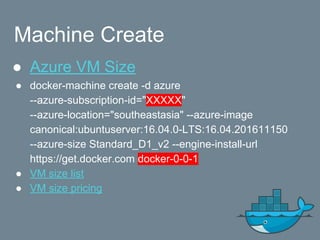
Machine Create
● Azure VM Size
● docker-machine create -d azure
--azure-subscription-id="XXXXX"
--azure-location="southeastasia" --azure-image
canonical:ubuntuserver:16.04.0-LTS:16.04.201611150
--azure-size Standard_D1_v2 --engine-install-url
https://get.docker.com docker-0-0-1
● VM size list
● VM size pricing
Where is subscription-id ?
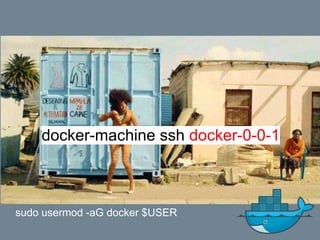
docker-machine ssh docker-0-0-1
sudo usermod -aG docker $USER
3.1 Docker Swarm
介紹
Container Orchestration
Docker Swarm
Kubernetes
DC/OS
Rancher
Docker Datacenter
???
Docker Swarm
● Docker-native clustering system
● From v1.12 is default feature.
● Docker overlay network
Play-with-docker Online Lab
Old Swarm Architecture
New Swarm Mode (1/2)
Byzantine
Generals
Problem
New Swarm Mode (2/2)
Consul, HashiCorp
K/V
Mesh, LB
3.2 Docker Swarm
基本指令
Docker Swarm commands
Commands:
init Initialize a swarm
join Join a swarm as a node and/or manager
join-token Manage join tokens
update Update the swarm
leave Leave the swarm (workers only)
Manager also can leave
$ docker swarm -h
4. 以 Machine 建置
Swarm 叢集
Machine Create Again
● docker-machine create -d azure
--azure-subscription-id="XXXXX"
--azure-location="southeastasia" --azure-image
canonical:ubuntuserver:16.04.0-LTS:16.04.201611150
--azure-size Standard_D1_v2 --engine-install-url
https://get.docker.com docker-0-0-2
● docker-machine create again
Create Swarm Cluster
Check version: $ docker -v
$ docker info
$ docker swarm init
docker swarm join 
--token SWMTKN-1-44ze8j7xkq5t 
192.168.0.4:2377
$ docker-machine ssh docker-0-0-2
COPY & PASTE
$ docker-machine ssh docker-0-0-3
docker swarm join docs
It’s so EASY!!!
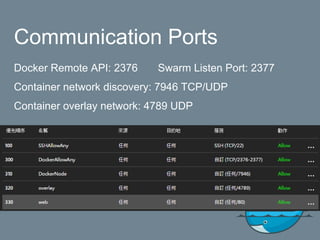
Finding Firewall
Communication Ports
Docker Remote API: 2376 Swarm Listen Port: 2377
Container network discovery: 7946 TCP/UDP
Container overlay network: 4789 UDP
Check Swarm Cluster
$ docker info
Managers: 1
Nodes: 2
$ docker node ls
ID HOSTNAME STATUS AVAILABILITY MANAGER
STATUS
29zkgygdq6el0ylwtov5xksy2 docker-0-0-2 Ready Active
bbf3b27xkybups1foh750qf15 * docker-0-0-1 Ready Active Leader
$ eval $(docker-machine env docker-0-0-1)
Docker node commands
Commands:
demote Demote one or more nodes from manager in the swarm
inspect Display detailed information on one or more nodes
ls List nodes in the swarm
promote Promote one or more nodes to manager in the swarm
rm Remove one or more nodes from the swarm
ps List tasks running on a node
update Update a node
$ docker node ls
$ docker promtoe docker-0-0-2
$ docker node ls
$ docker demtoe docker-0-0-2
$ docker node ls
5.1 Docker Swarm
Networking
Docker Built-In Network Drivers
● Bridge
● Overlay
● MACVLAN
● Host
● None
No more “link”, just use network.
Docker Reference Architecture: Designing Scalable,
Portable Docker Container Networks
Docker Plug-In Network Drivers
● weave
● calico
Docker Plug-In IPAM Drivers
● infoblox
Exercise
$ docker network ls
$ docker network create --driver overlay my-network
$ docker network inspect my-network
$ docker service create 
--replicas 3 
--name my-web 
--network my-network 
nginx:alpine
$ docker service ps my-web
$ docker network inspect my-network
$ docker ps
$ docker exec -ti XXXXX sh
$ nslookup my-web $nslookup tasks.my-web
5.2 Swarm service
Docker service commands
Commands:
create Create a new service
inspect Display detailed information on one or more services
ps List the tasks of a service
ls List services
rm Remove one or more services
scale Scale one or multiple services
update Update a service
Service Create Exercise
$ docker network create --driver overlay wp_db
$ docker network inspect wp_db
$ docker service create 
--name db --network=wp_db 
-e MYSQL_ROOT_PASSWORD=wordpress 
-e MYSQL_DATABASE=wordpress 
-e MYSQL_USER=wordpress 
-e MYSQL_PASSWORD=wordpress 
mysql:5.7
$ docker service create 
--name wp -p 80:80 --network=wp_db 
-e WORDPRESS_DB_HOST=db:3306 
-e WORDPRESS_DB_PASSWORD=wordpress 
wordpress:4.5
Service Rolling updates
$ docker service scale wp=3
$ docker service update 
--image wordpress:4.6 
--update-delay 10s 
--update-parallelism 1 
wp
$ docker service ps wp
docker service update docs
Docker stack
$ docker network create --driver overlay mysql
$ docker network create --driver overlay proxy
$ docker stack deploy
--compose-file=wordpress.yml wordpress
$ docker stack ps wordpress
$ docker service ls
Remove external: true & philipz/reproxy
Then try again & Scale down!
Compose & Wordpress
● 水平擴展 wordpress:scale
Swarm & MySQL Cluster
Docker Swarm for
MySQL Cluster &
WordPress
Katacoda online lab.
1. Getting Started Galera
with Docker, part 1
2. Getting Started Galera
with Docker, part 2
More
Advanced
Docker Workshop
Play Bigger!!!
ALL Docker Machines
Join Together!!!
https://github.com/swarm2k/swarm2k
Azure Container Instances
6. GitLab 結合 Docker
容器開發測試
Azure Web App on Linux
Use Docker image for Web AP
Azure PaaS 價格選型
ChatBot
系統架構
Azure
Web App
on Linux
GitLab
GitHub
GitLab
Jenkins Registry
Azure CLI 2.0 login
使用 Azure CLI 2.0 來建立 Azure 服務主體
Azure CLI 2.0 Reference
CI/CD Pipeline
Create GitLab account
Let’s play!!!
7. 容器與 Raspberry Pi
IoT 整合應用
From IBM
IoT Protocol
Pub/Sub, QoS
Arduino, mbed
Mosquitto, Xively
MQTT
1. sudo apt-get install
qemu-user-static
2. docker pull philipz/rpi-raspbian
3. docker run -ti -v
/usr/bin/qemu-arm-static:/usr/bin/
qemu-arm-static
philipz/rpi-raspbian bash
4. apt-get update
5. uname -a
QEMU 模擬 ARM 裝置
https://azure-samples.github.io/raspberry-pi-web-simulator/
將 Raspberry Pi 線上模擬器連線至 Azure IoT Hub (Node.js)
8. 以 GitLab 執行 Docker
Compose IoT E2E 測試
Docker Autobuild
Building ARM containers on any x86 machine, even DockerHub
GitHub source code
IoT DevOps
9. Moby & LinuxKit
介紹與入門
Exercise
1. git clone https://github.com/linuxkit/linuxkit
2. sudo make
3. sudo cp bin/moby bin/linuxkit /usr/local/bin
4. cd example && moby build redis-os.yml
5. linuxkit run -publish 6379:6379/tcp redis-os
6. docker run -ti --rm redis bash
7. redis-cli -h 172.17.0.2
10. 結語
Business
model
Microservices
Infrastructure
as Code
Container
Design
DevOps
*業務系統
微服務架構
Kubernetes
基礎架構
即程式碼
容器式
設計
自動化生產線
Exercise & Self-learning
1. Docker Basic - Katacoda by Philipz
2. Docker Trainning, examples
3. Docker Free self-paced courses
4. Docker Tutorials and Labs
Online Self-learning, http://testdriven.io
Offical Online Lab
Scalable Microservices with Kubernetes
- Udacity
Hope You Love Docker
So long!

Docker 進階實務班