CS-097
Muhammad Hassan
1
Computer Simulation and
Modeling
2
Contents
 What is Computer Simulation?
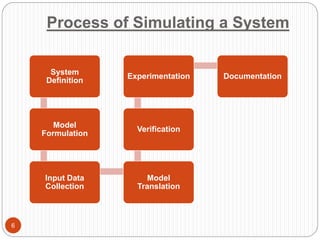
 Process of simulating a system
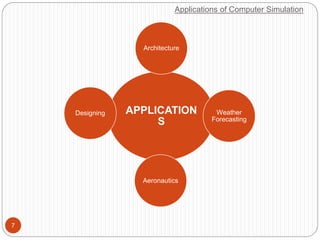
 Applications
 Advantages and Disadvantages
 Conclusion
3
What is Computer Simulation?
4
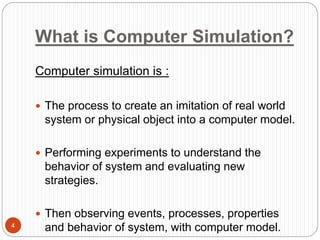
Computer simulation is :
 The process to create an imitation of real world
system or physical object into a computer model.
 Performing experiments to understand the
behavior of system and evaluating new
strategies.
 Then observing events, processes, properties
and behavior of system, with computer model.
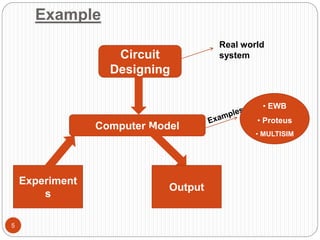
Example
5
Circuit
Designing
Real world
system
Computer Model
• EWB
• Proteus
• MULTISIM
Experiment
s
Output
Process of Simulating a System
6
System
Definition
Model
Formulation
Input Data
Collection
Model
Translation
Verification
Experimentation Documentation
Applications of Computer Simulation
7
APPLICATION
S
Architecture
Weather
Forecasting
Aeronautics
Designing
Weather Forecasting
8
 Computer simulation of weather forecasting can
be used to predict storms
 The wind, rain pattern and temperatures e.t.c for
the whole planet are simulated using very
powerful computers.
Application of Computer
Simulation
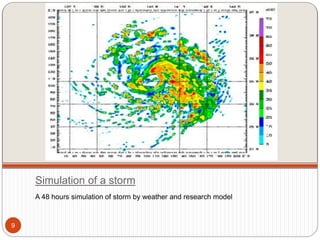
Simulation of a storm
A 48 hours simulation of storm by weather and research model
9
Designing
10
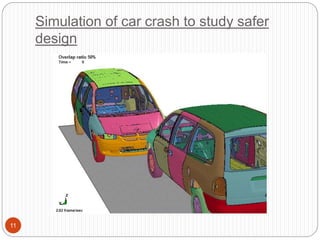
 Simulations software are used to design safer
cars and improve their designs ( performing real
car crash just to check design stability is very
expensive)
Application of Computer
Simulation
Simulation of car crash to study safer
design
11
Designing
12
 Simulations software are used to design safer
cars and improve their designs ( performing real
car crash just to check design stability is very
expensive)
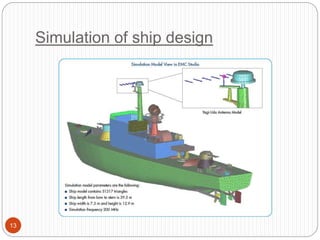
 Design of ships are also simulated first to achieve
more perfection
Application of Computer
Simulation
Simulation of ship design
13
Designing
14
 Simulations software are used to design safer
cars and improve their designs ( performing real
car crash just to check design stability is very
expensive)
 Design of ships are also simulated first to achieve
more perfection
 Circuit Designing
Application of Computer
Simulation
Architecture
15
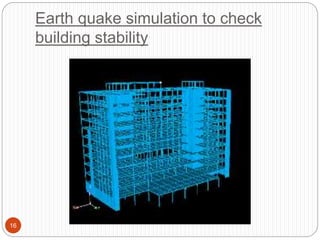
 Design stability of buildings are checked by
simulation of earth quake through simulation
software
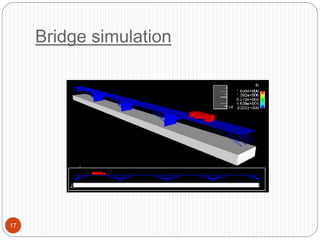
 Bridges are also simulated to check how much
load they can resist, and what improvement can
be made
Application of Computer
Simulation
Earth quake simulation to check
building stability
16
Bridge simulation
17
Aeronautics
18
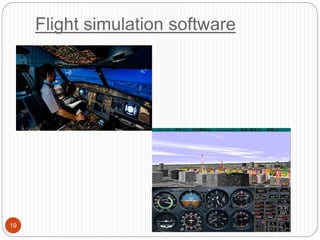
 Trainee pilots have many hours of lesson in flight
simulators before being allowed to fly an
airplanes.
 These simulators provide realistic flying situation
like storms, engine failure…
 This experience help them to tackle such
situation in real, as they have gained a bit
experience.
Application of Computer
Simulation
Flight simulation software
19
20
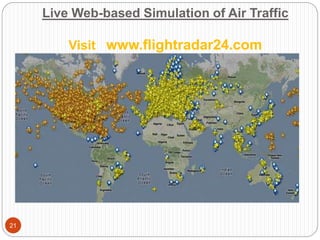
How many airplanes are flying in
the world right now?
Live Web-based Simulation of Air Traffic
Visit www.flightradar24.com
21
Advantages of Computer
Simulation
22
 To test a system without having to create the system
for real (Building real-life systems can be expensive,
and take a long time)
 To predict what might happen to a system in the
future (An accurate model allows us to go forward in
virtual time to see what the system will be doing in the
future)
 To train people to use a system without putting them
at risk (Learning to fly an airplane is very difficult and
mistake will be made. In a real plane mistakes could
be fatal!)
 To investigate a system in great detail (A model of a
system can be zoomed in/out or rotated. Time can be
stopped, rewound, etc.)
Disadvantages of Computer
Simulation
23
 It depends upon the skills of the model maker
 Time consuming and high cost
 Sometimes, it does not give the best solution for
system
Conclusion
24
 Computer Simulation and Modeling software are
very useful in many areas.
 It gives great understanding of a system and also
predicts the behavior of system in different
situation
 The Big picture…
25
THANK YOU

Computer Simulation And Modeling

  • 1.
  • 2.
  • 3.
    Contents  What isComputer Simulation?  Process of simulating a system  Applications  Advantages and Disadvantages  Conclusion 3
  • 4.
    What is ComputerSimulation? 4 Computer simulation is :  The process to create an imitation of real world system or physical object into a computer model.  Performing experiments to understand the behavior of system and evaluating new strategies.  Then observing events, processes, properties and behavior of system, with computer model.
  • 5.
    Example 5 Circuit Designing Real world system Computer Model •EWB • Proteus • MULTISIM Experiment s Output
  • 6.
    Process of Simulatinga System 6 System Definition Model Formulation Input Data Collection Model Translation Verification Experimentation Documentation
  • 7.
    Applications of ComputerSimulation 7 APPLICATION S Architecture Weather Forecasting Aeronautics Designing
  • 8.
    Weather Forecasting 8  Computersimulation of weather forecasting can be used to predict storms  The wind, rain pattern and temperatures e.t.c for the whole planet are simulated using very powerful computers. Application of Computer Simulation
  • 9.
    Simulation of astorm A 48 hours simulation of storm by weather and research model 9
  • 10.
    Designing 10  Simulations softwareare used to design safer cars and improve their designs ( performing real car crash just to check design stability is very expensive) Application of Computer Simulation
  • 11.
    Simulation of carcrash to study safer design 11
  • 12.
    Designing 12  Simulations softwareare used to design safer cars and improve their designs ( performing real car crash just to check design stability is very expensive)  Design of ships are also simulated first to achieve more perfection Application of Computer Simulation
  • 13.
  • 14.
    Designing 14  Simulations softwareare used to design safer cars and improve their designs ( performing real car crash just to check design stability is very expensive)  Design of ships are also simulated first to achieve more perfection  Circuit Designing Application of Computer Simulation
  • 15.
    Architecture 15  Design stabilityof buildings are checked by simulation of earth quake through simulation software  Bridges are also simulated to check how much load they can resist, and what improvement can be made Application of Computer Simulation
  • 16.
    Earth quake simulationto check building stability 16
  • 17.
  • 18.
    Aeronautics 18  Trainee pilotshave many hours of lesson in flight simulators before being allowed to fly an airplanes.  These simulators provide realistic flying situation like storms, engine failure…  This experience help them to tackle such situation in real, as they have gained a bit experience. Application of Computer Simulation
  • 19.
  • 20.
    20 How many airplanesare flying in the world right now?
  • 21.
    Live Web-based Simulationof Air Traffic Visit www.flightradar24.com 21
  • 22.
    Advantages of Computer Simulation 22 To test a system without having to create the system for real (Building real-life systems can be expensive, and take a long time)  To predict what might happen to a system in the future (An accurate model allows us to go forward in virtual time to see what the system will be doing in the future)  To train people to use a system without putting them at risk (Learning to fly an airplane is very difficult and mistake will be made. In a real plane mistakes could be fatal!)  To investigate a system in great detail (A model of a system can be zoomed in/out or rotated. Time can be stopped, rewound, etc.)
  • 23.
    Disadvantages of Computer Simulation 23 It depends upon the skills of the model maker  Time consuming and high cost  Sometimes, it does not give the best solution for system
  • 24.
    Conclusion 24  Computer Simulationand Modeling software are very useful in many areas.  It gives great understanding of a system and also predicts the behavior of system in different situation  The Big picture…
  • 25.

Editor's Notes

  • #7 System Def : in this step, we have to understand the real world system first we have to study all the laws,theories about our system. Model Formulation: in second step we collect all set of equations that are required to formulate our model, here our system is circuit designing so in this casse our equations are like KCL,KVL,Mash and nodal analysis. In third step we collect all required input for our model, if we talk about circuit model than all circuit components are our input that are used in making circuit Next step is very important in this step we translate our system into computer through programming. Then we verify that whether our computer model is following rules of our real system or not ? Then we perform various experiments on our computer like, like we made circuits on our circuit simulation software if everything worls well then we proceed to last step that is documentation, in which we give information about how to use the simulation software. These are the steps required to simulate a system