Features of E-mail


1 of 10             © Boardworks Ltd 2007
Learning objectives
              At the end of this presentation you will:
                Understand what e-mail is
                Know the features of e-mail
                Describe what an attachment is, what form it
                can take and why it is used.
                Learn about encryption and how it can help
                prevent e-mail fraud.
                Be able to explain at least two advantages of
                email
                Be able to explain at least two disadvantages
                of email


    2 of 10                                               © Boardworks Ltd 2007
                                                          © Boardworks Ltd 2007
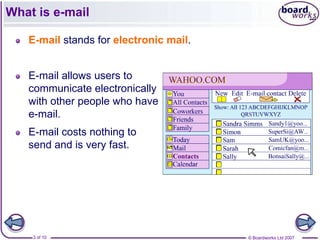
What is e-mail

   E-mail stands for electronic mail.


   E-mail allows users to
   communicate electronically
   with other people who have
   e-mail.
   E-mail costs nothing to
   send and is very fast.


    3 of 10                             © Boardworks Ltd 2007
What does the software do?


    4 of 10                  © Boardworks Ltd 2007
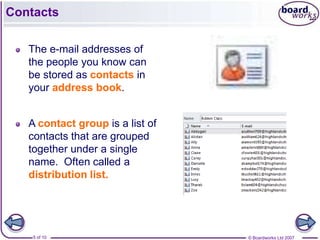
Contacts

   The e-mail addresses of
   the people you know can
   be stored as contacts in
   your address book.


   A contact group is a list of
   contacts that are grouped
   together under a single
   name. Often called a
   distribution list.


    5 of 10                       © Boardworks Ltd 2007
E-mail layout

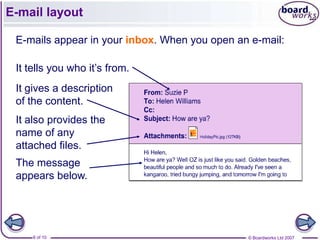
 E-mails appear in your inbox. When you open an e-mail:

 It tells you who it’s from.
 It gives a description
 of the content.
 It also provides the
 name of any
 attached files.
 The message
 appears below.


     6 of 10                                   © Boardworks Ltd 2007
Sending a reply

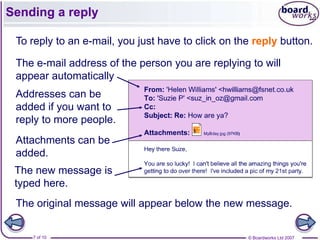
 To reply to an e-mail, you just have to click on the reply button.

 The e-mail address of the person you are replying to will
 appear automatically
 Addresses can be
 added if you want to
 reply to more people.
 Attachments can be
 added.
 The new message is
 typed here.
 The original message will appear below the new message.


    7 of 10                                         © Boardworks Ltd 2007
An e-mail address


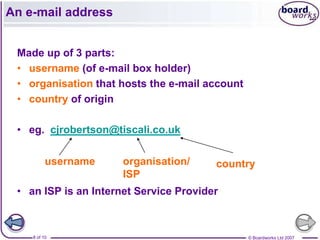
 Made up of 3 parts:
 • username (of e-mail box holder)
 • organisation that hosts the e-mail account
 • country of origin

 • eg. cjrobertson@tiscali.co.uk

          username    organisation/     country
                      ISP
 • an ISP is an Internet Service Provider


    8 of 10                                     © Boardworks Ltd 2007
Signature

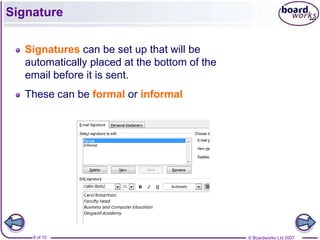
   Signatures can be set up that will be
   automatically placed at the bottom of the
   email before it is sent.
   These can be formal or informal


    9 of 10                                    © Boardworks Ltd 2007
Attachments

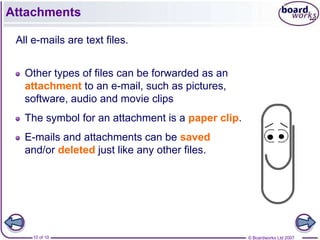
 All e-mails are text files.


   Other types of files can be forwarded as an
   attachment to an e-mail, such as pictures,
   software, audio and movie clips
   The symbol for an attachment is a paper clip.
   E-mails and attachments can be saved
   and/or deleted just like any other files.


     10 of 10                                      © Boardworks Ltd 2007
Out of Office Reply


   An automated reply to an email that states
   you are not available to reply.
   People who use email for business will find
   that when they are unable to check their mail
   this is useful.
   The date of your return would normally be
   sent with the out-of-office reply.


    11 of 10                                       © Boardworks Ltd 2007
Calendar


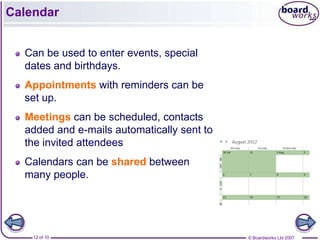
  Can be used to enter events, special
  dates and birthdays.
  Appointments with reminders can be
  set up.
  Meetings can be scheduled, contacts
  added and e-mails automatically sent to
  the invited attendees
  Calendars can be shared between
  many people.


    12 of 10                                © Boardworks Ltd 2007
Problems with e-mail

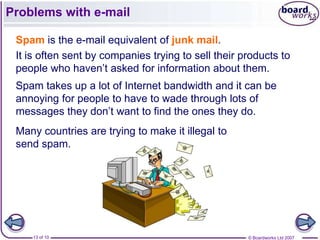
 Spam is the e-mail equivalent of junk mail.
 It is often sent by companies trying to sell their products to
 people who haven’t asked for information about them.
 Spam takes up a lot of Internet bandwidth and it can be
 annoying for people to have to wade through lots of
 messages they don’t want to find the ones they do.
 Many countries are trying to make it illegal to
 send spam.


    13 of 10                                         © Boardworks Ltd 2007
Phishing and fraud

 E-mails are sometimes used by criminals to steal money.
 They send e-mails to thousands of people in the hope
 that a few will fall for their trick.
 Phishing e-mails pretend to be from banks. They ask the
 customer to enter their bank details because of some
 problem. They then use these details to steal money.
 Other frauds pretend to give away free gifts or prizes.
 Another common fraud is to pretend to need help to get
 lots of money out of another country. They just need a
 bank account to pay it into…
 The websites that fraudsters set up are usually closed
 after a few days, which makes them difficult to trace.


    14 of 10                                      © Boardworks Ltd 2007
Other problems with e-mail

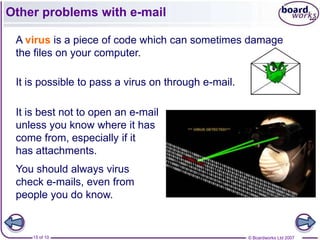
 A virus is a piece of code which can sometimes damage
 the files on your computer.

 It is possible to pass a virus on through e-mail.

 It is best not to open an e-mail
 unless you know where it has
 come from, especially if it
 has attachments.
 You should always virus
 check e-mails, even from
 people you do know.


    15 of 10                                         © Boardworks Ltd 2007
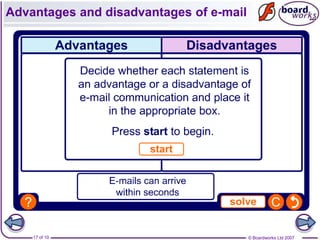
Advantages of e-mail


  •   Fast communication
  •   Cheap
  •   Attachments can be sent with the e-mail
  •   Provides a written document
  •   Can be sent to many people at one time


      16 of 10                         © Boardworks Ltd 2007
Disadvantages of e-mail


  • Virus can be sent with the email unknown
    to the recipient
  • May be insecure
  • Used for spam
  • Used for phishing


    17 of 10                         © Boardworks Ltd 2007
Summary

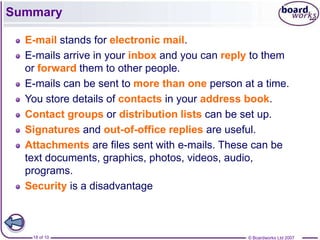
  E-mail stands for electronic mail.
  E-mails arrive in your inbox and you can reply to them
  or forward them to other people.
  E-mails can be sent to more than one person at a time.
  You store details of contacts in your address book.
  Contact groups or distribution lists can be set up.
  Signatures and out-of-office replies are useful.
  Attachments are files sent with e-mails. These can be
  text documents, graphics, photos, videos, audio,
  programs.
  Security is a disadvantage


   18 of 10                                    © Boardworks Ltd 2007

E mail features

  • 1.
    Features of E-mail 1of 10 © Boardworks Ltd 2007
  • 2.
    Learning objectives At the end of this presentation you will: Understand what e-mail is Know the features of e-mail Describe what an attachment is, what form it can take and why it is used. Learn about encryption and how it can help prevent e-mail fraud. Be able to explain at least two advantages of email Be able to explain at least two disadvantages of email 2 of 10 © Boardworks Ltd 2007 © Boardworks Ltd 2007
  • 3.
    What is e-mail E-mail stands for electronic mail. E-mail allows users to communicate electronically with other people who have e-mail. E-mail costs nothing to send and is very fast. 3 of 10 © Boardworks Ltd 2007
  • 4.
    What does thesoftware do? 4 of 10 © Boardworks Ltd 2007
  • 5.
    Contacts The e-mail addresses of the people you know can be stored as contacts in your address book. A contact group is a list of contacts that are grouped together under a single name. Often called a distribution list. 5 of 10 © Boardworks Ltd 2007
  • 6.
    E-mail layout E-mailsappear in your inbox. When you open an e-mail: It tells you who it’s from. It gives a description of the content. It also provides the name of any attached files. The message appears below. 6 of 10 © Boardworks Ltd 2007
  • 7.
    Sending a reply To reply to an e-mail, you just have to click on the reply button. The e-mail address of the person you are replying to will appear automatically Addresses can be added if you want to reply to more people. Attachments can be added. The new message is typed here. The original message will appear below the new message. 7 of 10 © Boardworks Ltd 2007
  • 8.
    An e-mail address Made up of 3 parts: • username (of e-mail box holder) • organisation that hosts the e-mail account • country of origin • eg. cjrobertson@tiscali.co.uk username organisation/ country ISP • an ISP is an Internet Service Provider 8 of 10 © Boardworks Ltd 2007
  • 9.
    Signature Signatures can be set up that will be automatically placed at the bottom of the email before it is sent. These can be formal or informal 9 of 10 © Boardworks Ltd 2007
  • 10.
    Attachments All e-mailsare text files. Other types of files can be forwarded as an attachment to an e-mail, such as pictures, software, audio and movie clips The symbol for an attachment is a paper clip. E-mails and attachments can be saved and/or deleted just like any other files. 10 of 10 © Boardworks Ltd 2007
  • 11.
    Out of OfficeReply An automated reply to an email that states you are not available to reply. People who use email for business will find that when they are unable to check their mail this is useful. The date of your return would normally be sent with the out-of-office reply. 11 of 10 © Boardworks Ltd 2007
  • 12.
    Calendar Canbe used to enter events, special dates and birthdays. Appointments with reminders can be set up. Meetings can be scheduled, contacts added and e-mails automatically sent to the invited attendees Calendars can be shared between many people. 12 of 10 © Boardworks Ltd 2007
  • 13.
    Problems with e-mail Spam is the e-mail equivalent of junk mail. It is often sent by companies trying to sell their products to people who haven’t asked for information about them. Spam takes up a lot of Internet bandwidth and it can be annoying for people to have to wade through lots of messages they don’t want to find the ones they do. Many countries are trying to make it illegal to send spam. 13 of 10 © Boardworks Ltd 2007
  • 14.
    Phishing and fraud E-mails are sometimes used by criminals to steal money. They send e-mails to thousands of people in the hope that a few will fall for their trick. Phishing e-mails pretend to be from banks. They ask the customer to enter their bank details because of some problem. They then use these details to steal money. Other frauds pretend to give away free gifts or prizes. Another common fraud is to pretend to need help to get lots of money out of another country. They just need a bank account to pay it into… The websites that fraudsters set up are usually closed after a few days, which makes them difficult to trace. 14 of 10 © Boardworks Ltd 2007
  • 15.
    Other problems withe-mail A virus is a piece of code which can sometimes damage the files on your computer. It is possible to pass a virus on through e-mail. It is best not to open an e-mail unless you know where it has come from, especially if it has attachments. You should always virus check e-mails, even from people you do know. 15 of 10 © Boardworks Ltd 2007
  • 16.
    Advantages of e-mail • Fast communication • Cheap • Attachments can be sent with the e-mail • Provides a written document • Can be sent to many people at one time 16 of 10 © Boardworks Ltd 2007
  • 17.
    Disadvantages of e-mail • Virus can be sent with the email unknown to the recipient • May be insecure • Used for spam • Used for phishing 17 of 10 © Boardworks Ltd 2007
  • 18.
    Summary E-mailstands for electronic mail. E-mails arrive in your inbox and you can reply to them or forward them to other people. E-mails can be sent to more than one person at a time. You store details of contacts in your address book. Contact groups or distribution lists can be set up. Signatures and out-of-office replies are useful. Attachments are files sent with e-mails. These can be text documents, graphics, photos, videos, audio, programs. Security is a disadvantage 18 of 10 © Boardworks Ltd 2007