Programming in Java
5-day workshop
Operators and
conditionals
Matt Collison
JP Morgan Chase 2021
PiJ1.2: Java Basics
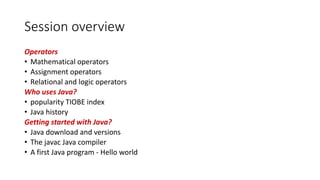
Session overview
Operators
• Mathematical operators
• Assignment operators
• Relational and logic operators
Who uses Java?
• popularity TIOBE index
• Java history
Getting started with Java?
• Java download and versions
• The javac Java compiler
• A first Java program - Hello world
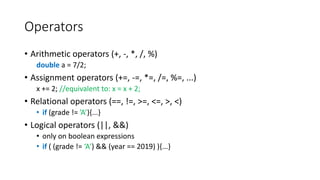
Operators
• Arithmetic operators (+, -, *, /, %)
double a = 7/2;
• Assignment operators (+=, -=, *=, /=, %=, ...)
x += 2; //equivalent to: x = x + 2;
• Relational operators (==, !=, >=, <=, >, <)
• if (grade != ’A’){...}
• Logical operators (||, &&)
• only on boolean expressions
• if ( (grade != ‘A’) && (year == 2019) ){...}
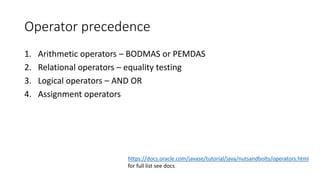
Operator precedence
1. Arithmetic operators – BODMAS or PEMDAS
2. Relational operators – equality testing
3. Logical operators – AND OR
4. Assignment operators
https://docs.oracle.com/javase/tutorial/java/nutsandbolts/operators.html
for full list see docs
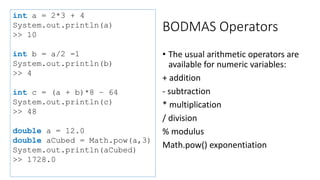
BODMAS Operators
• The usual arithmetic operators are
available for numeric variables:
+ addition
- subtraction
* multiplication
/ division
% modulus
Math.pow() exponentiation
int a = 2*3 + 4
System.out.println(a)
>> 10
int b = a/2 -1
System.out.println(b)
>> 4
int c = (a + b)*8 – 64
System.out.println(c)
>> 48
double a = 12.0
double aCubed = Math.pow(a,3)
System.out.println(aCubed)
>> 1728.0
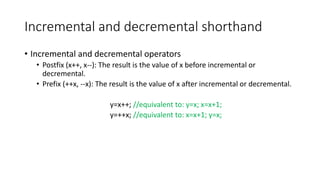
Incremental and decremental shorthand
• Incremental and decremental operators
• Postfix (x++, x--): The result is the value of x before incremental or
decremental.
• Prefix (++x, --x): The result is the value of x after incremental or decremental.
y=x++; //equivalent to: y=x; x=x+1;
y=++x; //equivalent to: x=x+1; y=x;
Incremental and decremental operators class
IncrementalOperators {
public static void main(String[] args) {
float x = 5.2f;
y = x++;
System.out.println("x = " + x + ", y = " + y);
int a = 10;
b = --a;
System.out.println("a = " + a + ", b = " + b);
}
}
Q: What is the output? x = 6.2, y = 5.2 a = 9, b = 9
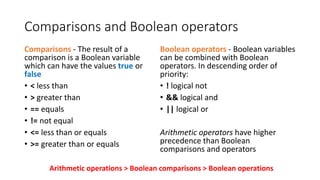
Comparisons and Boolean operators
Comparisons - The result of a
comparison is a Boolean variable
which can have the values true or
false
• < less than
• > greater than
• == equals
• != not equal
• <= less than or equals
• >= greater than or equals
Boolean operators - Boolean variables
can be combined with Boolean
operators. In descending order of
priority:
• ! logical not
• && logical and
• || logical or
Arithmetic operators have higher
precedence than Boolean
comparisons and operators
Arithmetic operations > Boolean comparisons > Boolean operations
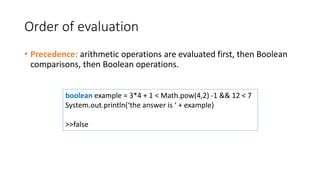
Order of evaluation
• Precedence: arithmetic operations are evaluated first, then Boolean
comparisons, then Boolean operations.
boolean example = 3*4 + 1 < Math.pow(4,2) -1 && 12 < 7
System.out.println(‘the answer is ‘ + example)
>>false
Conditional logic
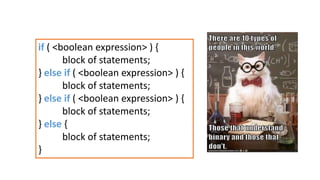
if ( <boolean expression> ) {
block of statements;
} else if ( <boolean expression> ) {
block of statements;
} else if ( <boolean expression> ) {
block of statements;
} else {
block of statements;
}
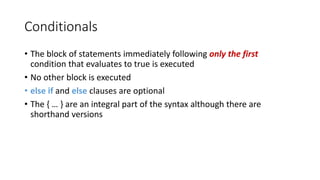
Conditionals
• The block of statements immediately following only the first
condition that evaluates to true is executed
• No other block is executed
• else if and else clauses are optional
• The { … } are an integral part of the syntax although there are
shorthand versions
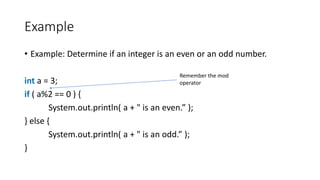
Example
• Example: Determine if an integer is an even or an odd number.
int a = 3;
if ( a%2 == 0 ) {
System.out.println( a + " is an even.” );
} else {
System.out.println( a + " is an odd.” );
}
Remember the mod
operator
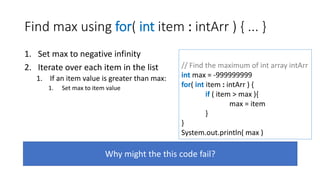
Find max using for( int item : intArr ) { ... }
1. Set max to negative infinity
2. Iterate over each item in the list
1. If an item value is greater than max:
1. Set max to item value
Why might the this code fail?
// Find the maximum of int array intArr
int max = -999999999
for( int item : intArr ) {
if ( item > max ){
max = item
}
}
System.out.println( max )
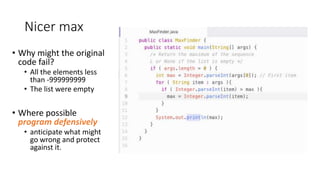
Nicer max
• Why might the original
code fail?
• All the elements less
than -999999999
• The list were empty
• Where possible
program defensively
• anticipate what might
go wrong and protect
against it.
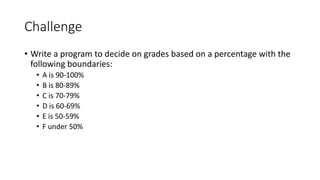
Challenge
• Write a program to decide on grades based on a percentage with the
following boundaries:
• A is 90-100%
• B is 80-89%
• C is 70-79%
• D is 60-69%
• E is 50-59%
• F under 50%
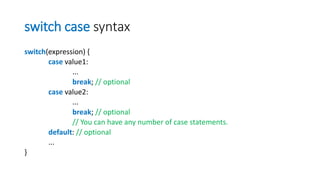
switch case syntax
switch(expression) {
case value1:
...
break; // optional
case value2:
...
break; // optional
// You can have any number of case statements.
default: // optional
...
}
switch case example
//A demo to output a comment based on the input grade.
public class SwitchApp {
public static void main(String args[]) {
char grade = ’C’;
switch(grade) {
case ’A’:
System.out.println("Excellent!");
break;
case ’B’ :
case ’C’ :
System.out.println("Well done");
break;
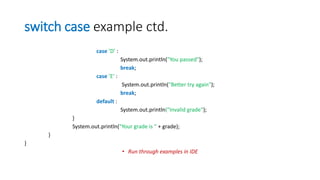
switch case example ctd.
case ’D’ :
System.out.println("You passed");
break;
case ’E’ :
System.out.println("Better try again");
break;
default :
System.out.println("Invalid grade");
}
System.out.println("Your grade is " + grade);
}
}
• Run through examples in IDE
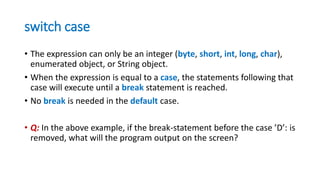
switch case
• The expression can only be an integer (byte, short, int, long, char),
enumerated object, or String object.
• When the expression is equal to a case, the statements following that
case will execute until a break statement is reached.
• No break is needed in the default case.
• Q: In the above example, if the break-statement before the case ’D’: is
removed, what will the program output on the screen?
Learning resources
The workshop homepage
https://mcollison.github.io/JPMC-java-intro-2021/
The course materials
https://mcollison.github.io/java-programming-foundations/
• Session worksheets – updated each week
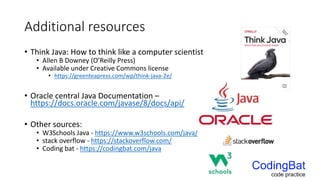
Additional resources
• Think Java: How to think like a computer scientist
• Allen B Downey (O’Reilly Press)
• Available under Creative Commons license
• https://greenteapress.com/wp/think-java-2e/
• Oracle central Java Documentation –
https://docs.oracle.com/javase/8/docs/api/
• Other sources:
• W3Schools Java - https://www.w3schools.com/java/
• stack overflow - https://stackoverflow.com/
• Coding bat - https://codingbat.com/java

Pi j1.3 operators

  • 1.
    Programming in Java 5-dayworkshop Operators and conditionals Matt Collison JP Morgan Chase 2021 PiJ1.2: Java Basics
  • 2.
    Session overview Operators • Mathematicaloperators • Assignment operators • Relational and logic operators Who uses Java? • popularity TIOBE index • Java history Getting started with Java? • Java download and versions • The javac Java compiler • A first Java program - Hello world
  • 3.
    Operators • Arithmetic operators(+, -, *, /, %) double a = 7/2; • Assignment operators (+=, -=, *=, /=, %=, ...) x += 2; //equivalent to: x = x + 2; • Relational operators (==, !=, >=, <=, >, <) • if (grade != ’A’){...} • Logical operators (||, &&) • only on boolean expressions • if ( (grade != ‘A’) && (year == 2019) ){...}
  • 4.
    Operator precedence 1. Arithmeticoperators – BODMAS or PEMDAS 2. Relational operators – equality testing 3. Logical operators – AND OR 4. Assignment operators https://docs.oracle.com/javase/tutorial/java/nutsandbolts/operators.html for full list see docs
  • 5.
    BODMAS Operators • Theusual arithmetic operators are available for numeric variables: + addition - subtraction * multiplication / division % modulus Math.pow() exponentiation int a = 2*3 + 4 System.out.println(a) >> 10 int b = a/2 -1 System.out.println(b) >> 4 int c = (a + b)*8 – 64 System.out.println(c) >> 48 double a = 12.0 double aCubed = Math.pow(a,3) System.out.println(aCubed) >> 1728.0
  • 6.
    Incremental and decrementalshorthand • Incremental and decremental operators • Postfix (x++, x--): The result is the value of x before incremental or decremental. • Prefix (++x, --x): The result is the value of x after incremental or decremental. y=x++; //equivalent to: y=x; x=x+1; y=++x; //equivalent to: x=x+1; y=x;
  • 7.
    Incremental and decrementaloperators class IncrementalOperators { public static void main(String[] args) { float x = 5.2f; y = x++; System.out.println("x = " + x + ", y = " + y); int a = 10; b = --a; System.out.println("a = " + a + ", b = " + b); } } Q: What is the output? x = 6.2, y = 5.2 a = 9, b = 9
  • 8.
    Comparisons and Booleanoperators Comparisons - The result of a comparison is a Boolean variable which can have the values true or false • < less than • > greater than • == equals • != not equal • <= less than or equals • >= greater than or equals Boolean operators - Boolean variables can be combined with Boolean operators. In descending order of priority: • ! logical not • && logical and • || logical or Arithmetic operators have higher precedence than Boolean comparisons and operators Arithmetic operations > Boolean comparisons > Boolean operations
  • 9.
    Order of evaluation •Precedence: arithmetic operations are evaluated first, then Boolean comparisons, then Boolean operations. boolean example = 3*4 + 1 < Math.pow(4,2) -1 && 12 < 7 System.out.println(‘the answer is ‘ + example) >>false
  • 10.
  • 11.
    if ( <booleanexpression> ) { block of statements; } else if ( <boolean expression> ) { block of statements; } else if ( <boolean expression> ) { block of statements; } else { block of statements; }
  • 12.
    Conditionals • The blockof statements immediately following only the first condition that evaluates to true is executed • No other block is executed • else if and else clauses are optional • The { … } are an integral part of the syntax although there are shorthand versions
  • 13.
    Example • Example: Determineif an integer is an even or an odd number. int a = 3; if ( a%2 == 0 ) { System.out.println( a + " is an even.” ); } else { System.out.println( a + " is an odd.” ); } Remember the mod operator
  • 14.
    Find max usingfor( int item : intArr ) { ... } 1. Set max to negative infinity 2. Iterate over each item in the list 1. If an item value is greater than max: 1. Set max to item value Why might the this code fail? // Find the maximum of int array intArr int max = -999999999 for( int item : intArr ) { if ( item > max ){ max = item } } System.out.println( max )
  • 15.
    Nicer max • Whymight the original code fail? • All the elements less than -999999999 • The list were empty • Where possible program defensively • anticipate what might go wrong and protect against it.
  • 16.
    Challenge • Write aprogram to decide on grades based on a percentage with the following boundaries: • A is 90-100% • B is 80-89% • C is 70-79% • D is 60-69% • E is 50-59% • F under 50%
  • 17.
    switch case syntax switch(expression){ case value1: ... break; // optional case value2: ... break; // optional // You can have any number of case statements. default: // optional ... }
  • 18.
    switch case example //Ademo to output a comment based on the input grade. public class SwitchApp { public static void main(String args[]) { char grade = ’C’; switch(grade) { case ’A’: System.out.println("Excellent!"); break; case ’B’ : case ’C’ : System.out.println("Well done"); break;
  • 19.
    switch case examplectd. case ’D’ : System.out.println("You passed"); break; case ’E’ : System.out.println("Better try again"); break; default : System.out.println("Invalid grade"); } System.out.println("Your grade is " + grade); } } • Run through examples in IDE
  • 20.
    switch case • Theexpression can only be an integer (byte, short, int, long, char), enumerated object, or String object. • When the expression is equal to a case, the statements following that case will execute until a break statement is reached. • No break is needed in the default case. • Q: In the above example, if the break-statement before the case ’D’: is removed, what will the program output on the screen?
  • 21.
    Learning resources The workshophomepage https://mcollison.github.io/JPMC-java-intro-2021/ The course materials https://mcollison.github.io/java-programming-foundations/ • Session worksheets – updated each week
  • 22.
    Additional resources • ThinkJava: How to think like a computer scientist • Allen B Downey (O’Reilly Press) • Available under Creative Commons license • https://greenteapress.com/wp/think-java-2e/ • Oracle central Java Documentation – https://docs.oracle.com/javase/8/docs/api/ • Other sources: • W3Schools Java - https://www.w3schools.com/java/ • stack overflow - https://stackoverflow.com/ • Coding bat - https://codingbat.com/java

Editor's Notes

  • #5 From 1-4
  • #8 x = 6.2, y = 5.2 a = 9, b = 9
  • #10 true
  • #21 Well done You passed Your grade is B
  • #22 All resources hang from the ELE pages. How many of you have looked through them?