Java Fundamental and
Control Structures
Object-Oriented Programming
1
 Identifiers
 Variables
 Constants
 Primitive Data Types
 Operators
 Expressions
 Control Flow
 Selection Statements
 Looping statements
 break and continue Statements
Agenda
2
 An identifier is a sequence of characters that
consist of letters, digits, underscores (_), and dollar
signs ($).
 An identifier must start with a letter, an underscore
(_), or a dollar sign ($). It cannot start with a digit.
 An identifier cannot be a reserved word.
 An identifier cannot be true, false, or null.
 An identifier can be of any length.
 Identifiers can be variables or constants
3
Identifiers
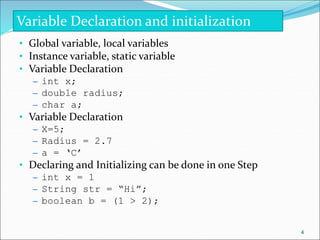
• Global variable, local variables
• Instance variable, static variable
• Variable Declaration
– int x;
– double radius;
– char a;
• Variable Declaration
– X=5;
– Radius = 2.7
– a = ‘C’
• Declaring and Initializing can be done in one Step
– int x = 1
– String str = “Hi”;
– boolean b = (1 > 2);
Variable Declaration and initialization
4
 The values of constants can never be changed once
they are initialized.
 Constant variables are also called named
constants or read-only variables.
 The general formal for declaration of constants is
given by:
 final datatype CONSTANTNAME = VALUE;
 Examples
 final double PI = 3.14159;
 final int SIZE = 3;
 Math.PI (built in constant)
5
Constants
• String literal
– sequence of characters in double quotation marks. E.g. “Java”
• floating-point literals
– E.g. 34.678
• Integer literal
– E.g. 45
• Character literal
– E.g. ‘A’
Literal Values
6
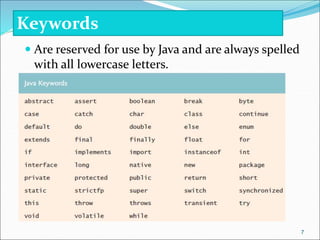
 Are reserved for use by Java and are always spelled
with all lowercase letters.
Keywords
7
 There are around 8 primitive data types in java.
 These are
 byte
 short
 int
 long
 float
 double
 boolean
 char
Primitive Data Type
8
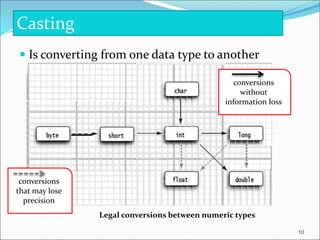
Name Range Storage Size
byte –27 (-128) to 27–1 (127) 8-bit signed
short –215 (-32768) to 215–1 (32767) 16-bit signed
int –231 (-2147483648) to 231–1 (2147483647) 32-bit signed
long –263 to 263–1 64-bit signed
(i.e., -9223372036854775808
to 9223372036854775807)
float Negative range: 32-bit IEEE 754
-3.4028235E+38 to -1.4E-45
Positive range:
1.4E-45 to 3.4028235E+38
double Negative range: 64-bit IEEE 754
-1.7976931348623157E+308 to
-4.9E-324
Positive range:
4.9E-324 to 1.7976931348623157E+308
Numeric Data Type
9
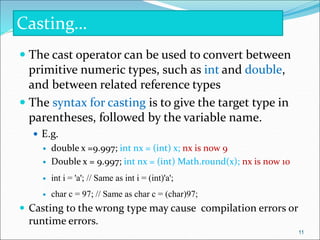
 Is converting from one data type to another
conversions
that may lose
precision
conversions
without
information loss
Legal conversions between numeric types
Casting
10
 The cast operator can be used to convert between
primitive numeric types, such as int and double,
and between related reference types
 The syntax for casting is to give the target type in
parentheses, followed by the variable name.
 E.g.
 double x =9.997; int nx = (int) x; nx is now 9
 Double x = 9.997; int nx = (int) Math.round(x); nx is now 10
 int i = 'a'; // Same as int i = (int)'a';
 char c = 97; // Same as char c = (char)97;
 Casting to the wrong type may cause compilation errors or
runtime errors.
Casting…
11
• Arithmetic operators
– + (addition)
– – (subtraction)
– * (multiplication)
– / (division)
• Integer division by zero is not allowed where as
floating-point division by zero yields an infinite.
Java Operator
12
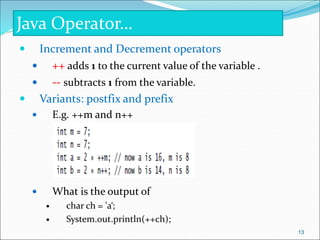
 Increment and Decrement operators
 ++ adds 1 to the current value of the variable .
 -- subtracts 1 from the variable.
 Variants: postfix and prefix
 E.g. ++m and n++
 What is the output of
 char ch = 'a‘;
 System.out.println(++ch);
Java Operator…
13
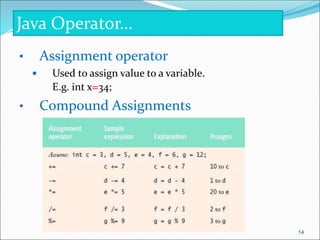
• Assignment operator
 Used to assign value to a variable.
E.g. int x=34;
• Compound Assignments
Java Operator…
14
 Logical operators
– && for the logical “and” operator and
– || for the logical “or” operator
 Boolean logical operators
– & and | are identical to && and || respectively except
• Boolean logical operator s always evaluate both of their operands
(i.e. they don’t perform short-circuit evaluation)
 If x is 1, what is x after this expression? (x > 1) & (x++ < 10)
 If x is 1, what is x after this expression? (1 > x) && ( 1 > x++)
 How about (1 == x) | (10 > x++)? (1 == x) || (10 > x++)?
– Boolean logical exclusive OR(^)
– Logical Negation (!) Operator
Java Operator…
15
Relational operators
• == (equal),
• != (not equal)
• < (less than),
• > (greater than),
• <= (less than or equal), and
• >= (greater than or equal) operators.
Java Operator…
16
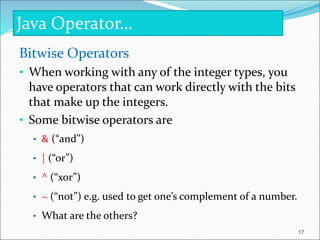
Bitwise Operators
• When working with any of the integer types, you
have operators that can work directly with the bits
that make up the integers.
• Some bitwise operators are
• & (“and”)
• | (“or”)
• ^ (“xor”)
• ~ (“not”) e.g. used to get one’s complement of a number.
• What are the others?
Java Operator…
17
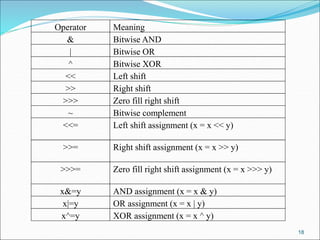
Operator Meaning
& Bitwise AND
| Bitwise OR
^ Bitwise XOR
<< Left shift
>> Right shift
>>> Zero fill right shift
~ Bitwise complement
<<= Left shift assignment (x = x << y)
>>= Right shift assignment (x = x >> y)
>>>= Zero fill right shift assignment (x = x >>> y)
x&=y AND assignment (x = x & y)
x|=y OR assignment (x = x | y)
x^=y XOR assignment (x = x ^ y)
18
class operators {
public static void main(String[] args) {
System.out.println("nBitwise operators nn") ;
System.out.println(" 2 & 3 = " + ( 2 & 3 ) + " bitwise AND ") ;
System.out.println(" -2 & 3 = " + (-2 & 3 ) ) ;
System.out.println(" 2 | 3 = " + ( 2 | 3 ) + " bitwise OR ") ;
System.out.println(" -2 | 3 = " + (-2 | 3 ) ) ;
System.out.println(" 2 ^ 3 = " + ( 2^3) + " bitwise Exclusive OR" ) ;
System.out.println(" -2 ^ 3 = " + (-2^3) ) ;
System.out.println(" 10 << 2 " + ( 10 << 2) ) ;
System.out.println(" 10 >> 2 " + ( 10 >> 2) ) ;
System.out.println("-10 << 2 " + (-10 << 2) ) ;
System.out.println("-10 >> 2 " + (-10 >> 2) ) ;
System.out.println(" 10 >>> 2 " + ( 10 >>> 2) ) ;
System.out.println("-10 >>> 2 " + (-10 >>> 2) ) ;
}
}
19
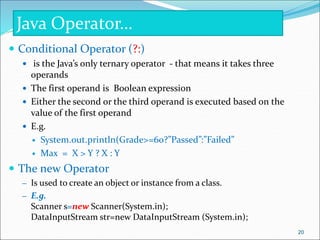
 Conditional Operator (?:)
 is the Java’s only ternary operator - that means it takes three
operands
 The first operand is Boolean expression
 Either the second or the third operand is executed based on the
value of the first operand
 E.g.
 System.out.println(Grade>=60?”Passed”:”Failed”
 Max = X > Y ? X : Y
 The new Operator
– Is used to create an object or instance from a class.
– E.g.
Scanner s=new Scanner(System.in);
DataInputStream str=new DataInputStream (System.in);
Java Operator…
20
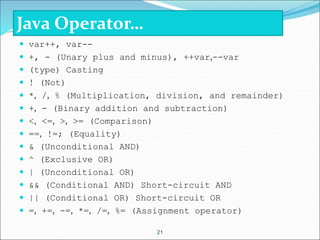
 var++, var--
 +, - (Unary plus and minus), ++var,--var
 (type) Casting
 ! (Not)
 *, /, % (Multiplication, division, and remainder)
 +, - (Binary addition and subtraction)
 <, <=, >, >= (Comparison)
 ==, !=; (Equality)
 & (Unconditional AND)
 ^ (Exclusive OR)
 | (Unconditional OR)
 && (Conditional AND) Short-circuit AND
 || (Conditional OR) Short-circuit OR
 =, +=, -=, *=, /=, %= (Assignment operator)
21
Java Operator…
 An expression is any legal combination of symbols that
represents a value.
 Each programming language and application has its
own rules for what is legal and illegal.
 In Java, arithmetic, boolean, and String expressions are
written in conventional mathematical infix notation
 Examples of valid expressions in java are
 var
 X+1
 “string”
 5
 ! (5 < 6)
 (x*x + y*y > 25) && (x > 0)
Expressions
22
 There are three basic types of program flows
 Sequential
 In Sequential execution statements in a program are executed
one after the other in sequence.
 Selection
 Selection or conditional execution executes part of the code
based on the condition
 Iteration
 In iterative program flow statements inside looping
statement are executed repeatedly as long as a condition
is true
Control Flows
23
 Java has the following Conditional statements
 if Conditions
 if Statement
 If…else Statement
 if …else if…else Statement
 Conditional Operators (?:)
 switch Statements
Selection/conditional Statement
24
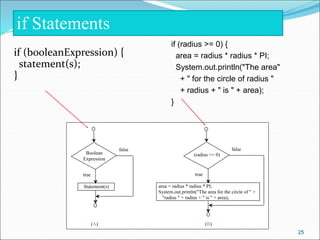
if (booleanExpression) {
statement(s);
}
25
Boolean
Expression
true
Statement(s)
false
(radius >= 0)
true
area = radius * radius * PI;
System.out.println("The area for the circle of " +
"radius " + radius + " is " + area);
false
(A) (B)
if (radius >= 0) {
area = radius * radius * PI;
System.out.println("The area"
+ " for the circle of radius "
+ radius + " is " + area);
}
if Statements
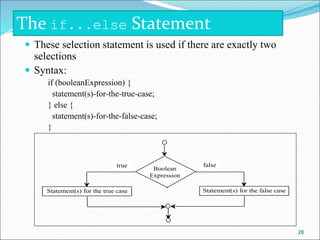
 These selection statement is used if there are exactly two
selections
 Syntax:
if (booleanExpression) {
statement(s)-for-the-true-case;
} else {
statement(s)-for-the-false-case;
}
26
Boolean
Expression
false
true
Statement(s) for the false case
Statement(s) for the true case
The if...else Statement
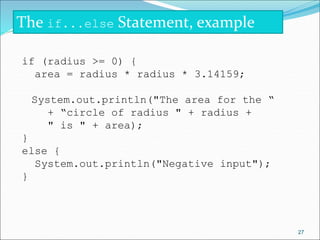
if (radius >= 0) {
area = radius * radius * 3.14159;
System.out.println("The area for the “
+ “circle of radius " + radius +
" is " + area);
}
else {
System.out.println("Negative input");
}
27
The if...else Statement, example
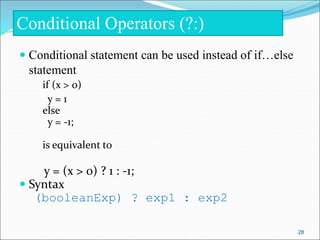
 Conditional statement can be used instead of if…else
statement
if (x > 0)
y = 1
else
y = -1;
is equivalent to
y = (x > 0) ? 1 : -1;
 Syntax
(booleanExp) ? exp1 : exp2
Conditional Operators (?:)
28
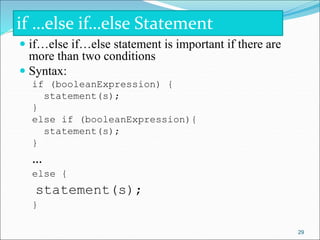
 if…else if…else statement is important if there are
more than two conditions
 Syntax:
if (booleanExpression) {
statement(s);
}
else if (booleanExpression){
statement(s);
}
…
else {
statement(s);
}
if …else if…else Statement
29
30
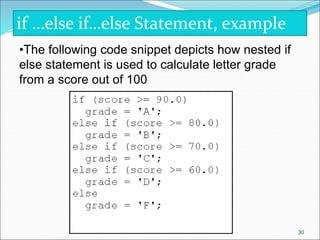
if …else if…else Statement, example
•The following code snippet depicts how nested if
else statement is used to calculate letter grade
from a score out of 100
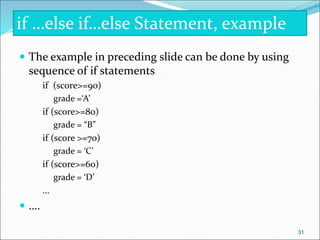
 The example in preceding slide can be done by using
sequence of if statements
if (score>=90)
grade =‘A’
if (score>=80)
grade = “B”
if (score >=70)
grade = ‘C’
if (score>=60)
grade = ‘D’
…
 ….
if …else if…else Statement, example
31
 Problem: Write a program that solves quadratic
equation
if …else if…else Statement, example
32
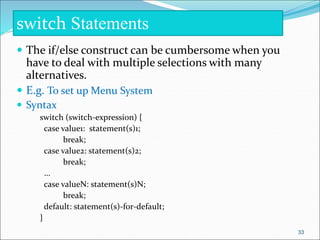
 The if/else construct can be cumbersome when you
have to deal with multiple selections with many
alternatives.
 E.g. To set up Menu System
 Syntax
switch (switch-expression) {
case value1: statement(s)1;
break;
case value2: statement(s)2;
break;
…
case valueN: statement(s)N;
break;
default: statement(s)-for-default;
}
switch Statements
33
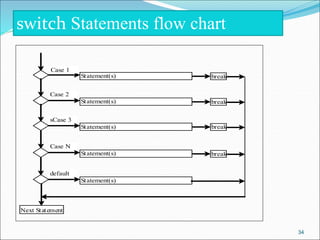
switch Statements flow chart
Case 1
Statement(s) break
Statement(s) break
Case 2
Statement(s) break
sCase 3
Statement(s) break
Case N
Statement(s)
default
Next Statement
34
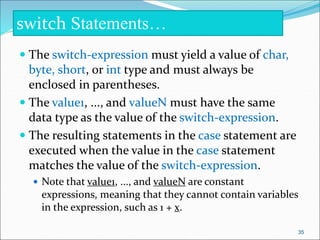
 The switch-expression must yield a value of char,
byte, short, or int type and must always be
enclosed in parentheses.
 The value1, ..., and valueN must have the same
data type as the value of the switch-expression.
 The resulting statements in the case statement are
executed when the value in the case statement
matches the value of the switch-expression.
 Note that value1, ..., and valueN are constant
expressions, meaning that they cannot contain variables
in the expression, such as 1 + x.
switch Statements…
35
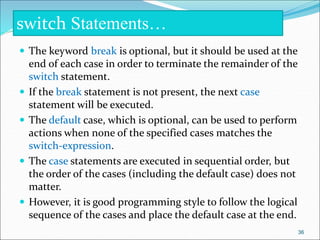
 The keyword break is optional, but it should be used at the
end of each case in order to terminate the remainder of the
switch statement.
 If the break statement is not present, the next case
statement will be executed.
 The default case, which is optional, can be used to perform
actions when none of the specified cases matches the
switch-expression.
 The case statements are executed in sequential order, but
the order of the cases (including the default case) does not
matter.
 However, it is good programming style to follow the logical
sequence of the cases and place the default case at the end.
switch Statements…
36
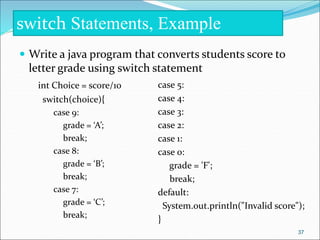
 Write a java program that converts students score to
letter grade using switch statement
int Choice = score/10
switch(choice){
case 9:
grade = ‘A’;
break;
case 8:
grade = ‘B’;
break;
case 7:
grade = ‘C’;
break;
switch Statements, Example
case 5:
case 4:
case 3:
case 2:
case 1:
case 0:
grade = 'F';
break;
default:
System.out.println("Invalid score");
}
37
 Java have the following repitition
statements
 while loop
 do…while loop
 for loop
 for each loop
Repetition Statement
38
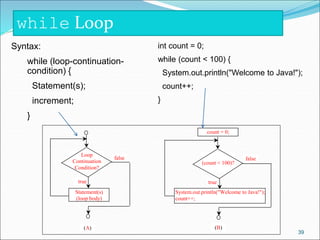
while Loop
Syntax:
while (loop-continuation-
condition) {
Statement(s);
increment;
}
int count = 0;
while (count < 100) {
System.out.println("Welcome to Java!");
count++;
}
Loop
Continuation
Condition?
true
Statement(s)
(loop body)
false
(count < 100)?
true
System.out.println("Welcome to Java!");
count++;
false
(A) (B)
count = 0;
39
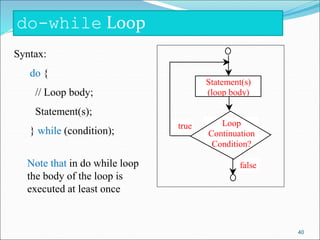
do-while Loop
Syntax:
do {
// Loop body;
Statement(s);
} while (condition);
Loop
Continuation
Condition?
true
Statement(s)
(loop body)
false
Note that in do while loop
the body of the loop is
executed at least once
40
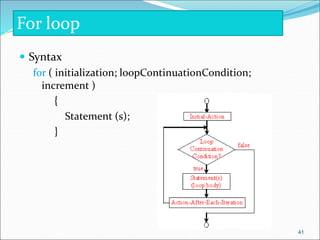
 Syntax
for ( initialization; loopContinuationCondition;
increment )
{
Statement (s);
}
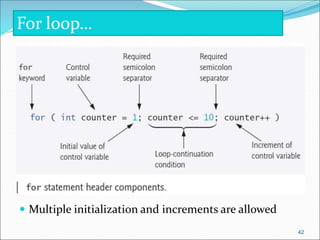
For loop
41
 Multiple initialization and increments are allowed
For loop…
42
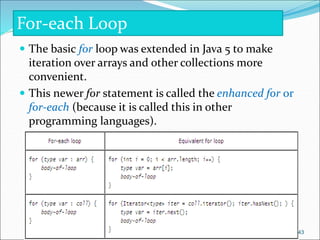
 The basic for loop was extended in Java 5 to make
iteration over arrays and other collections more
convenient.
 This newer for statement is called the enhanced for or
for-each (because it is called this in other
programming languages).
For-each Loop
43
For-each Loop example
double[] ar = {1.2, 3.0, 0.8};
int sum = 0;
/* d gets successively each
value in ar */
for (double d : ar)
{.
sum += d;
}
double[] ar = {1.2, 3.0, 0.8};
int sum = 0;
/* i indexes each element
successively. */
for (int i = 0; i < ar.length; i++) {
Sum += ar[i];
}
•The for-each loop is used to access each successive
value in a collection of values.
•Here is a loop written as both a for-each loop and a
basic for loop to add all elements of an array
44
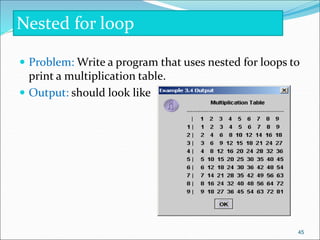
 Problem: Write a program that uses nested for loops to
print a multiplication table.
 Output: should look like
Nested for loop
45
Nested for loop…
import javax.swing.JOptionPane;
public class TestMultiplicationTable {
/** Main method */
public static void main(String[] args) {
// Display the table heading
String output = " Multiplication Tablen";
output += "-------------------------------------------------n";
// Display the number title
output += " | ";
for (int j = 1; j <= 9; j++)
output += " " + j;
output += "n";
46
Nested for loop…
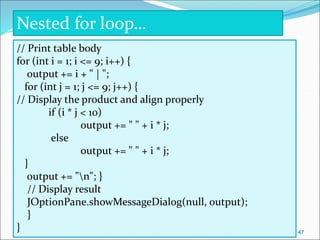
// Print table body
for (int i = 1; i <= 9; i++) {
output += i + " | ";
for (int j = 1; j <= 9; j++) {
// Display the product and align properly
if (i * j < 10)
output += " " + i * j;
else
output += " " + i * j;
}
output += "n"; }
// Display result
JOptionPane.showMessageDialog(null, output);
}
} 47
 break in
 switch statements
 repetition statements.
 The break statement, when executed in a while, for,
do…while or switch, causes immediate exit from that
statement.
 break and continue Statements
48
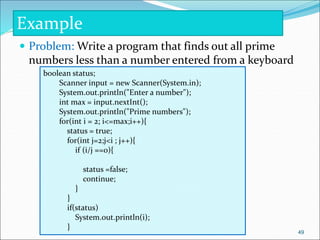
 Problem: Write a program that finds out all prime
numbers less than a number entered from a keyboard
Example
boolean status;
Scanner input = new Scanner(System.in);
System.out.println("Enter a number");
int max = input.nextInt();
System.out.println("Prime numbers");
for(int i = 2; i<=max;i++){
status = true;
for(int j=2;j<i ; j++){
if (i/j ==0){
status =false;
continue;
}
}
if(status)
System.out.println(i);
}
49
50

Chapter 2&3 (java fundamentals and Control Structures).ppt

  • 1.
    Java Fundamental and ControlStructures Object-Oriented Programming 1
  • 2.
     Identifiers  Variables Constants  Primitive Data Types  Operators  Expressions  Control Flow  Selection Statements  Looping statements  break and continue Statements Agenda 2
  • 3.
     An identifieris a sequence of characters that consist of letters, digits, underscores (_), and dollar signs ($).  An identifier must start with a letter, an underscore (_), or a dollar sign ($). It cannot start with a digit.  An identifier cannot be a reserved word.  An identifier cannot be true, false, or null.  An identifier can be of any length.  Identifiers can be variables or constants 3 Identifiers
  • 4.
    • Global variable,local variables • Instance variable, static variable • Variable Declaration – int x; – double radius; – char a; • Variable Declaration – X=5; – Radius = 2.7 – a = ‘C’ • Declaring and Initializing can be done in one Step – int x = 1 – String str = “Hi”; – boolean b = (1 > 2); Variable Declaration and initialization 4
  • 5.
     The valuesof constants can never be changed once they are initialized.  Constant variables are also called named constants or read-only variables.  The general formal for declaration of constants is given by:  final datatype CONSTANTNAME = VALUE;  Examples  final double PI = 3.14159;  final int SIZE = 3;  Math.PI (built in constant) 5 Constants
  • 6.
    • String literal –sequence of characters in double quotation marks. E.g. “Java” • floating-point literals – E.g. 34.678 • Integer literal – E.g. 45 • Character literal – E.g. ‘A’ Literal Values 6
  • 7.
     Are reservedfor use by Java and are always spelled with all lowercase letters. Keywords 7
  • 8.
     There arearound 8 primitive data types in java.  These are  byte  short  int  long  float  double  boolean  char Primitive Data Type 8
  • 9.
    Name Range StorageSize byte –27 (-128) to 27–1 (127) 8-bit signed short –215 (-32768) to 215–1 (32767) 16-bit signed int –231 (-2147483648) to 231–1 (2147483647) 32-bit signed long –263 to 263–1 64-bit signed (i.e., -9223372036854775808 to 9223372036854775807) float Negative range: 32-bit IEEE 754 -3.4028235E+38 to -1.4E-45 Positive range: 1.4E-45 to 3.4028235E+38 double Negative range: 64-bit IEEE 754 -1.7976931348623157E+308 to -4.9E-324 Positive range: 4.9E-324 to 1.7976931348623157E+308 Numeric Data Type 9
  • 10.
     Is convertingfrom one data type to another conversions that may lose precision conversions without information loss Legal conversions between numeric types Casting 10
  • 11.
     The castoperator can be used to convert between primitive numeric types, such as int and double, and between related reference types  The syntax for casting is to give the target type in parentheses, followed by the variable name.  E.g.  double x =9.997; int nx = (int) x; nx is now 9  Double x = 9.997; int nx = (int) Math.round(x); nx is now 10  int i = 'a'; // Same as int i = (int)'a';  char c = 97; // Same as char c = (char)97;  Casting to the wrong type may cause compilation errors or runtime errors. Casting… 11
  • 12.
    • Arithmetic operators –+ (addition) – – (subtraction) – * (multiplication) – / (division) • Integer division by zero is not allowed where as floating-point division by zero yields an infinite. Java Operator 12
  • 13.
     Increment andDecrement operators  ++ adds 1 to the current value of the variable .  -- subtracts 1 from the variable.  Variants: postfix and prefix  E.g. ++m and n++  What is the output of  char ch = 'a‘;  System.out.println(++ch); Java Operator… 13
  • 14.
    • Assignment operator Used to assign value to a variable. E.g. int x=34; • Compound Assignments Java Operator… 14
  • 15.
     Logical operators –&& for the logical “and” operator and – || for the logical “or” operator  Boolean logical operators – & and | are identical to && and || respectively except • Boolean logical operator s always evaluate both of their operands (i.e. they don’t perform short-circuit evaluation)  If x is 1, what is x after this expression? (x > 1) & (x++ < 10)  If x is 1, what is x after this expression? (1 > x) && ( 1 > x++)  How about (1 == x) | (10 > x++)? (1 == x) || (10 > x++)? – Boolean logical exclusive OR(^) – Logical Negation (!) Operator Java Operator… 15
  • 16.
    Relational operators • ==(equal), • != (not equal) • < (less than), • > (greater than), • <= (less than or equal), and • >= (greater than or equal) operators. Java Operator… 16
  • 17.
    Bitwise Operators • Whenworking with any of the integer types, you have operators that can work directly with the bits that make up the integers. • Some bitwise operators are • & (“and”) • | (“or”) • ^ (“xor”) • ~ (“not”) e.g. used to get one’s complement of a number. • What are the others? Java Operator… 17
  • 18.
    Operator Meaning & BitwiseAND | Bitwise OR ^ Bitwise XOR << Left shift >> Right shift >>> Zero fill right shift ~ Bitwise complement <<= Left shift assignment (x = x << y) >>= Right shift assignment (x = x >> y) >>>= Zero fill right shift assignment (x = x >>> y) x&=y AND assignment (x = x & y) x|=y OR assignment (x = x | y) x^=y XOR assignment (x = x ^ y) 18
  • 19.
    class operators { publicstatic void main(String[] args) { System.out.println("nBitwise operators nn") ; System.out.println(" 2 & 3 = " + ( 2 & 3 ) + " bitwise AND ") ; System.out.println(" -2 & 3 = " + (-2 & 3 ) ) ; System.out.println(" 2 | 3 = " + ( 2 | 3 ) + " bitwise OR ") ; System.out.println(" -2 | 3 = " + (-2 | 3 ) ) ; System.out.println(" 2 ^ 3 = " + ( 2^3) + " bitwise Exclusive OR" ) ; System.out.println(" -2 ^ 3 = " + (-2^3) ) ; System.out.println(" 10 << 2 " + ( 10 << 2) ) ; System.out.println(" 10 >> 2 " + ( 10 >> 2) ) ; System.out.println("-10 << 2 " + (-10 << 2) ) ; System.out.println("-10 >> 2 " + (-10 >> 2) ) ; System.out.println(" 10 >>> 2 " + ( 10 >>> 2) ) ; System.out.println("-10 >>> 2 " + (-10 >>> 2) ) ; } } 19
  • 20.
     Conditional Operator(?:)  is the Java’s only ternary operator - that means it takes three operands  The first operand is Boolean expression  Either the second or the third operand is executed based on the value of the first operand  E.g.  System.out.println(Grade>=60?”Passed”:”Failed”  Max = X > Y ? X : Y  The new Operator – Is used to create an object or instance from a class. – E.g. Scanner s=new Scanner(System.in); DataInputStream str=new DataInputStream (System.in); Java Operator… 20
  • 21.
     var++, var-- +, - (Unary plus and minus), ++var,--var  (type) Casting  ! (Not)  *, /, % (Multiplication, division, and remainder)  +, - (Binary addition and subtraction)  <, <=, >, >= (Comparison)  ==, !=; (Equality)  & (Unconditional AND)  ^ (Exclusive OR)  | (Unconditional OR)  && (Conditional AND) Short-circuit AND  || (Conditional OR) Short-circuit OR  =, +=, -=, *=, /=, %= (Assignment operator) 21 Java Operator…
  • 22.
     An expressionis any legal combination of symbols that represents a value.  Each programming language and application has its own rules for what is legal and illegal.  In Java, arithmetic, boolean, and String expressions are written in conventional mathematical infix notation  Examples of valid expressions in java are  var  X+1  “string”  5  ! (5 < 6)  (x*x + y*y > 25) && (x > 0) Expressions 22
  • 23.
     There arethree basic types of program flows  Sequential  In Sequential execution statements in a program are executed one after the other in sequence.  Selection  Selection or conditional execution executes part of the code based on the condition  Iteration  In iterative program flow statements inside looping statement are executed repeatedly as long as a condition is true Control Flows 23
  • 24.
     Java hasthe following Conditional statements  if Conditions  if Statement  If…else Statement  if …else if…else Statement  Conditional Operators (?:)  switch Statements Selection/conditional Statement 24
  • 25.
    if (booleanExpression) { statement(s); } 25 Boolean Expression true Statement(s) false (radius>= 0) true area = radius * radius * PI; System.out.println("The area for the circle of " + "radius " + radius + " is " + area); false (A) (B) if (radius >= 0) { area = radius * radius * PI; System.out.println("The area" + " for the circle of radius " + radius + " is " + area); } if Statements
  • 26.
     These selectionstatement is used if there are exactly two selections  Syntax: if (booleanExpression) { statement(s)-for-the-true-case; } else { statement(s)-for-the-false-case; } 26 Boolean Expression false true Statement(s) for the false case Statement(s) for the true case The if...else Statement
  • 27.
    if (radius >=0) { area = radius * radius * 3.14159; System.out.println("The area for the “ + “circle of radius " + radius + " is " + area); } else { System.out.println("Negative input"); } 27 The if...else Statement, example
  • 28.
     Conditional statementcan be used instead of if…else statement if (x > 0) y = 1 else y = -1; is equivalent to y = (x > 0) ? 1 : -1;  Syntax (booleanExp) ? exp1 : exp2 Conditional Operators (?:) 28
  • 29.
     if…else if…elsestatement is important if there are more than two conditions  Syntax: if (booleanExpression) { statement(s); } else if (booleanExpression){ statement(s); } … else { statement(s); } if …else if…else Statement 29
  • 30.
    30 if …else if…elseStatement, example •The following code snippet depicts how nested if else statement is used to calculate letter grade from a score out of 100
  • 31.
     The examplein preceding slide can be done by using sequence of if statements if (score>=90) grade =‘A’ if (score>=80) grade = “B” if (score >=70) grade = ‘C’ if (score>=60) grade = ‘D’ …  …. if …else if…else Statement, example 31
  • 32.
     Problem: Writea program that solves quadratic equation if …else if…else Statement, example 32
  • 33.
     The if/elseconstruct can be cumbersome when you have to deal with multiple selections with many alternatives.  E.g. To set up Menu System  Syntax switch (switch-expression) { case value1: statement(s)1; break; case value2: statement(s)2; break; … case valueN: statement(s)N; break; default: statement(s)-for-default; } switch Statements 33
  • 34.
    switch Statements flowchart Case 1 Statement(s) break Statement(s) break Case 2 Statement(s) break sCase 3 Statement(s) break Case N Statement(s) default Next Statement 34
  • 35.
     The switch-expressionmust yield a value of char, byte, short, or int type and must always be enclosed in parentheses.  The value1, ..., and valueN must have the same data type as the value of the switch-expression.  The resulting statements in the case statement are executed when the value in the case statement matches the value of the switch-expression.  Note that value1, ..., and valueN are constant expressions, meaning that they cannot contain variables in the expression, such as 1 + x. switch Statements… 35
  • 36.
     The keywordbreak is optional, but it should be used at the end of each case in order to terminate the remainder of the switch statement.  If the break statement is not present, the next case statement will be executed.  The default case, which is optional, can be used to perform actions when none of the specified cases matches the switch-expression.  The case statements are executed in sequential order, but the order of the cases (including the default case) does not matter.  However, it is good programming style to follow the logical sequence of the cases and place the default case at the end. switch Statements… 36
  • 37.
     Write ajava program that converts students score to letter grade using switch statement int Choice = score/10 switch(choice){ case 9: grade = ‘A’; break; case 8: grade = ‘B’; break; case 7: grade = ‘C’; break; switch Statements, Example case 5: case 4: case 3: case 2: case 1: case 0: grade = 'F'; break; default: System.out.println("Invalid score"); } 37
  • 38.
     Java havethe following repitition statements  while loop  do…while loop  for loop  for each loop Repetition Statement 38
  • 39.
    while Loop Syntax: while (loop-continuation- condition){ Statement(s); increment; } int count = 0; while (count < 100) { System.out.println("Welcome to Java!"); count++; } Loop Continuation Condition? true Statement(s) (loop body) false (count < 100)? true System.out.println("Welcome to Java!"); count++; false (A) (B) count = 0; 39
  • 40.
    do-while Loop Syntax: do { //Loop body; Statement(s); } while (condition); Loop Continuation Condition? true Statement(s) (loop body) false Note that in do while loop the body of the loop is executed at least once 40
  • 41.
     Syntax for (initialization; loopContinuationCondition; increment ) { Statement (s); } For loop 41
  • 42.
     Multiple initializationand increments are allowed For loop… 42
  • 43.
     The basicfor loop was extended in Java 5 to make iteration over arrays and other collections more convenient.  This newer for statement is called the enhanced for or for-each (because it is called this in other programming languages). For-each Loop 43
  • 44.
    For-each Loop example double[]ar = {1.2, 3.0, 0.8}; int sum = 0; /* d gets successively each value in ar */ for (double d : ar) {. sum += d; } double[] ar = {1.2, 3.0, 0.8}; int sum = 0; /* i indexes each element successively. */ for (int i = 0; i < ar.length; i++) { Sum += ar[i]; } •The for-each loop is used to access each successive value in a collection of values. •Here is a loop written as both a for-each loop and a basic for loop to add all elements of an array 44
  • 45.
     Problem: Writea program that uses nested for loops to print a multiplication table.  Output: should look like Nested for loop 45
  • 46.
    Nested for loop… importjavax.swing.JOptionPane; public class TestMultiplicationTable { /** Main method */ public static void main(String[] args) { // Display the table heading String output = " Multiplication Tablen"; output += "-------------------------------------------------n"; // Display the number title output += " | "; for (int j = 1; j <= 9; j++) output += " " + j; output += "n"; 46
  • 47.
    Nested for loop… //Print table body for (int i = 1; i <= 9; i++) { output += i + " | "; for (int j = 1; j <= 9; j++) { // Display the product and align properly if (i * j < 10) output += " " + i * j; else output += " " + i * j; } output += "n"; } // Display result JOptionPane.showMessageDialog(null, output); } } 47
  • 48.
     break in switch statements  repetition statements.  The break statement, when executed in a while, for, do…while or switch, causes immediate exit from that statement.  break and continue Statements 48
  • 49.
     Problem: Writea program that finds out all prime numbers less than a number entered from a keyboard Example boolean status; Scanner input = new Scanner(System.in); System.out.println("Enter a number"); int max = input.nextInt(); System.out.println("Prime numbers"); for(int i = 2; i<=max;i++){ status = true; for(int j=2;j<i ; j++){ if (i/j ==0){ status =false; continue; } } if(status) System.out.println(i); } 49
  • 50.