DeviceNet and SDS 
Presented by : 
Ramesh Vishwanathan 
Biosystems and Agl. Engineering
Goals 
 Introduction 
 DeviceNet 
 Smart Distributed Systems 
 Comparison of DeviceNet and 
SDS
Introduction 
 An analogy – 
 The Functionalities provided by CAN is 
similar to Latin letters in human 
communication. 
 To specify a language we need a stock of 
words as well as grammar to build 
sentences. 
 CAN users specify their own CAN-based 
language, or the user decides to use a 
standardized CAN-based higher-layer protocol 
 Examples of CAN-based higher layer protocols 
are CANopen, DeviceNet, CANKingdom, 
SDC, etc.
DeviceNet 
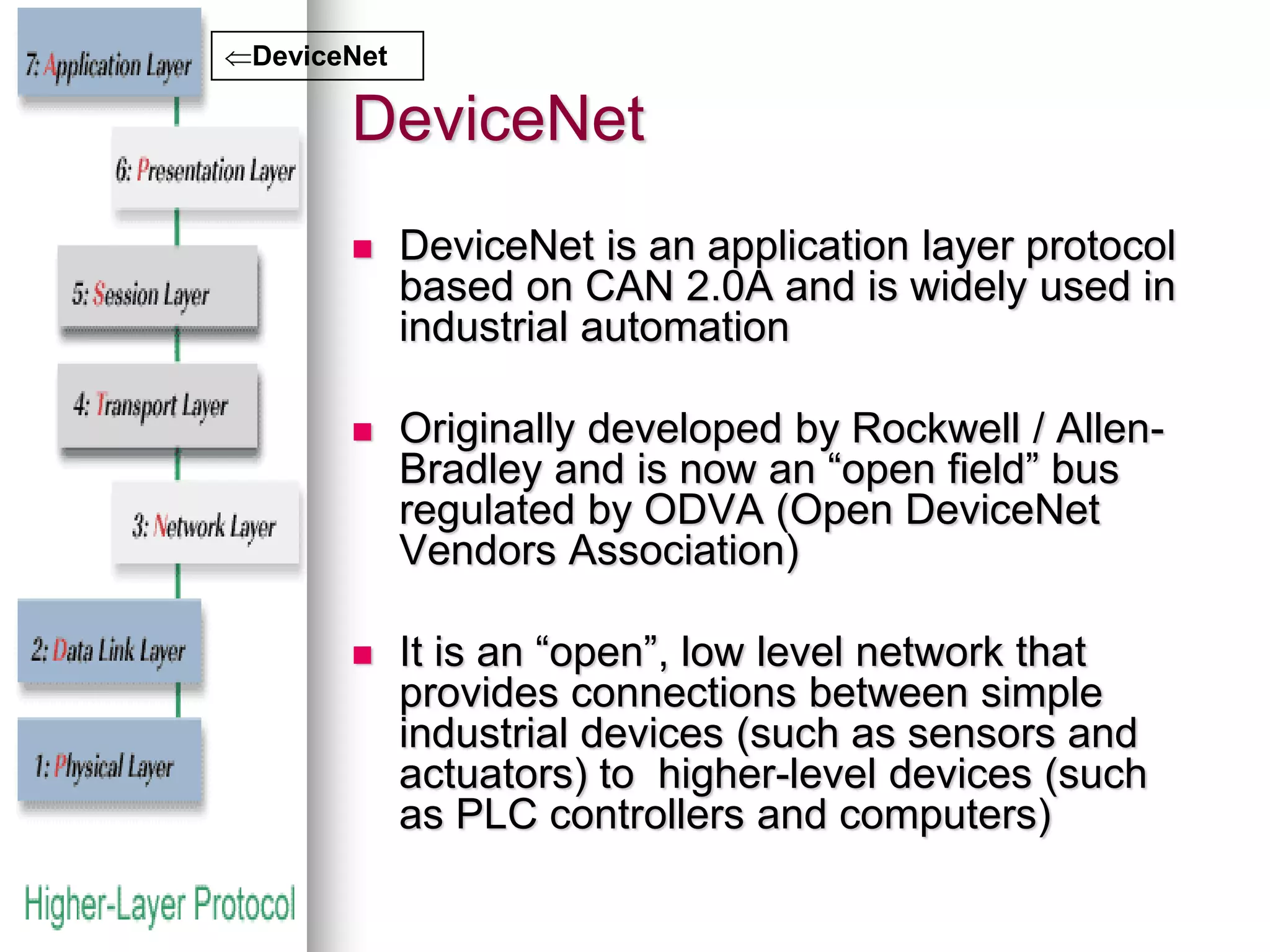
 DeviceNet is an application layer protocol 
based on CAN 2.0A and is widely used in 
industrial automation 
 Originally developed by Rockwell / Allen- 
Bradley and is now an “open field” bus 
regulated by ODVA (Open DeviceNet 
Vendors Association) 
 It is an “open”, low level network that 
provides connections between simple 
industrial devices (such as sensors and 
actuators) to higher-level devices (such 
as PLC controllers and computers) 
DeviceNet
DeviceNet 
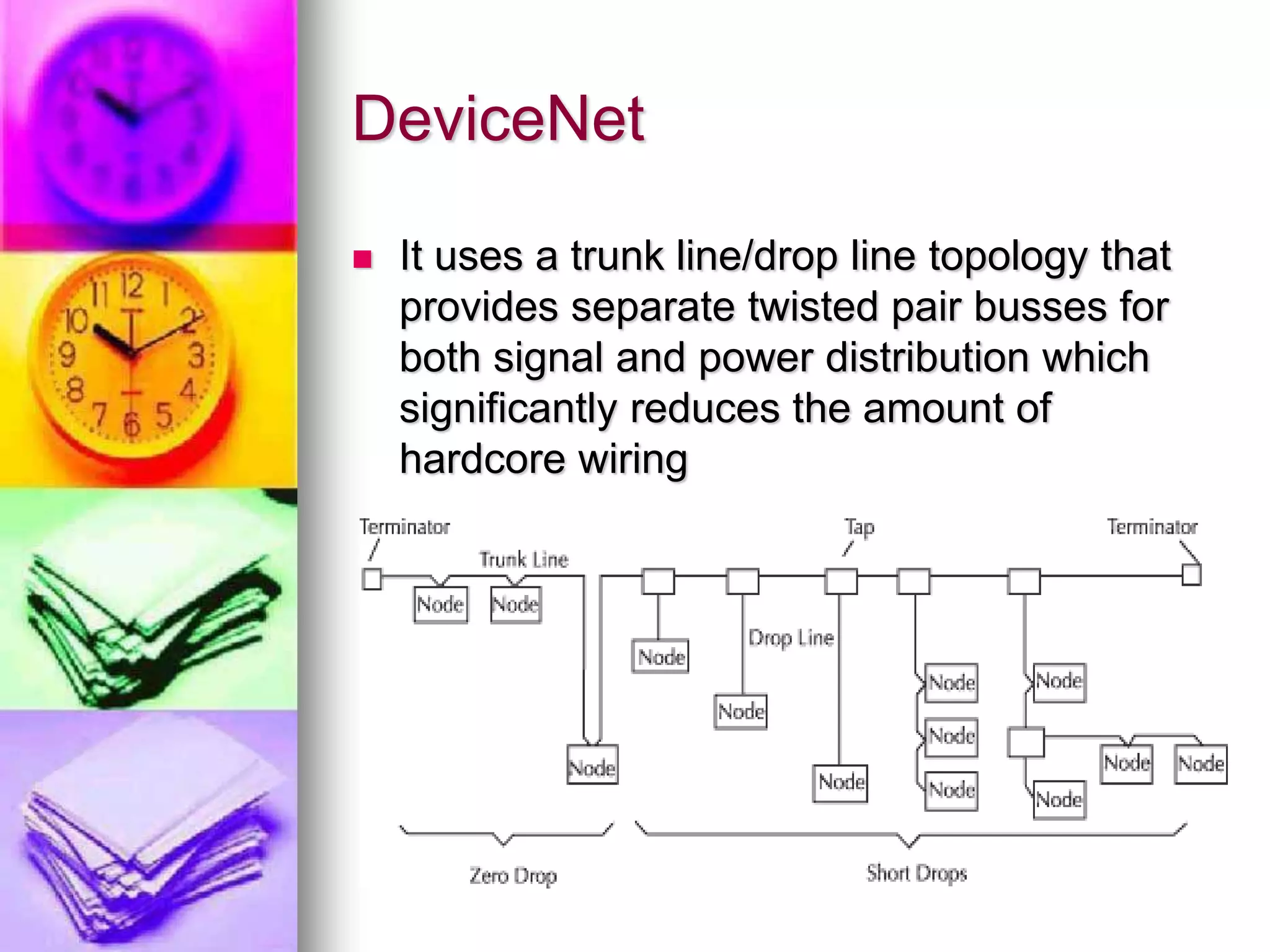
 It uses a trunk line/drop line topology that 
provides separate twisted pair busses for 
both signal and power distribution which 
significantly reduces the amount of 
hardcore wiring
DeviceNet 
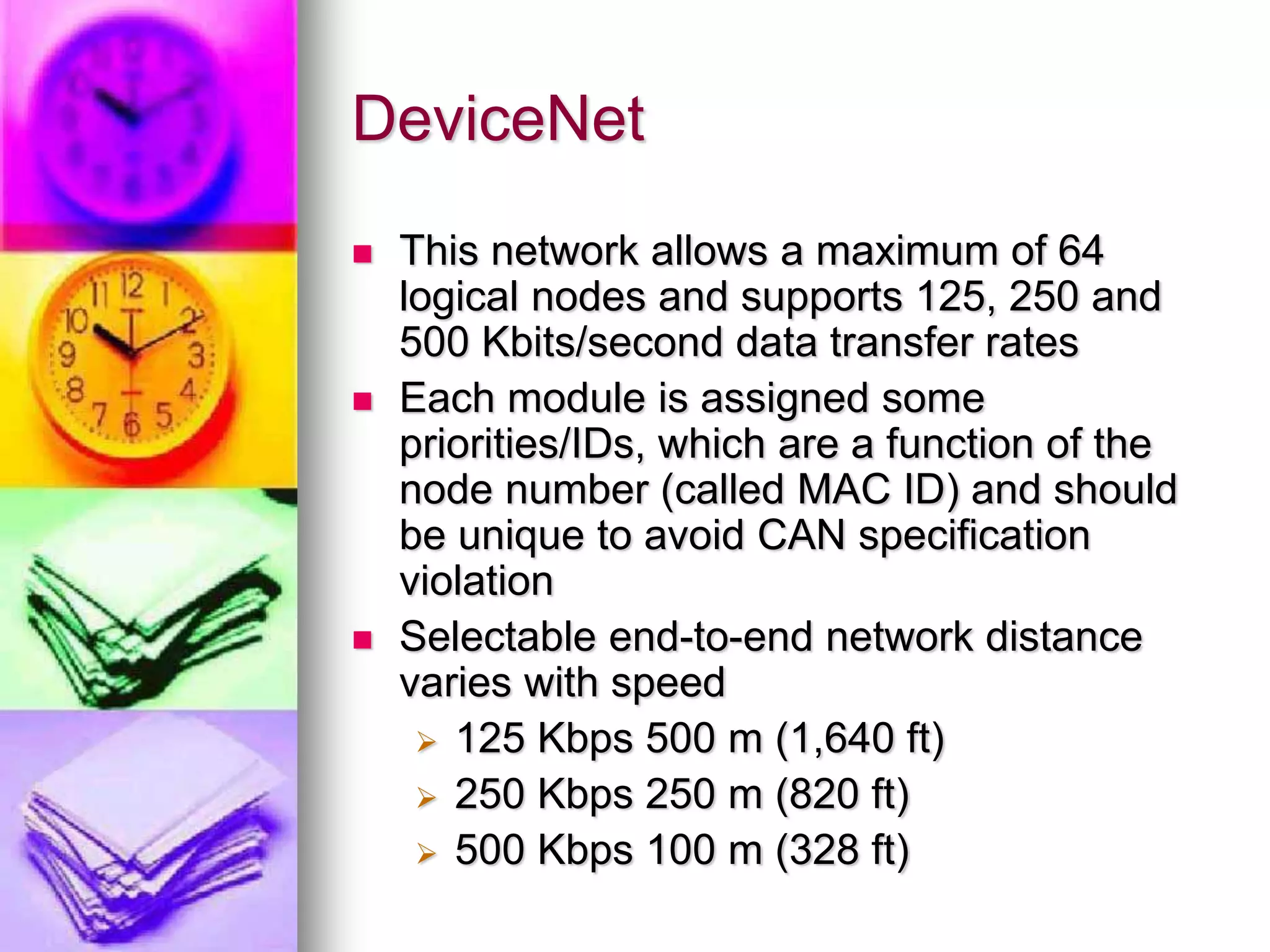
 This network allows a maximum of 64 
logical nodes and supports 125, 250 and 
500 Kbits/second data transfer rates 
 Each module is assigned some 
priorities/IDs, which are a function of the 
node number (called MAC ID) and should 
be unique to avoid CAN specification 
violation 
 Selectable end-to-end network distance 
varies with speed 
 125 Kbps 500 m (1,640 ft) 
 250 Kbps 250 m (820 ft) 
 500 Kbps 100 m (328 ft)
DeviceNet 
 Devices can be interfaced with 
network without removing power 
 Supports only Standard CAN 
 Uses production/consumption model for 
module to module transfer 
 Peer-to-Peer with Multi-Cast (one-to-many); 
Multi-Master and Master/Slave 
Polled or change-of-state
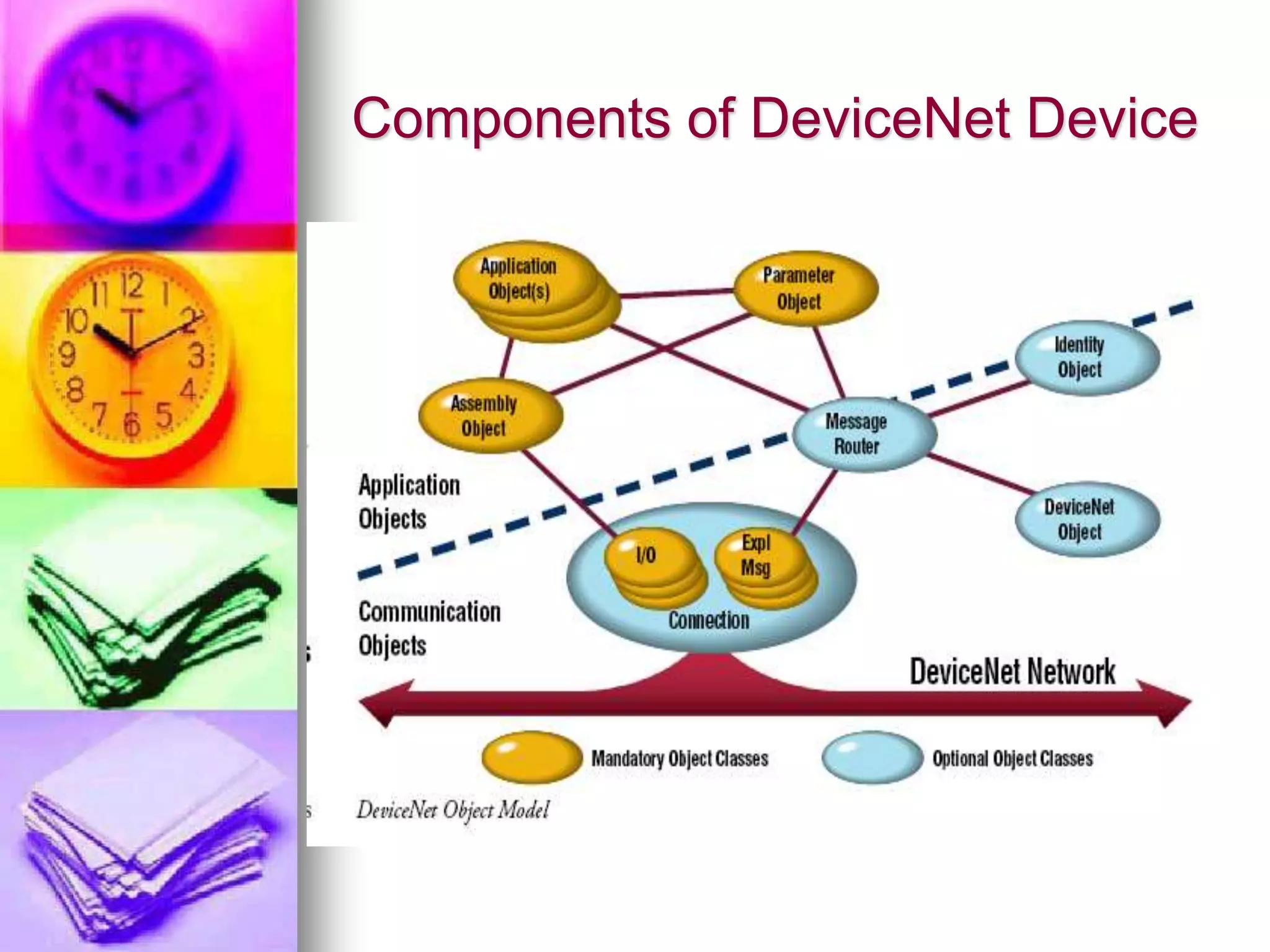
Components of DeviceNet Device
DeviceNet 
 Each of these components are organized 
into attributes, services (methods or 
procedures), and behaviors of the 
components 
 These objects are defined by DeviceNet 
specification. For instance, the identity 
object has attributes such as vendor ID, 
device type, and serial number.
DeviceNet 
 A device profile consists of 
 device’s object model, 
 I/O data format (including definition of 
assembly object(s) for efficient data 
transfer and, 
 the device’s configurable parameters 
documented in electronic data sheet 
(EDS)
Smart Distributed Systems (SDS) 
 Developed by Honeywell's MICRO 
SWITCH Division 
 is also an advanced CAN based device-level 
communication network bus system 
for intelligent sensors and actuators 
 The SDS Application Layer Protocol is 
optimized for “Smart Sensors and 
Actuators”, where Configuration, 
Diagnostic, and Process information can 
be embedded cost-effectively in a very 
small footprint
Features of SDS 
 Communication bit transfer rates are 125, 
250, 500, and 1,000 kBaud 
 1500 ft maximum distance at 125 kBaud 
(longer with Bridge) 
 Maximum of 125 modules can be 
connected to the network 
 12-24VDC, 2 power wires + 2 
communication wires + shield 
 126 logical addresses - not related to 
physical location on the network 
 Event-Driven, Master-Slave, Multicast and 
Peer to Peer Services
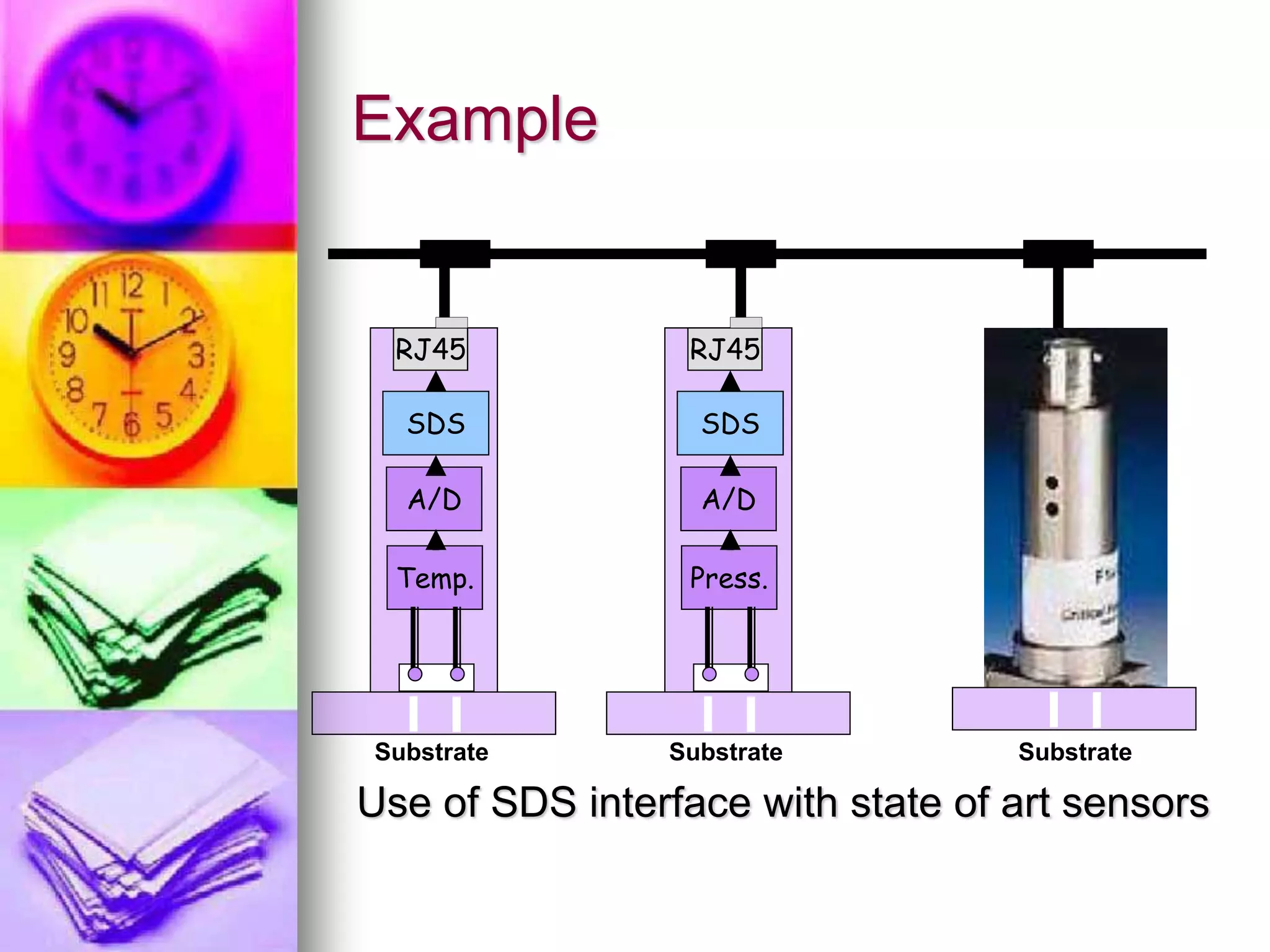
Example 
RJ45 
SDS 
A/D 
Temp. 
Substrate 
RJ45 
SDS 
A/D 
Press. 
Substrate 
Substrate 
Use of SDS interface with state of art sensors
SDS 
 Small and effective way to connect small 
devices to a master controller. 
 Master has 100% control of all modules. 
 No support for communication between 
modules without a master PLC. 
 Supports only Standard CAN. 
 Effective when it comes to connect I/O 
devices (e.g., on/off switches, proximity 
sensors, etc.) to a PLC, as SDS 
fundamentally is a point to point 
communication between a master (Host) 
and remote I/O’s.
SDS 
 SDS has 2 Special APDU (Application 
Layer Protocol Data Unit) Forms: 
 Short Form APDU - Shortens the CAN 
message for single-bit commands such 
as COS, Write, and Acknowledgement. 
This allows for greater throughput and 
improved system response time. 
 Fragmented APDU - Allows for data 
messages longer than the standard 6 
data byte format. Up to 256 bytes of 
data may be sent. This allows complex 
data such as ASCII strings to be sent 
across the network
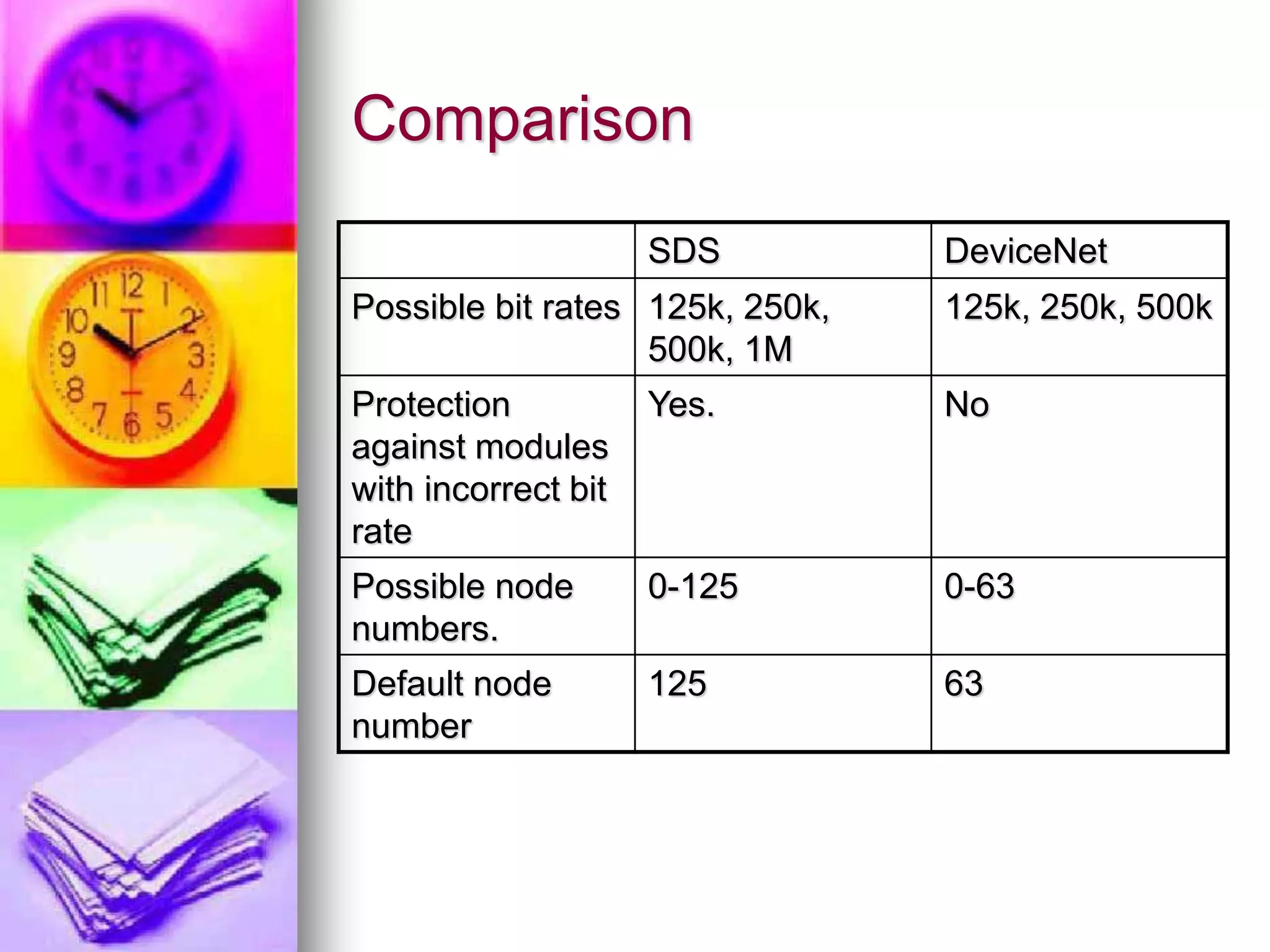
Comparison 
SDS DeviceNet 
Possible bit rates 125k, 250k, 
500k, 1M 
125k, 250k, 500k 
Protection 
against modules 
with incorrect bit 
rate 
Yes. No 
Possible node 
numbers. 
0-125 0-63 
Default node 
number 
125 63
Questions??

Ppt devicenet

  • 1.
    DeviceNet and SDS Presented by : Ramesh Vishwanathan Biosystems and Agl. Engineering
  • 2.
    Goals  Introduction  DeviceNet  Smart Distributed Systems  Comparison of DeviceNet and SDS
  • 3.
    Introduction  Ananalogy –  The Functionalities provided by CAN is similar to Latin letters in human communication.  To specify a language we need a stock of words as well as grammar to build sentences.  CAN users specify their own CAN-based language, or the user decides to use a standardized CAN-based higher-layer protocol  Examples of CAN-based higher layer protocols are CANopen, DeviceNet, CANKingdom, SDC, etc.
  • 4.
    DeviceNet  DeviceNetis an application layer protocol based on CAN 2.0A and is widely used in industrial automation  Originally developed by Rockwell / Allen- Bradley and is now an “open field” bus regulated by ODVA (Open DeviceNet Vendors Association)  It is an “open”, low level network that provides connections between simple industrial devices (such as sensors and actuators) to higher-level devices (such as PLC controllers and computers) DeviceNet
  • 5.
    DeviceNet  Ituses a trunk line/drop line topology that provides separate twisted pair busses for both signal and power distribution which significantly reduces the amount of hardcore wiring
  • 6.
    DeviceNet  Thisnetwork allows a maximum of 64 logical nodes and supports 125, 250 and 500 Kbits/second data transfer rates  Each module is assigned some priorities/IDs, which are a function of the node number (called MAC ID) and should be unique to avoid CAN specification violation  Selectable end-to-end network distance varies with speed  125 Kbps 500 m (1,640 ft)  250 Kbps 250 m (820 ft)  500 Kbps 100 m (328 ft)
  • 7.
    DeviceNet  Devicescan be interfaced with network without removing power  Supports only Standard CAN  Uses production/consumption model for module to module transfer  Peer-to-Peer with Multi-Cast (one-to-many); Multi-Master and Master/Slave Polled or change-of-state
  • 8.
  • 9.
    DeviceNet  Eachof these components are organized into attributes, services (methods or procedures), and behaviors of the components  These objects are defined by DeviceNet specification. For instance, the identity object has attributes such as vendor ID, device type, and serial number.
  • 10.
    DeviceNet  Adevice profile consists of  device’s object model,  I/O data format (including definition of assembly object(s) for efficient data transfer and,  the device’s configurable parameters documented in electronic data sheet (EDS)
  • 11.
    Smart Distributed Systems(SDS)  Developed by Honeywell's MICRO SWITCH Division  is also an advanced CAN based device-level communication network bus system for intelligent sensors and actuators  The SDS Application Layer Protocol is optimized for “Smart Sensors and Actuators”, where Configuration, Diagnostic, and Process information can be embedded cost-effectively in a very small footprint
  • 12.
    Features of SDS  Communication bit transfer rates are 125, 250, 500, and 1,000 kBaud  1500 ft maximum distance at 125 kBaud (longer with Bridge)  Maximum of 125 modules can be connected to the network  12-24VDC, 2 power wires + 2 communication wires + shield  126 logical addresses - not related to physical location on the network  Event-Driven, Master-Slave, Multicast and Peer to Peer Services
  • 13.
    Example RJ45 SDS A/D Temp. Substrate RJ45 SDS A/D Press. Substrate Substrate Use of SDS interface with state of art sensors
  • 14.
    SDS  Smalland effective way to connect small devices to a master controller.  Master has 100% control of all modules.  No support for communication between modules without a master PLC.  Supports only Standard CAN.  Effective when it comes to connect I/O devices (e.g., on/off switches, proximity sensors, etc.) to a PLC, as SDS fundamentally is a point to point communication between a master (Host) and remote I/O’s.
  • 15.
    SDS  SDShas 2 Special APDU (Application Layer Protocol Data Unit) Forms:  Short Form APDU - Shortens the CAN message for single-bit commands such as COS, Write, and Acknowledgement. This allows for greater throughput and improved system response time.  Fragmented APDU - Allows for data messages longer than the standard 6 data byte format. Up to 256 bytes of data may be sent. This allows complex data such as ASCII strings to be sent across the network
  • 16.
    Comparison SDS DeviceNet Possible bit rates 125k, 250k, 500k, 1M 125k, 250k, 500k Protection against modules with incorrect bit rate Yes. No Possible node numbers. 0-125 0-63 Default node number 125 63
  • 17.