Ethical concerns with
technology
Naughty or Nice?
Ethical concerns?
What is ethics, anyway?
• Ethics is two things
– Ethics refers to well based standards of right
and wrong that prescribe what humans
ought to do, usually in terms of rights,
obligations, benefits to society, fairness, or
specific virtues.
– Ethics refers to the study and development
of one's ethical standards.
• What is Ethics?
2
Ethics in Education?
National Education Assocation:
– Commitment to the Student
– The educator strives to help each student realize
his or her potential as a worthy and effective
member of society. The educator therefore works
to stimulate the spirit of inquiry, the acquisition of
knowledge and understanding, and the thoughtful
formulation of worthy goals.
– Commitment to the Profession
– The education profession is vested by the public
with a trust and responsibility requiring the
highest ideals of professional service.
• NEA Code of Ethics
3
Ethics in Technology?
4
Ethics for librarians?
Code of Ethics of the American Library
Association
II. We uphold the principles of intellectual
freedom and resist all efforts to censor
library resources.
III. We protect each library user's right to
privacy and confidentiality with respect to
information sought or received and
resources consulted, borrowed, acquired or
transmitted.
IV. We respect intellectual property rights and
advocate balance between the interests of
information users and rights holders.
5
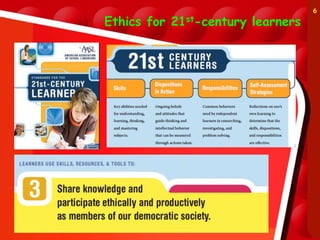
Ethics for 21st-century learners
6
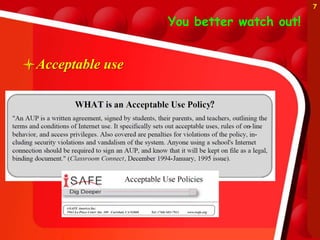
You better watch out!
Acceptable use
7
 Nine Themes of Digital
Citizenship
– Digital citizenship can be defined as the norms of appropriate,
responsible behavior with regard to technology use.
1. Digital Etiquette: electronic standards of conduct or procedure.
2. Digital Communication: electronic exchange of information.
3. Digital Literacy: process of teaching and learning about technology
and the use of technology.
4. Digital Access: full electronic participation in society.
5. Digital Commerce: electronic buying and selling of goods.
6. Digital Law: electronic responsibility for actions and deeds
7. Digital Rights & Responsibilities: those freedoms extended to
everyone in a digital world.
8. Digital Health & Wellness: physical and psychological well-being in
a digital technology world.
9. Digital Security (self-protection): electronic precautions to
guarantee safety.
8
KY Guidelines
• Best practices for appropriate use of technology
• Generally, employees and students think of
best practices only in the sense of electronic
mail and internet use. It must be understood
that any Acceptable Use Policy also extends
to: computer hardware and peripherals; software;
network access; storage devices: databases, files, and
other repositories of information in electronic form.
Best practice applies to use while onsite and when
using remote access (from home, conferences, while
traveling, etc.).
•
9
3 aspects of acceptable use
1. Access to “objectionable materials”
– How do you define “objectionable” or
“inappropruate”
– What sanctions do you put in place to “punish”
or as a deterrent?
– Is blocking and filtering censorship?
2. Use of intellectual property
– Copyright vs. “fair use”
– Plagiarism vs. citing sources
3. Misuse of communication
– Cyberbullying
10
Internet filtering
What Are We Protecting
Them From?
– No one disputes the need to protect kids from
the harm that lurks online. What's at issue is
whether or not mandated internet filters are
the best way to achieve those safeguards-or
whether the filters aren't up to the task and
are actually interfering with the educational
mission by obstructing use of important Web
2.0 tools.
• Villano, M. (2008, May 1). What are we protecting
them from? THE Journal/
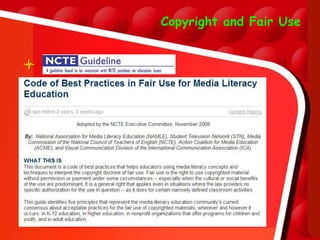
Copyright and Fair Use

Copyright vs. Fair Use
http://www.stfrancis.edu/content/cid/copyrightbay/
13
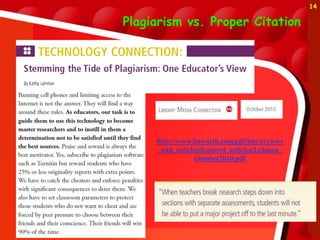
Plagiarism vs. Proper Citation
http://www.linworth.com/pdf/lmc/reviews
_and_articles/featured_articles/Lehman_
October2010.pdf
14
Cyberbullying
Cyberbullying
– They may not call it cyberbullying.
Students may say they got “dissed” on
Facebook or that someone flooded
their phone with mean texts. Even little
kids have been known to hack into
Club Penguin to sabotage each other’s games.
– The answer isn’t forbidding technology, say
experts, so much as teaching kids right from
wrong. As a teacher, you can be a powerful force
in promoting a climate of respect. Educate
yourself and be on the lookout for signs that
cyberbullying is taking place, because you may be
the trusted adult a student turns to for help.
• Adams, C. (2010). Cyberbullying: What Teachers and Schools Can Do. Instructor,
120(2), 44-49.
Some internet safety organizations
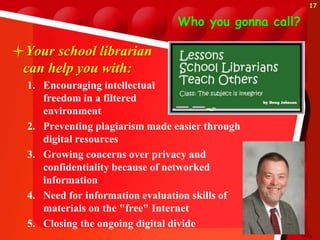
Who you gonna call?
Your school librarian
can help you with:
1. Encouraging intellectual
freedom in a filtered
environment
2. Preventing plagiarism made easier through
digital resources
3. Growing concerns over privacy and
confidentiality because of networked
information
4. Need for information evaluation skills of
materials on the "free" Internet
5. Closing the ongoing digital divide
17
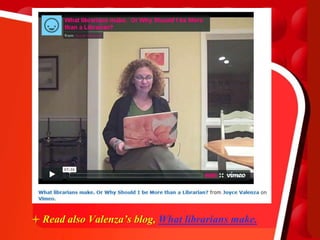
Read also Valenza’s blog, What librarians make.
Have a safe holiday!

Naughty or nice 2007 version

  • 1.
  • 2.
    Ethical concerns? What isethics, anyway? • Ethics is two things – Ethics refers to well based standards of right and wrong that prescribe what humans ought to do, usually in terms of rights, obligations, benefits to society, fairness, or specific virtues. – Ethics refers to the study and development of one's ethical standards. • What is Ethics? 2
  • 3.
    Ethics in Education? NationalEducation Assocation: – Commitment to the Student – The educator strives to help each student realize his or her potential as a worthy and effective member of society. The educator therefore works to stimulate the spirit of inquiry, the acquisition of knowledge and understanding, and the thoughtful formulation of worthy goals. – Commitment to the Profession – The education profession is vested by the public with a trust and responsibility requiring the highest ideals of professional service. • NEA Code of Ethics 3
  • 4.
  • 5.
    Ethics for librarians? Codeof Ethics of the American Library Association II. We uphold the principles of intellectual freedom and resist all efforts to censor library resources. III. We protect each library user's right to privacy and confidentiality with respect to information sought or received and resources consulted, borrowed, acquired or transmitted. IV. We respect intellectual property rights and advocate balance between the interests of information users and rights holders. 5
  • 6.
  • 7.
    You better watchout! Acceptable use 7
  • 8.
     Nine Themesof Digital Citizenship – Digital citizenship can be defined as the norms of appropriate, responsible behavior with regard to technology use. 1. Digital Etiquette: electronic standards of conduct or procedure. 2. Digital Communication: electronic exchange of information. 3. Digital Literacy: process of teaching and learning about technology and the use of technology. 4. Digital Access: full electronic participation in society. 5. Digital Commerce: electronic buying and selling of goods. 6. Digital Law: electronic responsibility for actions and deeds 7. Digital Rights & Responsibilities: those freedoms extended to everyone in a digital world. 8. Digital Health & Wellness: physical and psychological well-being in a digital technology world. 9. Digital Security (self-protection): electronic precautions to guarantee safety. 8
  • 9.
    KY Guidelines • Bestpractices for appropriate use of technology • Generally, employees and students think of best practices only in the sense of electronic mail and internet use. It must be understood that any Acceptable Use Policy also extends to: computer hardware and peripherals; software; network access; storage devices: databases, files, and other repositories of information in electronic form. Best practice applies to use while onsite and when using remote access (from home, conferences, while traveling, etc.). • 9
  • 10.
    3 aspects ofacceptable use 1. Access to “objectionable materials” – How do you define “objectionable” or “inappropruate” – What sanctions do you put in place to “punish” or as a deterrent? – Is blocking and filtering censorship? 2. Use of intellectual property – Copyright vs. “fair use” – Plagiarism vs. citing sources 3. Misuse of communication – Cyberbullying 10
  • 11.
    Internet filtering What AreWe Protecting Them From? – No one disputes the need to protect kids from the harm that lurks online. What's at issue is whether or not mandated internet filters are the best way to achieve those safeguards-or whether the filters aren't up to the task and are actually interfering with the educational mission by obstructing use of important Web 2.0 tools. • Villano, M. (2008, May 1). What are we protecting them from? THE Journal/
  • 12.
  • 13.
    Copyright vs. FairUse http://www.stfrancis.edu/content/cid/copyrightbay/ 13
  • 14.
    Plagiarism vs. ProperCitation http://www.linworth.com/pdf/lmc/reviews _and_articles/featured_articles/Lehman_ October2010.pdf 14
  • 15.
    Cyberbullying Cyberbullying – They maynot call it cyberbullying. Students may say they got “dissed” on Facebook or that someone flooded their phone with mean texts. Even little kids have been known to hack into Club Penguin to sabotage each other’s games. – The answer isn’t forbidding technology, say experts, so much as teaching kids right from wrong. As a teacher, you can be a powerful force in promoting a climate of respect. Educate yourself and be on the lookout for signs that cyberbullying is taking place, because you may be the trusted adult a student turns to for help. • Adams, C. (2010). Cyberbullying: What Teachers and Schools Can Do. Instructor, 120(2), 44-49.
  • 16.
    Some internet safetyorganizations
  • 17.
    Who you gonnacall? Your school librarian can help you with: 1. Encouraging intellectual freedom in a filtered environment 2. Preventing plagiarism made easier through digital resources 3. Growing concerns over privacy and confidentiality because of networked information 4. Need for information evaluation skills of materials on the "free" Internet 5. Closing the ongoing digital divide 17
  • 18.
    Read also Valenza’sblog, What librarians make.
  • 19.
    Have a safeholiday!