Computer System Validation

 Strategies for Achieving and
Maintaining Part 11 Compliance
 in Today's Current Practices
Today’s Presenter


  Gary D. Kimmel
         Senior Director
      Quality Assurance and
       Compliance Service
Introductions
• Introduction of Team Members

• Pilgrim Software
       • Nancy Defilippis
       • Jim Dalton
       • Jeff Fenske

• Business Intelligence Solutions
      • Gary Kimmel
      • Jon Nugent
What we’re covering today:

Perspective from the FDA: Computer Validation
Overview of Computer Systems Validation
     What System to Validate
       Validation Requirements
Computerized System Validation Documentation
A Practical Approach to Implementing CAPA
Perspective from FDA

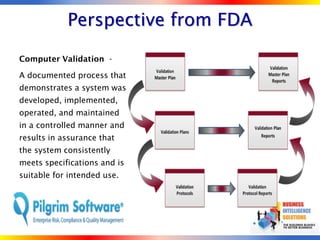
Computer Validation -

A documented process that
demonstrates a system was
developed, implemented,
operated, and maintained
in a controlled manner and
results in assurance that
the system consistently
meets specifications and is
suitable for intended use.
Overview of
  Computer Systems Validation

• Computer System - Includes hardware, software,
  peripheral devices, personnel, and documentation; e.g.,
  manuals and Standard Operating Procedures.


  The scope of validation includes implementation of
  hardware, software, policies, procedures, and training of
  personnel on automated information systems (AIS) that
  house FDA-regulated data.
Validation Requirements
• Guidelines leave Validation open to interpretation

• Developing and following internal standards

• Auditable to standards

• Personal accountability

• Time and resource constraints needed for
  execution

• Volume of documentation
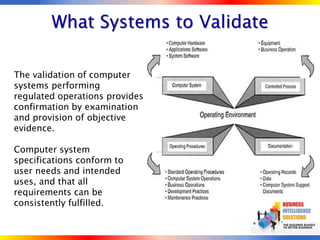
What Systems to Validate

The validation of computer
systems performing
regulated operations provides
confirmation by examination
and provision of objective
evidence.

Computer system
specifications conform to
user needs and intended
uses, and that all
requirements can be
consistently fulfilled.
Installation Qualification (IQ)
• The IQ includes the verification of the
  installation requirements, verification of the
  equipment specifications, and verification of
  the actual installation.

• The IQ protocol should verify that the system
  meets the System Design Specification

  expectations.
Operational Qualification (OQ)

• The OQ is tied to the Functional
 Requirements Specification (FRS). All
 functions identified in the FRS must
 be tested. Testing includes Unit
 Testing and Integration Testing.
Performance Qualification (PQ)

• The PQ is based on the User
 Requirements Specification (URS).
 Since these tests provide evidence for
 user acceptance, trained key users of
 the system must be involved in PQ
 testing and in review and approval.
Computer System Validation
                Documentation
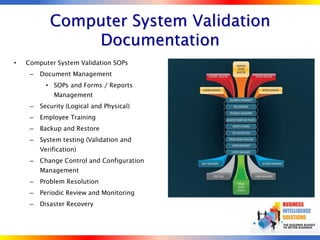
•   Computer System Validation SOPs
     –   Document Management
           • SOPs and Forms / Reports
             Management
     –   Security (Logical and Physical)
     –   Employee Training
     –   Backup and Restore
     –   System testing (Validation and
         Verification)
     –   Change Control and Configuration
         Management
     –   Problem Resolution
     –   Periodic Review and Monitoring
     –   Disaster Recovery
A Practical Approach to
Validation Document Management
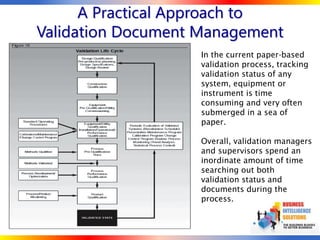
                   In the current paper-based
                   validation process, tracking
                   validation status of any
                   system, equipment or
                   instrument is time
                   consuming and very often
                   submerged in a sea of
                   paper.

                   Overall, validation managers
                   and supervisors spend an
                   inordinate amount of time
                   searching out both
                   validation status and
                   documents during the
                   process.
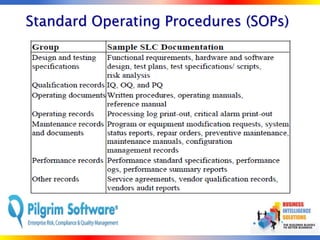
Standard Operating Procedures (SOPs)
Audits
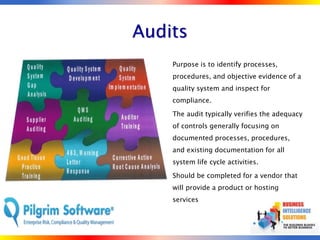
   •   Purpose is to identify processes,
       procedures, and objective evidence of a
       quality system and inspect for
       compliance.

   •   The audit typically verifies the adequacy
       of controls generally focusing on
       documented processes, procedures,
       and existing documentation for all
       system life cycle activities.

   •   Should be completed for a vendor that
       will provide a product or hosting
       services
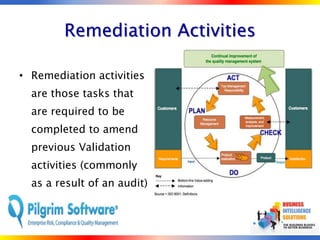
Remediation Activities

• Remediation activities
  are those tasks that
  are required to be
  completed to amend
  previous Validation
  activities (commonly
  as a result of an audit)
Corrective and Preventive Action
Who: Who is involved with the
CAPA Process.
What: What events trigger the
CAPA process.
When: When do you conduct the
CAPA.
Why:    Why     is   the   CAPA
performed.
Where: Where do you start the
CAPA process.

.
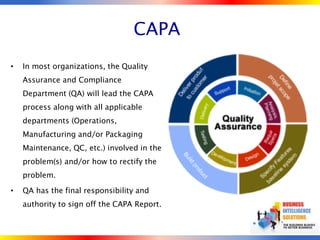
CAPA
•   In most organizations, the Quality
    Assurance and Compliance
    Department (QA) will lead the CAPA
    process along with all applicable
    departments (Operations,
    Manufacturing and/or Packaging
    Maintenance, QC, etc.) involved in the
    problem(s) and/or how to rectify the
    problem.

•   QA has the final responsibility and
    authority to sign off the CAPA Report.
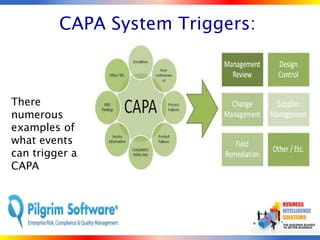
CAPA System Triggers:


There
numerous
examples of
what events
can trigger a
CAPA
CAPA System Measurement
               •   Consumer Complaint(s)
                   are received for the
                   same problem(s):
                   Product, Materials,
                   Labeling, Contamination
               •   Plant or FDA Product
                   Recall initiation
               •   Internal QA Audits find
                   major system
                   discrepancies
CAPA System Analysis

• To get to the
  root cause of
  the problem,
  fix it, and
  assure that it
  never happens
  again!
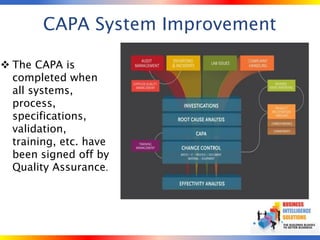
CAPA System Improvement

 The CAPA is
  completed when
  all systems,
  process,
  specifications,
  validation,
  training, etc. have
  been signed off by
  Quality Assurance.
Successful Computerized Validation
                •   How will you know if you have
                    had a successful CAPA and
                    Validation effort?
                     – A successful implementation
                       with no “bugs” introduced to
                       your Production environment
                     – A well documented path
                       from the initial validation to
                       the change control process
                     – A successful audit with no
                       major compliant or findings
References
• Home page - http://www.pilgrimsoftware.com
                  • http://www.busintellsol.com

• FDA Glossary of Terms
  http://www.fda.gov/ora/inspect_ref/igs/gloss.html

• Guidance for Industry Part 11, Electronic Records; Electronic
  Signatures – Scope and Application
  http://www.fda.gov/cder/guidance/5667fnl.htm

• 21 CFR Part 11 Electronic Records, Electronic Signatures
  http://www.accessdata.fda.gov/scripts/cdrh/cfdocs/cfCFR/CF
  RSearch.cfm?CFRPart=11
Business Intelligence Solutions | 1.800.782.0580 | www.busintellsol.com


            0                                                    13

Computerized System Validation Business Intelligence Solutions

  • 1.
    Computer System Validation Strategies for Achieving and Maintaining Part 11 Compliance in Today's Current Practices
  • 2.
    Today’s Presenter Gary D. Kimmel Senior Director Quality Assurance and Compliance Service
  • 3.
    Introductions • Introduction ofTeam Members • Pilgrim Software • Nancy Defilippis • Jim Dalton • Jeff Fenske • Business Intelligence Solutions • Gary Kimmel • Jon Nugent
  • 4.
    What we’re coveringtoday: Perspective from the FDA: Computer Validation Overview of Computer Systems Validation What System to Validate Validation Requirements Computerized System Validation Documentation A Practical Approach to Implementing CAPA
  • 5.
    Perspective from FDA ComputerValidation - A documented process that demonstrates a system was developed, implemented, operated, and maintained in a controlled manner and results in assurance that the system consistently meets specifications and is suitable for intended use.
  • 6.
    Overview of Computer Systems Validation • Computer System - Includes hardware, software, peripheral devices, personnel, and documentation; e.g., manuals and Standard Operating Procedures. The scope of validation includes implementation of hardware, software, policies, procedures, and training of personnel on automated information systems (AIS) that house FDA-regulated data.
  • 7.
    Validation Requirements • Guidelinesleave Validation open to interpretation • Developing and following internal standards • Auditable to standards • Personal accountability • Time and resource constraints needed for execution • Volume of documentation
  • 8.
    What Systems toValidate The validation of computer systems performing regulated operations provides confirmation by examination and provision of objective evidence. Computer system specifications conform to user needs and intended uses, and that all requirements can be consistently fulfilled.
  • 9.
    Installation Qualification (IQ) •The IQ includes the verification of the installation requirements, verification of the equipment specifications, and verification of the actual installation. • The IQ protocol should verify that the system meets the System Design Specification expectations.
  • 10.
    Operational Qualification (OQ) •The OQ is tied to the Functional Requirements Specification (FRS). All functions identified in the FRS must be tested. Testing includes Unit Testing and Integration Testing.
  • 11.
    Performance Qualification (PQ) •The PQ is based on the User Requirements Specification (URS). Since these tests provide evidence for user acceptance, trained key users of the system must be involved in PQ testing and in review and approval.
  • 12.
    Computer System Validation Documentation • Computer System Validation SOPs – Document Management • SOPs and Forms / Reports Management – Security (Logical and Physical) – Employee Training – Backup and Restore – System testing (Validation and Verification) – Change Control and Configuration Management – Problem Resolution – Periodic Review and Monitoring – Disaster Recovery
  • 13.
    A Practical Approachto Validation Document Management In the current paper-based validation process, tracking validation status of any system, equipment or instrument is time consuming and very often submerged in a sea of paper. Overall, validation managers and supervisors spend an inordinate amount of time searching out both validation status and documents during the process.
  • 14.
  • 15.
    Audits • Purpose is to identify processes, procedures, and objective evidence of a quality system and inspect for compliance. • The audit typically verifies the adequacy of controls generally focusing on documented processes, procedures, and existing documentation for all system life cycle activities. • Should be completed for a vendor that will provide a product or hosting services
  • 16.
    Remediation Activities • Remediationactivities are those tasks that are required to be completed to amend previous Validation activities (commonly as a result of an audit)
  • 17.
    Corrective and PreventiveAction Who: Who is involved with the CAPA Process. What: What events trigger the CAPA process. When: When do you conduct the CAPA. Why: Why is the CAPA performed. Where: Where do you start the CAPA process. .
  • 18.
    CAPA • In most organizations, the Quality Assurance and Compliance Department (QA) will lead the CAPA process along with all applicable departments (Operations, Manufacturing and/or Packaging Maintenance, QC, etc.) involved in the problem(s) and/or how to rectify the problem. • QA has the final responsibility and authority to sign off the CAPA Report.
  • 19.
    CAPA System Triggers: There numerous examplesof what events can trigger a CAPA
  • 20.
    CAPA System Measurement • Consumer Complaint(s) are received for the same problem(s): Product, Materials, Labeling, Contamination • Plant or FDA Product Recall initiation • Internal QA Audits find major system discrepancies
  • 21.
    CAPA System Analysis •To get to the root cause of the problem, fix it, and assure that it never happens again!
  • 22.
    CAPA System Improvement The CAPA is completed when all systems, process, specifications, validation, training, etc. have been signed off by Quality Assurance.
  • 23.
    Successful Computerized Validation • How will you know if you have had a successful CAPA and Validation effort? – A successful implementation with no “bugs” introduced to your Production environment – A well documented path from the initial validation to the change control process – A successful audit with no major compliant or findings
  • 24.
    References • Home page- http://www.pilgrimsoftware.com • http://www.busintellsol.com • FDA Glossary of Terms http://www.fda.gov/ora/inspect_ref/igs/gloss.html • Guidance for Industry Part 11, Electronic Records; Electronic Signatures – Scope and Application http://www.fda.gov/cder/guidance/5667fnl.htm • 21 CFR Part 11 Electronic Records, Electronic Signatures http://www.accessdata.fda.gov/scripts/cdrh/cfdocs/cfCFR/CF RSearch.cfm?CFRPart=11
  • 25.
    Business Intelligence Solutions| 1.800.782.0580 | www.busintellsol.com 0 13