XHTML Tags Reference - exploring XML
XHTML Tags Reference
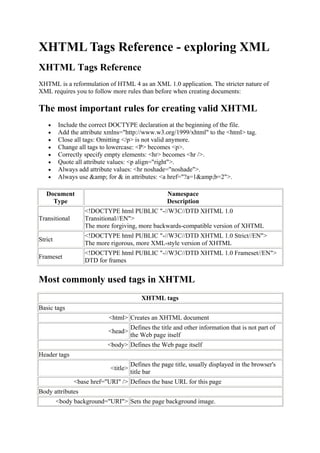
XHTML is a reformulation of HTML 4 as an XML 1.0 application. The stricter nature of
XML requires you to follow more rules than before when creating documents:

The most important rules for creating valid XHTML
         Include the correct DOCTYPE declaration at the beginning of the file.
         Add the attribute xmlns="http://www.w3.org/1999/xhtml" to the <html> tag.
         Close all tags: Omitting </p> is not valid anymore.
         Change all tags to lowercase: <P> becomes <p>.
         Correctly specify empty elements: <hr> becomes <hr />.
         Quote all attribute values: <p align="right">.
         Always add attribute values: <hr noshade="noshade">.
         Always use &amp; for & in attributes: <a href="?a=1&amp;b=2">.

   Document                                         Namespace
     Type                                           Description
                   <!DOCTYPE html PUBLIC "-//W3C//DTD XHTML 1.0
Transitional       Transitional//EN">
                   The more forgiving, more backwards-compatible version of XHTML
                   <!DOCTYPE html PUBLIC "-//W3C//DTD XHTML 1.0 Strict//EN">
Strict
                   The more rigorous, more XML-style version of XHTML
                   <!DOCTYPE html PUBLIC "-//W3C//DTD XHTML 1.0 Frameset//EN">
Frameset
                   DTD for frames


Most commonly used tags in XHTML
                                          XHTML tags
Basic tags
                           <html> Creates an XHTML document
                                      Defines the title and other information that is not part of
                           <head>
                                      the Web page itself
                           <body> Defines the Web page itself
Header tags
                                      Defines the page title, usually displayed in the browser's
                            <title>
                                      title bar
               <base href="URI" /> Defines the base URL for this page
Body attributes
         <body background="URI"> Sets the page background image.
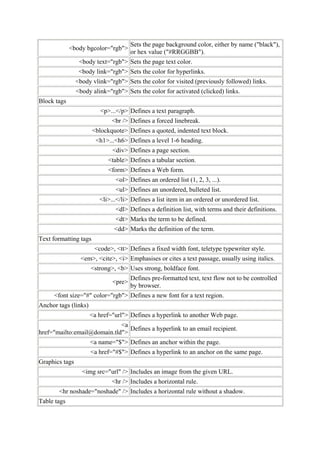
Sets the page background color, either by name ("black"),
             <body bgcolor="rgb">
                                      or hex value ("#RRGGBB").
                 <body text="rgb"> Sets the page text color.
                 <body link="rgb"> Sets the color for hyperlinks.
                <body vlink="rgb"> Sets the color for visited (previously followed) links.
                <body alink="rgb"> Sets the color for activated (clicked) links.
Block tags
                          <p>...</p> Defines a text paragraph.
                              <br /> Defines a forced linebreak.
                       <blockquote> Defines a quoted, indented text block.
                        <h1>...<h6> Defines a level 1-6 heading.
                              <div> Defines a page section.
                             <table> Defines a tabular section.
                             <form> Defines a Web form.
                               <ol> Defines an ordered list (1, 2, 3, ...).
                               <ul> Defines an unordered, bulleted list.
                         <li>...</li> Defines a list item in an ordered or unordered list.
                               <dl> Defines a definition list, with terms and their definitions.
                               <dt> Marks the term to be defined.
                               <dd> Marks the definition of the term.
Text formatting tags
                       <code>, <tt> Defines a fixed width font, teletype typewriter style.
                  <em>, <cite>, <i> Emphasises or cites a text passage, usually using italics.
                      <strong>, <b> Uses strong, boldface font.
                                      Defines pre-formatted text, text flow not to be controlled
                              <pre>
                                      by browser.
     <font size="#" color="rgb"> Defines a new font for a text region.
Anchor tags (links)
                      <a href="url"> Defines a hyperlink to another Web page.
                             <a
                                Defines a hyperlink to an email recipient.
href="mailto:email@domain.tld">
                      <a name="$"> Defines an anchor within the page.
                      <a href="#$"> Defines a hyperlink to an anchor on the same page.
Graphics tags
                  <img src="url" /> Includes an image from the given URL.
                              <hr /> Includes a horizontal rule.
       <hr noshade="noshade" /> Includes a horizontal rule without a shadow.
Table tags
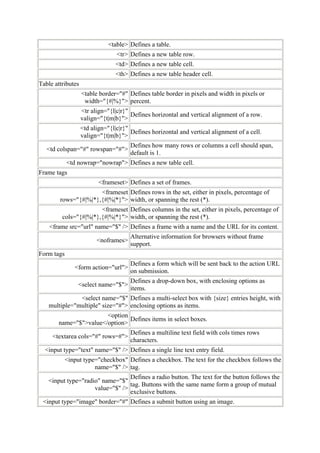
<table> Defines a table.
                                 <tr> Defines a new table row.
                                 <td> Defines a new table cell.
                                 <th> Defines a new table header cell.
Table attributes
                   <table border="#" Defines table border in pixels and width in pixels or
                    width="{#|%}"> percent.
                   <tr align="{l|c|r}"
                                       Defines horizontal and vertical alignment of a row.
                   valign="{t|m|b}">
                   <td align="{l|c|r}"
                                       Defines horizontal and vertical alignment of a cell.
                   valign="{t|m|b}">
                                      Defines how many rows or columns a cell should span,
   <td colspan="#" rowspan="#">
                                      default is 1.
            <td nowrap="nowrap"> Defines a new table cell.
Frame tags
                          <frameset> Defines a set of frames.
                      <frameset Defines rows in the set, either in pixels, percentage of
        rows="{#|%|*},{#|%|*}"> width, or spanning the rest (*).
                       <frameset Defines columns in the set, either in pixels, percentage of
         cols="{#|%|*},{#|%|*}"> width, or spanning the rest (*).
    <frame src="url" name="$" /> Defines a frame with a name and the URL for its content.
                                      Alternative information for browsers without frame
                         <noframes>
                                      support.
Form tags
                                      Defines a form which will be sent back to the action URL
               <form action="url">
                                      on submission.
                                      Defines a drop-down box, with enclosing options as
                 <select name="$">
                                      items.
              <select name="$" Defines a multi-select box with {size} entries height, with
   multiple="multiple" size="#"> enclosing options as items.
                       <option
                               Defines items in select boxes.
       name="$">value</option>
                                      Defines a multiline text field with cols times rows
     <textarea cols="#" rows=#">
                                      characters.
  <input type="text" name="$" /> Defines a single line text entry field.
            <input type="checkbox" Defines a checkbox. The text for the checkbox follows the
                       name="$" /> tag.
                                 Defines a radio button. The text for the button follows the
   <input type="radio" name="$"
                                 tag. Buttons with the same name form a group of mutual
                    value="$" />
                                 exclusive buttons.
 <input type="image" border="#" Defines a submit button using an image.
name="$" src="url" />
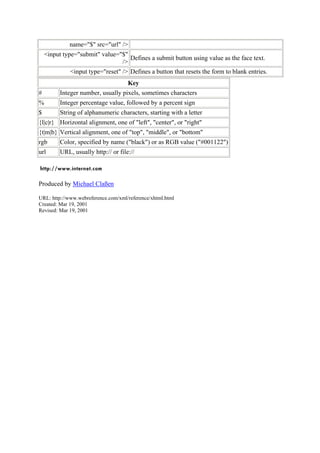
    <input type="submit" value="$"
                                   Defines a submit button using value as the face text.
                                />
              <input type="reset" /> Defines a button that resets the form to blank entries.
                                      Key
#         Integer number, usually pixels, sometimes characters
%         Integer percentage value, followed by a percent sign
$         String of alphanumeric characters, starting with a letter
{l|c|r} Horizontal alignment, one of "left", "center", or "right"
{t|m|b} Vertical alignment, one of "top", "middle", or "bottom"
rgb       Color, specified by name ("black") or as RGB value ("#001122")
url       URL, usually http:// or file://


Produced by Michael Claßen

URL: http://www.webreference.com/xml/reference/xhtml.html
Created: Mar 19, 2001
Revised: Mar 19, 2001

Xhtml tags reference

  • 1.
    XHTML Tags Reference- exploring XML XHTML Tags Reference XHTML is a reformulation of HTML 4 as an XML 1.0 application. The stricter nature of XML requires you to follow more rules than before when creating documents: The most important rules for creating valid XHTML Include the correct DOCTYPE declaration at the beginning of the file. Add the attribute xmlns="http://www.w3.org/1999/xhtml" to the <html> tag. Close all tags: Omitting </p> is not valid anymore. Change all tags to lowercase: <P> becomes <p>. Correctly specify empty elements: <hr> becomes <hr />. Quote all attribute values: <p align="right">. Always add attribute values: <hr noshade="noshade">. Always use &amp; for & in attributes: <a href="?a=1&amp;b=2">. Document Namespace Type Description <!DOCTYPE html PUBLIC "-//W3C//DTD XHTML 1.0 Transitional Transitional//EN"> The more forgiving, more backwards-compatible version of XHTML <!DOCTYPE html PUBLIC "-//W3C//DTD XHTML 1.0 Strict//EN"> Strict The more rigorous, more XML-style version of XHTML <!DOCTYPE html PUBLIC "-//W3C//DTD XHTML 1.0 Frameset//EN"> Frameset DTD for frames Most commonly used tags in XHTML XHTML tags Basic tags <html> Creates an XHTML document Defines the title and other information that is not part of <head> the Web page itself <body> Defines the Web page itself Header tags Defines the page title, usually displayed in the browser's <title> title bar <base href="URI" /> Defines the base URL for this page Body attributes <body background="URI"> Sets the page background image.
  • 2.
    Sets the pagebackground color, either by name ("black"), <body bgcolor="rgb"> or hex value ("#RRGGBB"). <body text="rgb"> Sets the page text color. <body link="rgb"> Sets the color for hyperlinks. <body vlink="rgb"> Sets the color for visited (previously followed) links. <body alink="rgb"> Sets the color for activated (clicked) links. Block tags <p>...</p> Defines a text paragraph. <br /> Defines a forced linebreak. <blockquote> Defines a quoted, indented text block. <h1>...<h6> Defines a level 1-6 heading. <div> Defines a page section. <table> Defines a tabular section. <form> Defines a Web form. <ol> Defines an ordered list (1, 2, 3, ...). <ul> Defines an unordered, bulleted list. <li>...</li> Defines a list item in an ordered or unordered list. <dl> Defines a definition list, with terms and their definitions. <dt> Marks the term to be defined. <dd> Marks the definition of the term. Text formatting tags <code>, <tt> Defines a fixed width font, teletype typewriter style. <em>, <cite>, <i> Emphasises or cites a text passage, usually using italics. <strong>, <b> Uses strong, boldface font. Defines pre-formatted text, text flow not to be controlled <pre> by browser. <font size="#" color="rgb"> Defines a new font for a text region. Anchor tags (links) <a href="url"> Defines a hyperlink to another Web page. <a Defines a hyperlink to an email recipient. href="mailto:email@domain.tld"> <a name="$"> Defines an anchor within the page. <a href="#$"> Defines a hyperlink to an anchor on the same page. Graphics tags <img src="url" /> Includes an image from the given URL. <hr /> Includes a horizontal rule. <hr noshade="noshade" /> Includes a horizontal rule without a shadow. Table tags
  • 3.
    <table> Defines atable. <tr> Defines a new table row. <td> Defines a new table cell. <th> Defines a new table header cell. Table attributes <table border="#" Defines table border in pixels and width in pixels or width="{#|%}"> percent. <tr align="{l|c|r}" Defines horizontal and vertical alignment of a row. valign="{t|m|b}"> <td align="{l|c|r}" Defines horizontal and vertical alignment of a cell. valign="{t|m|b}"> Defines how many rows or columns a cell should span, <td colspan="#" rowspan="#"> default is 1. <td nowrap="nowrap"> Defines a new table cell. Frame tags <frameset> Defines a set of frames. <frameset Defines rows in the set, either in pixels, percentage of rows="{#|%|*},{#|%|*}"> width, or spanning the rest (*). <frameset Defines columns in the set, either in pixels, percentage of cols="{#|%|*},{#|%|*}"> width, or spanning the rest (*). <frame src="url" name="$" /> Defines a frame with a name and the URL for its content. Alternative information for browsers without frame <noframes> support. Form tags Defines a form which will be sent back to the action URL <form action="url"> on submission. Defines a drop-down box, with enclosing options as <select name="$"> items. <select name="$" Defines a multi-select box with {size} entries height, with multiple="multiple" size="#"> enclosing options as items. <option Defines items in select boxes. name="$">value</option> Defines a multiline text field with cols times rows <textarea cols="#" rows=#"> characters. <input type="text" name="$" /> Defines a single line text entry field. <input type="checkbox" Defines a checkbox. The text for the checkbox follows the name="$" /> tag. Defines a radio button. The text for the button follows the <input type="radio" name="$" tag. Buttons with the same name form a group of mutual value="$" /> exclusive buttons. <input type="image" border="#" Defines a submit button using an image.
  • 4.
    name="$" src="url" /> <input type="submit" value="$" Defines a submit button using value as the face text. /> <input type="reset" /> Defines a button that resets the form to blank entries. Key # Integer number, usually pixels, sometimes characters % Integer percentage value, followed by a percent sign $ String of alphanumeric characters, starting with a letter {l|c|r} Horizontal alignment, one of "left", "center", or "right" {t|m|b} Vertical alignment, one of "top", "middle", or "bottom" rgb Color, specified by name ("black") or as RGB value ("#001122") url URL, usually http:// or file:// Produced by Michael Claßen URL: http://www.webreference.com/xml/reference/xhtml.html Created: Mar 19, 2001 Revised: Mar 19, 2001