Santa Clara, 06-22-2010


          Mobile Web
    High Performance


   Maximiliano Firtman
   @firt www.firt.mobi

Picture from Simon Howden freedigitalphotos.net
Maximiliano Firtman


   www.firt.mobi
   twitter.com/firt
   Blog: www.mobilexweb.com
What

  MWPO – Mobile Web Performance Optimization*


*Thanks Steve Souders for creating WPO!
But first…

What is mobile web?
Mobile Web


       Is it other web?

                    NO	


But, the device and the context where
we see the web are different
Mobile Web


 Why should we
 care about
 Mobile Web?
Mobile Web


     And now we have

       RETINA
       DISPLAY
Mobile Web


But…

  it is still a 3” screen
  The user is on the move
  Does the user like to
 zoom and pan?
Mobile Web


And more important for us


Mobile browsers are different
Let’s talk about some
Myths
Myths


One document should
work for all devices
Myths


Just use standard HTML
Myths


People are not using their
 mobile browsers
Myths


Mobile web is iPhone,
Android and… maybe
BlackBerry
Mobile Web Development

    Techniques and best practices
   for delivering the best possible
  experience for each mobile device
Mobile Web Development

    Techniques and best practices
   for delivering the best possible
  experience for each mobile device

   Even with widgets, webapps or
      offline web applications
Why Mobile WPO
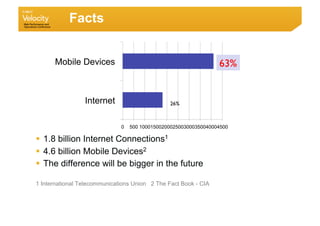
Facts


      Mobile Devices                                              63%	


                 Internet                       26%	


                              0   500 10001500200025003000350040004500

  1.8 billion Internet Connections1
  4.6 billion Mobile Devices2
  The difference will be bigger in the future

1 International Telecommunications Union 2 The Fact Book - CIA
Why


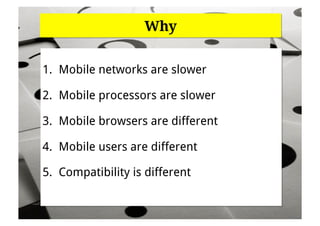
1.  Mobile networks are slower

2.  Mobile processors are slower

3.  Mobile browsers are different

4.  Mobile users are different

5.  Compatibility is different
Why


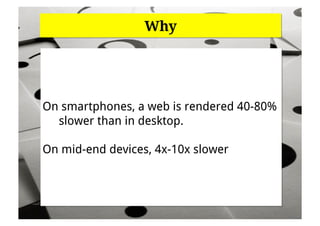
On smartphones, a web is rendered 40-80%
  slower than in desktop.

On mid-end devices, 4x-10x slower
Why


WPO has higher impact in mobile
Why


Users hate you
Let’s talk about browsers!
Mobile	
  Browsers	
  

• Too many	


•  Limited support and higher support than desktop	


•  Different navigation methods. Proxied vs. Direct
Browsers	


•  No documentation for most of them	


•  Non-updatable
Mobile	
  Browsers	
  Categories	
  by	
  its	
  browser	
  

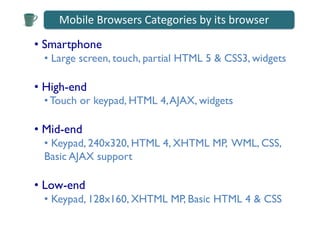
•  Smartphone	

  •  Large screen, touch, partial HTML 5 & CSS3, widgets	


•  High-end 	

  • Touch or keypad, HTML 4, AJAX, widgets	


•  Mid-end	

  •  Keypad, 240x320, HTML 4, XHTML MP, WML, CSS,
  Basic AJAX support	

•  Low-end	

  •  Keypad, 128x160, XHTML MP, Basic HTML 4 & CSS
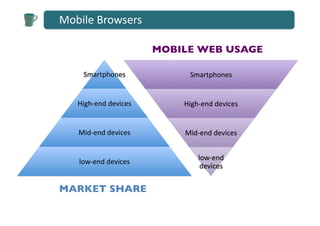
Mobile	
  Browsers	
  

                                MOBILE WEB USAGE	


      Smartphones	
                    Smartphones	


    High-­‐end	
  devices	
          High-­‐end	
  devices	


    Mid-­‐end	
  devices	
           Mid-­‐end	
  devices	


                                           low-­‐end	
  
     low-­‐end	
  devices	
  
                                            devices	


MARKET SHARE
Mobile	
  Widget	
  Overview	
  

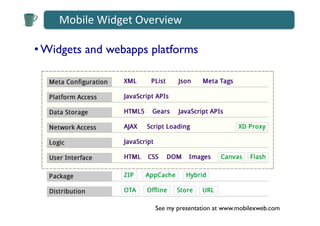
• Widgets and webapps platforms	


                             See my presentation at www.mobilexweb.com
Mobile	
  Browsers	
  

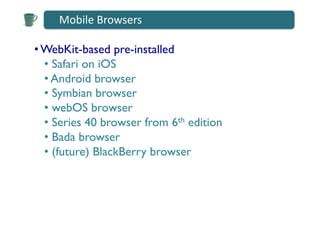
• WebKit-based pre-installed	

  •  Safari on iOS	

  •  Android browser	

  •  Symbian browser	

  •  webOS browser	

  •  Series 40 browser from 6th edition	

  •  Bada browser	

  •  (future) BlackBerry browser
Mobile	
  Browsers	
  

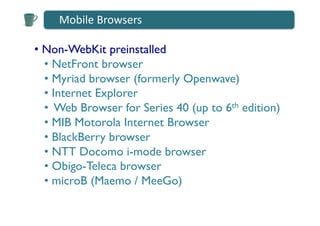
•  Non-WebKit preinstalled 	

   •  NetFront browser	

   •  Myriad browser (formerly Openwave)	

   •  Internet Explorer	

   •  Web Browser for Series 40 (up to 6th edition) 	

   •  MIB Motorola Internet Browser	

   •  BlackBerry browser	

   •  NTT Docomo i-mode browser	

   •  Obigo-Teleca browser	

   •  microB (Maemo / MeeGo)
Mobile	
  Browsers	
  

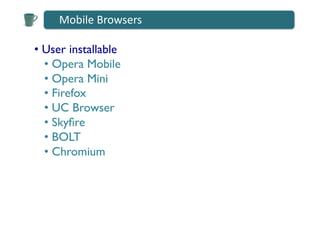
•  User installable	

   •  Opera Mobile	

   •  Opera Mini	

   •  Firefox	

   •  UC Browser	

   •  Skyfire	

   •  BOLT	

   •  Chromium
How to reach!
the right!
experience!
to each device!
Progressive Enhancement
    for Mobile web
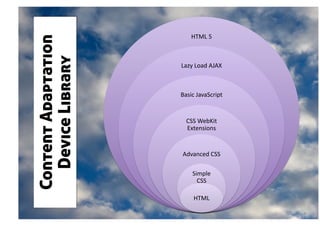
HTML	
  5	
  
Content Adaptation
  Device Library     Lazy	
  Load	
  AJAX	


                     Basic	
  JavaScript	


                       CSS	
  WebKit	
  
                       Extensions	


                      Advanced	
  CSS	
  

                           Simple	
  
                             CSS	
  

                            HTML	
  
Device Libraries

• WURFL	

•  Device Atlas	

•  ASP.NET Mobile Device Browser File	


    www.mobilexweb.com for links and tips
Tools

• Testing	

•  Performance	

•  Debugging
Testing Tools

•  Emulators & Simulators	


  •  Only some of them are useful for mobile web	

    •  iPhone, Android, BlackBerry, Symbian, webOS, Series 40,
    Opera Mobile, Opera Mini, Windows Mobile	

  •  No mobile browser emulation for	

    •  Bada, MeeGo (Maemo), propietary OS’s devices (for LG,
    Motorola, Samsung), NetFront, Windows Phone 7	


    www.mobilexweb.com for links and tips
Testing Tools

• Testing with real devices, real networks is
mandatory
Testing Tools

• Testing with real devices, real networks is
mandatory	


  •  Get a lot of new friends 	

  •  Buy some “key” devices 	

  •  Use virtual labs
Virtual Labs

Some are software-based and some magic-based	


 •  Free solutions	

    •  Nokia Remote Device Access	

    •  Samsung	

 •  Commercial solutions	

    •  DeviceAnyWhere	

    •  Perfecto Mobile
Performance Tools

 •  Classic desktop solutions	

   •  FireBug,YSlow!, PageSpeed	

   •  Using with User Agent Switcher for Firefox	


 •  Mobile Solutions	

     Doesn’t exist, but we can rely on server-side
     and proxy-based solutions (for Wi-Fi devices).
Performance Tools

 •  Server-Side scripts for performance	

   •  Cloud Four’s Mobile Browser Test	


 •  Client-Side scripts for performance	

   • Yahoo UI Profiler	


 •  Proxy-based solutions 	

      Charles Debugger	

       •  Useful for emulators and real devices	

       • Throttling feature to emulate GPRS, EDGE, 3G
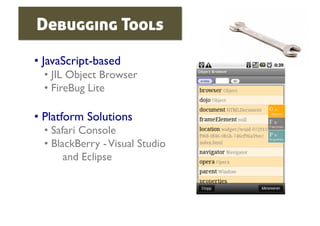
Debugging Tools

•  JavaScript-based	

  •  JIL Object Browser	

  •  FireBug Lite	


•  Platform Solutions	

  •  Safari Console	

  •  BlackBerry - Visual Studio 
        and Eclipse
Now,
Mobile Web High
Performance Tips
Starting with
14 WPO Rules
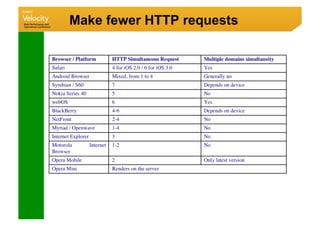
Make fewer HTTP requests


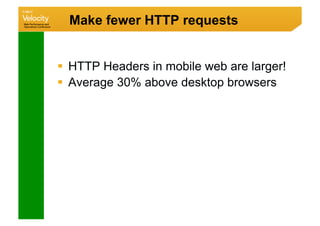
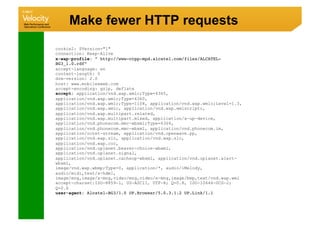
  HTTP Headers in mobile web are larger!
  Average 30% above desktop browsers
Make fewer HTTP requests


 Yes, make fewer requests, please!

  But how?
Make fewer HTTP requests


Donate $50 per request
Make fewer HTTP requests


Are you sure you need all those
   requests?

It’s just a mobile, remember: 3”
Make fewer HTTP requests


In the home page, embed your CSS
    and JavaScript
Make fewer HTTP requests


In the home page, embed your CSS
    and JavaScript

After onload:
  download external CSS and JS
  save them to local cache
Make fewer HTTP requests


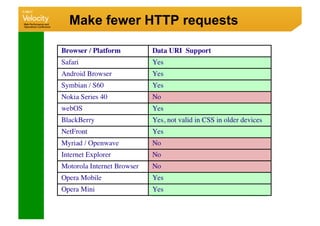
Use inline images (data URI)
Make fewer HTTP requests

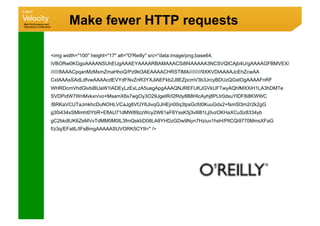
img width=100 height=17 alt=O'Reilly src=data:image/png;base64,
iVBORw0KGgoAAAANSUhEUgAAAEYAAAARBAMAAACSi8f4AAAAA3NCSVQICAjb4U/gAAAAGFBMVEX/
//////8AAACpqanMzMxmZmaHhoQ/Pz9kt3AEAAAACHRSTlMA/////////9XKVDIAAAAJcEhZcwAA
CxIAAAsSAdLdfvwAAAAcdEVYdFNvZnR3YXJlAEFkb2JlIEZpcmV3b3JrcyBDUzQGstOgAAAAFnRF
WHRDcmVhdGlvbiBUaW1lADEyLzExLzA5uegApgAAAQNJREFUKJGVkUFTwyAQhfMXXiH1LA3hDMTe
SVDPidW7WnMvkxn/vo+MsamX6s7wgOy3O29JgetR/I2Rdy8B8HIcAyhj8PLIr0dsuYlDF8i8KWWC
/BRKaVCUTaJmkhcDuNOHLVCaJg6VfJY6JivqGJHEjn00q3tpsGcfd0KuuGdx2+fsmSl3m2r2k2gG
g30i434xSMlmht0YbR+EflAU71dMW89zzWcy2W61eF6YssK5j3vlII81Lj0vzOKHaXCuSz8334yb
gC2bkdlUK6ZeMVvTdMM0M0IL3fmQskbD08LA8YHDzGDw9Nyn7Hziuv1hsH/PltCQi9770MmsXFaG
f/z3q/EFatlL/IFsBmgAAAAASUVORK5CYII= /
Make fewer HTTP requests


Use inline images (data URI)

Remember:
  optimize the image first
  GZIP the document

You can also:
  use local storage
Make fewer HTTP requests


Use local pictograms
whenever you can
Make fewer HTTP requests


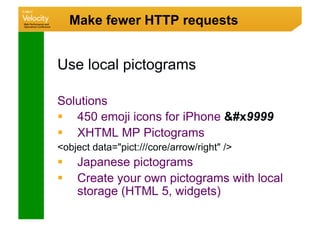
Use local pictograms

Solutions
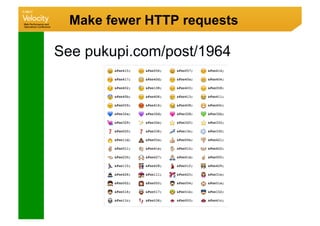
  450 emoji icons for iPhone #x9999
  XHTML MP Pictograms
object data=pict:///core/arrow/right /
     Japanese pictograms
     Create your own pictograms with local
      storage (HTML 5, widgets)
Make fewer HTTP requests

See pukupi.com/post/1964
Make fewer HTTP requests


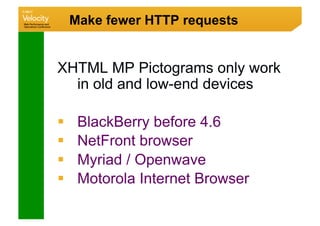
XHTML MP Pictograms only work
  in old and low-end devices

     BlackBerry before 4.6
     NetFront browser
     Myriad / Openwave
     Motorola Internet Browser
Make fewer HTTP requests


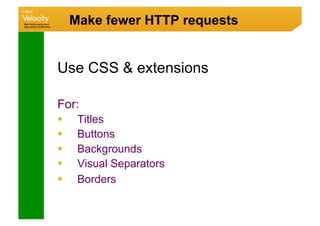
Use CSS  extensions

For:
     Titles
     Buttons
     Backgrounds
     Visual Separators
     Borders
Make fewer HTTP requests

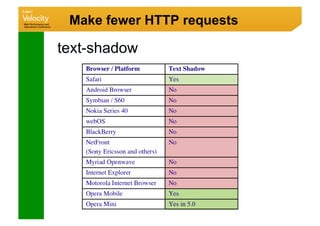
text-shadow
Make fewer HTTP requests

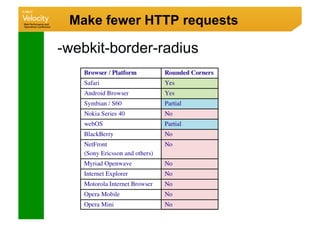
-webkit-border-radius
Make fewer HTTP requests
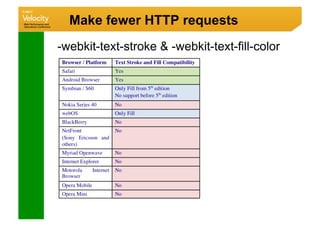
-webkit-text-stroke  -webkit-text-fill-color
Make fewer HTTP requests

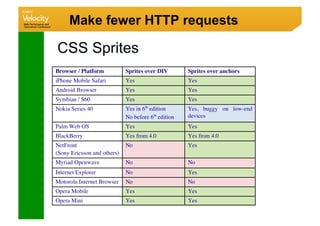
CSS Sprites
Make fewer HTTP requests

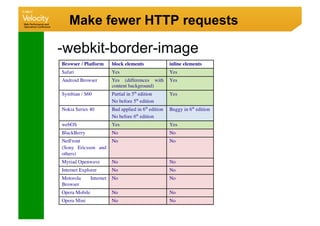
-webkit-border-image
Make fewer HTTP requests

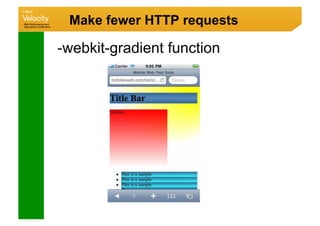
-webkit-gradient function
Make fewer HTTP requests

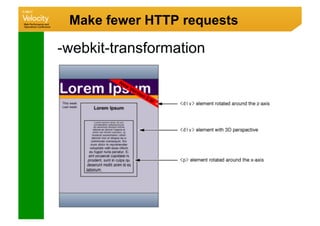
-webkit-transformation
Make fewer HTTP requests

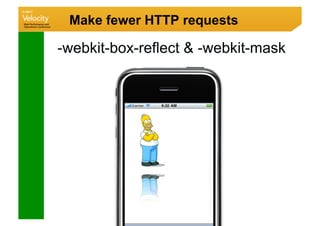
-webkit-box-reflect  -webkit-mask
Make fewer HTTP requests

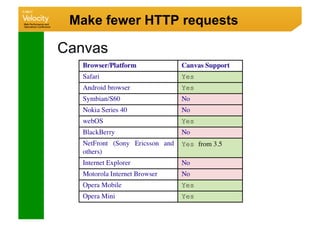
Canvas
Make fewer HTTP requests

Mutipart documents
  Use a device library

  Use Accept header, look for multipart/mixed or
  application/vnd.wap.multipart

  BlackBerry, Nokia, Series 40, Symbian,
  Openwave  other low- and mid-end devices

  Create dynamically the multipart document
Use a Content Delivery Network


  It is better to have it

  Use other domain
  - Cookies
  - Parallel downloads
Add an Expires Header


  Yes, use it. Every device
 understand it.

  Be careful with
 -  Resources  20Kb
 -  Mobile Caches are small


  You can have more control in
 HTML 5
GZIP Components


  Yes, use it. +95% devices
 supports it.

  Be careful with
 -  Proxies and Transcoders
 -  Old low-end devices
 -  Old BlackBerry devices
 -  Old NetFront devices
Put Stylesheets at the Top


  Works similar to desktop
Move scripts to the bottom


  With some exceptions, script
 blocks parallel downloads
  So, move scripts to the bottom
Avoid CSS Expressions


  They don’t work on mobile
 browsers
Make JS and CSS external


  In theory, it will be better
  But, to reduce requests, we
 should embed them in the Home
 Page
Reduce DNS lookups


  Yes, please
Avoid redirects


  Yes, and in mobile redirects are
 very common

mysite.com 
m.mysite.com 
m.mysite.com/iphone
Avoid redirects


  Deliver the home page using the
 same URL

You can take some approaches for SEO
 using the same URL
Remove duplicate scripts


  Are you even thinking on more
 than one script?

Use only one script file, compressed and
 with GZIP
Configure ETags


  They don’t work on mobile
 browsers
Now,
Other Tips
Reduce DOM


  Keep it simple!
  Did you understand? Keep it
 simple!
  Ok, KISS
JavaScript Frameworks


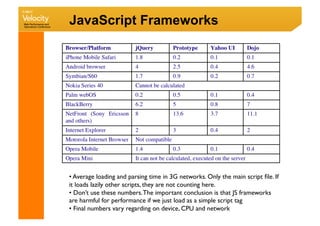
  We all love jQuery, but is it
 suitable for mobile?
JavaScript Frameworks


•  Average loading and parsing time in 3G networks. Only the main script file. If
it loads lazily other scripts, they are not counting here.	

•  Don’t use these numbers. The important conclusion is that JS frameworks
are harmful for performance if we just load as a simple script tag	

•  Final numbers vary regarding on device, CPU and network
JavaScript Frameworks


  Use native code when possible
 (DOM browsing, AJAX)
  Use mobile-optimized frameworks
 -  baseJS
 -  XUI
  Use hardware-accelerated
 animation instead of a library for
 effects
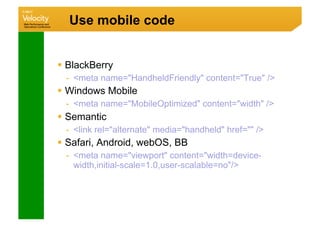
Use mobile code


 Right MIME and DOCTypes for each
  device
 Use viewport meta tag
 Use mobile version meta tags
 Create valid, simple HTML
Use mobile code


  BlackBerry
  -  meta name=HandheldFriendly content=True /
  Windows Mobile
  -  meta name=MobileOptimized content=width /
  Semantic
  -  link rel=alternate media=handheld href= /
  Safari, Android, webOS, BB
  -  meta name=viewport content=width=device-
     width,initial-scale=1.0,user-scalable=no/
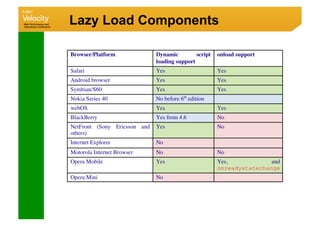
Lazy Load Components


  After onload or with prediction
  For images, later-usage
 resources and code
Lazy Load Components
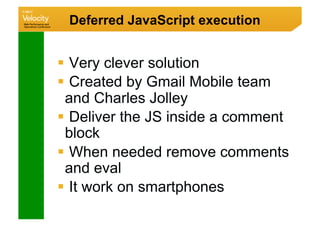
Deferred JavaScript execution


  Very clever solution
  Created by Gmail Mobile team
 and Charles Jolley
  Deliver the JS inside a comment
 block
  When needed remove comments
 and eval
  It work on smartphones
Local Code Repository


  Download a JS code by AJAX,
 dynamic script or other technique
  Store it in localStorage or
 database for future usage.
  Eval or inject the code in a script
 tag.
  Useful for auto-updatable widgets
Use AJAX for content


  On compatible devices, use AJAX
  Less traffic = more performance
  Use a server-side engine
  Implement SEO over AJAX
  Using progressive enhancement
Use COMET solutions


  COMET solutions for AJAX don’t
 work on mobile browsers
  Many problems with 3G and
 operator gateways
Optimize JavaScript


  JavaScript = expensive
  Reduce it, simplify it
  Reduce global variables
  Avoid large code execution
  Follow any tip you can find about
 JS optimization
Timer usage


  Don’t use timers with a frequency
 higher than 1s
  Gmail Mobile team analysis
  What framework are you using?
  In home widgets, remember how
 much time your code will be live
Image optimization


  Follow typical image optimization
  techniques
  Use PNG safely
  Use optimized animated GIF against
  Flash for banners, when possible.
 -  Animated GIF doesn’t work on webOS or Android
  Use SVG for charts and shape-based
  images
 -  SVG only works on Safari, webOS, Symbian and
    NetFront
Use Application Cache


  HTML 5 new feature
  Manifest file
  Can show the first HTML, CSS, JS and
  images without using network
  Use AJAX to retrieve update information
  Update the cache
Use Offline Storage


  HTML 5 new feature
  localStorage and Database
  Store useful objects
 -  Images in data URI format
 -  JSON with useful collections
 -  Scripts with codes by module
  Define a versioning method
IFrames


  Don’t use iframes
  They are not compatible with
 most browsers.
  For those who are compatible, it
 have strange behaviors
  Slow down all the page load
CSS optimization


  Again, Keep it Simple
  Reduce large CSS structures
  Use direct selectors
  Follow desktop CSS optimization rules
Geolocation Cache


 Remember last user’s position
 Start your query while the updated position
  is loaded
 Ask the user for its location if the
  geolocation query is taking much time
Widget and webapp optimization


 Don’t create a super DOM with lots of divs
  with display: none

 DOM Object Pool for recycling

  Endless scrolling pattern

wiki.forum.nokia.com/index.php/
 JavaScript_Performance_Best_Practices
Do Mobile
   Keep it Simple
   Best Experience
   for each device
   Test  measure
   Don’t let the user
   hates you

Picture from Simon Howden freedigitalphotos.net
THANK YOU!	


twitter.com/firt	

www.mobilexweb.com	


Pictures from freedigitalphotos.net

Mobile Web High Performance

  • 1.
    Santa Clara, 06-22-2010 Mobile Web High Performance Maximiliano Firtman @firt www.firt.mobi Picture from Simon Howden freedigitalphotos.net
  • 2.
    Maximiliano Firtman  www.firt.mobi   twitter.com/firt   Blog: www.mobilexweb.com
  • 3.
    What MWPO– Mobile Web Performance Optimization* *Thanks Steve Souders for creating WPO!
  • 4.
  • 5.
    Mobile Web Is it other web? NO But, the device and the context where we see the web are different
  • 6.
    Mobile Web Whyshould we care about Mobile Web?
  • 7.
    Mobile Web And now we have RETINA DISPLAY
  • 8.
    Mobile Web But…   itis still a 3” screen   The user is on the move   Does the user like to zoom and pan?
  • 9.
    Mobile Web And moreimportant for us Mobile browsers are different
  • 10.
  • 11.
  • 12.
  • 13.
    Myths People are notusing their mobile browsers
  • 14.
    Myths Mobile web isiPhone, Android and… maybe BlackBerry
  • 15.
  • 16.
    Mobile Web Development Techniques and best practices for delivering the best possible experience for each mobile device
  • 17.
    Mobile Web Development Techniques and best practices for delivering the best possible experience for each mobile device Even with widgets, webapps or offline web applications
  • 18.
  • 19.
    Facts Mobile Devices 63% Internet 26% 0 500 10001500200025003000350040004500   1.8 billion Internet Connections1   4.6 billion Mobile Devices2   The difference will be bigger in the future 1 International Telecommunications Union 2 The Fact Book - CIA
  • 21.
    Why 1.  Mobile networksare slower 2.  Mobile processors are slower 3.  Mobile browsers are different 4.  Mobile users are different 5.  Compatibility is different
  • 22.
    Why On smartphones, aweb is rendered 40-80% slower than in desktop. On mid-end devices, 4x-10x slower
  • 23.
    Why WPO has higherimpact in mobile
  • 24.
  • 25.
  • 26.
    Mobile  Browsers   • Toomany •  Limited support and higher support than desktop •  Different navigation methods. Proxied vs. Direct Browsers •  No documentation for most of them •  Non-updatable
  • 27.
    Mobile  Browsers  Categories  by  its  browser   •  Smartphone •  Large screen, touch, partial HTML 5 & CSS3, widgets •  High-end • Touch or keypad, HTML 4, AJAX, widgets •  Mid-end •  Keypad, 240x320, HTML 4, XHTML MP, WML, CSS, Basic AJAX support •  Low-end •  Keypad, 128x160, XHTML MP, Basic HTML 4 & CSS
  • 28.
    Mobile  Browsers   MOBILE WEB USAGE Smartphones   Smartphones   High-­‐end  devices   High-­‐end  devices   Mid-­‐end  devices   Mid-­‐end  devices   low-­‐end   low-­‐end  devices   devices   MARKET SHARE
  • 29.
    Mobile  Widget  Overview   • Widgets and webapps platforms See my presentation at www.mobilexweb.com
  • 30.
    Mobile  Browsers   • WebKit-basedpre-installed •  Safari on iOS •  Android browser •  Symbian browser •  webOS browser •  Series 40 browser from 6th edition •  Bada browser •  (future) BlackBerry browser
  • 31.
    Mobile  Browsers   • Non-WebKit preinstalled •  NetFront browser •  Myriad browser (formerly Openwave) •  Internet Explorer •  Web Browser for Series 40 (up to 6th edition) •  MIB Motorola Internet Browser •  BlackBerry browser •  NTT Docomo i-mode browser •  Obigo-Teleca browser •  microB (Maemo / MeeGo)
  • 32.
    Mobile  Browsers   • User installable •  Opera Mobile •  Opera Mini •  Firefox •  UC Browser •  Skyfire •  BOLT •  Chromium
  • 33.
    How to reach! theright! experience! to each device!
  • 34.
  • 35.
    HTML  5   ContentAdaptation Device Library Lazy  Load  AJAX   Basic  JavaScript   CSS  WebKit   Extensions   Advanced  CSS   Simple   CSS   HTML  
  • 36.
    Device Libraries • WURFL •  DeviceAtlas •  ASP.NET Mobile Device Browser File www.mobilexweb.com for links and tips
  • 37.
  • 38.
    Testing Tools •  Emulators& Simulators •  Only some of them are useful for mobile web •  iPhone, Android, BlackBerry, Symbian, webOS, Series 40, Opera Mobile, Opera Mini, Windows Mobile •  No mobile browser emulation for •  Bada, MeeGo (Maemo), propietary OS’s devices (for LG, Motorola, Samsung), NetFront, Windows Phone 7 www.mobilexweb.com for links and tips
  • 39.
    Testing Tools • Testing withreal devices, real networks is mandatory
  • 40.
    Testing Tools • Testing withreal devices, real networks is mandatory •  Get a lot of new friends  •  Buy some “key” devices •  Use virtual labs
  • 41.
    Virtual Labs Some aresoftware-based and some magic-based •  Free solutions •  Nokia Remote Device Access •  Samsung •  Commercial solutions •  DeviceAnyWhere •  Perfecto Mobile
  • 42.
    Performance Tools • Classic desktop solutions •  FireBug,YSlow!, PageSpeed •  Using with User Agent Switcher for Firefox •  Mobile Solutions Doesn’t exist, but we can rely on server-side and proxy-based solutions (for Wi-Fi devices).
  • 43.
    Performance Tools • Server-Side scripts for performance •  Cloud Four’s Mobile Browser Test •  Client-Side scripts for performance • Yahoo UI Profiler •  Proxy-based solutions Charles Debugger •  Useful for emulators and real devices • Throttling feature to emulate GPRS, EDGE, 3G
  • 44.
    Debugging Tools •  JavaScript-based •  JIL Object Browser •  FireBug Lite •  Platform Solutions •  Safari Console •  BlackBerry - Visual Studio and Eclipse
  • 45.
  • 46.
  • 47.
  • 48.
  • 49.
    Make fewer HTTPrequests   HTTP Headers in mobile web are larger!   Average 30% above desktop browsers
  • 50.
  • 51.
    Make fewer HTTPrequests  Yes, make fewer requests, please!   But how?
  • 52.
    Make fewer HTTPrequests Donate $50 per request
  • 53.
    Make fewer HTTPrequests Are you sure you need all those requests? It’s just a mobile, remember: 3”
  • 54.
    Make fewer HTTPrequests In the home page, embed your CSS and JavaScript
  • 55.
    Make fewer HTTPrequests In the home page, embed your CSS and JavaScript After onload:   download external CSS and JS   save them to local cache
  • 56.
    Make fewer HTTPrequests Use inline images (data URI)
  • 57.
    Make fewer HTTPrequests img width=100 height=17 alt=O'Reilly src=data:image/png;base64, iVBORw0KGgoAAAANSUhEUgAAAEYAAAARBAMAAACSi8f4AAAAA3NCSVQICAjb4U/gAAAAGFBMVEX/ //////8AAACpqanMzMxmZmaHhoQ/Pz9kt3AEAAAACHRSTlMA/////////9XKVDIAAAAJcEhZcwAA CxIAAAsSAdLdfvwAAAAcdEVYdFNvZnR3YXJlAEFkb2JlIEZpcmV3b3JrcyBDUzQGstOgAAAAFnRF WHRDcmVhdGlvbiBUaW1lADEyLzExLzA5uegApgAAAQNJREFUKJGVkUFTwyAQhfMXXiH1LA3hDMTe SVDPidW7WnMvkxn/vo+MsamX6s7wgOy3O29JgetR/I2Rdy8B8HIcAyhj8PLIr0dsuYlDF8i8KWWC /BRKaVCUTaJmkhcDuNOHLVCaJg6VfJY6JivqGJHEjn00q3tpsGcfd0KuuGdx2+fsmSl3m2r2k2gG g30i434xSMlmht0YbR+EflAU71dMW89zzWcy2W61eF6YssK5j3vlII81Lj0vzOKHaXCuSz8334yb gC2bkdlUK6ZeMVvTdMM0M0IL3fmQskbD08LA8YHDzGDw9Nyn7Hziuv1hsH/PltCQi9770MmsXFaG f/z3q/EFatlL/IFsBmgAAAAASUVORK5CYII= /
  • 58.
    Make fewer HTTPrequests Use inline images (data URI) Remember:   optimize the image first   GZIP the document You can also:   use local storage
  • 59.
  • 60.
    Make fewer HTTPrequests Use local pictograms whenever you can
  • 61.
    Make fewer HTTPrequests Use local pictograms Solutions   450 emoji icons for iPhone #x9999   XHTML MP Pictograms object data=pict:///core/arrow/right /   Japanese pictograms   Create your own pictograms with local storage (HTML 5, widgets)
  • 62.
    Make fewer HTTPrequests See pukupi.com/post/1964
  • 63.
    Make fewer HTTPrequests XHTML MP Pictograms only work in old and low-end devices   BlackBerry before 4.6   NetFront browser   Myriad / Openwave   Motorola Internet Browser
  • 64.
    Make fewer HTTPrequests Use CSS extensions For:   Titles   Buttons   Backgrounds   Visual Separators   Borders
  • 65.
    Make fewer HTTPrequests text-shadow
  • 66.
    Make fewer HTTPrequests -webkit-border-radius
  • 67.
    Make fewer HTTPrequests -webkit-text-stroke -webkit-text-fill-color
  • 68.
    Make fewer HTTPrequests CSS Sprites
  • 69.
    Make fewer HTTPrequests -webkit-border-image
  • 70.
    Make fewer HTTPrequests -webkit-gradient function
  • 71.
    Make fewer HTTPrequests -webkit-transformation
  • 72.
    Make fewer HTTPrequests -webkit-box-reflect -webkit-mask
  • 73.
    Make fewer HTTPrequests Canvas
  • 74.
    Make fewer HTTPrequests Mutipart documents   Use a device library   Use Accept header, look for multipart/mixed or application/vnd.wap.multipart   BlackBerry, Nokia, Series 40, Symbian, Openwave other low- and mid-end devices   Create dynamically the multipart document
  • 75.
    Use a ContentDelivery Network   It is better to have it   Use other domain - Cookies - Parallel downloads
  • 76.
    Add an ExpiresHeader   Yes, use it. Every device understand it.   Be careful with -  Resources 20Kb -  Mobile Caches are small   You can have more control in HTML 5
  • 77.
    GZIP Components   Yes,use it. +95% devices supports it.   Be careful with -  Proxies and Transcoders -  Old low-end devices -  Old BlackBerry devices -  Old NetFront devices
  • 78.
    Put Stylesheets atthe Top   Works similar to desktop
  • 79.
    Move scripts tothe bottom   With some exceptions, script blocks parallel downloads   So, move scripts to the bottom
  • 80.
    Avoid CSS Expressions  They don’t work on mobile browsers
  • 81.
    Make JS andCSS external   In theory, it will be better   But, to reduce requests, we should embed them in the Home Page
  • 82.
  • 83.
    Avoid redirects   Yes,and in mobile redirects are very common mysite.com m.mysite.com m.mysite.com/iphone
  • 84.
    Avoid redirects   Deliverthe home page using the same URL You can take some approaches for SEO using the same URL
  • 85.
    Remove duplicate scripts  Are you even thinking on more than one script? Use only one script file, compressed and with GZIP
  • 86.
    Configure ETags   Theydon’t work on mobile browsers
  • 87.
  • 88.
    Reduce DOM   Keepit simple!   Did you understand? Keep it simple!   Ok, KISS
  • 89.
    JavaScript Frameworks   Weall love jQuery, but is it suitable for mobile?
  • 90.
    JavaScript Frameworks •  Averageloading and parsing time in 3G networks. Only the main script file. If it loads lazily other scripts, they are not counting here. •  Don’t use these numbers. The important conclusion is that JS frameworks are harmful for performance if we just load as a simple script tag •  Final numbers vary regarding on device, CPU and network
  • 91.
    JavaScript Frameworks   Usenative code when possible (DOM browsing, AJAX)   Use mobile-optimized frameworks -  baseJS -  XUI   Use hardware-accelerated animation instead of a library for effects
  • 92.
    Use mobile code  RightMIME and DOCTypes for each device  Use viewport meta tag  Use mobile version meta tags  Create valid, simple HTML
  • 93.
    Use mobile code  BlackBerry -  meta name=HandheldFriendly content=True /   Windows Mobile -  meta name=MobileOptimized content=width /   Semantic -  link rel=alternate media=handheld href= /   Safari, Android, webOS, BB -  meta name=viewport content=width=device- width,initial-scale=1.0,user-scalable=no/
  • 94.
    Lazy Load Components  After onload or with prediction   For images, later-usage resources and code
  • 95.
  • 96.
    Deferred JavaScript execution  Very clever solution   Created by Gmail Mobile team and Charles Jolley   Deliver the JS inside a comment block   When needed remove comments and eval   It work on smartphones
  • 97.
    Local Code Repository  Download a JS code by AJAX, dynamic script or other technique   Store it in localStorage or database for future usage.   Eval or inject the code in a script tag.   Useful for auto-updatable widgets
  • 98.
    Use AJAX forcontent   On compatible devices, use AJAX   Less traffic = more performance   Use a server-side engine   Implement SEO over AJAX   Using progressive enhancement
  • 99.
    Use COMET solutions  COMET solutions for AJAX don’t work on mobile browsers   Many problems with 3G and operator gateways
  • 100.
    Optimize JavaScript   JavaScript= expensive   Reduce it, simplify it   Reduce global variables   Avoid large code execution   Follow any tip you can find about JS optimization
  • 101.
    Timer usage   Don’tuse timers with a frequency higher than 1s   Gmail Mobile team analysis   What framework are you using?   In home widgets, remember how much time your code will be live
  • 102.
    Image optimization   Followtypical image optimization techniques   Use PNG safely   Use optimized animated GIF against Flash for banners, when possible. -  Animated GIF doesn’t work on webOS or Android   Use SVG for charts and shape-based images -  SVG only works on Safari, webOS, Symbian and NetFront
  • 103.
    Use Application Cache  HTML 5 new feature   Manifest file   Can show the first HTML, CSS, JS and images without using network   Use AJAX to retrieve update information   Update the cache
  • 104.
    Use Offline Storage  HTML 5 new feature   localStorage and Database   Store useful objects -  Images in data URI format -  JSON with useful collections -  Scripts with codes by module   Define a versioning method
  • 105.
    IFrames   Don’t useiframes   They are not compatible with most browsers.   For those who are compatible, it have strange behaviors   Slow down all the page load
  • 106.
    CSS optimization   Again,Keep it Simple   Reduce large CSS structures   Use direct selectors   Follow desktop CSS optimization rules
  • 107.
    Geolocation Cache  Remember lastuser’s position  Start your query while the updated position is loaded  Ask the user for its location if the geolocation query is taking much time
  • 108.
    Widget and webappoptimization  Don’t create a super DOM with lots of divs with display: none  DOM Object Pool for recycling   Endless scrolling pattern wiki.forum.nokia.com/index.php/ JavaScript_Performance_Best_Practices
  • 109.
    Do Mobile Keep it Simple Best Experience for each device Test measure Don’t let the user hates you Picture from Simon Howden freedigitalphotos.net
  • 110.