Jimmy Chen, Junping Du
Tencent Cloud
Agenda
• Spark service in the cloud – our practice
• Spark on Kubernetes – architecture, best
practice and performance
About us
Jimmy Chen
Sr. Software Engineer at Tencent Cloud
Apache Hadoop, Spark, Parquet Contributor
Previously, worked at Intel
Junping Du
Principal Engineer & Director at Tencent Cloud
Apache Hadoop PMC & ASF Member
Previously, worked at Hortonwork and VMware
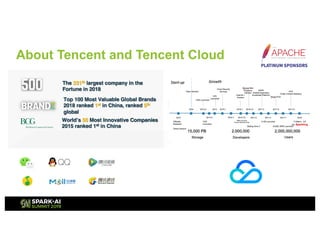
Top 100 Most Valuable Global Brands
2018 ranked 1st in China, ranked 5th
global
World’s 50 Most Innovative Companies
2015 ranked 1st in China
The 331th largest company in the
Fortune in 2018
About Tencent and Tencent Cloud
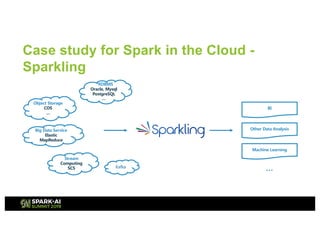
Case study for Spark in the Cloud -
Sparkling
,
,
,
,
,
,
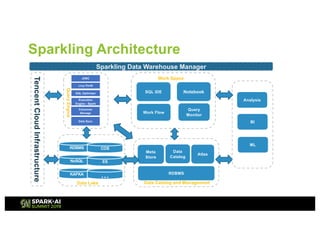
Sparkling Architecture
TencentCloudInfrastructure
RDBMS
NoSQL
KAFKA
COS
ES
…
Data Lake Data Catalog and Management
Atlas
Meta
Store
RDBMS
Data
Catalog
Sparkling Data Warehouse Manager
Data Application
NotebookSQL IDE
Data Sync
Livy-Thrift
SQL Optimizer
Columnar
Storage
JDBC
Execution
Engine - Spark
QueryEngine
Work Flow
Query
Monitor
Analysis
BI
ML
…
Work Space
Motivations towards dockerized Spark
• Serverless
– Better isolation
• On-premises deployment
– Bare metal infrastructure, control
protocol not work
– DevOps scope
– Cost
Our Practice
• Sparkling on Kubernetes
– Cloud API server -> Kubernetes API server
– CVM resource -> container resource
– Cloud load balancer -> Kubernetes load balancer
– Cloud DNS -> Kubernetes ingress/coredns
– CVM image -> docker image
– etc.
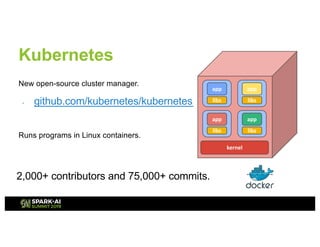
Kubernetes
New open-source cluster manager.
- github.com/kubernetes/kubernetes
libs
app
kernel
libs
app
libs
app
libs
app
Runs programs in Linux containers.
2,000+ contributors and 75,000+ commits.
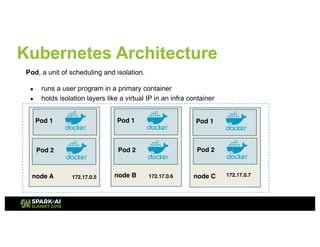
Kubernetes Architecture
node A
Pod 1
172.17.0.5
Pod, a unit of scheduling and isolation.
● runs a user program in a primary container
● holds isolation layers like a virtual IP in an infra container
Pod 2
node B
Pod 1
Pod 2
node C
Pod 1
Pod 2
172.17.0.6 172.17.0.7
Kubernetes Advantages
• . . . . . .
.
• ,
. . ,,. , . . ,
• ,
•
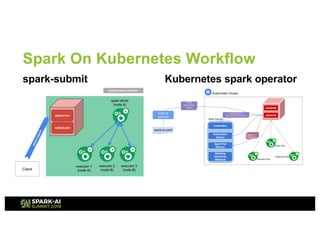
Spark On Kubernetes Workflow
spark-submit Kubernetes spark operator
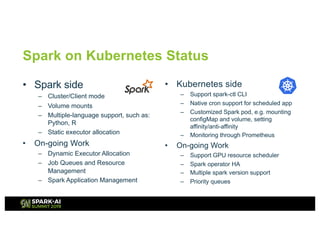
Spark on Kubernetes Status
• Spark side
– Cluster/Client mode
– Volume mounts
– Multiple-language support, such as:
Python, R
– Static executor allocation
• On-going Work
– Dynamic Executor Allocation
– Job Queues and Resource
Management
– Spark Application Management
• Kubernetes side
– Support spark-ctl CLI
– Native cron support for scheduled app
– Customized Spark pod, e.g. mounting
configMap and volume, setting
affinity/anti-affinity
– Monitoring through Prometheus
• On-going Work
– Support GPU resource scheduler
– Spark operator HA
– Multiple spark version support
– Priority queues
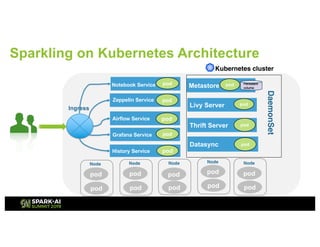
Sparkling on Kubernetes Architecture
Livy Server
Thrift Server
Metastore
Airflow Service
History Service
Kubernetes cluster
Grafana Service
Notebook Service
Zeppelin Service
Ingress
pod
Datasync
pod
pod
pod
pod
pod
pod
pod
pod
Node
pod
pod
Node
pod
pod
Node
pod
pod
Node
Persistent
volume
pod
pod
Node
pod
pod
DaemonSet
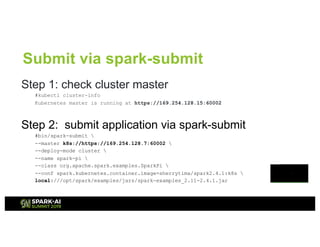
Submit via spark-submit
Step 1: check cluster master
#kubectl cluster-info
Kubernetes master is running at https://169.254.128.15:60002
Step 2: submit application via spark-submit
#bin/spark-submit 
--master k8s://https://169.254.128.7:60002 
--deploy-mode cluster 
--name spark-pi 
--class org.apache.spark.examples.SparkPi 
--conf spark.kubernetes.container.image=sherrytima/spark2.4.1:k8s 
local:///opt/spark/examples/jars/spark-examples_2.11-2.4.1.jar
Submit via kubectl/sparkctl
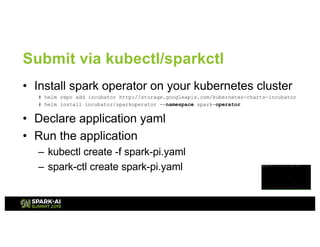
• Install spark operator on your kubernetes cluster
# helm repo add incubator http://storage.googleapis.com/kubernetes-charts-incubator
# helm install incubator/sparkoperator --namespace spark-operator
• Declare application yaml
• Run the application
– kubectl create -f spark-pi.yaml
– spark-ctl create spark-pi.yaml
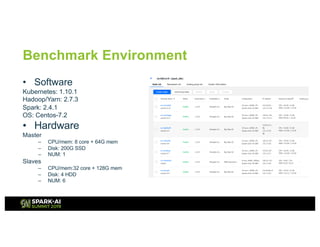
Benchmark Environment
• Software
Kubernetes: 1.10.1
Hadoop/Yarn: 2.7.3
Spark: 2.4.1
OS: Centos-7.2
• Hardware
Master
– CPU/mem: 8 core + 64G mem
– Disk: 200G SSD
– NUM: 1
Slaves
– CPU/mem:32 core + 128G mem
– Disk: 4 HDD
– NUM: 6
Terasort
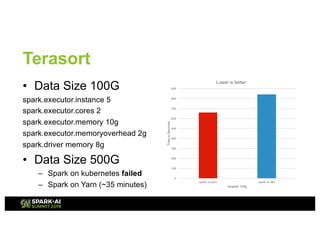
• Data Size 100G
spark.executor.instance 5
spark.executor.cores 2
spark.executor.memory 10g
spark.executor.memoryoverhead 2g
spark.driver memory 8g
• Data Size 500G
– Spark on kubernetes failed
– Spark on Yarn (~35 minutes)
0
100
200
300
400
500
600
700
800
900
spark on yarn spark on k8s
TimeinSeconds
terasort 100g
Lower is better
Root Cause Analysis
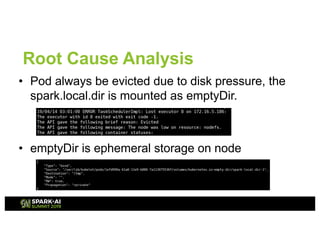
• Pod always be evicted due to disk pressure, the
spark.local.dir is mounted as emptyDir.
• emptyDir is ephemeral storage on node
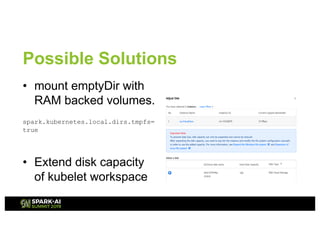
Possible Solutions
• mount emptyDir with
RAM backed volumes.
spark.kubernetes.local.dirs.tmpfs=
true
• Extend disk capacity
of kubelet workspace
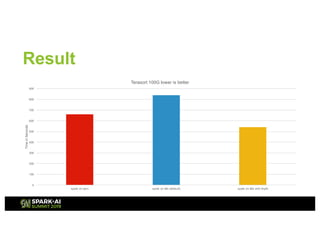
Result
0
100
200
300
400
500
600
700
800
900
spark on yarn spark on k8s (default) spark on k8s with tmpfs
TimeinSeconds
Terasort 100G lower is better
Spark-sql-perf
• Use spark-sql-perf repo from Databricks
– 10 shuffle bound queries
– spark application base on spark-sql-perf
• Run in cluster mode for Kubernetes
bin/spark-submit --name tpcds-1000
--jars hdfs://172.17.0.8:32001/run-lib/*
--class perf.tpcds.TpcDsPerf
--conf spark.kubernetes.container.image=sherrytima/spark-2.4.1:k8sv8
--conf spark.driver.args="hdfs://172.17.0.8:32001/run-tpcds 1000 orc true"
hdfs://172.17.0.8:32001/tpcds/tpcds_2.11-1.1.jar
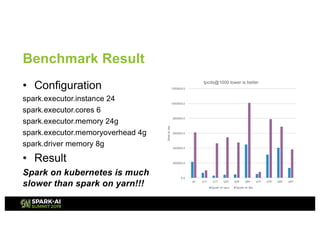
Benchmark Result
• Configuration
spark.executor.instance 24
spark.executor.cores 6
spark.executor.memory 24g
spark.executor.memoryoverhead 4g
spark.driver memory 8g
• Result
Spark on kubernetes is much
slower than spark on yarn!!!
0.0
200000.0
400000.0
600000.0
800000.0
1000000.0
1200000.0
q4 q11 q17 q25 q29 q64 q74 q78 q80 q93
timeinms
tpcds@1000 lower is better
Spark on yarn Spark on k8s
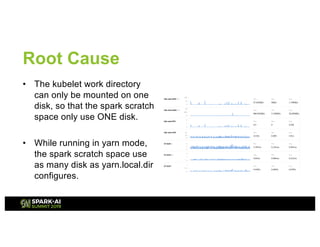
Root Cause
• The kubelet work directory
can only be mounted on one
disk, so that the spark scratch
space only use ONE disk.
• While running in yarn mode,
the spark scratch space use
as many disk as yarn.local.dir
configures.
Possible workaround
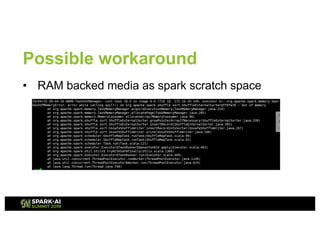
• RAM backed media as spark scratch space
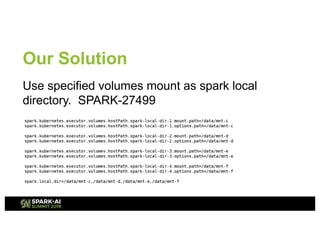
Our Solution
Use specified volumes mount as spark local
directory. SPARK-27499
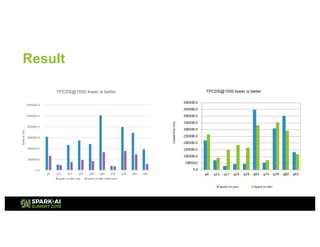
Result
CreateTime(ms)
TPCDS@1000 lower is better
. 0 . .
0.0
200000.0
400000.0
600000.0
800000.0
1000000.0
1200000.0
q4 q11 q17 q25 q29 q64 q74 q78 q80 q93
timeinms
TPCDS@1000 lower is better
spark on k8s orig spark on k8s optimized
Summary
• Spark on Kubernetes practices – scenario in
serverless and cloud native
• But we hit problems in production - local storage
issues, etc.
• Work with community for better solution and best
practices
Future Work
• Close performance gap with yarn mode
• Data locality awareness for Kubernetes
scheduler
• Prometheus/Grafana integration
Question?

Apache Spark on K8S Best Practice and Performance in the Cloud

  • 1.
    Jimmy Chen, JunpingDu Tencent Cloud
  • 2.
    Agenda • Spark servicein the cloud – our practice • Spark on Kubernetes – architecture, best practice and performance
  • 3.
    About us Jimmy Chen Sr.Software Engineer at Tencent Cloud Apache Hadoop, Spark, Parquet Contributor Previously, worked at Intel Junping Du Principal Engineer & Director at Tencent Cloud Apache Hadoop PMC & ASF Member Previously, worked at Hortonwork and VMware
  • 4.
    Top 100 MostValuable Global Brands 2018 ranked 1st in China, ranked 5th global World’s 50 Most Innovative Companies 2015 ranked 1st in China The 331th largest company in the Fortune in 2018 About Tencent and Tencent Cloud
  • 5.
    Case study forSpark in the Cloud - Sparkling , , , , , ,
  • 6.
    Sparkling Architecture TencentCloudInfrastructure RDBMS NoSQL KAFKA COS ES … Data LakeData Catalog and Management Atlas Meta Store RDBMS Data Catalog Sparkling Data Warehouse Manager Data Application NotebookSQL IDE Data Sync Livy-Thrift SQL Optimizer Columnar Storage JDBC Execution Engine - Spark QueryEngine Work Flow Query Monitor Analysis BI ML … Work Space
  • 7.
    Motivations towards dockerizedSpark • Serverless – Better isolation • On-premises deployment – Bare metal infrastructure, control protocol not work – DevOps scope – Cost
  • 8.
    Our Practice • Sparklingon Kubernetes – Cloud API server -> Kubernetes API server – CVM resource -> container resource – Cloud load balancer -> Kubernetes load balancer – Cloud DNS -> Kubernetes ingress/coredns – CVM image -> docker image – etc.
  • 9.
    Kubernetes New open-source clustermanager. - github.com/kubernetes/kubernetes libs app kernel libs app libs app libs app Runs programs in Linux containers. 2,000+ contributors and 75,000+ commits.
  • 10.
    Kubernetes Architecture node A Pod1 172.17.0.5 Pod, a unit of scheduling and isolation. ● runs a user program in a primary container ● holds isolation layers like a virtual IP in an infra container Pod 2 node B Pod 1 Pod 2 node C Pod 1 Pod 2 172.17.0.6 172.17.0.7
  • 11.
    Kubernetes Advantages • .. . . . . . • , . . ,,. , . . , • , •
  • 12.
    Spark On KubernetesWorkflow spark-submit Kubernetes spark operator
  • 13.
    Spark on KubernetesStatus • Spark side – Cluster/Client mode – Volume mounts – Multiple-language support, such as: Python, R – Static executor allocation • On-going Work – Dynamic Executor Allocation – Job Queues and Resource Management – Spark Application Management • Kubernetes side – Support spark-ctl CLI – Native cron support for scheduled app – Customized Spark pod, e.g. mounting configMap and volume, setting affinity/anti-affinity – Monitoring through Prometheus • On-going Work – Support GPU resource scheduler – Spark operator HA – Multiple spark version support – Priority queues
  • 14.
    Sparkling on KubernetesArchitecture Livy Server Thrift Server Metastore Airflow Service History Service Kubernetes cluster Grafana Service Notebook Service Zeppelin Service Ingress pod Datasync pod pod pod pod pod pod pod pod Node pod pod Node pod pod Node pod pod Node Persistent volume pod pod Node pod pod DaemonSet
  • 15.
    Submit via spark-submit Step1: check cluster master #kubectl cluster-info Kubernetes master is running at https://169.254.128.15:60002 Step 2: submit application via spark-submit #bin/spark-submit --master k8s://https://169.254.128.7:60002 --deploy-mode cluster --name spark-pi --class org.apache.spark.examples.SparkPi --conf spark.kubernetes.container.image=sherrytima/spark2.4.1:k8s local:///opt/spark/examples/jars/spark-examples_2.11-2.4.1.jar
  • 16.
    Submit via kubectl/sparkctl •Install spark operator on your kubernetes cluster # helm repo add incubator http://storage.googleapis.com/kubernetes-charts-incubator # helm install incubator/sparkoperator --namespace spark-operator • Declare application yaml • Run the application – kubectl create -f spark-pi.yaml – spark-ctl create spark-pi.yaml
  • 17.
    Benchmark Environment • Software Kubernetes:1.10.1 Hadoop/Yarn: 2.7.3 Spark: 2.4.1 OS: Centos-7.2 • Hardware Master – CPU/mem: 8 core + 64G mem – Disk: 200G SSD – NUM: 1 Slaves – CPU/mem:32 core + 128G mem – Disk: 4 HDD – NUM: 6
  • 18.
    Terasort • Data Size100G spark.executor.instance 5 spark.executor.cores 2 spark.executor.memory 10g spark.executor.memoryoverhead 2g spark.driver memory 8g • Data Size 500G – Spark on kubernetes failed – Spark on Yarn (~35 minutes) 0 100 200 300 400 500 600 700 800 900 spark on yarn spark on k8s TimeinSeconds terasort 100g Lower is better
  • 19.
    Root Cause Analysis •Pod always be evicted due to disk pressure, the spark.local.dir is mounted as emptyDir. • emptyDir is ephemeral storage on node
  • 20.
    Possible Solutions • mountemptyDir with RAM backed volumes. spark.kubernetes.local.dirs.tmpfs= true • Extend disk capacity of kubelet workspace
  • 21.
    Result 0 100 200 300 400 500 600 700 800 900 spark on yarnspark on k8s (default) spark on k8s with tmpfs TimeinSeconds Terasort 100G lower is better
  • 22.
    Spark-sql-perf • Use spark-sql-perfrepo from Databricks – 10 shuffle bound queries – spark application base on spark-sql-perf • Run in cluster mode for Kubernetes bin/spark-submit --name tpcds-1000 --jars hdfs://172.17.0.8:32001/run-lib/* --class perf.tpcds.TpcDsPerf --conf spark.kubernetes.container.image=sherrytima/spark-2.4.1:k8sv8 --conf spark.driver.args="hdfs://172.17.0.8:32001/run-tpcds 1000 orc true" hdfs://172.17.0.8:32001/tpcds/tpcds_2.11-1.1.jar
  • 23.
    Benchmark Result • Configuration spark.executor.instance24 spark.executor.cores 6 spark.executor.memory 24g spark.executor.memoryoverhead 4g spark.driver memory 8g • Result Spark on kubernetes is much slower than spark on yarn!!! 0.0 200000.0 400000.0 600000.0 800000.0 1000000.0 1200000.0 q4 q11 q17 q25 q29 q64 q74 q78 q80 q93 timeinms tpcds@1000 lower is better Spark on yarn Spark on k8s
  • 24.
    Root Cause • Thekubelet work directory can only be mounted on one disk, so that the spark scratch space only use ONE disk. • While running in yarn mode, the spark scratch space use as many disk as yarn.local.dir configures.
  • 25.
    Possible workaround • RAMbacked media as spark scratch space
  • 26.
    Our Solution Use specifiedvolumes mount as spark local directory. SPARK-27499
  • 27.
    Result CreateTime(ms) TPCDS@1000 lower isbetter . 0 . . 0.0 200000.0 400000.0 600000.0 800000.0 1000000.0 1200000.0 q4 q11 q17 q25 q29 q64 q74 q78 q80 q93 timeinms TPCDS@1000 lower is better spark on k8s orig spark on k8s optimized
  • 28.
    Summary • Spark onKubernetes practices – scenario in serverless and cloud native • But we hit problems in production - local storage issues, etc. • Work with community for better solution and best practices
  • 29.
    Future Work • Closeperformance gap with yarn mode • Data locality awareness for Kubernetes scheduler • Prometheus/Grafana integration
  • 30.