Elements of Computing Systems, Nisan & Schocken, MIT Press, www.nand2tetris.org , Chapter 12: Operating System slide 1
Operating Systems
Elements of Computing Systems, Nisan & Schocken, MIT Press www.idc.ac.il/tecs
www.nand2tetris.org
Building a Modern Computer From First Principles
Elements of Computing Systems, Nisan & Schocken, MIT Press, www.nand2tetris.org , Chapter 12: Operating System slide 2
Where we are at:
Assembler
Chapter 6
H.L. Language
&
Operating Sys.
abstract interface
Compiler
Chapters 10 - 11
VM Translator
Chapters 7 - 8
Computer
Architecture
Chapters 4 - 5
Gate Logic
Chapters 1 - 3 Electrical
Engineering
Physics
Virtual
Machine
abstract interface
Software
hierarchy
Assembly
Language
abstract interface
Hardware
hierarchy
Machine
Language
abstract interface
Hardware
Platform
abstract interface
Chips &
Logic Gates
abstract interface
Human
Thought
Abstract design
Chapters 9, 12
Elements of Computing Systems, Nisan & Schocken, MIT Press, www.nand2tetris.org , Chapter 12: Operating System slide 3
Jack revisited
/** Computes the average of a sequence of integers. */
class Main {
function void main() {
var Array a;
var int length;
var int i, sum;
let length = Keyboard.readInt(”How many numbers? ”);
let a = Array.new(length); // Constructs the array
let i = 0;
while (i < length) {
let a[i] = Keyboard.readInt(”Enter the next number: ”);
let sum = sum + a[i];
let i = i + 1;
}
do Output.printString(”The average is: ”);
do Output.printInt(sum / length);
do Output.println();
return;
}
}
/** Computes the average of a sequence of integers. */
class Main {
function void main() {
var Array a;
var int length;
var int i, sum;
let length = Keyboard.readInt(”How many numbers? ”);
let a = Array.new(length); // Constructs the array
let i = 0;
while (i < length) {
let a[i] = Keyboard.readInt(”Enter the next number: ”);
let sum = sum + a[i];
let i = i + 1;
}
do Output.printString(”The average is: ”);
do Output.printInt(sum / length);
do Output.println();
return;
}
}
Elements of Computing Systems, Nisan & Schocken, MIT Press, www.nand2tetris.org , Chapter 12: Operating System slide 4
/** Computes the average of a sequence of integers. */
class Main {
function void main() {
var Array a;
var int length;
var int i, sum;
let length = Keyboard.readInt(”How many numbers? ”);
let a = Array.new(length); // Constructs the array
let i = 0;
while (i < length) {
let a[i] = Keyboard.readInt(”Enter the next number: ”);
let sum = sum + a[i];
let i = i + 1;
}
do Output.printString(”The average is: ”);
do Output.printInt(sum / length);
do Output.println();
return;
}
}
/** Computes the average of a sequence of integers. */
class Main {
function void main() {
var Array a;
var int length;
var int i, sum;
let length = Keyboard.readInt(”How many numbers? ”);
let a = Array.new(length); // Constructs the array
let i = 0;
while (i < length) {
let a[i] = Keyboard.readInt(”Enter the next number: ”);
let sum = sum + a[i];
let i = i + 1;
}
do Output.printString(”The average is: ”);
do Output.printInt(sum / length);
do Output.println();
return;
}
}
Jack revisited
Elements of Computing Systems, Nisan & Schocken, MIT Press, www.nand2tetris.org , Chapter 12: Operating System slide 5
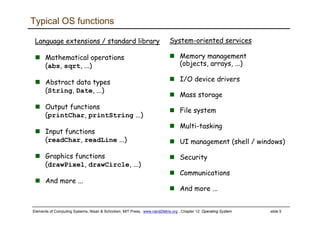
Typical OS functions
Language extensions / standard library
Mathematical operations
(abs, sqrt, ...)
Abstract data types
(String, Date, ...)
Output functions
(printChar, printString ...)
Input functions
(readChar, readLine ...)
Graphics functions
(drawPixel, drawCircle, ...)
And more ...
System-oriented services
Memory management
(objects, arrays, ...)
I/O device drivers
Mass storage
File system
Multi-tasking
UI management (shell / windows)
Security
Communications
And more ...
Elements of Computing Systems, Nisan & Schocken, MIT Press, www.nand2tetris.org , Chapter 12: Operating System slide 6
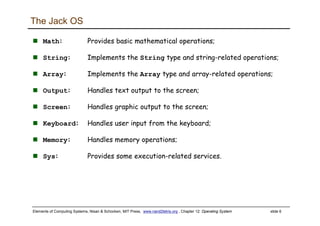
The Jack OS
Math: Provides basic mathematical operations;
String: Implements the String type and string-related operations;
Array: Implements the Array type and array-related operations;
Output: Handles text output to the screen;
Screen: Handles graphic output to the screen;
Keyboard: Handles user input from the keyboard;
Memory: Handles memory operations;
Sys: Provides some execution-related services.
Elements of Computing Systems, Nisan & Schocken, MIT Press, www.nand2tetris.org , Chapter 12: Operating System slide 7
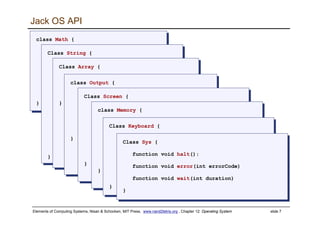
Jack OS API
class Math {
function void init()
function int abs(int x)
function int multiply(int x, int y)
function int divide(int x, int y)
function int min(int x, int y)
function int max(int x, int y)
function int sqrt(int x)
}
class Math {
function void init()
function int abs(int x)
function int multiply(int x, int y)
function int divide(int x, int y)
function int min(int x, int y)
function int max(int x, int y)
function int sqrt(int x)
}
Class String {
constructor String new(int maxLength)
method void dispose()
method int length()
method char charAt(int j)
method void setCharAt(int j, char c)
method String appendChar(char c)
method void eraseLastChar()
method int intValue()
method void setInt(int j)
function char backSpace()
function char doubleQuote()
function char newLine()
}
Class String {
constructor String new(int maxLength)
method void dispose()
method int length()
method char charAt(int j)
method void setCharAt(int j, char c)
method String appendChar(char c)
method void eraseLastChar()
method int intValue()
method void setInt(int j)
function char backSpace()
function char doubleQuote()
function char newLine()
}
Class Array {
function Array new(int size)
method void dispose()
}
Class Array {
function Array new(int size)
method void dispose()
}
class Output {
function void moveCursor(int i, int j)
function void printChar(char c)
function void printString(String s)
function void printInt(int i)
function void println()
function void backSpace()
}
class Output {
function void moveCursor(int i, int j)
function void printChar(char c)
function void printString(String s)
function void printInt(int i)
function void println()
function void backSpace()
}
Class Screen {
function void clearScreen()
function void setColor(boolean b)
function void drawPixel(int x, int y)
function void drawLine(int x1, int y1,
int x2, int y2)
function void drawRectangle(int x1, int y1,
int x2, int y2)
function void drawCircle(int x, int y, int r)
}
Class Screen {
function void clearScreen()
function void setColor(boolean b)
function void drawPixel(int x, int y)
function void drawLine(int x1, int y1,
int x2, int y2)
function void drawRectangle(int x1, int y1,
int x2, int y2)
function void drawCircle(int x, int y, int r)
}
class Memory {
function int peek(int address)
function void poke(int address, int value)
function Array alloc(int size)
function void deAlloc(Array o)
}
class Memory {
function int peek(int address)
function void poke(int address, int value)
function Array alloc(int size)
function void deAlloc(Array o)
}
Class Keyboard {
function char keyPressed()
function char readChar()
function String readLine(String message)
function int readInt(String message)
}
Class Keyboard {
function char keyPressed()
function char readChar()
function String readLine(String message)
function int readInt(String message)
}
Class Sys {
function void halt():
function void error(int errorCode)
function void wait(int duration)
}
Class Sys {
function void halt():
function void error(int errorCode)
function void wait(int duration)
}
Elements of Computing Systems, Nisan & Schocken, MIT Press, www.nand2tetris.org , Chapter 12: Operating System slide 8
A typical OS:
Is modular and scalable
Empowers programmers (language extensions)
Empowers users (file system, GUI, ...)
Closes gaps between software and hardware
Runs in “protected mode”
Typically written in some high level language
Typically grows gradually, assuming more and more functions
Must be efficient.
Elements of Computing Systems, Nisan & Schocken, MIT Press, www.nand2tetris.org , Chapter 12: Operating System slide 9
Efficiency
We have to implement various operations on n-bit binary numbers
(n = 16, 32, 64, ...).
For example, consider multiplication
Naïve algorithm: to multiply x*y: { for i = 1 ... y do sum = sum + x }
Run-time is proportional to y
In a 64-bit system, y can be as large as 264.
Multiplications can take years to complete
Algorithms that operate on n-bit inputs can be either:
Naïve: run-time is proportional to the value of the n-bit inputs
Good: run-time is proportional to n, the input’s size.
Elements of Computing Systems, Nisan & Schocken, MIT Press, www.nand2tetris.org , Chapter 12: Operating System slide 10
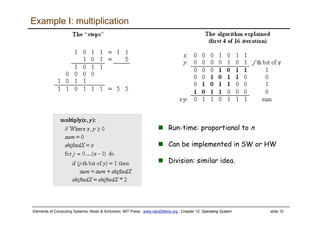
Run-time: proportional to n
Can be implemented in SW or HW
Division: similar idea.
Example I: multiplication
Elements of Computing Systems, Nisan & Schocken, MIT Press, www.nand2tetris.org , Chapter 12: Operating System slide 11
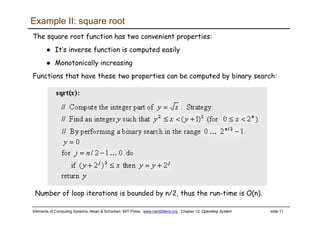
Example II: square root
The square root function has two convenient properties:
It’s inverse function is computed easily
Monotonically increasing
Functions that have these two properties can be computed by binary search:
Number of loop iterations is bounded by n/2, thus the run-time is O(n).
Elements of Computing Systems, Nisan & Schocken, MIT Press, www.nand2tetris.org , Chapter 12: Operating System slide 12
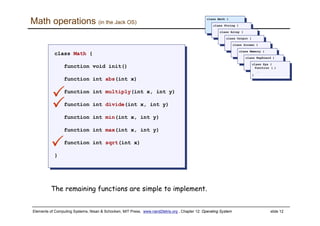
Math operations (in the Jack OS)
class Math {
function void init()
function int abs(int x)
function int multiply(int x, int y)
function int divide(int x, int y)
function int min(int x, int y)
function int max(int x, int y)
function int sqrt(int x)
}
class Math {
function void init()
function int abs(int x)
function int multiply(int x, int y)
function int divide(int x, int y)
function int min(int x, int y)
function int max(int x, int y)
function int sqrt(int x)
}
class Math {
class Math {
class String {
class String {
class Array {
class Array {
class Output {
class Output {
class Screen {
class Screen {
class Memory {
class Memory {
class Keyboard {
class Keyboard {
class Sys {
function (…)
…
}
class Sys {
function (…)
…
}
The remaining functions are simple to implement.
Elements of Computing Systems, Nisan & Schocken, MIT Press, www.nand2tetris.org , Chapter 12: Operating System slide 13
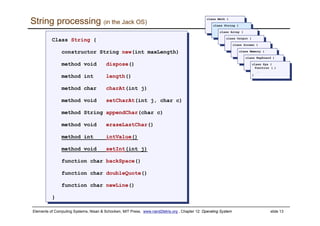
String processing (in the Jack OS)
Class String {
constructor String new(int maxLength)
method void dispose()
method int length()
method char charAt(int j)
method void setCharAt(int j, char c)
method String appendChar(char c)
method void eraseLastChar()
method int intValue()
method void setInt(int j)
function char backSpace()
function char doubleQuote()
function char newLine()
}
Class String {
constructor String new(int maxLength)
method void dispose()
method int length()
method char charAt(int j)
method void setCharAt(int j, char c)
method String appendChar(char c)
method void eraseLastChar()
method int intValue()
method void setInt(int j)
function char backSpace()
function char doubleQuote()
function char newLine()
}
class Math {
class Math {
class String {
class String {
class Array {
class Array {
class Output {
class Output {
class Screen {
class Screen {
class Memory {
class Memory {
class Keyboard {
class Keyboard {
class Sys {
function (…)
…
}
class Sys {
function (…)
…
}
Elements of Computing Systems, Nisan & Schocken, MIT Press, www.nand2tetris.org , Chapter 12: Operating System slide 14
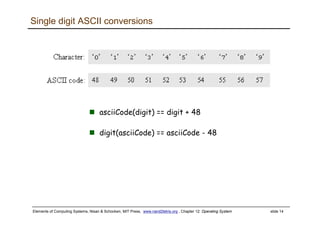
Single digit ASCII conversions
asciiCode(digit) == digit + 48
digit(asciiCode) == asciiCode - 48
Elements of Computing Systems, Nisan & Schocken, MIT Press, www.nand2tetris.org , Chapter 12: Operating System slide 15
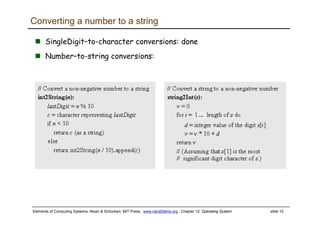
SingleDigit–to-character conversions: done
Number–to-string conversions:
Converting a number to a string
Elements of Computing Systems, Nisan & Schocken, MIT Press, www.nand2tetris.org , Chapter 12: Operating System slide 16
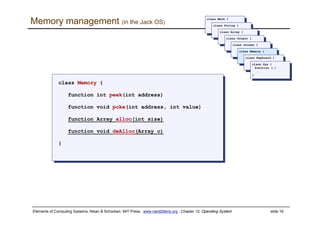
Memory management (in the Jack OS)
class Memory {
function int peek(int address)
function void poke(int address, int value)
function Array alloc(int size)
function void deAlloc(Array o)
}
class Memory {
function int peek(int address)
function void poke(int address, int value)
function Array alloc(int size)
function void deAlloc(Array o)
}
class Math {
class Math {
class String {
class String {
class Array {
class Array {
class Output {
class Output {
class Screen {
class Screen {
class Memory {
class Memory {
class Keyboard {
class Keyboard {
class Sys {
function (…)
…
}
class Sys {
function (…)
…
}
Elements of Computing Systems, Nisan & Schocken, MIT Press, www.nand2tetris.org , Chapter 12: Operating System slide 17
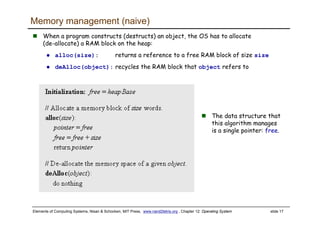
The data structure that
this algorithm manages
is a single pointer: free.
Memory management (naive)
When a program constructs (destructs) an object, the OS has to allocate
(de-allocate) a RAM block on the heap:
alloc(size): returns a reference to a free RAM block of size size
deAlloc(object): recycles the RAM block that object refers to
Elements of Computing Systems, Nisan & Schocken, MIT Press, www.nand2tetris.org , Chapter 12: Operating System slide 18
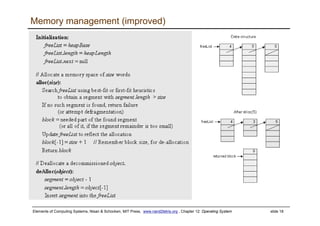
Memory management (improved)
Elements of Computing Systems, Nisan & Schocken, MIT Press, www.nand2tetris.org , Chapter 12: Operating System slide 19
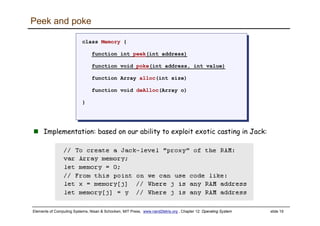
Peek and poke
class Memory {
function int peek(int address)
function void poke(int address, int value)
function Array alloc(int size)
function void deAlloc(Array o)
}
class Memory {
function int peek(int address)
function void poke(int address, int value)
function Array alloc(int size)
function void deAlloc(Array o)
}
Implementation: based on our ability to exploit exotic casting in Jack:
Elements of Computing Systems, Nisan & Schocken, MIT Press, www.nand2tetris.org , Chapter 12: Operating System slide 20
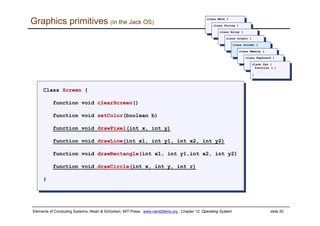
Graphics primitives (in the Jack OS)
Class Screen {
function void clearScreen()
function void setColor(boolean b)
function void drawPixel(int x, int y)
function void drawLine(int x1, int y1, int x2, int y2)
function void drawRectangle(int x1, int y1,int x2, int y2)
function void drawCircle(int x, int y, int r)
}
Class Screen {
function void clearScreen()
function void setColor(boolean b)
function void drawPixel(int x, int y)
function void drawLine(int x1, int y1, int x2, int y2)
function void drawRectangle(int x1, int y1,int x2, int y2)
function void drawCircle(int x, int y, int r)
}
class Math {
class Math {
class String {
class String {
class Array {
class Array {
class Output {
class Output {
class Screen {
class Screen {
class Memory {
class Memory {
class Keyboard {
class Keyboard {
class Sys {
function (…)
…
}
class Sys {
function (…)
…
}
Elements of Computing Systems, Nisan & Schocken, MIT Press, www.nand2tetris.org , Chapter 12: Operating System slide 21
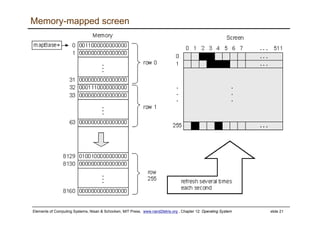
Memory-mapped screen
Elements of Computing Systems, Nisan & Schocken, MIT Press, www.nand2tetris.org , Chapter 12: Operating System slide 22
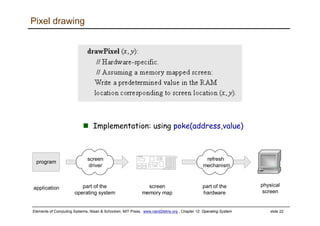
Pixel drawing
Implementation: using poke(address,value)
screen
memory map
program
application
physical
screen
refresh
mechanism
screen
driver
part of the
operating system
part of the
hardware
Elements of Computing Systems, Nisan & Schocken, MIT Press, www.nand2tetris.org , Chapter 12: Operating System slide 23
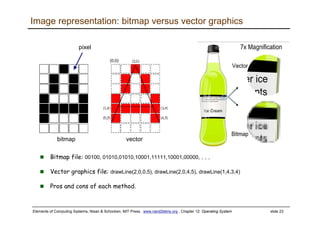
Image representation: bitmap versus vector graphics
Bitmap file: 00100, 01010,01010,10001,11111,10001,00000, . . .
Vector graphics file: drawLine(2,0,0,5), drawLine(2,0,4,5), drawLine(1,4,3,4)
Pros and cons of each method.
(0,0)
vectorbitmap
pixel
Elements of Computing Systems, Nisan & Schocken, MIT Press, www.nand2tetris.org , Chapter 12: Operating System slide 24
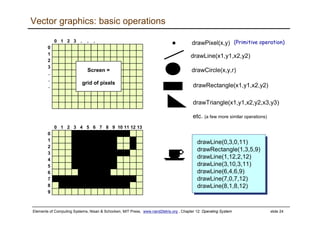
Vector graphics: basic operations
drawPixel(x,y)
drawCircle(x,y,r)
drawLine(x1,y1,x2,y2)
drawRectangle(x1,y1,x2,y2)
1
2
3
4
5
6
7
8
9
0 1 2 3 4 5 6 7 8 9 10 11 12 13
0
drawLine(0,3,0,11)
drawRectangle(1,3,5,9)
drawLine(1,12,2,12)
drawLine(3,10,3,11)
drawLine(6,4,6,9)
drawLine(7,0,7,12)
drawLine(8,1,8,12)
(Primitive operation)
drawTriangle(x1,y1,x2,y2,x3,y3)
etc. (a few more similar operations)
1
2
3
.
.
.
0 1 2 3 . . .
0
Screen =
grid of pixels
Elements of Computing Systems, Nisan & Schocken, MIT Press, www.nand2tetris.org , Chapter 12: Operating System slide 25
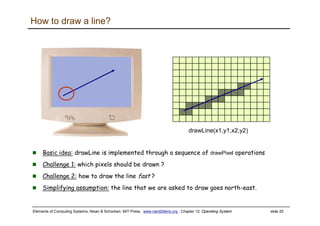
How to draw a line?
drawLine(x1,y1,x2,y2)
Basic idea: drawLine is implemented through a sequence of drawPixel operations
Challenge 1: which pixels should be drawn ?
Challenge 2: how to draw the line fast ?
Simplifying assumption: the line that we are asked to draw goes north-east.
Elements of Computing Systems, Nisan & Schocken, MIT Press, www.nand2tetris.org , Chapter 12: Operating System slide 26
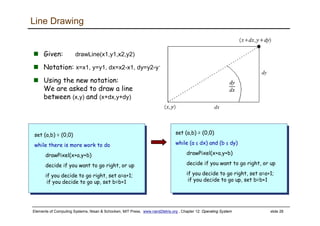
Line Drawing
Given: drawLine(x1,y1,x2,y2)
Notation: x=x1, y=y1, dx=x2-x1, dy=y2-y1
Using the new notation:
We are asked to draw a line
between (x,y) and (x+dx,y+dy)
set (a,b) = (0,0)
while there is more work to do
drawPixel(x+a,y+b)
decide if you want to go right, or up
if you decide to go right, set a=a+1;
if you decide to go up, set b=b+1
set (a,b) = (0,0)
while (a ≤ dx) and (b ≤ dy)
drawPixel(x+a,y+b)
decide if you want to go right, or up
if you decide to go right, set a=a+1;
if you decide to go up, set b=b+1
dx
dy
Elements of Computing Systems, Nisan & Schocken, MIT Press, www.nand2tetris.org , Chapter 12: Operating System slide 27
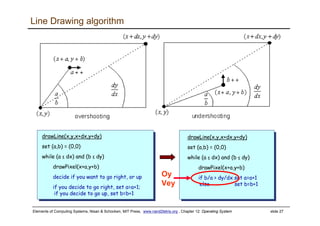
Line Drawing algorithm
drawLine(x,y,x+dx,y+dy)
set (a,b) = (0,0)
while (a ≤ dx) and (b ≤ dy)
drawPixel(x+a,y+b)
decide if you want to go right, or up
if you decide to go right, set a=a+1;
if you decide to go up, set b=b+1
drawLine(x,y,x+dx,y+dy)
set (a,b) = (0,0)
while (a ≤ dx) and (b ≤ dy)
drawPixel(x+a,y+b)
if b/a > dy/dx set a=a+1
else set b=b+1
Oy
Vey
Elements of Computing Systems, Nisan & Schocken, MIT Press, www.nand2tetris.org , Chapter 12: Operating System slide 28
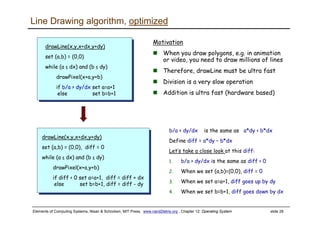
Line Drawing algorithm, optimized
b/a > dy/dx is the same as a*dy < b*dx
Define diff = a*dy – b*dx
Let’s take a close look at this diff:
1. b/a > dy/dx is the same as diff < 0
2. When we set (a,b)=(0,0), diff = 0
3. When we set a=a+1, diff goes up by dy
4. When we set b=b+1, diff goes down by dx
drawLine(x,y,x+dx,y+dy)
set (a,b) = (0,0)
while (a ≤ dx) and (b ≤ dy)
drawPixel(x+a,y+b)
if b/a > dy/dx set a=a+1
else set b=b+1
drawLine(x,y,x+dx,y+dy)
set (a,b) = (0,0), diff = 0
while (a ≤ dx) and (b ≤ dy)
drawPixel(x+a,y+b)
if diff < 0 set a=a+1, diff = diff + dx
else set b=b+1, diff = diff - dy
Motivation
When you draw polygons, e.g. in animation
or video, you need to draw millions of lines
Therefore, drawLine must be ultra fast
Division is a very slow operation
Addition is ultra fast (hardware based)
Elements of Computing Systems, Nisan & Schocken, MIT Press, www.nand2tetris.org , Chapter 12: Operating System slide 29
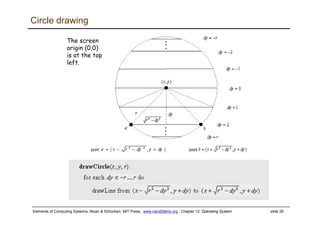
Circle drawing
The screen
origin (0,0)
is at the top
left.
Elements of Computing Systems, Nisan & Schocken, MIT Press, www.nand2tetris.org , Chapter 12: Operating System slide 30
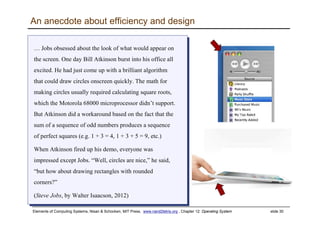
An anecdote about efficiency and design
… Jobs obsessed about the look of what would appear on
the screen. One day Bill Atkinson burst into his office all
excited. He had just come up with a brilliant algorithm
that could draw circles onscreen quickly. The math for
making circles usually required calculating square roots,
which the Motorola 68000 microprocessor didn’t support.
But Atkinson did a workaround based on the fact that the
sum of a sequence of odd numbers produces a sequence
of perfect squares (e.g. 1 + 3 = 4, 1 + 3 + 5 = 9, etc.)
When Atkinson fired up his demo, everyone was
impressed except Jobs. “Well, circles are nice,” he said,
“but how about drawing rectangles with rounded
corners?”
(Steve Jobs, by Walter Isaacson, 2012)
… Jobs obsessed about the look of what would appear on
the screen. One day Bill Atkinson burst into his office all
excited. He had just come up with a brilliant algorithm
that could draw circles onscreen quickly. The math for
making circles usually required calculating square roots,
which the Motorola 68000 microprocessor didn’t support.
But Atkinson did a workaround based on the fact that the
sum of a sequence of odd numbers produces a sequence
of perfect squares (e.g. 1 + 3 = 4, 1 + 3 + 5 = 9, etc.)
When Atkinson fired up his demo, everyone was
impressed except Jobs. “Well, circles are nice,” he said,
“but how about drawing rectangles with rounded
corners?”
(Steve Jobs, by Walter Isaacson, 2012)
Elements of Computing Systems, Nisan & Schocken, MIT Press, www.nand2tetris.org , Chapter 12: Operating System slide 31
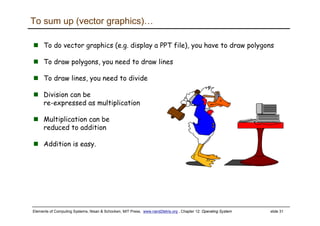
To do vector graphics (e.g. display a PPT file), you have to draw polygons
To draw polygons, you need to draw lines
To draw lines, you need to divide
Division can be
re-expressed as multiplication
Multiplication can be
reduced to addition
Addition is easy.
To sum up (vector graphics)…
Elements of Computing Systems, Nisan & Schocken, MIT Press, www.nand2tetris.org , Chapter 12: Operating System slide 32
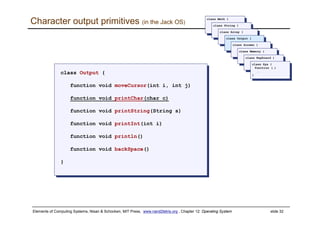
Character output primitives (in the Jack OS)
class Output {
function void moveCursor(int i, int j)
function void printChar(char c)
function void printString(String s)
function void printInt(int i)
function void println()
function void backSpace()
}
class Output {
function void moveCursor(int i, int j)
function void printChar(char c)
function void printString(String s)
function void printInt(int i)
function void println()
function void backSpace()
}
class Math {
class Math {
class String {
class String {
class Array {
class Array {
class Output {
class Output {
class Screen {
class Screen {
class Memory {
class Memory {
class Keyboard {
class Keyboard {
class Sys {
function (…)
…
}
class Sys {
function (…)
…
}
Elements of Computing Systems, Nisan & Schocken, MIT Press, www.nand2tetris.org , Chapter 12: Operating System slide 33
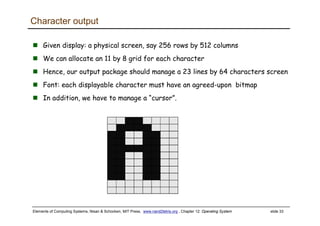
Character output
Given display: a physical screen, say 256 rows by 512 columns
We can allocate an 11 by 8 grid for each character
Hence, our output package should manage a 23 lines by 64 characters screen
Font: each displayable character must have an agreed-upon bitmap
In addition, we have to manage a “cursor”.
Elements of Computing Systems, Nisan & Schocken, MIT Press, www.nand2tetris.org , Chapter 12: Operating System slide 34
class Output {
static Array charMaps;
function void initMap() {
let charMaps = Array.new(127);
// Assign a bitmap for each character
do Output.create(32,0,0,0,0,0,0,0,0,0,0,0); // space
do Output.create(33,12,30,30,30,12,12,0,12,12,0,0); // !
do Output.create(34,54,54,20,0,0,0,0,0,0,0,0); // “
do Output.create(35,0,18,18,63,18,18,63,18,18,0,0); // #
...
do Output.create(48,12,30,51,51,51,51,51,30,12,0,0); // 0
do Output.create(49,12,14,15,12,12,12,12,12,63,0,0); // 1
do Output.create(50,30,51,48,24,12,6,3,51,63,0,0); // 2
. . .
do Output.create(65,0,0,0,0,0,0,0,0,0,0,0); // A ** TO BE FILLED **
do Output.create(66,31,51,51,51,31,51,51,51,31,0,0); // B
do Output.create(67,28,54,35,3,3,3,35,54,28,0,0); // C
. . .
return;
}
class Output {
static Array charMaps;
function void initMap() {
let charMaps = Array.new(127);
// Assign a bitmap for each character
do Output.create(32,0,0,0,0,0,0,0,0,0,0,0); // space
do Output.create(33,12,30,30,30,12,12,0,12,12,0,0); // !
do Output.create(34,54,54,20,0,0,0,0,0,0,0,0); // “
do Output.create(35,0,18,18,63,18,18,63,18,18,0,0); // #
...
do Output.create(48,12,30,51,51,51,51,51,30,12,0,0); // 0
do Output.create(49,12,14,15,12,12,12,12,12,63,0,0); // 1
do Output.create(50,30,51,48,24,12,6,3,51,63,0,0); // 2
. . .
do Output.create(65,0,0,0,0,0,0,0,0,0,0,0); // A ** TO BE FILLED **
do Output.create(66,31,51,51,51,31,51,51,51,31,0,0); // B
do Output.create(67,28,54,35,3,3,3,35,54,28,0,0); // C
. . .
return;
}
Font implementation (in the Jack OS)
// Creates a character map array
function void create(int index, int a, int b, int c, int d, int e,
int f, int g, int h, int i, int j, int k) {
var Array map;
let map = Array.new(11);
let charMaps[index] = map;
let map[0] = a;
let map[1] = b;
let map[2] = c;
...
let map[10] = k;
return; }
// Creates a character map array
function void create(int index, int a, int b, int c, int d, int e,
int f, int g, int h, int i, int j, int k) {
var Array map;
let map = Array.new(11);
let charMaps[index] = map;
let map[0] = a;
let map[1] = b;
let map[2] = c;
...
let map[10] = k;
return; }
Elements of Computing Systems, Nisan & Schocken, MIT Press, www.nand2tetris.org , Chapter 12: Operating System slide 35
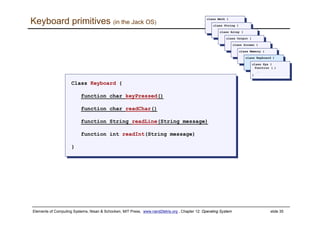
Keyboard primitives (in the Jack OS)
Class Keyboard {
function char keyPressed()
function char readChar()
function String readLine(String message)
function int readInt(String message)
}
Class Keyboard {
function char keyPressed()
function char readChar()
function String readLine(String message)
function int readInt(String message)
}
class Math {
class Math {
class String {
class String {
class Array {
class Array {
class Output {
class Output {
class Screen {
class Screen {
class Memory {
class Memory {
class Keyboard {
class Keyboard {
class Sys {
function (…)
…
}
class Sys {
function (…)
…
}
Elements of Computing Systems, Nisan & Schocken, MIT Press, www.nand2tetris.org , Chapter 12: Operating System slide 36
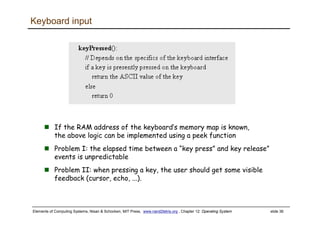
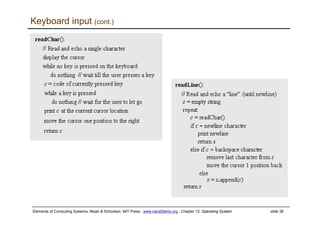
Keyboard input
If the RAM address of the keyboard’s memory map is known,
the above logic can be implemented using a peek function
Problem I: the elapsed time between a “key press” and key release”
events is unpredictable
Problem II: when pressing a key, the user should get some visible
feedback (cursor, echo, ...).
Elements of Computing Systems, Nisan & Schocken, MIT Press, www.nand2tetris.org , Chapter 12: Operating System slide 37
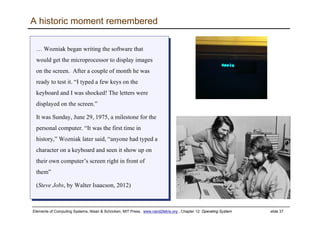
A historic moment remembered
… Wozniak began writing the software that
would get the microprocessor to display images
on the screen. After a couple of month he was
ready to test it. “I typed a few keys on the
keyboard and I was shocked! The letters were
displayed on the screen.”
It was Sunday, June 29, 1975, a milestone for the
personal computer. “It was the first time in
history,” Wozniak later said, “anyone had typed a
character on a keyboard and seen it show up on
their own computer’s screen right in front of
them”
(Steve Jobs, by Walter Isaacson, 2012)
… Wozniak began writing the software that
would get the microprocessor to display images
on the screen. After a couple of month he was
ready to test it. “I typed a few keys on the
keyboard and I was shocked! The letters were
displayed on the screen.”
It was Sunday, June 29, 1975, a milestone for the
personal computer. “It was the first time in
history,” Wozniak later said, “anyone had typed a
character on a keyboard and seen it show up on
their own computer’s screen right in front of
them”
(Steve Jobs, by Walter Isaacson, 2012)
Elements of Computing Systems, Nisan & Schocken, MIT Press, www.nand2tetris.org , Chapter 12: Operating System slide 38
Keyboard input (cont.)
Elements of Computing Systems, Nisan & Schocken, MIT Press, www.nand2tetris.org , Chapter 12: Operating System slide 39
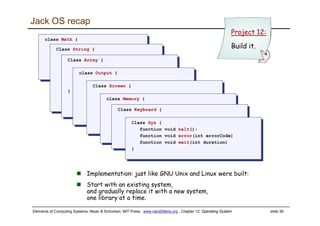
Jack OS recap
class Math {
function void init()
function int abs(int x)
class Math {
function void init()
function int abs(int x)Class String {Class String {
Class Array {
function Array new(int size)
method void dispose()
}
Class Array {
function Array new(int size)
method void dispose()
}
class Output {class Output {
Class Screen {Class Screen {
class Memory {
function int peek(int address)
class Memory {
function int peek(int address)Class Keyboard {Class Keyboard {
Class Sys {
function void halt():
function void error(int errorCode)
function void wait(int duration)
}
Class Sys {
function void halt():
function void error(int errorCode)
function void wait(int duration)
}
Project 12:
Build it.
Implementation: just like GNU Unix and Linux were built:
Start with an existing system,
and gradually replace it with a new system,
one library at a time.
Elements of Computing Systems, Nisan & Schocken, MIT Press, www.nand2tetris.org , Chapter 12: Operating System slide 40
Perspective
What we presented can be described as a:
mini OS
Standard library
Many classical OS functions are missing
No separation between user mode and OS mode
Some algorithms (e.g. multiplication and division) are standard
Other algorithms (e.g. line- and circle-drawing) can be accelerated
with special hardware
And, by the way, we’ve just finished building the computer.
Elements of Computing Systems, Nisan & Schocken, MIT Press, www.nand2tetris.org , Chapter 12: Operating System slide 41
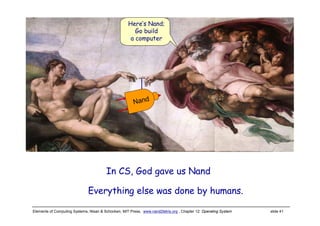
Everything else was done by humans.
In CS, God gave us Nand
Here’s Nand;
Go build
a computer
Nand
Elements of Computing Systems, Nisan & Schocken, MIT Press, www.nand2tetris.org , Chapter 12: Operating System slide 42
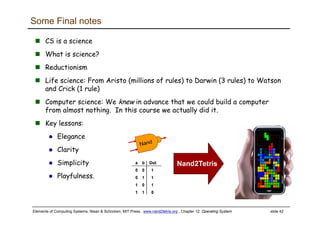
Some Final notes
CS is a science
What is science?
Reductionism
Life science: From Aristo (millions of rules) to Darwin (3 rules) to Watson
and Crick (1 rule)
Computer science: We knew in advance that we could build a computer
from almost nothing. In this course we actually did it.
Key lessons:
Elegance
Clarity
Simplicity
Playfulness.

Lecture 12 os

  • 1.
    Elements of ComputingSystems, Nisan & Schocken, MIT Press, www.nand2tetris.org , Chapter 12: Operating System slide 1 Operating Systems Elements of Computing Systems, Nisan & Schocken, MIT Press www.idc.ac.il/tecs www.nand2tetris.org Building a Modern Computer From First Principles
  • 2.
    Elements of ComputingSystems, Nisan & Schocken, MIT Press, www.nand2tetris.org , Chapter 12: Operating System slide 2 Where we are at: Assembler Chapter 6 H.L. Language & Operating Sys. abstract interface Compiler Chapters 10 - 11 VM Translator Chapters 7 - 8 Computer Architecture Chapters 4 - 5 Gate Logic Chapters 1 - 3 Electrical Engineering Physics Virtual Machine abstract interface Software hierarchy Assembly Language abstract interface Hardware hierarchy Machine Language abstract interface Hardware Platform abstract interface Chips & Logic Gates abstract interface Human Thought Abstract design Chapters 9, 12
  • 3.
    Elements of ComputingSystems, Nisan & Schocken, MIT Press, www.nand2tetris.org , Chapter 12: Operating System slide 3 Jack revisited /** Computes the average of a sequence of integers. */ class Main { function void main() { var Array a; var int length; var int i, sum; let length = Keyboard.readInt(”How many numbers? ”); let a = Array.new(length); // Constructs the array let i = 0; while (i < length) { let a[i] = Keyboard.readInt(”Enter the next number: ”); let sum = sum + a[i]; let i = i + 1; } do Output.printString(”The average is: ”); do Output.printInt(sum / length); do Output.println(); return; } } /** Computes the average of a sequence of integers. */ class Main { function void main() { var Array a; var int length; var int i, sum; let length = Keyboard.readInt(”How many numbers? ”); let a = Array.new(length); // Constructs the array let i = 0; while (i < length) { let a[i] = Keyboard.readInt(”Enter the next number: ”); let sum = sum + a[i]; let i = i + 1; } do Output.printString(”The average is: ”); do Output.printInt(sum / length); do Output.println(); return; } }
  • 4.
    Elements of ComputingSystems, Nisan & Schocken, MIT Press, www.nand2tetris.org , Chapter 12: Operating System slide 4 /** Computes the average of a sequence of integers. */ class Main { function void main() { var Array a; var int length; var int i, sum; let length = Keyboard.readInt(”How many numbers? ”); let a = Array.new(length); // Constructs the array let i = 0; while (i < length) { let a[i] = Keyboard.readInt(”Enter the next number: ”); let sum = sum + a[i]; let i = i + 1; } do Output.printString(”The average is: ”); do Output.printInt(sum / length); do Output.println(); return; } } /** Computes the average of a sequence of integers. */ class Main { function void main() { var Array a; var int length; var int i, sum; let length = Keyboard.readInt(”How many numbers? ”); let a = Array.new(length); // Constructs the array let i = 0; while (i < length) { let a[i] = Keyboard.readInt(”Enter the next number: ”); let sum = sum + a[i]; let i = i + 1; } do Output.printString(”The average is: ”); do Output.printInt(sum / length); do Output.println(); return; } } Jack revisited
  • 5.
    Elements of ComputingSystems, Nisan & Schocken, MIT Press, www.nand2tetris.org , Chapter 12: Operating System slide 5 Typical OS functions Language extensions / standard library Mathematical operations (abs, sqrt, ...) Abstract data types (String, Date, ...) Output functions (printChar, printString ...) Input functions (readChar, readLine ...) Graphics functions (drawPixel, drawCircle, ...) And more ... System-oriented services Memory management (objects, arrays, ...) I/O device drivers Mass storage File system Multi-tasking UI management (shell / windows) Security Communications And more ...
  • 6.
    Elements of ComputingSystems, Nisan & Schocken, MIT Press, www.nand2tetris.org , Chapter 12: Operating System slide 6 The Jack OS Math: Provides basic mathematical operations; String: Implements the String type and string-related operations; Array: Implements the Array type and array-related operations; Output: Handles text output to the screen; Screen: Handles graphic output to the screen; Keyboard: Handles user input from the keyboard; Memory: Handles memory operations; Sys: Provides some execution-related services.
  • 7.
    Elements of ComputingSystems, Nisan & Schocken, MIT Press, www.nand2tetris.org , Chapter 12: Operating System slide 7 Jack OS API class Math { function void init() function int abs(int x) function int multiply(int x, int y) function int divide(int x, int y) function int min(int x, int y) function int max(int x, int y) function int sqrt(int x) } class Math { function void init() function int abs(int x) function int multiply(int x, int y) function int divide(int x, int y) function int min(int x, int y) function int max(int x, int y) function int sqrt(int x) } Class String { constructor String new(int maxLength) method void dispose() method int length() method char charAt(int j) method void setCharAt(int j, char c) method String appendChar(char c) method void eraseLastChar() method int intValue() method void setInt(int j) function char backSpace() function char doubleQuote() function char newLine() } Class String { constructor String new(int maxLength) method void dispose() method int length() method char charAt(int j) method void setCharAt(int j, char c) method String appendChar(char c) method void eraseLastChar() method int intValue() method void setInt(int j) function char backSpace() function char doubleQuote() function char newLine() } Class Array { function Array new(int size) method void dispose() } Class Array { function Array new(int size) method void dispose() } class Output { function void moveCursor(int i, int j) function void printChar(char c) function void printString(String s) function void printInt(int i) function void println() function void backSpace() } class Output { function void moveCursor(int i, int j) function void printChar(char c) function void printString(String s) function void printInt(int i) function void println() function void backSpace() } Class Screen { function void clearScreen() function void setColor(boolean b) function void drawPixel(int x, int y) function void drawLine(int x1, int y1, int x2, int y2) function void drawRectangle(int x1, int y1, int x2, int y2) function void drawCircle(int x, int y, int r) } Class Screen { function void clearScreen() function void setColor(boolean b) function void drawPixel(int x, int y) function void drawLine(int x1, int y1, int x2, int y2) function void drawRectangle(int x1, int y1, int x2, int y2) function void drawCircle(int x, int y, int r) } class Memory { function int peek(int address) function void poke(int address, int value) function Array alloc(int size) function void deAlloc(Array o) } class Memory { function int peek(int address) function void poke(int address, int value) function Array alloc(int size) function void deAlloc(Array o) } Class Keyboard { function char keyPressed() function char readChar() function String readLine(String message) function int readInt(String message) } Class Keyboard { function char keyPressed() function char readChar() function String readLine(String message) function int readInt(String message) } Class Sys { function void halt(): function void error(int errorCode) function void wait(int duration) } Class Sys { function void halt(): function void error(int errorCode) function void wait(int duration) }
  • 8.
    Elements of ComputingSystems, Nisan & Schocken, MIT Press, www.nand2tetris.org , Chapter 12: Operating System slide 8 A typical OS: Is modular and scalable Empowers programmers (language extensions) Empowers users (file system, GUI, ...) Closes gaps between software and hardware Runs in “protected mode” Typically written in some high level language Typically grows gradually, assuming more and more functions Must be efficient.
  • 9.
    Elements of ComputingSystems, Nisan & Schocken, MIT Press, www.nand2tetris.org , Chapter 12: Operating System slide 9 Efficiency We have to implement various operations on n-bit binary numbers (n = 16, 32, 64, ...). For example, consider multiplication Naïve algorithm: to multiply x*y: { for i = 1 ... y do sum = sum + x } Run-time is proportional to y In a 64-bit system, y can be as large as 264. Multiplications can take years to complete Algorithms that operate on n-bit inputs can be either: Naïve: run-time is proportional to the value of the n-bit inputs Good: run-time is proportional to n, the input’s size.
  • 10.
    Elements of ComputingSystems, Nisan & Schocken, MIT Press, www.nand2tetris.org , Chapter 12: Operating System slide 10 Run-time: proportional to n Can be implemented in SW or HW Division: similar idea. Example I: multiplication
  • 11.
    Elements of ComputingSystems, Nisan & Schocken, MIT Press, www.nand2tetris.org , Chapter 12: Operating System slide 11 Example II: square root The square root function has two convenient properties: It’s inverse function is computed easily Monotonically increasing Functions that have these two properties can be computed by binary search: Number of loop iterations is bounded by n/2, thus the run-time is O(n).
  • 12.
    Elements of ComputingSystems, Nisan & Schocken, MIT Press, www.nand2tetris.org , Chapter 12: Operating System slide 12 Math operations (in the Jack OS) class Math { function void init() function int abs(int x) function int multiply(int x, int y) function int divide(int x, int y) function int min(int x, int y) function int max(int x, int y) function int sqrt(int x) } class Math { function void init() function int abs(int x) function int multiply(int x, int y) function int divide(int x, int y) function int min(int x, int y) function int max(int x, int y) function int sqrt(int x) } class Math { class Math { class String { class String { class Array { class Array { class Output { class Output { class Screen { class Screen { class Memory { class Memory { class Keyboard { class Keyboard { class Sys { function (…) … } class Sys { function (…) … } The remaining functions are simple to implement.
  • 13.
    Elements of ComputingSystems, Nisan & Schocken, MIT Press, www.nand2tetris.org , Chapter 12: Operating System slide 13 String processing (in the Jack OS) Class String { constructor String new(int maxLength) method void dispose() method int length() method char charAt(int j) method void setCharAt(int j, char c) method String appendChar(char c) method void eraseLastChar() method int intValue() method void setInt(int j) function char backSpace() function char doubleQuote() function char newLine() } Class String { constructor String new(int maxLength) method void dispose() method int length() method char charAt(int j) method void setCharAt(int j, char c) method String appendChar(char c) method void eraseLastChar() method int intValue() method void setInt(int j) function char backSpace() function char doubleQuote() function char newLine() } class Math { class Math { class String { class String { class Array { class Array { class Output { class Output { class Screen { class Screen { class Memory { class Memory { class Keyboard { class Keyboard { class Sys { function (…) … } class Sys { function (…) … }
  • 14.
    Elements of ComputingSystems, Nisan & Schocken, MIT Press, www.nand2tetris.org , Chapter 12: Operating System slide 14 Single digit ASCII conversions asciiCode(digit) == digit + 48 digit(asciiCode) == asciiCode - 48
  • 15.
    Elements of ComputingSystems, Nisan & Schocken, MIT Press, www.nand2tetris.org , Chapter 12: Operating System slide 15 SingleDigit–to-character conversions: done Number–to-string conversions: Converting a number to a string
  • 16.
    Elements of ComputingSystems, Nisan & Schocken, MIT Press, www.nand2tetris.org , Chapter 12: Operating System slide 16 Memory management (in the Jack OS) class Memory { function int peek(int address) function void poke(int address, int value) function Array alloc(int size) function void deAlloc(Array o) } class Memory { function int peek(int address) function void poke(int address, int value) function Array alloc(int size) function void deAlloc(Array o) } class Math { class Math { class String { class String { class Array { class Array { class Output { class Output { class Screen { class Screen { class Memory { class Memory { class Keyboard { class Keyboard { class Sys { function (…) … } class Sys { function (…) … }
  • 17.
    Elements of ComputingSystems, Nisan & Schocken, MIT Press, www.nand2tetris.org , Chapter 12: Operating System slide 17 The data structure that this algorithm manages is a single pointer: free. Memory management (naive) When a program constructs (destructs) an object, the OS has to allocate (de-allocate) a RAM block on the heap: alloc(size): returns a reference to a free RAM block of size size deAlloc(object): recycles the RAM block that object refers to
  • 18.
    Elements of ComputingSystems, Nisan & Schocken, MIT Press, www.nand2tetris.org , Chapter 12: Operating System slide 18 Memory management (improved)
  • 19.
    Elements of ComputingSystems, Nisan & Schocken, MIT Press, www.nand2tetris.org , Chapter 12: Operating System slide 19 Peek and poke class Memory { function int peek(int address) function void poke(int address, int value) function Array alloc(int size) function void deAlloc(Array o) } class Memory { function int peek(int address) function void poke(int address, int value) function Array alloc(int size) function void deAlloc(Array o) } Implementation: based on our ability to exploit exotic casting in Jack:
  • 20.
    Elements of ComputingSystems, Nisan & Schocken, MIT Press, www.nand2tetris.org , Chapter 12: Operating System slide 20 Graphics primitives (in the Jack OS) Class Screen { function void clearScreen() function void setColor(boolean b) function void drawPixel(int x, int y) function void drawLine(int x1, int y1, int x2, int y2) function void drawRectangle(int x1, int y1,int x2, int y2) function void drawCircle(int x, int y, int r) } Class Screen { function void clearScreen() function void setColor(boolean b) function void drawPixel(int x, int y) function void drawLine(int x1, int y1, int x2, int y2) function void drawRectangle(int x1, int y1,int x2, int y2) function void drawCircle(int x, int y, int r) } class Math { class Math { class String { class String { class Array { class Array { class Output { class Output { class Screen { class Screen { class Memory { class Memory { class Keyboard { class Keyboard { class Sys { function (…) … } class Sys { function (…) … }
  • 21.
    Elements of ComputingSystems, Nisan & Schocken, MIT Press, www.nand2tetris.org , Chapter 12: Operating System slide 21 Memory-mapped screen
  • 22.
    Elements of ComputingSystems, Nisan & Schocken, MIT Press, www.nand2tetris.org , Chapter 12: Operating System slide 22 Pixel drawing Implementation: using poke(address,value) screen memory map program application physical screen refresh mechanism screen driver part of the operating system part of the hardware
  • 23.
    Elements of ComputingSystems, Nisan & Schocken, MIT Press, www.nand2tetris.org , Chapter 12: Operating System slide 23 Image representation: bitmap versus vector graphics Bitmap file: 00100, 01010,01010,10001,11111,10001,00000, . . . Vector graphics file: drawLine(2,0,0,5), drawLine(2,0,4,5), drawLine(1,4,3,4) Pros and cons of each method. (0,0) vectorbitmap pixel
  • 24.
    Elements of ComputingSystems, Nisan & Schocken, MIT Press, www.nand2tetris.org , Chapter 12: Operating System slide 24 Vector graphics: basic operations drawPixel(x,y) drawCircle(x,y,r) drawLine(x1,y1,x2,y2) drawRectangle(x1,y1,x2,y2) 1 2 3 4 5 6 7 8 9 0 1 2 3 4 5 6 7 8 9 10 11 12 13 0 drawLine(0,3,0,11) drawRectangle(1,3,5,9) drawLine(1,12,2,12) drawLine(3,10,3,11) drawLine(6,4,6,9) drawLine(7,0,7,12) drawLine(8,1,8,12) (Primitive operation) drawTriangle(x1,y1,x2,y2,x3,y3) etc. (a few more similar operations) 1 2 3 . . . 0 1 2 3 . . . 0 Screen = grid of pixels
  • 25.
    Elements of ComputingSystems, Nisan & Schocken, MIT Press, www.nand2tetris.org , Chapter 12: Operating System slide 25 How to draw a line? drawLine(x1,y1,x2,y2) Basic idea: drawLine is implemented through a sequence of drawPixel operations Challenge 1: which pixels should be drawn ? Challenge 2: how to draw the line fast ? Simplifying assumption: the line that we are asked to draw goes north-east.
  • 26.
    Elements of ComputingSystems, Nisan & Schocken, MIT Press, www.nand2tetris.org , Chapter 12: Operating System slide 26 Line Drawing Given: drawLine(x1,y1,x2,y2) Notation: x=x1, y=y1, dx=x2-x1, dy=y2-y1 Using the new notation: We are asked to draw a line between (x,y) and (x+dx,y+dy) set (a,b) = (0,0) while there is more work to do drawPixel(x+a,y+b) decide if you want to go right, or up if you decide to go right, set a=a+1; if you decide to go up, set b=b+1 set (a,b) = (0,0) while (a ≤ dx) and (b ≤ dy) drawPixel(x+a,y+b) decide if you want to go right, or up if you decide to go right, set a=a+1; if you decide to go up, set b=b+1 dx dy
  • 27.
    Elements of ComputingSystems, Nisan & Schocken, MIT Press, www.nand2tetris.org , Chapter 12: Operating System slide 27 Line Drawing algorithm drawLine(x,y,x+dx,y+dy) set (a,b) = (0,0) while (a ≤ dx) and (b ≤ dy) drawPixel(x+a,y+b) decide if you want to go right, or up if you decide to go right, set a=a+1; if you decide to go up, set b=b+1 drawLine(x,y,x+dx,y+dy) set (a,b) = (0,0) while (a ≤ dx) and (b ≤ dy) drawPixel(x+a,y+b) if b/a > dy/dx set a=a+1 else set b=b+1 Oy Vey
  • 28.
    Elements of ComputingSystems, Nisan & Schocken, MIT Press, www.nand2tetris.org , Chapter 12: Operating System slide 28 Line Drawing algorithm, optimized b/a > dy/dx is the same as a*dy < b*dx Define diff = a*dy – b*dx Let’s take a close look at this diff: 1. b/a > dy/dx is the same as diff < 0 2. When we set (a,b)=(0,0), diff = 0 3. When we set a=a+1, diff goes up by dy 4. When we set b=b+1, diff goes down by dx drawLine(x,y,x+dx,y+dy) set (a,b) = (0,0) while (a ≤ dx) and (b ≤ dy) drawPixel(x+a,y+b) if b/a > dy/dx set a=a+1 else set b=b+1 drawLine(x,y,x+dx,y+dy) set (a,b) = (0,0), diff = 0 while (a ≤ dx) and (b ≤ dy) drawPixel(x+a,y+b) if diff < 0 set a=a+1, diff = diff + dx else set b=b+1, diff = diff - dy Motivation When you draw polygons, e.g. in animation or video, you need to draw millions of lines Therefore, drawLine must be ultra fast Division is a very slow operation Addition is ultra fast (hardware based)
  • 29.
    Elements of ComputingSystems, Nisan & Schocken, MIT Press, www.nand2tetris.org , Chapter 12: Operating System slide 29 Circle drawing The screen origin (0,0) is at the top left.
  • 30.
    Elements of ComputingSystems, Nisan & Schocken, MIT Press, www.nand2tetris.org , Chapter 12: Operating System slide 30 An anecdote about efficiency and design … Jobs obsessed about the look of what would appear on the screen. One day Bill Atkinson burst into his office all excited. He had just come up with a brilliant algorithm that could draw circles onscreen quickly. The math for making circles usually required calculating square roots, which the Motorola 68000 microprocessor didn’t support. But Atkinson did a workaround based on the fact that the sum of a sequence of odd numbers produces a sequence of perfect squares (e.g. 1 + 3 = 4, 1 + 3 + 5 = 9, etc.) When Atkinson fired up his demo, everyone was impressed except Jobs. “Well, circles are nice,” he said, “but how about drawing rectangles with rounded corners?” (Steve Jobs, by Walter Isaacson, 2012) … Jobs obsessed about the look of what would appear on the screen. One day Bill Atkinson burst into his office all excited. He had just come up with a brilliant algorithm that could draw circles onscreen quickly. The math for making circles usually required calculating square roots, which the Motorola 68000 microprocessor didn’t support. But Atkinson did a workaround based on the fact that the sum of a sequence of odd numbers produces a sequence of perfect squares (e.g. 1 + 3 = 4, 1 + 3 + 5 = 9, etc.) When Atkinson fired up his demo, everyone was impressed except Jobs. “Well, circles are nice,” he said, “but how about drawing rectangles with rounded corners?” (Steve Jobs, by Walter Isaacson, 2012)
  • 31.
    Elements of ComputingSystems, Nisan & Schocken, MIT Press, www.nand2tetris.org , Chapter 12: Operating System slide 31 To do vector graphics (e.g. display a PPT file), you have to draw polygons To draw polygons, you need to draw lines To draw lines, you need to divide Division can be re-expressed as multiplication Multiplication can be reduced to addition Addition is easy. To sum up (vector graphics)…
  • 32.
    Elements of ComputingSystems, Nisan & Schocken, MIT Press, www.nand2tetris.org , Chapter 12: Operating System slide 32 Character output primitives (in the Jack OS) class Output { function void moveCursor(int i, int j) function void printChar(char c) function void printString(String s) function void printInt(int i) function void println() function void backSpace() } class Output { function void moveCursor(int i, int j) function void printChar(char c) function void printString(String s) function void printInt(int i) function void println() function void backSpace() } class Math { class Math { class String { class String { class Array { class Array { class Output { class Output { class Screen { class Screen { class Memory { class Memory { class Keyboard { class Keyboard { class Sys { function (…) … } class Sys { function (…) … }
  • 33.
    Elements of ComputingSystems, Nisan & Schocken, MIT Press, www.nand2tetris.org , Chapter 12: Operating System slide 33 Character output Given display: a physical screen, say 256 rows by 512 columns We can allocate an 11 by 8 grid for each character Hence, our output package should manage a 23 lines by 64 characters screen Font: each displayable character must have an agreed-upon bitmap In addition, we have to manage a “cursor”.
  • 34.
    Elements of ComputingSystems, Nisan & Schocken, MIT Press, www.nand2tetris.org , Chapter 12: Operating System slide 34 class Output { static Array charMaps; function void initMap() { let charMaps = Array.new(127); // Assign a bitmap for each character do Output.create(32,0,0,0,0,0,0,0,0,0,0,0); // space do Output.create(33,12,30,30,30,12,12,0,12,12,0,0); // ! do Output.create(34,54,54,20,0,0,0,0,0,0,0,0); // “ do Output.create(35,0,18,18,63,18,18,63,18,18,0,0); // # ... do Output.create(48,12,30,51,51,51,51,51,30,12,0,0); // 0 do Output.create(49,12,14,15,12,12,12,12,12,63,0,0); // 1 do Output.create(50,30,51,48,24,12,6,3,51,63,0,0); // 2 . . . do Output.create(65,0,0,0,0,0,0,0,0,0,0,0); // A ** TO BE FILLED ** do Output.create(66,31,51,51,51,31,51,51,51,31,0,0); // B do Output.create(67,28,54,35,3,3,3,35,54,28,0,0); // C . . . return; } class Output { static Array charMaps; function void initMap() { let charMaps = Array.new(127); // Assign a bitmap for each character do Output.create(32,0,0,0,0,0,0,0,0,0,0,0); // space do Output.create(33,12,30,30,30,12,12,0,12,12,0,0); // ! do Output.create(34,54,54,20,0,0,0,0,0,0,0,0); // “ do Output.create(35,0,18,18,63,18,18,63,18,18,0,0); // # ... do Output.create(48,12,30,51,51,51,51,51,30,12,0,0); // 0 do Output.create(49,12,14,15,12,12,12,12,12,63,0,0); // 1 do Output.create(50,30,51,48,24,12,6,3,51,63,0,0); // 2 . . . do Output.create(65,0,0,0,0,0,0,0,0,0,0,0); // A ** TO BE FILLED ** do Output.create(66,31,51,51,51,31,51,51,51,31,0,0); // B do Output.create(67,28,54,35,3,3,3,35,54,28,0,0); // C . . . return; } Font implementation (in the Jack OS) // Creates a character map array function void create(int index, int a, int b, int c, int d, int e, int f, int g, int h, int i, int j, int k) { var Array map; let map = Array.new(11); let charMaps[index] = map; let map[0] = a; let map[1] = b; let map[2] = c; ... let map[10] = k; return; } // Creates a character map array function void create(int index, int a, int b, int c, int d, int e, int f, int g, int h, int i, int j, int k) { var Array map; let map = Array.new(11); let charMaps[index] = map; let map[0] = a; let map[1] = b; let map[2] = c; ... let map[10] = k; return; }
  • 35.
    Elements of ComputingSystems, Nisan & Schocken, MIT Press, www.nand2tetris.org , Chapter 12: Operating System slide 35 Keyboard primitives (in the Jack OS) Class Keyboard { function char keyPressed() function char readChar() function String readLine(String message) function int readInt(String message) } Class Keyboard { function char keyPressed() function char readChar() function String readLine(String message) function int readInt(String message) } class Math { class Math { class String { class String { class Array { class Array { class Output { class Output { class Screen { class Screen { class Memory { class Memory { class Keyboard { class Keyboard { class Sys { function (…) … } class Sys { function (…) … }
  • 36.
    Elements of ComputingSystems, Nisan & Schocken, MIT Press, www.nand2tetris.org , Chapter 12: Operating System slide 36 Keyboard input If the RAM address of the keyboard’s memory map is known, the above logic can be implemented using a peek function Problem I: the elapsed time between a “key press” and key release” events is unpredictable Problem II: when pressing a key, the user should get some visible feedback (cursor, echo, ...).
  • 37.
    Elements of ComputingSystems, Nisan & Schocken, MIT Press, www.nand2tetris.org , Chapter 12: Operating System slide 37 A historic moment remembered … Wozniak began writing the software that would get the microprocessor to display images on the screen. After a couple of month he was ready to test it. “I typed a few keys on the keyboard and I was shocked! The letters were displayed on the screen.” It was Sunday, June 29, 1975, a milestone for the personal computer. “It was the first time in history,” Wozniak later said, “anyone had typed a character on a keyboard and seen it show up on their own computer’s screen right in front of them” (Steve Jobs, by Walter Isaacson, 2012) … Wozniak began writing the software that would get the microprocessor to display images on the screen. After a couple of month he was ready to test it. “I typed a few keys on the keyboard and I was shocked! The letters were displayed on the screen.” It was Sunday, June 29, 1975, a milestone for the personal computer. “It was the first time in history,” Wozniak later said, “anyone had typed a character on a keyboard and seen it show up on their own computer’s screen right in front of them” (Steve Jobs, by Walter Isaacson, 2012)
  • 38.
    Elements of ComputingSystems, Nisan & Schocken, MIT Press, www.nand2tetris.org , Chapter 12: Operating System slide 38 Keyboard input (cont.)
  • 39.
    Elements of ComputingSystems, Nisan & Schocken, MIT Press, www.nand2tetris.org , Chapter 12: Operating System slide 39 Jack OS recap class Math { function void init() function int abs(int x) class Math { function void init() function int abs(int x)Class String {Class String { Class Array { function Array new(int size) method void dispose() } Class Array { function Array new(int size) method void dispose() } class Output {class Output { Class Screen {Class Screen { class Memory { function int peek(int address) class Memory { function int peek(int address)Class Keyboard {Class Keyboard { Class Sys { function void halt(): function void error(int errorCode) function void wait(int duration) } Class Sys { function void halt(): function void error(int errorCode) function void wait(int duration) } Project 12: Build it. Implementation: just like GNU Unix and Linux were built: Start with an existing system, and gradually replace it with a new system, one library at a time.
  • 40.
    Elements of ComputingSystems, Nisan & Schocken, MIT Press, www.nand2tetris.org , Chapter 12: Operating System slide 40 Perspective What we presented can be described as a: mini OS Standard library Many classical OS functions are missing No separation between user mode and OS mode Some algorithms (e.g. multiplication and division) are standard Other algorithms (e.g. line- and circle-drawing) can be accelerated with special hardware And, by the way, we’ve just finished building the computer.
  • 41.
    Elements of ComputingSystems, Nisan & Schocken, MIT Press, www.nand2tetris.org , Chapter 12: Operating System slide 41 Everything else was done by humans. In CS, God gave us Nand Here’s Nand; Go build a computer Nand
  • 42.
    Elements of ComputingSystems, Nisan & Schocken, MIT Press, www.nand2tetris.org , Chapter 12: Operating System slide 42 Some Final notes CS is a science What is science? Reductionism Life science: From Aristo (millions of rules) to Darwin (3 rules) to Watson and Crick (1 rule) Computer science: We knew in advance that we could build a computer from almost nothing. In this course we actually did it. Key lessons: Elegance Clarity Simplicity Playfulness.