Digital Footprint
Now
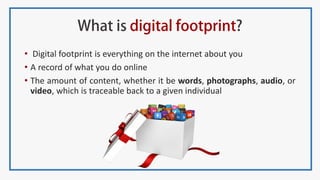
• Digital footprint is everything on the internet about you
• A record of what you do online
• The amount of content, whether it be words, photographs, audio, or
video, which is traceable back to a given individual
5 Questions | Ask Yourself
1) What kind of things would be good for your reputation in the future if
they are posted online now? What kinds of things might be harmful?
2) What does your online activity show?
3) Do you ever post things online about your friends? Do you comment on
their posts or photos? How do you decide what is okay?
4) Name one thing you will do differently to make yourself visible online.
5) How will you feel if you will be visible on Google?
“In the future, your digital footprint will carry far
more weight than anything you might include on
a resume.
- Chris Betcher
What positive things employers want in one’s
online content?
An indication of the applicants personality
Online profile should support professional qualifications and
conduct
Good communication skills
Creativity
Groups in which the applicant is participating in
Do other people provide good references and comments about
them
Have they received any awards and accolades
Do you have a Facebook profile?
Do you have a Twitter profile?
Do you have a LinkedIn profile?
Do you have a profile on any social media channel?
Have you ever been mentioned on any social media channel,
website or blog?
Have you ever been tagged in any image online?
Do you have a Google+ profile?
Do you blog?
Have you ever Googled yourself?
“ Everything you post on
social media impacts your
personal brand. How do you
want to be known
- Lisa Horn
• Use a headshot for your profile picture
• Add a high resolution cover photo
• Get a vanity URL - https://plus.google.com/+vinitshahdeo/
• Use keywords in your cover image filename
• Add more people to your circles
• Become more accessible
• Brief tagline & Full introduction
• Share content to get it indexed
• Be active - Add photos, YouTube videos, Create reviews
• Get noticed by others – Comment, Share, Mention
• Avoid over tagging/sharing
• Don’t make your personal comments public
• Don’t be a victim of Facebook Addiction
Disorder
• Do you think, before you share
• Use proper photo captions
• Mention pic credits
• Allow everyone to follow
• Avoid Fakebook and practice Safebook
• Don’t do something permanently stupid, just
because you’re temporarily upset
• Always remember, it says status, not diary
“Think once before you act,
twice before you speak, and
three times before you post on
Facebook
- Paul Carrick Brunson
“Don’t tweet all about
you, tweet all about
them – Chris Brogan
• Personalized bio
• Put decent profile picture
• Create your own background image
• Tweet regularly
• Respond to everyone
• Engage others directly
• Not everything that pops into your
head needs to be tweeted
• You are what you tweet – Alex Tew
• Start with a professional photo
• Make your headline stand out
• Fill out the “summary” field with 5–6 biggest achievement of yours
• Add images or documents about your experience
• Fill as much of the profile as possible
• Keep your work history relevant
• Add links to relevant sites
• Ask for recommendations
• Join Groups…Strategically
• Use status updates to share industry-relevant content
• Add your Public URL and email signature to your website
• Keep it professional
• Give your video a descriptive title
• Use exact tags
• Write a description -don’t forget to have hyperlinks
• Use simple editing software
• Be social. Share and Collaborate
• Don’t forget to have a Subscribe button
• Don’t do something just because you think it might
get views
• Try not to let negative comments affect you too
much
• Add a Pin It button to your browser
• Add Social Buttons to your board
• Name your board smartly
• Describe your board
• Use hashtags
• Pin trends and unique items
• Follow some boards
• Invite friends to your board
• Perform a Google Search on Pins
• Connect your Instagram and Facebook accounts
• Don’t post too frequently
• Post when the time is right
• Don’t follow too many people
• Don’t post crappy images or words
• Don’t buy fake followers
• Use popular hashtags
• Use popular filters
• Are you showing off and being personal?
• Your message: Focused and clear
• Keep it simple: Create a template and use it forever
• Stunning images: Big Visuals, Minimal Text
• Find a custom font and eye-catching color, and stick with them throughout the
presentation.
• Use a visual metaphor to supplement the text on a slide. Try iconography and
images that support the message.
• Build your slides to fit the full SlideShare screen
• Give your presentation a good title and description
• Tag and categorize your content
• Optimize - Embed on web, Share on Facebook, Google+
• Use Canva, Google Slides, Powerpoint
• Few more PPT(Content) sharing sites – DocSlide, Hubslide
• Link your account with other social media profiles
• Follow the topics and connect with users who have similar interests
• Try to answer questions in your niche
• Use proper grammar and punctuation
• Google before you write
• Use visual content, external links
• Don’t forget to mention sources
• Share your answers
• Visit Quora regularly
Review Writing
• Movie Reviews – IMDb
• Books Reviews – Goodreads, Amazon.com
• Restaurant Reviews – Zomato
• Music Reviews – Gaana.com
• Always have a common username as
www.socialnetworkingsite.com/yourname
• None of your posts should show your
negative side
• Don’t make private photos public on social
media
• Put similar bio everywhere. Your bio should
exactly explain who you are
• Link all your accounts
• Change your settings and make your profile
visible to search engines
“Spend at least 2
minutes thinking about
how to make a post better
before posting it
- Krista Neher
T – is it true
H – is it helpful
I – is it inspiring/interesting
N – is it necessary
K – is it kind
“Don’t put anything on social media you would not
like your boss or grandmother to see
• Don’t have more hashtags than words.
• Don’t go too long
• Don’t try to be too clever
• Don’t hashtag everything
• Be specific - Keep it simple
• Give context
• Don’t string too many words together with a single
hashtag
• Accurate - A professional description
• Exciting - One word that is not boring
• Targeted - One niche descriptor
• Flattering - One accomplishment
• Humanizing - A hobby
• Intriguing – An interesting fact or feature about yourself
• Connected - Your company or another social profile
• Short - Your bio should be to the point
Decide
What you want to
blog about• Blogger
• WordPress
• Tumblr
• Quora
• Spend time to get a unique Brand Name for the blog
• Design logo & put a tagline too
• Choose a clean, simple and responsive template
• Don’t compete but instead make it unique
• Aim for evergreen content - Add a personal touch to your posts
• Use relevant media - Visual contents play an essential part
• Don’t forget the power of Local Language
• Blog Consistently - Enable guest blogging
• Learn basic HTML & SEO – Use alt text for images, Put proper tags
• Use social media – Create pages & share your blogposts
• Practice competitive programming on Hackerrank, CodeChef , SPOJ
• Contribute here – GitHub, Hackerearth
• Participate in Online Hackathons – angelhack
• Create about.me account
• Use SoundCloud, Wattpad
• Optimize your email signature – BrandMyMail.com
• Comment on different blog posts
• Guest blogging – itimes, Lifehack, itechCode
• Share your college experiences – CampusDiaries, Visual Bloggers Club
• Have common password for all your profiles
• Schedule your posts ahead of time
• Use Buffer – Schedule content to multiple social
accounts from one simple dashboard
• Tools similar to Buffer – Hootsuite, HubSpot,
Everypost
• It’s always good to have secondary email
• Know the purpose of using any social media
• Use social media management tools like SumAll,
SocialHunt, SocialCount, BuzzSumo Alerts etc.
• Check your privacy settings on all online media
• Google yourself regularly
• Look through your online friends and screen out anyone you don’t know
• Check what pictures you have posted or been tagged in
• Reset your password if you think someone else knows it
• Check your online profile and make sure you have limited personal
information listed
• Link all your accounts
• Filter all your social profiles
• Buy a personal domain
• Domain providers – GoDaddy, hostmonster,
bluehost etc.
• Build your own website
• Signup for Google Search Console and index
your site.
 How to optimize your website for search engines?
 Does the extensions(.com, .net , .co etc.) affect SEO?
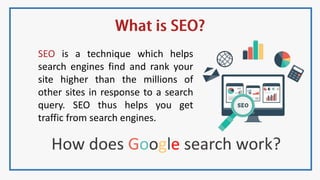
SEO is a technique which helps
search engines find and rank your
site higher than the millions of
other sites in response to a search
query. SEO thus helps you get
traffic from search engines.
How does Google search work?
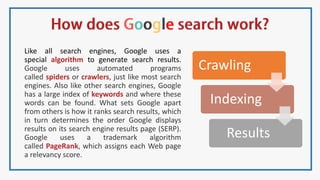
Like all search engines, Google uses a
special algorithm to generate search results.
Google uses automated programs
called spiders or crawlers, just like most search
engines. Also like other search engines, Google
has a large index of keywords and where these
words can be found. What sets Google apart
from others is how it ranks search results, which
in turn determines the order Google displays
results on its search engine results page (SERP).
Google uses a trademark algorithm
called PageRank, which assigns each Web page
a relevancy score.
Crawling
Indexing
Results
• Make sure all pages have unique and relevant title as well as meta
descriptions
• Make sure you have a unique keyword focusing on Title tag of every page
• In each page , focus on a single keyword phrase. Don’t try to optimize the
page for several keywords at once.
• Make sure you have links to your site and within the site use keyword
phrase
• Submit your URL to Google Console
Search: http://www.google.com/addurl/
• Create sitemap
• Text around your links should also be related to keywords
• Use Alt text for images
• Add social media icons
• Use backlinking
• <meta name=“robots” content=“index, follow”>
• <meta name="description" content=“write about your website">
• <meta name="keywords" content="some keywords, phrases">
• <meta name="revisit-after" content="7 days">
• <meta name="author" content=“codechef - vit chapter">
• <meta name="copyright" content=“© CodeChef VIT | 2016">
• <meta name="expires" content="tue, 01 Jun 2010 19:45:00 GMT">
• <meta name="generator" content="dreamweaver">
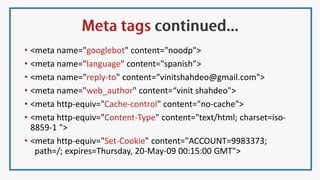
• <meta name="googlebot" content="noodp">
• <meta name="language" content="spanish">
• <meta name="reply-to" content=“vinitshahdeo@gmail.com">
• <meta name="web_author" content=“vinit shahdeo">
• <meta http-equiv="Cache-control" content="no-cache">
• <meta http-equiv="Content-Type" content="text/html; charset=iso-
8859-1 ">
• <meta http-equiv="Set-Cookie" content="ACCOUNT=9983373;
path=/; expires=Thursday, 20-May-09 00:15:00 GMT">
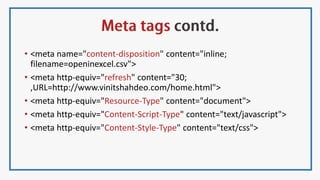
• <meta name="content-disposition" content="inline;
filename=openinexcel.csv">
• <meta http-equiv="refresh" content="30;
,URL=http://www.vinitshahdeo.com/home.html">
• <meta http-equiv="Resource-Type" content="document">
• <meta http-equiv="Content-Script-Type" content="text/javascript">
• <meta http-equiv="Content-Style-Type" content="text/css">
Rebranding - Associate name with location, profession, brand
SEO Practice – Keyword density
Keyword Density
[ (Keyword count)*100]/Total Word Count
Follow your
Digital Footprint!
Google yourself
regularly!
Thank You
Presented By
Vinit
Shahdeo
Organized By
CodeChef
VIT Chapter
vinitshahdeo.com

Digital Footprint | Brand Yourself

  • 1.
  • 2.
  • 4.
    • Digital footprintis everything on the internet about you • A record of what you do online • The amount of content, whether it be words, photographs, audio, or video, which is traceable back to a given individual
  • 5.
    5 Questions |Ask Yourself 1) What kind of things would be good for your reputation in the future if they are posted online now? What kinds of things might be harmful? 2) What does your online activity show? 3) Do you ever post things online about your friends? Do you comment on their posts or photos? How do you decide what is okay? 4) Name one thing you will do differently to make yourself visible online. 5) How will you feel if you will be visible on Google?
  • 6.
    “In the future,your digital footprint will carry far more weight than anything you might include on a resume. - Chris Betcher
  • 7.
    What positive thingsemployers want in one’s online content? An indication of the applicants personality Online profile should support professional qualifications and conduct Good communication skills Creativity Groups in which the applicant is participating in Do other people provide good references and comments about them Have they received any awards and accolades
  • 9.
    Do you havea Facebook profile? Do you have a Twitter profile? Do you have a LinkedIn profile? Do you have a profile on any social media channel? Have you ever been mentioned on any social media channel, website or blog? Have you ever been tagged in any image online? Do you have a Google+ profile? Do you blog? Have you ever Googled yourself?
  • 10.
    “ Everything youpost on social media impacts your personal brand. How do you want to be known - Lisa Horn
  • 12.
    • Use aheadshot for your profile picture • Add a high resolution cover photo • Get a vanity URL - https://plus.google.com/+vinitshahdeo/ • Use keywords in your cover image filename • Add more people to your circles • Become more accessible • Brief tagline & Full introduction • Share content to get it indexed • Be active - Add photos, YouTube videos, Create reviews • Get noticed by others – Comment, Share, Mention
  • 13.
    • Avoid overtagging/sharing • Don’t make your personal comments public • Don’t be a victim of Facebook Addiction Disorder • Do you think, before you share • Use proper photo captions • Mention pic credits • Allow everyone to follow • Avoid Fakebook and practice Safebook • Don’t do something permanently stupid, just because you’re temporarily upset • Always remember, it says status, not diary “Think once before you act, twice before you speak, and three times before you post on Facebook - Paul Carrick Brunson
  • 14.
    “Don’t tweet allabout you, tweet all about them – Chris Brogan • Personalized bio • Put decent profile picture • Create your own background image • Tweet regularly • Respond to everyone • Engage others directly • Not everything that pops into your head needs to be tweeted • You are what you tweet – Alex Tew
  • 15.
    • Start witha professional photo • Make your headline stand out • Fill out the “summary” field with 5–6 biggest achievement of yours • Add images or documents about your experience • Fill as much of the profile as possible • Keep your work history relevant • Add links to relevant sites • Ask for recommendations • Join Groups…Strategically • Use status updates to share industry-relevant content • Add your Public URL and email signature to your website • Keep it professional
  • 16.
    • Give yourvideo a descriptive title • Use exact tags • Write a description -don’t forget to have hyperlinks • Use simple editing software • Be social. Share and Collaborate • Don’t forget to have a Subscribe button • Don’t do something just because you think it might get views • Try not to let negative comments affect you too much
  • 17.
    • Add aPin It button to your browser • Add Social Buttons to your board • Name your board smartly • Describe your board • Use hashtags • Pin trends and unique items • Follow some boards • Invite friends to your board • Perform a Google Search on Pins
  • 18.
    • Connect yourInstagram and Facebook accounts • Don’t post too frequently • Post when the time is right • Don’t follow too many people • Don’t post crappy images or words • Don’t buy fake followers • Use popular hashtags • Use popular filters • Are you showing off and being personal?
  • 19.
    • Your message:Focused and clear • Keep it simple: Create a template and use it forever • Stunning images: Big Visuals, Minimal Text • Find a custom font and eye-catching color, and stick with them throughout the presentation. • Use a visual metaphor to supplement the text on a slide. Try iconography and images that support the message. • Build your slides to fit the full SlideShare screen • Give your presentation a good title and description • Tag and categorize your content • Optimize - Embed on web, Share on Facebook, Google+ • Use Canva, Google Slides, Powerpoint • Few more PPT(Content) sharing sites – DocSlide, Hubslide
  • 20.
    • Link youraccount with other social media profiles • Follow the topics and connect with users who have similar interests • Try to answer questions in your niche • Use proper grammar and punctuation • Google before you write • Use visual content, external links • Don’t forget to mention sources • Share your answers • Visit Quora regularly
  • 23.
    Review Writing • MovieReviews – IMDb • Books Reviews – Goodreads, Amazon.com • Restaurant Reviews – Zomato • Music Reviews – Gaana.com
  • 24.
    • Always havea common username as www.socialnetworkingsite.com/yourname • None of your posts should show your negative side • Don’t make private photos public on social media • Put similar bio everywhere. Your bio should exactly explain who you are • Link all your accounts • Change your settings and make your profile visible to search engines
  • 25.
    “Spend at least2 minutes thinking about how to make a post better before posting it - Krista Neher
  • 26.
    T – isit true H – is it helpful I – is it inspiring/interesting N – is it necessary K – is it kind
  • 27.
    “Don’t put anythingon social media you would not like your boss or grandmother to see
  • 28.
    • Don’t havemore hashtags than words. • Don’t go too long • Don’t try to be too clever • Don’t hashtag everything • Be specific - Keep it simple • Give context • Don’t string too many words together with a single hashtag
  • 29.
    • Accurate -A professional description • Exciting - One word that is not boring • Targeted - One niche descriptor • Flattering - One accomplishment • Humanizing - A hobby • Intriguing – An interesting fact or feature about yourself • Connected - Your company or another social profile • Short - Your bio should be to the point
  • 30.
    Decide What you wantto blog about• Blogger • WordPress • Tumblr • Quora
  • 32.
    • Spend timeto get a unique Brand Name for the blog • Design logo & put a tagline too • Choose a clean, simple and responsive template • Don’t compete but instead make it unique • Aim for evergreen content - Add a personal touch to your posts • Use relevant media - Visual contents play an essential part • Don’t forget the power of Local Language • Blog Consistently - Enable guest blogging • Learn basic HTML & SEO – Use alt text for images, Put proper tags • Use social media – Create pages & share your blogposts
  • 33.
    • Practice competitiveprogramming on Hackerrank, CodeChef , SPOJ • Contribute here – GitHub, Hackerearth • Participate in Online Hackathons – angelhack • Create about.me account • Use SoundCloud, Wattpad • Optimize your email signature – BrandMyMail.com • Comment on different blog posts • Guest blogging – itimes, Lifehack, itechCode • Share your college experiences – CampusDiaries, Visual Bloggers Club
  • 34.
    • Have commonpassword for all your profiles • Schedule your posts ahead of time • Use Buffer – Schedule content to multiple social accounts from one simple dashboard • Tools similar to Buffer – Hootsuite, HubSpot, Everypost • It’s always good to have secondary email • Know the purpose of using any social media • Use social media management tools like SumAll, SocialHunt, SocialCount, BuzzSumo Alerts etc.
  • 35.
    • Check yourprivacy settings on all online media • Google yourself regularly • Look through your online friends and screen out anyone you don’t know • Check what pictures you have posted or been tagged in • Reset your password if you think someone else knows it • Check your online profile and make sure you have limited personal information listed • Link all your accounts • Filter all your social profiles
  • 36.
    • Buy apersonal domain • Domain providers – GoDaddy, hostmonster, bluehost etc. • Build your own website • Signup for Google Search Console and index your site.  How to optimize your website for search engines?  Does the extensions(.com, .net , .co etc.) affect SEO?
  • 38.
    SEO is atechnique which helps search engines find and rank your site higher than the millions of other sites in response to a search query. SEO thus helps you get traffic from search engines. How does Google search work?
  • 39.
    Like all searchengines, Google uses a special algorithm to generate search results. Google uses automated programs called spiders or crawlers, just like most search engines. Also like other search engines, Google has a large index of keywords and where these words can be found. What sets Google apart from others is how it ranks search results, which in turn determines the order Google displays results on its search engine results page (SERP). Google uses a trademark algorithm called PageRank, which assigns each Web page a relevancy score. Crawling Indexing Results
  • 40.
    • Make sureall pages have unique and relevant title as well as meta descriptions • Make sure you have a unique keyword focusing on Title tag of every page • In each page , focus on a single keyword phrase. Don’t try to optimize the page for several keywords at once. • Make sure you have links to your site and within the site use keyword phrase • Submit your URL to Google Console Search: http://www.google.com/addurl/ • Create sitemap • Text around your links should also be related to keywords • Use Alt text for images • Add social media icons • Use backlinking
  • 41.
    • <meta name=“robots”content=“index, follow”> • <meta name="description" content=“write about your website"> • <meta name="keywords" content="some keywords, phrases"> • <meta name="revisit-after" content="7 days"> • <meta name="author" content=“codechef - vit chapter"> • <meta name="copyright" content=“© CodeChef VIT | 2016"> • <meta name="expires" content="tue, 01 Jun 2010 19:45:00 GMT"> • <meta name="generator" content="dreamweaver">
  • 42.
    • <meta name="googlebot"content="noodp"> • <meta name="language" content="spanish"> • <meta name="reply-to" content=“vinitshahdeo@gmail.com"> • <meta name="web_author" content=“vinit shahdeo"> • <meta http-equiv="Cache-control" content="no-cache"> • <meta http-equiv="Content-Type" content="text/html; charset=iso- 8859-1 "> • <meta http-equiv="Set-Cookie" content="ACCOUNT=9983373; path=/; expires=Thursday, 20-May-09 00:15:00 GMT">
  • 43.
    • <meta name="content-disposition"content="inline; filename=openinexcel.csv"> • <meta http-equiv="refresh" content="30; ,URL=http://www.vinitshahdeo.com/home.html"> • <meta http-equiv="Resource-Type" content="document"> • <meta http-equiv="Content-Script-Type" content="text/javascript"> • <meta http-equiv="Content-Style-Type" content="text/css">
  • 44.
    Rebranding - Associatename with location, profession, brand SEO Practice – Keyword density Keyword Density [ (Keyword count)*100]/Total Word Count
  • 46.
  • 47.
    Thank You Presented By Vinit Shahdeo OrganizedBy CodeChef VIT Chapter vinitshahdeo.com