Using social media for career progression Boosting your online identity
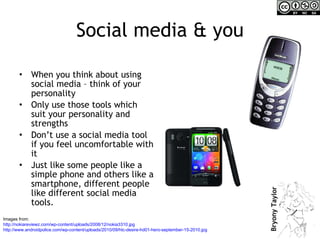
Social media & you When you think about using social media – think of your personality Only use those tools which suit your personality and strengths  Don’t use a social media tool if you feel uncomfortable with it Just like some people like a simple phone and others like a smartphone, different people like different social media tools. Images from:  http://nokiareviewz.com/wp-content/uploads/2008/12/nokia3310.jpg http://www.androidpolice.com/wp-content/uploads/2010/09/htc-desire-hd01-hero-september-15-2010.jpg
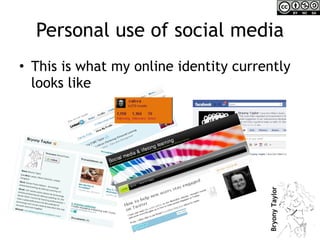
Personal use of social media This is what my online identity currently looks like
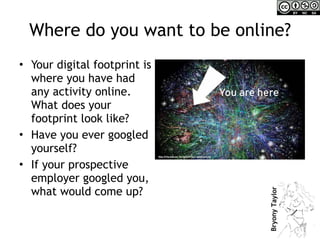
Where do you want to be online? Your digital footprint is where you have had any activity online. What does your footprint look like? Have you ever googled yourself? If your prospective employer googled you, what would come up?
Managing your online identity Not having any online presence at all can be just as bad as having a negative presence – especially to prospective employers who are trying to look you up! You have the opportunity to manage what comes up when people Google you. The rest of this presentation gives you some tips for getting started with this.
Developing an online presence – some ideas: Join a professional network like  LinkedIn  – but make sure you use it! Set up a profile on  http://Slideshare.net   as a place to host your presentations Set up a  professional blog  Join  Twitter  to share ideas and create a professional network
Recommended sites http:// www.linkedin.com/nhome /   http:// twitter.com /   http:// www.slideshare.net /   For your own blog:  http:// wordpress.com /   or  https:// posterous.com /
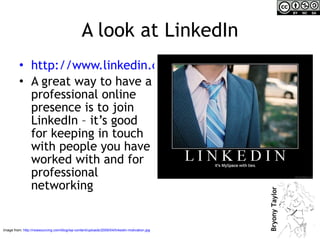
A look at LinkedIn http://www.linkedin.com/nhome/ A great way to have a professional online presence is to join LinkedIn – it’s good for keeping in touch with people you have worked with and for professional networking Image from:  http://nowsourcing.com/blog/wp-content/uploads/2009/04/linkedin-motivation.jpg
Making the most of LinkedIn A lot of people join LinkedIn but then don’t do anything with their account. These next few slides provide some tips on getting the most out of LinkedIn, you never know, you might get a dream job offer out of it!
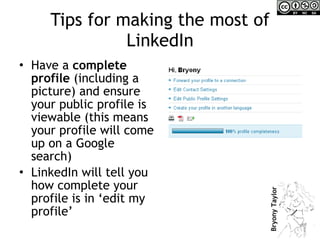
Tips for making the most of LinkedIn Have a  complete profile  (including a picture) and ensure your public profile is viewable (this means your profile will come up on a Google search) LinkedIn will tell you how complete your profile is in ‘edit my profile’
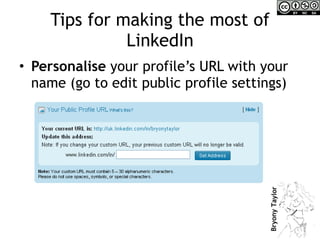
Tips for making the most of LinkedIn Personalise  your profile’s URL with your name (go to edit public profile settings)
Tips for making the most of LinkedIn If you have them,  link  your blog, Twitter & Slideshare accounts to LinkedIn Add as many  connections  as you can and keep looking for new ones – just ask people you know, most people say yes! Look people up – you can find old colleagues Join  a relevant LinkedIn  group
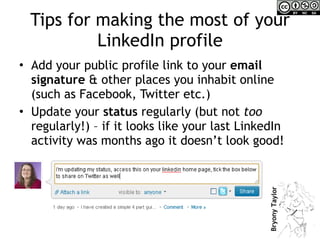
Tips for making the most of your LinkedIn profile Add your public profile link to your  email signature  & other places you inhabit online (such as Facebook, Twitter etc.) Update your  status  regularly (but not  too  regularly!) – if it looks like your last LinkedIn activity was months ago it doesn’t look good!
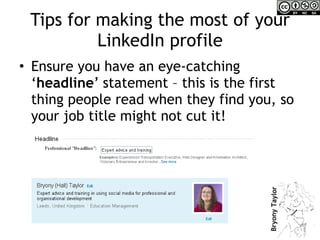
Tips for making the most of your LinkedIn profile Ensure you have an eye-catching ‘ headline ’ statement – this is the first thing people read when they find you, so your job title might not cut it!
Tips for making the most of your LinkedIn profile Speak  to your contacts on LinkedIn – comment on their status or send them a message Ask people to  endorse  you & write some endorsements/recommendations Answer a question on the ‘ answers ’ page  –  show your  expertise
Tips for using LinkedIn If you are in a  group , start a discussion, ask a question or join in a discussion Search for  jobs  in LinkedIn (it will also make recommendations for jobs based on the information in your profile) Search for the  organisation  you are applying to work for and/or people you might work with Ask advice via the ‘ answers ’ section Introduce contacts to each other through LinkedIn (ie forward the profile to a connection)
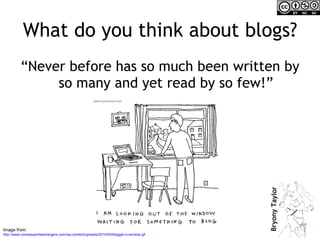
What do you think about blogs? “ Never before has so much been written by so many and yet read by so few!” Image from:  http://www.consequentialstrangers.com/wp-content/uploads/2010/05/blogger-o-window.gif
Blogging Blogging can be a really useful professional development tool It is a way you can promote your work And perhaps, most significantly, it is a way that you can share your knowledge with the world and receive comments and ideas from others
Some types of blog A place to keep things you’re interested in (eg. Videos, other people’s blogs, pictures) – for this I recommend  https:// posterous.com /   A reflective practice blog – where you journal your thoughts about your area of interest/your work – for this I recommend  http:// wordpress.com /   A themed blog – eg. Music reviews, HR tips, making cup cakes – for this I recommend  http:// www.tumblr.com /
Blogging If you decide to create a blog, don’t forget to share the link on your other networks (like Twitter, LinkedIn etc.)  A lot of blogs enable you to ‘autopost’ to other services Enable people to subscribe to your updates and gain a wide readership
Blogging Think about what you would like to write about. Will it be a reflective blog, a themed blog or just a place where you can keep stuff you’re interested in? Here are my different blogs just to give you an example: Personal:  http:// vahva.wordpress.com /   Professional:  http:// sociallearningonline.wordpress.com /   Stuff I find interesting/funny:  http:// vahva.posterous.com /
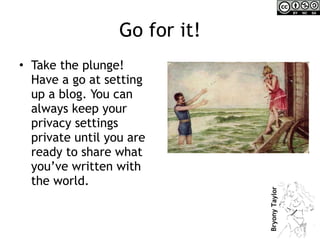
Go for it! Take the plunge! Have a go at setting up a blog. You can always keep your privacy settings private until you are ready to share what you’ve written with the world.
Contact me If you still have questions, please feel free to contact me at bryony.taylor @ gmail.com Or ask me on Twitter  @vahva

Developing an online identity - some tips

  • 1.
    Using social mediafor career progression Boosting your online identity
  • 2.
    Social media &you When you think about using social media – think of your personality Only use those tools which suit your personality and strengths Don’t use a social media tool if you feel uncomfortable with it Just like some people like a simple phone and others like a smartphone, different people like different social media tools. Images from: http://nokiareviewz.com/wp-content/uploads/2008/12/nokia3310.jpg http://www.androidpolice.com/wp-content/uploads/2010/09/htc-desire-hd01-hero-september-15-2010.jpg
  • 3.
    Personal use ofsocial media This is what my online identity currently looks like
  • 4.
    Where do youwant to be online? Your digital footprint is where you have had any activity online. What does your footprint look like? Have you ever googled yourself? If your prospective employer googled you, what would come up?
  • 5.
    Managing your onlineidentity Not having any online presence at all can be just as bad as having a negative presence – especially to prospective employers who are trying to look you up! You have the opportunity to manage what comes up when people Google you. The rest of this presentation gives you some tips for getting started with this.
  • 6.
    Developing an onlinepresence – some ideas: Join a professional network like LinkedIn – but make sure you use it! Set up a profile on http://Slideshare.net as a place to host your presentations Set up a professional blog Join Twitter to share ideas and create a professional network
  • 7.
    Recommended sites http://www.linkedin.com/nhome / http:// twitter.com / http:// www.slideshare.net / For your own blog: http:// wordpress.com / or https:// posterous.com /
  • 8.
    A look atLinkedIn http://www.linkedin.com/nhome/ A great way to have a professional online presence is to join LinkedIn – it’s good for keeping in touch with people you have worked with and for professional networking Image from: http://nowsourcing.com/blog/wp-content/uploads/2009/04/linkedin-motivation.jpg
  • 9.
    Making the mostof LinkedIn A lot of people join LinkedIn but then don’t do anything with their account. These next few slides provide some tips on getting the most out of LinkedIn, you never know, you might get a dream job offer out of it!
  • 10.
    Tips for makingthe most of LinkedIn Have a complete profile (including a picture) and ensure your public profile is viewable (this means your profile will come up on a Google search) LinkedIn will tell you how complete your profile is in ‘edit my profile’
  • 11.
    Tips for makingthe most of LinkedIn Personalise your profile’s URL with your name (go to edit public profile settings)
  • 12.
    Tips for makingthe most of LinkedIn If you have them, link your blog, Twitter & Slideshare accounts to LinkedIn Add as many connections as you can and keep looking for new ones – just ask people you know, most people say yes! Look people up – you can find old colleagues Join a relevant LinkedIn group
  • 13.
    Tips for makingthe most of your LinkedIn profile Add your public profile link to your email signature & other places you inhabit online (such as Facebook, Twitter etc.) Update your status regularly (but not too regularly!) – if it looks like your last LinkedIn activity was months ago it doesn’t look good!
  • 14.
    Tips for makingthe most of your LinkedIn profile Ensure you have an eye-catching ‘ headline ’ statement – this is the first thing people read when they find you, so your job title might not cut it!
  • 15.
    Tips for makingthe most of your LinkedIn profile Speak to your contacts on LinkedIn – comment on their status or send them a message Ask people to endorse you & write some endorsements/recommendations Answer a question on the ‘ answers ’ page – show your expertise
  • 16.
    Tips for usingLinkedIn If you are in a group , start a discussion, ask a question or join in a discussion Search for jobs in LinkedIn (it will also make recommendations for jobs based on the information in your profile) Search for the organisation you are applying to work for and/or people you might work with Ask advice via the ‘ answers ’ section Introduce contacts to each other through LinkedIn (ie forward the profile to a connection)
  • 17.
    What do youthink about blogs? “ Never before has so much been written by so many and yet read by so few!” Image from: http://www.consequentialstrangers.com/wp-content/uploads/2010/05/blogger-o-window.gif
  • 18.
    Blogging Blogging canbe a really useful professional development tool It is a way you can promote your work And perhaps, most significantly, it is a way that you can share your knowledge with the world and receive comments and ideas from others
  • 19.
    Some types ofblog A place to keep things you’re interested in (eg. Videos, other people’s blogs, pictures) – for this I recommend https:// posterous.com / A reflective practice blog – where you journal your thoughts about your area of interest/your work – for this I recommend http:// wordpress.com / A themed blog – eg. Music reviews, HR tips, making cup cakes – for this I recommend http:// www.tumblr.com /
  • 20.
    Blogging If youdecide to create a blog, don’t forget to share the link on your other networks (like Twitter, LinkedIn etc.) A lot of blogs enable you to ‘autopost’ to other services Enable people to subscribe to your updates and gain a wide readership
  • 21.
    Blogging Think aboutwhat you would like to write about. Will it be a reflective blog, a themed blog or just a place where you can keep stuff you’re interested in? Here are my different blogs just to give you an example: Personal: http:// vahva.wordpress.com / Professional: http:// sociallearningonline.wordpress.com / Stuff I find interesting/funny: http:// vahva.posterous.com /
  • 22.
    Go for it!Take the plunge! Have a go at setting up a blog. You can always keep your privacy settings private until you are ready to share what you’ve written with the world.
  • 23.
    Contact me Ifyou still have questions, please feel free to contact me at bryony.taylor @ gmail.com Or ask me on Twitter @vahva

Editor's Notes

  • #5 Have you ever googled yourself? What is your online identity? Digital footprint. Where are you online? Using LinkedIn Using Facebook Using Twitter Using Slideshare Writing a blog
  • #8 Explain how will go into more detail about these sites later in the day’s course
  • #18 Ask the group about their perceptions of blogs, do any of them blog?