Unityプログレッシブライトマッパー
Unity Progressive Lightmapper
Unity Technologies Korea
Technical Artist/Evangelist
SangYun Yi
フィールドに光を着せる
SangYun Yi
Unity Technologies Korea Technical Artst/Evangelist
https://illu.tistory.com
sangyun@unity3d.com
15 Build on game environment art for mobile platform using the Light probes
16 Rooms2 mobile to VR
17 Implement quality unity shader on mobile hardware
18 Unity Pregressive Lightampper(2H)
19 Surface Shader for Artist(Training 4H)
Lighting..?
Lighting in game or 3D Contents
• make users aware of the game design
• Describe and direct the game environment with Mood and Tone.
• Description of the shape and material of objects placed in a scene.
• Depth Representation.
Le Mont-Saint-Michel
Abbaye du Thoronet
Piazza San Pietro Colonnade
Gyeongbokgung
Chosun dynasty palace in Seoul
Jongmyo Shrine
Why using Lightmapping?
• Performance : low device(AR, VR do not using real time GI)
• Quality : Realtim GI does not perfect implement G.I
• More clearly reflected indirect light.
Vertex Color Lighting
• A simple solution for how to express light with vertex color.
• The number of vertices should be sufficient and the expression is limited because according
to direction of edge.
• A good way to assist in situations where lightmap textures are limited
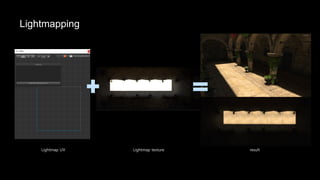
Lightmapping
Lightmap UV Lightmap texture result
Asset
Work process
3D props
Terrain or mesh
Lighting
Main lighting
(direction, color)
Sub lighting
(ambient color, sub light.. etc)
Budget check
Platform dependencies
game, animation, industries
pc, mobile, console..etc
Memory, hardware
spec
Rough & check
Texel size test
(most option set the lowest value)
Main scene mood
Level design
Lighting plan
work concept
(theme mood.. Etc)
Lightmap method
(baked indirect, shadowmask… etc)
Level design
Main bake
Sub option activation
Maximized option value
Add Detail lighting
Modifed and Polishing
Artifact check
running test on target
platform
Camera Technical plan
(LOD, Post Processing..etc)
Unity Progressive Lightmapper
Unity Lightmapping system change history
Unity 3.X, 4.X
Unity 5.X(deprecated)
Unity 2018.3(Preview)
Unity 5.6(Preview)
Lighting: Technical information and terminology
Emitted Light : This is light that is emitted directly onto
the surface of the Scene.
Direct Light : This is light that is emitted, hits the surface
of the Scene and is then reflected into a sensor (for
example, the eye’s retina or a camera). A Light’s direct
contribution is any direct light that arrives at a sensor
from that Light.
https://docs.unity3d.com/Manual/LightModes-TechnicalInformation.html
Indirect Light : This is light that is emitted, hits the surface of the Scene at least two times and is ultimately
reflected into a sensor. A Light’s indirect contribution is any indirect light that arrives at a sensor from that Light.
Light
Camera
object
object
Emissive object
Lighting options
Mixed Lighting
Mixed Lights are Light components which have their Mode property set to Mixed.
Mixed mode Legacy LWRP(ULRP) HDRP
Subtractive Supported Supported X
Baked Indirect Supported Supported Supported
Shadowmask supported X(2019.3 will be released) Supported
Lighting >> Mixed Lighting menu Light >> Mode set the mode
Subtractive
Traditional lightmapping method.
All the lighting information baked on texture
(Direct, indirect lights)
Discards the information that Unity uses to
composite dynamic and static shadows in other
Mixed lighting modes.
Do not show specular or glossy highlights.
Subtractive mode: All light paths are precomputed.
Mixed baked(subtractive) Non mixed baked(subtractive)
Shadow does not casting and light does not
working in the scene. But if add light it can work
in the scene but draw call increase.
Shadow can casting and light does not effected to
static object(dynamic object be effected). Also drawcall
increase for shadow casting(directional and point light)
Subtractive mode therefore has a
realtime shadow color field. Unity uses
this color in the shader.
Shadow transparent controlled by ‘realtme shadows
strength’ option in (main)directional light.
(It does not working on real time lighting only)
Advantage
• It provides high-quality shadows between static GameObjects in lightmaps at no additional performance
requirement.
• One Texture operation in the Shader handles all lighting and shadows between static GameObjects.
• It provides indirect lighting.
Disadvantage
• It does not provide real-time direct lighting, and therefore does not provide specular lighting.
• It does not provide dynamic shadows on static GameObjects, except for one Directional Light (the main
Light).
• It only provides low-resolution shadows from static GameObjects onto dynamic GameObjects, via Light
Probes.
• It provides inaccurate composition of dynamic and static shadows.(compared to no lightmaps)
LWRP(6.9.0)
(direction light x 1, point light x 4)
LWRP limitet max 4 light per object, but bake lightmap does not effected it
LWRP(6.9.0)
Real time point light x 20
LWRP(6.9.0)
Baked point light x 20
LWRP(6.9.0)
point light soft shadow
Legacy point light baked
(soft and hard shadow)
LWRP(6.9.0)
point light hard shadow
In LWRP point light does not supported real time shadow but shadow attenuation change to Physically Based Light Attenuation. Light intensity
decreases by the inverse-square law.
Legacy point light real time
(soft and hard shadow)
Legacy spot light
(soft & hard shadow)
Baked shadow Radius : 0
Legacy spot light
(soft shadow)
Baked shadow Radius : 2
LWRP(6.9.0)
(soft & hard shadow)
Baked shadow Radius : 0
LWRP(6.9.0)
(soft shadow)
Baked shadow Radius : 2
Indirect multiplier : control the indirect lighting intensity
Legacy spot light
Indirect multiplier : 1
Legacy spot light
Indirect multiplier : 50
LWRP spot light
Indirect multiplier : 1
LWRP spot light
Indirect multiplier : 50
Baked Indirect
For Lights that are set to Baked Indirect mode, Unity
only precomputes indirect lighting, and does not
carry out shadow pre-computations.(Shadow are fully
real-time withing the shadow distance)
The performance requirements of Baked Indirect
mode make it a good option for building to mid-
range PC’s and high-end mobile devices.
Default rendering budget + baked indirect lightmap
textures
Baked Indirect mode: Only indirect lighting is precomputed
Baked in direct + Realtime lighting
(direction light x 1, point light x 4)
Batches : 30, Saved by batch : 9
Realtime lighting
(direction light x 1, point light x 4)
Batches : 30, Saved by batch : 9
Baked in direct + Realtime lighting
(direction light x 1)
Batches : 8, Saved by batch : 3
Baked in direct
Batches : 3, Saved by batch : 1
Baked in direct + Realtime lighting
(direction light x 1)
Batches : 8, Saved by batch : 3, SetPassCall : 6
Realtime light + SSAO
(direction light x 1)
Batches : 16, Saved by batch : 3, SetPassCall : 13
Compare Baked indirect and SSAO(Screen Space Ambient Occlusion)
Baked indirect Lit shader
HDRP Baked indirect
HDRP ambient color is affected from Static Lighting Sky in scene settings.
HDRP Baked Indirect
GPU Progressive lightmapper
Direct Samples : 32, Indirect Samples : 50
Environment Samples : 50, filter : Auto
HDRP Baked Indirect
GPU Progressive lightmapper
Direct Samples : 32, Indirect Samples : 500
Environment Samples : 100, filter : Auto
HDRP Baked Indirect
CPU Progressive lightmapper
Direct Samples : 32, Indirect Samples : 50
Environment Samples : 50, filter : Auto
HDRP Baked Indirect(GPU)
Direct Samples : 32, Indirect Samples : 50
Environment Samples : 50, filter : Auto
HDRP Baked Indirect(GPU)
Direct Samples : 32, Indirect Samples : 500
Environment Samples : 100, filter : Auto
Legacy Baked Indirect
Direct Samples : 32, Indirect Samples : 50
Environment Samples : 50, filter : Auto
Advantage
• It provides the same visual effect as Realtime Lighting.
• It provides indirect lighting.
Disadvantage
• It has higher performance requirements relative to other Mixed Light modes, because it renders shadow-
casting static GameObjects into shadow maps.
• Shadows do not render beyond the Shadow Distance.
Shadowmask
Shadowmask and Distance Shadowmask modes: Indirect lighting
and direct occlusion are precomputed
Precomputes shadows cast from static static
GameObjects.
Project Settings >> Quality >> shadowmask mode
select Shadowmask, Distance Shadowmask
Realtime, Baked Indirect
(direction light x 1, point light x 4)
Batches : 35, Saved by batch : 9, SetPassCall : 32
Shadowmask
(direction light x 1, point light x 4)
Batches : 16, Saved by batch : 1, SetPassCall : 15
Lightmap texture
Lightmap texture
Shadowmask texture
Precomputes shadows cast from static static
GameObjects.
if light over 4 count overlapping in per pixel ,
lightmapper bake the light into the lightmap texture.
Light Probes also receive the same information for up
to 4 lights.
Shadowmask texture sepearted each RGBA channel
Compare shadowmask and Distance shadowmask, Baked Indirect
Shadowmask
(mixed direction light x 1)
Batches : 259, Saveb by batch : 16, SetPassCall : 182
Distance Shadowmask
(mixed direction light x 1)
Batches : 456, Saveb by batch : 129, SetPassCall : 211
Baked Indirect
(mixed direction light x 1)
Batches : 508, Saveb by batch : 167, SetPassCall : 211
Shadow Quality
Realtime lighting Baked shadow texture to lightmap
Shadow distance applied distance shadowmask mode
set a short shadow distance, see a border where the shadow texture and realtime shadow change as shown in
the image above.
Advantage
• It offers the same visual effect as Realtime Lighting.
• It provides real-time shadows from dynamic GameObjects onto static GameObjects.
• One Texture operation in the Shader handles all lighting and shadows between static GameObjects.
• It automatically composites overlapping shadows from static and dynamic GameObjects.
• It has mid-to-low performance requirements, because it does not render static GameObjects into shadow maps.
• It provides indirect lighting.
Disadvantage
• It only provides low-resolution shadows from static GameObjects onto dynamic GameObjects, via Light Probes.
• It only allows up to 4 overlapping light .
• It has increased memory requirements for the light map Texture / Shadow mask texture.
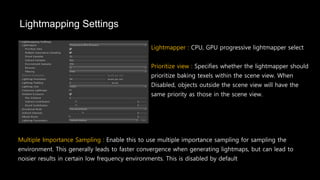
Lightmapping Settings
Lightmapper : CPU, GPU progressive lightmapper select
Prioritize view : Specifies whether the lightmapper should
prioritize baking texels within the scene view. When
Disabled, objects outside the scene view will have the
same priority as those in the scene view.
Multiple Importance Sampling : Enable this to use multiple importance sampling for sampling the
environment. This generally leads to faster convergence when generating lightmaps, but can lead to
noisier results in certain low frequency environments. This is disabled by default
Prioritize view disable Prioritize view enable
Direct Samples : Number of rays shot
towards light sources
Indirect Samples : Number of paths
shot in the upper hemisphere
Bounces : Number of times a ray is
allowed to bounce of another surface
Direct Light(Local illumination)
Indirect Light(Global illumination)
Bounces
Local illumination
Global illumination
Direct samples : 1
Indirect Samples : 8
Bounces : 1
Direct samples : 1
Indirect Samples : 500
Bounces : 1
Direct samples : 1
Indirect Samples : 500
Bounces : 4
Direct samples : 1
Indirect Samples : 500 Bounces : 4
+
Point light indirect multiplier : 10
GPU Progressive lightmapper CPU Progressive lightmapper
Filter : None Filter : Advanced
Denosiser : Open ImageDenoise, optix
Direct / Indirect / AO Filter : None
Filter : Advanced
Denosiser : Open ImageDenoise
Direct / Indirect / AO Filter : Gaussian
GPU Progressive Lightmapper support only Gaussian filtering mode.
Direct samples : 16
Indirect Samples : 100
Environment Samples : 100
Bounces : 1
Multiple Importance sampling : Disable / Enable
Skybox cubemap : 32x32
Direct samples : 16
Indirect Samples : 100
Environment Samples : 100
Bounces : 1
Multiple Importance sampling : Disable / Enable
Skybox cubemap : 1024x1024
Intel Open Image Denoise : https://openimagedenoise.github.io/
Nvidia Optix AI-Accelerated Denoiser :
https://developer.nvidia.com/optix-denoiser/
Lightmap Resoultion
Sets the resolution in texels that are used per unit for objects being lit by baked global
illumination. Larger value will result in increased time to calculate the baked lighting.
• Pixels in lightmap
• Mapped to units of space
• Texel count is proportional to resolution^2
• Each texel spawns:
• n direct rays towards k lights
• m indirect rays * j bounces
• one direct ray per bounce towards K
lights
• Texels are the amount of work to do
texel resolution could checked in the scene windows submenu “baked Lightmap”
Lightmap Resolution : 1 Lightmap Resolution : 5
Lightmap Resolution : 25.6(reach out maximize texel size in this scene)
Scale in Lightmap
Lightmap texture can controlled by each object scale in lightmap.
If your UVs are split into multiple chart, it's best not to reduce them when the lightmap texture
resolution is not sufficient.
Ensure that you use fewer non-important objects in your level design(in Camera view).
Objects that use lightmaps large enough can be adjusted accordingly.
Stitch seams
lightmap seam stitching is a technique that smooths unwanted hard edges in GameObjects
seam line appeared on mesh when texel size to too small.
https://docs.unity3d.com/Manual/Lightmapping-SeamStitching.html
Ambient Occlusion
Ambient Occlusion : disable Max distance : 1 Max distance : 10
Ambient Color
Environment Lighting : These settings affect light
coming from the distant environment.
ambient light is light that is present all around the Scene and
doesn’t come from any specific source object. Use this to
define a source color.
Intensity Multiplier : brightness of the diffuse environmental light in the Scene, defined as a value between 0
and 8. The default value is 1
How ambient color effect to scene’s mood and tone.
LowPoly environment Pack
https://assetstore.unity.com/packages/3d/environments/landscapes/lowpoly-environment-pack-99479
Environment Lighting : GradientEnvironment Lighting : Skybox
Environment Lighting : Color Environment Lighting : Color
Statics
The panel the Auto Generate and Generate Lighting options shows statistics about the lightmapping.
Occupied Texel : The number of texels that are occupied in lightmap UV space.
Bake Performance: The number of rays per second. If this is low (that is, less than 2) you should adjust your
settings or your hardware to process more light rays at a time.
GPU based Progressive Lightmapper
GPU Progressive Lightmapper
The GPU version an order of magnitude faster than the CPU version
RadeonRays: an open source ray tracing library from AMD
Unity and AMD have collaborated on the GPU Lightmapper to implement several key features :
power sampling, rays compaction, and custom BVH(Bounding volume hierarchy) traversal.
• Unbiased interactive lightmapping
• Feature parity between CPU and GPU backends
• Compute based solution
• Wavefront path tracing for maximum performance
https://en.wikipedia.org/wiki/Bounding_volume_hierarchy
https://gpuopen.com/gaming-product/radeon-rays
Requirements and Limitations
To use the Progressive GPU Lightmapper, your computer must have:
• At least one GPU with OpenCL 1.2 support(RadeonRays based on OpenCL 1.2)
- Geforce 600 Series(Kepler), AMD HD5000 Series(Evergreen)
• At least 2GB of dedicated GPU memory
• A CPU that supports SSE4.1 instructions(at least Intel Penryn, AMD Bulldozer.. Etc)
- Recommended AMD graphics driver: 18.9.3. / Nvidia graphics driver: 416.34.
The Progressive GPU Lightmapper does not support:
• Baked LOD
• A-Trous filtering (it only uses Gaussian filtering)
• The custom bake API (experimental)
• Submeshes (the lightmapper uses Material properties on the first submesh)
Sponza 63 Refection Probes
GPU : Nvidia GTX 1080
Direct Sample : 24 / Indirect Sample : 50
Progressive bake : about 2min 10sec Progressive GPU bake : about 20sec
The goal of the GPU lightmapper is to provide the same feature set as the CPU progressive lightmapper,
with higher performance.
LOD Mesh Bake Lightmap
LOD0 : 3001 tris LOD1 : 2293 tris Scene Settings
LOD mesh baked CPU Progressive Lightmap
Baking time at least 10 min, CPU processor usage 99% during bake
LOD mesh baked GPU Progressive Lightmap
Baking time at least 30 sec, GPU Processor usage 99% during bake
LOD mesh using Light Probes
Baked lightmap
LOD0
no lightmap / no light
probes
LOD1
no lightmap / light probes
LOD1
no lightmap / light probes
proxy volume
LOD1
no lightmap / light probes
proxy volume
LOD1
Actual scale compare in scene
no lightmap / light probes
proxy volume
LOD1
no lightmap / light probes
proxy volume + vertex color
LOD1
3DS MAX view port
• Marking only LOD0 in an LOD Group as lightmap
static
• Only renderers in LOD0 get lightmap texels
• Lower LODs reuse those texels
• UVs need to match between LOD levels
• Same UV island outline, simpler topology inside
• Bakes are fast again
• All renderers processed in one go
• Raytracer’s acceleration structure is static
Projection LOD lightmapping
https://www.slideshare.net/unity3d/progressive-lightmapper-an-introduction-to-lightmapping-in-unity
Applied Batching Static
Objects using same material(Legacy Standard)
Checked Contribute Static(for lightmaps) and same lightmap texture index
Subtractive bake mode(non realtime lighting)
Batches : 2, Saved by batching : 3
Batches : 4, Saved by batching : 1
LOD1 using lightProbes
Batches : 3, Saved by batching : 2
LOD1 mesh separated batching statics
(if LOD1 do not use light probes it be a
static batching)
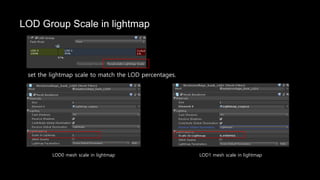
LOD Group Scale in lightmap
set the lightmap scale to match the LOD percentages.
LOD0 mesh scale in lightmap LOD1 mesh scale in lightmap
Submeshes bake
2 submeshes 5 submeshes
Defense Technica(steam, PS3, XBOX360) 2013
Use several submeshes
Standard(Transparent)
Standard(Cutout)
Standard(Fade)
Transparent object can bake shadow only directional light.(Mixed Subtractive, baked)
Transparent(Legacy Render Pipeline)
Realtime lighting
Transparent(HDRP)
Lit(Transparent-AlphaClipping) Lit(Opaque-AlphaClipping) Lit(Transparent-alpha)
Realtime
Baked
Lit(Transparent-AlphaClipping) Lit(Opaque-AlphaClipping) Lit(Transparent-alpha)
Shadowmask
Baked- point, spot lights
(not include directional lighting)
Lit(Transparent-AlphaClipping) Lit(Opaque-AlphaClipping) Lit(Transparent-alpha)
Transparent(LWRP)
Lit(Transparent-AlphaClipping) Lit(Opaque-AlphaClipping) Lit(Transparent-alpha)
Realtime
Baked, Mixed subtractive
(CPU, GPU)
Same Lightmapper option HDRP
Lit(Transparent-AlphaClipping) Lit(Opaque-AlphaClipping) Lit(Transparent-alpha)
Lit(Transparent-AlphaClipping) Lit(Opaque-AlphaClipping) Lit(Transparent-alpha) Subtractive support point,
spot light shadow
Others..
Mesh UV
If mesh does not has lightmap uv(uv2), lightmapper bake to 1st UV again.
Mesh Lightmap UV
UV Editor >> UV Sets >> Current UV set Select 2nd UV
Maya 2018
Unwrap UVW >> Channel >> Map Channel >> Select 2nd
UV
3DS Max 2018
Utilities >> channel info >> 3DS MAX can check uv information
Unwrap UV
Modify >> Layout
Maya 2018
Arrange Elements
3DS Max 2018
Generate Lightmap UVs
Unity can unwrap uv : Model option >> Generate Lightmap UVs
default UV(unwrap in 3DS MAX) Hard Angle : 88(default) Hard Angle : 178
Pack Margin : 16
if object shape close to cylinder, it’s better to work in DCC Tools and don't divide uv
seam line.
Pro Builder
Hard Angle : 178
Probuilder Generate UVs : Probuilder Object >> Probuilderize menu support check the UV visualized in editor.
This is a same function in model option.
Visualising baked UVs
Lightmap uv check in baked lightmap texture. Mesh component Lightmapping >> Open Preview
Camera
1
2
3
1
2
3
1
2
3
3
2
1
Object scale in lightmap depend on object scale in scene If object has a extra uv space, the lightmapper fills
that spaces.
Things to keep in mind
• 2019.2 and older releases will have sampling and noise patterns slightly different than what is
produced by the CPU lightmapper as the sampling algorithm used is different. 2019.3 and newer is
using the same sampling algorithm as the CPU lightmapper.
• If the baking process uses more than the available GPU memory the baking can fall back to the
CPU lightmapper. Some drivers with virtual memory support will start swapping to CPU memory
instead, making the bake much slower.
• GPU memory usage is very high in the preview version but we are optimizing this. In 2018.3 you
need more than 12GB of GPU memory if you want to bake a 4K lightmap.
https://forum.unity.com/threads/gpu-lightmapper-preview.561103/
Will be update features
• GPU lightmapper : Reduced memory usage when baking.
• Submesh support(2019.3.0a3)
• Match CPU lightmapper sampling algorithm (2019.3.0a8)
• AMD Radeon Pro Image Filters AI denoiser added. Currently Windows and AMD hardware only
(2019.3.0a10).
• Added support for baking box and pyramid shapes for SRP spotlights(2019.3.0a10).
Features added in 2020.1 (will not be backported)
• GPU backend can now export AOVs to train ML code for de-noising lightmaps. Only available in
developer mode(2020.1.0a1).
• Compressed transparency textures; 75% memory reduction by using rgba32 instead of floats
(2020.1.0a2).
• GPU lightmapper can now write out the filtered AO texture to disk, alongside the Lighting Data
Asset. Only available in On Demand mode. Only available through experimental API(2020.1.0a3).
Lightmaps : Technical Information
The Decode Lightmap shader function from the UnityCG.cginc shader include file handles the decoding of
lightmap values after the value is read from the lightmap texture in a shader.
encoding schemes and their texture compression formats per target platform
If the target is Android then you can override the default texture compression format from the Build Settings to
one of the following formats: DXT1, PVRTC, ETC2, ASTC. The default format is ETC for RGB textures and ETC2 for
RGBA textures.
https://docs.unity3d.com/Manual/Lightmaps-TechnicalInformation.html
Thank you!
Q & A
sangyun@unity3d.com
Reference
Bounding Volume Hierarchy : https://en.wikipedia.org/wiki/Bounding_volume_hierarchy
RadeonRays : https://gpuopen.com/gaming-product/radeon-rays
GPU Lightmapper: A Technical Deep Dive : https://blogs.unity3d.com/2019/05/20/gpu-lightmapper-a-technical-deep-dive/
SSE4 processor list : https://en.wikipedia.org/wiki/SSE4
Progressive Lightmapper : An introduction to Lightmapping in Unity : https://www.slideshare.net/unity3d/progressive-lightmapper-an-introduction-to-lightmapping-in-unity
Unity Progressive Lightmapper Unity forum : https://forum.unity.com/threads/gpu-lightmapper-preview.561103/
Lightmaps : Technical information : https://docs.unity3d.com/Manual/Lightmaps-TechnicalInformation.html
Unity3D ShaderLab, DecodeLightmap : https://zhuanlan.zhihu.com/p/35096536

【Unite Tokyo 2019】Unityプログレッシブライトマッパー2019

  • 1.
    Unityプログレッシブライトマッパー Unity Progressive Lightmapper UnityTechnologies Korea Technical Artist/Evangelist SangYun Yi フィールドに光を着せる
  • 2.
    SangYun Yi Unity TechnologiesKorea Technical Artst/Evangelist https://illu.tistory.com sangyun@unity3d.com 15 Build on game environment art for mobile platform using the Light probes 16 Rooms2 mobile to VR 17 Implement quality unity shader on mobile hardware 18 Unity Pregressive Lightampper(2H) 19 Surface Shader for Artist(Training 4H)
  • 3.
  • 4.
    Lighting in gameor 3D Contents • make users aware of the game design • Describe and direct the game environment with Mood and Tone. • Description of the shape and material of objects placed in a scene. • Depth Representation.
  • 5.
  • 6.
    Piazza San PietroColonnade Gyeongbokgung Chosun dynasty palace in Seoul Jongmyo Shrine
  • 7.
    Why using Lightmapping? •Performance : low device(AR, VR do not using real time GI) • Quality : Realtim GI does not perfect implement G.I • More clearly reflected indirect light.
  • 8.
    Vertex Color Lighting •A simple solution for how to express light with vertex color. • The number of vertices should be sufficient and the expression is limited because according to direction of edge. • A good way to assist in situations where lightmap textures are limited
  • 9.
  • 10.
    Asset Work process 3D props Terrainor mesh Lighting Main lighting (direction, color) Sub lighting (ambient color, sub light.. etc) Budget check Platform dependencies game, animation, industries pc, mobile, console..etc Memory, hardware spec Rough & check Texel size test (most option set the lowest value) Main scene mood Level design Lighting plan work concept (theme mood.. Etc) Lightmap method (baked indirect, shadowmask… etc) Level design Main bake Sub option activation Maximized option value Add Detail lighting Modifed and Polishing Artifact check running test on target platform Camera Technical plan (LOD, Post Processing..etc)
  • 11.
  • 12.
    Unity Lightmapping systemchange history Unity 3.X, 4.X Unity 5.X(deprecated) Unity 2018.3(Preview) Unity 5.6(Preview)
  • 13.
    Lighting: Technical informationand terminology Emitted Light : This is light that is emitted directly onto the surface of the Scene. Direct Light : This is light that is emitted, hits the surface of the Scene and is then reflected into a sensor (for example, the eye’s retina or a camera). A Light’s direct contribution is any direct light that arrives at a sensor from that Light. https://docs.unity3d.com/Manual/LightModes-TechnicalInformation.html Indirect Light : This is light that is emitted, hits the surface of the Scene at least two times and is ultimately reflected into a sensor. A Light’s indirect contribution is any indirect light that arrives at a sensor from that Light. Light Camera object object Emissive object
  • 14.
  • 15.
    Mixed Lighting Mixed Lightsare Light components which have their Mode property set to Mixed. Mixed mode Legacy LWRP(ULRP) HDRP Subtractive Supported Supported X Baked Indirect Supported Supported Supported Shadowmask supported X(2019.3 will be released) Supported Lighting >> Mixed Lighting menu Light >> Mode set the mode
  • 16.
    Subtractive Traditional lightmapping method. Allthe lighting information baked on texture (Direct, indirect lights) Discards the information that Unity uses to composite dynamic and static shadows in other Mixed lighting modes. Do not show specular or glossy highlights. Subtractive mode: All light paths are precomputed.
  • 17.
    Mixed baked(subtractive) Nonmixed baked(subtractive) Shadow does not casting and light does not working in the scene. But if add light it can work in the scene but draw call increase. Shadow can casting and light does not effected to static object(dynamic object be effected). Also drawcall increase for shadow casting(directional and point light)
  • 18.
    Subtractive mode thereforehas a realtime shadow color field. Unity uses this color in the shader. Shadow transparent controlled by ‘realtme shadows strength’ option in (main)directional light. (It does not working on real time lighting only)
  • 19.
    Advantage • It provideshigh-quality shadows between static GameObjects in lightmaps at no additional performance requirement. • One Texture operation in the Shader handles all lighting and shadows between static GameObjects. • It provides indirect lighting. Disadvantage • It does not provide real-time direct lighting, and therefore does not provide specular lighting. • It does not provide dynamic shadows on static GameObjects, except for one Directional Light (the main Light). • It only provides low-resolution shadows from static GameObjects onto dynamic GameObjects, via Light Probes. • It provides inaccurate composition of dynamic and static shadows.(compared to no lightmaps)
  • 20.
    LWRP(6.9.0) (direction light x1, point light x 4) LWRP limitet max 4 light per object, but bake lightmap does not effected it LWRP(6.9.0) Real time point light x 20 LWRP(6.9.0) Baked point light x 20
  • 21.
    LWRP(6.9.0) point light softshadow Legacy point light baked (soft and hard shadow) LWRP(6.9.0) point light hard shadow In LWRP point light does not supported real time shadow but shadow attenuation change to Physically Based Light Attenuation. Light intensity decreases by the inverse-square law. Legacy point light real time (soft and hard shadow)
  • 22.
    Legacy spot light (soft& hard shadow) Baked shadow Radius : 0 Legacy spot light (soft shadow) Baked shadow Radius : 2 LWRP(6.9.0) (soft & hard shadow) Baked shadow Radius : 0 LWRP(6.9.0) (soft shadow) Baked shadow Radius : 2
  • 23.
    Indirect multiplier :control the indirect lighting intensity Legacy spot light Indirect multiplier : 1 Legacy spot light Indirect multiplier : 50 LWRP spot light Indirect multiplier : 1 LWRP spot light Indirect multiplier : 50
  • 24.
    Baked Indirect For Lightsthat are set to Baked Indirect mode, Unity only precomputes indirect lighting, and does not carry out shadow pre-computations.(Shadow are fully real-time withing the shadow distance) The performance requirements of Baked Indirect mode make it a good option for building to mid- range PC’s and high-end mobile devices. Default rendering budget + baked indirect lightmap textures Baked Indirect mode: Only indirect lighting is precomputed
  • 25.
    Baked in direct+ Realtime lighting (direction light x 1, point light x 4) Batches : 30, Saved by batch : 9 Realtime lighting (direction light x 1, point light x 4) Batches : 30, Saved by batch : 9 Baked in direct + Realtime lighting (direction light x 1) Batches : 8, Saved by batch : 3 Baked in direct Batches : 3, Saved by batch : 1
  • 26.
    Baked in direct+ Realtime lighting (direction light x 1) Batches : 8, Saved by batch : 3, SetPassCall : 6 Realtime light + SSAO (direction light x 1) Batches : 16, Saved by batch : 3, SetPassCall : 13 Compare Baked indirect and SSAO(Screen Space Ambient Occlusion)
  • 27.
    Baked indirect Litshader HDRP Baked indirect HDRP ambient color is affected from Static Lighting Sky in scene settings.
  • 28.
    HDRP Baked Indirect GPUProgressive lightmapper Direct Samples : 32, Indirect Samples : 50 Environment Samples : 50, filter : Auto HDRP Baked Indirect GPU Progressive lightmapper Direct Samples : 32, Indirect Samples : 500 Environment Samples : 100, filter : Auto HDRP Baked Indirect CPU Progressive lightmapper Direct Samples : 32, Indirect Samples : 50 Environment Samples : 50, filter : Auto
  • 29.
    HDRP Baked Indirect(GPU) DirectSamples : 32, Indirect Samples : 50 Environment Samples : 50, filter : Auto HDRP Baked Indirect(GPU) Direct Samples : 32, Indirect Samples : 500 Environment Samples : 100, filter : Auto Legacy Baked Indirect Direct Samples : 32, Indirect Samples : 50 Environment Samples : 50, filter : Auto
  • 30.
    Advantage • It providesthe same visual effect as Realtime Lighting. • It provides indirect lighting. Disadvantage • It has higher performance requirements relative to other Mixed Light modes, because it renders shadow- casting static GameObjects into shadow maps. • Shadows do not render beyond the Shadow Distance.
  • 31.
    Shadowmask Shadowmask and DistanceShadowmask modes: Indirect lighting and direct occlusion are precomputed Precomputes shadows cast from static static GameObjects. Project Settings >> Quality >> shadowmask mode select Shadowmask, Distance Shadowmask
  • 32.
    Realtime, Baked Indirect (directionlight x 1, point light x 4) Batches : 35, Saved by batch : 9, SetPassCall : 32 Shadowmask (direction light x 1, point light x 4) Batches : 16, Saved by batch : 1, SetPassCall : 15 Lightmap texture Lightmap texture Shadowmask texture
  • 33.
    Precomputes shadows castfrom static static GameObjects. if light over 4 count overlapping in per pixel , lightmapper bake the light into the lightmap texture. Light Probes also receive the same information for up to 4 lights. Shadowmask texture sepearted each RGBA channel
  • 34.
    Compare shadowmask andDistance shadowmask, Baked Indirect Shadowmask (mixed direction light x 1) Batches : 259, Saveb by batch : 16, SetPassCall : 182 Distance Shadowmask (mixed direction light x 1) Batches : 456, Saveb by batch : 129, SetPassCall : 211 Baked Indirect (mixed direction light x 1) Batches : 508, Saveb by batch : 167, SetPassCall : 211
  • 35.
    Shadow Quality Realtime lightingBaked shadow texture to lightmap
  • 36.
    Shadow distance applieddistance shadowmask mode set a short shadow distance, see a border where the shadow texture and realtime shadow change as shown in the image above.
  • 37.
    Advantage • It offersthe same visual effect as Realtime Lighting. • It provides real-time shadows from dynamic GameObjects onto static GameObjects. • One Texture operation in the Shader handles all lighting and shadows between static GameObjects. • It automatically composites overlapping shadows from static and dynamic GameObjects. • It has mid-to-low performance requirements, because it does not render static GameObjects into shadow maps. • It provides indirect lighting. Disadvantage • It only provides low-resolution shadows from static GameObjects onto dynamic GameObjects, via Light Probes. • It only allows up to 4 overlapping light . • It has increased memory requirements for the light map Texture / Shadow mask texture.
  • 38.
    Lightmapping Settings Lightmapper :CPU, GPU progressive lightmapper select Prioritize view : Specifies whether the lightmapper should prioritize baking texels within the scene view. When Disabled, objects outside the scene view will have the same priority as those in the scene view. Multiple Importance Sampling : Enable this to use multiple importance sampling for sampling the environment. This generally leads to faster convergence when generating lightmaps, but can lead to noisier results in certain low frequency environments. This is disabled by default
  • 39.
    Prioritize view disablePrioritize view enable
  • 40.
    Direct Samples :Number of rays shot towards light sources Indirect Samples : Number of paths shot in the upper hemisphere Bounces : Number of times a ray is allowed to bounce of another surface Direct Light(Local illumination) Indirect Light(Global illumination) Bounces
  • 41.
  • 42.
    Direct samples :1 Indirect Samples : 8 Bounces : 1 Direct samples : 1 Indirect Samples : 500 Bounces : 1 Direct samples : 1 Indirect Samples : 500 Bounces : 4 Direct samples : 1 Indirect Samples : 500 Bounces : 4 + Point light indirect multiplier : 10
  • 43.
    GPU Progressive lightmapperCPU Progressive lightmapper
  • 44.
    Filter : NoneFilter : Advanced Denosiser : Open ImageDenoise, optix Direct / Indirect / AO Filter : None Filter : Advanced Denosiser : Open ImageDenoise Direct / Indirect / AO Filter : Gaussian GPU Progressive Lightmapper support only Gaussian filtering mode.
  • 45.
    Direct samples :16 Indirect Samples : 100 Environment Samples : 100 Bounces : 1 Multiple Importance sampling : Disable / Enable Skybox cubemap : 32x32 Direct samples : 16 Indirect Samples : 100 Environment Samples : 100 Bounces : 1 Multiple Importance sampling : Disable / Enable Skybox cubemap : 1024x1024
  • 46.
    Intel Open ImageDenoise : https://openimagedenoise.github.io/ Nvidia Optix AI-Accelerated Denoiser : https://developer.nvidia.com/optix-denoiser/
  • 47.
    Lightmap Resoultion Sets theresolution in texels that are used per unit for objects being lit by baked global illumination. Larger value will result in increased time to calculate the baked lighting. • Pixels in lightmap • Mapped to units of space • Texel count is proportional to resolution^2 • Each texel spawns: • n direct rays towards k lights • m indirect rays * j bounces • one direct ray per bounce towards K lights • Texels are the amount of work to do texel resolution could checked in the scene windows submenu “baked Lightmap”
  • 48.
    Lightmap Resolution :1 Lightmap Resolution : 5 Lightmap Resolution : 25.6(reach out maximize texel size in this scene)
  • 49.
    Scale in Lightmap Lightmaptexture can controlled by each object scale in lightmap. If your UVs are split into multiple chart, it's best not to reduce them when the lightmap texture resolution is not sufficient. Ensure that you use fewer non-important objects in your level design(in Camera view). Objects that use lightmaps large enough can be adjusted accordingly.
  • 50.
    Stitch seams lightmap seamstitching is a technique that smooths unwanted hard edges in GameObjects seam line appeared on mesh when texel size to too small. https://docs.unity3d.com/Manual/Lightmapping-SeamStitching.html
  • 51.
    Ambient Occlusion Ambient Occlusion: disable Max distance : 1 Max distance : 10
  • 52.
    Ambient Color Environment Lighting: These settings affect light coming from the distant environment. ambient light is light that is present all around the Scene and doesn’t come from any specific source object. Use this to define a source color. Intensity Multiplier : brightness of the diffuse environmental light in the Scene, defined as a value between 0 and 8. The default value is 1
  • 53.
    How ambient coloreffect to scene’s mood and tone. LowPoly environment Pack https://assetstore.unity.com/packages/3d/environments/landscapes/lowpoly-environment-pack-99479 Environment Lighting : GradientEnvironment Lighting : Skybox Environment Lighting : Color Environment Lighting : Color
  • 54.
    Statics The panel theAuto Generate and Generate Lighting options shows statistics about the lightmapping. Occupied Texel : The number of texels that are occupied in lightmap UV space. Bake Performance: The number of rays per second. If this is low (that is, less than 2) you should adjust your settings or your hardware to process more light rays at a time.
  • 55.
  • 56.
    GPU Progressive Lightmapper TheGPU version an order of magnitude faster than the CPU version RadeonRays: an open source ray tracing library from AMD Unity and AMD have collaborated on the GPU Lightmapper to implement several key features : power sampling, rays compaction, and custom BVH(Bounding volume hierarchy) traversal. • Unbiased interactive lightmapping • Feature parity between CPU and GPU backends • Compute based solution • Wavefront path tracing for maximum performance https://en.wikipedia.org/wiki/Bounding_volume_hierarchy https://gpuopen.com/gaming-product/radeon-rays
  • 57.
    Requirements and Limitations Touse the Progressive GPU Lightmapper, your computer must have: • At least one GPU with OpenCL 1.2 support(RadeonRays based on OpenCL 1.2) - Geforce 600 Series(Kepler), AMD HD5000 Series(Evergreen) • At least 2GB of dedicated GPU memory • A CPU that supports SSE4.1 instructions(at least Intel Penryn, AMD Bulldozer.. Etc) - Recommended AMD graphics driver: 18.9.3. / Nvidia graphics driver: 416.34. The Progressive GPU Lightmapper does not support: • Baked LOD • A-Trous filtering (it only uses Gaussian filtering) • The custom bake API (experimental) • Submeshes (the lightmapper uses Material properties on the first submesh)
  • 58.
    Sponza 63 RefectionProbes GPU : Nvidia GTX 1080 Direct Sample : 24 / Indirect Sample : 50 Progressive bake : about 2min 10sec Progressive GPU bake : about 20sec The goal of the GPU lightmapper is to provide the same feature set as the CPU progressive lightmapper, with higher performance.
  • 59.
    LOD Mesh BakeLightmap LOD0 : 3001 tris LOD1 : 2293 tris Scene Settings
  • 60.
    LOD mesh bakedCPU Progressive Lightmap Baking time at least 10 min, CPU processor usage 99% during bake
  • 61.
    LOD mesh bakedGPU Progressive Lightmap Baking time at least 30 sec, GPU Processor usage 99% during bake
  • 62.
    LOD mesh usingLight Probes Baked lightmap LOD0 no lightmap / no light probes LOD1 no lightmap / light probes LOD1 no lightmap / light probes proxy volume LOD1
  • 63.
    no lightmap /light probes proxy volume LOD1 Actual scale compare in scene no lightmap / light probes proxy volume LOD1 no lightmap / light probes proxy volume + vertex color LOD1 3DS MAX view port
  • 64.
    • Marking onlyLOD0 in an LOD Group as lightmap static • Only renderers in LOD0 get lightmap texels • Lower LODs reuse those texels • UVs need to match between LOD levels • Same UV island outline, simpler topology inside • Bakes are fast again • All renderers processed in one go • Raytracer’s acceleration structure is static Projection LOD lightmapping https://www.slideshare.net/unity3d/progressive-lightmapper-an-introduction-to-lightmapping-in-unity
  • 65.
    Applied Batching Static Objectsusing same material(Legacy Standard) Checked Contribute Static(for lightmaps) and same lightmap texture index Subtractive bake mode(non realtime lighting) Batches : 2, Saved by batching : 3 Batches : 4, Saved by batching : 1 LOD1 using lightProbes Batches : 3, Saved by batching : 2 LOD1 mesh separated batching statics (if LOD1 do not use light probes it be a static batching)
  • 66.
    LOD Group Scalein lightmap set the lightmap scale to match the LOD percentages. LOD0 mesh scale in lightmap LOD1 mesh scale in lightmap
  • 67.
  • 68.
    Defense Technica(steam, PS3,XBOX360) 2013 Use several submeshes
  • 69.
    Standard(Transparent) Standard(Cutout) Standard(Fade) Transparent object canbake shadow only directional light.(Mixed Subtractive, baked) Transparent(Legacy Render Pipeline) Realtime lighting
  • 70.
  • 71.
    Lit(Transparent-AlphaClipping) Lit(Opaque-AlphaClipping) Lit(Transparent-alpha) Shadowmask Baked-point, spot lights (not include directional lighting) Lit(Transparent-AlphaClipping) Lit(Opaque-AlphaClipping) Lit(Transparent-alpha)
  • 72.
    Transparent(LWRP) Lit(Transparent-AlphaClipping) Lit(Opaque-AlphaClipping) Lit(Transparent-alpha) Realtime Baked,Mixed subtractive (CPU, GPU) Same Lightmapper option HDRP Lit(Transparent-AlphaClipping) Lit(Opaque-AlphaClipping) Lit(Transparent-alpha)
  • 73.
  • 74.
  • 75.
    Mesh UV If meshdoes not has lightmap uv(uv2), lightmapper bake to 1st UV again.
  • 76.
    Mesh Lightmap UV UVEditor >> UV Sets >> Current UV set Select 2nd UV Maya 2018 Unwrap UVW >> Channel >> Map Channel >> Select 2nd UV 3DS Max 2018 Utilities >> channel info >> 3DS MAX can check uv information
  • 77.
    Unwrap UV Modify >>Layout Maya 2018 Arrange Elements 3DS Max 2018
  • 78.
    Generate Lightmap UVs Unitycan unwrap uv : Model option >> Generate Lightmap UVs default UV(unwrap in 3DS MAX) Hard Angle : 88(default) Hard Angle : 178 Pack Margin : 16 if object shape close to cylinder, it’s better to work in DCC Tools and don't divide uv seam line.
  • 79.
    Pro Builder Hard Angle: 178 Probuilder Generate UVs : Probuilder Object >> Probuilderize menu support check the UV visualized in editor.
  • 80.
    This is asame function in model option.
  • 81.
    Visualising baked UVs Lightmapuv check in baked lightmap texture. Mesh component Lightmapping >> Open Preview
  • 82.
    Camera 1 2 3 1 2 3 1 2 3 3 2 1 Object scale inlightmap depend on object scale in scene If object has a extra uv space, the lightmapper fills that spaces.
  • 83.
    Things to keepin mind • 2019.2 and older releases will have sampling and noise patterns slightly different than what is produced by the CPU lightmapper as the sampling algorithm used is different. 2019.3 and newer is using the same sampling algorithm as the CPU lightmapper. • If the baking process uses more than the available GPU memory the baking can fall back to the CPU lightmapper. Some drivers with virtual memory support will start swapping to CPU memory instead, making the bake much slower. • GPU memory usage is very high in the preview version but we are optimizing this. In 2018.3 you need more than 12GB of GPU memory if you want to bake a 4K lightmap. https://forum.unity.com/threads/gpu-lightmapper-preview.561103/
  • 84.
    Will be updatefeatures • GPU lightmapper : Reduced memory usage when baking. • Submesh support(2019.3.0a3) • Match CPU lightmapper sampling algorithm (2019.3.0a8) • AMD Radeon Pro Image Filters AI denoiser added. Currently Windows and AMD hardware only (2019.3.0a10). • Added support for baking box and pyramid shapes for SRP spotlights(2019.3.0a10). Features added in 2020.1 (will not be backported) • GPU backend can now export AOVs to train ML code for de-noising lightmaps. Only available in developer mode(2020.1.0a1). • Compressed transparency textures; 75% memory reduction by using rgba32 instead of floats (2020.1.0a2). • GPU lightmapper can now write out the filtered AO texture to disk, alongside the Lighting Data Asset. Only available in On Demand mode. Only available through experimental API(2020.1.0a3).
  • 85.
    Lightmaps : TechnicalInformation The Decode Lightmap shader function from the UnityCG.cginc shader include file handles the decoding of lightmap values after the value is read from the lightmap texture in a shader. encoding schemes and their texture compression formats per target platform If the target is Android then you can override the default texture compression format from the Build Settings to one of the following formats: DXT1, PVRTC, ETC2, ASTC. The default format is ETC for RGB textures and ETC2 for RGBA textures. https://docs.unity3d.com/Manual/Lightmaps-TechnicalInformation.html
  • 86.
    Thank you! Q &A sangyun@unity3d.com Reference Bounding Volume Hierarchy : https://en.wikipedia.org/wiki/Bounding_volume_hierarchy RadeonRays : https://gpuopen.com/gaming-product/radeon-rays GPU Lightmapper: A Technical Deep Dive : https://blogs.unity3d.com/2019/05/20/gpu-lightmapper-a-technical-deep-dive/ SSE4 processor list : https://en.wikipedia.org/wiki/SSE4 Progressive Lightmapper : An introduction to Lightmapping in Unity : https://www.slideshare.net/unity3d/progressive-lightmapper-an-introduction-to-lightmapping-in-unity Unity Progressive Lightmapper Unity forum : https://forum.unity.com/threads/gpu-lightmapper-preview.561103/ Lightmaps : Technical information : https://docs.unity3d.com/Manual/Lightmaps-TechnicalInformation.html Unity3D ShaderLab, DecodeLightmap : https://zhuanlan.zhihu.com/p/35096536